bug
30 Topics[FIXED] Can't Restart or Shut down my PC- Windows 10 insider build 18999 Fast Ring
UPDATE 10/18: We have released 20H1 Build 19002.1002, which includes a fix for the issue causing some devices to get stuck during shutdown or restart. https://blogs.windows.com/windowsexperience/2019/10/17/announcing-windows-10-insider-preview-build-19002/ After upgrading to 18999 from 18995, I can't restart my computer or shut it down anymore. when I attempt to do any of them, the computer gets stuck forever in either "shutting down" or "restarting" state with the loading icon circling. also the CPU usage goes up and I can tell it by reading the CPU temp number showin on my motherboard and CPU fans getting loud. I have to hard reset or hard shut down by either pressing the reset button on my case or holding the power button. the scary part is that it's not listen under the known issues in here: https://blogs.windows.com/windowsexperience/2019/10/08/announcing-windows-10-insider-preview-build-18999/ anyone else having the same problem? my specs: i7 7700K 16GB RAM DDR4 3200Mhz IGPU graphic card SSD M.2 Feedback to upvote: https://aka.ms/AA67uo7Solved64KViews2likes107Comments
Windows 11: Double taskbar profile icon when opening Chrome profile
I found a bug in Windows 11 when I opened a chrome profile, it shows up two profile icons instead of just one (see the screenshot). In Windows 10, it used to open with the bottom-right icon, but I think Windows 11 added a new place for the icon in the upper-right, but overlapping it with the old icon place instead of replacing it. Device and OS Spesification: Edition: Windows 11 Enterprise Version: 21H1 Build: 22000.100 Is it just for me or everyone else have the same problem? If so, I hope this bug can be fixed in the next update. Thank you.47KViews3likes19Comments
Windows 11 start menu is missing Explorer bug?
Hello, I have been using the new Windows 11 Insider Preview with satisfaction for several weeks. Unfortunately, bugs since the last update, probably the Explorer process, every time after logging in, the Explorer (i.e. the icons at the bottom right and the desktop icons) briefly flickers and I see a thousand reports in the task manager on Microsoft processes that require almost 100% CPU, But that will happen after a few minutes. When that has loaded, I only have the problem that I cannot open the start menu and that when I try the settings etz. to open an error message comes up. If there is no way to solve the problem in the near future either, I wanted to ask if there is any way to downgrade without losing the data. Hope you can help me here. L.G. Chris27KViews0likes14Comments
Windows 11 File Explorer - User Profile Contacts directory
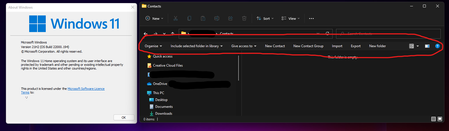
Description: Opening the Contacts folder causes the Windows 10 quick access buttons panel to appear Affected versions: 22000.51 -> 22000.194 Steps to recreate issue: Open File Explorer and navigate to %userprofile% (or go up a directory and double click the folder with your username) Open the 'Contacts' folder16KViews0likes2CommentsCan't move Sticky Note apps's window, it's stuck on the screen | WIF build 19582
Windows 10 insider fast ring build 19582 Can't move Sticky Note apps's window, it's stuck on the screen, restarting computer doesn't fix it. neither the main sticky notes list nor individual sticky notes can't be moved or dragged to anywhere on the screen. Posted this on Feedback hub app and added a problem repro to it: https://aka.ms/AA7pp6vSolved9.1KViews0likes9Comments
Windows 11 - Explorer forever loading folder or crashing when navigating
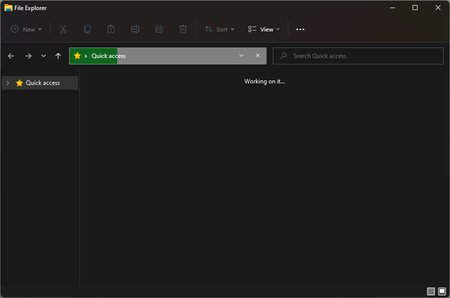
Using Evaluation copy. Build 22478.rs__prerelease.211008-1414. When I open explorer, it will show the green progress bar in the address bar/directory bar, it'll keep loading forever without ever showing any files. This happens if I open explorer from my task bar: Alternatively I managed to make a folder on my desktop, I can open this folder, but if I then open a folder which is nested inside this one, explorer crashes / stop responding: This has been present since installing this update, sometimes everything functions perfectly, but it seems to be more of an issue as time goes on. Something else I have noticed, my desktop icons will sometimes fail to load, not sure if this is related to issues with explorer, as this happens in explorer (aswell as thumbnails). Maybe something to do with indexing broken? I don't know, but you'll also notice none of the other 'quick access' / 'this computer' / 'network' are showing in the first screenshot either.6.1KViews0likes5Comments
File History problems after installing KB5124008, KB5126052,KB5126146, KB5122878, and KB890830
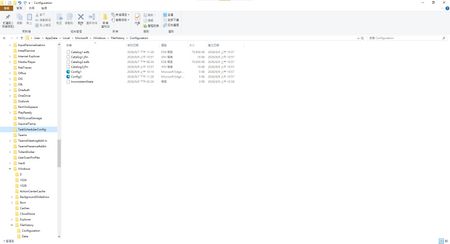
This morning, I ran Windows Update on two Windows 10/11 computers, but the file history feature stopped working completely after the update. Previously, after updating KB5120249 and KB5101684, files could still be backed up to the D: drive normally. The "Last Backup" time in "File History" is not updating correctly. Newly created or saved Word documents, pictures, videos, etc., still show "No previous version available" in "Content → Previous Versions". No folders were corrected; their dates are automatically updated. After running Windows Update again today, the file history feature stopped working on both computers. The File History panel pops up but cannot be used, prompting for a hard drive connection. (The hard drive is connected and I've confirmed it can read and write.) resulting in an "InconsistentState" entry in C:\Users\User\AppData\Local\Microsoft\Windows\FileHistory\Configuration. I'm very angry. If Microsoft doesn't address this, I'll keep complaining. If anyone else has encountered the same situation, please leave a comment below. You can also check Microsoft Q&A or the Microsoft Community Hub. The five updates installed are: September 8, 2026—KB5122878 (OS Builds 19045.7725 and 19044.7725) September 8, 2026-KB5126146 Cumulative Update for .NET Framework 3.5, 4.8 and 4.8.1 for Windows 10 Version 22H2 2026-09 Security Update (KB5124008) (26200.9445) 2026-09 .NET Framework Security Update (KB5126052) Windows Malicious Software Removal Tool x64 - v5.145 (KB890830) Deleting the %LocalAppData%\Microsoft\Windows\FileHistory folder also failed. Furthermore, "File History" itself is not listed in Microsoft's "Deprecated Features List." While other backup features suggest that Microsoft has no plans to discontinue it. Microsoft is going to pretend it doesn't exist. These worked normally before the update but stopped working afterward. This is to inform other users experiencing the same problem.5.5KViews5likes35CommentsWindows 11 start menu not clickable
When the taskbar is centered i can't click inside the start menu but if i place it on the left, it is possible. Then the terminal had the same problem, if i place it on the center i can't click but i can in the left. It's like something is blocking the screen center. The problem only happens with this programs, it is very weird. I attached a video. The problem goes away if i only enable the second display and then only enable the primary display.4.4KViews1like4CommentsInsider Preview Build 17074.1002 Broke Every Windows Apps + Start Menu and Action Center
The Insider Preview installed on my machine flawlessly but after around 5 minutes. The Start menu and action center won't open as well as Basic Windows Apps + opening files with basic Windows Apps (eg. Groove Music Player, Video Players, Settings Panel, etc.) returns a "File System Error (-2147219200)". File Explorer is fine and all installed software is working okay but there is no way to roll back from a previous build since I can't access the Settings Panel.Solved3.9KViews0likes6CommentsWindows on exFAT has some bugs
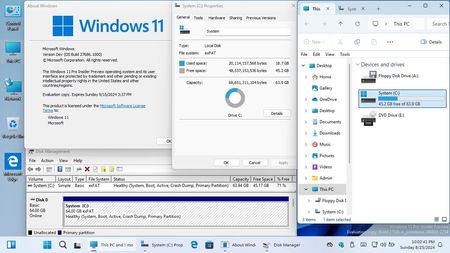
As shown in the screenshot attachment, when using the exFAT file system as the system volume to run the latest version of Windows 11 Build 27686, the following bugs exist: 1. When the Shim DataBase file exists, the system UWP such as the start menu and settings cannot be opened. If you delete the file named "RandomGUID.sysmain.sdb" in the "C:\Windows\apppatch\MergeSdbFilesSource" directory, or delete the registry "HKEY_LOCAL_MACHINE\SOFTWARE\Microsoft\Windows NT\CurrentVersion\AppCompatFlags\SdbUpdates" item, the problem can be solved. This bug has existed since Win11 v22H2 two years ago and has not been fixed yet. 2. When the Smart App Control function is in the evaluation or enabled state, the operating system will run very slowly. If you set it to off in app & browser control in Windows Security, or directly change the "VerifiedAndReputablePolicyState" key value in the registry "HKEY_LOCAL_MACHINE\SYSTEM\ControlSet001\Control\CI\Policy" to "0" to turn it off, the problem can be solved. This bug has existed since Win11 v22H2 two years ago and has not been fixed yet. 3. Check Disk Utility will throw an error when checking exFAT volumes with a total number of clusters between 2^30 and 2^32 (that is, the FAT table size is between 4GB and 16GB), but in fact the volume is completely normal and not damaged. In addition, according to the exFAT file system specification, a single exFAT volume can have a maximum of 4294967295 allocation units, which means that the maximum partition capacity supported by formatting with 4KB clusters is 4096Byte×2^32Byte=16TB. However, when trying to load a volume of this size, it takes a long time to complete the operation, which may be another bug. 4. The change partition size function in the disks & volumes in the new system storage settings will cause file system corruption and loss of all data when operating on exFAT volumes. If the volume is a system partition, it will immediately trigger BSOD and cause the OS to completely crash and fail to start. This is a very dangerous bug. 5. When the system Blue Screen of Death occurs, the DUMP file cannot be generated normally in the exFAT volume. This seems to be a bug in exfat.sys. 6. When the system volume is exFAT, the hiberfil.sys file cannot be created normally, resulting in the inability to use the hybrid boot function. The 0xc0000010 error will also be prompted through command line operations. This seems to be a bug in exfat.sys. 7. Every time try to run a user UWP app such as Microsoft Store, the AppX Deployment Service will repeatedly stop abnormally, causing the UWP program to crash immediately. This seems to be a bug in AppXDeploymentServer.dll. Please fix these bugs, thanks! In addition, it usually takes a long time to boot Windows in the exFAT volume. Can you optimize the boot speed of exFAT system volumes in OS Loader?2.4KViews0likes9Comments