bug
30 Topics
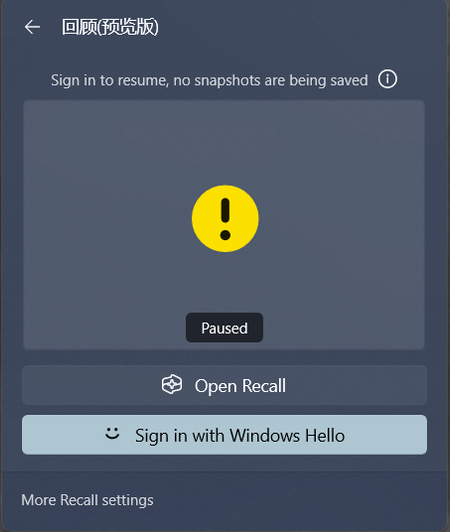
Recall fails to start and always asks me to log in using Windows Hello
"My Windows version is 26120.3073. Recall had always worked properly on my computer, but today after restarting my computer, it no longer works and remains in a paused state, prompting me to log in using Windows Hello to resume. I logged in using Windows Hello, but Recall did not resume and still prompts me to log in using Windows Hello to resume. I have tried various methods, including opening Recall, re-logging into Windows, putting the computer to sleep and waking it up, restarting the computer, disabling and enabling the Recall function, but none of these methods solved the issue. It consistently prompts me to log in using Windows Hello to resume. I also checked TPM and Windows Hello, and both are working properly.969Views6likes7Comments
File History problems after installing KB5124008, KB5126052,KB5126146, KB5122878, and KB890830
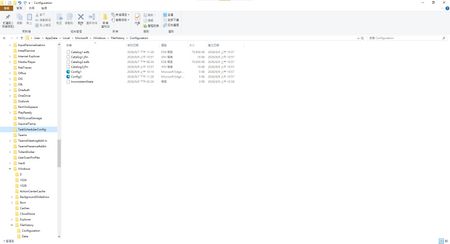
This morning, I ran Windows Update on two Windows 10/11 computers, but the file history feature stopped working completely after the update. Previously, after updating KB5120249 and KB5101684, files could still be backed up to the D: drive normally. The "Last Backup" time in "File History" is not updating correctly. Newly created or saved Word documents, pictures, videos, etc., still show "No previous version available" in "Content → Previous Versions". No folders were corrected; their dates are automatically updated. After running Windows Update again today, the file history feature stopped working on both computers. The File History panel pops up but cannot be used, prompting for a hard drive connection. (The hard drive is connected and I've confirmed it can read and write.) resulting in an "InconsistentState" entry in C:\Users\User\AppData\Local\Microsoft\Windows\FileHistory\Configuration. I'm very angry. If Microsoft doesn't address this, I'll keep complaining. If anyone else has encountered the same situation, please leave a comment below. You can also check Microsoft Q&A or the Microsoft Community Hub. The five updates installed are: September 8, 2026—KB5122878 (OS Builds 19045.7725 and 19044.7725) September 8, 2026-KB5126146 Cumulative Update for .NET Framework 3.5, 4.8 and 4.8.1 for Windows 10 Version 22H2 2026-09 Security Update (KB5124008) (26200.9445) 2026-09 .NET Framework Security Update (KB5126052) Windows Malicious Software Removal Tool x64 - v5.145 (KB890830) Deleting the %LocalAppData%\Microsoft\Windows\FileHistory folder also failed. Furthermore, "File History" itself is not listed in Microsoft's "Deprecated Features List." While other backup features suggest that Microsoft has no plans to discontinue it. Microsoft is going to pretend it doesn't exist. These worked normally before the update but stopped working afterward. This is to inform other users experiencing the same problem.5.5KViews5likes35CommentsBroken File History after July/August Updates (KB5101684 on Win11 25H2 / KB5120249 on Win10 22H2)
Hi everyone, I am writing to report a major regression bug with File History that was introduced in the recent Windows updates. This is happening across two entirely different machines with no settings changed, no system files modified, and no registry tweaks applied. The Issue: Windows 11 25H2 > after installing KB5101684 (July 29, 2026) Windows 10 22H2 > after installing KB5120249 (August 12, 2026) On both PCs backing up to a local drive (D:), the underlying files are actually being written to the drive, but the File History interface is completely broken: TheLast Backup time stamp in Control Panel frozen and fails to update automatically. In File Explorer, right-clicking new files > Properties> Previous Versions shows There are no previous versions available, making daily time-travel restoration impossible. Temporary Workaround: The only way to force it to sync is to go to Control Panel > File History > Select Drive, and re-select the D: drive again. This proves the backup engine works, but the automatic scheduling and catalog syncing are completely frozen by these updates. Please Help Upvote on Feedback Hub: I have already submitted this issue via the Feedback Hub but have received no official response yet. Since File History is critical for users who prefer local offline backups over OneDrive, we need to bring this to Microsoft’s attention immediately so they can patch it in the next cumulative update. If you are experiencing the same issue, please upvote my feedback link below:[Post your Feedback Hub sharing screenshot]416Views4likes1Comment
Windows 11: Double taskbar profile icon when opening Chrome profile
I found a bug in Windows 11 when I opened a chrome profile, it shows up two profile icons instead of just one (see the screenshot). In Windows 10, it used to open with the bottom-right icon, but I think Windows 11 added a new place for the icon in the upper-right, but overlapping it with the old icon place instead of replacing it. Device and OS Spesification: Edition: Windows 11 Enterprise Version: 21H1 Build: 22000.100 Is it just for me or everyone else have the same problem? If so, I hope this bug can be fixed in the next update. Thank you.47KViews3likes19Comments[FIXED] Can't Restart or Shut down my PC- Windows 10 insider build 18999 Fast Ring
UPDATE 10/18: We have released 20H1 Build 19002.1002, which includes a fix for the issue causing some devices to get stuck during shutdown or restart. https://blogs.windows.com/windowsexperience/2019/10/17/announcing-windows-10-insider-preview-build-19002/ After upgrading to 18999 from 18995, I can't restart my computer or shut it down anymore. when I attempt to do any of them, the computer gets stuck forever in either "shutting down" or "restarting" state with the loading icon circling. also the CPU usage goes up and I can tell it by reading the CPU temp number showin on my motherboard and CPU fans getting loud. I have to hard reset or hard shut down by either pressing the reset button on my case or holding the power button. the scary part is that it's not listen under the known issues in here: https://blogs.windows.com/windowsexperience/2019/10/08/announcing-windows-10-insider-preview-build-18999/ anyone else having the same problem? my specs: i7 7700K 16GB RAM DDR4 3200Mhz IGPU graphic card SSD M.2 Feedback to upvote: https://aka.ms/AA67uo7Solved64KViews2likes107CommentsUrgent: Stuck KB5094126 (2026-06 Security Update) Loop on ASUS M413A
Hello, I have a very urgent issue. I am running an ASUS M413A Model M413IA-EB211T laptop running in the Windows 11 Insider Preview program. Right now, my machine is caught in a persistent and highly aggressive background update loop regarding the June 2026 Security Update KB5094126 for OS Build 26200.8655. The core background engines wuauserv and usosvc continually flip themselves back to Running and Manual/Automatic via background kernel self-healing routines. They are completely ignoring manual user flags to stay disabled via standard sc config commands. Because my system utilizes 8 GB of total RAM with shared integrated graphics, this ongoing background processing loop completely bottlenecks my remaining usable memory. This is throwing my processor usage to 100 percent and causing extreme, loud cooling fan strain whenever the AC charger is plugged in. Furthermore, the loop is continually eating 5 to 12 GBs of data at every single automatic download attempt, creating massive network usage and consuming massive storage bandwidth. My Exact System Specs: Device Name: LAPTOP-S4R984K2 Processor: AMD Ryzen 7 4700U with Radeon Graphics 2.00 GHz, 8 Cores Installed RAM: 8.00 GB 7.42 GB usable due to integrated hardware reservation Graphics Card: Integrated AMD Radeon Graphics 496 MB dedicated video cache System Type: 64-bit operating system, x64-based processor Storage Environment: 226 GB used out of 477 GB available total capacity What Actionable Steps I Am Seeking from the Community: Question 1. July Update Availability Check: Is there a way to safely skip this broken June patch and download the July updated version directly for my specific environment: Windows 11 Insider Preview Build 26200.8655? Question 2. Safe Standalone Roadmap: If I must install this, what is the exact method to download the correct standalone package for KB5094126 and initialize it manually without using the broken Windows Update pipeline? Question 3. Enforcement Command: What exact script can I deploy inside an elevated Administrator Command Prompt cmd or anywhere else to forcefully inject a registry block or anything else that stays active for as long as I put it? It must survive the aggressive Insider kernel health loops and hold the block long-term without risking database corruption or triggering automatic system overrides? Question 4. Cache and Datastore Maintenance Question: Is there any safe method to clear out the active transaction log database handles inside C:\Windows\SoftwareDistribution\DataStore\Logs? Could these lingering handles be the underlying reason why this build is failing to process the install, and how can they be purged without risking database corruption or a forced recovery loop? CRITICAL CONSTRAINT — Strict Risks I Must Avoid: I am completely refusing to do an In-Place Upgrade, a total system reset, or utilize the built-in Fix problems using Windows Update recovery utility. I need the forum experts to provide a path that completely guards against the following risks: Risk 1. System Freeze and Repair Loops: Falling into a mid-way installation freeze or an endless Automatic Repair boot loop where the machine fails to load back to the desktop. Risk 2. Display and Brightness Driver Corruption: Resetting, updating, or modifying my legacy display driver configuration. Any driver modification will immediately re-trigger unreadable thin system fonts, highly oversaturated display graphics, or high brightness spikes. Risk 3. Loss of Custom Profiles: Overriding my fine-tuned power slider behaviors, custom screen brightness thresholds, or my explicitly disabled auto-brightness/adaptive content feature tags. I must avoid resetting any of these features, as simply changing the brightness level itself causes a severe brightness spike. Complete Ledger of Troubleshooting Steps Taken So Far All Failed or Reversed: Step 1. Cache Purges: Cleared out the SoftwareDistribution Download folder, but the text entry remains stuck on the Settings app screen. Step 2. File-Level Permission Locks: Used icacls to deny the local SYSTEM account permission to execute wuaueng.dll. This successfully froze the loop for exactly 3 days until the automated 3-day Insider system health check forcefully restored factory permissions and restarted the services. Step 3. Firewall Barriers: Set up outbound Windows Defender Firewall block rules targeting the specific update services, which were actively bypassed by alternative network pipelines inside svchost.exe. Step 4. Service Configurations: Regularly deployed combination scripts to stop and disable wuauserv, usosvc, and bits via command line, which are immediately overwritten by the Insider kernel health loops. Step 5. System Health Restore and Scan Results: Ran standard administrative system repairs sfc /scannow and DISM /RestoreHealth. The tools reported that they successfully repaired something in the background, but the scan logs were completely unclear as to what was fixed, and it did not resolve the update loop. How can I safely acquire the standalone update package and force-install it without risking my current display profiles, causing a system freeze, or forcing an in-place operating system upgrade? Please let me know as soon as possible, I have been dealing with this for at least a month or longer.338Views1like2Comments[BUG]Desktop Icon Order and File Explorer Window Size Not Saved
After updating to Build 26200.5661, I found two major issues: 1. The desktop icon order is not retained after reboot or shutdown. Every time the system restarts, icons are randomly rearranged. 2. The File Explorer window size is not remembered. It always resets to the default size after closing and reopening. These issues did not occur in the previous build. Expected behavior: - Desktop icons should retain their order and position. - Explorer windows should remember their last size and position364Views1like2CommentsWindows 11 start menu not clickable
When the taskbar is centered i can't click inside the start menu but if i place it on the left, it is possible. Then the terminal had the same problem, if i place it on the center i can't click but i can in the left. It's like something is blocking the screen center. The problem only happens with this programs, it is very weird. I attached a video. The problem goes away if i only enable the second display and then only enable the primary display.4.4KViews1like4Comments