bot
49 Topics
Questions About Alternatives to Multi-Tenant Bots After July 31, 2025 Deprecation
Hello, As the ability to create multi-tenant bots in Azure will be discontinued after July 31, 2025, I’d like to ask if there are any viable alternatives available now? If I create a single-tenant bot and publish it to the Teams App Store, will users from other tenants still be able to interact with the bot? Additionally, will the bot be able to access their basic user profile information (only user name and aadObjectId) and conversation data? From my understanding, access tokens obtained using the client ID and client secret are tenant-scoped, meaning they are not valid across other tenants. As a result, the bot cannot access user information such as profile photos or email addresses from users in other tenants — is that correct? I'd really appreciate any clarification or recommended best practices on this. Thank you!2.3KViews0likes3Comments
Maximum # of scopes in manifest 1.21
I am looking at the 1.21 version of the https://developer.microsoft.com/json-schemas/teams/v1.21/MicrosoftTeams.schema.json and I see the definition below for the scopes properties. It only allows a maximum of 3 items, which means that you cannot allow all 4 available values to be defined. E.g. the following definition in the bot manifest would be invalid scopes: ["team", "personal", "groupChat", "copilot"] Is this intentional? Thank you. "scopes": { "type": "array", "description": "Specifies whether the bot offers an experience in the context of a channel in a team, in a 1:1 or group chat, or in an experience scoped to an individual user alone. These options are non-exclusive.", "maxItems": 3, "items": { "enum": [ "team", "personal", "groupChat", "copilot" ] } }, "commandLists": { "type": "array", "maxItems": 3, "description": "The list of commands that the bot supplies, including their usage, description, and the scope for which the commands are valid. A separate command list should be used for each scope.", "items": { "type": "object", "additionalProperties": false, "properties": { "scopes": { "type": "array", "description": "Specifies the scopes for which the command list is valid", "maxItems": 3, "items": { "enum": [ "team", "personal", "groupChat", "copilot" ] } }Solved173Views0likes1CommentWhat is the recommended bot type for multi-tenant bots?
According to this https://learn.microsoft.com/en-us/azure/bot-service/bot-service-quickstart-registration?view=azure-bot-service-4.0&tabs=multitenant#bot-identity-information multi-tenant bots cannot be created after July 31, 2025. Another option to reach tenants other than ours is to use incoming webhooks. However, according to this https://learn.microsoft.com/en-us/microsoftteams/platform/webhooks-and-connectors/how-to/add-incoming-webhook?tabs=newteams%2Cdotnet, incoming webhooks will be deprecated at the end of 2025. I would like to create a bot that can be deployed to any Microsoft Teams outside our organization. What is the recommended approach? Thank you.Solved3.1KViews1like4Comments
Microsoft.Bot.Connector SendToConversationAsync Failed - 'Forbidden'
Hi. We use Microsoft.Bot.Connector (4.22.9) SendToConversationAsync for sending an activity to a conversation. Most of them are processed successfully, but some fail with 'Operation returned an invalid status code 'Forbidden'. How can I handle it? What is the reason? Also, I have a second question about "blocked conversation." If the user blocks the conversation, I think SendToConversationAsync will fail, too. How can I handle this, and what kind of error will be raised?386Views0likes5CommentsSeeking Best Practices for Performance Testing Bots in Microsoft Teams
Teams Meeting Bot This bot is automatically installed in all scheduled meetings across the organization. It interacts with the Microsoft Graph API via the 'api/messages' endpoint in the Bot Framework to retrieve meeting transcripts. These transcripts are then processed by an LLM model to generate a summarized version of the meeting. Chatbot This is a personal Teams chatbot built using the Bot Framework. It streams real-time responses from an LLM model based on user queries. We are planning a performance test for these bots. What would be the standard procedure to achieve this? Looking forward to your insights.584Views0likes2Comments
CSS Properties being stripped from Teams Chat messages from Bot
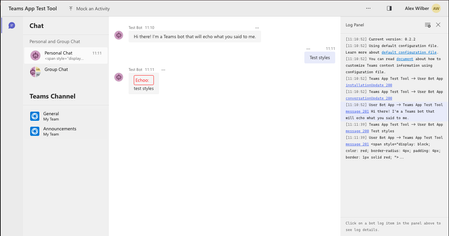
Hi Team, We've noticed that certain CSS properties are no longer appearing in HTML messages when sent to Teams Chat. Previously, our bot styled messages using display and border properties, but now these properties are missing from the HTML when we inspect the page. Steps to Reproduce: Start the Echo bot from the sample templates (I used Teams Toolkit to deploy it to Teams or run it in the Test tool). In the TeamsBot.ts file, modify the onMessage function by replacing await context.sendActivity(...) with the following code. This example adds styling to an echo message. const a: Partial<Activity> = { text: `<span style="display: block; color: red; border-radius: 4px; padding: 4px; border: 1px solid red; ">Echoo:</span> <span style="display: block;">${txt}</span>`, textFormat: TextFormatTypes.Xml }; await context.sendActivity(a); Note: I also tried sending the HTML directly with context.sendActivity(...) without setting the textFormat property in the Activity, and observed the same result. Run the bot in the Test tool and Teams to compare behavior. Observed behavior: In the Test tool: All styles are applied as expected. In Teams: Only the color property is applied, while display, padding, and border properties are ignored (stripped out of the HTML). Here’s an example of the HTML output in Teams: <div dir="auto" id="content-1730973548675" aria-label="Echoo: test styles properties" class="fui-Primitive ___16zla5h f1oy3dpc fqtknz5 fyvcxda"> <span style="color: red;">Echoo:</span> <span>test styles properties</span> </div> Could you provide insights on whether this change is intended, and if there are any workarounds for preserving these CSS properties in Teams messages? Thank you!1.6KViews11likes4CommentsTeams application hosted media bot not calling webhook
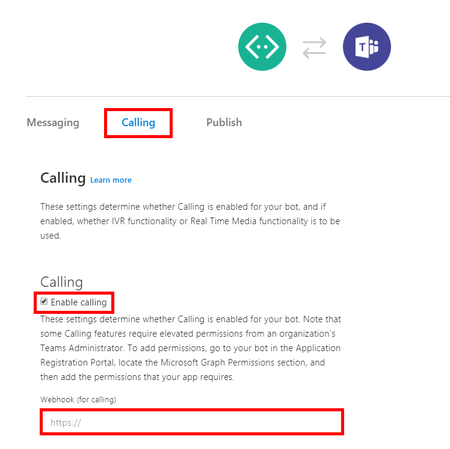
I have setup a media bot as per the instructions mentioned in https://github.com/microsoftgraph/microsoft-graph-comms-samples/tree/master/Samples/PublicSamples/PsiBot. The TCP address has been added in the firewall. Necessary API permissions in App Registration has been provided. Currently, testing on local computer using ngrok and followed the instructions mentioned in the link above. Issues: In an online teams meeting an App is added to the meeting and a call to JoinCallAsync api for bot to join the call occurs, which is successful. But after that nothing happens. The bot is not added in the meeting. The call to webhook (api/calling) should be called which is not happening. Please guide what should be done to add the bot to the meeting to fetch the audio of participants. 1. Ngrok points TCP to: Forwarding tcp://0.tcp.in.ngrok.io:12345 -> localhost:8445 In domain added the below record: CNAME 0.local.bot mapped to 0.tcp.in.ngrok.io Created certificate using openssl for *.local.bot.example.com and added in the Microsoft Management Control under Personal Certificates. The program has accepted this certificate i.e. no exception occurred. 2. Added all the ports, domains, endpoints, application id in the appsettings of the project. 3. Set supportsCalling to true in manifest file How can the issue be traced? Please guide.656Views0likes7Comments
Send Messages using Bot/Change Notification in MS Teams
Hi I have some questions regarding bot functionality within Microsoft Teams. I'm developing an app/plug-in to monitor and analyze all incoming messages in chats and channels. The goal is to intercept these messages, check them for specific flagged (e.g., inappropriate) content, and instantly send a notification back to the respective chat or channel if flagged content is detected. I need to achieve this in real time. Currently, I’ve implemented the first half of this functionality using Microsoft Graph’s change notifications API, allowing me to intercept and read messages as they arrive. However, I’m facing a limitation: since my app doesn’t have permissions to post messages, I can't use the Graph API’s send capabilities to notify users within the channels or chats. To work around this, I’m considering utilizing a bot. My approach is to have a bot send these notifications to the appropriate chats and channels, using identifiers such as tenant ID, team ID, channel ID, message ID, and chat ID—information I retrieve through the change notifications API. So here are my main questions: Can I use a bot to send messages to various chats and channels on demand, leveraging the IDs obtained from the change notifications API? This would allow my app to handle message interception while the bot takes over in sending the flagged notifications. In my current setup, is there a way to reply to chats or channels directly using the Graph API's 'send' functionality through the app itself? It is related to Application/Delegation Permissions. Thanks699Views0likes5CommentsCommand menu not show in Teams mobile app
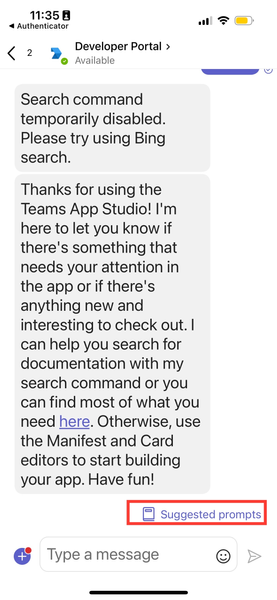
Hi, I just create my chat bot on Teams and I add some "Command menu" in Teams Developer page. So that can show on Desktop but did not show on mobile application. Here's my short manifest from Developer page. "bots": [ { "botId": "497ed9a0-1823-4a6c-8d3c-b0281b024645", "scopes": ["personal"], "commandLists": [ { "commands": [ { "title": "Change use case", "description": "เปลี่ยนหัวข้อในการสนทนา" }, { "title": "Read privacy policy", "description": "อ่านนโยบายความเป็นส่วนตัว" }, { "title": "Read terms of use", "description": "อ่านข้อกำหนดและเงื่อนไขการใช้บริการ" } ], "scopes": ["personal"] } ], "isNotificationOnly": false, "supportsCalling": false, "supportsVideo": false, "supportsFiles": false } ] But when I testing Adaptive Card via Developer Protal that will show "Suggested prompts" on the bottom right. So the "Command menu" and "Suggested prompts" are the same feature? and why that not working on my bot? Here's the attachment453Views0likes4Comments
Teams Bot Feedback button is not shown to most of the user
Hello everyone, I developed a Teams chatbot which used Azure Search and Azure OpenAI. For chatbot response which has citations from Azure Search, I enabled the feedbackLoop response.ChannelData = new { feedbackLoopEnabled = true }; It was a success. I can see the thumbs up/down button and managed to capture the feedback. Unfortunately, some of the users reported that they can't see the thumbs up/down button in Desktop Teams or Teams Web. Strangely, if they use their Android Teams App, they can see the thumbs up/down button. Anyone knows what could be the reason for such a strange behavior? Thanks in advance. Regards, HardonoSolved1.5KViews0likes12Comments