blogs
30 TopicsExploring Azure OpenAI Assistants and Azure AI Agent Services: Benefits and Opportunities
In the rapidly evolving landscape of artificial intelligence, businesses are increasingly turning to cloud-based solutions to harness the power of AI. Microsoft Azure offers two prominent services in this domain: Azure OpenAI Assistants and Azure AI Agent Services. While both services aim to enhance user experiences and streamline operations, they cater to different needs and use cases. This blog post will delve into the details of each service, their benefits, and the opportunities they present for businesses. Understanding Azure OpenAI Assistants What Are Azure OpenAI Assistants? Azure OpenAI Assistants are designed to leverage the capabilities of OpenAI's models, such as GPT-3 and its successors. These assistants are tailored for applications that require advanced natural language processing (NLP) and understanding, making them ideal for conversational agents, chatbots, and other interactive applications. Key Features Pre-trained Models: Azure OpenAI Assistants utilize pre-trained models from OpenAI, which means they come with a wealth of knowledge and language understanding out of the box. This reduces the time and effort required for training models from scratch. Customizability: While the models are pre-trained, developers can fine-tune them to meet specific business needs. This allows for the creation of personalized experiences that resonate with users. Integration with Azure Ecosystem: Azure OpenAI Assistants seamlessly integrate with other Azure services, such as Azure Functions, Azure Logic Apps, and Azure Cognitive Services. This enables businesses to build comprehensive solutions that leverage multiple Azure capabilities. Benefits of Azure OpenAI Assistants Enhanced User Experience: By utilizing advanced NLP capabilities, Azure OpenAI Assistants can provide more natural and engaging interactions. This leads to improved customer satisfaction and loyalty. Rapid Deployment: The availability of pre-trained models allows businesses to deploy AI solutions quickly. This is particularly beneficial for organizations looking to implement AI without extensive development time. Scalability: Azure's cloud infrastructure ensures that applications built with OpenAI Assistants can scale to meet growing user demands without compromising performance. Understanding Azure AI Agent Services What Are Azure AI Agent Services? Azure AI Agent Services provide a more flexible framework for building AI-driven applications. Unlike Azure OpenAI Assistants, which are limited to OpenAI models, Azure AI Agent Services allow developers to utilize a variety of AI models, including those from other providers or custom-built models. Key Features Model Agnosticism: Developers can choose from a wide range of AI models, enabling them to select the best fit for their specific use case. This flexibility encourages innovation and experimentation. Custom Agent Development: Azure AI Agent Services support the creation of custom agents that can perform a variety of tasks, from simple queries to complex decision-making processes. Integration with Other AI Services: Like OpenAI Assistants, Azure AI Agent Services can integrate with other Azure services, allowing for the creation of sophisticated AI solutions that leverage multiple technologies. Benefits of Azure AI Agent Services Diverse Use Cases: The ability to use any AI model opens a world of possibilities for businesses. Whether it's a specialized model for sentiment analysis or a custom-built model for a niche application, organizations can tailor their solutions to meet specific needs. Enhanced Automation: AI agents can automate repetitive tasks, freeing up human resources for more strategic activities. This leads to increased efficiency and productivity. Cost-Effectiveness: By allowing the use of various models, businesses can choose cost-effective solutions that align with their budget and performance requirements. Opportunities for Businesses Improved Customer Engagement Both Azure OpenAI Assistants and Azure AI Agent Services can significantly enhance customer engagement. By providing personalized and context-aware interactions, businesses can create a more satisfying user experience. For example, a retail company can use an AI assistant to provide tailored product recommendations based on customer preferences and past purchases. Data-Driven Decision Making AI agents can analyze vast amounts of data and provide actionable insights. This capability enables organizations to make informed decisions based on real-time data analysis. For instance, a financial institution can deploy an AI agent to monitor market trends and provide investment recommendations to clients. Streamlined Operations By automating routine tasks, businesses can streamline their operations and reduce operational costs. For example, a customer support team can use AI agents to handle common inquiries, allowing human agents to focus on more complex issues. Innovation and Experimentation The flexibility of Azure AI Agent Services encourages innovation. Developers can experiment with different models and approaches to find the most effective solutions for their specific challenges. This culture of experimentation can lead to breakthroughs in product development and service delivery. Enhanced Analytics and Insights Integrating AI agents with analytics tools can provide businesses with deeper insights into customer behavior and preferences. This data can inform marketing strategies, product development, and customer service improvements. For example, a company can analyze interactions with an AI assistant to identify common customer pain points, allowing them to address these issues proactively. Conclusion In summary, both Azure OpenAI Assistants and Azure AI Agent Services offer unique advantages that can significantly benefit businesses looking to leverage AI technology. Azure OpenAI Assistants provide a robust framework for building conversational agents using advanced OpenAI models, making them ideal for applications that require sophisticated natural language understanding and generation. Their ease of integration, rapid deployment, and enhanced user experience make them a compelling choice for businesses focused on customer engagement. Azure AI Agent Services, on the other hand, offer unparalleled flexibility by allowing developers to utilize a variety of AI models. This model-agnostic approach encourages innovation and experimentation, enabling businesses to tailor solutions to their specific needs. The ability to automate tasks and streamline operations can lead to significant cost savings and increased efficiency. Additional Resources To further explore Azure OpenAI Assistants and Azure AI Agent Services, consider the following resources: Agent Service on Microsoft Learn Docs Watch On-Demand Sessions Streamlining Customer Service with AI-Powered Agents: Building Intelligent Multi-Agent Systems with Azure AI Microsoft learn Develop AI agents on Azure - Training | Microsoft Learn Community and Announcements Tech Community Announcement: Introducing Azure AI Agent Service Bonus Blog Post: Announcing the Public Preview of Azure AI Agent Service AI Agents for Beginners 10 Lesson Course https://aka.ms/ai-agents-beginners6.1KViews0likes2Comments
Sentinel Cost Optimization Series - Part 1 - Data prioritization
* There are graphs in this post, but I can't seem to upload/insert them; please visit the link in each part to see the picture. Problem statement Data prioritization is an issue that any SIEM or data gathering and analysis solution must consider. The log that we collect to SIEM is typically security-related and capable of directly creating alerts based on the event of that log, such as EDR alerts. However, not all logs are equally weighted. For example, the proxy log only contains the connections of internal users, which is very useful for investigation, but it does not directly create alerts and has a very high volume. To demonstrate this, we categorize the log into the primary log and secondary log based on its security value and volume. https://i.ibb.co/d4CzxCH/sentinel-cost-optimize-p1-1.png The metadata and context of what was discovered are frequently contained in the primary log sources used for detection. However, secondary log sources are sometimes required to present a complete picture of a security incident or breach. Unfortunately, many of these secondary log sources are high-volume verbose logs with little relevance for security detection. They aren’t useful unless a security issue or threat search requires them. On the current traditional on-premise solution, we will use SIEM alongside a data lake to store secondary logs for later use. https://i.ibb.co/kyc96Dx/sentinel-cost-optimize-p1-architect-onpremise.png Because we have complete control over everything, we can use any technology or solution, making it simple to set up (Eg. Qradar for SIEM and ELK for data lake). However, for cloud-naive SIEM, this becomes more difficult, particularly with https://azure.microsoft.com/en-gb/products/microsoft-sentinel/. Microsoft Sentinel is a cloud-native security information and event manager (SIEM) platform that includes artificial intelligence (AI) to help with data analysis across an enterprise. To store and analyze everything for Sentinel, we typically use Log Analytics with the Analytics Logs data plan. However, this is prohibitively expensive, costing between $2.00 and $2.50 per GB ingested per day depending on the Azure region used. Current Solution Storage Account (Blob Storage) To store these secondary data, the present approach uses https://docs.microsoft.com/en-us/azure/storage/blobs/storage-blobs-introduction. Blob storage is designed to hold large volumes of unstructured data, which implies it does not follow a certain data model or specification, such as text or binary data. This is a low-cost option for storing large amounts of data. The architecture for this solution is as follows: https://i.ibb.co/YhDJvJ8/sentinel-cost-optimize-p1-architect-blob.png However, Blob Storage has a limitation that is hard to ignore. The data in Blob Storage is not searchable. We can circumvent this by using as demonstrated in https://docs.microsoft.com/en-us/azure/search/search-blob-storage-integration, but this adds another layer of complexity and pricing that we would prefer to avoid. The alternative option is to use https://docs.microsoft.com/en-us/azure/data-explorer/kusto/query/externaldata-operator?pivots=azuredataexplorer, but this is designed to obtain small amounts of data (up to 100 MB) from an external storage device, not massive amounts of data. Our Solution High-Level Architecture Our solution used Basic Logs to tackle this problem. https://docs.microsoft.com/en-us/azure/azure-monitor/logs/log-analytics-workspace-overview#log-data-plans-preview is a less expensive option for importing large amounts of verbose log data into your Log Analytics workspace. The Basic log also supports a subset of KQL, making it searchable. To get the log into the Basic Log, We need to use a Custom table generated with the Data Collection Rule (DCR)-based logs ingestion API. The structure is as follows: https://i.ibb.co/2hZ6Gpx/sentinel-cost-optimize-p1-architect.png Our Experiment In our experiment, we use the following component for the architecture: Component Solution Description Source Data VMware Carbon Black EDR Carbon Black EDR is an endpoint activity data capture and retention solution that allows security professionals to chase attacks in real-time and observe the whole attack kill chain. This means that it captures not only data for alerting, but also data that is informative, such as binary or host information. Data Processor Cribl Stream Cribl helps process machine data in real-time - logs, instrumentation data, application data, metrics, and so on - and delivers it to a preferred analysis platform. It supports sending logs to Log Analytics, but only with the Analytics plan. To send the log to the Basic plan, we need to set up a data collection endpoint and rule, please see Logs ingestion API in https://learn.microsoft.com/en-us/azure/azure-monitor/logs/logs-ingestion-api-overview for additional information on how to set this up. And we also use a Logic App as a webhook to collect the log and send it to the Data collection endpoint. The environment we use for log generation is as follows: Number of hosts: 2 Operation System: Windows Server 2019 Number of days demo: 7 The number of logs we collected for our test environment are: Basic Log generated: 30.2 MB Alerts generated: 16.6 MB https://i.ibb.co/HYXyDYL/sentinel-cost-optimize-p1-2.png The cost is based on the East US region, the currency is the USD, and the Pay-As-You-Go Tier was used to determine the number saved using the generated data with 1000 hosts and 30 days retention period. The calculation using only Analytic Log Table Ingestion Volume (GB) Cost per GB (USD) Total cost per day (USD) Total cost per retention period (USD) Host number Retention (Days) Cb_logs_Raw_CL 2.16 2.3 4.96 148.84 1000 30 Cb_logs_alert_CL 1.19 2.3 2.73 81.81 1000 30 Total 7.69 230.66 If we use Analytic Log with Storage Account Table Ingestion Volume (GB) Cost per GB (USD) Total cost per day (USD) Total cost per retention period (USD) Host number Retention (Days) Cb_logs_Raw_CL 2.16 0.02 0.04 1.29 1000 30 Cb_logs_alert_CL 1.19 2.3 2.73 81.81 1000 30 Total 2.77 83.11 If we use Analytic Log with Basic Log Table Ingestion Volume (GB) Cost per GB (USD) Total cost per day (USD) Total cost per retention period (USD) Host number Retention (Days) Cb_logs_Raw_CL 2.16 0.5 1.08 32.36 1000 30 Cb_logs_alert_CL 1.19 2.3 2.73 81.81 1000 30 Total 3.81 114.17 Now let’s compare these 3 solutions together and get an overall look altogether. Only Analytic Log Analytic Log with Storage Account Analytic Log with Basic Log Cost calculated $230.66 $83.11 $114.17 Searchable Yes No Yes but cost $0.005 per GB Retention Up to 2,556 days (7 years) 146,000 days (400 years) Up to 2,556 days (7 years) Limitation Even though the Basic Log is an excellent choice for ingesting hot data, it does have some limitations that are difficult to overlook: The retention period is only 8 days, and this retention can’t be increased, after that, it will either be deleted or archived KQL language access is limited, for a list of what operators can be used, please see https://learn.microsoft.com/en-us/azure/azure-monitor/logs/basic-logs-query?tabs=portal-1#kql-language-limits There is a charge for interactive queries ($0.005/GB-scanned) This is the first post in this Sentinel Cost Optimization series. I hope this helps you have another choice to consider when setting up and sending your custom log to Sentinel.2.7KViews1like0CommentsNew Blog Post | The Easy Way to Get the ARM Deployment Template for a Microsoft Sentinel Solution
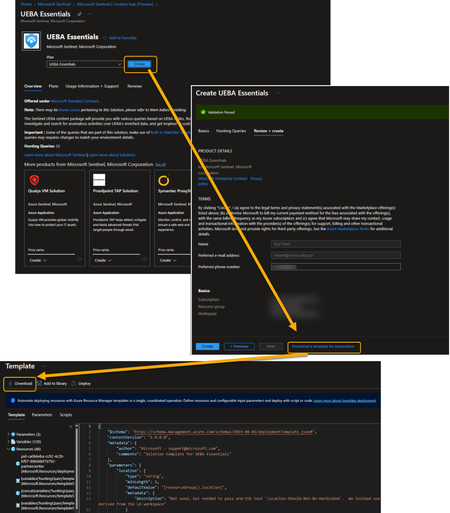
The Easy Way to Get the ARM Deployment Template for a Microsoft Sentinel Solution - Azure Cloud & AI Domain Blog (azurecloudai.blog) If you need the deployment (ARM) template for any Microsoft Sentinel Solution, there’s an easy in the UI to way to obtain it. The ARM template will allow you to deploy the Solution using your favorite DevOps method. Once you locate the Solution you want install, begin the actual, normal installation process. When you get to the end of the Solution installation wizard, instead of choosing to go ahead and allow the Solution to be installed, click or tap the “Download template for automation” link. This takes you to a page where the template has been auto generated for you where you can download it, add it to your ARM template library, or deploy it directly from here. You can also use this page to adjust any of the parameters, variables, or resources for the template. Original Post: New Blog Post | The Easy Way to Get the ARM Deployment Template for a Microsoft Sentinel Solution - Microsoft Community Hub1.8KViews0likes0CommentsNew Blog Post | Bring Threat Intelligence from SEKOIA.IO using TAXII data connector
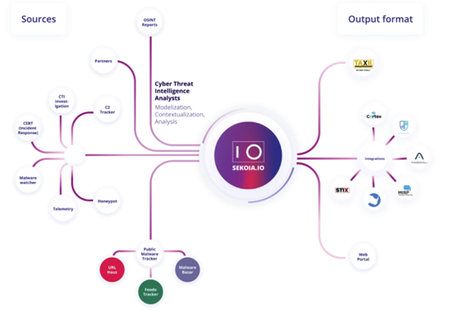
Bring Threat Intelligence from SEKOIA.IO using TAXII data connector - Microsoft Tech Community Microsoft Sentinel is a cloud native SIEM solution that allows you to detect and hunt for actionable threats. Microsoft Sentinel provides a rich variety of ways to import threat intelligence data and use it in various parts of the product like hunting, investigation, analytics, workbooks etc. Cyber threat intelligence is the new oil of cybersecurity: if SIEM are engines, CTI is the fuel that makes you faster than attackers. It is now time to move from crude oil (raw streams of IOCs) to jet fuel: using intelligence to describe precisely how threats occur and get a bird’s eye view of your threat landscape. Microsoft Sentinel was one of the early adopters of STIX/TAXII as the preferred way to import threat intelligence data. Microsoft Sentinel has built a data connector called the “Threat Intelligence -TAXII” connector that uses the TAXII protocol for sharing data in STIX format. This data connector supports pulling data from TAXII 2.0 and 2.1 servers. The Threat Intelligence – TAXII data connector is essentially a built-in TAXII client in Microsoft Sentinel to import threat intelligence from TAXII 2.x servers. Today we are announcing the availability of the SEKOIA.IO Cyber Threat Intelligence into Microsoft Sentinel using the TAXII data connector. Original Post: New Blog Post | Bring Threat Intelligence from SEKOIA.IO using TAXII data connector - Microsoft Tech Community1.7KViews0likes3CommentsNew Blog Post | Automated Detection and Response for Azure WAF with Sentinel
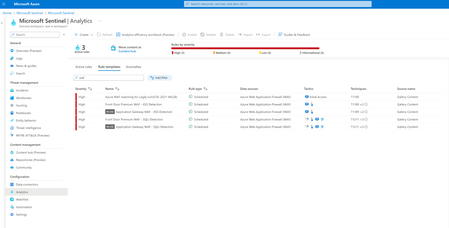
Full article: Automated Detection and Response for Azure WAF with Sentinel - Microsoft Community Hub Web applications are increasingly targeted by malicious attacks that exploit commonly known vulnerabilities. SQL injection and Cross-site scripting are among the most common attacks. Preventing such attacks in application code is challenging. It can require rigorous maintenance, patching, and monitoring at multiple layers of the application topology. A WAF solution can react to a security threat faster by centrally patching a known vulnerability, instead of securing each individual web application. Azure Web Application Firewall (WAF) is a cloud-native service that protects web apps from common web-hacking techniques. This service can be deployed in a matter of minutes to get complete visibility into the web application traffic and block malicious web attacks. Integrating Azure WAF with Microsoft Sentinel (Cloud Native SIEM/SOAR solution) for automated detection and response to threats/incidents/alerts would be an added advantage and reduces the manual intervention needed to update the WAF policy. In this blog, we will discuss about WAF detection templates in Sentinel, deploying a Playbook, and configuring the detection and response in Sentinel using these templates and the Playbook. Original Post: New Blog Post | Automated Detection and Response for Azure WAF with Sentinel - Microsoft Community Hub1.5KViews1like0CommentsNew Blog Post | Introduction to Machine Learning Notebooks in Microsoft Sentinel
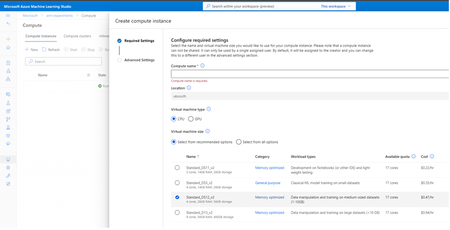
Read the full blog post here: Introduction to Machine Learning Notebooks in Microsoft Sentinel It has never been harder to keep hybrid environments secure. Microsoft’s Security Research teams are observing an increasing number and complexity of cybercrimes occurring across all sectors of critical infrastructure, from targeted ransomware attacks to increasing password and phishing campaigns on email, according to the Microsoft Digital Defense Report. The 2022 Cost of Insider Threats reported that threat incidents have risen by over 44% in the last two years, with associated costs exceeding $15.38M per incident per year, up by a third in the preceding years. The report also concluded that there has been a 10.3% increase in the average time taken to contain an incident, from 77 days to 85 days. Advanced tools, techniques, and processes used by threat actor groups allow them to counter obsolete defences and scale their attack campaigns to a broad range of victims, from government organisations to for-profit enterprises. Original Post: New Blog Post | Introduction to Machine Learning Notebooks in Microsoft Sentinel - Microsoft Tech Community1.1KViews0likes0CommentsNew Blog Post | Announcing the Microsoft Sentinel: NIST SP 800-53 Solution
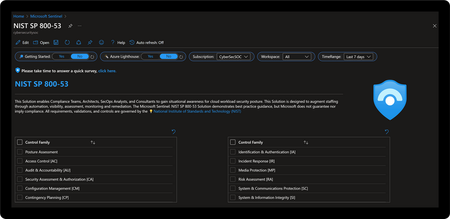
Announcing the Microsoft Sentinel: NIST SP 800-53 Solution - Microsoft Tech Community he Microsoft Sentinel: NIST SP 800-53 Solution enables compliance teams, architects, security analysts, and consultants to understand their cloud security posture related to Special Publication (SP) 800-53 guidance issued by the National Institute of Standards and Technology (NIST). This solution is designed to augment staffing through automation, visibility, assessment, monitoring, and remediation. Content features include an intuitive user interface, policy-based assessments, control cards for guiding alignment with control requirements, alerting rules to monitor configuration drift, and playbook automations for response. The power of this solution lies in its ability to aggregate at big data scale across first- and third-party products to provide maximum visibility into cloud, hybrid, and multi-cloud workloads. Original Post: New Blog Post | Announcing the Microsoft Sentinel: NIST SP 800-53 Solution - Microsoft Tech Community1KViews0likes0Comments
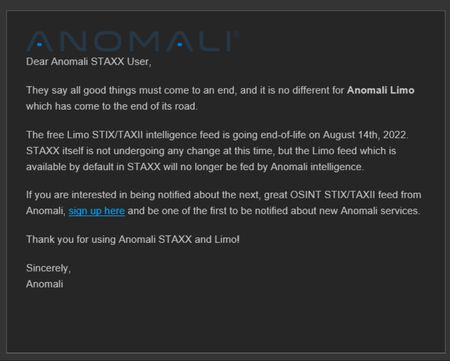
New Blog Post | Anomali Limo Feeds for Microsoft Sentinel to Expire for Good
https://rodtrent.com/8bh I’m sure there’s some organizational reason why Anomali wants to detach itself from maintaining these feeds. If you use these feeds for Microsoft Sentinel demos, consider querying the ThreatIntelligenceIndicator table for the Limo feeds and exporting the results to save them for later for when the active feed dries up. ThreatIntelligenceIndicator | where SourceSystem contains "Limo" You can then use our new functionality to import flat files into ThreatIntelligence and reuse the continually stale indicators.1KViews0likes0CommentsNew Blog Post | Microsoft Sentinel this Week - Issue #57
Microsoft Sentinel this Week - Issue #57 | Revue (getrevue.co) Happy Friday, everyone! Gearing up for speaking at an in-person conference in a couple weeks (MMSMOA), my week has been extraordinarily busy. This time of year at Microsoft is busy anyway as we gear up for completing the fiscal year, so this added work has really felt as if things are heaped-on more than normal. But, hey…it makes the days and weeks seem to go much quicker. Speaking of which, as this newsletter edition hits your inboxes today, I’m celebrating my 3rd Microsoft birthday. Three years ago today, I joined Microsoft and began my NEO (new employee training) in our Las Colinas, TX office. My life has absolutely changed for the better since that day and I’m constantly amazed, in awe, and wonderfully challenged. I’ve mentioned this before, but I wanted to make sure its fresh of mind for everyone. Every Wednesday evening, myself and some of my colleagues produce a podcast called Microsoft Security Insights. The podcast streams live (video) on Twitch.tv and then the audio portion is released on the following Monday wherever you get your stream for podcasts. Approaching our 100th episode, it’s with great excitement that we will start delivering this as a show on Microsoft Reactor this next Wednesday evening, April 20th at 5pm EST, joined by our inaugural guest, Matt Soseman, Senior Program Manager in Identity & Network Access Division. You can join us live, or watch the show in replay after. Visit the following link to set yourself a reminder to join or watch: https://cda.ms/48h That’s it for me for this week. Talk soon and enjoy the newsletter. -Rod Original Post: New Blog Post | Microsoft Sentinel this Week - Issue #57 - Microsoft Tech Community945Views0likes0Comments