azure
22 TopicsSAP Business Data Cloud Connect with Azure Databricks is now generally available
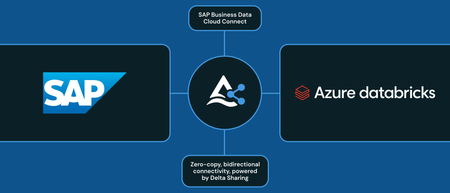
We are excited to share that SAP Business Data Cloud (SAP BDC) Connect for Azure Databricks is generally available. With this announcement, Azure Databricks customers like you, can connect your SAP BDC environment to your existing Azure Databricks instance – without copying the data – to enable bi-directional, live data sharing. Connecting SAP data with other enterprise data prevents governance risk, compliance gaps, and data silos. In addition, maintenance costs are also reduced and manual building of semantics is no longer needed. SAP data products can now be shared directly via Delta Sharing into your existing Azure Databricks instances ensuring complete context for your business. You can now unify your data estate across Azure Databricks and SAP BDC This makes it easier for you to: Enforce governance Power analytics, data warehousing, BI and AI Connecting SAP BDC to Azure Databricks is simple, secure, and fast. The connection is trusted and requires approval from both platforms to enable bi-directional sharing of data products. Once approved, data products in SAP BDC can be directly mounted into Azure Databricks Unity Catalog and are treated like other assets shared using Delta sharing. As a result, your teams can query, analyze, and gather insights on SAP data in addition to your existing business data in one unified way. Instead of spending time gathering the data in once place, your teams can instead focus on unlocking insights from this unified data quickly and securely. This launch complements SAP Databricks in SAP BDC running on Azure that enables AI, ML, data engineering, and data warehousing capabilities directly inside your SAP environment. We have expanded the list of supported regions for SAP Databricks on SAP BDC running on Azure. To learn more with SAP BDC Connect with Azure Databricks review documentation and get started today.2.3KViews3likes0CommentsGeneral Availability: Automatic Identity Management (AIM) for Entra ID on Azure Databricks
In February, we announced that Automatic Identity Management in public preview and loved to hear your overwhelmingly positive feedback. Prior to public preview, you either had to set up an Entra Enterprise Application or involve an Azure Databricks account admin to import the appropriate groups. This required manual steps whether it was adding or removing users with organizational changes, maintaining scripts, or requiring additional Entra or SCIM configuration. Identity management was thus cumbersome and required management overhead. Today, we are excited to announce that Automatic Identity management (AIM) for Entra ID on Azure Databricks is generally available. This means no manual user setup is needed and you can instantly add users to your workspace(s). Users, groups, and service principals from Microsoft Entra ID are automatically available within Azure Databricks, including support for nested groups and dashboards. This native integration is one of the many reasons Databricks runs best on Azure. Here are some addition ways AIM could benefit you and your organization: Seamlessly share dashboards You can share AI/BI dashboards with any user, service principal, or group in Microsoft Entra ID immediately as these users are automatically added to the Azure Databricks account upon login. Members of Microsoft Entra ID who do not have access to the workspace are granted access to a view-only copy of a dashboard published with embedded credentials. This enables you to share dashboards with users outside your organization, too. To learn more, see share a dashboard. Updated defaults for new accounts All new Azure Databricks accounts have AIM enabled – no opt in or additional configuration required. For existing accounts, you can enable AIM with a single click in the Account Admin Console. Soon, we will also make this the default for existing accounts. Automation at scale enabled via APIs You can also register users, groups, or service principles in Microsoft Entra ID via APIs. Being able to do this programmatically enables the enterprise scale most of our customers need. You can also enable automation via scripts leveraging these APIs. Read the Databricks blog here and get started via documentation today!2.4KViews1like0CommentsClosing the loop: Interactive write-back from Power BI to Azure Databricks
This is a collaborative post from Microsoft and Databricks. We thank Toussaint Webb, Product Manager at Databricks, for his contributions. We're excited to announce that the Azure Databricks connector for Power Platform is now Generally Available. With this integration, organizations can seamlessly build Power Apps, Power Automate flows, and Copilot Studio agents with secure, governed data and no data duplication. A key functionality unlocked by this connector is the ability to write data back from Power BI to Azure Databricks. Many organizations want to not only analyze data but also act on insights quickly and efficiently. Power BI users, in particular, have been seeking a straightforward way to “close the loop” by writing data back from Power BI into Azure Databricks. This capability is now here - real-time updates and streamlined operational workflows with the new Azure Databricks connector for Power Platform. With this connector, users can now read from and write to Azure Databricks data warehouses in real time, all from within familiar interfaces — no custom connectors, no data duplication, and no loss of governance. How It Works: Write-backs from Power BI through Power Apps Enabling writebacks from Power BI to Azure Databricks is seamless. Follow these steps: Open Power Apps and create a connection to Azure Databricks (documentation). In Power BI (desktop or service), add a Power Apps visual to your report (purple Power Apps icon). Add data to connect to your Power App via the visualization pane. Create a new Power App directly from the Power BI interface, or choose an existing app to embed. Start writing records to Azure Databricks! With this integration, users can make real-time updates directly within Power BI using the embedded Power App, instantly writing changes back to Azure Databricks. Think of all the workflows that this can unlock, such as warehouse managers monitoring performance and flagging issues on the spot, or store owners reviewing and adjusting inventory levels as needed. The seamless connection between Azure Databricks, Power Apps, and Power BI lets you close the loop on critical processes by uniting reporting and action in one place. Try It Out: Get started with Azure Databricks Power Platform Connector The Power Platform Connector is now Generally Available for all Azure Databricks customers. Explore more in the deep dive blog here and to get started, check out our technical documentation. Coming soon we will add the ability to execute existing Azure Databricks Jobs via Power Automate. If your organization is looking for an even more customizable end-to-end solution, check out Databricks Apps in Azure Databricks! No extra services or licenses required.5.3KViews2likes2CommentsAnnouncing the Azure Databricks connector in Power Platform
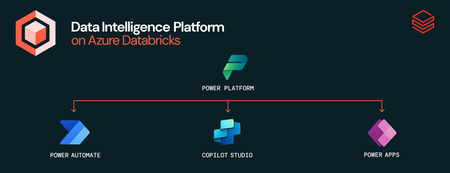
We are ecstatic to announce the public preview of the Azure Databricks Connector for Power Platform. This native connector is specifically for Power Apps, Power Automation, and Copilot Studio within Power Platform and enables seamless, single click connection. With this connector, your organization can build data-driven, intelligent conversational experiences that leverage the full power of your data within Azure Databricks without any additional custom configuration or scripting – it's all fully built in! The Azure Databricks connector in power platform enables you to: Maintain governance: All access controls for data you set up in Azure Databricks are maintained in Power Platform Prevent data copy: Read and write to your data without data duplication Secure your connection: Connect Azure Databricks to Power Platform using Microsoft Entra user-based OAuth or service principals Have real time updates: Read and write data and see updates in Azure Databricks in near real time Build agents with context: Build agents with Azure Databricks as grounding knowledge with all the context of your data Instead of spending time copying or moving data and building custom connections which require additional manual maintenance, you can now seamlessly connect and focus on what matters – getting rich insights from your data – without worrying about security or governance. Let’s see how this connector can be beneficial across Power Apps, Power Automate, and Copilot Studio: Azure Databricks Connector for Power Apps – You can seamlessly connect to Azure Databricks from Power Apps to enable read/write access to your data directly within canvas apps enabling your organization to build data-driven experiences in real time. For example, our retail customers are using this connector to visualize different placements of items within the store and how they impact revenue. Azure Databricks Connector for Power Automate – You can execute SQL commands against your data within Azure Databricks with the rich context of your business use case. For example, one of our global retail customers is using automated workflows to track safety incidents, which plays a crucial role in keeping employees safe. Azure Databricks as a Knowledge Source in Copilot Studio – You can add Azure Databricks as a primary knowledge source for your agents, enabling them to understand, reason over, and respond to user prompts based on data from Azure Databricks. To get started, all you need to do in Power Apps or Power Automate is add a new connection – that's how simple it is! Check out our demo here and get started using our documentation today! This connector is available in all public cloud regions. You can also learn more about customer use cases in this blog. You can also review the connector reference here 3.8KViews2likes2Comments
Announcing the availability of Azure Databricks connector in Azure AI Foundry
At Microsoft, Databricks Data Intelligence Platform is available as a fully managed, native, first party Data and AI solution called Azure Databricks. This makes Azure the optimal cloud for running Databricks workloads. Because of our unique partnership, we can bring you seamless integrations leveraging the power of the entire Microsoft ecosystem to do more with your data. Azure AI Foundry is an integrated platform for Developers and IT Administrators to design, customize, and manage AI applications and agents. Today we are excited to announce the public preview of the Azure Databricks connector in Azure AI Foundry. With this launch you can build enterprise-grade AI agents that reason over real-time Azure Databricks data while being governed by Unity Catalog. These agents will also be enriched by the responsible AI capabilities of Azure AI Foundry. Here are a few ways this can benefit you and your organization: Native Integration: Connect to Azure Databricks AI/BI Genie from Azure AI Foundry Contextual Answers: Genie agents provide answers grounded in your unique data Supports Various LLMs: Secure, authenticated data access Streamlined Process: Real-time data insights within GenAI apps Seamless Integration: Simplifies AI agent management with data governance Multi-Agent workflows: Leverages Azure AI agents and Genie Spaces for faster insights Enhanced Collaboration: Boosts productivity between business and technical users To further democratize the use of data to those in your organization who aren't directly interacting with Azure Databricks, you can also take it one step further with Microsoft Teams and AI/BI Genie. AI/BI Genie enables you to get deep insights from your data using your natural language without needing to access Azure Databricks. Here you see an example of what an agent built in AI Foundry using data from Azure Databricks available in Microsoft Teams looks like We'd love to hear your feedback as you use the Azure Databricks connector in AI Foundry. Try it out today – to help you get started, we’ve put together some samples here. Read more on the Databricks blog, too.10KViews5likes3CommentsAnnouncing the availability of Azure Databricks connector in Azure AI Foundry
At Microsoft, Databricks Data Intelligence Platform is available as a fully managed, native, first party Data and AI solution called Azure Databricks. This makes Azure the optimal cloud for running Databricks workloads. Because of our unique partnership, we can bring you seamless integrations leveraging the power of the entire Microsoft ecosystem to do more with your data. Azure AI Foundry is an integrated platform for Developers and IT Administrators to design, customize, and manage AI applications and agents. Today we are excited to announce the public preview of the Azure Databricks connector in Azure AI Foundry. With this launch you can build enterprise-grade AI agents that reason over real-time Azure Databricks data while being governed by Unity Catalog. These agents will also be enriched by the responsible AI capabilities of Azure AI Foundry. Here are a few ways this seamless integration can benefit you and your organization: Native Integration: Connect to Azure Databricks AI/BI Genie from Azure AI Foundry Contextual Answers: Genie agents provide answers grounded in your unique data Supports Various LLMs: Secure, authenticated data access Streamlined Process: Real-time data insights within GenAI apps Seamless Integration: Simplifies AI agent management with data governance Multi-Agent workflows: Leverages Azure AI agents and Genie Spaces for faster insights Enhanced Collaboration: Boosts productivity between business and technical users To further democratize the use of data for those in your organization aren't directly interacting with Azure Databricks, you can also take it one step further with Microsoft Teams and AI/BI Genie. AI/BI Genie enables you to get deep insights from your data using your natural language without needing to access Azure Databricks. Here you see an example of what an agent built in AI Foundry using data from Azure Databricks available in Microsoft Teams looks like We'd love to hear your feedback as you use the Azure Databricks connector in AI Foundry. Try it out today – to help you get started, we’ve put together some samples here.1.4KViews0likes0CommentsPower BI & Azure Databricks: Smarter Refreshes, Less Hassle
We are excited to extend the deep integration between Azure Databricks and Microsoft Power BI with the Public Preview of the Power BI task type in Azure Databricks Workflows. This new capability allows users to update and refresh Power BI semantic models directly from their Azure Databricks workflows, ensuring real-time data updates for reports and dashboards. By leveraging orchestration and triggers within Azure Databricks Workflows, organizations can improve efficiency, reduce refresh costs, and enhance data accuracy for Power BI users. Power BI tasks seamlessly integrate with Unity Catalog in Azure Databricks, enabling automated updates to tables, views, materialized views, and streaming tables across multiple schemas and catalogs. With support for Import, DirectQuery, and Dual Storage modes, Power BI tasks provide flexibility in managing performance and security. This direct integration eliminates manual processes, ensuring Power BI models stay synchronized with underlying data without requiring context switching between platforms. Built into Azure Databricks Lakeflow, Power BI tasks benefit from enterprise-grade orchestration and monitoring, including task dependencies, scheduling, retries, and notifications. This streamlines workflows and improves governance by utilizing Microsoft Entra ID authentication and Unity Catalog suite of security and governance offerings. We invite you to explore the new Power BI tasks today and experience seamless data integration—get started by visiting the [ADB Power BI task documentation].2.9KViews0likes2CommentsLlama 4 is now available in Azure Databricks
We are excited to announce the availability of Meta's Llama 4 in Azure Databricks. As you know, enterprises all over the world already use Llama models in Azure Databricks to power AI enterprise agents, workflows, and applications. Now with Llama 4 and Azure Databricks, you can get higher quality, faster inference, and lower cost than previous models. Llama 4 Maverick, the highest-quality and largest Llama model from today's announcement, is built for developers building the next generation of AI products that combine multilingual fluency, image understanding precision, and security. With Maverick on Azure Databricks, you can: Build domain specific AI agents with your data Run scalable inference with your data pipeline Fine-tune for accuracy and Govern AI usage with Mosaic AI Gateway Azure Databricks Intelligence Platform makes it easy for you to securely connect Llama 4 to your enterprise data using Unity Catalog governed tools to build agents with contextual awareness. Enterprise data needs enterprise scale, whether it is to summarize documents or analyze support tickets, but without the infrastructure overhead. With Azure Databricks workflows and Llama 4 at scale, you can use SQL/Python to run LLMs at scale without overhead. You can tune Llama 4 to your custom use case for accuracy and alignment such as assistant behavior or summarization. All this comes with built in security controls and compliant model usage via Azure Databricks Mosaic AI Gateway with PII detection, logging, and policy guardrails on Azure Databricks. Llama 4 is available now in Azure Databricks. More models will become available in phases. Llama 4 Scout is coming soon and you'll be able to pick the model that fits your workload best. Learn more about Llama 4 and supported models in Azure Databricks here and get started today.1.8KViews1like0CommentsAnthropic State-of-the-Art Models Available to Azure Databricks Customers
Our customers now have greater model choices with the arrival of Anthropic Claude 3.7 Sonnet in Azure Databricks. Databricks is announcing a partnership with Anthropic to integrate their state-of-the-art models into Databricks Data Intelligence Platform as a native offering, starting with Claude 3.7 Sonnet http://databricks.com/blog/anthropic-claude-37-sonnet-now-natively-available-databricks. With this announcement, Azure customers can use Claude Models directly in Azure Databricks. Foundation model REST API reference - Azure Databricks | Microsoft Learn With Anthropic models available in Azure Databricks, customers can use the Claude "think" tool with business data optimized promote to guide Claude efficiently perform complex tasks. With Claude models in Azure Databricks, enterprises can deliver domain-specific, high quality AI agents more efficiently. As an integrated component of the Azure Databricks Data Intelligence Platform, Anthropic Claude models benefit from comprehensive end-to-end governance and monitoring throughout the entire data and AI lifecycle with Unity Catalog. With Claude models, we remain committed to providing customers with model flexibility. Through the Azure Databricks Data Intelligence Platform, customers can securely connect to any model provider and select the most suitable model for their needs. They can further enhance these models with enterprise data to develop domain-specific, high-quality AI agents, supported by built-in custom evaluation governance across both data and models.12KViews2likes0Comments