azure
7965 TopicsCloud-Native vs. Hybrid for the 2026 Workplace
When to choose Cloud-Native vs. Hybrid for the 2026 Workplace? Hi everyone, I am starting a discussion on the foundational phase of one project. As a Computer Engineer, I believe the most critical decision we face in 2026 is determining exactly when to step to a Full Cloud model versus maintaining a Hybrid Infrastructure. In my view, the decision is not about cost, it is about resiliency, high availability and more avalability. I would like to exchange views with other engineers on these area: latency, edge requirements, integration and aglility. In your experience, what are the Tipps that makes you choose one over the other for a 2026 environment? I'm looking for technical architectural insights, not sales approaches.40Views0likes2CommentsHealthcare Agent Orchestrator: Multi-agent Framework for Domain-Specific Decision Support
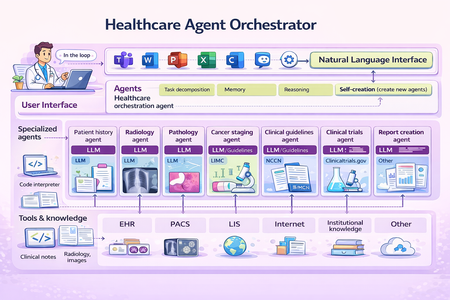
At Microsoft Build, we introduced the Healthcare Agent Orchestrator, now available in Azure AI Foundry Agent Catalog . In this blog, we unpack the science: how we structured the architecture, curated real tumor board data, and built robust agent coordination that brings AI into real healthcare workflows. Healthcare Agent Orchestrator assisting a simulated tumor board meeting. Introduction Healthcare is inherently collaborative. Critical decisions often require input from multiple specialists—radiologists, pathologists, oncologists, and geneticists—working together to deliver the best outcomes for patients. Yet most AI systems today are designed around narrow tasks or single-agent architectures, failing to reflect the real-world teamwork that defines healthcare practice. That’s why we developed the Healthcare Agent Orchestrator: an orchestrator and code sample built around Microsoft’s industry-leading healthcare AI models, designed to support reasoning and multidisciplinary collaboration -- enabling modular, interpretable AI workflows that mirror how healthcare teams actually work. The orchestrator brings together Microsoft healthcare AI models—such as MedImageParse for image recognition, CXRReportGen for automated radiology reporting, and MedImageInsight for retrieval and similarity analysis—into a unified, task-aware system that enables developers to build an agent that reflects real-word healthcare decision making pattern. This work was led by Yu (Aiden) Gu, Principal Applied Scientist at Microsoft Research, who conceived the study, defined the research direction, and led the design and development of the Healthcare Agent Orchestrator proof-of-concept. Healthcare Is Naturally Multi-Agent Healthcare decision-making often requires synthesizing diverse data types—radiologic images, pathology slides, genetic markers, and unstructured clinical narratives—while reconciling differing expert perspectives. In a molecular tumor board, for instance, a radiologist might highlight a suspicious lesion on CT imaging, a pathologist may flag discordant biopsy findings, and a geneticist could identify a mutation pointing toward an alternate treatment path. Effective collaboration in these settings hinges not on isolated analysis, but on structured dialogue—where evidence is surfaced, assumptions are challenged, and hypotheses are iteratively refined. To support the development of healthcare agent orchestrator, we partnered with a leading healthcare provider organization, who independently curated and de-identified a proprietary dataset comprising longitudinal patient records and real tumor board transcripts—capturing the complexity of multidisciplinary discussions. We provided guidance on data types most relevant for evaluating agent coordination, reasoning handoffs, and task alignment in collaborative settings. We then applied LLM-based structuring techniques to convert de-identified free-form transcripts into interpretable units, followed by expert review to ensure domain fidelity and relevance. This dataset provides a critical foundation for assessing agent coordination, reasoning handoffs, and task alignment in simulated collaborative settings. Why General-Purpose LLMs Fall Short for Healthcare Collaboration While general-purpose large language models have delivered remarkable results in many domains, they face key limitations in high-stakes healthcare environments: Precision is critical: Even small hallucinations or inconsistencies can compromise safety and decision quality Multi-modal integration is required: Many healthcare decisions involve interpreting and correlating diverse data types—images, reports, structured records—much of which is not available in public training sets Transparency and traceability matter: Users must understand how conclusions are formed and be able to audit intermediate steps The Healthcare Agent Orchestrator addresses these challenges by pairing general reasoning capabilities with specialized agents that operate over imaging, genomics, and structured EHRs—ensuring grounded, explainable results aligned with clinical expectations. Each agent contributes domain-specific expertise, while the orchestrator ensures coherence, oversight, and explainability—resulting in outputs that are both grounded and verifiable. Architecture: Coordinating Specialists Through Orchestration Healthcare Agent Orchestrator. Healthcare Agent Orchestrator’s multi-agent framework is built on modular AI infrastructure, designed for secure, scalable collaboration: Semantic Kernel: A lightweight, open-source development kit for building AI agents and integrating the latest AI models into C#, Python, or Java codebases. It acts as efficient middleware for rapidly delivering enterprise-grade solutions—modular, extensible, and designed to support responsible AI at scale. Model Context Protocol (MCP): an open standard that enables developers to build secure, two-way connections between their data sources and AI-powered tools. Magentic-One: Microsoft’s generalist multi-agent system for solving open-ended web and file-based tasks across domains—built on Microsoft AutoGen, our popular open-source framework for developing multi-agent applications. Each agent is orchestrated within the system and integrated via Semantic Kernel’s group chat infrastructure, with support for communication and modular deployment via Azure. This orchestration ensures that each model—whether interpreting a lung nodule, analyzing a biopsy image, or summarizing a genomic variant—is applied precisely where its expertise is most relevant, without overloading a single system with every task. The modularity of the framework also future-proofs: as new health AI models and tools emerge, they can be seamlessly incorporated into the ecosystem without disrupting existing workflows—enabling continuous innovation while maintaining clinical stability. Microsoft’s healthcare AI models at the Core Healthcare agent orchestrator also enables developers to explore the capabilities of Microsoft’s latest healthcare AI models: CXRReportGen: Integrates multimodal inputs—including current and prior X-ray images and report context—to generate grounded, interpretable radiology reports. The model has shown improved accuracy and transparency in automated chest X-ray interpretation, evaluated on both public and private data. MedImageParse 3 : A biomedical foundation model for imaging parsing that can jointly conduct segmentation, detection, and recognition across 9 imaging modalities. MedImageInsight 4 : Facilitates fast retrieval of clinically similar cases, supports disease classification across broad range of medical image modalities, accelerating second opinion generation and diagnostic review workflows. Each model has the ability to act as a specialized agent within the system, contributing focused expertise while allowing flexible, context-aware collaboration orchestrated at the system level. CXRReportGen is included in the initial release and supports the development and testing of grounded radiology report generation. Other Microsoft healthcare models such as MedImageParse and MedImageInsight are being explored in internal prototypes to expand the orchestrator’s capabilities across segmentation, detection, and image retrieval tasks. Seamless Integration with Microsoft Teams Rather than creating new silos, Healthcare Agent Orchestrator integrates directly into the tools clinicians already use—specifically Microsoft Teams. Developers are investigating how clinicians can engage with agents through natural conversation, asking questions, requesting second opinions, or cross-validating findings—all without leaving their primary collaboration environment. This approach minimizes friction, improves user experience, and brings cutting-edge AI into real-world care settings. Building Toward Robust, Trustworthy Multi-Agent Collaboration Think of the orchestrator as managing a secure, structured group chat. Each participant is a specialized AI agent—such as a ‘Radiology’ agent, ‘PatientHistory’ agent, or 'ClinicalTrials‘ agent. At the center is the ‘Orchestrator’ agent, which moderates the interaction: assigning tasks, maintaining shared context, and resolving conflicting outputs. Agents can also communicate directly with one another, exchanging intermediate results or clarifying inputs. Meanwhile, the user can engage either with the orchestrator or with specific agents as needed. Each agent is configured with instructions (the system prompt that guides its reasoning), and a description (used by both the UI and the orchestrator to determine when the agent should be activated). For example, the Radiology agent is paired with the cxr_report_gen tool, which wraps Microsoft’s CXRReportGen model for generating findings from chest X-ray images. Tools like this are declared under the agent’s tools field and allow it to call foundation models or other capabilities on demand—such as the clinical_trials tool 5 for querying ClinicalTrials.gov. Only one agent is marked as facilitator, designating it as the moderator of the conversation; in this scenario, the Orchestrator agent fills that role. Early observations highlight that multi-agent orchestration introduces new complexities—even as it improves specialization and task alignment. To address these emergent challenges, we are actively evolving the framework across several dimensions: Mitigating Error Propagation Across Agents: Ensuring that early-stage errors by one agent do not cascade unchecked through subsequent reasoning steps. This includes introducing critical checkpoints where outputs from key agents are verified before being consumed by others. Optimizing Agent Selection and Specialization: Recognizing that more agents are not always better. Adding unnecessary or redundant agents can introduce noise and confusion. We’ve implemented a systematic framework that emphasizes a few highly suited agents per task —dynamically selected based on case complexity and domain needs—while continuously tracking performance gains and catching regressions early. Improving Transparency and Hand-off Clarity: Structuring agent interactions to make intermediate outputs and rationales visible, enabling developers (and the system itself) to trace how conclusions were reached, catch inconsistencies early, and intervene when necessary. Adapting General Frameworks for Healthcare Complexity Generic orchestration frameworks like Semantic Kernel provide a strong foundation—but healthcare demands more. The stakes are higher, the data more nuanced, and the workflows require precision, traceability, and regulatory compliance. Here’s how we’ve extended and adapted these systems to help address healthcare demands: Precision and Safety: We introduced domain-aware verification checkpoints and task-specific agent constraints to reduce inappropriate tool usage—supporting more reliable reasoning. To help uphold the high standards required in healthcare, we defined two complementary metric systems (Check Healthcare Agent Orchestrator Evaluation for more details): Core Metrics: monitor health agents selection accuracy, intent resolution, contextual relevance, and information aggregation RoughMetric: a composite score based on ROUGE that helps quantify the precision of generated outputs and conversation reliability. TBFact: A modified version of RadFact 2 that measures factuality of claims in agents' messages and helps identifying omissions and hallucination Domain-Specific Tool Planning: Healthcare agents must reason across multimodal inputs—such as chest X-rays, CT slices, pathology images, and structured EHRs. We’ve customized Semantic Kernel’s tool invocation and planning modules to reflect clinical workflows, not generic task chains. These infrastructure-level adaptations are designed to complement Microsoft Healthcare AI models—such as CXRReportGen, MedImageParse, and MedImageInsight—working together to enable coordinated, domain-aware reasoning across complex healthcare tasks. Enabling Collaborative, Trustworthy AI in Healthcare Healthcare demands AI systems that are as collaborative, adaptive, and trustworthy as the clinical teams they aim to support. The Healthcare Agent Orchestrator is a concrete step toward that vision—pairing specialized health AI models with a flexible, multi-agent coordination framework, purpose-built to reflect the complexity of real clinical decision-making. By aligning with existing healthcare workflows and enabling transparent, role-specific collaboration, this system shows promise to empower clinicians to work more effectively—with AI as a partner, not a replacement. Healthcare Multi-Agent Orchestrator and the Microsoft healthcare AI models are intended for research and development use. Healthcare Multi-Agent Orchestrator and the healthcare AI models not designed or intended to be deployed in clinical settings as-is nor is it intended for use in the diagnosis or treatment of any health or medical condition, and its performance for such purposes has not been established. You bear sole responsibility and liability for any use of Healthcare Multi-Agent Orchestrator or the healthcare AI models, including verification of outputs and incorporation into any product or service intended for a medical purpose or to inform clinical decision-making, compliance with applicable healthcare laws and regulations, and obtaining any necessary clearances or approvals. 1 arXiv, Universal Abstraction: Harnessing Frontier Models to Structure Real-World Data at Scale, February 2, 2025 2 arXiv, MAIRA-2: Grounded Radiology Report Generation, June 6, 2024 3 Nature Method, A foundation model for joint segmentation, detection and recognition of biomedical objects across nine modalities, Nov 18, 2024 4 arXiv, Medimageinsight: An open-source embedding model for general domain medical imaging, Oct 9, 2024 5 Machine Learning for Healthcare Conference, Scaling Clinical Trial Matching Using Large Language Models: A Case Study in Oncology, August 4, 20237.8KViews2likes1CommentHow can you stay competitive and relevant in an AI-Driven World?
In a world where AI tools evolve weekly and yesterday's skills can feel obsolete overnight, this blog offers a grounded, human-first guide for cloud and technology professionals who want to stay ahead not by chasing every trend, but by building the right foundations. Across six core themes, the post walks readers through understanding what AI truly changes in the workplace, committing to deliberate and structured learning through platforms like Microsoft Learn, getting hands-on with real Azure AI projects beyond just certifications, and doubling down on the human skills critical thinking, communication, and ethical judgment that AI simply cannot replicate. The blog also makes the case for community and network as a long-term career asset, and closes with a call to develop an AI mindset rooted in curiosity, adaptability, and a willingness to experiment and share openly. Whether you're a cloud architect, a security professional preparing for AZ-500 or SC-200, or simply someone navigating what this AI shift means for your career this post is written for you. Key Takeaways for Readers: Understand AI's real impact · Build a deliberate learning habit · Go hands-on with Azure AI tools · Strengthen human skills · Invest in community · Cultivate an AI-first mindset286Views1like0Comments
Best practices for safely performing schema changes in Azure Database for MySQL
Azure Database for MySQL - Flexible Server is built on the open-source MySQL database engine, and the service supports MySQL 8.0 and newer versions. This means that users can take advantage of the flexibility and advanced capabilities of MySQL’s latest features while benefitting from a fully managed database service. While newer versions and features can provide a lot of value, the recent issues identified with MySQL versions 8.0+ makes it important to be aware of potential risks that can occur during certain operations, particularly if you are making online schema changes. Issues with data loss and duplicate keys with Online DDL Online Data Definition Language (DDL) operations are a powerful feature in MySQL, enabling schema changes like ALTER TABLE or OPTIMIZE TABLE with minimal impact on table availability. These operations are designed to reduce downtime by allowing concurrent reads and writes during schema modifications, making them an essential tool for managing active databases efficiently. However, a recent post on the Percona blog, Who Ate My MySQL Table Rows? highlights critical risks associated with MySQL 8.0.x versions after 8.0.27 and all versions beyond 8.4.y. Specifically, the open-source INPLACE algorithm, commonly used for online schema changes, can lead to data loss and duplicate key errors under certain conditions. These issues arise from constraints in the INPLACE algorithm, particularly during ALTER TABLE and OPTIMIZE TABLE operations, exposing vulnerabilities that compromise data integrity and system reliability. These risks are called out in the following bug reports: Bug #115511: Data loss during online ALTER operations with concurrent DML Bug #115608: Duplicate key errors caused by online ALTER operations Documented issues related to the INPLACE algorithm (used for online DDL) can cause: Data Loss: Rows may be accidentally deleted or become inaccessible. Duplicate Keys: Indexes can end up with duplicate entries, leading to data consistency issues and potential replication errors. Problems arise when INPLACE operations, such as ALTER TABLE or OPTIMIZE TABLE, run concurrently with: DML operations (INSERT, UPDATE, DELETE): Modifications to table data during the rebuild. A purge activity: Background cleanup operations for old row versions in InnoDB. These scenarios can lead to anomalies resulting from race conditions and incomplete synchronization between concurrent activities. Impact on Azure Database for MySQL - Flexible Server Customers For Azure Database for MySQL Flexible Server customers using MySQL 8.0+ and all versions after 8.4.y, this issue is particularly critical as it affects: Data Integrity: During schema changes such as ALTER TABLE or OPTIMIZE TABLE run using the INPLACE algorithm, data rows may be lost or duplicated if these operations run concurrently with a DML activity (e.g., INSERT, UPDATE, or DELETE) or background purge tasks. This can compromise the accuracy and reliability of the database, potentially leading to incorrect query results or the loss of critical business data. Replication Instability: Duplicate keys or missing rows can interrupt replication processes, which rely on a consistent data stream across the primary and replica servers. These issues can arise when there are concurrent insertions into the table during schema changes, leading to data inconsistencies between the primary and replicas. Such inconsistencies may result in replication lag, errors, or even a complete breakdown of high-availability setups, requiring manual intervention to restore synchronization. Operational Downtime: Resolving these issues often involves manually syncing data or restoring backups. These recovery efforts can be time-consuming and disruptive, leading to extended downtime for applications and potential business impact. Recommendations for safe schema changes on Azure Database for MySQL flexible servers To minimize the risks of data loss and duplicate keys while making schema changes, follow these best practices: Set old_alter_table=ON to Default to COPY Algorithm Enable the server parameter old_alter_table system variable so that ALTER TABLE operations without a specified ALGORITHM default to using the COPY algorithm instead of INPLACE. This reduces the risk for users who do not explicitly specify the ALGORITHM in their commands. Learn more on how configure server parameters in Azure Database for MySQL. Avoid using ALGORITHM=INPLACE Do not explicitly use ALGORITHM=INPLACE for ALTER TABLE commands, as it increases the risk of data loss or duplicate keys. Back up your data before schema changes Always perform a full on-demand backup of your server before executing schema changes. This precaution ensures data recoverability in case of unexpected issues. Learn more on how to take full on-demand backups for your server. Avoid Concurrent DML during schema changes Schedule schema changes like ALTER TABLE and OPTIMIZE TABLE during application maintenance windows when no concurrent writes activities occur. This minimizes race conditions and synchronization conflicts. Use External Tools for Safer Online Schema Changes Consider using external tools like pt-online-schema-change to modify table definitions without blocking concurrent changes. These tools enable you to make schema changes with minimal impact on availability and performance. Learn more about pt-online-schema-change. Disclaimer: The pt-online-schema-change tool is not managed or supported by Microsoft; use it at your discretion. Mitigation plans To address these risks, we’re actively working to integrate the necessary fixes to ensure a more robust and reliable experience for our customers. New Servers Fully Secured by End of February 2025 All new Azure Database for MySQL Flexible Server instances created after 1 st March 2025, will include the latest fixes, ensuring that schema changes are safeguarded against data loss and duplicate key risks. Rollout for Existing Servers For existing servers, we will roll out patches during upcoming maintenance windows by end of Q1 of Calendar Year 2025 We recommend monitoring your Azure portal for scheduled maintenance windows and Release notes for announcements about critical updates and patches. Priority updates available upon request If you require an urgent update outside of the scheduled maintenance windows, you can contact Azure Support. Provide the necessary server details and an appropriate maintenance window, and our team will work with you to prioritize the patching process. Note that priority patching will be available by February 2025. We recommend monitoring Release notes for announcements about critical updates and patches. Conclusion Safely managing schema changes on MySQL servers requires understanding the risks associated with online DDL operations, such as potential data loss and duplicate keys. To help safeguard data integrity and maintain server stability, implement best practices, for example enabling the COPY algorithm, using offline operations if feasible, or scheduling changes during low activity periods. Fixes are expected by the end of February 2025, and new Azure Database for MySQL flexible servers will be fully protected against these bugs. We will apply updates to existing servers during maintenance windows in Q1 2025. Following the recommendations above will help ensure that you can confidently make schema changes while preserving the reliability and performance of your server.
Patterns for low-code Azure config state snapshot + recovery solution for resource groups
I’m looking for patterns that capture resource configuration changes over time and support best-effort recovery (redeployment) of resource config state. I understand that authoritative IaC (Bicep) would be the most mature option, however, I am wondering if anyone has ever implemented a solution similar to what I have described above. Ideally this would be a low-code, Azure native solution.30Views0likes1Comment
Driving AI‑Powered Healthcare: A Data & AI Webinar and Workshop Series
Across these sessions, you’ll learn how healthcare organizations are using Microsoft Fabric, advanced analytics, and AI to unify fragmented data, modernize analytics, and enable intelligent, scalable solutions, from enterprise reporting to AI‑powered use cases. Whether you’re just getting started or looking to accelerate adoption, these sessions offer practical guidance, real‑world examples, and hands‑on learning to help you build a strong data foundation for AI in healthcare. Date Topic Details Location Registration Link May 6 Webinar: Microsoft Fabric Foundations - A Simple Path to Modern Analytics and AI Discover how Microsoft Fabric consolidates fragmented analytics into a single integrated data platform, making it easier to deliver trusted insights and adopt AI without added complexity. Virtual Register May 13 Webinar: Reduce BI Sprawl, Cut Cost and Build an AI-Ready Analytics Foundation Learn how Power BI enables enterprise BI consolidation, consistent metrics, and secure, scalable analytics that support both operational reporting and emerging AI use cases. Virtual Register May 19-20 In Person Workshop: Driving AI‑Powered Healthcare: Advanced Analytics, AI, and Real‑World Impact Attend this two‑day, in‑person event to learn how healthcare organizations use Microsoft Fabric to unify data, accelerate AI adoption, and deliver measurable clinical and operational value. Day 1 focuses on strategy, architecture, and real‑world healthcare use cases, while Day 2 offers hands‑on workshops to apply those concepts through guided labs and agent‑powered solutions. Chicago Register May 27 Webinar: Unified Data Foundation for AI & Analytics - Leveraging OneLake and Microsoft Fabric This session shows how organizations can simplify fragmented data architectures by using Microsoft Fabric and OneLake as a single, governed foundation for analytics and AI. Virtual Register May 27-28 In Person Workshop: Driving AI‑Powered Healthcare: Advanced Analytics, AI, and Real‑World Impact Attend this two‑day, in‑person event to learn how healthcare organizations use Microsoft Fabric to unify data, accelerate AI adoption, and deliver measurable clinical and operational value. Day 1 focuses on strategy, architecture, and real‑world healthcare use cases, while Day 2 offers hands‑on workshops to apply those concepts through guided labs and agent‑powered solutions. Silicon Valley Register June 3-4 In Person Workshop: Driving AI‑Powered Healthcare: Advanced Analytics, AI, and Real‑World Impact Attend this two‑day, in‑person event to learn how healthcare organizations use Microsoft Fabric to unify data, accelerate AI adoption, and deliver measurable clinical and operational value. Day 1 focuses on strategy, architecture, and real‑world healthcare use cases, while Day 2 offers hands‑on workshops to apply those concepts through guided labs and agent‑powered solutions. New York Register June 10 Webinar: From Data to Decisions: How AI Data Agents in Microsoft Fabric Redefine Analytics Join us to learn how Fabric Data Agents enable users to interact with enterprise data through AI‑powered, governed agents that understand both data and business context. Virtual Register June 17 Webinar: Building the Intelligent Factory: A Unified Data and AI Approach to Life Science Manufacturing Discover how life science & MedTech manufacturers use Microsoft Fabric to integrate operational, quality, and enterprise data and apply AI‑powered analytics for smarter, faster manufacturing decisions. Virtual Register June 23-24 In Person Workshop: Driving AI‑Powered Healthcare: Advanced Analytics, AI, and Real‑World Impact Attend this two‑day, in‑person event to learn how healthcare organizations use Microsoft Fabric to unify data, accelerate AI adoption, and deliver measurable clinical and operational value. Day 1 focuses on strategy, architecture, and real‑world healthcare use cases, while Day 2 offers hands‑on workshops to apply those concepts through guided labs and agent‑powered solutions. Dallas RegisterPartner perspective: How Breakthru uses App Advisor and AI-listing optimization to drive growth
Optimizing a Marketplace listing isn’t just a marketing exercise—it directly impacts discoverability, demand, and revenue. But knowing what to change (and when) can be challenging for software development companies. In this partner‑written blog post, Marketplace software development company Breakthru shares firsthand experience using AI‑powered listing recommendations in App Advisor to move from guesswork to confident, data‑driven optimization—without risking listing performance. Dan Langille also reflects on how App Advisor became a core part of their business, what’s working in practice, and how AI is changing how teams iterate on their Marketplace presence. 👉 Read the partner story here: Improve Marketplace outcomes with AI‑powered listing recommendations in App Advisor Discussion prompts for the community: Would AI‑driven recommendations change how often you iterate on your listing? Have you used App Advisor for selling and growing app and AI agent sales? Curious to hear how other Marketplace partners are approaching listing optimization today!GitHub Copilot is moving to usage-based billing
Instead of counting premium requests, every Copilot plan will include a monthly allotment of GitHub AI Credits, with the option for paid plans to purchase additional usage. Usage will be calculated based on token consumption, including input, output, and cached tokens, using the listed API rates for each model. This change aligns Copilot pricing with actual usage and is an important step toward a sustainable, reliable Copilot business and experience for all users. Learn more here and access partner resources here. APAC Office hours link – May 6, 7:00 PM — 8:00 PM PDT EMEA/AMER Office hours link – May 7, 8:00 AM — 9:00 AM PDT734Views0likes0Comments
MFA required for Global Admin without Conditional Access or PIM enforcement
Hi, I'm analyzing a break-glass account scenario in Microsoft Entra ID and would like to validate a behavior I'm observing. The account: Has Global Administrator role (permanent assignment) Is excluded from all Conditional Access policies (fully validated) Is excluded from Authentication Methods policies and MFA Registration Campaign (fully validated) Has no per-user MFA enabled (disabled) PIM is not enforcing MFA (role is permanently active, no activation required) Security Defaults are disabled SSPR is not enforcing MFA All configurable sources that could require MFA have been reviewed and fully ruled out. However, when signing into Microsoft Admin Portals (Entra/Azure), MFA is still required and cannot be skipped. In Sign-in logs: Conditional Access → Not Applied Authentication Details show: "MFA required in Azure AD" "App requires multifactor authentication" Additionally, there is a Microsoft-managed policy: "Multifactor authentication for admins accessing Microsoft Admin Portals" but it is in Report-only mode. Question: Is Microsoft Entra ID enforcing MFA automatically for privileged roles (like Global Administrator) in admin portals, even when no Conditional Access or PIM policy requires it? And if so, is there any supported way to fully exclude a break-glass account from this behavior? Thanks in advance.60Views0likes1Comment