azure
7833 TopicsNVIDIA GTC AI Conference
Event Description: NVIDIA GTC is the premier global AI conference, where developers, researchers, and business leaders come together to explore the next wave of AI innovation. From physical AI and AI factories to agentic AI and inference, GTC 2026 will showcase the breakthroughs shaping every industry. Venues throughout downtown San Jose for inspiring sessions, hands-on training, and opportunities to connect with experts and peers—and be part of the unique GTC experience. Event Dates: March 16 – 19, 2026 San Jose Convention Center & Virtual Who: 27K+ Attendees – including developers, researchers, and business leaders Event website29Views0likes0CommentsPlease clarify the numbering system in Microsoft exams
I am trying to make sense of exam numbers in Microsoft Certification poster. https://arch-center.azureedge.net/Credentials/Certification-Poster_en-us.pdf. For example I notice most azure exam numbers start with 1xx. That gives me the impression that 1xx could be related to Infrastructure. But I am not sure if that is the correct understanding. For example all fundamental exams are numbered 9xx. So are exams numbered differently in role based certifications? What is the numbering pattern and practice in role based certifications? Again one might assume that all architect exams may have the same number pattern but they don’t. Some patterns emerge when it comes to Windows certification - 8xx. Collaboration and communication - 7xx except MB 700. So it appears even under role based certifications the numbering pattern may be different depending on the technology or platform or product. I have not found any authoritative material on the internet form anyone in Microsoft or an MVP on this topic. Some clarification on this topic will help to put at rest years of curiosity and confusion in the community. Thank you.29Views0likes1Comment
Managed Identity on SQL Server On-Prem: The End of Stored Secrets
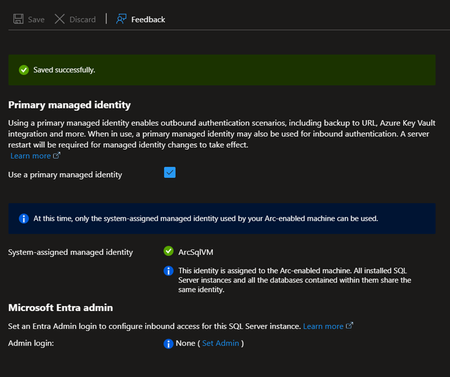
The Problem with Credentials in SQL Server For an On-Premises SQL Server to access Azure services, you traditionally need to store secrets: Common Scenarios Requiring Credentials Scenario Required Credential Backup to URL (Azure Blob) Storage account key or SAS token Extensible Key Management (Azure Key Vault) Service principal + secret Calling Azure OpenAI from T-SQL API key PolyBase to Azure Data Lake Service principal or key Associated Risks Manual Rotation Secrets expire. You need to plan and execute rotation and not forget to update all references. Secure Storage Where to store these secrets? In SQL Server via CREATE CREDENTIAL? In a config file? Each option has its risks. Attack Surface A compromised secret gives access to associated Azure resources. The more secrets you have, the larger the attack surface. Complex Auditing Who has access to these secrets? When were they used? Tracking is difficult. The Solution: Azure Arc + Managed Identity SQL Server 2025 connected to Azure Arc can geta Managed Identity : This identity: Is managed by Microsoft Entra ID Has no secret to store or rotate Can receive RBAC permissions on Azure resources Is centrally audited in Entra ID How It Works SQL Server 2025 On-Prem Azure Arc Agent installed on the server Managed Identity (automatically created in Entra ID) RBAC assignment on Azure resources -free access to Blob Storage, Key Vault, etc Step-by-Step Configuration Step 1: Enable Azure Arc on the Server and/or Register SQL Server in Azure Arc Follow the procedure describes in this article to onboard your server in Azure Arc. Connect Your SQL Server to Azure Arc Remember that you can also evaluate Azure Arc on a Azure VM (test use only) How to evaluate Azure Arc-enabled servers with an Azure virtual machine Step 2: Retrieve the Managed Identity The Managed Identity can be enabled and retrieved from Azure Arc | SQL Servers > “SQL Server instance” > Settings > Microsoft Entra ID Note: The Managed Identity is server-wide (not at the instance level) Step 3: Assign RBAC Roles Granting access to a Storage Account for backups $sqlServerId = (az resource show --resource-group "MyRG" --name "ServerName" --resource-type "Microsoft.HybridCompute/machines" --query identity.principalId -o tsv) az role assignment create --role "Storage Blob Data Contributor" ` --assignee-object-id $sqlServerId ` --scope "/subscriptions/xxx/resourceGroups/MyRG/providers/Microsoft.Storage/storageAccounts/mybackupaccount" Ex: Backup to URL Without Credential Before (with SAS token) -- Create a credential with a SAS token (expires, must be rotated) CREATE CREDENTIAL [https://mybackup.blob.core.windows.net/backups] WITH IDENTITY = 'SHARED ACCESS SIGNATURE', SECRET = 'sv=2022-11-02&ss=b&srt=sco&sp=rwdlacup...' BACKUP DATABASE [MyDB] TO URL = 'https://mybackup.blob.core.windows.net/backups/MyDB.bak' WITH COMPRESSION After (with Managed Identity --No secret anymore CREATE CREDENTIAL [https://mybackup.blob.core.windows.net/backups] WITH IDENTITY = 'Managed Identity' BACKUP DATABASE [MyDB] TO URL = 'https://mybackup.blob.core.windows.net/backups/MyDB.bak' WITH COMPRESSION Extensible Key Management with Key Vault EKM Configuration with Managed Identity CREATE CREDENTIAL [MyAKV.vault.azure.net] WITH IDENTITY = 'Managed Identity' FOR CRYPTOGRAPHIC PROVIDER AzureKeyVault_EKM_Prov; How Copilot Can Help Infrastructure Configuration Walk me through setting up Azure Arc for SQL Server 2025 to use Managed Identity for backups to Azure Blob Storage @mssql Generate the PowerShell commands to register my SQL Server with Azure Arc and configure RBAC for Key Vault access Identify Existing Credentials to Migrate List all credentials in my SQL Server that use SHARED ACCESS SIGNATURE or contain secrets, so I can plan migration to Managed Identity Migration Scripts I have backup jobs using SAS token credentials. Generate a migration script to convert them to use Managed Identity Troubleshooting My backup WITH MANAGED_IDENTITY fails with "Authorization failed". What are the steps to diagnose RBAC permission issues? @mssql The Azure Arc agent shows "Disconnected" status. How do I troubleshoot connectivity and re-register the server? Audit and Compliance Generate a report showing all Azure resources my SQL Server's Managed Identity has access to, with their RBAC role assignments Prerequisites and Limitations Prerequisites Azure Arc agent installed and connected SQL Server 2025, running on Windows Azure Extension for SQL Server. Current Limitations Failover cluster instances isn't supported. Disabling not recommended Only system-assigned managed identities are supported FIDO2 method not currently supported Azure public cloud access required Documentation Overview Managed identity overview Set Up Managed Identity and Microsoft Entra Authentication for SQL Server Enabled by Azure Arc Set up Transparent Data Encryption (TDE) Extensible Key Management with Azure Key VaultIntegrating Microsoft Foundry with OpenClaw: Step by Step Model Configuration
Step 1: Deploying Models on Microsoft Foundry Let us kick things off in the Azure portal. To get our OpenClaw agent thinking like a genius, we need to deploy our models in Microsoft Foundry. For this guide, we are going to focus on deploying gpt-5.2-codex on Microsoft Foundry with OpenClaw. Navigate to your AI Hub, head over to the model catalog, choose the model you wish to use with OpenClaw and hit deploy. Once your deployment is successful, head to the endpoints section. Important: Grab your Endpoint URL and your API Keys right now and save them in a secure note. We will need these exact values to connect OpenClaw in a few minutes. Step 2: Installing and Initializing OpenClaw Next up, we need to get OpenClaw running on your machine. Open up your terminal and run the official installation script: curl -fsSL https://openclaw.ai/install.sh | bash The wizard will walk you through a few prompts. Here is exactly how to answer them to link up with our Azure setup: First Page (Model Selection): Choose "Skip for now". Second Page (Provider): Select azure-openai-responses. Model Selection: Select gpt-5.2-codex , For now only the models listed (hosted on Microsoft Foundry) in the picture below are available to be used with OpenClaw. Follow the rest of the standard prompts to finish the initial setup. Step 3: Editing the OpenClaw Configuration File Now for the fun part. We need to manually configure OpenClaw to talk to Microsoft Foundry. Open your configuration file located at ~/.openclaw/openclaw.json in your favorite text editor. Replace the contents of the models and agents sections with the following code block: { "models": { "providers": { "azure-openai-responses": { "baseUrl": "https://<YOUR_RESOURCE_NAME>.openai.azure.com/openai/v1", "apiKey": "<YOUR_AZURE_OPENAI_API_KEY>", "api": "openai-responses", "authHeader": false, "headers": { "api-key": "<YOUR_AZURE_OPENAI_API_KEY>" }, "models": [ { "id": "gpt-5.2-codex", "name": "GPT-5.2-Codex (Azure)", "reasoning": true, "input": ["text", "image"], "cost": { "input": 0, "output": 0, "cacheRead": 0, "cacheWrite": 0 }, "contextWindow": 400000, "maxTokens": 16384, "compat": { "supportsStore": false } }, { "id": "gpt-5.2", "name": "GPT-5.2 (Azure)", "reasoning": false, "input": ["text", "image"], "cost": { "input": 0, "output": 0, "cacheRead": 0, "cacheWrite": 0 }, "contextWindow": 272000, "maxTokens": 16384, "compat": { "supportsStore": false } } ] } } }, "agents": { "defaults": { "model": { "primary": "azure-openai-responses/gpt-5.2-codex" }, "models": { "azure-openai-responses/gpt-5.2-codex": {} }, "workspace": "/home/<USERNAME>/.openclaw/workspace", "compaction": { "mode": "safeguard" }, "maxConcurrent": 4, "subagents": { "maxConcurrent": 8 } } } } You will notice a few placeholders in that JSON. Here is exactly what you need to swap out: Placeholder Variable What It Is Where to Find It <YOUR_RESOURCE_NAME> The unique name of your Azure OpenAI resource. Found in your Azure Portal under the Azure OpenAI resource overview. <YOUR_AZURE_OPENAI_API_KEY> The secret key required to authenticate your requests. Found in Microsoft Foundry under your project endpoints or Azure Portal keys section. <USERNAME> Your local computer's user profile name. Open your terminal and type whoami to find this. Step 4: Restart the Gateway After saving the configuration file, you must restart the OpenClaw gateway for the new Foundry settings to take effect. Run this simple command: openclaw gateway restart Configuration Notes & Deep Dive If you are curious about why we configured the JSON that way, here is a quick breakdown of the technical details. Authentication Differences Azure OpenAI uses the api-key HTTP header for authentication. This is entirely different from the standard OpenAI Authorization: Bearer header. Our configuration file addresses this in two ways: Setting "authHeader": false completely disables the default Bearer header. Adding "headers": { "api-key": "<key>" } forces OpenClaw to send the API key via Azure's native header format. Important Note: Your API key must appear in both the apiKey field AND the headers.api-key field within the JSON for this to work correctly. The Base URL Azure OpenAI's v1-compatible endpoint follows this specific format: https://<your_resource_name>.openai.azure.com/openai/v1 The beautiful thing about this v1 endpoint is that it is largely compatible with the standard OpenAI API and does not require you to manually pass an api-version query parameter. Model Compatibility Settings "compat": { "supportsStore": false } disables the store parameter since Azure OpenAI does not currently support it. "reasoning": true enables the thinking mode for GPT-5.2-Codex. This supports low, medium, high, and xhigh levels. "reasoning": false is set for GPT-5.2 because it is a standard, non-reasoning model. Model Specifications & Cost Tracking If you want OpenClaw to accurately track your token usage costs, you can update the cost fields from 0 to the current Azure pricing. Here are the specs and costs for the models we just deployed: Model Specifications Model Context Window Max Output Tokens Image Input Reasoning gpt-5.2-codex 400,000 tokens 16,384 tokens Yes Yes gpt-5.2 272,000 tokens 16,384 tokens Yes No Current Cost (Adjust in JSON) Model Input (per 1M tokens) Output (per 1M tokens) Cached Input (per 1M tokens) gpt-5.2-codex $1.75 $14.00 $0.175 gpt-5.2 $2.00 $8.00 $0.50 Conclusion: And there you have it! You have successfully bridged the gap between the enterprise-grade infrastructure of Microsoft Foundry and the local autonomy of OpenClaw. By following these steps, you are not just running a chatbot; you are running a sophisticated agent capable of reasoning, coding, and executing tasks with the full power of GPT-5.2-codex behind it. The combination of Azure's reliability and OpenClaw's flexibility opens up a world of possibilities. Whether you are building an automated devops assistant, a research agent, or just exploring the bleeding edge of AI, you now have a robust foundation to build upon. Now it is time to let your agent loose on some real tasks. Go forth, experiment with different system prompts, and see what you can build. If you run into any interesting edge cases or come up with a unique configuration, let me know in the comments below. Happy coding!355Views0likes0CommentsThe AI Trilemma: Navigating Hype, Hope, and Horror
Artificial Intelligence has taken the world by storm, inspiring a mix of excitement, optimism, and profound concern. Is the current explosion of AI just hype, a beacon of hope for humanity's greatest challenges, or a potential horror story in the making? Join AI Safety expert Harshavardhan Bajoria for a comprehensive overview of this critical field. This workshop delves into the essential questions surrounding the safe and beneficial development of advanced AI, moving from current issues to future possibilities. You will explore: - The Risks (Horror): Understand the real-world dangers already present, from AI-powered scams and deep fakes to future concerns like societal destabilization and the "misalignment problem," where AI goals diverge catastrophically from human values. - The Potential (Hope): Discover the incredible promise AI holds, with the potential to solve complex problems like climate change, prevent diseases through breakthroughs like protein folding, and unleash human potential. - The Approaches: Learn about the core concepts and research areas designed to steer AI in a positive direction, including Value Alignment, Robustness, Scalable Oversight, Interpretability, and Governance. This session provides a foundational look at the challenges and solutions in AI safety, equipping you to engage more deeply with one of the most important conversations of our time. Speaker: https://www.linkedin.com/in/harshavardhan-bajoria246Views1like2Comments
Understand New Sentinel Pricing Model with Sentinel Data Lake Tier
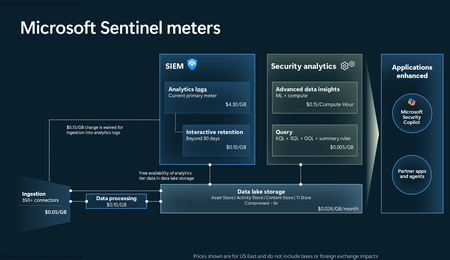
Introduction on Sentinel and its New Pricing Model Microsoft Sentinel is a cloud-native Security Information and Event Management (SIEM) and Security Orchestration, Automation, and Response (SOAR) platform that collects, analyzes, and correlates security data from across your environment to detect threats and automate response. Traditionally, Sentinel stored all ingested data in the Analytics tier (Log Analytics workspace), which is powerful but expensive for high-volume logs. To reduce cost and enable customers to retain all security data without compromise, Microsoft introduced a new dual-tier pricing model consisting of the Analytics tier and the Data Lake tier. The Analytics tier continues to support fast, real-time querying and analytics for core security scenarios, while the new Data Lake tier provides very low-cost storage for long-term retention and high-volume datasets. Customers can now choose where each data type lands—analytics for high-value detections and investigations, and data lake for large or archival types—allowing organizations to significantly lower cost while still retaining all their security data for analytics, compliance, and hunting. Please flow diagram depicts new sentinel pricing model: Now let's understand this new pricing model with below scenarios: Scenario 1A (PAY GO) Scenario 1B (Usage Commitment) Scenario 2 (Data Lake Tier Only) Scenario 1A (PAY GO) Requirement Suppose you need to ingest 10 GB of data per day, and you must retain that data for 2 years. However, you will only frequently use, query, and analyze the data for the first 6 months. Solution To optimize cost, you can ingest the data into the Analytics tier and retain it there for the first 6 months, where active querying and investigation happen. After that period, the remaining 18 months of retention can be shifted to the Data Lake tier, which provides low-cost storage for compliance and auditing needs. But you will be charged separately for data lake tier querying and analytics which depicted as Compute (D) in pricing flow diagram. Pricing Flow / Notes The first 10 GB/day ingested into the Analytics tier is free for 31 days under the Analytics logs plan. All data ingested into the Analytics tier is automatically mirrored to the Data Lake tier at no additional ingestion or retention cost. For the first 6 months, you pay only for Analytics tier ingestion and retention, excluding any free capacity. For the next 18 months, you pay only for Data Lake tier retention, which is significantly cheaper. Azure Pricing Calculator Equivalent Assuming no data is queried or analyzed during the 18-month Data Lake tier retention period: Although the Analytics tier retention is set to 6 months, the first 3 months of retention fall under the free retention limit, so retention charges apply only for the remaining 3 months of the analytics retention window. Azure pricing calculator will adjust accordingly. Scenario 1B (Usage Commitment) Now, suppose you are ingesting 100 GB per day. If you follow the same pay-as-you-go pricing model described above, your estimated cost would be approximately $15,204 per month. However, you can reduce this cost by choosing a Commitment Tier, where Analytics tier ingestion is billed at a discounted rate. Note that the discount applies only to Analytics tier ingestion—it does not apply to Analytics tier retention costs or to any Data Lake tier–related charges. Please refer to the pricing flow and the equivalent pricing calculator results shown below. Monthly cost savings: $15,204 – $11,184 = $4,020 per month Now the question is: What happens if your usage reaches 150 GB per day? Will the additional 50 GB be billed at the Pay-As-You-Go rate? No. The entire 150 GB/day will still be billed at the discounted rate associated with the 100 GB/day commitment tier bucket. Azure Pricing Calculator Equivalent (100 GB/ Day) Azure Pricing Calculator Equivalent (150 GB/ Day) Scenario 2 (Data Lake Tier Only) Requirement Suppose you need to store certain audit or compliance logs amounting to 10 GB per day. These logs are not used for querying, analytics, or investigations on a regular basis, but must be retained for 2 years as per your organization’s compliance or forensic policies. Solution Since these logs are not actively analyzed, you should avoid ingesting them into the Analytics tier, which is more expensive and optimized for active querying. Instead, send them directly to the Data Lake tier, where they can be retained cost-effectively for future audit, compliance, or forensic needs. Pricing Flow Because the data is ingested directly into the Data Lake tier, you pay both ingestion and retention costs there for the entire 2-year period. If, at any point in the future, you need to perform advanced analytics, querying, or search, you will incur additional compute charges, based on actual usage. Even with occasional compute charges, the cost remains significantly lower than storing the same data in the Analytics tier. Realized Savings Scenario Cost per Month Scenario 1: 10 GB/day in Analytics tier $1,520.40 Scenario 2: 10 GB/day directly into Data Lake tier $202.20 (without compute) $257.20 (with sample compute price) Savings with no compute activity: $1,520.40 – $202.20 = $1,318.20 per month Savings with some compute activity (sample value): $1,520.40 – $257.20 = $1,263.20 per month Azure calculator equivalent without compute Azure calculator equivalent with Sample Compute Conclusion The combination of the Analytics tier and the Data Lake tier in Microsoft Sentinel enables organizations to optimize cost based on how their security data is used. High-value logs that require frequent querying, real-time analytics, and investigation can be stored in the Analytics tier, which provides powerful search performance and built-in detection capabilities. At the same time, large-volume or infrequently accessed logs—such as audit, compliance, or long-term retention data—can be directed to the Data Lake tier, which offers dramatically lower storage and ingestion costs. Because all Analytics tier data is automatically mirrored to the Data Lake tier at no extra cost, customers can use the Analytics tier only for the period they actively query data, and rely on the Data Lake tier for the remaining retention. This tiered model allows different scenarios—active investigation, archival storage, compliance retention, or large-scale telemetry ingestion—to be handled at the most cost-effective layer, ultimately delivering substantial savings without sacrificing visibility, retention, or future analytical capabilities.1.6KViews2likes2CommentsPartner Blog | Expanded partner benefits are now available: What’s new in February 2026
Expanded partner benefits are now available across the Microsoft AI Cloud Partner Program. These updates reflect continued investment in the tools, resources, and support partners rely on to build, differentiate, and grow, and they incorporate feedback we hear consistently across the ecosystem. If you read our January post about planning ahead for the February refresh, this is the follow-up: the new benefits are now rolling out, and partners with eligible offers will find them in Partner Center as they become available. What’s new You’ll find a range of meaningful additions designed to empower you to move faster with AI, support security needs, and improve go-to-market execution. Highlights include: Copilot additions in select offers: The FY26 refresh introduces new Copilot-related benefits across parts of the program, including Microsoft 365 Copilot, Copilot Studio, and Microsoft Dragon Copilot (per user) in select partner offers where available. Security benefits expansion: Security-focused benefits have been broadened, including additions such as Microsoft Defender Suite, Microsoft Entra Suite, and Microsoft Intune Suite in select offerings. Azure credit updates: Azure benefits are being updated across multiple offers, including new additions and increases in value for certain cloud benefits. These credits are designed to support solution development, testing, and expansion of your practice. Go-to-market resources: As partners continue to access marketing benefits and resources through the program, Microsoft is simplifying discovery and execution—so you can bring campaigns to market with less friction. Continue reading here234Views2likes4Comments
Azure Migrate: Now Supporting Premium SSD V2, Ultra and ZRS Disks as Targets
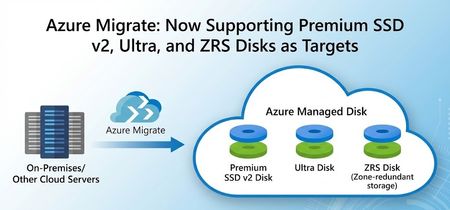
We are excited to announce that we have added assessment and migration support for Premium SSD v2,Ultra Disk and ZRS Disks as storage options in Azure Migrate, with Premium SSD v2 and ZRS Disks now Generally Available and Ultra Disk in Public Preview. This further enhances the assessment and migration experience Azure Migrate offers and allows you to bring your mission critical workloads to these key Azure Storage offerings seamlessly. What’s New Additional Assessment targets: Premium SSD v2 and Ultra Disks As part of the migration journey to the cloud, Azure Migrate makes recommendations on what cloud resources to move your workloads to. Post successful discovery of on-prem workloads, Azure Migrate utilizes multiple parameters like size, IOPS, and throughput to make target recommendations in Azure. Instead of just static sizing, assessments can map actual performance demand to Azure VM and disk SKUs, optimizing performance, resiliency, and total cost of ownership to give you a tailored recommendation that fits your cloud migration journey. With today’s announcement, we are adding more supported disks to Azure Migrate, providing you with improved guidance to ensure that you land on the resources in Azure that align with your goals. If you are looking to migrate your demanding on-premises applications and workloads to Azure, you will benefit from these advanced disk options, which come with greater flexibility and enhanced performance. For example, Premium SSD v2 disks decouple capacity from performance, allowing you to dial IOPS and throughput precisely to your workload’s needs. For high-end scenarios, Ultra Disks offer the highest performance among Azure managed disks, while ZRS disks provide zonally redundant storage to further protect your data. With these included in Azure Migrate’s assessment engine, you end up with a right‑sized, data‑driven target configuration that aligns Azure storage choices with how workloads actually run. Below is a snippet of how the assessment recommendations appear in Azure Migrate for Premium V2 SSD disks. Customers can get details on the disk type, provisioned IOPS, throughput, cost, and seamlessly migrate using the assessment to the recommended target. Migrating to Premium SSD v2 and Ultra Disks in Azure Migrate When Premium SSD v2 or Ultra disks are identified as the optimal targets based on workload characteristics during the assessment phase, they can be auto-populated seamlessly into the migration process. This workflow accelerates the lift-and-shift of on-prem disks to Azure’s high performance managed disks. Below is a snippet from the replication step during migration: Assessing and Migrating to ZRS Disks in Azure Migrate Azure Migrate also has enhanced resiliency by supporting migration to ZRS Disks during Migration. Zone-Redundant Storage (ZRS) for Azure Disks synchronously replicates data across three physically separate availability zones within a region - each with independent power, cooling, and networking - enhancing Disk availability and resiliency. While creating Assessments in Azure Migrate, you can configure a range of target preferences, including the newly introduced option to enable zone-redundant storage (ZRS). You can opt-in to enable ZRS Disk recommendations by editing the Server (Machine) default settings in the Advanced settings blade. Since the preview announcement for these capabilities, recommendations for Ultra, Premium v2 and ZRS Disks have led to petabytes of data being successfully migrated into Azure. Below is a quote from our Premium v2 (Pv2) customer that was provided during the preview: "Through this preview, we have Pv2 disks recommendations in place of Pv1, which is beneficial for our estate during migration in terms of both cost and performance. We are now awaiting General Availability " – Yogesh Patil, Cloud Enterprise Architect, Tata Consultancy Services (TCS) With these added capabilities, Azure Migrate and Azure disk storage are more ready than ever for migrating your most demanding and mission-critical workloads. Learn more about Azure Migrate and for expert migration help, please try Azure Accelerate. You can also contact your preferred partner or Microsoft field for next steps. Get started in Azure today!152Views1like0Comments
How Cloud + AI Solutions Empower Nonprofits to Do More with Less
Nonprofits play a vital role in our communities—delivering essential services, supporting vulnerable groups, and driving social change. Yet many face familiar hurdles: limited budgets, outdated systems, rising data demands, and the need to stay connected with donors, volunteers, and the people they serve. Cloud technology and artificial intelligence (AI) are helping nonprofits overcome these challenges. Solutions like Microsoft Azure make it easier to modernize, stay secure, and expand impact. The Cloud + AI Advantage for Nonprofits Cloud computing provides secure storage, flexible computing power, and modern tools without costly infrastructure. AI builds on that foundation—analyzing data, automating tasks, understanding language, and making predictions that help teams work smarter. Together, cloud and AI help nonprofits: Reduce manual work Improve staff and volunteer efficiency Personalize communications Gain deeper data insights Build more responsive, effective programs In short, AI becomes a digital copilot that frees teams to focus on their mission. Secure Data, Stronger Trust Nonprofits manage sensitive information and complex compliance needs. Azure offers built‑in security, encryption, and access controls—allowing organizations to protect data with enterprise‑grade safeguards, without needing a large IT team. Modernize Without Overspending Aging servers and disconnected systems slow organizations down. Azure enables nonprofits to: Move files and apps to the cloud Scale storage as needed Avoid expensive hardware upgrades Reduce downtime and crashes This flexibility stretches budgets while improving reliability. Unlock Better Insights With AI Data is powerful only when it’s usable. Azure AI helps nonprofits analyze trends, measure impact, forecast needs, and improve engagement—turning raw data into actionable insights. Do More With Limited Resources Small teams often juggle many roles. Cloud automation and AI‑enhanced workflows streamline processes, reduce manual tasks, and boost productivity—so more time goes toward serving communities. Ready to Explore Azure? Cloud and AI don’t replace human effort—they amplify it. With the right foundation, nonprofits can become more agile, secure, and impactful. Register for the eBook: The cloud + AI: Microsoft Azure solutions for nonprofits60Views0likes0CommentsCodeless Connect Framework (CCF) Template Help
As the title suggests, I'm trying to finalize the template for a Sentinel Data Connector that utilizes the CCF. Unfortunately, I'm getting hung up on some parameter related issues with the polling config. The API endpoint I need to call utilizes a date range to determine the events to return and then pages within that result set. The issue is around the requirements for that date range and how CCF is processing my config. The API expects an HTTP GET verb and the query string should contain two instances of a parameter called EventDates among other params. For example, a valid query string may look something like: ../path/to/api/myEndpoint?EventDates=2025-08-25T15%3A46%3A36.091Z&EventDates=2025-08-25T16%3A46%3A36.091Z&PageSize=200&PageNumber=1 I've tried a few approaches in the polling config to accomplish this, but none have worked. The current config is as follows and has a bunch of extra stuff and names that aren't recognized by my API endpoint but are there simply to demonstrate different things: "queryParameters": { "EventDates.Array": [ "{_QueryWindowStartTime}", "{_QueryWindowEndTime}" ], "EventDates.Start": "{_QueryWindowStartTime}", "EventDates.End": "{_QueryWindowEndTime}", "EventDates.Same": "{_QueryWindowStartTime}", "EventDates.Same": "{_QueryWindowEndTime}", "Pagination.PageSize": 200 } This yields the following URL / query string: ../path/to/api/myEndpoint?EventDates.Array=%7B_QueryWindowStartTime%7D&EventDates.Array=%7B_QueryWindowEndTime%7D&EventDates.Start=2025-08-25T15%3A46%3A36.091Z&EventDates.End=2025-08-25T16%3A46%3A36.091Z&EventDates.Same=2025-08-25T16%3A46%3A36.091Z&Pagination.PageSize=200 There are few things to note here: The query param that is configured as an array (EventDates.Array) does indeed show up twice in the query string and with distinct values. The issue is, of course, that CCF doesn't seem to do the variable substitution for values nested in an array the way it does for standard string attributes / values. The query params that have distinct names (EventDates.Start and .End) both show up AND both have the actual timestamps substituted properly. Unfortunately, this doesn't match the API expectations since the names differ. The query params that are repeated with the same name (EventDates.Same) only show once and it seems to use the value from which comes last in the config (so last one overwrites the rest). Again, this doesn't meet the requirements of the API since we need both. I also tried a few other things ... Just sticking the query params and placeholders directly in the request.apiEndpoint polling config attribute. No surprise, it doesn't do the variable substitution there. Utilizing queryParametersTemplate instead of queryParameters. https://learn.microsoft.com/en-us/azure/sentinel/data-connector-connection-rules-referenceindicates this is a string parameter that expects a JSON string. I tried this with various approaches to the structure of the JSON. In ALL instances, the values here seemed to be completely ignored. All other examples from Azure-Sentinel repository utilize the POST verb. Perhaps that attribute isn't even interpreted on a GET request??? And because some AI agents suggested it and ... sure, why not??? ... I tried queryParametersTemplate as an actual query string template, so "EventDates={_QueryWindowStartTime}&EventDates={_QueryWindowEndTime}". Just as with previous attempts to use this attribute, it was completely ignored. I'm willing to try anything at this point, so if you have suggestions, I'll give it a shot! Thanks for any input you may have!297Views0likes5Comments