azure
8223 TopicsAzure Storage Discovery now offers advanced capacity insights
Azure Storage Discovery is introducing advanced capacity insights to help customers gain deeper visibility into their data estate, identify inactive or inefficiently stored data, understand storage composition and retention considerations, and pinpoint resources for further investigation and optimization.150Views0likes1Comment
Optimize selective analytics reads in Azure Data Lake Storage with ABFS Vectored Read
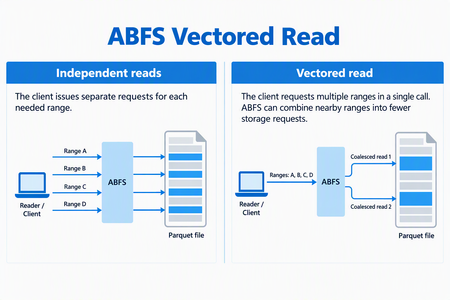
ABFS Vectored Read helps compatible analytics engines reduce request overhead when reading selected portions of columnar files in Azure Data Lake Storage. By coordinating multiple noncontiguous byte ranges through the Azure Blob File System (ABFS) driver, it can combine nearby ranges into fewer storage requests and execute those requests asynchronously. For data engineers working with selective Parquet queries, this brings the storage read pattern closer to what the query needs: a coordinated set of ranges rather than a collection of independent small reads. When the Parquet reader supports vectored I/O and the runtime includes a compatible ABFS client, Spark workloads that use higher-level APIs can enable this capability through configuration - without rewriting queries, changing application logic, or migrating data. Why selective reads need coordinated I/O Consider a query that selects a few columns from a Parquet dataset and filters out most row groups. The reader can skip much of the data the query doesn't need, but the data it needs may be spread across different parts of the file. Reading each range independently can create many small storage requests. Each request carries network and processing overhead, so selecting less data doesn't necessarily remove the cost of coordinating those reads. Vectored Read lets a compatible reader provide the ranges together, giving the client an opportunity to plan the I/O as a group. How ABFS Vectored Read works A compatible reader submits the file ranges it needs together. ABFS validates and sorts the ranges, combines nearby ranges when appropriate, and divides the resulting work to fit its read buffers. It then queues the storage requests asynchronously and returns the requested bytes to the corresponding range buffers. Illustrative request pattern, not a benchmark. Actual grouping depends on range layout and client configuration; coalesced storage requests can include bytes between the requested ranges. This is a client-side optimization. It does not change the file format or rewrite your stored data. The engine still receives the data for the ranges it requested. What this means for your workloads For compatible selective-read workloads, Vectored Read offers: Less request overhead: Combining nearby ranges can reduce separate storage requests and network round trips. Coordinated I/O: Asynchronous reads allow the client to work on multiple requested ranges without treating every range as an isolated operation. Configuration-based adoption: Compatible Spark workloads using the Hadoop Parquet and ABFS path can use the feature without rewriting their queries. The best starting point is a workload that reads selected portions of Parquet files through abfs:// or abfss://. Full sequential scans may see less benefit, and engines that bypass the Hadoop/ABFS path do not use this capability. Support depends on the Hadoop, hadoop-azure, and parquet-hadoop libraries included in the runtime, not only on the Spark version. See Availability and resources for the minimum versions and verification guidance. The benefit depends on the number, size, and spacing of requested ranges, the coalescing configuration, storage and network latency, concurrency and caching. Combining ranges can reduce requests and round trips, but it can also read additional bytes between noncontiguous requested ranges. Compare query duration, storage transactions, bytes read, and resource utilization against a controlled baseline using representative data and concurrency. Get started First, verify that your runtime contains Apache Hadoop 3.3.5 or later, including the hadoop-azure module, and parquet-hadoop 1.12.3 or later. The presence of an ABFS URI alone does not establish that the optimized implementation is installed. For Spark, enable the Parquet setting before the application starts, using the spark.hadoop. prefix: spark-submit \ --conf spark.hadoop.parquet.hadoop.vectored.io.enabled=true \ <other-options> \ <application> Replace the command placeholders with your normal submission options and application. Set the property explicitly rather than relying on a default, which can vary by packaged Parquet version. For managed services, use the service's supported cluster or session configuration mechanism. Availability and resources Azure Databricks does not currently support ABFS Vectored Read because its runtime ships an ABFS version that does not include this capability. In addition, Photon does not use the ABFS driver for data access, even when a workload uses an abfs:// or abfss:// URI. Therefore, the presence of an ABFS URI alone does not indicate that Vectored Read is available. For other packaged or managed runtimes, verify that the environment includes Apache Hadoop 3.3.5 or later with the hadoop-azure module, and parquet-hadoop 1.12.3 or later. Start with one representative selective-read workload and compare it with your baseline. For background, see the ABFS driver overview.115Views1like0Comments
Learned something useful today about updating multiparty private offers
I needed to update a multiparty private offer in Azure Marketplace today, and a vendor showed me a simple way to do it as the reseller. While the offer is still pending customer acceptance, select the checkbox next to it in Partner Center and click Withdraw at the top. This lets you edit your part of the offer and send it back to the customer. If the change involves something the vendor controls, they’ll need to update it on their side. In other marketplaces I’ve worked with, this can involve getting a new resale authorization and creating a new offer, so I appreciated how easy this was. This feature has probably been around for a while, but I only learned about it today. A small thing that makes day-to-day work easier and helps move sales along. Thought I’d share!29Views0likes0CommentsHow to maintain and update Azure Function Connector deployed via WEBSITE_RUN_FROM_PACKAGE?
Background We recently completed a migration from the legacy Microsoft Sentinel Box connector to the newer Box Events (CCP) connector. During the migration we discovered that the legacy Box connector was implemented using: Azure Functions JWT authentication WEBSITE_RUN_FROM_PACKAGE The Function App is configured as: WEBSITE_RUN_FROM_PACKAGE=https://aka.ms/sentinel-BoxDataConnector-functionapp and the Azure Function therefore operates in read-only mode because it is running directly from the package referenced by that URL. The migration to the new Box Events (CCP) connector has been successful and is now ingesting data into BoxEventsV2_CL using Client Credentials Grant (CCG) authentication. What prompted the question While reviewing the legacy Azure Function deployment, we noticed that: The Box Solution GitHub repository has received updates over time. The Box Solution itself has been updated (currently v3.16 in our environment). Analytics, parsers, and connector components have evolved. The legacy Azure Function deployment still appears to be tied to the original package referenced by WEBSITE_RUN_FROM_PACKAGE. This raised a broader lifecycle and maintenance question: Questions 1. Is the package referenced by: https://aka.ms/sentinel-BoxDataConnector-functionapp still actively maintained and republished by Microsoft? 2. If updates are made to the Box Solution source code or supporting files in the GitHub repository, are those updates expected to flow automatically to existing Azure Function deployments that use WEBSITE_RUN_FROM_PACKAGE? 3. If updates do not automatically flow to existing deployments, what was the intended maintenance model for customers using the legacy Azure Function connector? For example, were customers expected to: Continue using the Microsoft-hosted package URL indefinitely? Periodically redeploy using updated templates? Download and self-maintain the Function App package? Modify the Function App to stop using WEBSITE_RUN_FROM_PACKAGE? 4. Prior to the introduction of the Box Events (CCP) connector, how were customers expected to apply updates, dependency changes, security fixes, and other improvements to existing Box Azure Function deployments? 5. Is migration to the Box Events (CCP) connector now considered the only supported path for customers wishing to remain current with Microsoft Sentinel Box integrations? Reason for asking The goal is not to troubleshoot the new CCP connector. Rather, we are trying to better understand the support and maintenance lifecycle of the legacy Azure Function-based Box connector and how Microsoft intended customers to remain current when deployments were originally made using a Microsoft-hosted WEBSITE_RUN_FROM_PACKAGE endpoint. Any clarification from the Box Solution maintainers or Microsoft Sentinel team would be appreciated. NB I came across this notice after following some links from the Box Solution listed in Azure. https://github.com/Azure/Azure-Sentinel/blob/master/Solutions/known_issues.md#known-issue-2--solution-re-deployment-or-update That seems to indicate that somehow we are meant to Redeploy the entire package when there is an update and then somehow copy / update all the Custom Analytics Rules and Automations. Is there no way to merge the new modules and updates without basically having to start over with a side-by-side deployment?32Views0likes0CommentsDatabricks connect with Azure SQL Database
While following a Data Engineering hands-on tutorial on a YouTube channel, I ran into a JDBC connection failure in a Medallion architecture (Bronze to Silver pipeline). Interestingly, my initial connection configuration code runs successfully, but the actual read operation using spark.read.jdbc throws an error. Both connections use the same personal account login. Error: [FAILED_JDBC.CONNECTION] Failed JDBC jdbc:sqlserver:*********(redacted) on the operation: SQLSTATE: HV000 Why is spark.read.jdbc throwing a [FAILED_JDBC.CONNECTION] error with SQLSTATE: HV000 when the basic connection details are correct and working elsewhere? Any help to resolve this is greatly appreciated.36Views0likes0Comments
Azure CLI to create the budget Alert
Hello All, I am new to Azure CLI and trying to create the Budget alert. While using below commands i am keep getting the error. Please assist me to fix the issue. Syntax- az consumption budget create --budget-name "MonthlyAlert" --amount 10.0 --time-grain "Monthly" --start-date "2026-11-01" --end-date "2027-11-01" --resource-group "LearnRG" --category "cost" I also tried az consumption budget create --budget-name MonthlyAlert --amount 10.0 --time-grain Monthly -s 2026-11-01 -e 2027-11-01 --resource-group LearnRG --category cost Command group 'consumption' is in preview and under development. Reference and support levels: https://aka.ms/CLI_refstatus (400) Invalid budget configuration, please use filter interface with 2019-05-01-preview version (Request ID: 8726e67e-4c5b-4830-8318-0da1c5a688fb) Code: 400 Message: Invalid budget configuration, please use filter interface with 2019-05-01-preview version (Request ID: 8726e67e-4c5b-4830-8318-0da1c5a688fb)18Views0likes0CommentsAzure Incident Retrospective - Please register! Session 2 - Tracking ID: 7Q30-010
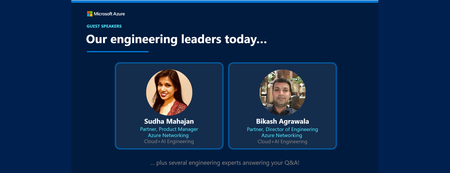
Join our upcoming live webcast for a transparent discussion about this recent Azure service incident led by our engineering teams. Network connectivity – Gateway service degradation Tracking ID: 7Q30-010 | Impacted: 30 September 2026 Same content presented in both sessions: pick the one that works best for your timezone! What to expect 📚 Understand What happened, how we responded, and what we learned 💬 Ask Live Q&A with our engineering experts throughout the session 🛠 Learn The fixes we've put in place and guidance for workload resiliency Choose your session Same content presented at both times: pick the one that works best for your timezone: Session 1 17:30 UTC Thursday, 22 Oct 2026 Register now → Session 2 05:30 UTC Friday, 23 Oct 2026 Register now → 11:30 AM US Pacific (PDT) 2:30 PM US Eastern (EDT) 7:30 PM London (BST) 2:30 AM +1 Beijing (CST) 5:30 AM +1 Sydney (AEDT) 7:30 AM +1 Auckland (NZDT) 11:30 PM -1 US Pacific (PDT) 2:30 AM US Eastern (EDT) 7:30 AM London (BST) 2:30 PM Beijing (CST) 5:30 PM Sydney (AEDT) 7:30 PM Auckland (NZDT) Our engineering leaders Sudha Mahajan General Manager Azure Networking Cloud+AI Engineering LinkedIn ↗ Bikash Agrawala Partner Director of Engineering Azure Networking Cloud+AI Engineering LinkedIn ↗ ⚠️ Prepare before the livestream Read the Post Incident Review (PIR) ahead of time so you can ask any follow up questions during the live Q&A Helpful resources 🔔 Azure Service Health Alerts Get alerts for relevant incidents by setting up notifications via email, SMS, or webhook 🎥 Past Retrospective Recordings Watch recordings of previous retrospective livestreams 📄 Azure Post Incident Reviews Learn more about PIRs and the retrospective program107Views0likes0Comments