azure
7740 TopicsOverload to Optimal: Tuning Microsoft Fabric Capacity
Co-Authored by: Daya Ram, Sr. Cloud Solutions Architect and Rafia Aqil, Could Solutions Architect Optimizing Microsoft Fabric capacity is both a performance and cost exercise. By diagnosing workloads, tuning cluster and Spark settings, and applying data best practices, teams can reduce run times, avoid throttling, and lower total cost of ownership—without compromising SLAs. Use Fabric’s built-in observability (Monitoring Hub, Capacity Metrics, Spark UI) to identify hot spots and then apply cluster- and data-level remediations. Capacity Planning For capacity planning and sizing guidance, see Plan your capacity size. Selecting the wrong SKU can lead to two major issues: Over-provisioning: Paying for resources you don’t need. Under-provisioning: Struggling with performance bottlenecks and failed jobs. To simplify this process, Microsoft provides the Fabric SKU Estimator, a powerful tool designed to help organizations accurately size their capacity based on real-world usage patterns. Run the SKU Estimator before onboarding new workloads or scaling existing ones. Combine its recommendations with monitoring tools like Fabric Capacity Metrics to validate performance and adjust as needed. Options to Diagnose Capacity Issues 1) Monitoring Hub — Start with the Story of the Run What to use it for: Browse Spark activity across applications (notebooks, Spark Job Definitions, and pipelines). Quickly surface long‑running or anomalous runs; view read/write bytes, idle time, core allocation, and utilization. How to use it From the Fabric portal, open Monitoring (Monitor Hub). Select a Notebook or Spark Job Definition to run and choose Historical Runs. Inspect the Run Duration chart; click on a run to see read/write bytes, idle time, core allocation, overall utilization, and other Spark metrics. What to look for Use the guide: application detail monitoring to review and monitor your application. 2) Capacity Metrics App — Measure the Whole Environment What to use it for: Review capacity-wide utilization and system events (overloads, queueing); compare utilization across time windows and identify sustained peaks. How to use it Open the Microsoft Fabric Capacity Metrics app for your capacity. Review the Compute page (ribbon charts, utilization trends) and the System events tab to see overload or throttling windows. Use the Timepoint page to drill into a 30‑second interval and see which operations consumed the most compute. What to look for Use the Troubleshooting guide: Monitor and identify capacity usage to pinpoint top CU‑consuming items. 3) Spark UI — Diagnose at Deeper Level Why it matters: Spark UI exposes skew, shuffle, memory pressure, and long stages. Use it after Monitoring Hub/Capacity Metrics to pinpoint the problematic job. Key tabs to inspect Stages: uneven task durations (data skew), heavy shuffle read/write, large input/output volumes. Executors: storage memory, task time (GC), shuffle metrics. High GC or frequent spills indicate memory tuning is needed. Storage: which RDDs/cached tables occupy memory; any disk spill. Jobs: long‑running jobs and gaps in the timeline (driver compilation, non‑Spark code, driver overload). What to look for Set via environment Spark properties or session config. Data skew, Memory usage, High/Low Shuffles: Adjust Apache Spark settings: i.e. spark.ms.autotune.enabled, spark.task.cpus and spark.sql.shuffle.partitions. Remediation and Optimization Suggestions A) Cluster & Workspace Settings Runtime & Native Execution Engine (NEE) Use Fabric Runtime 1.3 (Spark 3.5, Delta 3.2) and enable the Native Execution Engine to boost performance; enable at the environment level under Spark compute → Acceleration. Starter Pools vs. Custom Pools Starter Pool: prehydrated, medium‑size pools; fast session starts, good for dev/quick runs. Custom Pools: size nodes, enable autoscale, dynamic executors. Create via workspace Spark Settings (requires capacity admin to enable workspace customization). High Concurrency Session Sharing Enable High Concurrency to share Spark Sessions across notebooks (and pipelines) to reduce session startup latency and cost; use session tags in pipelines to group notebooks. Autotune for Spark Enable Autotune (spark.ms.autotune.enabled = true) to auto‑adjust per‑query: spark.sql.shuffle.partitions Spark.sql.autoBroadcastJoinThreshold spark.sql.files.maxPartitionBytes. Autotune is disabled by default and is in preview; enable per environment or session. B) Data‑level best practices Microsoft Fabric offers several approaches to maintain optimal file sizes in Delta tables, review documentation here: Table Compaction - Microsoft Fabric. Intelligent Cache Enabled by default (Runtime 1.1/1.2) for Spark pools: caches frequently read files at node level for Delta/Parquet/CSV; improves subsequent read performance and TCO. OPTIMIZE & Z‑Order Run OPTIMIZE regularly to rewrite files and improve file layout. V‑Order V‑Order (disabled by default in new workspaces) can accelerate reads for read‑heavy workloads; enable via spark.sql.parquet.vorder.default = true. Vacuum Run VACUUM to remove unreferenced files (stale data); default retention is 7 days; align retention across OneLake to control storage costs and maintain time travel. Collaboration & Next Steps Engage Data Engineering Team to Define an Optimization Playbook Start with reviewing capacity sizing guidance, cluster‑level optimizations (runtime/NEE, pools, concurrency, Autotune) and then target data improvements (Z‑order, compaction, caching, query refactors). Triage: Monitor Hub → Capacity Metrics → Spark UI to map workloads and identify high‑impact jobs, and workloads causing throttling. Schedule: Operationalize maintenance: OPTIMIZE (full or selective) during off‑peak windows; enable Auto Compaction for micro‑batch/streaming writes; add VACUUM to your cadence with agreed retention. Add regular code review sessions to ensure consistent performance patterns. Fix: Adjust pool sizing or concurrency; enable Autotune; tune shuffle partitions; refactor problematic queries; re‑run compaction. Verify: Re‑run the job and change, i.e. reduced run time, lower shuffle, improved utilization.507Views1like0CommentsAzure Databricks Cost Optimization: A Practical Guide
Co-Authored by: Sanjeev Nair Sanjeev Nair and Rafia Aqil Rafia_Aqil This guide walks through a proven approach to Databricks cost optimization, structured in three phases: Discovery, Cluster/Data/Code Best Practices, and Team Alignment & Next Steps. Phase 1: Discovery Assessing Your Current State The following questions are designed to guide your initial assessment and help you identify areas for improvement. Documenting answers to each will provide a baseline for optimization and inform the next phases of your cost management strategy. Environment & Organization Cluster Management Cost Optimization Data Management Performance Monitoring Future Planning What is the current scale of your Databricks environment? How many workspaces do you have? How are your workspaces organized (e.g., by environment type, region, use case)? How many clusters are deployed? How many users are active? What are the primary use cases for Databricks in your organization? Data engineering Data science Machine learning Business intelligence How are clusters currently managed? Manual configuration Automated scripts Databricks REST API Cluster policies What is the average cluster uptime? Hours per day Days per week What is the average cluster utilization rate? CPU usage Memory usage What is the current monthly spend on Databricks? Total cost Breakdown by workspace Breakdown by cluster What cost management tools are currently in use? Azure Cost Management Third-party tools Are there any existing cost optimization strategies in place? Reserved instances Spot instances Cluster auto-scaling What is the current data storage strategy? Data lake Data warehouse Hybrid What is the average data ingestion rate? GB per day Number of files What is the average data processing time? ETL jobs Machine learning models What types of data formats are used in your environment? Delta Lake Parquet JSON CSV Other formats relevant to your workloads What performance monitoring tools are currently in use? Databricks Ganglia Azure Monitor Third-party tools What are the key performance metrics tracked? Job execution time Cluster performance Data processing speed Are there any planned expansions or changes to the Databricks environment? New use cases Increased data volume Additional users What are the long-term goals for Databricks cost optimization? Reducing overall spend Improving resource utilization & cost attribution Enhancing performance Understanding Databricks Cost Structure Total Cost = Cloud Cost + DBU Cost Cloud Cost: Compute (VMs, networking, IP addresses), storage (ADLS, MLflow artifacts), other services (firewalls), cluster type (serverless compute, classic compute) DBU Cost: Workload size, cluster/warehouse size, photon acceleration, compute runtime, workspace tier, SKU type (Jobs, Delta Live Tables, All Purpose Clusters, Serverless), model serving, queries per second, model execution time Diagnose Cost and Issues Effectively diagnosing cost and performance issues in Databricks requires a structured approach. Use the following steps and metrics to gain visibility into your environment and uncover actionable insights. 1. Identify Costly Workloads Account Console Usage Reports: Review usage reports to identify usage breakdowns by product, SKU name, and custom tags. Usage Breakdown by Product and SKU: Helps you understand which services and compute types (clusters, SQL warehouses, serverless options) are consuming the most resources. Custom Tags for Attribution: Tags allow you to attribute costs to teams, projects, or departments, making it easier to identify high-cost areas. Workflow and Job Analysis: By correlating usage data with workflows and jobs, you can pinpoint long-running or resource-heavy workloads that drive costs. Focus on Long-Running Workloads: Examine workloads with extended runtimes or high resource utilization. Key Question: Which pipelines or workloads are driving the majority of your costs? Now That You’ve Identified Long-Running Workloads, Review These Key Areas: 2. Review Cluster Metrics CPU Utilization: Track guest, iowait, idle, irq, nice, softirq, steal, system, and user times to understand how compute resources are being used. Memory Utilization: Monitor used, free, buffer, and cached memory to identify over- or under-utilization. Key Question: Is your cluster over- or under-utilized? Are resources being wasted or stretched too thin? 3. Review SQL Warehouse Metrics Live Statistics: Monitor warehouse status, running/queued queries, and current cluster count. Time Scale Filter: Analyze query and cluster activity over different time frames (8 hours, 24 hours, 7 days, 14 days). Peak Query Count Chart: Identify periods of high concurrency. Completed Query Count Chart: Track throughput and query success/failure rates. Running Clusters Chart: Observe cluster allocation and recycling events. Query History Table: Filter and analyze queries by user, duration, status, and statement type. Key Question: Is your SQL Warehouse over- or under-utilized? Are resources being wasted or stretched too thin? 4. Review Spark UI Stages Tab: Look for skewed data, high input/output, and shuffle times. Uneven task durations may indicate data skew or inefficient data handling. Jobs Timeline: Identify long-running jobs or stages that consume excessive resources. Stage Analysis: Determine if stages are I/O bound or suffering from data skew/spill. Executor Metrics: Monitor memory usage, CPU utilization, and disk I/O. Frequent garbage collection or high memory usage may signal the need for better resource allocation. 4.1. Spark UI: Storage & Jobs Tab Storage Level: Check if data is stored in memory, on disk, or both. Size: Assess the size of cached data. Job Analysis: Investigate jobs that dominate the timeline or have unusually long durations. Look for gaps caused by complex execution plans, non-Spark code, driver overload, or cluster malfunction. 4.2. Spark UI: Executor Tab Storage Memory: Compare used vs. available memory. Task Time (Garbage Collection): Review long tasks and garbage collection times. Shuffle Read/Write: Measure data transferred between stages. 5. Additional Diagnostic Methods System Tables in Unity Catalog: Query system tables for cost attribution and resource usage trends. Cost Observability Queries Tagging Analysis: Use tags to identify which teams or projects consume the most resources. Dashboards & Alerts: Set up cost dashboards and budget alerts for proactive monitoring. Phase 2: Cluster/Code/Data Best Practices Alignment Cluster UI Configuration and Cost Attribution Effectively configuring clusters/workloads in Databricks is essential for balancing performance, scalability, and cost. Tunning settings and features when used strategically can help organizations maximize resource efficiency and minimize unnecessary spending. Key Configuration Strategies 1. Reduce Idle Time: Clusters to incur costs even when not actively processing workloads. To avoid paying for unused resources: Enable Auto-Terminate: Set clusters automatically shut down after a period of inactivity. This simple setting can significantly reduce wasted spending. Enable Autoscaling: Workloads fluctuate in size and complexity. Autoscaling allows clusters to dynamically adjust the number of nodes based on demand: Automatic Resource Adjustment: Scale up for heavy jobs and scale down for lighter loads, ensuring you only pay for what you use. It significantly enhances cost efficiency and overall performance. For serverless and streaming, using Delta Live Tables with autoscaling is recommended. This approach leads to better resource management and reliability. Use Spot Instances: For batch processing and non-critical workloads, spot instances offer substantial cost savings: Lower VM Costs: Spot instances are typically much cheaper than standard VMs. However, they are not recommended for jobs requiring constant uptime due to potential interruptions. Considerations: Azure Spot VMs are intended for non-critical, fault-tolerant tasks. They can be evicted without notice, riskingproduction stability. No SLA guarantees mean potentialdowntime for critical applications. Using Spot VMs could lead to reliability issues in production environments. Leverage Photon Engine: Photon is Databricks’ high-performance, vectorized query engine: Accelerate Large Workloads: Photon can dramatically reduce runtime for compute-intensive tasks, improving both speed and cost efficiency. Keep Runtimes Up to Date: Using the latest Databricks runtime ensures optimal performance and security: Benefit from Improvements: Regular updates include performance enhancements, bug fixes, and new features. Apply Cluster Policies: Cluster policies help standardize configurations and enforce cost controls across teams: Governance and Consistency: Policies can restrict certain settings, enforce tagging, and ensure clusters are created with cost-effective defaults. Optimize Storage: type impacts both performance and cost: Switch from HDDs to SSDs: SSDs provide faster caching and shuffle operations, which can improve job efficiency and reduce runtime. Tag Clusters for Cost Attribution: Tagging clusters enables granular tracking and reporting: Visibility and Accountability: Use tags to attribute costs to specific teams, projects, or environments, supporting better budgeting and chargeback processes. Select the Right Cluster Type: Different workloads require different cluster types, see table below for Serverless vs Classic Compute: Feature Classic Compute Serverless Compute Control Full control over config & network Minimal control, fully managed by Databricks Startup Time Slower (unless pre-warmed) Instant Cost Model Hourly, supports reservations Pay-per-use, elastic scaling Security VNet injection, private endpoints NCC-based private connectivity Best For Heavy ETL, ML, compliance workloads Interactive queries, unpredictable demand Job Clusters: Ideal for scheduled jobs and Delta Live Tables. All-Purpose Clusters: Suited for ad-hoc analysis and collaborative work. Single-Node Clusters: Efficient for simple exploratory data analysis or pure Python tasks. Serverless Compute: Scalable, managed workloads with automatic resource management. 11. Monitor and Adjust Regularly: review cluster metrics and query history: Continuous Optimization: Use built-in dashboards to monitor usage, identify bottlenecks, and adjust cluster size or configuration as needed. Code Best Practices Avoid Reprocessing Large Tables Use a CDC (Change Data Capture) architecture with Delta Live Tables (DLT) to process only new or changed data, minimizing unnecessary computation. Ensure Code Parallelizes Well Write Spark code that leverages parallel processing. Avoid loops, deeply nested structures, and inefficient user-defined functions (UDFs) that can hinder scalability. Reduce Memory Consumption Tweak Spark configurations to minimize memory overhead. Clean out legacy or unnecessary settings that may have carried over from previous Spark versions. Prefer SQL Over Complex Python Use SQL (declarative language) for Spark jobs whenever possible. SQL queries are typically more efficient and easier to optimize than complex Python logic. Modularize Notebooks Use %run to split large notebooks into smaller, reusable modules. This improves maintainability. Use LIMIT in Exploratory Queries When exploring data, always use the LIMIT clause to avoid scanning large datasets unnecessarily. Monitor Job Performance Regularly review Spark UI to detect inefficiencies such as high shuffle, input, or output. Review the below table for optimization opportunities: Spark stage high I/O - Azure Databricks | Microsoft Learn Databricks Code Performance Enhancements & Data Engineering Best Practices By enabling the below features and applying best practices, you can significantly lower costs, accelerate job execution, and build Databricks pipelines that are both scalable and highly reliable. For more guidance review: Comprehensive Guide to Optimize Data Workloads | Databricks. Feature / Technique Purpose / Benefit How to Use / Enable / Key Notes Disk Caching Accelerates repeated reads of Parquet files Set spark.databricks.io.cache.enabled = true Dynamic File Pruning (DFP) Skips irrelevant data files during queries, improves query performance Enabled by default in Databricks Low Shuffle Merge Reduces data rewriting during MERGE operations, less need to recalculate ZORDER Use Databricks runtime with feature enabled Adaptive Query Execution (AQE) Dynamically optimizes query plans based on runtime statistics Available in Spark 3.0+, enabled by default Deletion Vectors Efficient row removal/change without rewriting entire Parquet file Enable in workspace settings, use with Delta Lake Materialized Views Faster BI queries, reduced compute for frequently accessed data Create in Databricks SQL Optimize Compacts Delta Lake files, improves query performance Run regularly, combine with ZORDER on high-cardinality columns ZORDER Physically sorts/co-locates data by chosen columns for faster queries Use with OPTIMIZE, select columns frequently used in filters/joins Auto Optimize Automatically compacts small files during writes Enable optimizeWrite and autoCompact table properties Liquid Clustering Simplifies data layout, replaces partitioning/ZORDER, flexible clustering keys Recommended for new Delta tables, enables easy redefinition of clustering keys File Size Tuning Achieve optimal file size for performance and cost Set delta.targetFileSize table property Broadcast Hash Join Optimizes joins by broadcasting smaller tables Adjust spark.sql.autoBroadcastJoinThreshold and spark.databricks.adaptive.autoBroadcastJoinThreshold Shuffle Hash Join Faster join alternative to sort-merge join Prefer over sort-merge join when broadcasting isn’t possible, Photon engine can help Cost-Based Optimizer (CBO) Improves query plans for complex joins Enabled by default, collect column/table statistics with ANALYZE TABLE Data Spilling & Skew Handles uneven data distribution and excessive shuffle Use AQE, set spark.sql.shuffle.partitions=auto, optimize partitioning Data Explosion Management Controls partition sizes after transformations (e.g., explode, join) Adjust spark.sql.files.maxPartitionBytes, use repartition() after reads Delta Merge Efficient upserts and CDC (Change Data Capture) Use MERGE operation in Delta Lake, combine with CDC architecture Data Purging (Vacuum) Removes stale data files, maintains storage efficiency Run VACUUM regularly based on transaction frequency Phase 3: Team Alignment and Next Steps Implementing Cost Observability and Taking Action Effective cost management in Databricks goes beyond configuration and code—it requires robust observability, granular tracking, and proactive measures. Below outlines how your teams can achieve this using system tables, tagging, dashboards, and actionable scripts. Cost Observability with System Tables Databricks Unity Catalog provides system tables that store operational data for your account. These tables enable historical cost observability and empower FinOps teams to analyze spend independently. System Tables Location: Found inside the Unity Catalog under the “system” schema. Key Benefits: Structured data for querying, historical analysis, and cost attribution. Action: Assign permissions to FinOps teams so they can access and analyze dedicated cost tables. Enable Tags for Granular Tracking Tagging is a powerful feature for tracking, reporting, and budgeting at a granular level. Classic Compute: Manually add key/value pairs when creating clusters, jobs, SQL Warehouses, or Model Serving endpoints. Use cluster policies to enforce custom tags. Serverless Compute: Create budget policies and assign permissions to teams or members for serverless workloads. Action: Tag all compute resources to enable detailed cost attribution and reporting. Track Costs with Dashboards and Alerts Databricks offers prebuilt dashboards and queries for cost forecasting and usage analysis. Dashboards: Visualize spend, usage trends, and forecast future costs. Prebuilt Queries: Use top queries with system tables to answer meaningful cost questions. Budget Alerts: Set up alerts in the Account Console (Usage > Budget) to receive notifications when spend approaches defined thresholds. Build Culture of Efficiency To go beyond technical fixes and build a culture of efficiency, by focusing on the below strategic actions: Collaborate with Internal Engineers: Spend time with engineering teams to understand workload patterns and optimization opportunities. Peer Reviews and Code Audits: Conduct regular code review sessions and peer reviews to ensure best practices are followed for Spark jobs, data pipelines, and cluster configurations. Create Internal Best Practice Documentation: Develop clear guidelines for writing optimized code, managing data, and maintaining clusters. Make these resources easily accessible for all teams. Implement Observability Dashboards: Use Databricks’ built-in features to create dashboards that track spend, monitor resource utilization, and highlight anomalies. Set Alerts and Budgets: Configure alerts for long-running workloads and establish budgets using prebuilt Databricks capabilities to prevent cost overruns. 5. Azure Reservations and Azure Savings Plan When optimizing Databricks costs on Azure, it’s important to understand the two main commitment-based savings options: Azure Reservations and Azure Savings Plans. Both can help you reduce compute costs, but they differ in flexibility and how savings are applied. Which Should You Choose? Reservations are ideal if you have stable, predictable Databricks workloads and want maximum savings. Savings Plans are better if you expect your compute needs to change, or if you want a simpler, more flexible way to save across multiple services. Pro Tip: You can combine both options—use Reservations for your baseline, always-on Databricks clusters, and Savings Plans for bursty, variable, or new workloads. Summary Table: Action Steps It’s critical to monitor costs continuously and align your teams with established best practices, while scheduling regular code review sessions to ensure efficiency and consistency. Area Best Practice / Action System Tables Use for historical cost analysis and attribution Tagging Apply to all compute resources for granular tracking Dashboards Visualize spend, usage, and forecasts Alerts Set budget alerts for proactive cost management Scripts/Queries Build custom analysis tools for deep insights Cluster/Data/Code Review & Align Regularly review best practices, share findings, and align teams on optimization Save on your Usage Consider Azure Reservations and Azure Savings Plan1.4KViews3likes0CommentsFrom Bronze to Gold: Data Quality Strategies for ETL in Microsoft Fabric
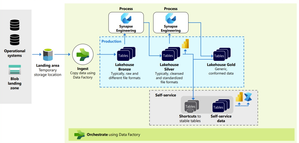
Introduction Data fuels analytics, machine learning, and AI but only if it’s trustworthy. Most organizations struggle with inconsistent schemas, nulls, data drift, or unexpected upstream changes that silently break dashboards, models, and business logic. Microsoft Fabric provides a unified analytics platform with OneLake, pipelines, notebooks, and governance capabilities. When combined with Great Expectations, an open-source data quality framework, Fabric becomes a powerful environment for enforcing data quality at scale. In this article, we explore how to implement enterprise-ready, parameterized data validation inside Fabric notebooks using Great Expectations including row-count drift detection, schema checks, primary-key uniqueness, and time-series batch validation. A quick reminder: ETL (Extract, Transform, Load) is the process of pulling raw data from source systems, applying business logic and quality validations, and delivering clean, curated datasets for analytics and AI. While ETL spans the full Medallion architecture, this guide focuses specifically on data quality checks in the Bronze layer using the NYC Taxi sample dataset. 🔗 Full implementation is available in my GitHub repository: sallydabbahmsft/Data-Quality-Checks-in-Microsoft-Fabric: Data Quality Checks in Microsoft Fabric Why Data Quality Matters More Than Ever? AI and analytics initiatives fail not because of model quality but because the underlying data is inaccurate, incomplete, or inconsistent. Organizations adopting Microsoft Fabric often ask: How can we validate data as it lands in Bronze? How do we detect schema changes before they break downstream pipelines? How do we prevent silent failures, anomalies, and drift? How do we standardize data quality checks across multiple tables and pipelines? Great Expectations provides a unified, testable, automation-friendly way to answer these questions. Great Expectations in Fabric Great Expectations (GX) is an open-source library for: ✔ Declarative data quality rules ("expectations") ✔ Automated validation during ETL ✔ Rich documentation and reporting ✔ Batch-based validation for time-series or large datasets ✔ Integration with Python, Spark, SQL, and cloud data platforms Fabric notebooks now support Great Expectations natively (via PySpark), enabling engineering teams to: Build reusable DQ suites Parameterize expectations by pipeline Validate full datasets or daily partitions Integrate validation into Fabric pipelines and alerting Data Quality Across the Medallion Architecture This solution follows the Medallion Architecture, with validation at every layer. This pipeline follows a Medallion Architecture, moving data through the Bronze, Silver, and Gold layers while enforcing data quality checks at every stage. 📘 P.S. Fabric also supports this via built-in Medallion task flows: Task flows overview - Microsoft Fabric | Microsoft Learn 🥉Bronze Layer: Ingestion & Validation Ingest raw source data into Bronze without transformations. Run foundational DQ checks to ensure structural integrity. Bronze DQ answers: ➡ Did the data arrive correctly? 🥈Silver Layer: Transformation & Validation Clean, standardize, and enrich Bronze data. Validate business rules, schema consistency, reference values, and more. Silver DQ answers: ➡ Is the data accurate and logically correct? 🥇 Gold Layer: Enrichment & Consumption Produce curated, analytics-ready datasets. Validate metrics, aggregates, and business KPIs. Gold DQ answers: ➡ Can executives trust the numbers? Recommended Data Quality Validations: Bronze Layer (Raw Ingestion) Ingestion Volume & Row Drift – Validate total row count and detect unexpected volume drops or spikes. Schema & Data Type Compliance – Ensure the table structure and column data types match the expected schema. Null / Empty Column Checks – Identify missing or empty values in required fields. Primary Key Uniqueness – Detect duplicate records based on the defined composite or natural key. Silver Layer (Cleaned & Standardized Data) Reference & Domain Value Validation – Confirm that values match valid categories, lookups, or reference datasets. Business Rule Enforcement – Validate logic constraints (e.g., StartDate <= EndDate, percentages within range). Anomaly / Outlier Detection – Identify unusual patterns or values that deviate from historical behavior. Post-Standardization Deduplication – Ensure standardized and enriched records no longer contain duplicates. Gold Layer (Curated, Business-Ready Data) Metric & Aggregation Consistency – Validate totals, ratios, rollups, and other aggregated metrics. KPI Threshold Monitoring – Trigger alerts when KPIs exceed defined thresholds. Data / Feature Drift Detection (for ML) – Monitor changes in distributions across time. Cross-System Consistency Checks – Compare business metrics across internal systems to ensure alignment. Implementing Data Quality with Great Expectations in Fabric Step 1 - Read data from Lakehouse (parametrized): lakehouse_name = "Bronze" table_name = "NYC Taxi - Green" query = f"SELECT * FROM {lakehouse_name}.`{table_name}`" df = spark.sql(query) Step 2 - Create and Register a Suite: context = gx.get_context() suite = context.suites.add( gx.ExpectationSuite(name="nyc_bronze_suite") ) Step 3 - Add Bronze Layer Expectations (Reusable Function): import great_expectations as gx def add_bronze_expectations( suite: gx.ExpectationSuite, primary_key_columns: list[str], required_columns: list[str], expected_schema: list[str], expected_row_count: int | None = None, max_row_drift_pct: float = 0.2, ) -> gx.ExpectationSuite: # 1. Ingestion Count & Row Drift if expected_row_count is not None: min_rows = int(expected_row_count * (1 - max_row_drift_pct)) max_rows = int(expected_row_count * (1 + max_row_drift_pct)) row_count_expectation = gx.expectations.ExpectTableRowCountToBeBetween( min_value=min_rows, max_value=max_rows, ) suite.add_expectation(expectation=row_count_expectation) # 2. Schema Compliance schema_expectation = gx.expectations.ExpectTableColumnsToMatchSet( column_set=expected_schema, exact_match=True, ) suite.add_expectation(expectation=schema_expectation) # 3. Required columns: NOT NULL for col in required_columns: not_null_expectation = gx.expectations.ExpectColumnValuesToNotBeNull( column=col ) suite.add_expectation(expectation=not_null_expectation) # 4. Primary key uniqueness (if provided) if primary_key_columns: unique_pk_expectation = gx.expectations.ExpectCompoundColumnsToBeUnique( column_list=primary_key_columns ) suite.add_expectation(expectation=unique_pk_expectation) return suite Step 4 - Attach Data Asset & Batch Definition: data_source = context.data_sources.add_spark(name="bronze_datasource") data_asset = data_source.add_dataframe_asset(name="nyc_bronze_data") batch_definition = data_asset.add_batch_definition_whole_dataframe("full_bronze_batch") Step 5 - Run Validation: validation_definition = gx.ValidationDefinition( data=batch_definition, suite=suite, name="Bronze_DQ_Validation" ) results = validation_definition.run( batch_parameters={"dataframe": df} ) print(results) 7. Optional: Time-Series Batch Validation (Daily Slices) Fabric does not yet support add_batch_definition_timeseries, so your notebook implements custom logic to validate each day independently: dates_df = df.select(F.to_date("lpepPickupDatetime").alias("dt")).distinct() for d in dates: df_day = df.filter(F.to_date("lpepPickupDatetime") == d) results = validation_definition.run(batch_parameters={"dataframe": df_day}) This enables: Daily anomaly detection Partition-level completeness checks Early schema drift detection Automating DQ with Fabric Pipelines Fabric pipelines can orchestrate your data quality workflow: Trigger notebook after ingestion Pass parameters (table, layer, suite name) Persist DQ results to Lakehouse or Log Analytics Configure alerts in Fabric Monitor Production workflow Run the notebook Check validation results If failures exist: Raise an incident Fail the pipeline Notify the on-call engineer This creates a closed loop of ingestion → validation → monitoring → alerting. An example of DQ pipeline: Results: How Enterprises Benefit By standardizing data quality rules across all domains, organizations ensure consistent expectations and uniform validation practices , improved observability makes data quality issues visible and actionable, enabling teams to detect and resolve failures early. This, in turn, enhances overall reliability, ensuring downstream transformations and Power BI reports operate on clean, trustworthy data. Ultimately, stronger data quality directly contributes to AI readiness high-quality, well-validated data produces significantly better analytics and machine learning outcomes. Conclusion Great Expectations + Microsoft Fabric creates a scalable, modular, enterprise-ready approach for ensuring data quality across the entire medallion architecture. Whether you're validating raw ingested data, transformed datasets, or business-ready tables, the approach demonstrated here enables consistency, observability, and automation across all pipelines. With Fabric’s unified compute, orchestration, and monitoring, teams can now integrate DQ as a first-class citizen not an afterthought. Links: Implement medallion lakehouse architecture in Fabric - Microsoft Fabric | Microsoft Learn GX Expectations Gallery • Great Expectations337Views0likes1Comment
PAAS resource metrics using Azure Data Collection Rule to Log Analytics Workspace
Hi Team, I want to build a use case to pull the Azure PAAS resources metrics using azure DCR and push that data metrics to log analytics workspace which eventually will push the data to azure event hub through streaming and final destination as azure postgres to store all the resources metrics information in a centralized table and create KPIs and dashboard for the clients for better utilization of resources. I have not used diagnose setting enabling option since it has its cons like we need to manually enable each resources settings also we get limited information extracted from diagnose setting. But while implementing i saw multiple articles stating DCR is not used for pulling PAAS metrics its only compatible for VM metrics. Want to understand is it possible to use DCR for PAAS metrics? Thanks in advance for any inputs.Solved38Views0likes1CommentAI Upskilling Framework Level 3 Building
The Global AI Community is excited to bring you the latest updates on AI Upskilling Framework Level 3 Building, straight from Microsoft Ignite! This session dives deep into advanced concepts for building agentic workflows and showcases new announcements that will help developers accelerate their Agentic AI journey.Microsoft Finland - Software Developing Companies monthly community series.
Tervetuloa jälleen mukaan Microsoftin webinaarisarjaan teknologiayrityksille! Microsoft Finlandin järjestämä Software Development monthly Community series on webinaarisarja, joka tarjoaa ohjelmistotaloille ajankohtaista tietoa, konkreettisia esimerkkejä ja strategisia näkemyksiä siitä, miten yhteistyö Microsoftin kanssa voi vauhdittaa kasvua ja avata uusia liiketoimintamahdollisuuksia. Sarja on suunnattu kaikenkokoisille ja eri kehitysvaiheissa oleville teknologiayrityksille - startupeista globaaleihin toimijoihin. Jokaisessa jaksossa pureudutaan käytännönläheisesti siihen, miten ohjelmistoyritykset voivat hyödyntää Microsoftin ekosysteemiä, teknologioita ja kumppanuusohjelmia omassa liiketoiminnassaan. Huom. Microsoft Software Developing Companies monthly community webinars -webinaarisarja järjestetään Cloud Champion -sivustolla, josta webinaarit ovat kätevästi saatavilla tallenteina pari tuntia live-lähetyksen jälkeen. Muistathan rekisteröityä Cloud Champion -alustalle ensimmäisellä kerralla, jonka jälkeen pääset aina sisältöön sekä tallenteisiin käsiksi. Pääset rekisteröitymään, "Register now"-kohdasta. Täytä tietosi ja valitse Distributor kohtaan - Other, mikäli et tiedä Microsoft-tukkurianne. Webinaarit: 5.9.2025 klo 09:00-09:30 - Teknologiayritysten ja Microsoftin prioriteetit syksylle 2025. Tervetuloa jälleen mukaan Microsoftin webinaarisarjaan teknologiayrityksille! Jatkamme sarjassa kuukausittain pureutumista siihen, miten yhteistyö Microsoftin kanssa voi vauhdittaa kasvua ja avata uusia mahdollisuuksia eri vaiheissa oleville ohjelmistotaloille – olipa yritys sitten start-up, scale-up tai globaalia toimintaa harjoittava. Jokaisessa jaksossa jaamme konkreettisia esimerkkejä, näkemyksiä ja strategioita, jotka tukevat teknologia-alan yritysten liiketoiminnan kehitystä ja innovaatioita. Elokuun lopun jaksossa keskitymme syksyn 2025 prioriteetteihin ja uusiin mahdollisuuksiin, jotka tukevat ohjelmistoyritysten oman toiminnan suunnittelua, kehittämistä ja kasvun vauhdittamista. Käymme läpi, mitkä ovat Microsoftin strategiset painopisteet tulevalle tilikaudelle – ja ennen kaikkea, miten ohjelmistotalot voivat hyödyntää niitä omassa liiketoiminnassaan. Tavoitteena on tarjota kuulijoille selkeä ymmärrys siitä, miten oma tuote, palvelu tai markkinastrategia voidaan linjata ekosysteemin kehityksen kanssa, ja miten Microsoft voi tukea tätä matkaa konkreettisin keinoin. Puhujat: Mikko Marttinen, Sr Partner Development Manager, Microsoft Eetu Roponen, Sr Partner Development Manager, Microsoft Katso nauhoitus täältä: Teknologiayritysten ja Microsoftin prioriteetit syksylle 2025. – Finland Cloud Champion 3.10. klo 09:00-09:30 - Autonomiset ratkaisut ohjelmistotaloille – Azure AI Foundry ja agenttiteknologioiden uudet mahdollisuudet Agenttiteknologiat mullistavat tapaa, jolla ohjelmistotalot voivat rakentaa älykkäitä ja skaalautuvia ratkaisuja. Tässä webinaarissa tutustumme siihen, miten Azure AI Foundry tarjoaa kehittäjille ja tuoteomistajille työkalut autonomisten agenttien rakentamiseen – mahdollistaen monimutkaisten prosessien automatisoinnin ja uudenlaisen asiakasarvon tuottamisen. Kuulet mm. Miten agenttiteknologiat muuttavat ohjelmistokehitystä ja liiketoimintaa. Miten Azure AI Foundry tukee agenttien suunnittelua, kehitystä ja käyttöönottoa. Miten ohjelmistotalot voivat hyödyntää agentteja kilpailuetuna. Puhujat: Juha Karvonen, Sr Partner Tech Strategist Mikko Marttinen, Sr Partner Development Manager, Microsoft Eetu Roponen, Sr Partner Development Manager, Microsoft Katso nauhoite täältä: Microsoft Finland – Software Developing Companies Monthly Community Series – Autonomiset ratkaisut ohjelmistotaloille – Azure AI Foundry ja agenttiteknologioiden uudet mahdollisuudet – Finland Cloud Champion 31.10. klo 09:00-09:30 - Kasvua ja näkyvyyttä ohjelmistotaloille – hyödynnä ISV Success ja Azure Marketplace rewards -ohjelmia Tässä webinaarissa pureudumme ohjelmistotaloille suunnattuihin Microsoftin keskeisiin kiihdytinohjelmiin, jotka tukevat kasvua, skaalautuvuutta ja kansainvälistä näkyvyyttä. Käymme läpi, miten ISV Success -ohjelma tarjoaa teknistä ja kaupallista tukea ohjelmistoyrityksille eri kehitysvaiheissa, ja miten Azure Marketplace toimii tehokkaana myyntikanavana uusien asiakkaiden tavoittamiseen. Lisäksi esittelemme Marketplace Rewards -edut, jotka tukevat markkinointia, yhteismyyntiä ja asiakashankintaa Microsoftin ekosysteemissä. Webinaari tarjoaa: Konkreettisia esimerkkejä ohjelmien hyödyistä Käytännön vinkkejä ohjelmiin liittymiseen ja hyödyntämiseen Näkemyksiä siitä, miten ohjelmistotalot voivat linjata strategiansa Microsoftin tarjoamiin mahdollisuuksiin Puhujat: Mikko Marttinen, Sr Partner Development Manager, Microsoft Eetu Roponen, Sr Partner Development Manager, Microsoft Nauhoite: Microsoft Finland – Software Developing Companies Monthly Community Series – Kasvua ja näkyvyyttä ohjelmistotaloille – hyödynnä ISV Success ja Azure Marketplace rewards -ohjelmia – Finland Cloud Champion 28.11. klo 09:00-09:30 - Pilvipalvelut omilla ehdoilla – mitä Microsoftin Sovereign Cloud tarkoittaa ohjelmistotaloille? Yhä useampi ohjelmistotalo kohtaa vaatimuksia datan sijainnista, sääntelyn noudattamisesta ja operatiivisesta kontrollista – erityisesti julkisella sektorilla ja säädellyillä toimialoilla. Tässä webinaarissa pureudumme siihen, miten Microsoftin uusi Sovereign Cloud -tarjonta vastaa näihin tarpeisiin ja mitä mahdollisuuksia se avaa suomalaisille ohjelmistoyrityksille. Keskustelemme muun muassa: Miten Sovereign Public ja Private Cloud eroavat ja mitä ne mahdollistavat? Miten datan hallinta, salaus ja operatiivinen suvereniteetti toteutuvat eurooppalaisessa kontekstissa? Mitä tämä tarkoittaa ohjelmistoyrityksille, jotka rakentavat ratkaisuja julkiselle sektorille tai säädellyille toimialoille? Puhujat: Juha Karppinen, National Security Officer, Microsoft Mikko Marttinen, Sr Partner Development Manager, Microsoft Eetu Roponen, Sr Partner Development Manager, Microsoft Katso nauhoite: Microsoft Finland – Software Developing Companies Monthly Community Series – Pilvipalvelut omilla ehdoilla – mitä Microsoftin Sovereign Cloud tarkoittaa ohjelmistotaloille? – Finland Cloud Champion 12.12. klo 09:00-09:30 - Mitä Suomen Azure-regioona tarkoittaa ohjelmistotaloille? Microsoftin uusi datakeskusalue Suomeen tuo pilvipalvelut lähemmäksi suomalaisia ohjelmistotaloja – olipa kyseessä startup, scaleup tai globaali toimija. Webinaarissa pureudumme siihen, mitä mahdollisuuksia uusi Azure-regioona avaa datan sijainnin, suorituskyvyn, sääntelyn ja asiakasvaatimusten näkökulmasta. Keskustelemme muun muassa: Miten datan paikallinen sijainti tukee asiakasvaatimuksia ja sääntelyä? Mitä hyötyä ohjelmistotaloille on pienemmästä latenssista ja paremmasta suorituskyvystä? Miten Azure-regioona tukee yhteismyyntiä ja skaalautumista Suomessa? Miten valmistautua teknisesti ja kaupallisesti uuden regioonan avaamiseen? Puhujat: Fama Doumbouya, Sales Director, Cloud Infra and Security, Microsoft Mikko Marttinen, Sr Partner Development Manager, Microsoft Eetu Roponen, Sr Partner Development Manager, Microsoft Katso nauhoite: Microsoft Finland – Software Developing Companies Monthly Community Series – Mitä Suomen Azure-regioona tarkoittaa ohjelmistotaloille? – Finland Cloud Champion297Views0likes0CommentsConfigure a log analytics workspace to collect Window Server Event log, IIS and performance data.
Configuring Azure Monitor with Log Analytics for IIS Servers Azure Monitor combined with Log Analytics provides centralized telemetry collection for performance metrics, event logs, and application logs from Windows-based workloads. This guide demonstrates how to configure data collection from IIS servers using Data Collection Rules (DCRs). Create the Log Analytics Workspace Navigate to Log Analytics workspaces in the Azure portal Select Create Choose your resource group (e.g., Zava IIS resource group) Provide a workspace name and select your preferred region Select Review + Create, then Create After deployment, configure RBAC permissions by assigning the Contributor role to users or service principals that need to interact with the workspace data. Configure Data Collection Infrastructure Create a Data Collection Endpoint: Navigate to Azure Monitor in the portal Select Data Collection Endpoints, then Create Specify the endpoint name, subscription, resource group, and region (match your Log Analytics workspace region) Create the endpoint Create a Data Collection Rule: Navigate to Data Collection Rules and select Create Provide a rule name, resource group, and region Select Windows as the platform type Choose the data collection endpoint created in the previous step Skip the Resources tab initially (you'll associate VMs later) Configure Data Sources Add three data source types to capture comprehensive telemetry: Performance Counters: On the Collect and Deliver page, select Add data source Choose Performance Counters as the data source type Select Basic for standard CPU, memory, disk, and network metrics (or Custom for specific counters) Set the destination to Azure Monitor Logs and select your Log Analytics workspace Windows Event Logs: Add another data source and select Windows Event Logs Choose Basic collection mode Select Application, Security, and System logs Configure severity filters (Critical, Error, Warning for Application and System; Audit Success for Security) Specify the same Log Analytics workspace as the destination IIS Logs: Add a final data source for Internet Information Services logs Accept the default IIS log file paths or customize as needed Set the destination to your Log Analytics workspace After configuring all data sources, select Review + Create, then Create the data collection rule. Associate Resources Navigate to your newly created Data Collection Rule Select Resources from the rule properties Click Add and select your IIS servers (e.g., zava-iis1, zava-iis2) Return to Data Collection Endpoints Select your endpoint and add the same IIS servers as resources This two-step association ensures proper routing of telemetry data. Query Collected Data After allowing time for data collection, query the telemetry: Navigate to your Log Analytics workspace Select Logs to open the query editor Browse predefined queries under Virtual Machines Run the "What data has been collected" query to view performance counters, network metrics, and memory data Access Insights to monitor data ingestion volumes You can create custom KQL queries to analyze specific events, performance patterns, or IIS log entries across your monitored infrastructure. Find out more at: https://learn.microsoft.com/en-us/azure/azure-monitor/fundamentals/overview147Views0likes0Comments
Microsoft Ignite 2025 AI announcements: What software developers need to know
Igniting what’s next: What software development companies need to know about Microsoft’s AI announcements at Ignite 2025 The AI landscape took a major leap forward at Microsoft Ignite 2025, and for software development companies and digital natives, the announcements represent a massive opportunity: faster innovation, simplified agent development, access to enterprise‑ready AI platforms, and a dramatically expanded ecosystem to build on. This year, Microsoft introduced the era of agentic AI—and software companies are at the center of this shift. Ignite 2025 formally unveiled Microsoft Foundry, our unified platform for building, governing, and scaling intelligent agents. From new agent runtimes to multi‑agent orchestration, enterprise‑grade knowledge access, and one‑click publishing to Microsoft 365, the momentum creates one clear signal: 💡 AI assistants are becoming intelligent agents—and Foundry is the platform software companies will use to build them. Why Microsoft Ignite 2025 mattered for software companies Across every session, Microsoft doubled down on helping partners accelerate time‑to‑market with agentic AI solutions. Whether you’re building vertical apps, automation copilots, knowledge systems, or developer tools, the new capabilities in Foundry eliminate much of the heavy lifting associated with retrieval, orchestration, compliance, hosting, and model selection. Key themes this year from Azure AI: Unified agent platform across all Microsoft clouds Framework‑agnostic development (bring your own models, tools, or frameworks) Enterprise‑grade governance built into the lifecycle Open ecosystem and interoperability using MCP, A2A, OpenAPI Seamless distribution through Microsoft 365 and Teams Let’s break down what’s new—and what it means for your product strategy. Top announcements for software companies at Ignite 2025 Microsoft Foundry: A unified brand for AI agent development Azure AI Foundry is now Microsoft Foundry—a consolidated platform for building, deploying, and managing intelligent agents. For software companies, this means: One consistent developer experience Shared governance and compliance across products A more integrated ecosystem for publishing and distributing agentic solutions This rebrand isn’t cosmetic—it reflects Microsoft’s strategic shift to deliver a platform built explicitly for the next generation of AI agents. Introducing Foundry IQ: Your enterprise knowledge engine One of the most exciting announcements is Foundry IQ, a new engine that gives agents instant access to enterprise data from SharePoint, OneLake, ADLS, and the web, all governed by Purview. For software companies, this unlocks: Reliable, production‑grade knowledge retrieval without building RAG pipelines Consistent compliance and security models Faster customer onboarding with fewer integration gaps Foundry IQ is a game‑changer for teams who have spent months building retrieval layers or maintaining custom RAG components. Foundry Control Plane: Unified governance for all agents Now in public preview, the Foundry Control Plane enables teams to manage agents across frameworks, clouds, and environments. Highlights: Unified visibility and observability Built‑in security & compliance (Defender, Purview) Fleet‑wide monitoring for cost, health, and risk For software companies offering multi‑tenant solutions or operating in regulated industries, this dramatically simplifies the operational burden of managing AI agents. Agent Framework (public preview): SK + AutoGen, Unified The Microsoft Agent Framework, now in public preview, merges the strengths of Semantic Kernel and AutoGen into a single SDK for building durable, interoperable agents. Software companies gain: A consistent programming model Durable memory Strong interoperability with MCP, A2A, OpenAPI Framework‑agnostic design This is the developer foundation for future AI applications built on Microsoft clouds. Hosted Agents: Enterprise‑grade runtime, no infrastructure needed With Hosted Agents, teams can deploy custom‑code agents directly into a fully managed runtime—no containers, pipelines, or infra setup. What this enables for software companies: Faster deployment cycles Secure, autoscaling environments Simple onboarding for customer‑specific agents Observability and monitoring built in This drastically reduces the operational overhead many software companies face today. Multi‑agent workflows & connected intelligence Ignite 2025 introduced major advancements in multi‑agent orchestration: Built‑in memory across sessions A catalog of 1,000+ Microsoft & partner tools (with private catalogs for software companies) Visual and programmatic orchestration tools Enterprise‑ready coordination for long‑running workflows Foundry IQ for instant knowledge access This allows software companies to design more autonomous, intelligent, and interconnected systems—moving beyond assistants toward true digital workers. Model Router GA + Anthropic partnership expansion There are two major updates for model flexibility: Model Router GA Now supporting 11,000+ models, the router helps developers intelligently choose the best model for each task, optimizing both cost and performance. Anthropic Claude models in Foundry Claude Sonnet 4.5, Opus 4.1, and Haiku 4.5 are now integrated into Microsoft Foundry through an expanded partnership with Anthropic. This gives software companies more choice, capability, and model‑agnostic development paths. One‑click publishing to Microsoft 365 & Teams One of the biggest wins for software companies: Agents built in Foundry can now be published to Microsoft 365 and Teams Chat with one click. This means: Access to hundreds of millions of users Unified governance through Microsoft Admin Center Seamless integration with Copilot experiences For software companies, this is a massive new distribution channel. Why this matters for software development companies Ignite 2025 didn’t just introduce new products—it signaled a platform shift. software companies now have: A full-stack platform for agentic applications - From data access to orchestration, hosting, deployment, and compliance. A unified runtime and SDK - Reducing fragmentation and speeding up development cycles. Enterprise reach through Microsoft 365 - Making your agents as discoverable as apps. A rapidly expanding ecosystem - More models, more tools, more integration points. If you’re building AI-powered products, this is your moment. Get hands-on: Sessions & resources for software companies Here are links to top Ignite sessions to dive deeper. Build & Manage AI Apps with Your Agent Factory AI Agents in Azure AI Foundry: Ship Fast, Scale Fearlessly AI‑Powered Automation & Multi‑Agent Orchestration Agent Developer Guide for Foundry Agent Service The Future of RAG with Agentic Retrieval & AI Search What’s next: December Foundry Council Session Join us on Dec 18 for the Ignite Recap session through the Foundry Partner Council. It’s the best opportunity for software companies to: Get deeper into the new capabilities Share partner/DN feedback Join focus groups For more information about the December 18 session, contact foundrycouncil@microsoft.com or visit aka.ms/foundrycouncil368Views0likes0Comments
Transforming Data migration using Azure Copilot
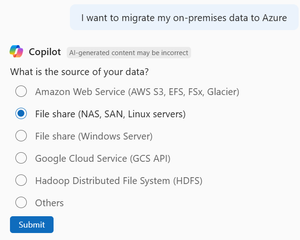
Introduction Data migration is critical, yet it is one of the most complex tasks in any cloud adoption journey. Whether you’re moving workloads from on-premises environments, consolidating hybrid deployments, or transitioning from other cloud providers, the migration process involves multiple tools, intricate planning, and risk management. What’s New in Azure Copilot With the new “Storage Migration Solutions Advisor” capability in Azure Copilot, Microsoft is transforming this experience into a conversational, AI-driven workflow that accelerates decision-making and reduces operational friction. Why This Matters Traditionally, customers faced challenges such as: Weeks of advisory time spent choosing the right migration tool amongst the many (Azure Storage Mover, AzCopy, Data Box, File Sync etc., and various Partner solutions). High support overhead due to missteps during migration if a sub-optimal tool or service is used. The Storage Migration Solutions Advisor feature introduces: Conversational Guidance: Share your migration needs with Copilot, like talking with an Azure advisor. Scenario-Based Recommendations: Tailored suggestions based on transfer data size, protocol, and bandwidth. Expanded Coverage: Supports on-premises to Azure, cloud-to-cloud (AWS/GCP to Azure), and hybrid scenarios. Native and Partner solutions: Copilot can recommend Microsoft-native (1P) solutions and third-party (3P) tools for specialized scenarios —ensuring flexibility for enterprise needs. User Workflow: Step-by-Step Initiate Migration: Start with a prompt like “How can I migrate my data into Azure?” or “What’s the best tool for moving 1 PB from AWS S3 to Azure Blob?” Provide Details: Copilot will guide you by asking for details about your requirement, such as source type (e.g., NAS, SAN, AWS S3, GCS), protocol (e.g., NFS, SMB, S3 API), target (e.g., Azure Blob, Files, Elastic SAN), data size, and bandwidth. Azure and Partner Solutions: Based on your requirements, Copilot recommends the best-fit Azure solution. If a partner solution is better suited to your requirement, Copilot will also select and recommend the appropriate solution with links to its documentation and/or its Azure marketplace page. Examples Copilot generates recommendations for migrating an on-premises file share to Azure Files. Figure 1 Prompt from user invokes Copilot Migration recommendation workflow Figure 2 Copilot understanding protocols that customer environment has access to Figure 3 Copilot asking user's target Storage type Figure 4 Copilot gathering inputs on data size, network bandwidth availability and transfer direction Figure 5 Copilot recommendation for user scenario Copilot recommends Partner solutions for specialized migration scenarios Figure 1 Prompt from user invokes Copilot Migration recommendation workflow Figure 2 Copilot understanding protocols that customer environment has access to Figure 3 Copilot asking user's target Storage type Figure 4 Copilot gathering inputs on data size, network bandwidth availability and transfer direction Figure 5 Copilot recommendation for user scenario Pro Tips Run a small proof-of-concept migration to estimate throughput and timing, especially for large datasets or small file sizes. Combine Copilot’s recommendations with Azure Storage Discovery for visibility into your storage estate after migration. Getting Started Navigate to Azure Portal → Copilot. Try prompts like: o “Help me migrate an NFS share to Azure Files.” o “What’s the best tool for moving 1 PB from AWS S3 to Azure Blob?” Explore Manage and migrate storage accounts using Azure Copilot | Microsoft Learn for detailed guidance. Ready to simplify your migration journey? Start using Azure Copilot’s Storage Migration Solutions Advisor today and experience AI-driven efficiency for your cloud transformation.100Views0likes0Comments