azure
7853 Topics
Guide to Upgrade Azure Database for MySQL from 8.0 to 8.4
A practical, end‑to‑end guide for safely upgrading Azure Database for MySQL to 8.4 LTS, covering prerequisites, breaking changes, upgrade paths, downtime considerations, and rollback strategies based on real‑world experience.111Views0likes0CommentsComplete Guide to Deploying OpenClaw on Azure Windows 11 Virtual Machine
1. Introduction to OpenClaw OpenClaw is an open-source AI personal assistant platform that runs on your own devices and executes real-world tasks. Unlike traditional cloud-based AI assistants, OpenClaw emphasizes local deployment and privacy protection, giving you complete control over your data. Key Features of OpenClaw Cross-Platform Support: Runs on Windows, macOS, Linux, and other operating systems Multi-Channel Integration: Interact with AI through messaging platforms like WhatsApp, Telegram, and Discord Task Automation: Execute file operations, browser control, system commands, and more Persistent Memory: AI remembers your preferences and contextual information Flexible AI Backends: Supports multiple large language models including Anthropic Claude and OpenAI GPT OpenClaw is built on Node.js and can be quickly installed and deployed via npm. 2. Security Advantages of Running OpenClaw on Azure VM Deploying OpenClaw on an Azure virtual machine instead of your personal computer offers significant security benefits: 1. Environment Isolation Azure VMs provide a completely isolated runtime environment. Even if the AI agent exhibits abnormal behavior or is maliciously exploited, it won't affect your personal computer or local data. This isolation mechanism forms the foundation of a zero-trust security architecture. 2. Network Security Controls Through Azure Network Security Groups (NSGs), you can precisely control which IP addresses can access your virtual machine. The RDP rules configured in the deployment script allow you to securely connect to your Windows 11 VM via Remote Desktop while enabling further restrictions on access sources. 3. Data Persistence and Backup Azure VM managed disks support automatic snapshots and backups. Even if the virtual machine encounters issues, your OpenClaw configuration and data remain safe. 4. Elastic Resource Management You can adjust VM specifications (memory, CPU) at any time based on actual needs, or stop the VM when not in use to save costs, maintaining maximum flexibility. 5. Enterprise-Grade Authentication Azure supports integration with Azure Active Directory (Entra ID) for identity verification, allowing you to assign different access permissions to team members for granular access control. 6. Audit and Compliance Azure provides detailed activity logs and audit trails, making it easy to trace any suspicious activity and meet enterprise compliance requirements. 3. Deployment Steps Explained This deployment script uses Azure CLI to automate the installation of OpenClaw and its dependencies on a Windows 11 virtual machine. Here are the detailed execution steps: Prerequisites Before running the script, ensure you have: Install Azure CLI # Windows users can download the MSI installer https://aka.ms/installazurecliwindows # macOS users brew install azure-cli # Linux users curl -sL https://aka.ms/InstallAzureCLIDeb | sudo bash 2. Log in to Azure Account az login 3. Prepare Deployment Script Save the provided deploy-windows11-vm.sh script locally and grant execute permissions: chmod +x deploy-windows11-vm.sh Step 1: Configure Deployment Parameters The script begins by defining key configuration variables that you can modify as needed: RESOURCE_GROUP="Your Azure Resource Group Name" # Resource group name VM_NAME="win11-openclaw-vm" # Virtual machine name LOCATION="Your Azure Regison Name" # Azure region ADMIN_USERNAME="Your Azure VM Administrator Name" # Administrator username ADMIN_PASSWORD="our Azure VM Administrator Password" # Administrator password (change to a strong password) VM_SIZE="Your Azure VM Size" # VM size (4GB memory) Security Recommendations: Always change ADMIN_PASSWORD to your own strong password Passwords should contain uppercase and lowercase letters, numbers, and special characters Never commit scripts containing real passwords to code repositories Step 2: Check and Create Resource Group The script first checks if the specified resource group exists, and creates it automatically if it doesn't: echo "Checking resource group $RESOURCE_GROUP..." az group show --name $RESOURCE_GROUP &> /dev/null if [ $? -ne 0 ]; then echo "Creating resource group $RESOURCE_GROUP..." az group create --name $RESOURCE_GROUP --location $LOCATION fi A resource group is a logical container in Azure used to organize and manage related resources. All associated resources (VMs, networks, storage, etc.) will be created within this resource group. Step 3: Create Windows 11 Virtual Machine This is the core step, using the az vm create command to create a Windows 11 Pro virtual machine: az vm create \ --resource-group $RESOURCE_GROUP \ --name $VM_NAME \ --image MicrosoftWindowsDesktop:windows-11:win11-24h2-pro:latest \ --size $VM_SIZE \ --admin-username $ADMIN_USERNAME \ --admin-password $ADMIN_PASSWORD \ --public-ip-sku Standard \ --nsg-rule RDP Parameter Explanations: --image: Uses the latest Windows 11 24H2 Professional edition image --size: Standard_B2s provides 2 vCPUs and 4GB memory, suitable for running OpenClaw --public-ip-sku Standard: Assigns a standard public IP --nsg-rule RDP: Automatically creates network security group rules allowing RDP (port 3389) inbound traffic Step 4: Retrieve Virtual Machine Public IP After VM creation completes, the script retrieves its public IP address: PUBLIC_IP=$(az vm show -d -g $RESOURCE_GROUP -n $VM_NAME --query publicIps -o tsv) echo "VM Public IP: $PUBLIC_IP" This IP address will be used for subsequent RDP remote connections. Step 5: Install Chocolatey Package Manager Using az vm run-command to execute PowerShell scripts inside the VM, first installing Chocolatey: az vm run-command invoke -g $RESOURCE_GROUP -n $VM_NAME --command-id RunPowerShellScript \ --scripts "Set-ExecutionPolicy Bypass -Scope Process -Force; [System.Net.ServicePointManager]::SecurityProtocol = [System.Net.ServicePointManager]::SecurityProtocol -bor 3072; iex ((New-Object System.Net.WebClient).DownloadString( 'https://community.chocolatey.org/install.ps1'))" Chocolatey is a package manager for Windows, similar to apt or yum on Linux, simplifying subsequent software installations. Step 6: Install Git Git is a dependency for many npm packages, especially those that need to download source code from GitHub for compilation: az vm run-command invoke -g $RESOURCE_GROUP -n $VM_NAME --command-id RunPowerShellScript \ --scripts "C:\ProgramData\chocolatey\bin\choco.exe install git -y" Step 7: Install CMake and Visual Studio Build Tools Some of OpenClaw's native modules require compilation, necessitating the installation of C++ build toolchain: az vm run-command invoke -g $RESOURCE_GROUP -n $VM_NAME --command-id RunPowerShellScript \ --scripts "C:\ProgramData\chocolatey\bin\choco.exe install cmake visualstudio2022buildtools visualstudio2022-workload-vctools -y" Component Descriptions: cmake: Cross-platform build system visualstudio2022buildtools: VS 2022 Build Tools visualstudio2022-workload-vctools: C++ development toolchain Step 8: Install Node.js LTS Install the Node.js Long Term Support version, which is the core runtime environment for OpenClaw: az vm run-command invoke -g $RESOURCE_GROUP -n $VM_NAME --command-id RunPowerShellScript \ --scripts "$env:Path = [System.Environment]::GetEnvironmentVariable('Path','Machine') + ';' + [System.Environment]::GetEnvironmentVariable('Path','User'); C:\ProgramData\chocolatey\bin\choco.exe install nodejs-lts -y" The script refreshes environment variables first to ensure Chocolatey is in the PATH, then installs Node.js LTS. Step 9: Globally Install OpenClaw Use npm to globally install OpenClaw: az vm run-command invoke -g $RESOURCE_GROUP -n $VM_NAME --command-id RunPowerShellScript \ --scripts "$env:Path = [System.Environment]::GetEnvironmentVariable('Path','Machine') + ';' + [System.Environment]::GetEnvironmentVariable('Path','User'); npm install -g openclaw" Global installation makes the openclaw command available from anywhere in the system. Step 10: Configure Environment Variables Add Node.js and npm global paths to the system PATH environment variable: az vm run-command invoke -g $RESOURCE_GROUP -n $VM_NAME --command-id RunPowerShellScript \ --scripts " $npmGlobalPath = 'C:\Program Files\nodejs'; $npmUserPath = [System.Environment]::GetFolderPath('ApplicationData') + '\npm'; $currentPath = [System.Environment]::GetEnvironmentVariable('Path', 'Machine'); if ($currentPath -notlike \"*$npmGlobalPath*\") { $newPath = $currentPath + ';' + $npmGlobalPath; [System.Environment]::SetEnvironmentVariable('Path', $newPath, 'Machine'); Write-Host 'Added Node.js path to system PATH'; } if ($currentPath -notlike \"*$npmUserPath*\") { $newPath = [System.Environment]::GetEnvironmentVariable('Path', 'Machine') + ';' + $npmUserPath; [System.Environment]::SetEnvironmentVariable('Path', $newPath, 'Machine'); Write-Host 'Added npm global path to system PATH'; } Write-Host 'Environment variables updated successfully!'; " This ensures that node, npm, and openclaw commands can be used directly even in new terminal sessions. Step 11: Verify Installation The script finally verifies that all software is correctly installed: az vm run-command invoke -g $RESOURCE_GROUP -n $VM_NAME --command-id RunPowerShellScript \ --scripts "$env:Path = [System.Environment]::GetEnvironmentVariable('Path','Machine') + ';' + [System.Environment]::GetEnvironmentVariable('Path','User'); Write-Host 'Node.js version:'; node --version; Write-Host 'npm version:'; npm --version; Write-Host 'openclaw:'; npm list -g openclaw" Successful output should look similar to: Node.js version: v20.x.x npm version: 10.x.x openclaw: openclaw@x.x.x Step 12: Connect to Virtual Machine After deployment completes, the script outputs connection information: ============================================ Deployment completed! ============================================ Resource Group: Your Azure Resource Group Name VM Name: win11-openclaw-vm Public IP: xx.xx.xx.xx Admin Username: Your Administrator UserName VM Size: Your VM Size Connect via RDP: mstsc /v:xx.xx.xx.xx ============================================ Connection Methods: Windows Users: Press Win + R to open Run dialog Enter mstsc /v:public_ip and press Enter Log in using the username and password set in the script macOS Users: Download "Windows App" from the App Store Add PC connection with the public IP Log in using the username and password set in the script Linux Users: # Use Remmina or xfreerdp xfreerdp /u:username /v:public_ip Step 13: Initialize OpenClaw After connecting to the VM, run the following in PowerShell or Command Prompt # Initialize OpenClaw openclaw onboard # Configure AI model API key # Edit configuration file: C:\Users\username\.openclaw\openclaw.json notepad $env:USERPROFILE\.openclaw\openclaw.json Add your AI API key in the configuration file: { "agents": { "defaults": { "model": "Your Model Name", "apiKey": "your-api-key-here" } } } Step 14: Start OpenClaw # Start Gateway service openclaw gateway # In another terminal, connect messaging channels (e.g., WhatsApp) openclaw channels login Follow the prompts to scan the QR code and connect OpenClaw to your messaging app. 4. Summary Through this guide, we've successfully implemented the complete process of automatically deploying OpenClaw on an Azure Windows 11 virtual machine. The entire deployment process is highly automated, completing everything from VM creation to installing all dependencies and OpenClaw itself through a single script. Key Takeaways Automation Benefits: Using az vm run-command allows executing configuration scripts immediately after VM creation without manual RDP login Dependency Management: Chocolatey simplifies the Windows package installation workflow Environment Isolation: Running AI agents on cloud VMs protects local computers and data Scalability: Scripted deployment facilitates replication and team collaboration, easily deploying multiple instances Cost Optimization Tips Standard_B2s VMs cost approximately $0.05/hour (~$37/month) on pay-as-you-go pricing When not in use, stop the VM to only pay for storage costs Consider Azure Reserved Instances to save up to 72% Security Hardening Recommendations Change Default Port: Modify RDP port from 3389 to a custom port Enable JIT Access: Use Azure Security Center's just-in-time access feature Configure Firewall Rules: Only allow specific IP addresses to access Regular System Updates: Enable automatic Windows Updates Use Azure Key Vault: Store API keys in Key Vault instead of configuration files 5. Additional Resources Official Documentation OpenClaw Website: https://openclaw.ai OpenClaw GitHub: https://github.com/openclaw/openclaw OpenClaw Documentation: https://docs.openclaw.ai Azure CLI Documentation: https://docs.microsoft.com/cli/azure/ Azure Resources Azure VM Pricing Calculator: https://azure.microsoft.com/pricing/calculator/ Azure Free Account: https://azure.microsoft.com/free/ (new users receive $200 credit) Azure Security Center: https://azure.microsoft.com/services/security-center/ Azure Key Vault: https://azure.microsoft.com/services/key-vault/7.5KViews3likes3CommentsAzure Migration Challenges (and how to resolve them)
Moving workloads to Azure is rarely plug-and-play. Here are some workarounds for challenges organizations encounter when planning and executing migrations. Server Migration Legacy OS & Software Compatibility Old, out-of-support operating systems may not run in Azure or may perform poorly. Tightly coupled apps tied to specific hardware or OS versions are hard to replicate. Fix: Run compatibility assessments early. Upgrade or patch the OS before migrating, or refactor the workload to run on a supported OS. Performance Sizing On-prem VMs may rely on fast local SSDs or low-latency network links you won't get by default in Azure. Undersizing means poor performance; oversizing means wasted spend. Fix: Use Azure Migrate's performance-based recommendations to right-size your VMs. Network & Identity Integration Migrated servers still need to communicate with on-prem resources and authenticate users. Splitting app servers and auth servers across environments breaks things fast. Fix: Design network topology & identity infrastructure before you move anything. Move workloads that have interdependencies together. Governance & Cloud Sprawl On-prem controls (naming conventions, equipment tags) don't automatically follow you to the cloud. Spinning up resources with a click leads to sprawl. Fix: Set up Azure Policy from day one. Enforce tagging, naming, and compliance rules as part of the migration project—not after. Skills Gaps On-prem server experts aren't automatically fluent in Azure operations. Fix: Invest in cloud operations training before and during the migration. Database Migration Compatibility Not every database engine or version maps cleanly to an Azure equivalent. Fix: Run the Azure Data Migration Assistant early to verify feature and functionality support. Post-Migration Performance Performance depends on the hosting ecosystem; what worked on-prem may not translate directly. Fix: Revisit indexing and configuration after migration. Use SQL Intelligent Insights and Performance Recommendations for tuning guidance. Choosing the Right Service Tier Azure offers elastic pools, managed instances, Hyperscale, and sharding—picking wrong may be costly. Fix: Profile your workload with your DBA and use Azure Migrate's Database Assessment for sizing suggestions. Security Configuration User logins, roles, and encryption settings must migrate with the data. Fix: Map every layer of your on-prem security configuration and implement corresponding controls post-migration. Data Integrity Data types, constraints, and triggers must come over intact with zero loss or corruption. Fix: Use reliable migration tools, test multiple times, and validate row counts and key constraints. Plan cutover during low-usage windows and always have a rollback plan. Application Migration Legacy App Complexity Custom and legacy apps carry years of accumulated config files, hard-coded paths, IP addresses, and environment-specific logging. Each app can feel like its own mini migration project. Fix: Use Azure Migrate's app dependency analysis to map what each app needs before you touch it. Dependency Conflicts Apps may depend on specific framework versions, libraries, or OS features that aren't available or supported in Azure. Fix: Identify and resolve dependency gaps early. Consider containerizing or refactoring apps to isolate them from environment differences. Scale of Effort Dozens or hundreds of apps, each with unique characteristics, create a massive manual workload. Fix: Automate everything you can. Use porting assistants and batch migration tooling to reduce repetitive tasks. Key Takeaway Start assessments early, automate aggressively, set up governance from day one, and train your team before the move—not after. The most likely cause of a migration failure comes from skipping the prep work.74Views1like1CommentCloud Native Identity with Azure Files: Entra-only Secure Access for the Modern Enterprise
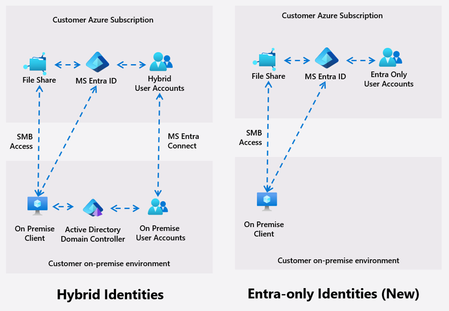
Azure Files introduces Entra only identities authentication for SMB shares, enabling cloud-only identity management without reliance on on-premises Active Directory. This advancement supports secure, seamless access to file shares from anywhere, streamlining cloud migration and modernization, and reducing operational complexity and costs.14KViews8likes16CommentsAzure App Service Managed Instances: What IT/Ops Teams Need to Know
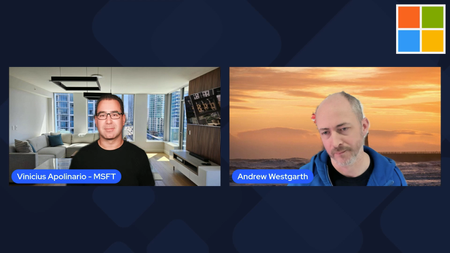
Azure App Service has long been one of the most reliable ways to run web apps on Azure, giving teams a fully managed platform with built‑in scaling, deployment integration, and enterprise‑grade security. But for organizations that need more control, expanded flexibility, or the ability to run apps that have additional dependencies, the new Azure App Service Managed Instance (preview) brings a powerful new option. Vinicius Apolinario recently sat down with Andrew Westgarth, Product Manager for Azure App Service to talk through what Managed Instances are, why they matter, and how IT/Ops teams can take advantage of the new capabilities. What Managed Instances Bring to the Table Managed Instances (MI) deliver the App Service experience you know with added flexibility for additional scenarios. You get the same PaaS benefits—patching, scaling, deployment workflows—but with the control typically associated with IaaS. Some of the highlights we discussed: App Service and App Service Managed Instance — What are the main differences and what scenarios MI is focusing on. Consistent App Service experience — Same deployment model, same runtime options, same operational model. App service experience for different audiences — How IT/Ops teams can leverage MI and what does it mean for development teams. Features IT/Ops Teams Will Appreciate Beyond the core architecture, MI introduces capabilities that make day‑to‑day operations easier: Configuration (Install) Script — A new way to customize the underlying environment with scripts that run during provisioning. This is especially useful for installing dependencies, configuring app and OS settings, installing fonts, or preparing the environment for the workload. RDP Access for Troubleshooting — A long‑requested feature that gives operators a secure way to RDP into the instance for deep troubleshooting. Perfect for diagnosing issues that require OS‑level visibility. Learn more about Azure App Service Managed Instance (preview): Documentation: https://aka.ms/AppService/ManagedInstance Hands On Lab: https://aka.ms/managedinstanceonappservicelab Blog: https://aka.ms/managedinstanceonappservice Ignite session: https://ignite.microsoft.com/en-US/sessions/BRK10288Views1like0CommentsAzure AI Connect - March 2 to March 6 2026
The Future of AI is Connected. The Future is on Azure. Join us for a 5-day virtual event dedicated to mastering the Microsoft Azure AI platform. Azure AI Connect isn't just another virtual conference. It's a 5-day deep-dive immersion into the *connective tissue* of artificial intelligence on the cloud. We're bringing together developers, data scientists, and enterprise leaders to explore the full spectrum of Azure AI services—from Cognitive Services and Machine Learning to the latest breakthroughs in Generative AI. Explore the Ecosystem: Understand how services work *together* to create powerful, end-to-end solutions. Learn from Experts: Get direct insights from Microsoft MVPs, product teams, and industry pioneers. Gain Practical Skills: Move beyond theory with code-driven sessions, practical workshops, and live Q&As. Connect with Peers: Network with a global community in our virtual lounge. Event Details825Views0likes1CommentHow to Build a Microsoft Marketplace Channel Practice: A Partner Guide to Scalable Growth
For Microsoft partners looking to make Marketplace a repeatable, scalable growth channel, this article outlines what it really takes to succeed. It breaks down how top partners structure their teams, align ownership across sales, alliances, and operations, and activate Microsoft Marketplace as a core part of their co-sell and go-to-market strategy. With practical frameworks, best practices, and real-world guidance, this resource helps partners drive pipeline, accelerate deal velocity, and grow alongside Microsoft through Marketplace. Read the full article: How to build a Microsoft Marketplace channel practice
Cloud Kerberos Trust with 1 AD and 6 M365 Tenants?
Hi, we would like to enable Cloud Kerberos Trust on hybrid joined devices ( via Entra connect sync) In our local AD wie have 6 OUs and users and devices from each OU have a seperate SCP to differnt M365 Tenants. I found this Article to configure the Cloud Kerberos Trust . Set-AzureADKerberosServer 1 2 The Set-AzureADKerberosServer PowerShell cmdlet is used to configure a Microsoft Entra (formerly Azure AD) Kerberos server object. This enables seamless Single Sign-On (SSO) for on-premises resources using modern authentication methods like FIDO2 security keys or Windows Hello for Business. Steps to Configure the Kerberos Server 1. Prerequisites Ensure your environment meets the following: Devices must run Windows 10 version 2004 or later. Domain Controllers must run Windows Server 2016 or later. Install the AzureADHybridAuthenticationManagement module: [Net.ServicePointManager]::SecurityProtocol = [Net.ServicePointManager]::SecurityProtocol -bor [Net.SecurityProtocolType]::Tls12 Install-Module -Name AzureADHybridAuthenticationManagement -AllowClobber 2. Create the Kerberos Server Object Run the following PowerShell commands to create and publish the Kerberos server object: Prompt for All Credentials: $domain = $env:USERDNSDOMAIN $cloudCred = Get-Credential -Message 'Enter Azure AD Hybrid Identity Administrator credentials' $domainCred = Get-Credential -Message 'Enter Domain Admin credentials' Set-AzureADKerberosServer -Domain $domain -CloudCredential $cloudCred -DomainCredential $domainCred As I understand the process, a object is created in local AD when running Set-AzureADKerberosServer What happens, if I run the command multiple times, for each OU/Tenant. Does this ovveride the object, or does it create a new objects?28Views0likes1Comment