azure
3 Topics
How to setup customer to obtain AADB2C token for an API exposed through APIM
I am setting up Azure APIM instance behind a Azure Application gateway. Developer portal will be exposed so external customers will be able to subscribe to products containing the APIs and obtain the subscription key that way. There will be approvals required for subscription. I want to setup OIDC on top of the subscription key validation. For that I believe I have to setup a Validate JWT policy on the API in APIM, using this guide below and use scopes/roles:- https://learn.microsoft.com/en-us/azure/api-management/validate-jwt-policy And seems like I will have to setup client credentials flow for customers to be able to obtain token from AADB2C, using the below KB:- https://learn.microsoft.com/en-us/azure/active-directory-b2c/client-credentials-grant-flow?pivots=b2c-custom-policy Q1 - Firstly, is that the correct way of setting it up? Secondly, with client credentials flow seems like customers will have to use the POST request (or PowerShell) like the one below to obtain the token:- https://<tenant-name>.b2clogin.com/<tenant-name>.onmicrosoft.com/<policy>/oauth2/v2.0/token But this will mean that I will have to document my B2C token endpoint in Developer portal documentation to advise customers on how to obtain token. I have 2 questions related to that:- Q2 - Is advising/advertising B2C token endpoint good practice from security point of view? Q3 - With client credentials flow, setting up the calling app APP Registration in B2C and providing related APP secret will become a manual process. This will remove the benefit of having Product/API subscriptions process automated through APIM and bring in the complexity of securely communicating the secret to customers. Is there a better way of doing this?307Views0likes2Comments
Issue with Custom Domain on APIM and Cloudflare Proxying
Dear all, Last week, we attempted to configure a custom domain name for our Azure API Management (APIM) instance. We use Cloudflare as our DNS provider. The required CNAME record was created with the proxied attribute enabled. However, when configuring the custom hostname in Azure, we encountered the following error: Invalid parameter: CustomHostnameOwnershipCheckFailed. A CNAME record pointing from apim.ourowndomain.net to apim.azure-api.net was not found. As a workaround, we disabled the proxied attribute in Cloudflare, retried the configuration, and it worked successfully. We then re-enabled the proxied attribute, and the custom domain continued to function correctly. However, yesterday, we discovered that the custom domain was no longer working and returned a "404 Web site not found" error page. After extensive troubleshooting—including disabling the proxied attribute on the CNAME record—we were unable to resolve the issue. To restore functionality, we removed and reconfigured the custom domain by following the same steps: Disable the proxied attribute on the CNAME record. Configure the custom domain in APIM. Re-enable the proxied attribute. This resolved the issue again. We suspect that Azure initially validates the CNAME record during the custom domain configuration process when the proxied attribute is disabled. However, after a few days, Azure appears to revalidate the CNAME record and expects it to resolve to *.azure-api.net. Since Cloudflare returns its own IPs when proxying is enabled, Azure may reject the custom domain configuration, leading to the issue. Can anyone confirm whether our assumption is correct? Additionally, is there a recommended workaround for this issue? We are considering deploying a reverse proxy (Application Gateway) to handle Cloudflare requests and forward them to the APIM instance. Thank you in advance for your help. Best regards,1.2KViews0likes4CommentsAzure API Management Gateway - RBAC on the API level
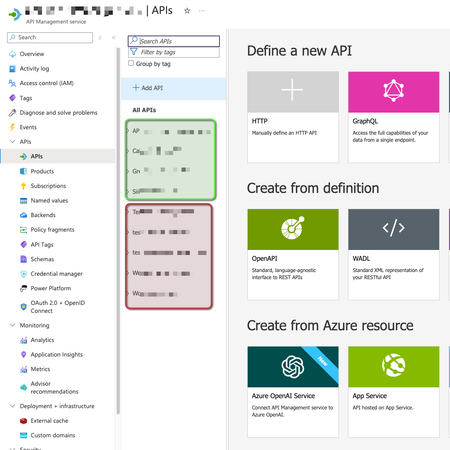
Is it possible to grant access on specific APIs implementation, making users able to see some APIs but not others inside the same Azure API Management Gateway? For example: User1 can manage green ones, but not red ones. Thanks.505Views0likes3Comments