azure
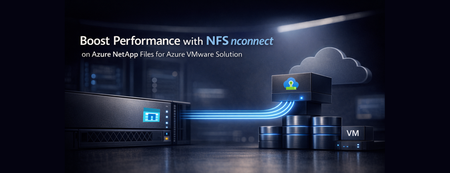
77 TopicsBoost performance with NFS nconnect on Azure NetApp Files datastores for Azure VMware Solution
Azure VMware Solution now supports nconnect=4 with Azure NetApp Files datastores each ESXi host opens up to four parallel TCP connections to a single NFS datastore, raising throughput and lowering latency under load. Supported on both Gen 1 and Gen 2 private clouds, it makes Azure VMware Solution with Azure NetApp Files an even stronger home for databases and other storage‑intensive workloads.439Views0likes0CommentsEnterprise Identity Meets Secure File Transfer: Entra ID Public Preview on Azure Blob Storage SFTP
Updated on June 23 2026: Microsoft Entra ID-based access for Azure Blob Storage SFTP is now Generally Available. GA enhancements: Improved ABAC by resolving inconsistencies with the Storage Blob Data Owner role (eliminating timeout issues) while adding support for sub-operations to enable more granular access control. Learn more here. We are excited to announce the public preview of Entra ID-based access for Azure Blob Storage SFTP. This new capability enables you to use Microsoft Entra ID (formerly Azure Active Directory) identities (including guest users via Entra External Identities) to securely connect to Azure Blob Storage via SFTP without needing local users. This feature eliminates the operational overhead of managing local SFTP users and passwords by introducing enterprise-grade identity management powered by Microsoft Entra ID. For IT administrators and security teams, this means no more creating, tracking, rotating, or decommissioning local SFTP credentials. For developers and architects, it means seamless integration with your existing identity infrastructure. For business users, it means faster, more secure access to the data they need, all while maintaining compliance with enterprise security policies. Azure Blob Storage SFTP Azure Blob Storage SFTP natively enables secure file access and management without third-party solutions. This simplifies operations for customers and removes the need for complex, custom SFTP solutions. Until this Public Preview, Azure Blob Storage SFTP utilized a form of identity management called local users as the only authorization mechanism. Local users must use either a password or a Secure Shell (SSH) private key credential for authentication. Learn more about local users here. The Challenge: SFTP Local User Management Organizations currently face challenges when managing SFTP access at scale with Azure Storage SFTP Local Users. Local User based SFTP access require IT teams to: Manually create and provision local user accounts for each SFTP user Generate, distribute, and securely store SSH keys or passwords Implement custom workflows for lifecycle management Manage offboarding processes to ensure departed users lose access immediately Audit and track access across disconnected identity silos Handle external partner and vendor access through ad-hoc, often insecure methods The Solution: Enterprise Identity Meets Secure File Transfer With Entra ID-based access for Azure Blob Storage SFTP, you can now leverage your organization's centralized identity platform to authenticate and authorize SFTP users. This integration brings the full power of Microsoft Entra ID to your file transfer workflows, delivering the following benefits: 1. Eliminate Local User Management Simplify SFTP management by assigning access with Entra ID—no separate SFTP accounts needed. No local credential generation or distribution—users authenticate with their existing corporate credentials No orphaned accounts when users change roles or leave the organization Reduced attack surface by eliminating static, long-lived local credentials Centralized user lifecycle management through your existing identity platform 2. Enterprise-Grade Identity and Security Leverage the full security capabilities of Microsoft Entra ID for your SFTP infrastructure: Multi-Factor Authentication (MFA): Require additional verification factors beyond passwords, significantly reducing the risk of account compromise Conditional Access: Define policies that grant or block access based on user location, device compliance, sign-in risk, and other conditions Identity Protection: Benefit from Microsoft threat intelligence and risk detection to identify and respond to compromised accounts Privileged Identity Management (PIM): Provide just-in-time elevated access for administrative operations 3. Native Azure RBAC, ABAC, and ACL Integration Your SFTP access control seamlessly integrates with Azure comprehensive authorization framework: Role-Based Access Control (RBAC): Assign built-in or custom roles at the storage account, container, or even blob level Attribute-Based Access Control (ABAC): Create sophisticated access policies based on resource tags, user attributes, and environmental conditions Access Control Lists (ACLs): Apply fine-grained permissions at the directory and file level for hierarchical namespace-enabled accounts Unified Permission Model: SFTP access respects the same permissions as REST API, Azure CLI, and other access methods—no separate permission system to manage 4. Faster SFTP Onboarding and Time-to-Value Onboard new SFTP users or partners in minutes instead of hours or days, saving significant time and boosting business agility. 5. Secure External Collaboration with Entra External Identities Seamlessly enable secure external SFTP access by allowing partners to authenticate with their own credentials using Entra External Identities (Azure AD B2B). External users authenticate with credentials they already manage Full audit trail of external user activity Ability to apply Conditional Access policies to external users Automatic access revocation when B2B relationships end Real World Scenarios Financial Services: A bank receives daily transaction files from merchants via SFTP. Merchants authenticate with their own Entra ID credentials (B2B collaboration), MFA is enforced, and access is restricted to assigned directories. Access is instantly revoked when a merchant is removed from the B2B directory. Healthcare: A hospital exchanges patient data with insurers and labs. Entra ID authentication ensures only authorized staff access sensitive PII, with full audit logs for HIPAA compliance. Conditional Access restricts connections to approved locations and devices. Media & Entertainment: A production company enables freelance editors and agencies to transfer large media files. Entra External Identities provide time-limited access and automatic revocation when projects end—no need for local SFTP accounts. Manufacturing: A manufacturer receives CAD files and orders from suppliers using SFTP. With Entra ID, suppliers use unified credentials and access policies across all systems, streamlining supply chain management. How It Works Entra ID simplifies SFTP access to Azure Blob Storage by authenticating users with their corporate credentials. After authentication, users receive a short-lived Open SSH certificate to connect. The service verifies certificate validity and user permissions, enabling secure file operations and automatic access revocation in line with current identity policies. Learn more here. Getting started with the Public Preview We encourage you to try Entra ID-based access for Azure Blob Storage SFTP in your non-production environments today. Learn more about how to register for the preview and get started with the detailed ms docs learn guide here. This preview gives you an opportunity to shape the feature development by providing feedback on what works well and what could be improved. Note: Local user accounts for SFTP access are still supported, but we strongly recommend switching to Entra ID-based access for greater security, simpler management, and automatic access control. Questions or feedback? We would love to hear from you! Reach out to our team at blobsftp@microsoft.com We are excited to bring enterprise-grade identity management to Azure Blob Storage SFTP, and we cannot wait to see how you use this capability to simplify operations, enhance security, and enable new collaboration scenarios. Happy transferring!2.1KViews0likes0CommentsBringing Enterprise File Data to Users with Azure NetApp Files, Microsoft Foundry, and M365 Copilot
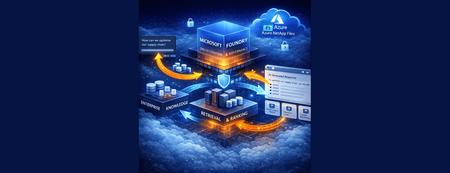
This is Part 3 of a 3-part series on extending AI to enterprise file data, showing how the knowledge pipeline is surfaced through enterprise AI agents and user experiences including Microsoft 365 Copilot.537Views0likes0CommentsFrom Enterprise File Storage to an AI-Ready Data Foundation using Azure NetApp Files and OneLake
This 3-part series shows how to extend AI to enterprise file data – without migration – by combining Azure NetApp Files, OneLake, and a RAG-based architecture that surfaces grounded insights through enterprise AI agents. This is Part 1 of a 3-part series covering the data foundation, knowledge pipeline, and user experience layers.529Views0likes0CommentsFrom File Data to AI‑Powered Knowledge Pipelines using Azure NetApp Files object REST API
This is Part 2 of a 3-part series on extending AI to enterprise file data hosted on Azure NetApp Files, building on the data foundation to create a knowledge pipeline that makes enterprise file data usable by AI systems.478Views0likes0CommentsAction required: Kerberos RC4 hardening may affect Azure Files Active Directory Domain Services
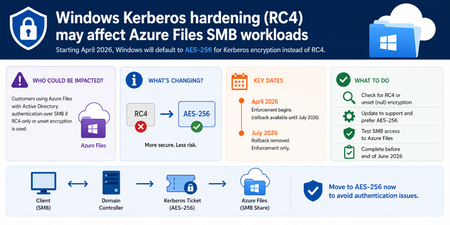
A Windows security hardening change beginning in April 2026 updates default Kerberos encryption behavior and may impact customers using Azure Files with Active Directory Domain Services (AD DS) authentication over SMB. If you created Azure Files shares prior to 2023, or chose RC4 encryption for your file shares, you will need to reconfigure to use AES-256 to avoid disruption to file share access. This is in accordance with the updated security posture and recommendation from Windows CVE-2026-20833. Background Azure Files uses Kerberos authentication for identity-based access when integrated with on-premises Active Directory Domain Services (AD DS). AES-256 Kerberos encryption has been supported since AzFilesHybrid module v0.2.2, and it has been the default since v0.2.5. Historically, RC4 was the only supported option until AES-256 support was added. This is a Windows platform security hardening change; Azure Files service behavior is not being modified. You may be impacted if: You use Kerberos-based SMB access to Azure Files with AD DS authentication, and Kerberos encryption settings are RC4-only or unset (null) for relevant AD objects, service accounts, or computer accounts associated with Azure Files authentication. When will this happen: April 2026 – July 2026: Install the Windows security update and validate access. Domain controllers will default to issuing AES-256 tickets when msDS-SupportedEncryptionTypes is not explicitly set. After July 2026: Manual rollback is removed. If you have not migrated to AES-256 by then, Kerberos-based SMB access to your Azure Files shares may fail. What you should do now: Find out if you are impacted, run the following PowerShell command on a domain-joined machine, with read access to AD. This identifies storage accounts that use Azure Files with AD DS authentication but have not been upgraded to AES-256 or follow the detection steps in aka.ms/rc4azurefiles: Get-ADObject ` -LDAPFilter "(&(servicePrincipalName=*.file.core.windows.net)(!(msDS-SupportedEncryptionTypes=*)))" -Properties servicePrincipalName, msDS-SupportedEncryptionTypes | Select-Object Name, ObjectClass, servicePrincipalName, msDS-SupportedEncryptionTypes Update configurations to support and prefer AES256-based Kerberos ticket encryption. Validate end-to-end SMB authentication and application access to Azure Files shares. Run klist purge from an elevated command prompt to clear any cached Kerberos tickets that still use RC4. Remount the Azure file share. For any questions, please reach out to the team at azurefiles@microsoft.com Resources: Azure Files documentation on this change Read the full Windows hardening guidance: How to manage Kerberos KDC usage of RC4 for service account ticket issuance changes related to CVE-2026-20833. Learn about RC4 usage in Windows and its risks: Detect and remediate RC4 usage in Kerberos. Learn more about the related vulnerability: CVE-2026-20833. Windows Server Blog: Beyond RC4 for Windows authentication4.7KViews0likes0CommentsSimpler, scalable file share management in Azure - now generally available
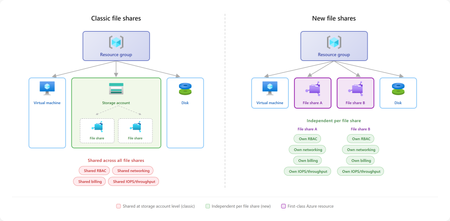
Linux workloads in Azure are scaling faster than ever, powering everything from container platforms, analytics pipelines, SAP environments to line-of-business applications. As these workloads grow, infrastructure teams commonly run into challenges with scale, cost management, complexity and compliance. IT organizations need more granular control over management and isolation boundaries for file shares independent of storage accounts, to prevent multiple application teams sharing the same capacity pools, limits, and configuration surface across different storage services. Infrastructure administrators seek operational simplicity with managing access control, policy and networking isolation for file shares, so application teams can focus on business logic and development agility. We are announcing the general availability of a new service management experience for premium SSD file shares (NFS) which allows each file share to be created, secured, scaled, and billed independently, without being tied to a storage account. Key benefits include: Familiar and intuitive file share management: Aligns user experience with on-premises NAS and file server paradigms, improving usability compared to the classic model. Infrastructure-as-Code: Define naming, capacity, IOPS, networking, tags, and security in Bicep or ARM templates for simplified automation with your favorite DevOps tools. Scale to match the workload: Support for up to 10,000 file shares per subscription per region, with 2.5x faster file share provisioning experience. Share-level security and networking: Network restrictions, snapshots, and encryption scoped to the individual share, making isolation boundaries match workload boundaries. Per-share cost visibility: Billing meters emit under the file share resource, teams can crossbill accurately, track per-workload costs, and improve chargeback without workarounds. Independent performance, security, and billing per share Combined with the provisioned v2 model, each file share is independently provisioned with its own storage, IOPS, and throughput. This allows organizations to align file shares directly to application or tenant boundaries, rather than grouping them under shared infrastructure constructs. For multi-tenant SaaS platforms, this enables a natural one-to-one mapping between tenants and file shares. Each tenant operates within its own performance envelope, allowing steady workloads and bursty workloads to scale independently without contention. This reduces the need for capacity planning tradeoffs or overprovisioning to accommodate peak usage across tenants. This isolation extends beyond performance; each file share carries its own encryption in transit settings, RBAC, policy, and network boundaries. For example, production tenants can be isolated with dedicated private endpoints, while development environments can operate under more flexible configurations. These boundaries align directly with application design, making systems easier to reason about and manage at scale. Finally, treating each file share as its own resource simplifies cost management. Teams can tag and track usage at the workload or tenant level, enabling more accurate chargeback and better visibility into resource consumption. This makes it easier to understand how individual workloads contribute to overall spending without introducing additional tracking mechanisms. Start easy, scale big Cloud-native Linux applications often scale dynamically, so the underlying storage platform must provide resources quickly and support higher scale limits to keep pace with workload demand and enable teams to quickly provision infrastructure and keep pace of development. The new file share experience supports up to 10,000 file shares per subscription per region, making it practical to use a dedicated share for each application, environment, or tenant without running into platform limits. It also provides faster provisioning, with time to first share 2.5x times faster than classic file shares, so teams can spend less time waiting on infrastructure and more time building, testing, and shipping. “Provisioning is fast and integrates seamlessly with Linux environments through NFS.” - Siam Commercial Bank Data protection with snapshots Linux workloads using shared file storage require robust data protection. With the new service management experience, customers can continue to leverage point-in-time incremental snapshots with up to 200 snapshots per share. You can also now edit metadata on individual snapshots, making it easier to organize and identify recovery points. Whether you need short term restore points or need to retain data for compliance requirements, snapshots provide an easy and cost-effective recovery mechanism. Get started today The new file share experience is available for NFS 4.1 file shares on SSD storage, using the provisioned v2 billing model with LRS and ZRS options. Whether the deployment model is ARM templates, Bicep, MCP server, or custom CI/CD pipelines, file shares are scriptable, repeatable, and automatable through the same tooling used for the rest of Azure infrastructure. Explore our documentation for step-by-step guidance. We're continuously enhancing the new file share experience with the goal of achieving full feature parity while delivering improved scale and performance limits. We would love to hear your feedback, please fill out the survey to share your thoughts. Learn more Planning for an Azure Files deployment How to create a file share Scalability & performance targets For questions or feedback, contact us at azurefiles@microsoft.com.1.6KViews3likes0CommentsSecure, Modern Access to Azure Files on macOS with MS Entra ID
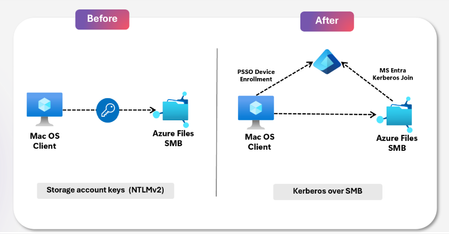
Enterprises, large and small, rely on Azure Files for secure, scalable, and cost-efficient file storage. Modern workflows today span devices, platforms, and geographies; seamless, and secure access to shared data across every endpoint is critical to keeping teams productive and collaborative. With the growing demand for access across every device, Azure Files now extends secure access to macOS with Entra ID authentication, supporting design, creative, and AI teams where they work. Today, we are announcing the Public Preview of MS Entra ID based authentication for Azure Files on macOS. Whether you are running creative production pipelines, design workflows, or AI workloads, macOS users can now access Azure file shares securely, meeting Microsoft Entra ID enterprise governance standards automatically and seamlessly, with no credential prompts, no storage account keys, and no complexity. Key benefits Enhanced Security posture: MacOS users can now sign in to their device and open shared files in Finder with no credential prompts and no storage account keys. Microsoft Entra ID governs access, conditional access policies, MFA requirements, and MS Entra ID governance applies automatically with AES-256 encryption. Reduced operational overhead: IT admins no longer need to manage storage account key distribution/rotation. Provisioning and deprovisioning access is handled through standard Entra ID group membership. No dependency on Active Directory: Organizations moving away from on-premises infrastructure, including Active Directory, can now give MacOS users full access to Azure file shares using cloud-based identities in MS Entra ID, with no domain controller required. MacOS users get full parity with the traditional Windows SMB share experience. Identity Based Access model: User authentication is enforced with Kerberos and share-level access is enforced through Azure RBAC. File and folder permissions are controlled through NTFS ACLs, giving organizations precise, layered control. Enabling AI-Driven Workloads: SMB shares on macOS enables AI teams to seamlessly access and share large datasets, fueling faster experimentation and streamlining developer and AI-generated workflows. Partnership with Apple Azure Files support for macOS is built in close collaboration with Apple macOS SMB engineering team. The integration works with Apple’s Platform SSO and the Microsoft Enterprise SSO plug-in, via MDM platforms such as Microsoft Intune. This allows macOS devices to authenticate through Microsoft Entra ID with single sign-in. We are committed to continuing this partnership to ensure Mac users in enterprise environments have a first-class experience accessing cloud services. Powering Diverse Workloads across Design, Developer and Education Enterprises Secure SMB access for creative workloads Creative workflows on macOS have historically required workarounds to reach centralized cloud storage, often meaning local copies, consumer file sharing tools, or storage account keys distributed to individuals. Azure Files gives creative teams direct access to shared project libraries and production files from Finder, with no syncing or local copies needed. For IT, setup is simple: assign the right RBAC role on the share, add users to an Entra group, and access is ready. No keys to distribute and no deep storage expertise required. "Secure access for our macOS users is a gamechanger for our creative teams. The ability to mount directly and access shared files securely — without keys, without workarounds — changes how we work. It’s how modern enterprise file access should feel." -Peter Day, Senior Engineer, The Marketing Store SMB shares streamline developer and AI-generated build workflows MacOS developers rely on local tools like Visual Studio Code, GitHub copilot, or fast iteration, but build artifacts, logs, and AI-generated outputs often end up fragmented across machines and pipelines. With Azure Files, teams can use SMB shares as a centralized workspace for build outputs and shared assets. Mac build systems can write directly to a mounted share, making artifacts immediately accessible across developers, pipelines, and AI agents. DevOps teams gain a secure, identity-based storage layer using RBAC and Microsoft Entra, without managing keys or custom storage solutions. Enable collaboration across mixed platform environments Mac users should not be a special case. Azure Files gives MacOS users the same governed, identity-based access to shared storage that Windows users have always had. Access is provisioned through Entra ID, enforced through RBAC, and managed without a separate workflow, separate keys, or separate infrastructure. For large organizations running mixed-OS environments, this means a single, consistent access model tied to the user and not a device – the user can seamlessly access the SMB share across their Windows and Mac devices. “By supporting Kerberos authentication for Azure Files on Mac devices, Microsoft delivers secure, consistent access for organizations operating mixed-OS environments. It addresses a long-standing enterprise gap by extending centrally governed identity controls to all users, regardless of device—helping organizations simplify access management and maintain trust at scale.” -Preetham G.K., CDL, Accenture Modernize Infrastructure and secure access for Educational Institutions Institutions standardizing on macOS have faced a hard tradeoff: maintain costly on-premises infrastructure at every site or accept that MacOS users fall back on personal drives and consumer file sharing. Neither is acceptable at scale. Azure Files removes the tradeoff. Students, faculty, and staff access shared repositories and course materials directly from an SMB share over Finder using their Entra ID credentials. Access management can be controlled through group membership, with no per-site infrastructure and no manual credential management. Get started with Azure Files Entra Kerberos authentication for macOS Start leveraging secure, identity-based file access on macOS today at no added cost. Explore our documentation for step-by-step guidance. Whether you are onboarding new Mac users or modernizing an existing deployment, this feature gives your organization a simple path to identity management for Azure Files on macOS. Make your Mac workloads ready for the future! For any questions, please reach out to the team at azurefiles@microsoft.com.1KViews0likes0CommentsFrom Scale to Breakthrough: Azure NetApp Files Sets a New Cloud Benchmark for EDA Performance
This article spotlights the newest leap in Azure NetApp Files: large volume breakthrough mode performance – independently validated by SPECstorage® Solution 2020 benchmarks. Azure NetApp Files is setting a new record for enterprise-scale Electronic Design Automation (EDA) workloads in the cloud. Backed by benchmark results at enterprise scale, it further reduces the traditional tradeoff between massive scale and uncompromising storage performance. For EDA teams, this means storage can keep pace with design cycles – enabling faster iteration, supporting cloud-first workflows, and reducing time spent waiting on infrastructure.505Views0likes0Comments
Modernizing Azure Virtual Desktop with Nerdio and Azure Files
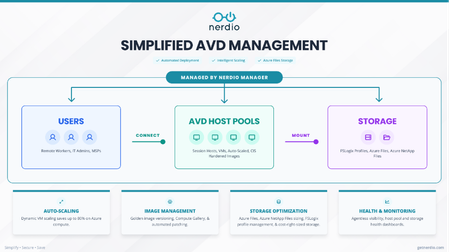
Coauthored with Nerdio Organizations adopting Azure Virtual Desktop (AVD) typically begin with small pilot deployments that perform well under limited load. As these environments scale to hundreds or thousands of users, a consistent set of challenges emerges. At the center of that shift is the user profile layer. FSLogix profile containers—stored on file shares—sit directly on the critical path of the user experience. During peak periods such as login storms, profile attach latency becomes a primary determinant of sign-in performance. At the same time, identity dependencies, storage configuration complexity, and cost management introduce variability across environments. What worked in a pilot often becomes more difficult to manage consistently at scale. Common challenges include: Performance variability during peak concurrency Complex identity configurations for SMB access Configuration drift across environments Cost inefficiencies from peak-based provisioning At enterprise scale, these issues converge at the storage and identity layers—making them central to both user experience and operational efficiency. Nerdio: simplifying how AVD is deployed and operated Nerdio Manager (available as Nerdio Manager for Enterprise and Nerdio Manager for MSP) is a deployment, management, and auto-scaling platform for Azure Virtual Desktop (AVD) with capabilities such as desktop image management, performance monitoring, and user session control to eliminate the need for complex scripting and speed up responses to end-users. Nerdio Manager helps organizations deploy and operate AVD environments in a more consistent, repeatable way. Rather than treating compute, storage, and identity as separate workflows, Nerdio integrates these components into a single operational model. Storage provisioning, permissions, and FSLogix configuration are handled as part of host pool deployment and scaling. This reduces coordination overhead, minimizes configuration drift, and keeps storage aligned with how environments grow. This view shows how Nerdio brings users, host pools, and storage into a single control plane—ensuring storage is configured as part of deployment, not after. Azure Files: enabling performance and identity at scale Azure Files provides the foundational storage layer for FSLogix profile containers in many AVD environments. Because profiles attach at sign-in, storage performance directly impacts user experience. Provisioned v2: performance without over-provisioning Azure Files Provisioned v2 decouples performance (IOPS and throughput) from capacity. Previously, higher performance required over-provisioning storage. With Provisioned v2, organizations can align performance directly to workload needs. This is especially important for FSLogix, where login storms create short bursts of high IOPS demand even when data volumes are modest. The result: better cost efficiency and more predictable performance. “We’ve been early adopters of Nerdio and consistently see meaningful Azure cost optimization… With Azure Files Provisioned v2, the decoupling of quota and IOPS… gives us precise control over performance and cost.” — David Wasserman, Chief Value Officer, FlexibleIT.com Entra ID authentication: simplifying identity architecture Azure Files supports Microsoft Entra ID authentication for SMB, enabling a cloud-native identity model. This eliminates the need for domain infrastructure used only for storage access, resulting in: Reduced infrastructure overhead Simpler networking Lower operational burden Alignment with Zero Trust These capabilities are already in use in Nerdio Manager for MSP environments managing multi-tenant deployments, and are being extended to Nerdio Manager for Enterprise in Q3 CY26 to enable the same cloud-native model within enterprise environments This highlights how provisioning, monitoring, scaling, and identity are handled as part of a unified system instead of fragmented tasks. Operationalizing storage at scale, why this matters for enterprises Enterprise AVD environments operate under fundamentally different constraints. User populations are larger and more concentrated, compliance requirements are stricter, and tolerance for performance variability is significantly lower. In practice, these pressures converge at the storage layer. For enterprise customers, the goal is not automation itself—it is better user experience, lower cost, and predictable operations. Faster, more consistent deployments. Storage is configured alongside compute, reducing dependency on separate teams and minimizing drift. Lower cost without sacrificing peak performance. Capacity and performance align with actual demand instead of peak assumptions. More predictable sign-ins during login storms. Standardized configuration reduces bottlenecks during high concurrency. Audit-ready governance by default. RBAC, snapshots, backup, and data protection policies are applied consistently across environments. Get started At scale, Azure Virtual Desktop is as much about storage and identity as it is about compute. Azure Files plays a central role in determining sign-in performance, user experience, and cost efficiency. With Provisioned v2 and Entra ID authentication, organizations can move toward a more predictable and cloud-native model. Nerdio builds on this foundation by integrating storage and identity into a unified AVD deployment and operations workflow. Get started with Nerdio today.746Views1like0Comments