azure
7780 Topics
Moving the Logic Apps Designer Forward
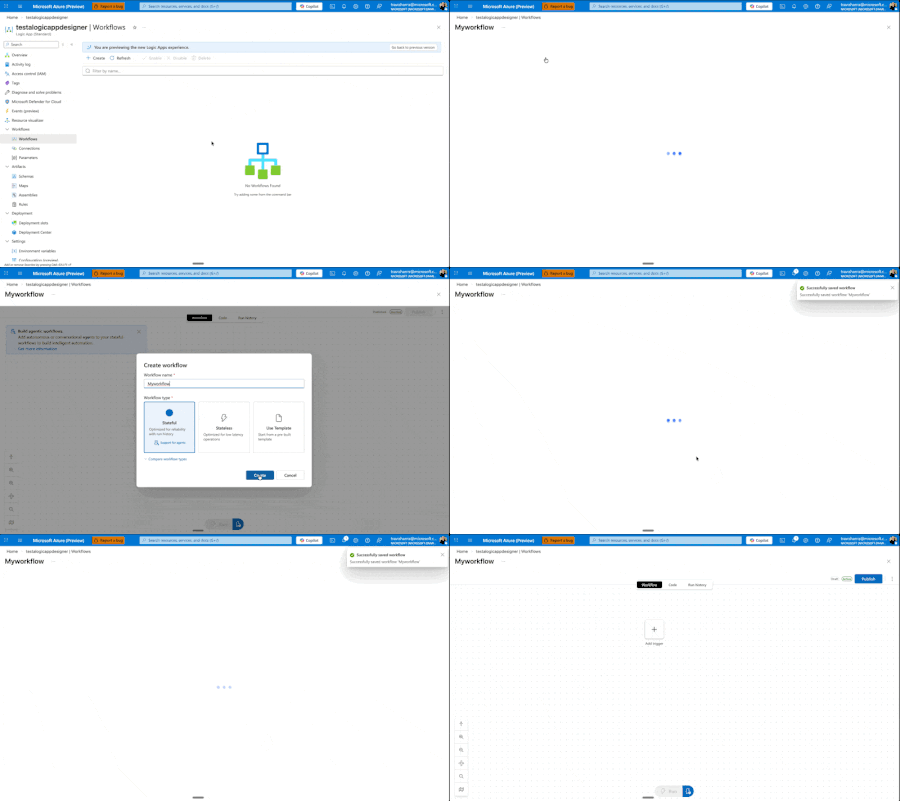
Today, we're excited to announce a major redesign of the Azure Logic Apps designer experience, now entering Public Preview for Standard workflows. While these improvements are currently Standard-only, our vision is to quickly extend them across all Logic Apps surfaces and SKUs. ⚠️ Important: As this is a Public Preview release, we recommend using these features for development and testing workflows rather than production workloads. We're actively stabilizing the experience based on your feedback. This Is Just the Beginning This is not us declaring victory and moving on. This is Phase I of a multi-phase journey, and I'm committed to sharing our progress through regular blog posts as we continue iterating. More importantly, we want to hear from you. Your feedback drives these improvements, and it will continue to shape what comes next. This redesign comes from listening to you—our customers—watching how you actually work, and adapting the designer to better fit your workflows. We've seen the pain points, heard the frustrations, and we're addressing them systematically. Our Roadmap: Three Phases Phase I: Perfecting the Development Loop (What we're releasing today) We're focused on making it cleaner and faster to edit your workflow, test it, and see the results. The development loop should feel effortless, not cumbersome. Phase II: Reimagining the Canvas Next, we'll rethink how the canvas works—introducing new shortcuts and workflows that make modifications easier and more intuitive. Phase III: Unified Experiences Across All Surfaces We'll ensure VS Code, Consumption, and Standard all deliver similarly powerful flows, regardless of where you're working. Beyond these phases, we have several standalone improvements planned: a better search experience, streamlined connection creation and management, and removing unnecessary overhead when creating new workflows. We're also tackling fundamental questions that shouldn't be barriers: What do stateful and stateless mean? Why can't you switch between them? Why do you have to decide upfront if something is an agent? You shouldn't. We're working toward making these decisions dynamic—something you can change directly in the designer as you build, not rigid choices you're locked into at creation time. We want to make it easier to add agentic capabilities to any workflow, whenever you need them. What's New in Phase I Let me walk you through what we're shipping at Ignite. Faster Onboarding: Get to Building Sooner We're removing friction from the very beginning. When you create a new workflow, you'll get to the designer before having to choose stateful, stateless, or agentic. Eventually, we want to eliminate that upfront choice entirely—making it a decision you can defer until after your workflow is created. This one still needs a bit more work, but it's coming soon. One View to Rule Them All We've removed the side panel. Workflows now exist in a single, unified view with all the tooling you need. No more context switching. You can easily hop between run history, code view, or visual editor, and change your settings inline—all without leaving your workflow. Draft Mode: Auto-Save Without the Risk Here's one of our biggest changes: draft mode with auto-save. We know the best practice is to edit locally in VS Code, store workflows in GitHub, and deploy properly to keep editing separate from production. But we also know that's not always possible or practical for everyone. It sucks to get your workflow into the perfect state, then lose everything if something goes wrong before you hit save. Now your workflow auto-saves every 10 seconds in draft mode. If you refresh the window, you're right back where you were—but your changes aren't live in production. There's now a separate Publish action that promotes your draft to production. This means you can work, test your workflow against the draft using the designer tools, verify everything works, and then publish to production—even when editing directly on the resource. Another benefit: draft saves won't restart your app. Your app keeps running. Restarts only happen when you publish. Smarter, Faster Search We've reorganized how browsing works—no more getting dropped into an endless list of connectors. You now get proper guidance as you explore and can search directly for what you need. Even better, we're moving search to the backend in the coming weeks, which will eliminate the need to download information about thousands of connectors upfront and deliver instant results. Our goal: no search should ever feel slow. Document Your Workflows with Notes You can now add sticky notes anywhere in your workflow. Drop a post-it note, add markdown (yes, even YouTube videos), and document your logic right on the canvas. We have plans to improve this with node anchoring and better stability features, but for now, you can visualize and explain your workflows more clearly than ever. Unified Monitoring and Run History Making the development loop smoother means keeping everything in one place. Your run history now lives on the same page as your designer. Switch between runs without waiting for full blade reloads. We've also added the ability to view both draft and published runs—a powerful feature that lets you test and validate your changes before they go live. We know there's a balance between developer and operator personas. Developers need quick iteration and testing capabilities, while operators need reliable monitoring and production visibility. This unified view serves both: developers can test draft runs and iterate quickly, while the clear separation between draft and published runs ensures operators maintain full visibility into what's actually running in production. New Timeline View for Better Debugging We experimented with a timeline concept in Agentic Apps to explain handoff—Logic Apps' first foray into cyclic graphs. But it was confusing and didn't work well with other Logic App types. We've refined it. On the left-hand side, you'll now see a hierarchical view of every action your Logic App ran, in execution order. This makes navigation and debugging dramatically easier when you're trying to understand exactly what happened during a run. What's Next This is Phase I. We're shipping these improvements, but we're not stopping here. As we move into Phase II and beyond, I'll continue sharing updates through blog posts like this one. How to Share Your Feedback We're actively listening and want to hear from you: Use the feedback button in the Azure Portal designer Join the discussion in GitHub/Community Forum – https://github.com/Azure/LogicAppsUX Comment below with your thoughts and suggestions Your input directly shapes our roadmap and priorities. Keep the feedback coming. It's what drives these changes, and it's what will shape the future of Azure Logic Apps. Let's build something great together.1.2KViews5likes3CommentsQuarterly AMA with Amir Netz (APAC) – Microsoft Fabric Partners, Don’t Miss Out!
🌟 Microsoft Partners—don’t miss your chance to connect directly with Amir Netz, CTO & Technical Fellow, at our exclusive Quarterly AMA (Ask Me Anything) session! The Fabric Engineering Connection is your gateway to insider insights, direct access to product leaders, and the latest updates on Microsoft Fabric. As a valued partner, you’ll have the opportunity to ask questions, share feedback, and learn about new features and strategies that can help you drive success for your clients and your business. This session is designed to empower partners with actionable knowledge and networking opportunities. 📅 Save the date: Americas & EMEA: Wednesday, January 21, 8–9 am PT APAC: Thursday, January 22, 1–2 am UTC / Americas & EMEA: Wednesday, January 21, 5–6 pm PT 🔗 Not a member yet? Join the Fabric Partner Community to participate: https://aka.ms/JoinFabricPartnerCommunity. Let’s build the future of data together!5Views0likes0CommentsQuarterly AMA with Amir Netz (Americas & EMEA) – Microsoft Fabric Partners, Don’t Miss Out!
🌟 Microsoft Partners—don’t miss your chance to connect directly with Amir Netz, CTO & Technical Fellow, at our exclusive Quarterly AMA (Ask Me Anything) session! The Fabric Engineering Connection is your gateway to insider insights, direct access to product leaders, and the latest updates on Microsoft Fabric. As a valued partner, you’ll have the opportunity to ask questions, share feedback, and learn about new features and strategies that can help you drive success for your clients and your business. This session is designed to empower partners with actionable knowledge and networking opportunities. 📅 Save the date: Americas & EMEA: Wednesday, January 21, 8–9 am PT APAC: Thursday, January 22, 1–2 am UTC / Americas & EMEA: Wednesday, January 21, 5–6 pm PT 🔗 Not a member yet? Join the Fabric Partner Community to participate: https://aka.ms/JoinFabricPartnerCommunity. Let’s build the future of data together!5Views0likes0CommentsAzure File Sync: Azure Arc Integration, Additional Regions, and Secure Syncing
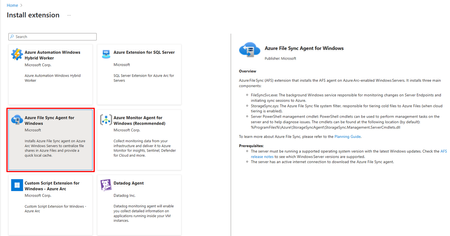
As organizations accelerate their cloud journeys, the ability to modernize file data without disrupting daily operations is critical for enterprises. Azure Files and Azure File Sync empower IT and devops teams to seamlessly bridge on-premises Windows File Servers with the flexibility and scale of the cloud. With the latest updates, Azure File Sync is now available in four new regions—bringing data closer to users for regional residency. This release also introduces a modern, identity-driven approach to authentication, providing end to end secure access with managed identities. Azure File Sync now provides simplified onboarding via Azure Arc integrating with the Azure hybrid management experience. With simplified onboarding, secure access and expanding list of regions, Azure File Sync enables organizations to seamlessly expand their hybrid file services, ensuring predictable cost, and scale. Simplified deployment with Azure Arc extension Customers using Azure Arc managed servers can now easily deploy Azure File Sync using the Azure Arc extensions. With Azure Arc, customers can simply add the File Sync agent to their servers using a few clicks on portal, or by using an automated workflow with PowerShell, or CLI. The Azure Arc extension model provides a trusted and predictable installation and upgrade experience, with built-in security. Once installed, the Arc extension simplifies Azure File Sync deployments for ARC managed servers. Beginning January 2026, File Sync will be available at no per‑server cost for customers using Windows Server Software Assurance with Azure Arc and File Sync agent v22 or later. As your environment grows, this reduces the incremental cost of adding servers and reinforces Azure File Sync as a scalable foundation to move your data to Azure. Azure File Sync available in 4 new regions Azure File Sync is now generally available in Italy North, New Zealand North, Poland Central, and Spain Central, adding top requested new geographies to the service. With these additions, customers have even more flexibility to keep data close to users, align with regional mandates and regulatory requirements, and improve performance for regional workloads. This matters especially for customers modernizing branch offices, factories, retail locations, or government sites, where the ability to select a region that is physically close to the workload can be a key part of the storage strategy. As Azure continues to grow, File Sync is growing with it, ensuring that customers can bring hybrid file services wherever their business expands. Secure by default with Managed Identities Managed Identities support for Azure File Sync was introduced with v20, to ensure secure end-to-end access by default between the File Sync Server, Storage Sync Service and Azure Files, using Microsoft Entra ID. This reduces security risk of using passwords and operational effort to rotate keys. This means that customers don’t need to configure storage account keys or worry about resetting server certificates when using Azure Files or Azure File Sync. We have now further extended this support to Managed Identities for Azure Files SMB. Get Started Whether you are provisioning new storage, expanding to new regions, or modernizing existing deployments, these capabilities provide secure, enterprise-grade access with a streamlined configuration experience. Refer to the documentation below to get started: Azure Arc integration with Azure File Sync Azure File Sync regional availability Managed Identities for File Sync For any questions, please reach out to the team at azurefiles@microsoft.com111Views0likes0CommentsUpdated requirements for the SAP on Microsoft Azure specialization
The SAP on Microsoft Azure specialization is a credential that validates your deep expertise in planning, migrating, and operating SAP (Systems, Applications, and Products in Data Processing) workloads on Microsoft Azure. Microsoft is updating this specialization to make it more accessible for a broader range of partners. These changes are designed to expand opportunity—making it possible for more organizations to demonstrate SAP on Azure expertise, earn official Microsoft recognition, and unlock exclusive go‑to‑market advantages that strengthen differentiation in a competitive market. What’s changed Lower ACR threshold: Beginning in January 2026, the Azure consumed revenue (ACR) requirement decreased from $30,000 to $7,500,* totaled over three months, significantly reducing the barrier to entry while maintaining a high standard of technical capability. Streamlined skilling validation: Partners can validate required Microsoft learning coursework directly within Partner Center, removing the need to do so in the third‑party audit for this specialization. Skilling requirements may be met through either: The Azure for SAP Workloads Specialty certification. Completion of the Run SAP on the Microsoft Cloud learning path. This simplified approach accelerates the path to earning the specialization. Next actions Visit Partner Center to review the updated SAP on Microsoft Azure specialization requirements and apply or renew. Be sure to follow the Specialization Updates blog to stay up to date on all announcements! Throughout this document, $ refers to US dollar (USD).44Views0likes0Comments
Issue connecting Azure Sentinel GitHub app to Sentinel Instance when IP allow list is enabled
Hi everyone, I’m running into an issue connecting the Azure Sentinel GitHub app to my Sentinel workspace in order to create our CI/CD pipelines for our detection rules, and I’m hoping someone can point me in the right direction. Symptoms: When configuring the GitHub connection in Sentinel, the repository dropdown does not populate. There are no explicit errors, but the connection clearly isn’t completing. If I disable my organization’s IP allow list, everything works as expected and the repos appear immediately. I’ve seen that some GitHub Apps automatically add the IP ranges they require to an organization’s allow list. However, from what I can tell, the Azure Sentinel GitHub app does not seem to have this capability, and requires manual allow listing instead. What I’ve tried / researched: Reviewed Microsoft documentation for Sentinel ↔ GitHub integrations Looked through Azure IP range and Service Tag documentation I’ve seen recommendations to allow list the IP ranges published at //api.github.com/meta, as many GitHub apps rely on these ranges I’ve already tried allow listing multiple ranges from the GitHub meta endpoint, but the issue persists My questions: Does anyone know which IP ranges are used by the Azure Sentinel GitHub app specifically? Is there an official or recommended approach for using this integration in environments with strict IP allow lists? Has anyone successfully configured this integration without fully disabling IP restrictions? Any insight, references, or firsthand experience would be greatly appreciated. Thanks in advance!22Views0likes0CommentsMicrosoft Ignite- Meaningful Announcements That Create Real Movement
Now that we are officially in 2026, I want to reflect back on Microsoft Ignite as it was more energized than ever. There is real momentum right now across Microsoft Marketplace, and the most meaningful shift I am seeing is around REO( Reseller Enabled Offer )capability. This is opening the door for partners to take Marketplace offers and bring them directly into new regions, new customer segments, and new routes to market without adding operational friction for either side. A true channel selling motion! For ISVs, REO means you can authorize trusted partners to resell your Marketplace offer in the way that works best for the customer. You no longer need to manage every deal yourself. For partners, it means instant access to in demand AI and security solutions that customers are already asking for. It removes barriers, it speeds up the process, and it connects the ecosystem in a much more natural way. If anyone in the community is exploring REO, private offers, multiparty models, or Marketplace strategy in general, it would be great to hear from you or reach out and would love to discuss. Looking forward to connecting with everyone in the new year. justinroyalError when creating Assistant in Microsoft Foundry using Fabric Data Agent
I am facing an issue when using a Microsoft Fabric Data Agent integrated with the new Microsoft Foundry, and I would like your assistance to investigate it. Scenario: 1. I created a Data Agent in Microsoft Fabric. 2. I connected this Data Agent as a Tool within a project in the new Microsoft Foundry. 3. I published the agent to Microsoft Teams and Copilot for Microsoft 365. 4. I configured the required Azure permissions, assigning the appropriate roles to the Foundry project Managed Identity (as shown in the attached evidence – Azure AI Developer and Azure AI User roles). Issue: When trying to use the published agent, I receive the following error: Response failed with code tool_user_error: Create assistant failed. If issue persists, please use following identifiers in any support request: ConversationId = PQbM0hGUvMF0X5EDA62v3-br activityId = PQbM0hGUvMF0X5EDA62v3-br|0000000 Additional notes: • Permissions appear to be correctly configured in Azure. • The error occurs during the assistant creation/execution phase via Foundry after publishing. • The same behavior occurs both in Teams and in Copilot for Microsoft 365. Could you please verify: • Whether there are any additional permissions required when using Fabric Data Agents as Tools in Foundry; • If there are any known limitations or specific requirements for publishing to Teams/Copilot M365; • And analyze the error identifiers provided above. I appreciate your support and look forward to your guidance on how to resolve this issue.Solved121Views0likes3CommentsAzure customer usage attribution (CUA) - report or validate it is working?
Per this article - https://learn.microsoft.com/en-us/partner-center/marketplace-offers/azure-partner-customer-usage-attribution#example-azure-powershell If we use Azure PowerShell along with the ISV/SDC's Tracking GUID (created earlier in Partner Centre), to provision Azure VM's and other resources in end-customer tenants directly related to our IP as an ISV/SDC - how do we report or validate that this CUA is working?