azure web application firewall
15 TopicsSave the date - January 26, 2026 - AMA: Best practices for applying Zero Trust using Intune
Join us on January 26 at 10:00 AM PT, to Ask Microsoft Anything (AMA) and get the answers you need to implement the right policies, security settings, device configurations, and more. Never trust, always verify. Tune in for tips and insights to help you secure your endpoints using Microsoft Intune as part of your larger Zero Trust strategy. Find out how you can use Intune to protect both access and data on organization-owned devices and personal devices used for work. Go to aka.ms/AMA/IntuneZeroTrust and select "attend" to add this event to your calendar. Have questions? Submit them early by signing in to Tech Community and posting them on the event page!
WAF custom rule for bock others cookie and permit only a specific cookie name and value
Hello all, I need to create a custom WAF rule that only allows traffic for a specific request URI (/example-path) if it contains a particular cookie, Cookie=abc123, and blocks all other requests. Additionally, could someone clarify the difference between configuring the policy this way: RequestHeaders['Cookie'], Operator=DoesNotEqual, Values="Cookie=abc123" RequestCookie, Values="CookieName", Operator=Equal, valueOfTheCookie="abc123" I hope I explained myself clearly. Thanks in advance for your responses!Identifying date / timestamp of "Deleted" emails recovered via eDiscovery?
We have a "Never Delete" policy applied to our user mailboxes. In performing an eDiscovery, we are able to see all past Deleted emails found via the DiscoveryHolds and Deletions folders in the Discovery export. The question is, is there a way to also find out what the actual deletion date/time stamp was for these emails?
I cannot Send an email suddenly - Comes back as Undeliverable
My email was working fine, and then suddenly 5 minutes later this error started showing up when I tried sending another email: Please help!! I am also the admin of the group, but I don't know how to fix this as I am obviously not spam, and no one has blocked me. Delivery has failed to these recipients or groups: This message couldn't be delivered because the sending email address was not recognized as a valid sender. The most common reason for this error is that the email address is, or was, suspected of sending spam. Contact the organization's email admin for help and give them this error message.
New Blog Post | Enhancements to Azure WAF for Application Gateway now in General Availability
Enhancements to Azure WAF for Application Gateway now in General Availability - Microsoft Community Hub Azure Web Application Firewall (WAF) on Azure Application Gateway provides centralized protection for your web applications against common vulnerabilities and exploits. Web applications are increasingly targeted by malicious attacks that vulnerabilities. SQL Injection (SQLi) and Cross-Site Scripting (XSS) are examples of some well-known attacks. Preventing such attacks in application code can be challenging and may require rigorous maintenance, patching, and monitoring at many layers of the application topology. A centralized web application firewall helps make security management much simpler and gives better assurance to application developers and security teams against threats or intrusions. The Azure Web Application Firewall (WAF) engine is the component that inspects traffic and determines whether a web-request represents a potential attack, then takes appropriate action depending on the configuration. Previously, when you used the Azure WAF with Application Gateway, there were certain limitations in the way you could configure and monitor your WAF deployments. We are happy to announce several enhancements to the configurations and monitoring capabilities of Azure WAF when used with Azure Application Gateway going forward. Original Post: New Blog Post | Enhancements to Azure WAF for Application Gateway now in General Availability - Microsoft Community HubNew Blog Post | DRS 2.1 for Azure FrontDoor WAF General Availability
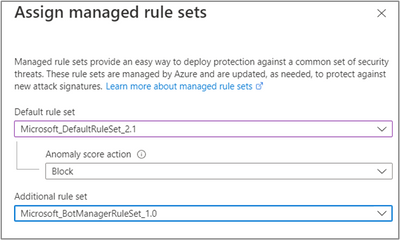
Full Blog: DRS 2.1 for Azure FrontDoor WAF General Availability - Microsoft Community Hub The Default Rule Set 2.1 (DRS 2.1) on Azure's global Web Application Firewall (WAF) with updated rules against new attack signatures is now available to Web Application Firewall customers. This ruleset is available on the Azure Front Door Premium tier. DRS 2.1 is baselined off the Open Web Application Security Project (OWASP) Core Rule Set (CRS) 3.3.2 and includes the Microsoft Threat Intelligence (MSTIC) rules that are written in partnership with the Microsoft Intelligence team. As with the previous DRS 2.0, the MSTIC team analyzes Common Vulnerabilities and Exposures (CVEs) and adapts the CRS ruleset to provide increased coverage, patches for specific vulnerabilities, and better false positive reduction. Also, Azure Front Door WAF with DRS 2.1 uses anomaly scoring mode, hence rule matches are not considered independently.New Blog Post | Automated Detection and Response for Azure WAF with Sentinel
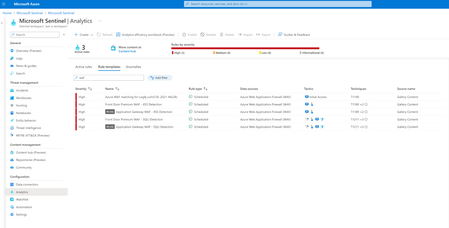
Full article: Automated Detection and Response for Azure WAF with Sentinel - Microsoft Community Hub Web applications are increasingly targeted by malicious attacks that exploit commonly known vulnerabilities. SQL injection and Cross-site scripting are among the most common attacks. Preventing such attacks in application code is challenging. It can require rigorous maintenance, patching, and monitoring at multiple layers of the application topology. A WAF solution can react to a security threat faster by centrally patching a known vulnerability, instead of securing each individual web application. Azure Web Application Firewall (WAF) is a cloud-native service that protects web apps from common web-hacking techniques. This service can be deployed in a matter of minutes to get complete visibility into the web application traffic and block malicious web attacks. Integrating Azure WAF with Microsoft Sentinel (Cloud Native SIEM/SOAR solution) for automated detection and response to threats/incidents/alerts would be an added advantage and reduces the manual intervention needed to update the WAF policy. In this blog, we will discuss about WAF detection templates in Sentinel, deploying a Playbook, and configuring the detection and response in Sentinel using these templates and the Playbook.New Blog Post | Zero Trust with Azure Network Security
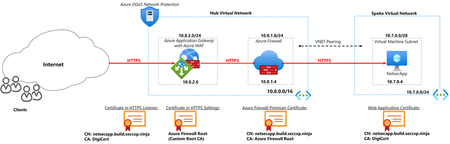
Read the full article here: Zero Trust with Azure Network Security - Microsoft Community Hub As more organizations continue to migrate workloads into the cloud and adopt hybrid cloud setups, security measures and controls can become complicated and difficult to implement. The zero-trust model assists and guides organizations in the continuous digital transformation space by providing a reliable framework to manage complexity, secure digital assets and manage risk. The Zero Trust model assumes breach and verifies each request as though it originated from an uncontrolled network regardless of where the request originates or what resource it accesses, instead of believing everything behind the corporate Firewall is safe. For this blog, we will guide you through strengthening one of Zero trust principles - Assume breach. To read more about Zero Trust principles see Zero Trust implementation guidance | Microsoft Learn Azure Network Security Solutions – Firewall, DDoS Protection, and Web Application Firewall (WAF) provide Zero Trust implementation at the network layer ensuring that organizations’ digital assets are secured from attacks and there is visibility into the network traffic. In this blog, we will look at how Azure DDoS Protection, Web Application Firewall and Azure Firewall can be deployed to achieve Zero Trust. The deployment is set up with end-to-end TLS encryption showcasing the ability of WAF and Azure Firewall to inspect encrypted traffic.