azure waf
95 TopicsAzure Web Application Firewall: WAF config versus WAF policy
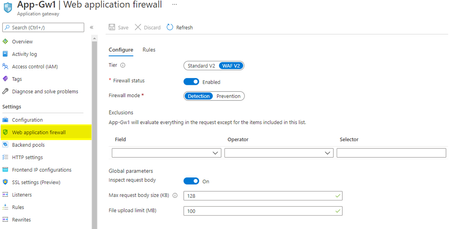
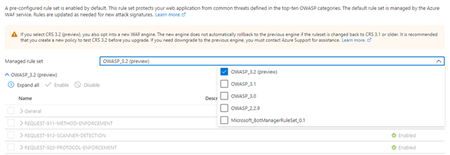
In this blog, we will explore the feature variations when deploying Azure Web Application Firewall (WAF) on Azure Application Gateway using WAF config or WAF policy. We will also show how WAF policies differ between Azure WAF for Azure Front Door and Azure Application Gateway deployments.21KViews8likes3Comments
Protect against React RSC CVE-2025-55182 with Azure Web Application Firewall (WAF)
Please subscribe to this blog as we will be updating the suggested rules as new attack permutations are found. On December 3, 2025, the React team disclosed a critical remote code execution (RCE) vulnerability in React Server Components (RSC), tracked as CVE-2025-55182. The vulnerability allows an unauthenticated attacker to send a specially crafted request to an RSC “Server Function” endpoint and potentially execute arbitrary code on the server. This vulnerability affects applications using React RSC in the following versions: 19.0.0 19.1.0 19.1.1 19.2.0 Patched versions are available, and all customers are strongly encouraged to update immediately. About CVE-2025-55182 According to the React security advisory, the issue stems from unsafe deserialization within React Server Components, where server function payloads were not adequately validated. When exploited, an attacker can execute arbitrary code on the server without authentication. The NVD entry classifies this vulnerability as Critical, with a CVSS score of 10.0, due to its ease of exploitation and the potential impact on server-side execution. All organizations using React Server Components — or frameworks that embed RSC capabilities such as Next.js, React Router (RSC mode), Waku, @parcel/rsc, @vitejs/plugin-rsc, or rwsdk — should consider themselves potentially exposed until the relevant patches are applied. Azure WAF Mitigation to CVE-2025-55182 The primary and most effective mitigation for this vulnerability is to upgrade any unpatched React versions to the latest security-patched releases. Mitigation on WAF on Application Gateway or Application Gateway for Containers If you are using the latest and recommended Default Rule Set (DRS) 2.1, or the previous Core Rule Set (CRS) 3.2, a new CVE-specific managed rule is available in Azure Web Application Firewall (WAF) for Application Gateway and Application Gateway for Containers. Please ensure this rule is enabled and retains its default Anomaly Score–based action: Rule ID: 99001018 (DRS 2.1) or 800115 (CRS 3.2) Rule description: Attempted React2Shell remote code execution exploitation (CVE-2025-55182) This CVE-specific rule has also been added to CRS 3.1. However, for enhanced and more comprehensive protection specifically against CVE-2025-55182, we strongly recommend upgrading to DRS 2.1, which includes additional detection coverage and tuning for this vulnerability. If you are using CRS 3.0, there is no built-in CVE-specific protection for CVE-2025-55182, and upgrading to DRS 2.1 is strongly advised. If upgrading is not currently possible, you may implement custom WAF rules to detect this exploit pattern using a Block action. Any custom rules should be validated in a test or staging environment before being enforced in production. Custom rules definition for WAF on Application Gateway and Application Gateway for Containers: "customRules": [ { "name": "cve202555182", "priority": 1, "ruleType": "MatchRule", "action": "Block", "matchConditions": [ { "matchVariables": [ { "variableName": "PostArgs" } ], "operator": "Contains", "negationConditon": false, "matchValues": [ "constructor", "__proto__", "prototype", "_response" ], "transforms": [ "Lowercase", "UrlDecode", "RemoveNulls" ] }, { "matchVariables": [ { "variableName": "RequestHeaders", "selector": "next-action" } ], "operator": "Any", "negationConditon": false, "matchValues": [], "transforms": [] } ], "skippedManagedRuleSets": [], "state": "Enabled" }, { "name": "cve202555182ver2", "priority": 100, "ruleType": "MatchRule", "action": "Block", "matchConditions": [ { "matchVariables": [ { "variableName": "PostArgs" } ], "operator": "Contains", "negationConditon": false, "matchValues": [ "constructor", "__proto__", "prototype", "_response" ], "transforms": [ "Lowercase", "UrlDecode", "RemoveNulls" ] }, { "matchVariables": [ { "variableName": "RequestHeaders", "selector": "rsc-action-id" } ], "operator": "Any", "negationConditon": false, "matchValues": [], "transforms": [] } ], "skippedManagedRuleSets": [], "state": "Enabled" } ], Adding these custom rules may fail if your WAF runs on the old WAF engine. In this case, we strongly recommend upgrading your WAF policy to the next-generation WAF engine by moving to a newer ruleset: either to the latest DRS 2.1 which includes the built-in managed rule (preferred) or to the previous CRS 3.2, then apply the custom rules described above. If upgrading your ruleset version is not an option, and your WAF remains on the old WAF engine, you can instead use the following alternative rules: "CustomRules": [ { "Name": "cve202555182", "Priority": 1, "RuleType": "MatchRule", "MatchConditions": [ { "MatchVariables": [ { "VariableName": "PostArgs" } ], "Operator": "Contains", "MatchValues": [ "constructor", "__proto__", "prototype", "_response" ], "Transforms": [ "Lowercase", "UrlDecode", "RemoveNulls" ] }, { "MatchVariables": [ { "VariableName": "RequestHeaders", "Selector": "next-action" } ], "Operator": "Regex", "MatchValues": [ "." ], "Transforms": [] } ], "Action": "Block" }, { "Name": "cve202555182ver2", "Priority": 2, "RuleType": "MatchRule", "MatchConditions": [ { "MatchVariables": [ { "VariableName": "PostArgs" } ], "Operator": "Contains", "MatchValues": [ "constructor", "__proto__", "prototype", "_response" ], "ATransforms": [ "Lowercase", "UrlDecode", "RemoveNulls" ] }, { "MatchVariables": [ { "VariableName": "RequestHeaders", "Selector": "rsc-action-id" } ], "Operator": "Regex", "MatchValues": [ "." ], "Transforms": [] } ], "Action": "Block" } ] Mitigation for WAF on Azure Front Door: If you are using WAF on Azure Front Door, you can create custom WAF rules to detect this exploit pattern. These custom rules are configured with a Block action. We recommend validating them in a test or staging environment before enforcing them in production. "customRules": [ { "name": "cve202555182", "enabledState": "Enabled", "priority": 1, "ruleType": "MatchRule", "rateLimitDurationInMinutes": 1, "rateLimitThreshold": 100, "matchConditions": [ { "matchVariable": "RequestHeader", "selector": "next-action", "operator": "Any", "negateCondition": false, "matchValue": [], "transforms": [] }, { "matchVariable": "RequestHeader", "selector": "content-type", "operator": "Contains", "negateCondition": false, "matchValue": [ "multipart/form-data", "application/x-www-form-urlencoded" ], "transforms": [ "Lowercase" ] }, { "matchVariable": "RequestBody", "operator": "Contains", "negateCondition": false, "matchValue": [ "constructor", "__proto__", "prototype", "_response" ], "transforms": [ "Lowercase", "UrlDecode", "RemoveNulls" ] } ], "action": "Block", "groupBy": [] }, { "name": "cve202555182ver2", "enabledState": "Enabled", "priority": 2, "ruleType": "MatchRule", "rateLimitDurationInMinutes": 1, "rateLimitThreshold": 100, "matchConditions": [ { "matchVariable": "RequestHeader", "selector": "rsc-action-id", "operator": "Any", "negateCondition": false, "matchValue": [], "transforms": [] }, { "matchVariable": "RequestHeader", "selector": "content-type", "operator": "Contains", "negateCondition": false, "matchValue": [ "multipart/form-data", "application/x-www-form-urlencoded" ], "transforms": [ "Lowercase" ] }, { "matchVariable": "RequestBody", "operator": "Contains", "negateCondition": false, "matchValue": [ "constructor", "__proto__", "prototype", "_response" ], "transforms": [ "Lowercase", "UrlDecode", "RemoveNulls" ] } ], "action": "Block", "groupBy": [] } ] You can find more information about Custom Rules on Azure WAF for Application Gateway here or for Azure Front Door here. Changelog 1/19/2026 5:00 PST - Updated built-in managed rule for CRS 3.2 and CRS 3.1 on WAF for Application Gateway 12/20/2025 11:00 PST - Updated built-in managed rule on WAF for Application Gateway and Application Gateway for Containers 12/7/2025 23:30 PST - Updated custom rules to detect additional attack permutation 12/5/2025 17:45 PST - Updated custom rules to include additional transform "RemoveNulls".16KViews7likes1CommentZero Trust with Azure Network Security
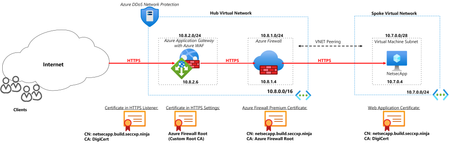
In this blog, we will look at how Azure DDoS Protection, Web Application Firewall and Azure Firewall can be deployed to achieve Zero Trust. The deployment is set up with end-to-end TLS encryption showcasing the ability of WAF and Azure Firewall to inspect encrypted traffic.26KViews6likes2CommentsIntroducing the Application Gateway WAF Triage Workbook
The new "Application Gateway WAF Triage" workbook is free of charge and it provides a convenient way to triage WAF events and identify false positives. It gives you the insights you need to better fine-tune your WAF policy. 30KViews6likes35Comments
Azure Network Security Proof of Concept Part 1: Planning
In this article, we discuss the steps you should consider when performing a network security POC (Container, Apps, Network) to meet regulatory and compliance standards. This is the first part in a network POC series for your Azure Network environment31KViews6likes5Comments