azure virtual machines
42 Topics
Connection was denied because the user account is not authorised for remote log in
Hi experts, ... there was a restart of the server that is running as VM in azure... and since then, I've been experiencing some issues that are seriously affecting the company. When I want to RDP with a required account (lets call it "azvmuser") to the server, I get the message that I'm not authorized. With Administrator account, I can connect with no issues... The only way I could fix it was by adding the "azvmuser" via "User Accounts" -> "Give other users access to this computer" .... This works for a while however at some point the issue returns and when I check the Users Accounts again, the "azvmuser" is missing there again and have to add it again... There is a task created in "Task Scheduler" that runs for that user and due to the issue above, the task is failing... When I add the user to "Give other users access...", the Task runs fine... Any idea how to fix it? ... for now, I just manually check the VM and add the user "azvmuser" when I get the error message... It is happening for a business critical VM..... other 3 VMs we have in Azure are working fine 😕257KViews0likes4CommentsAnnouncing Cobalt 200: Azure’s next cloud-native CPU
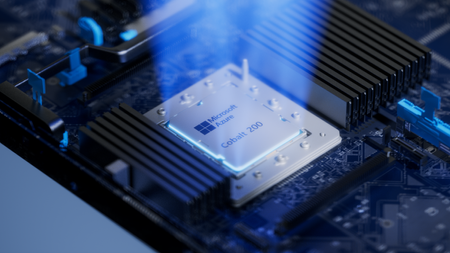
By Selim Bilgin, Corporate Vice President, Silicon Engineering, and Pat Stemen, Vice President, Azure Cobalt Today, we’re thrilled to announce Azure Cobalt 200, our next-generation Arm-based CPU designed for cloud-native workloads. Cobalt 200 is a milestone in our continued approach to optimize every layer of the cloud stack from silicon to software. Our design goals were to deliver full compatibility for workloads using our existing Azure Cobalt CPUs, deliver up to 50% performance improvement over Cobalt 100, and integrate with the latest Microsoft security, networking and storage technologies. Like its predecessor, Cobalt 200 is optimized for common customer workloads and delivers unique capabilities for our own Microsoft cloud products. Our first production Cobalt 200 servers are now live in our datacenters, with wider rollout and customer availability coming in 2026. Azure Cobalt 200 SoC and platform Building on Cobalt 100: Leading Price-Performance Our Azure Cobalt journey began with Cobalt 100, our first custom-built processor for cloud-native workloads. Cobalt 100 VMs have been Generally Available (GA) since October of 2024 and availability has expanded rapidly to 32 Azure datacenter regions around the world. In just one year, we have been blown away with the pace that customers have adopted the new platform, and migrated their most critical workloads to Cobalt 100 for the performance, efficiency, and price-performance benefits. Cloud analytics leaders like Databricks and Snowflake are adopting Cobalt 100 to optimize their cloud footprint. The compute performance and energy-efficiency balance of Cobalt 100-based virtual machines and containers has proven ideal for large-scale data processing workloads. Microsoft’s own cloud services have also rapidly adopted Azure Cobalt for similar benefits. Microsoft Teams achieved up to 45% better performance using Cobalt 100 than their previous compute platform. This increased performance means less servers needed for the same task, for instance Microsoft Teams media processing uses 35% fewer compute cores with Cobalt 100. Designing Compute Infrastructure for Real Workloads With this solid foundation, we set out to design a worthy successor – Cobalt 200. We faced a key challenge: traditional compute benchmarks do not represent the diversity of our customer workloads. Our telemetry from the wide range of workloads running in Azure (small microservices to globally available SaaS products) did not match common hardware performance benchmarks. Existing benchmarks tend to skew toward CPU core-focused compute patterns, leaving gaps in how real-world cloud applications behave at scale when using network and storage resources. Optimizing Azure Cobalt for customer workloads requires us to expand beyond these CPU core benchmarks to truly understand and model the diversity of customer workloads in Azure. As a result, we created a portfolio of benchmarks drawn directly from the usage patterns we see in Azure, including databases, web servers, storage caches, network transactions, and data analytics. Each of our benchmark workloads includes multiple variants for performance evaluation based on the ways our customers may use the underlying database, storage, or web serving technology. In total, we built and refined over 140 individual benchmark variants as part of our internal evaluation suite. With the help of our software teams, we created a complete digital twin simulation from the silicon up: beginning with the CPU core microarchitecture, fabric, and memory IP blocks in Cobalt 200, all the way through the server design and rack topology. Then, we used AI, statistical modelling and the power of Azure to model the performance and power consumption of the 140 benchmarks against 2,800 combinations of SoC and system design parameters: core count, cache size, memory speed, server topology, SoC power, and rack configuration. This resulted in the evaluation of over 350,000 configuration candidates of the Cobalt 200 system as part of our design process. This extensive modelling and simulation helped us to quickly iterate to find the optimal design point for Cobalt 200, delivering over 50% increased performance compared to Cobalt 100, all while continuing to deliver our most power-efficient platform in Azure. Cobalt 200: Delivering Performance and Efficiency At the heart of every Cobalt 200 server is the most advanced compute silicon in Azure: the Cobalt 200 System-on-Chip (SoC). The Cobalt 200 SoC is built around the Arm Neoverse Compute Subsystems V3 (CSS V3), the latest performance-optimized core and fabric from Arm. Each Cobalt 200 SoC includes 132 active cores with 3MB of L2 cache per-core and 192MB of L3 system cache to deliver exceptional performance for customer workloads. Power efficiency is just as important as raw performance. Energy consumption represents a significant portion of the lifetime operating cost of a cloud server. One of the unique innovations in our Azure Cobalt CPUs is individual per-core Dynamic Voltage and Frequency Scaling (DVFS). In Cobalt 200 this allows each of the 132 cores to run at a different performance level, delivering optimal power consumption no matter the workload. We are also taking advantage of the latest TSMC 3nm process, further improving power efficiency. Security is top-of-mind for all of our customers and a key part of the unique innovation in Cobalt 200. We designed and built a custom memory controller for Cobalt 200, so that memory encryption is on by default with negligible performance impact. Cobalt 200 also implements Arm’s Confidential Compute Architecture (CCA), which supports hardware-based isolation of VM memory from the hypervisor and host OS. When designing Cobalt 200, our benchmark workloads and design simulations revealed an interesting trend: several universal compute patterns emerged – compression, decompression, and encryption. Over 30% of cloud workloads had significant use of one of these common operations. Optimizing for these common operations required a different approach than just cache sizing and CPU core selection. We designed custom compression and cryptography accelerators – dedicated blocks of silicon on each Cobalt 200 SoC – solely for the purpose of accelerating these operations without sacrificing CPU cycles. These accelerators help reduce workload CPU consumption and overall costs. For example, by offloading compression and encryption tasks to the Cobalt 200 accelerator, Azure SQL is able to reduce use of critical compute resources, prioritizing them for customer workloads. Leading Infrastructure Innovation with Cobalt 200 Azure Cobalt is more than just an SoC, and we are constantly optimizing and accelerating every layer in the infrastructure. The latest Azure Boost capabilities are built into the new Cobalt 200 system, which significantly improves networking and remote storage performance. Azure Boost delivers increased network bandwidth and offloads remote storage and networking tasks to custom hardware, improving overall workload performance and reducing latency. Cobalt 200 systems also embed the Azure Integrated HSM (Hardware Security Module), providing customers with top-tier cryptographic key protection within Azure’s infrastructure, ensuring sensitive data stays secure. The Azure Integrated HSM works with Azure Key Vault for simplified management of encryption keys, offering high availability and scalability as well as meeting FIPS 140-3 Level 3 compliance. An Azure Cobalt 200 server in a validation lab Looking Forward to 2026 We are excited about the innovation and advanced technology in Cobalt 200 and look forward to seeing how our customers create breakthrough products and services. We’re busy racking and stacking Cobalt 200 servers around the world and look forward to sharing more as we get closer to wider availability next year. Check out Microsoft Ignite opening keynote Read more on what's new in Azure at Ignite Learn more about Microsoft's global infrastructure26KViews11likes0Comments
Azure Virtual Desktop Specialty certification is here!
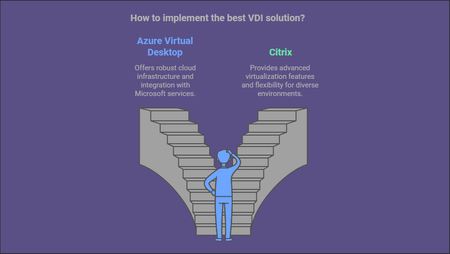
2019 was declared the year of VDI, 2020 was the year of Cloud and I think that 2021 will be the year of Azure Virtual Desktop, bringing VDI and the Cloud together…and the long wait is over! The Azure Virtual Desktop Specialty certification is now generally available. So lets take a few minutes to chat about WVD and why the Exam AZ-140: Configuring and Operating Microsoft Azure Virtual Desktop is something you should be interested in! What is Azure Virtual Desktop? Azure Virtual Desktop is Microsoft Azure’s VDI PaaS solution that enables you to provide remote applications and/or full desktops in the cloud. One of the strongest points of WVD is Windows 10 Multi-session which combines the functionality of a traditional windows remote desktop server with the windows client experience, giving you the best of both worlds. This combined with the FSLogix User Profile software is an amazing solution that will allow your users to work from home or remote locations securely without needing all the traditional heavy infrastructure. Why should you bother taking the Exam AZ-140? Like with all certifications it is a measure of your ability to complete a task, demonstrate your knowledge, improve your resume, get your next dream job, make more money, feel accomplished and empowered and of course bragging rights! What does the exam cover? The Exam AZ-140 will test all your Azure skills across five (5) key areas. Planning your Azure Virtual Desktop Architecture Implementing your Azure Virtual Desktop Infrastructure Manage Access and Security Manage User Environment and Apps Monitor and maintain your Azure Virtual Desktop Infrastructure. Who should be ready to take the exam? Those looking to get this certification should have a general expertise across The Azure Virtual Desktop stack along with Azure administration and architecture expertise including but not limited to: Azure Active Directory, Active Directory Domains, Group policy, Identity Security, Networking, DNS, Network Security, Endpoint Protection, Azure Virtual Machines, Mobile Device Management, Printing, Azure Monitor, FSLogix User Profiles Azure Storage solutions, client-side security, Automation Disaster Recovery, and VM Imaging. Now this may seem like a lot…and it is, but we’ve got you covered! The Azure Academy: Your training begins with my https://www.youtube.com/AzureAcademy/, where I have a https://www.youtube.com/watch?v=DZNc1DQxEEA&list=PL-V4YVm6AmwW1DBM25pwWYd1Lxs84ILZT This series was developed to match the requirements and is broken down into two (2) sections. The first eleven (11) Learning videos and twelve through twenty (12-20) Implementation videos. This way you can zero in on the specific areas you need to understand and practice building so you are ready for anything the exam can through at you! What The Hack: But the fun doesn’t stop there. My team, FastTrack for Azure, has led an effort across Microsoft’s WVD experts including Cloud Solution Architects, Global Black Belts, Customer Engineers and Consultants to put together materials to help you prep for the exam which can be found on the public GitHub repo https://github.com/microsoft/WhatTheHack/tree/master/037-WindowsVirtualDesktop A Hack is a challenge-based approach to learning. This format is intended to be led by a coach who will help guide the students as they progress through the challenges. This can be done on your own or with a small group to think through things as you would in designing a real-world solution. In this Hack you will find twelve (12) challenges which align with the video series to help you through each section to dive a little deeper into the scenarios and build the solutions, giving you the skills, you need to take the exam with confidence. This gives you the flexibility to use the videos as your coach or work with a WVD expert to coach you and your team through the process. What’s Next? “I can only show you the door, you are the one who must walk through it.” - Morpheus We have created the resources; Microsoft created the certification…it’s up to you now! Start down your learning path or if you are ready schedule your exam. If you need help drop a comment here or on one of my videos and we will all do our best to answer your questions. Also drop me a comment when you pass your exam, I love to hear your success stories and suggestions. Thanks for taking a few minutes out of your day to read this blog post…and good luck and all the success in the world to you in the year of Azure Virtual Desktop #HappyLearning Dean Cefola FastTrack for Azure Principal Engineer Azure Academy creator9.4KViews2likes1Comment(Part-1) Leverage Bicep: Standard model to Automate Azure IaaS deployment
Subjects. Those deeply interested in IaC using Azure. Those who understand the basics of Azure Resource Manager Templates and want to work deeply with Bicep. Those who understand the names of services and functions used in Azure IaaS and have experience in building automation. Agenda. How about Bicep Difference between ARM templates and Bicep Basic functionality Bicep Development Environment Sample Code and Explanation Traps and Avoidance Notes. Azure services are evolving every day. This content is based on what we have confirmed as of April 2023.8.8KViews4likes0Comments