azure sre agent
64 TopicsStop restricting the agent. Start restricting its environment.
Human review improves safety but limits autonomy. Standing credentials preserve autonomy but increase risk. With Azure SRE Agent, we found a safer middle by moving control out of the model and into the runtime around it.838Views1like1Comment
Azure SRE Agent: Introducing Live Reports
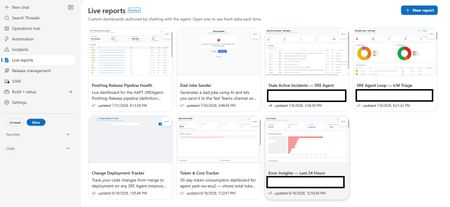
Today we're introducing Live Reports in Azure SRE Agent, now in public preview. You describe a dashboard in chat; the agent builds it, and it refreshes every time you open it. Ops teams ask the same handful of questions every morning: What's burning right now? What landed overnight? Who's on call? The answers usually live across multiple browser tabs, a one-off script only one person can run, or a chat prompt retyped daily and re-read as a fresh wall of text. Live Reports provides the missing piece: somewhere to author a view once and consume it many times. Frozen structure, live data This is the core design decision: the layout is deterministic, and the data is live. The agent authors the page once, then freezes it. Charts, thresholds, column order, and styling stay put. What refreshes on every open are the tool calls embedded in the page, so the shape is identical each morning, and the numbers are up to date. That's what separates a Live Report from a dashboard an LLM regenerates on every view. The chart looks consistent every day, and the page loads like a standard web page rather than a streaming chat response because there's no model in the render path. This leads to a key operational benefit: you only spend tokens when authoring the report. Opening a report built purely on tool calls uses no additional model tokens, no matter how many times you open it. (Reports that opt into AI-powered interpretation are the exception, as explained below.) This makes it practical for your entire team to open the report every morning without incurring ongoing LLM costs. When you want changes, simply ask the agent. It will edit the page in place and save a new version, preserving earlier revisions so you can always reference previous configurations. What you can build Report data sources include the connectors your agent already has access to: any connected MCP server, logs and metrics, source control, work items, and internal services. Charts are real visualizations. Reports pull vetted charting and grid libraries from a CDN, giving you interactive, sortable tables and graphics rather than static markdown tables. Reports can also reason at view time. Alongside tool calls, a report can send a focused prompt to a fast, lightweight model as it renders: classify alerts by severity, group issues by likely root cause, or summarize a discussion thread into a single line. Every reload re-fetches and re-interprets the data, keeping real-time judgment aligned with the latest telemetry. Note: AI-powered interpretation consumes tokens each time the report loads, which is why it is strictly opt-in per report. Reports can also take actions, but only the ones you wired in. A button invokes a write tool from a connector your agent is already connected to: acknowledge an incident, post to a discussion thread, assign an owner, open a work item. It cannot call an arbitrary URL or API of its own. Every button is limited to the exact tool names saved with that version of the report, and any tool that would ask for your approval in chat asks the same way when a button fires it. That's what turns a dashboard into something you operate from, without turning it into an open shell. The security model A model-authored page capable of calling production tools requires strict guardrails. It is constrained across four layers: Sandboxed origin: Reports render in an iframe with sandbox="allow-scripts" and deliberately omit allow-same-origin, ensuring the page runs at an opaque origin with no access to session tokens or cookies. Restricted network access: Report scripts cannot make direct API calls to arbitrary endpoints. All data requests route through the Live Reports runtime, which validates each call against the approved tool manifest for that specific report version. Per-version allowlists: A report can only invoke the exact tools it was configured with. Any unapproved call is rejected server-side at runtime, rather than relying on prompt-level instructions. Explicit human approval: When saving a report with connector access, the agent presents the exact tool descriptions provided by each connector. Nothing executes until you explicitly approve the configuration. Reports remain strictly bound to your agent's existing permission boundary. Exports are sanitized to a static, offline-safe file, which is safe to attach to a postmortem. Getting started Open the Live Reports tab and select New report. Describe your scenario in chat. The agent will inspect your available connectors, ask clarifying questions if needed, and generate the layout. Review and approve the tool permissions to add the report to your gallery. What's next We're continuing to expand connector support, build richer visualization primitives, and tighten the loop between observability and automated remediation. The best reports are often the ones we didn't anticipate. What is the operational view your team finds itself rebuilding by hand? Let us know in the comments. 👉 Try Live Reports in Azure SRE Agent936Views1like0CommentsReliability Starter Kit: SLIs, Health models, and SRE Agent
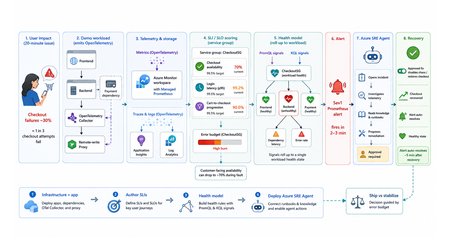
TL;DR This walkthrough uses a small e-commerce demo app to show how Azure Monitor can measure a user journey with service level indicators (SLIs) and service level objectives (SLOs), roll those results into a health model, and have the Azure SRE Agent investigate the alert. When the demo intentionally breaks, about one in three checkout attempts, a Sev1 Prometheus alert fires in about 2 to 3 minutes, and the agent opens an incident from that alert within a minute or two. Clone the kit, run four steps in order, and watch the failure go from alert to proposed fix on your own subscription. Who this is for Site reliability engineers who own on-call and want alerts that mean something. Platform engineers wiring observability for other teams. Application developers who need to prove a service is healthy before they ship. Engineering leaders deciding when to ship and when to stabilize. What the user felt, and what the system reported In the demo app, a fault makes about one in three checkout attempts fail for twenty minutes. The table below shows how that same incident can look to customers and to the platform. What the customer experienced What the system reported Payment failed, retried twice, gave up CPU 40%, memory normal, every instance up Cart abandoned, no order placed No alert fired on slidemo-be-<suffix> Called support: "it works fine for us" Average latency 180 ms, inside target Every statement in the right column is accurate. None of them explains the left column. The platform was answering a resource question: are the apps running? Users had a different question: can I complete checkout? A service level indicator (SLI) closes that gap. It is one number: successful checkouts divided by attempted checkouts, as a percentage. It changes when checkout succeeds or fails, not when CPU or memory changes. Set a target for that number, say 99.5%, and the target is your service level objective (SLO). With both in place, the questions that matter answer themselves: The question What the SLI tells you Is this real? Checkout availability is 70%, against a 99.5% target How bad is it? Most of a week's error budget is gone in ten minutes What broke? The checkout journey is failing, so responders start in the right place Azure Monitor computes that SLI for you. Azure Monitor health models roll it up into one workload state. The Azure SRE Agent turns the right alert into an investigation and a proposed fix. The hard part is the wiring between them: which metric feeds the indicator, which indicator feeds the health signal, and which alert source actually reaches the agent. This kit ships that wiring, as scripts you can run, against a workload you can break on purpose. What the kit ships The kit is a self-contained reference implementation. It deploys its own demo workload, instruments it, and connects five stages end to end: telemetry is emitted, stored in Azure Monitor, scored into SLIs and rolled up by a health model, turned into an alert the Azure SRE Agent acts on, and finally weighed against the error budget. It is opinionated on purpose: one workload, one service group, three SLIs, one health model, one agent, one proven trigger. The four services it wires together Service What it does Layer Azure Monitor SLIs and SLOs on a Service Group You name the metric that counts as good and the one that counts as total. It computes the ratio on a schedule, compares it to your target, and tracks the error budget. The score belongs to a service group, which is how Azure Monitor names your application as a whole, so the number describes the app rather than any one resource. This post calls that scoring component the SLI engine. Measurement Azure Monitor health models A dependency graph where every node carries its own health state. Each node is an entity, either an Azure resource or an application component discovered from Application Insights. You attach signals to an entity (a PromQL query, a KQL query, or a platform metric) with degraded and unhealthy thresholds, and the worst child state rolls up into one state for the workload. Aggregation Azure SRE Agent Takes Azure Monitor alerts as incidents and runs the first-pass investigation: queries the relevant metrics, logs, and recent deployments, forms a root-cause hypothesis, and proposes a remediation. It never applies a change without human approval. The kit deploys it read-only, so it investigates freely and has to ask before it changes anything. Action The telemetry plane OpenTelemetry (OTel) in the apps, a collector, an Azure Monitor workspace running managed Prometheus for metrics, and Application Insights backed by a Log Analytics workspace for traces and logs. One workspace holds both the raw metrics and the SLI results, so everything reads a single consistent set of numbers. Foundation What ships in the box Four steps you run in order: infrastructure and the app, SLIs on a service group, the health model, and the Azure SRE Agent. Runnable PowerShell scripts for every step, all idempotent, all with teardown. A demo workload with a chaos endpoint, so you can break checkout on demand. Validated console transcripts in the lab guides, so you know what "working" looks like before you run it. Everything is in this repo. The diagram shows how the pieces hand off to each other: Walking the flow: Emit. The apps emit OpenTelemetry counters and histograms. The Collector splits the stream two ways: metrics go to a remote-write proxy that attaches a Microsoft Entra ID token, and traces and logs go to Application Insights, backed by a Log Analytics workspace. Store. The Azure Monitor workspace ingests the metric series. Prometheus recording rules pre-aggregate them into the exact label shape the SLI engine can filter on. Score and roll up. Three SLIs on the CheckoutSG-<suffix> service group compute good over total, compare against a 99.5% baseline, and write their evaluated results back into the same workspace. The health model reads those stored results as PromQL signals and the failure data as a KQL signal, then rolls the worst child state up to the workload root. Alert and act. A Prometheus alert rule on the workspace fires Sev1 into the action group and into the Azure SRE Agent's incident source. The agent reads its uploaded knowledge base, correlates against the traces and logs, and proposes a runbook. After you approve it, the remediation runs and the agent verifies recovery. The health model's own health-state alerts reach the action group for human triage only: they fire in rg-healthmodel-demo, which is not the agent's incident-ingestion scope, so they never become incidents. Decide. The error budget gates the release call: ship when healthy, stabilize when burning. The demo workload The workload is a small e-commerce store, deliberately boring so the reliability mechanics are the interesting part. Component What it is What it does Frontend Node.js on App Service Linux Customer site, proxies /api/* to the backend Backend Node.js on App Service Linux Serves /login and /checkout, calls the payment dependency, emits the SLI source metrics Payment dependency Simulated, inside the backend Exercised through checkout, never called directly OpenTelemetry Collector Container web app Receives OpenTelemetry Protocol (OTLP) traffic, fans traces to Application Insights and metrics toward Prometheus remote write Remote-write proxy Node.js on App Service Linux Attaches a managed identity token so remote write works on App Service, which has no Instance Metadata Service (IMDS) endpoint Azure Monitor workspace Managed Prometheus Both the SLI source and the SLI destination Application Insights + Log Analytics workspace Traces and logs The investigation surface the agent correlates against The three source metrics are the raw material for every SLI in the kit: Metric Type Labels Feeds http_server_requests_total counter service, route, status_class Checkout availability (good is status_class="2xx") http_server_request_duration_seconds histogram service, route Login latency (good is under 300 ms) dependency_calls_total counter dependency, status Payment dependency availability The chaos endpoint Use the backend admin endpoint to inject failures or latency: POST {backend}/admin/chaos Set service to "login" or "checkout", then use errorRate and extraLatencyMs to shape the fault. Do not pass "payment": the payment dependency is exercised through checkout, so "payment" returns HTTP 400. Before you start: prerequisites Start by cloning the kit: git clone https://github.com/jvargh/azure-reliability-starter-kit.git cd azure-reliability-starter-kit Every command in this post runs from that repository root. No step asks you to change directory. Open two terminals there: the traffic generator described later in "Start traffic and leave it running" blocks its shell for the full run. Two things the table cannot tell you. Every step creates role assignments, so you need a subscription where you can grant roles, not just create resources. And the App Service plan defaults to P1v3, which is what you want if you also care about Azure Resource Health signals in the health model; pass -PlanSku B1 for a cheaper run, and use the Clean up section when you are finished. Requirement Value used in this kit Subscription role Owner, or Contributor plus User Access Administrator Shell PowerShell 7+ (pwsh), two terminals CLI Azure CLI, signed in (az login) Tooling (Step 4) git, jq, Python 3 with PyYAML on PATH (Phase 2 can install the last three) Resource providers Microsoft.Monitor, Microsoft.Web, Microsoft.CloudHealth, Microsoft.App Network Outbound to *.azuresre.ai Workload region eastus2 (any region works) Health model region centralus (region limited, so the kit pins it) Azure SRE Agent region eastus2 (check the current region list before changing it) Prefer to paste the whole sequence and read afterwards? The full command sequence is consolidated later in "Try it now." Step 1: stand up the infrastructure and the app Folder: 01-sli-demo/infra Prerequisites: everything in the table above. infra-deploy.ps1 registers the required resource providers itself, so you do not need to pre-register them. What infra-deploy.ps1 does infra-deploy.ps1 is one script that takes you from an empty subscription to a running, instrumented workload: Creates the resource group (rg-sli-demo) in your chosen location, or leaves it alone if it already exists. Registers the required resource providers. Deploys the Bicep in main.bicep, which composes four modules: monitoring (Azure Monitor workspace, Log Analytics workspace, Application Insights), identity (the user-assigned managed identity plus its Monitoring roles), the App Service plan and four web apps, and the ingestion wiring for the workspace. Zip-deploys the three Node.js applications (backend, frontend, remote-write proxy) with Oryx building each one on the platform. Prints every value the later steps need: the frontend URL, the Azure Monitor workspace name, the managed identity client id, and the suggested service group name. az login az account set --subscription "<SUBSCRIPTION_ID>" ./01-sli-demo/infra/infra-deploy.ps1 -ResourceGroup rg-sli-demo -Location eastus2 A clean run, trimmed: PS ...\azure-reliability-starter-kit> ./01-sli-demo/infra/infra-deploy.ps1 -ResourceGroup rg-sli-demo -Location eastus2 ==> Ensuring resource group rg-sli-demo (eastus2) ==> Registering required resource providers ==> Deploying infrastructure (Bicep) ==> Deploying app code (backend, frontend, proxy) ==> Deploying code to slidemo-be-<suffix> Status: Build successful. Time: 52(s) Status: Site started successfully. Time: 87(s) ... ==> Done. Resources deployed and code pushed. Frontend: https://slidemo-fe-<suffix>.azurewebsites.net Backend: https://slidemo-be-<suffix>.azurewebsites.net Azure Monitor WS: slidemo-amw-<suffix> Service Group name: CheckoutSG-<suffix> (add rg-sli-demo as a member) Keep <suffix> handy. Every later script auto-discovers it from the deployment outputs, but you will see it in resource names throughout. Smoke-test it with infra-validate-lab.ps1 infra-validate-lab.ps1 reads the deployment outputs and asserts the deployment succeeded, all four App Services are running, and every health and functional endpoint responds (including the frontend-to-backend proxy path). It prints [PASS], [FAIL], or [SKIP] per check and exits non-zero on any failure, so you can gate a demo or a pipeline on it. Run it with no optional switches at this point. The metric and SLI checks depend on traffic and on Step 2, neither of which has happened yet. ./01-sli-demo/infra/infra-validate-lab.ps1 -ResourceGroup rg-sli-demo Validating SLI/SLO demo infrastructure in 'rg-sli-demo'... == Prerequisites == [PASS] Azure CLI signed in [PASS] Resource group 'rg-sli-demo' exists == Deployment == [PASS] Deployment 'main' found [PASS] Deployment provisioningState (Succeeded) ... == Health endpoints == [PASS] backend /healthz (GET -> 200) [PASS] frontend /healthz (GET -> 200) [PASS] proxy /healthz (GET -> 200) ... == Functional endpoints == [PASS] frontend /api/checkout (GET -> 200) ... The two optional switches, -IncludeMetrics and -IncludeSlo, are staged deliberately. Switch -IncludeMetrics needs live traffic, and -IncludeSlo looks for the recording-rule group that Step 2 creates, so both belong at the end of Step 2 (see Re-validate, now with the metric and SLI checks). A [FAIL] means a resource is missing; a [SKIP] means it exists but has no data yet. Start traffic and leave it running Run this in a second terminal at the repository root. It blocks the shell for the full duration, and every remaining step needs it flowing. pwsh -File ./01-sli-demo/load/generate-traffic-all.ps1 -ResourceGroup rg-sli-demo -Rps 30 -DurationSeconds 3600 generate-traffic-all.ps1 auto-discovers the frontend URL from the main deployment output (falling back to the App Service whose name contains -fe-), then drives a mixed load defaulting to 30 requests per second with a 70% checkout weight. It requires PowerShell 7 or later. PS ...\azure-reliability-starter-kit> pwsh -File ./01-sli-demo/load/generate-traffic-all.ps1 -ResourceGroup rg-sli-demo -Rps 30 -DurationSeconds 3600 Resolved target from 'rg-sli-demo': https://slidemo-fe-<suffix>.azurewebsites.net Driving ~30 rps against https://slidemo-fe-<suffix>.azurewebsites.net checkout 70% (also drives payment dependency) | login 30% duration: 3600 s [1188s] checkout: sent=11032 ok=10977 fail=23 | login: sent=4777 ok=4772 fail=1 | payment via checkout Keep traffic running before you author SLIs. The SLI query validator needs the Azure Monitor workspace to index metric dimensions first, and that only happens after metrics flow. Histogram-derived dimensions index later than plain counters, so starting traffic early avoids false validation errors such as status_class not being available yet. Step 2: author the SLIs Folder: 01-sli-demo Prerequisites: Step 1 deployed and green in infra-validate-lab.ps1, and generate-traffic-all.ps1 still running in its own terminal, for the indexing reason in the callout above. What deploy-sli.ps1 does deploy-sli.ps1 automates the SLI authoring flow: Stage What the script does Why it matters Read context Reads the Azure Monitor workspace, managed identity, and suggested service group name from the main deployment outputs. Keeps later commands tied to the deployed workload. Prepare metrics Deploys six Prometheus recording rules. Four feed the SLIs; two (sli:http_request_latency_p95:5m, sli:http_request_latency_avg:5m) support dashboards and the health model. The SLI engine can filter dimensions on recording-rule output, not raw remote-written series. Create scope Creates CheckoutSG-<suffix>, adds rg-sli-demo as a member, and sets the default managed identity and Azure Monitor workspace. Puts the frontend and backend in SLI scope. Wait for data Waits up to -MetricWaitMinutes for sli:http_requests:rate5m and sli:http_request_latency_total:rate5m, then retries SLI creation for up to -SliIndexingRetryMinutes while dimensions index. Avoids false validation failures while metric metadata catches up. Author SLIs Creates the three SLIs and polls until each reports Succeeded. Produces the customer-facing reliability measurements. Wire alerts Creates ag-sli-demo and the linked baseline, fast-burn, and slow-burn alerts for each SLI. Makes the SLIs visible with their alert configuration. The three SLIs it creates. All three sit at a 99.5% baseline over a 7 rolling-day window: SLI Type Good over total CheckoutAvailabilitySLI Availability 2xx checkout requests over all checkout requests LoginLatencySLI Latency Login requests under 300 ms over all login requests PaymentDependencySLI Dependency availability Successful payment calls over all payment calls Run this script from the repository root after traffic has started. It creates the recording rules, service group, SLIs, and linked alert configuration in one pass. ./01-sli-demo/infra/sli/deploy-sli.ps1 -ResourceGroup rg-sli-demo A successful run should show these checkpoints: PS ...\azure-reliability-starter-kit> ./01-sli-demo/infra/sli/deploy-sli.ps1 -ResourceGroup rg-sli-demo ==> Reading deployment context AMW : .../Microsoft.Monitor/accounts/slidemo-amw-<suffix> Identity : .../userAssignedIdentities/slidemo-id-<suffix> ServiceGroup : CheckoutSG-<suffix> ==> Deploying Prometheus recording rules Succeeded ==> Creating Service Group Service Group: Succeeded ==> Adding resource group as a Service Group member Member relationship submitted. ==> Enabling monitoring on the Service Group Default workspace and identity set. ==> Waiting up to 10 min for recording-rule metrics Counter metric present: True Latency total metric present: True ==> Creating SLIs CheckoutAvailabilitySLI created LoginLatencySLI created PaymentDependencySLI created ==> Verifying SLI provisioning CheckoutAvailabilitySLI Succeeded LoginLatencySLI Succeeded PaymentDependencySLI Succeeded The result is a service group view with three SLIs: checkout availability, login latency, and payment dependency availability. Each one uses the same 99.5% baseline over a 7 rolling-day window, and the list shows both the current SLI value and the remaining error budget. The guided design method: sli-run-lab.ps1 Automation gets you three SLIs. It does not teach you how to choose them for your own application. That is what sli-run-lab.ps1 is for: an eight-phase interactive method that walks from telemetry to a design checklist, prompting for the judgement calls and computing everything else. Phase Name What you get 1 Environment setup and access checks Resolved workspace, identity, service group, Prometheus endpoint 2 Enumerate ALL user journeys journey-inventory.csv built from live telemetry 3 Extract the CRITICAL journeys Criticality scores and a shortlist 4 Data collection (per critical journey) Dimensions confirmed, performance measured, continuity checked 5 Consolidate into the design checklist design-checklist.csv, one row per SLI 6 Author the SLIs in the portal The wizard, or deploy-sli.ps1 7 Validate end-to-end Published :value series cross-checked against your own math 8 Lab completion checklist What "done" looks like Phase 4 is where the evidence gets collected, per journey: ---- checkout ---- ==> 4.1 - Confirm the source metric and required dimensions exist checkout / 2xx checkout / 5xx ==> 4.2 - Measure CURRENT performance (evidence for the target) Measuring over the last 7d... Measured (7d): 99.796% ==> 4.3 - Confirm the signal is continuous (no silent gaps) Checking the last 6h in 5m buckets... Continuous: yes (no empty 5m buckets). ==> 4.4 - Write the good / valid definition (the contract) ==> 4.5 - Data-collection worksheet (fill one per critical journey) At target 99.5% the error budget is 0.5% (currently ~0.41x used). Recorded worksheet for CheckoutAvailabilitySLI. Phase 7 proves the engine is not just configured but actually publishing, and cross-checks its arithmetic against yours: ==> 7.2 - Confirm the engine publishes results Authored SLIs: CheckoutAvailabilitySLI, LoginLatencySLI, PaymentDependencySLI ---- CheckoutAvailabilitySLI ---- engine value = 99.6914 ==> 7.3 - Cross-check the engine against your own math 100*good/total = 99.6914 (internal consistency) ... ---- LoginLatencySLI ---- engine value = 100.0000 Right after you restart traffic, Phase 7 will report "No published :value series yet." That is the engine waiting on evaluation cycles, not a failure. The portal's SLI status and error budget columns lag a further 30 to 60 minutes. You can validate the same thing yourself with one PromQL (the Prometheus query language) query against the workspace: 100 * sum(sli:http_requests:rate5m{service="checkout",status_class="2xx"}) / sum(sli:http_requests:rate5m{service="checkout"}) Re-validate, now with the metric and SLI checks With traffic flowing and the recording rules deployed, the two switches you skipped in Step 1 now have something to assert against. This is the full 22-check run: ./01-sli-demo/infra/infra-validate-lab.ps1 -ResourceGroup rg-sli-demo -IncludeMetrics -IncludeSlo == Metric pipeline == [PASS] Prometheus query token acquired [PASS] Source metrics present (http_server_requests_total series=3) [PASS] Recording-rule group deployed (slidemo-sli-recording-rules) [PASS] Recording-rule metrics present (sli:http_requests:rate5m) Summary: 22 passed, 0 failed, 0 skipped Before you move to Step 3, give the SLI engine 30 to 60 minutes to publish evaluated values into the workspace. The health model reads those stored results rather than recomputing them, so starting Step 3 too early gives you a graph of Unknown states and nothing to debug. Step 3: roll it up with an Azure Monitor health model Folder: 02-healthmodel-demo Prerequisites: the three SLIs authored and publishing values, and generate-traffic-all.ps1 still running. What healthmodel-run-lab.ps1 does healthmodel-run-lab.ps1 is a six-phase runner that calls two write scripts: src/healthmodel-deploy.ps1 creates the model, and src/configure-signals-alerts.ps1 attaches signals and alerts. Phase Name 1 Environment setup and access checks 2 Create the health model 3 Discover the app as entities 4 Map the SLIs to entities (from the sli label) 5 Configure signals and alerts 6 Validate end-to-end ./02-healthmodel-demo/healthmodel-run-lab.ps1 Phase 2 creates the health model (hm-checkout-demo) with a system-assigned identity under the Microsoft.CloudHealth provider at API version 2026-05-01-preview, grants that identity Monitoring Reader on the workload resource group, binds an authentication setting, and creates the discovery rules. Why there are two discovery nodes The kit creates two discovery rules, not one, because they answer different questions: Azure Resource Graph discovery imports the workload's Azure resources (the four App Services and the plan) as entities. This is the infrastructure view: concrete resource ids the Azure SRE Agent can act on. Application Insights topology discovery imports the application's own component map (sli-demo-frontend, sli-demo-backend) and their observed dependencies. This is the application view, which survives resource renames and shows call relationships that Resource Graph cannot see. The model uses a "worst of" rollup: if any child entity is Unhealthy, the parent moves to Unhealthy too. Discovery is not instant; it runs every five minutes, so wait 5 to 10 minutes after Phase 2 before checking for entities in Phase 3. The critical detail: tap the stored SLI results The health model does not recompute your SLIs from raw metrics. It reads the stored SLI result series that the SLI engine writes back into the Azure Monitor workspace. That is what keeps the model's numbers identical to the SLI blade's numbers. Those series are named ns::<servicegroup-lowercase>/m::<sli-lowercase>:value (with :good and :total alongside). The :: and / characters make that invalid as a bare metric token, so the selector has to be pinned with __name__ equality: last_over_time({__name__="ns::checkoutsg-<suffix>/m::checkoutavailabilitysli:value"}[1h]) Thresholds and the one-hour lookback. The one-hour last_over_time lookback is what keeps a brief gap in traffic from reading as an error: the signal returns the most recently published value instead of an empty result, and only goes Unknown when the SLI has published nothing for a full hour. Thresholds on that signal are degraded below 99 and unhealthy below 95, which means a 99.9% reading correctly stays Healthy instead of tripping on a "below 100" rule. ==> 5.1 - Invoking src/configure-signals-alerts.ps1 ==> Ensuring AMW query roles (Monitoring Data Reader + Monitoring Reader) for the health model identity Monitoring Data Reader assigned Monitoring Reader assigned ==> Discovering published SLI result series in the AMW CheckoutAvailabilitySLI: found LoginLatencySLI: found PaymentDependencySLI: found ==> Checkout (backend): slidemo-be-<suffix>: Checkout availability SLI (AMW), Payment dependency SLI (AMW) ==> Login (frontend): slidemo-fe-<suffix>: Login latency SLI (AMW) ==> App Service plan tier: PremiumV3 (Resource Health supported: True) ==> Uptime signal (Resource Health) on 'slidemo-promproxy-<suffix>' ==> Linking the model root to each discovery node so health rolls up root -> appinsights-topology updated root -> resource-graph updated Phase 6 reads the resulting states and confirms the numbers match: ==> 6.1 - Entity health states and attached SLI signals Entity Health SliSignals ------ ------ ---------- slidemo-be-<suffix> Healthy Checkout availability SLI (AMW), Payment dependency SLI (AMW) slidemo-fe-<suffix> Healthy Login latency SLI (AMW) Checkout/Login workload Healthy hm-checkout-demo Healthy ... -- 6.2 stored :value series -- checkoutavailabilitysli = 99.82 loginlatencysli = 100 paymentdependencysli = 99.82 Tier awareness matters. Azure Resource Health is unsupported on Free and Shared App Service plans, so configure-signals-alerts.ps1 reads the plan SKU and adapts: Basic and above use the built-in Resource Health signal, while Free and Shared fall back to the Http2xx platform metric on the sites and CpuPercentage on the plan. Without that fallback, every supporting entity reads Unknown on a cheap plan and the model looks broken when it is not. Step 4: deploy the Azure SRE Agent Folder: 03-sre-agent Prerequisites: Microsoft.App registered on the subscription, Owner or User Access Administrator so the deployment can create role assignments on both managed resource groups, outbound access to *.azuresre.ai for the agent data plane, and git, jq, and Python 3 with PyYAML available on PATH. Phase 2 can install the last three for you through the templates' Install-Prerequisites.ps1, so a clean machine only needs git in advance. What sre-run-lab.ps1 does sre-run-lab.ps1 runs six phases: Phase Name 1 Environment and access checks 2 Acquire the Azure SRE Agent IaC templates 3 Generate the agent config from the recipe 4 Deploy the agent 5 Validate the agent is up 6 Wire inputs from the health model and SLI 6.1 Alerts on the target resource groups 6.2 Action group (human notification path) 6.3 Confirm the agent target scope covers both resource groups 6.4 Apply response plans (incident filters) so alerts are auto-handled 6.5 Final data-plane verification 6.6 Upload knowledge (app topology and remediation runbooks) Phase 2 pulls the official Infrastructure as Code templates from github.com/microsoft/sre-agent. Phase 3 generates config from the azmon-lawappinsights recipe, which wires Azure Monitor alert response together with Log Analytics and Application Insights connectors, safety defaults, and a daily health check. Phase 4 deploys Microsoft.App/agents (API version 2025-05-01-preview) plus a user-assigned managed identity, a Log Analytics workspace, Application Insights, and role assignments on both managed resource groups. The Azure Resource Manager (ARM) deployment itself takes roughly 2 to 3 minutes. One naming trap to get ahead of: sre-run-lab.ps1 defaults -ResourceGroup to rg-sre-agent, while sli-alert-scenario.ps1 defaults -AgentResourceGroup to rg-sre-checkout. Pass the name explicitly so both scripts point at the same agent. -SkipRepos strips the optional placeholder GitHub connection, so the deploy never pauses for a browser sign-in. ./03-sre-agent/sre-run-lab.ps1 -SkipRepos -ResourceGroup rg-sre-checkout The deploy header confirms the safety posture before anything is created: ==> 4.1 - Deploy-Agent.ps1 ──────────────── SRE Agent deployment ──────────────── Region: eastus2 Agent name: sre-checkout Agent RG: rg-sre-checkout (will be created) Target RGs: rg-sli-demo, rg-healthmodel-demo Access level: Low Action mode: Review ───────────────────────────────────────────────────── ─────────────── Deployment Succeeded ─────────────── Agent (portal): https://sre.azure.com/#/agent/<SUBSCRIPTION_ID>/rg-sre-checkout/sre-checkout Phase 6.5 is the authoritative check. It re-reads the data plane and compares actual against expected: ARM PATCH -> incidentManagementConfiguration.type=AzMonitor ok ==> 6.4 - Apply response plans (incident filters) so alerts are auto-handled Response plan applied: azmon-sev01 (priorities Sev0/Sev1 -> alert-investigator) ==> 6.5 - Final data-plane verification (all config applied) Check Actual Expected Result ───────────────────────── ────────── ────────── ────── Incident platform AzMonitor AzMonitor PASS Connectors (total) 0 0 PASS Response Plans 1 1 PASS Filter names azmon-sev01 azmon-sev01 PASS ... Results: 22 passed, 0 failed All 22 checks pass on a clean run. One earlier line reads like a failure and is not. Phase 6.1 reports that rg-healthmodel-demo has no metric alert rules. That is correct, because health-model alerts live inside the health model resource and never appear in az monitor metrics alert list. The key settings are incidentManagementConfiguration.type = AzMonitor and response plan azmon-sev01. Together they turn Sev0 and Sev1 Azure Monitor alerts into agent investigations; the agent still runs in review mode, so it proposes mitigation and waits for approval. Finish the two portal steps that cannot be scripted The runner provisions everything it can, but two interactive OAuth steps have no scriptable equivalent. Do both before you run The end-to-end run, or no incident will appear and the agent will look inert. Open the agent in sre.azure.com using the portal link the deployment prints. Complete the GitHub sign-in prompt if you want the agent to correlate deploys. Skip it if you passed -SkipRepos. Open the agent's incident source settings and confirm the Azure Monitor Alerts incident source. Until you confirm it, fired alerts are not converted into incidents. The knowledge upload (phase 6.6) Phase 6.6 uploads a knowledge base to the agent's Knowledge settings, indexed for semantic search. This is the difference between an agent that spends its first incident rediscovering your architecture and one that starts from a map. Two kinds of document go up. The first is checkout-app-topology-and-runbook.md: the services, the telemetry pipeline (crucially, that request metrics live in the Azure Monitor workspace and not in Application Insights), the recording rules, the alerts, and the common failure scenarios. Without it, the agent burns cycles querying Application Insights for request data that is not there. The second is every remediation runbook, each wrapped into an indexed markdown document, because a .ps1 file is not an indexable knowledge type on its own. Runbook When to use it What it does disable-chaos.ps1 Injected or demo failure, chaos knobs non-zero Resets errorRate and extraLatencyMs to 0 per service restart-backend.ps1 Transient backend state Runs az webapp restart on the backend scale-plan.ps1 Latency under load Scales the App Service plan out or up rollback-deploy.ps1 Regression correlates with a deploy Lists recent deployments and prints the rollback command ==> 6.6 - Upload knowledge (app topology + all remediation runbooks) =================== Upload knowledge to SRE Agent =================== Agent : sre-checkout (rg-sre-checkout) Files : 1 knowledge + 4 runbook doc(s) ==> Uploading checkout-app-topology-and-runbook.md ok (indexed for semantic search) ==> Uploading runbook-disable-chaos.md ok (indexed for semantic search) ... 5/5 document(s) uploaded to sre-checkout Knowledge settings. The end-to-end run Prerequisites: the agent deployed and its knowledge uploaded (Step 4 complete, Phase 6.6 green), and traffic running against the workload. The scenario script starts its own traffic job, but the SLI needs recent data before the fault lands. sli-alert-scenario.ps1 drives the whole scenario, and it stops once the alert fires. Nothing in the script contacts the agent: the agent's Azure Monitor incident source ingests the fired alert on its own and opens the incident. What the scenario script does ./03-sre-agent/sli-alert-scenario.ps1 sli-alert-scenario.ps1 does five things: Stage What happens Reset Clears old chaos settings, traffic jobs, and prior trigger rules. Create trigger Creates a unique Sev1 Prometheus rule group on the Azure Monitor workspace in rg-sli-demo. Start traffic Starts load and warms up for 90 seconds so the SLI has recent data. Inject fault Sets checkout errorRate to 0.30, so about 30% of checkout requests fail. Watch alert Polls Azure Monitor until the new alert fires, reports it, and exits. Representative output, reconstructed from the script's messages. Timestamps and the per-run suffix will differ. =================== SLI alert -> SRE Agent scenario =================== Subscription : <SUBSCRIPTION_ID> AMW : .../Microsoft.Monitor/accounts/slidemo-amw-<suffix> (eastus2) Action group : .../actionGroups/ag-sli-demo Backend : https://slidemo-be-<suffix>.azurewebsites.net Agent : sre-checkout (rg-sre-checkout) Alert : sli-fast-alerts-<run> / checkoutAvailabilityFastBreach (Sev1, checkout availability < 95%; unique per run) ====================================================================== ==> 0 - Reset leftover state from any previous run Prior chaos cleared, stale traffic stopped, and old trigger alerts removed. ==> 1 - Create the fast SRE-Agent trigger alert (unique name per run) Alert 'sli-fast-alerts-<timestamp>/checkoutAvailabilityFastBreach' created (Sev1; unique name = new SRE-A incident). Auto-resolves ~5m after recovery. ==> 2 - Start traffic against the workload [<time>] Traffic job 'sli-scenario-traffic' started (~30 rps). Warming up 90s so the SLI value has fresh data... ==> 3 - Inject the fault (chaos) on 'checkout' [<time>] Chaos injected (errorRate 0.3). Watching for the SLI alert to fire... ==> 4 - Watch for the alert (it should fire in ~2-3 min) ... Alert FIRED (within the expected 2 to 3 minute band): checkoutAvailabilityFastBreach severity : Sev1 monitorService : Prometheus targetRG : rg-sli-demo (in the agent's managed scope) ==> 5 - The SRE Agent engages The timeline The default path, with the agent deployed as the kit ships it: T+ Event 0:00 30% error rate injected on checkout about 2 to 3 minutes Sev1 Prometheus alert fires on the Azure Monitor workspace, scoped to rg-sli-demo within a minute or two The Azure SRE Agent ingests the alert as an incident and investigates on its own next It reads the uploaded topology doc, identifies the chaos knob as the cause, and proposes the disable-chaos runbook on your approval The chaos knob is reset and checkout availability climbs back above 95% about 5 minutes after recovery The alert auto-resolves, because the rule carries timeToResolve: PT5M Watch it happen in sre.azure.com under Incidents. The Azure SRE Agent Lab covers the rest: widening the agent identity beyond the default Reader and Log Analytics Reader, the alerts that look like triggers but never fire, and a troubleshooting table for every failure mode above. Clean up Prerequisites: the same shell, at the repository root, with az login still valid. Work in reverse order. Steps 1 and 2 tear down together, and the scenario state is reset first. # Reset first: removes the per-run Prometheus rule group, clears the injected chaos, stops traffic ./03-sre-agent/sli-alert-scenario.ps1 -TeardownAlert # Step 4: delete the Azure SRE Agent (and optionally its resource group) ./03-sre-agent/teardown.ps1 -ResourceGroup rg-sre-checkout -AgentName sre-checkout -DeleteResourceGroup -Yes # Step 3: delete the health model and its Monitoring Reader role assignment ./02-healthmodel-demo/teardown.ps1 -ResourceGroup rg-healthmodel-demo -HealthModelName hm-checkout-demo -DeleteResourceGroup # Steps 1 and 2: remove the service group and SLIs first, then delete the workload resource group ./01-sli-demo/infra/infra-teardown.ps1 Two things the comments do not say. -ResourceGroup rg-sre-checkout is required on the agent teardown because the script defaults to rg-sre-agent, and -Yes skips its confirmation prompt. And infra-teardown.ps1 asks you to type yes before it deletes anything (skip with -Force). The order matters for one reason. The service group and its SLIs are tenant scoped, so they live outside rg-sli-demo and a plain resource group delete would orphan them. infra-teardown.ps1 removes them first, then deletes the resource group. To drop only the service group and leave the workload standing, run teardown-slo.ps1 instead. Conclusion and next steps You now have the full path: a metric a customer would recognize, an SLI that scores it, a health model that rolls it up, an alert that means something, and an agent that acts on it. The wiring is the product. Try it now Terminal 1 (leave running). Clone, deploy, then start traffic and leave it flowing for the rest of the walkthrough. The traffic generator blocks this shell for the full hour. git clone https://github.com/jvargh/azure-reliability-starter-kit.git cd azure-reliability-starter-kit az login az account set --subscription "<SUBSCRIPTION_ID>" # Step 1: infrastructure + apps, then traffic ./01-sli-demo/infra/infra-deploy.ps1 -ResourceGroup rg-sli-demo -Location eastus2 ./01-sli-demo/infra/infra-validate-lab.ps1 -ResourceGroup rg-sli-demo pwsh -File ./01-sli-demo/load/generate-traffic-all.ps1 -ResourceGroup rg-sli-demo -Rps 30 -DurationSeconds 3600 Terminal 2. Open a second shell at the same repository root and run the remaining steps while traffic flows. # Step 2: SLIs on the service group ./01-sli-demo/infra/sli/deploy-sli.ps1 -ResourceGroup rg-sli-demo # Step 3: health model (allow 30 to 60 min after Step 2 for SLI values to publish) ./02-healthmodel-demo/healthmodel-run-lab.ps1 # Step 4: Azure SRE Agent, then break checkout and watch it heal ./03-sre-agent/sre-run-lab.ps1 -SkipRepos -ResourceGroup rg-sre-checkout ./03-sre-agent/sli-alert-scenario.ps1 Learn more Repository lab guides. Each one carries the full captured console transcript of a validated run, so you can compare your output line by line: SLI/SLO Design Lab and the SLI/SLO Design Guide Health Model Lab and the Health Model Design Guide Azure SRE Agent Lab Video walkthroughs: # Walkthrough Video 01 Infrastructure and SLI demo Watch 02 Health modeling Watch 03 Azure SRE Agent Watch 04 End-to-end test Watch Microsoft Learn documentation: Create service level indicators Azure Monitor health models overview Azure SRE Agent overview Connect and contribute Run the steps, break them, and tell the repository what broke. Open an issue or a pull request at the solution repo.1.1KViews5likes0CommentsZero Ops: Agents Operate, Humans Govern
How to design, build, and grow an agentic operations practice — and what becomes possible once you do. A note on scope: the patterns in this guide apply to any agentic operations platform. The specifics — the pricing model, the built-in capabilities, the primitives named throughout — are Azure SRE Agent. Where something is a property of the product rather than a universal truth, it’s called out. Remember when? Remember the 3am page? The one where you sat on the edge of the bed with a laptop balanced on your knees, hunting through six dashboards to work out whether the thing that woke you was even real. Half the time it wasn’t. Remember the cost review? Somebody exports a month of billing to a spreadsheet, three engineers spend a fortnight arguing about which resources are actually orphaned, and by the time you’ve agreed on a plan the next month’s bill has already landed. Remember the zero-day? The all-hands marathon. Two days of people cancelling everything, tracing which services pulled the affected package, hand-patching in an order nobody had time to write down. And remember the CVE backlog — the one everyone knows about, the one that only ever grows, because triaging it properly would take a team you don’t have? None of that was a failure of effort. It was the operating model. For decades it looked like this: humans operated, software assisted. We built dashboards, alerts, runbooks, automation scripts, and eventually copilots — and through every one of those advances, the human was still the operator. That’s the part that’s changing. And it’s genuinely good news. Agents operate. Humans govern. That’s Zero Ops. And the best part is you don’t have to invent it — the path is already well-worn. The five things worth knowing before you start Everything below comes from building and running agentic operations at scale. If you read nothing else, read these. 1. Zero Ops is the destination — and it doesn’t mean zero humans. It means removing operations from humans. People don’t disappear; they move up the stack. They set the intent, govern the system, and validate outcomes. Nobody’s job becomes “watch the dashboard” ever again. 2. The model is not the moat. This was the biggest surprise. The model matters less every year. You can swap models. What you cannot swap is the context and governance wrapped around them. That’s the durable asset you’re building. 3. Context creates intelligence. Agents become genuinely useful the moment they’re grounded in reality — your source code, your live telemetry, your institutional knowledge, your incident history, and the skills and tools to act on all of it. Swap the model and the system still works. Swap the context and it stops being useful. 4. Governance creates trust. Enterprises don’t trust intelligence. Enterprises trust controls. Identity, audit, evals, rollback, evidence. Governance is what earns the right to automate — and it’s liberating rather than restricting, because it’s what lets you say yes. 5. Metrics create permission. Nobody should trust an agent because a demo looked impressive. Trust comes from numbers you can run yourself. If only the vendor can produce the number, it’s marketing. If you can query it, it’s a metric. The climb, and the one thing that changes at each rung Here’s the elegant part. As an agent matures, the thing that changes isn’t how clever it is. It’s what the human reviews. Rung What the agent does What the human reviews Crawl Suggests. A human still does the work. Their own work Walk Does the work one step at a time, asking before each action. Every step Run Completes whole tasks and hands back a change to approve. The diff Fly Fixes, deploys to test, validates the outcome itself, posts the evidence. The outcome And between Run and Fly sits the review wall. When an agent produces hundreds of changes a month, reviewing someone else’s diff is nearly as hard as writing it yourself. That’s where teams plateau — not because the agent isn’t capable, but because the humans became the bottleneck. Fly is how you get past it: you move the unit of human review from the diff to the outcome. Hold that thought — we’ll come back to it, because it’s the most exciting part of the whole journey. Getting there is a design problem before it’s a technology one. Agents that climb were built to climb. So let’s start where every one of them starts — how you scope it, what you teach it, and what you connect it to. Part One — Designing your agent Before you start: what you’ll want in place The good news is that this list is short, and you almost certainly have most of it already. There’s no platform to stand up first. Diagnostic logs turned on for the services you care about. An agent can only reason about what your system actually emits. Telemetry the agent can query. It doesn’t need to live in one place — most estates have it spread across several platforms, and that’s completely fine. What matters is that each of those places is reachable and queryable. This is what turns “something is wrong” into “here’s why.” Read access to the sources that hold the answers — your subscriptions, your repositories, your incident history, your ticketing system. An identity for the agent, with permissions scoped the way you’d scope a new team member’s on day one. A repository for agent artifacts. Skills, custom agents and tool definitions are production code. They deserve version control from the first one. That’s it. Nothing here is agent-specific — it’s the same hygiene that makes a system operable by humans. If your on-call engineer can answer a question at 3am, your agent can too. Step 1: Scope it — how many agents do you actually need? Good news first: fewer than you think. Teams often assume one agent per team, and that’s usually wrong. Five considerations decide it: 1. Fixed cost. Every Azure SRE Agent carries a small baseline charge just for existing — think of it as keeping the lights on so the agent is ready the instant something happens. That means consolidating where you can is genuinely good hygiene: fewer agents, each with a clear job, means every dollar goes toward outcomes rather than idle capacity. 2. Context. This is the big one. An agent is powerful because it holds a complete picture of a system. Split one application’s context across two agents and you’ve halved what each of them knows — usually the half that mattered. Don’t split an app’s context. 3. Data residency at rest. If data legally cannot leave a geography, that’s a boundary, and it’s a real one. Separate agent, separate region. 4. Team and organisational access boundaries. Genuinely different permission sets and genuinely different blast radius deserve genuinely different agents — each with its own identity, so least-privilege actually means something. 5. At least one dev agent. Always keep a non-production agent to test changes before they touch prod. Same reason you have a staging environment. That’s the whole list. Everything else, consolidate. Ideally, this is what it looks like. A single agent per application or product module — never splitting one across two. Explicit production and test agents. A regional agent wherever residency genuinely demands one. Every split maps to one of the five considerations above. The one thing to protect in every split decision is context. When two agents need to reason about the same problem, each one only has half the picture. If you absolutely must split context — say your org structure or access boundaries require it — plan for those agents to talk to each other so the full context is still reachable. Multiple patterns work. A dedicated infrastructure team that manages AKS clusters and only cares about the upkeep of that infrastructure? A single agent scoped to those resources makes perfect sense — they have a clear domain, a clear boundary, and a clear job. An application team whose service depends on a database? Give that application’s agent access to the database rather than standing up a second agent and splitting the problem’s context across two. There’s no single right layout — the principle is: keep the context of the problems you’re trying to solve together. Step 2: Teach it — context is king This is where the magic actually comes from, and it’s the step most worth over-investing in. Your agent needs five kinds of context: Source code — what the system actually does Production telemetry — what it’s doing right now Institutional knowledge — how your team really operates Previous incidents — what broke before, and why Skills and tools — how to act on any of it Connect the first two and you have a competent log reader. Add the middle two and it starts sounding like someone who’s worked on your team for a year. How you actually bring context in: Connect the real sources — subscriptions and their telemetry, your repositories, your incident history, your ticketing system. Knowledge as markdown in a repo. This is the pattern that works best. LLMs are exceptionally good with markdown files, and putting your knowledge in a connected repository means it’s version-controlled, reviewable, and — critically — updatable by the agent itself. Your scheduled tasks can automatically improve these files as the agent learns, closing the loop between insight and artifact. Connect external knowledge via MCP. If your team’s knowledge lives in Confluence, SharePoint, or another platform, connect it as an MCP server rather than migrating it. The agent queries it at runtime. Upload documents. Architecture diagrams, architecture decision records, design docs, onboarding guides. It reads all of it. Just talk to it. This is the underrated one. Tell it how your system works. Explain that “the blue cluster” means the EU stamp, that Tuesday deploys are riskier, that this alert is always noise before 8am. Ask it to summarise your architecture back to you — where it’s wrong, you’ve found a context gap, and you can fill it on the spot. One thing to be deliberate about: don’t dump everything. If you’ve accumulated years of documentation, runbooks, and tribal knowledge, resist the urge to pour all of it in on day one. Garbage in, garbage out. The agent will work with whatever you give it, and outdated or contradictory knowledge makes it worse, not better. Curate intentionally. Start with the knowledge that matters for the scenarios you’re tackling first, make sure it’s current, and grow from there. Teaching an agent feels remarkably like onboarding a sharp new hire. The difference is it reads everything you give it, overnight, and never forgets. And you don’t have to teach it everything at once. This is the part worth saying plainly, because the size of an estate can feel paralysing. You are not trying to pour your entire organisation into an agent before it becomes useful. You teach it the parts that matter, and you do it organically — one solution at a time. Start from your toil. Write down the things that actually wake your engineers up, the tasks your team does over and over, the investigation everyone dreads because it takes four hours and always ends the same way. Pick the top one. Coach the agent through that single scenario the way you’d coach a new engineer through their first on-call shift — the context it needs, the sources it should check, the judgement calls that aren’t written down anywhere. Then do the next one. Each scenario you teach is narrow, which means it’s cheap and fast to get right. And each one compounds: the context you gave it for scenario one is already there when you start scenario three. Six weeks in, you’ll notice it knows your system well enough to help with things you never explicitly taught it. Don’t boil the ocean. Boil the thing that’s burning you. Step 3: Create the artifacts — understand the primitives, then build Before you build anything, it helps to understand the three primitives you’re building with — because the difference between them is what gives you consistency. The meta agent is your agent out of the box. It has the LLM’s world knowledge plus all the context you’ve connected — your code, your telemetry, your documents, your memory. It’s versatile: it can investigate, reason, plan, and act. But it’s non-deterministic. Ask it the same question twice and it might take different steps, in a different order, and format its findings differently. That’s fine for exploration. It’s not fine for the 3am incident that needs to run the same way every time. Custom agents give you that consistency. A custom agent is a specialist with its own instructions, its own tools, and its own scope. Think of it as the what — the plan. The Zava learning lab’s learning-ops agent is a good example: it tells the agent exactly how to handle an incident — what to check, in what order, what to post, how to format the report. Every run follows that plan. Custom agents are scoped — they’re only invoked when you specifically ask for them (via /agent in chat, or via a response plan or scheduled task). That scoping is itself a governance lever, which we’ll come back to in Step 5. Skills are the how. They’re reusable procedures that teach the agent how to do a specific thing — query your Kusto cluster, restart a container app, read an IcM incident, run a particular diagnostic sequence. Skills are universal: both the meta agent and any custom agent can use them. A single skill written once is available everywhere. The key insight: the meta agent alone will get you far, but it won’t do the same ten steps next time, or in the same order, or produce the same kind of report. Custom agents and skills give you that repeatability — and repeatability is what you need for automation you trust. Now — how you actually create them. There are exactly two on-ramps, and which one you take depends on whether you already know the answer. Path A — you have a runbook (a known problem). Throw the runbook at the agent and ask it to build the artifacts: the skill, the custom agent, the tool definitions. Review what it produces, refine it, and have it cut a pull request into your repository. A procedure you’d have hand-written over a week arrives in an afternoon. Path B — you don’t (a complex or unknown problem). Work it interactively. Hand the agent the live problem and investigate together. Let it dig, watch it waver, correct its wrong turns, point it at the source it didn’t know about. When you finally crack it — that’s the moment. Ask it to turn what just happened into a custom agent, a skill, a tool. The next time that problem appears, it’s automatic. Path B is the one people don’t expect, and it’s the more valuable of the two. Your best artifacts aren’t written at a desk. They’re precipitated out of real investigations that worked. Every hard incident you solve together becomes an incident you never have to solve again. This isn’t unusual, either — teams everywhere now run skill-creating skills, agent-building skills, and MCP-server-building skills. Using the agent to build more of the agent is simply how this works now. Step 4: Test it — playground first, then non-prod Treat agent artifacts like code, because they are. Start in the playground — a safe space to exercise a skill against realistic inputs without touching anything. Then promote to a non-production system where the agent can act for real against resources that don’t matter. You won’t get everything right before production, and you don’t need to. Get the critical parts right — the core logic, the safety boundaries, the happy path — and then put it on real work. That’s where you find out what it’s actually like. From there, use evals to improve continuously. Every real run produces one, and reading them is how you find out whether the artifact holds up outside the playground. Part Two covers what to do with that signal — including how to wire it back into the artifacts automatically. And because these are production artifacts, they belong in source control from the beginning — with review, diffs, and rollback. Step 5: Govern it — earn the right to automate Remember principle four: governance creates trust. This is where you make it concrete. Before anything touches production, you decide who the agent is, what it’s allowed to do, what rules gate its actions, and what checks run in context. These controls layer on top of each other, and together they’re what lets you say yes to autonomy with confidence. Identity and access Your agent authenticates as a managed identity — system-assigned or user-assigned — and you scope it with normal Azure RBAC at the subscription, resource group, or management group level. Out of the box, Azure SRE Agent offers two access tiers: Reader — read-only access to your resources. This is all your agent needs for investigation, root-cause analysis, and reporting. It’s the right starting point. Privileged — adds resource-type-specific contributor roles (like Container App Contributor) based on what’s detected in your environment. This is what the agent needs for actions: restart, scale, rollback, configuration changes. Most teams start with Reader and add Privileged only on the resource groups where they want the agent to act. If neither tier fits — maybe you want the agent to restart App Services but never touch network rules — create a custom RBAC role with exactly the permissions you need and assign it to the agent’s managed identity. The agent’s identity is its security boundary; treat it the way you’d treat any other service principal. Run mode This is the single biggest lever. In Review mode, the agent proposes actions and waits for a human to approve each one. In Autonomous mode, it acts on its own within the bounds you’ve set. Most teams start every scenario in Review, watch it work for a few weeks, and then selectively move well-understood scenarios to Autonomous. That graduation is the Crawl-to-Run climb in practice. There’s a third thing worth understanding: what happens when the agent doesn’t have the privileges to act. If the agent’s managed identity lacks the RBAC permission for an action, it doesn’t fail silently — it asks. An Administrator can grant temporary elevation via on-behalf-of (OBO), which lets the action execute using the human’s credentials rather than the agent’s identity. This is the human-in-the-loop pattern at its most precise: the agent does the investigation, proposes the action, and a human with the right privileges authorises it in context. The agent never accumulates permissions it doesn’t need permanently, and the audit trail shows exactly who approved what. Tool controls Every tool the agent has access to can be set to one of three states: Allow — the tool executes without asking. Good for safe read operations you’re confident about. Ask — the tool pauses for human approval before running. Good for actions you trust but want to see before they happen. Off — the tool is completely disabled. The agent can’t use it at all. This is the first governance layer — simple, per-tool toggles. Need the agent to query your Kusto cluster but never write to it? Allow the read tool, turn the write tool off. Need it to restart an App Service but never delete one? Allow the restart, turn delete off. This is how you define the agent’s basic operational envelope. Some actions — like restarting a healthy service or scaling up a container app — may not need any gating at all. Others — like modifying a network security group or changing a database configuration — absolutely do. The right setting depends on how much autonomy you want the agent to have and how much you want a human involved. There’s no single right answer; there’s the answer that fits your comfort level today, and it can change tomorrow. Tool access policies Tool controls are per-tool on/off switches. Tool access policies go deeper: they let you write pattern-based rules that match tool names and even command arguments. Examples: - “Deny any command containing delete “ — bash(az * delete *) matches any az ... delete ... command regardless of which tool executes it. - “Allow all monitoring queries without approval” — so your read-only investigation flow runs uninterrupted. - “Ask before any deployment command” — so deploys always pause for a human. Policies apply at three scopes: Scope Who sets it What it can do Global Admin Allow, Ask, or Deny — across the entire agent Custom agent Admin or author Allow only — widen access within global boundaries for a specific custom agent Thread Any user Allow only — temporary override for one conversation The key principle: a global deny cannot be overridden by a lower scope. A custom agent or thread can widen access but never weaken a global deny. This means an admin can set a floor — “nobody, human or agent, can run a delete command” — and know it holds. Hooks Policies match patterns. Hooks evaluate context. This is the layer that handles the cases patterns can’t express. Four hook events: Event When it fires What you’d use it for Start A new thread begins Seed context, validate the trigger, tag the conversation PreToolUse The agent is about to call a tool Inspect the arguments, allow/deny/ask based on what you see PostToolUse A tool just returned Audit the result, flag sensitive output, trigger follow-up Stop The agent is about to finish Validate that the work is complete, reject and keep the loop running if it’s not Hooks can be prompt-based (an LLM judge evaluates the situation) or command-based (a bash or Python script runs deterministically). They sit at the highest priority in the decision chain — a hook allow overrides everything below it, and a hook deny blocks immediately. Here’s where it gets practical. Say the agent is investigating a performance issue and discovers a corrupt database index. It decides to drop and rebuild the index — exactly what a DBA would do. But you don’t want the agent to ever drop a table. How do you allow one and prevent the other? Three layers, working together: Tool access policy: a global deny on any command matching *DROP TABLE* . Pattern-based, unconditional, always enforced. Custom agent scoping: create a database-maintenance custom agent with instructions that explicitly say “you may drop and rebuild indexes; you may never drop tables.” The custom agent only has the database tools it needs — nothing else. The blast radius is contained by design. PreToolUse hook: a script that inspects the actual SQL command. It allows DROP INDEX , denies DROP TABLE , and can require approval for any DDL command above a risk threshold you define. The policy catches the obvious pattern. The custom agent constrains the scope. The hook handles the edge cases that patterns miss. This is the full stack working together. Scoping automations to a custom agent is one of the most powerful governance levers you have. Instead of giving the meta agent broad database access, you create a specialist with its own tools, its own instructions, its own tool access policies, and its own hooks. The meta agent can investigate and recommend. Actual database changes only happen through the custom agent, with guardrails purpose-built for that domain. Who can configure the agent RBAC extends to the agent itself. Four built-in roles govern who can do what: Role What they can do Administrator Full control — approve actions, manage connectors, configure hooks and policies, change run mode, deploy artifacts Author Create custom agents and tools, upload knowledge, author response plans and incident configurations, manage connectors Standard User Chat, run diagnostics, request actions, create scheduled tasks Reader View conversations and configuration — read-only Separation of duties applies here the same way it applies everywhere else: the person who builds a skill shouldn’t necessarily be the person who promotes it to Autonomous. Only Administrators can approve infrastructure actions — Standard Users and Authors cannot. And only Administrators can create hooks and tool access policies, because those controls govern what every other role can do. How it all fits together These controls layer: identity sets the boundary, run mode sets the default posture, tool controls set the envelope, policies set the rules, and hooks handle the judgement calls. They’re not restrictions — they’re what lets you say yes to progressively more autonomy, with evidence that each step is safe. A useful mental model: governance isn’t a gate you pass through once. It’s the dial you turn up gradually, scenario by scenario, as each one proves itself. The agent that’s fully autonomous for certificate renewals and fully gated for database changes isn’t half-governed — it’s precisely governed. Step 6: Promote to production — your agent configuration is code This is the step that turns your dev agent into a repeatable, auditable production system. Your dev agent is your workshop — the place where you experiment, teach, build artifacts, and iterate until things work. Once they do, the configuration you’ve built there becomes your golden state: the skills, custom agents, tool definitions, knowledge base, response plans, scheduled tasks, and memory that together define how this agent operates. All of it can be declared, versioned, and deployed programmatically: Infrastructure as Code — define agents and their configuration in Bicep or Terraform, same as any other Azure resource. Your agent’s entire shape lives in a template. CLI and REST API — create, update, and configure agents with az commands or direct API calls. Useful for CI/CD pipelines that promote artifacts from dev to prod as part of a normal release. Artifact repositories — skills, custom agents, and tool definitions are files in your repo. Push them to your production agent the same way you push code: through a pipeline, with review, with rollback. This means everything your dev agent learned can flow to production through your existing change process. A new skill gets built and tested in dev, reviewed in a PR, merged, and deployed to the production agent by the pipeline — no portal clicking, no manual replication, no drift. It also means consistency across a fleet. If you run multiple agents — per module, per region, per environment — they can all be powered from the same artifact repository. Update the skill once, deploy it everywhere. The agent-per-module pattern from Step 1 works precisely because IaC makes it cheap to keep them consistent. And when something goes wrong, you roll back the same way you roll back anything else: revert the commit, redeploy the template, and the agent is back to its last known-good state. Step 7: Wire it up — an artifact does nothing until something calls it A skill sitting in your repository doesn’t do anything until it’s bound to a trigger — something in your world that fires it without a human deciding to. It’s an easy step to skip, and worth not skipping. There are three you’ll use constantly: Incident response plans. Attach the artifact to an alert class, so that when that alert fires, that skill runs. This is the single highest-value wiring you can do. Scheduled tasks. For work that should happen on a rhythm rather than in response to a signal — the nightly sweep, the weekly review, the monthly audit. HTTP triggers. For everything else in your ecosystem that wants to start agent work: a pipeline stage, a webhook, a work item transitioning to Ready. Here’s why this matters more than it looks. Remember the climb — Crawl, Walk, Run, Fly. Teams often assume they’ll graduate by making the agent smarter. They won’t. A brilliantly capable agent that only ever runs when someone opens a chat window is still at Walk, permanently, because a human is still initiating every piece of work. Capability doesn’t promote you. Triggers do. Wiring is the actual line between Walk and Run. Cross it deliberately. Step 8: Mimic your production process Here’s the step that turns a clever assistant into an operations teammate: the agent should follow the process your humans already follow. Not a parallel workflow. The workflow. An incident arrives → the agent acknowledges it, so everyone can see it’s owned → it investigates, pulling telemetry, correlating recent deploys, checking dependencies → it posts its findings to the incident, where the on-call already lives → it proposes or applies the mitigation → it updates status → it documents the root cause → it resolves. That’s end-to-end incident investigation and remediation, in the same lifecycle, the same ticket, the same channel your team already watches. No new tool to learn. The on-call engineer just notices the work is already done. And this covers more ground than people expect. Most teams think of incidents in three flavours: outages, where something is down; performance issues, where something is slow or degrading; and manual errors — the config change somebody made by hand at the end of a long day, the setting that got flipped in the portal and never made it back into source control. That third category is the one teams under-count and the one agents are unusually good at, because catching it is mostly a matter of comparing what’s running against what was declared — patient, unglamorous work that nobody wants to do at 2am. A worked example. The Zava learning lab agent runs exactly this loop — incident-triggered investigation and remediation across a live estate. Looking at its real runs: a typical end-to-end run takes about 32 tool calls and lands in a 5-to-12-minute band, with a median around 8.6 minutes from signal to finished work. Roughly five minutes to a mitigation, ten to a full resolution. Compare that with what it replaces: a page, someone waking up, ten minutes to orient, a scramble across dashboards, a colleague pulled in for a second opinion. Ninety minutes and two engineers, on a good night. A second example, from the other end of the lifecycle. A large software vendor running a multi-region estate — dozens of subscriptions, tens of thousands of resources — wired their agents into delivery rather than just incidents. A work item moves to Ready, and that’s the trigger. A custom agent picks it up, writes the code, opens the pull request, deploys the change to a test environment, and runs the validation suite against it — synthetic checks and browser-driven tests, the same ones a human would have run. Then it posts the result on the original work item. The engineer’s first involvement is reading an outcome that already has evidence attached. Same five design considerations from Step 1 govern their fleet: one agent per product module, explicit prod and test agents, and one extra agent in-region purely for data residency. These two examples bookend the same idea. One agent closes incidents; the other closes work items. Both were built the same way — context first, artifacts second, triggers third. Beyond incidents — the agent as a proactive partner It’s easy to think of agents as incident responders, because that’s where the value is most visible. But the best teams use them just as heavily when nothing is broken. Understand your system better. Ask the agent to explain your architecture back to you. Ask it what depends on what. Ask it to map the blast radius of a change you haven’t made yet. Ask it to find every resource in your estate that hasn’t been touched in six months, or every configuration that drifts from what’s declared in code. These aren’t investigations — they’re conversations. And the answers come grounded in your actual telemetry and source code, not a wiki page that was last updated in 2023. Get recommendations you didn’t ask for. Set up a scheduled task that reviews your infrastructure weekly and surfaces opportunities: resources that could be right-sized, SKUs that could be downgraded, replicas that could be consolidated, regions where you’re paying for redundancy you’re not using. The same task can check for reliability gaps: services without health probes configured, storage accounts without soft-delete enabled, deployments running without a rollback path. The agent sees all of it because it already has the context — it just needs a reason to look. Run proactive reliability reviews. Ask the agent to evaluate your service against the Azure Well-Architected Framework, or against your own best practices checklist. Ask it to compare your production configuration against your staging configuration and tell you what’s different — and whether the difference is intentional. Ask it to trace a customer-facing flow end to end and identify the single points of failure. Shift from reactive to preventive. This is the compounding value of the platform. Every incident the agent resolves teaches it something about your system. Over time, the agent that started as an incident responder becomes the thing that prevents incidents — because it’s seen enough of your system to spot the preconditions before they become symptoms. The cost analysis that catches the runaway resource before finance does. The capacity check that raises the quota before the 429s start. The configuration audit that catches the drift before it becomes an outage. The agent that only responds to incidents is useful. The agent that also prevents them is transformative. Part Two — Running it well Two loops, not one queue Once agents are working real incidents, the question stops being can it and becomes which ones. Make that a routing decision rather than a judgement call. Run two loops: an agent loop and a human loop. Every incident class is registered to one of them, so where an incident lands is a property of the class, decided in advance — not something someone works out at 3am. Promotion between loops is deliberate. Moving a class into the agent loop is a reviewable change with a written gate, and a written demotion trigger for when it stops earning its place. The safety net belongs to the incident system, not the agent. Define the conditions your process cares about — not acknowledged within x minutes, not mitigated, not handed off — and let the incident system escalate to the human loop when they’re breached. An agent that has stalled can’t be relied on to report that it has stalled; something outside it has to notice. And escalation should carry the work with it, so the human arrives to evidence already gathered rather than a blank page. Cost: know what an outcome costs One of the quietly wonderful things about agentic operations is that you can finally price an outcome. Agents consume metered units, and every unit maps to work. So instead of “what does our on-call cost?” — a question nobody has ever answered honestly — you get: this incident, end to end, cost this much. For the loop above: an entire incident investigated, mitigated, documented and resolved, in minutes, for under $30. Now price the alternative. Two engineers, ninety minutes, out of hours, plus the context-switch tax on whatever they were doing, plus the meeting the next morning to explain what happened. You’re comparing tens of dollars against hundreds — and that’s before you count the ninety minutes of customer impact that didn’t happen because the fix landed in eight minutes instead of an hour and a half. Multiply by your monthly incident volume and it stops being a cost conversation and starts being a capacity one. The question isn’t “can we afford this?” — it’s “what do we do with the engineering time we just got back?” But be careful not to measure the return only in money and minutes, because the larger part of it never shows up on an invoice. It’s the engineer who slept through the night. It’s the on-call rotation people stop quietly dreading, and the weekend that stayed a weekend. It’s the postmortem that never had to be written — and with it, the whole uncomfortable ritual of working out whose change it was — because the problem was caught and fixed while it was still one degraded instance rather than a customer-visible outage. Teams feel that long before finance notices the bill. Morale has always been a reliability metric; it just never had a dashboard. A few practical habits: - Set a consumption budget deliberately, and know who can raise it and how fast before you need them. - Watch cost per resolved outcome, not total spend. Total spend rising while cost-per-outcome falls is exactly what success looks like. - Use the right trigger for the job. Incident response plans and HTTP triggers bring the work to the agent the instant it matters. Scheduled tasks handle the work that belongs on a rhythm — the nightly sweep, the weekly review. Both have a place; the key is matching each scenario to the trigger that fits it. Live Reports — the UI beyond chat Most people first encounter their agent in a chat window, and chat is genuinely good for investigation and conversation. But it’s not the only surface — and for a lot of operational work, it’s not the best one. Live Reports are interactive HTML applications built by the agent and hosted on the platform. They call the same tools the agent uses — Kusto queries, Azure CLI, incident APIs, connector tools — and render the results as charts, tables, grids, and interactive controls. They’re not screenshots of a past conversation. They’re live applications that re-fetch data every time you open them. Here’s the part worth understanding from a cost perspective: the agent spends tokens when it builds the report — the conversation where you describe what you want. After that, opening the report calls the tools directly. No LLM is involved, so there’s no ongoing token consumption. Build it once, open it a hundred times, share it with your team — the investment is in the creation, and it pays off every time someone opens it. Think of Live Reports as the place where your agent’s intelligence becomes a permanent, shareable surface rather than a conversation that scrolls away. Scenarios where Live Reports shine: Morning triage view. What happened overnight? Which incidents are open, which were resolved autonomously, which need human attention? A single page your on-call opens at the start of every shift — always current, no queries to run. Agent fleet health. Across all your agents: which are healthy, which have degraded tool reliability, which haven’t run in a week? Per-tool success rates, outcome counts, cost-per-resolution trending. The monitoring dashboard you’d otherwise build in Grafana, except it’s already wired to the data. Governance and compliance. NSG audit results, CVE exposure by service, resource compliance against your policy baseline. The report that used to take two engineers a day to compile — now it’s a page that’s always current. Cost analysis. Per-agent spend, per-outcome cost, consumption trending with visual charts. The data that makes the cost conversation in Part Two actually work. On-call handover. A shift handoff report: what happened during this rotation, what’s still pending, what to watch. Built once, regenerated for every handover. Stakeholder status pages. Service health for leadership or customers — uptime, incident summary, SLA adherence — without exposing the underlying tools or conversations. Interactive explorers. Not just viewing data but acting on it. A compliance report where you can drill into a finding and ask the agent to open a remediation PR, right from the report surface. The pattern is the same every time: you tell the agent what you want to see, it builds the report, and from that point forward the report is a zero-cost, always-current application that anyone on your team can open. It’s the agent’s intelligence crystallised into a surface that doesn’t need the agent to be running. Monitor the agent You’ll want a few different lenses, because each sees something the others can’t: Layer What it gives you Live reports Your measurement dashboard — autonomy by scenario, throughput, tool reliability — refreshed from your own connectors every time you open it Scheduled tasks The agent reporting on itself: a weekly health narrative, and the loops that keep artifacts current Your own observability platform Independent health and reliability monitoring outside the agent — the layer that still works when the agent doesn’t Foundry Control Plane Auto-discovers your SRE agents across the subscription: status, error rate, run counts, plus start/stop/block lifecycle control, governed by normal Azure RBAC Agent 365 Organisation-wide registry, governance and security posture across every agent platform you run. Agent 365 is generally available; SRE Agent integration into it is on the roadmap One field-tested tip: track tool failure rate per tool, not in aggregate. The overall success rate in large estates typically sits above 98%, which is reassuring — but it can mask a single connector that needs a configuration fix. Watching each tool individually lets you catch those early, and the fix is usually straightforward: a stale token, a permission gap, a connector that needs reconnecting. Knowledge, evals and learning — insist on these Context isn’t a one-time setup. It’s a living asset, and it’s the thing that compounds — but only if your platform is built to let it. This is the section where what you’re running starts to matter a great deal, so it’s worth being direct about what to demand. Insist on an agent that learns without being told to. The common failure mode of agentic tooling is that all the good material stays in the chat thread. Someone works a hard problem with the agent at midnight, finally cracks it, and the reasoning evaporates when the tab closes. What you want instead is derived learning: the agent distils what it just worked out — the query that got there, the dead end worth avoiding, the service that behaves nothing like its documentation — and files it as durable, structured knowledge on its own, without anyone remembering to write it down. Azure SRE Agent does this automatically. Every investigation deposits something. What still needs your attention is the round trip to the original source of truth. Derived learning lives with the agent. Your runbook, your architecture note, your alert definition lives in your repository — and that’s the copy your humans read. Wire the automation that pushes a learning back into the original artifact as a pull request, so the knowledge doesn’t quietly fork into two versions. This is the single most valuable piece of plumbing most teams haven’t built yet. Insist on evals that run forever, not once. Evals get widely misread as a pre-production gate: test the skill, it passes, it ships, done. That’s the smaller half of the value. The bigger half is relentless — continuously evaluating the agent’s real runs in production. Did it stay in scope? Did it reach the right conclusion? Did it stop and ask when it should have? Did that skill quietly start failing at step four last Tuesday? Real traffic finds things no test suite will, and it finds them on your actual estate rather than on a fixture. Then close the loop, so eval results become work rather than a report nobody opens. Azure SRE Agent ships this as a first-class loop: scheduled tasks that watch the eval signal, notice the degradation, and act on it. Self-improvement — where it gets fun Which is where something rather lovely happens: the agent starts improving itself. It notices a runbook is out of date and updates it. It sees a skill failing at the same step and rewrites that step. It spots a recurring investigation and proposes a new custom agent to own it. It watches its own eval scores and opens a pull request against the artifact that slipped. Teams run learning-loop agents alongside their fleets, and watchdog agents that review other agents’ work. Every completed task should make the next task easier. That’s the flywheel — and it only turns when all three pieces are present: knowledge that accumulates by itself, evals that keep scoring real work, and automation wired to act on both. Put them together and the system stops being something you maintain and starts being something that maintains itself. Part Three — The Zero Ops journey: the art of the possible Now the fun part. Here’s what each rung actually feels like, across the scenarios teams really run. Crawl — the agent suggests, you do the work You’ve connected context and you’re asking questions. It’s already useful: “Which of these 40 alerts overnight actually mattered?” — and it tells you, with reasoning. At this rung the governance sweep produces its first report: here are your idle resources, here are the network rules that don’t match policy, here are the CVEs you’re exposed to. Just a list — but it’s a list nobody had time to produce before, and it took four minutes. The certificate scan tells you what expires in the next 90 days. The cost analysis names your top ten spenders and why they moved. The change reviewer reads an incoming change request and tells you, in plain language, what it actually touches and what depends on it — the blast-radius analysis somebody used to do by hand in a change advisory board meeting. You still do all the work. But for the first time, you can see everything. Walk — the agent does the work, one step at a time Now it acts, asking before each step. This is where investigation and root-cause analysis come alive. An alert fires and the agent has already pulled the telemetry, correlated the recent deployment, checked the dependency, and posted a probable cause on the incident — before the on-call has finished reading the title. The question responder starts answering “is the EU region healthy?” in your team channel, with evidence. The governance sweep grows a spine: it doesn’t just list the orphaned resources, it recommends what to do about each. The CVE report becomes a prioritised remediation plan. The change reviewer stops describing the change and starts drafting it — the implementation plan, the validation steps, and the rollback procedure, written before anyone approves anything. You approve every step. It feels slow. It is also where you discover exactly what your agent is good at — and every gap you find becomes tomorrow’s artifact. Run — the agent completes whole tasks; you review the change Triggers are wired now — incidents, webhooks, schedules — and work starts without you. This is the rung where the 3am page stops arriving. The alert-class handler takes a whole class end to end: fires on arrival, investigates, applies the safe mitigation — restart, scale up, roll back the release — documents it, resolves it. You read about it in the morning. This is the rung where the word self-healing finally earns its place. It’s worth being precise about what it means, because it’s a phrase that gets stretched: self-healing is when the agent detects a known failure class, decides on the response, and acts on it within bounds you pre-approved. Not “the agent does whatever it thinks best.” The class is chosen by you. The safe actions are enumerated by you. The agent’s contribution is that it does the work at 3am, correctly, without waking anyone — and tells you exactly what it did. And notice that this is granted per alert class, never per service. It’s completely normal for one fleet to run some classes at near-total autonomy while other classes sit at a deliberate zero, because nobody’s ready yet. That’s not inconsistency. That’s the control working. The capacity agent sees the quota curve heading for a wall and raises it before anything breaks. The certificate agent opens the renewal PR on schedule. The maintenance agent handles the planned work that used to eat somebody’s weekend — the scheduled patching round, the index rebuild, the node pool rotation — running it in the window, verifying it landed, and reporting on it. The change agent executes the approved change in non-production, validates it, and raises the pull request and the change record together. The governance sweep stops recommending and starts acting — opening pull requests against your infrastructure-as-code to close the findings it used to just report. The CVE backlog that only ever grew? It starts going down, because something is working it every single day. And the work-item loop appears: a backlog item goes in, a custom agent writes the code and opens a pull request. You review the diff. Which is exactly when you meet the review wall. Fly — the agent proves the outcome, and improves the system Fly is not “the agent can execute.” It’s two much better things. Fly, part one: the agent can prove the outcome is correct. It builds the fix. It deploys it to a test environment. It runs the validation itself — synthetic checks, browser tests, the full suite. Then it posts the evidence. You stop reviewing the diff and start reviewing the outcome. That’s how the wall comes down. Now the work-item loop closes completely: backlog item → code → deploy → tested → evidence posted. The release-safety agent doesn’t just roll back after an incident, it gates the deploy beforehand — validating in test and blocking the bad one. The governance sweep pushes its own fix to production, having proven in test that it works. And your standard changes — the well-understood, pre-approved, thousand-times-executed ones — get carried out in production end to end, validated, and the change record closed with the evidence attached. The change advisory board stops reviewing procedure and starts reviewing outcomes, which is what it always wanted to be doing. Fly, part two: the agent improves the system. It learns from every incident. It improves knowledge, artifacts, runbooks, skills — and its own custom agents. The alert-quality loop turns inward: it notices which of your alerts are chronic false positives and opens PRs to fix the alert rules themselves. Your monitoring gets better while you sleep. The system gets better without a human editing it. And back to where we started That 3am page? A whole class of them doesn’t reach a person anymore. The fortnight-long cost review? A standing job that finds the waste and opens the PR. The zero-day marathon? The agent maps exposure across every service in minutes, patches in test, proves it works, and hands you evidence. The CVE backlog that only grew? Something works it every day, and it shrinks. That’s Zero Ops. Not zero humans — zero operations for humans. Your people set intent, govern the system, and validate outcomes. Everything below that line takes care of itself. The proof We run Microsoft this way. Every number here is queryable — these aren’t product metrics, they’re trust metrics. Today: - 2,500+ Microsoft engineering teams - 5,400+ agents running in production - Median time from alert to mitigation: 4 minutes To date: - 1.47M incidents processed - 221K mitigated autonomously - 1.25M enriched for the on-call engineer - ~1M developer hours saved* In the last month alone: - 480K incidents handled - 91K mitigated autonomously - 32M agent actions executed - 60K deploy-and-validate runs - 97.9% of agent work ran autonomously That last number is the one worth sitting with. Ninety-eight percent of the work happens with no human in the conversation — and the two percent that does reach a person is the two percent that genuinely needs judgement. In closing It isn’t about building a better agent. It’s about building a system that deserves autonomy. Context makes it intelligent. Governance makes it trustworthy. Metrics make it provable. When those three come together — agents operate, and humans govern. And the best news: you don’t have to build this from the ground up. Azure SRE Agent already carries these learnings — the context, the governance, the evidence, and the metrics — so your team can start today. Pick one scenario. Give it context. Teach it your system. Work a real problem with it, and turn what you learn into something that persists. Then do it again next week. Start your Zero Ops journey: aka.ms/sreagent · Resources and community: aka.ms/sreagent/links *AI-calculated estimate, based on a conservative earlier baseline.1.6KViews6likes0CommentsA Paradigm Shift in Cloud Operations with Azure SRE Agent
Cloud operations are entering a new era. As systems grow in scale and complexity, the traditional model of reactive incident response, where engineers manually piece together signals across dozens of tools and portals, juggling all that context alone, is no longer sustainable. The operational toil required to keep systems running shipping new capabilities. The question is straightforward: what if engineers could spend most of their time building instead of maintaining? To help organizations make that shift, today we’re sharing how Zafin, Provation Medical, and InEight are rethinking cloud operations with Azure SRE Agent. The SRE Agent product team has been working side by side with these customers, embedding with their engineering teams to agentify their cloud operations. What follows is the story of that collaboration and the results it produced. From hours to minutes across industries We worked closely with Zafin starting October last year. As the onboarding progressed, and Zafin’s scenarios became more sophisticated, Zafin’s security team needed confidence that the agent would respect their access boundaries at scale. We worked closely to configure granular RBAC, and scoping needed for multi-user rollout. “Azure SRE Agent transformed how we approach incident response. We’ve moved from fragmented signals and manual triage to an intelligence-driven model where agents collect evidence, classify issues, and recommend actions before our engineers even engage. We’ve taken incident triage from hours down to minutes, and we’re now expanding this automation across observability, health monitoring, and incident management. As an AI platform company serving tier 1 banks globally, that speed, accuracy, and enterprise-grade governance is exactly what we need.” — George K Mathew, SVP Cloud & Business Operations, Zafin We partnered with Provation on initial onboarding, connecting Azure DevOps as an incident source so the agent could begin triaging production support tickets. From there, they expanded into proactive health checks on their own. “When software runs reliably, care teams can focus on their patients instead of technology. At Provation, a leading provider of clinical productivity software, we’re continuing to advance our AI-powered software development lifecycle with Azure SRE Agent, Microsoft’s AI-powered reliability service. When a support ticket comes in, Azure SRE Agent pulls together the context an engineer needs to understand what the system was doing, what code recently changed, likely contributing factors, and recommended next steps. That analysis drops directly into our team’s normal workflow. In its first month, Azure SRE Agent provided analysis for all of our production-related tickets. Instead of checking multiple locations, engineers can start with more context already in front of them, helping work move forward more consistently and efficiently. Azure SRE Agent also supports our development environments, helping engineers review emerging patterns earlier in the process and create follow-up work with measurable first-month results, contributing to more than a quarter of related investigation tickets during that period. That’s what AI-assisted software development looks like day to day at Provation: intelligent tools integrated into the systems our teams already use, so healthcare providers get a smoother experience from start to finish.” — Paul Snider, CTO, Provation Medical With InEight, our engagement started with an on-site workshop where the agent diagnosed a live production bug their team had been unable to reproduce. That result drove rapid expansion, and we collaborated closely as InEight scaled from one product to multiple products and teams in three months. “SRE Agent is helping InEight transform how engineering operates. By embedding AI into software delivery, reliability engineering, quality assurance, security, and operational workflows, we are reducing manual effort, accelerating delivery, improving stability, and creating a scalable foundation for future growth. Incident investigation is down 80 percent, build failure triage down 80 percent, and bug investigation down 67 percent. Azure SRE Agent is the only tool we have found that reasons across source code, live telemetry, and Azure infrastructure simultaneously, in a single conversation. For a company operating a large suite of integrated products on Azure, that capability is not incremental. It is transformational.” — Jim Ellerbeck, Vice President of Technology, InEight Built on governance and memory Faster resolution is the most visible outcome, but not the full story. The reason these customers trust the agent with production operations comes down to two things: governance and memory. Governance is what makes this level of autonomy possible. The agent explains what it intends to do and why before acting, and every interaction produces a full audit trail. Routine operations run autonomously; actions designated high-impact pause for in-workflow sign-off. VNet integration routes traffic through your own network - NSG rules, private DNS, and firewalls all apply - while least-privilege access and granular tool-level policies keep the agent operating under your rules. Memory is what makes the system compound. Every investigation captures root causes, resolution steps, team preferences, and operational patterns. That knowledge persists across conversations. New team members ramp faster. On-call quality stays consistent regardless of who is paged. The collective expertise of the team grows automatically and never leaves when people do. From maintaining to building The pattern emerging from these customers points to a fundamental shift in what it means to run services. Traditional operations are giving way to an agent-driven model where the cognitive burden of monitoring, diagnosing, and resolving issues is lifted. When the agent handles the investigative toil, captures institutional knowledge, and gets smarter with every interaction, engineering teams can redirect their energy toward building the next generation of products and services. The teams adopting this model are not just operating faster. They are innovating faster, because their best people are no longer trapped in reactive maintenance cycles. Azure SRE Agent is generally available. Visit https://sre.azure.com to create your first agent in minutes.1.8KViews3likes2CommentsNew in Azure SRE Agent: Log Analytics and Application Insights Connectors
Azure SRE Agent now supports Log Analytics and Application Insights as log providers. Connect your workspaces and App Insights resources, and the agent can query them directly during investigations. Why This Matters Log Analytics and Application Insights are common destinations for Azure operational data - container logs, application traces, dependency failures, security events. The agent could already access this data through az monitor CLI commands if you granted RBAC roles to its managed identity, and that approach still works. But it required manual RBAC setup and the agent had to shell out to CLI for every query. With these connectors, setup is simpler and querying is faster. You pick a workspace, we handle the RBAC grants, and the agent gets native MCP-backed query tools instead of going through CLI. What You Get Two new connector types in Builder > Connectors (or through the onboarding flow under Logs): Log Analytics - connect a workspace. The agent can query ContainerLog, Syslog, AzureDiagnostics, KubeEvents, SecurityEvent, custom tables, anything in that workspace. Application Insights - connect an App Insights resource. The agent gets access to requests, dependencies, exceptions, traces, and custom telemetry. You can connect multiple workspaces and App Insights resources. The agent knows which ones are available and targets the right one based on the investigation. Setup If you want early access, please enable: Early access to features under Settings > Basics. From there you can add connectors in two ways: Through onboarding: Click Logs in the onboarding flow, then select Log Analytics Workspace or Application Insights under Additional connectors. Through Builder: Go to Builder > Connectors in the sidebar and add a Log Analytics or Application Insights connector. Pick your resource from the dropdown and save. If discovery doesn't find your resource, both connector types have a manual entry fallback. On save, we grant the agent's managed identity Log Analytics Reader and Monitoring Reader on the target resource group. If your account can't assign roles, you can grant them separately. Backed by Azure MCP Under the hood, this uses the Azure MCP Server with the monitor namespace. When you save your first connector, we spin up an MCP server instance automatically. The agent gets access to tools like: monitor_workspace_log_query - KQL against a workspace monitor_resource_log_query - KQL against a specific resource monitor_workspace_list - discover workspaces monitor_table_list - list tables in a workspace Everything is read-only. The agent can query but never modify your monitoring configuration. If different connectors use different managed identities, the system handles per-call identity routing automatically. What It Looks Like An alert fires on your AKS cluster. The agent starts investigating and queries your connected workspace: ContainerLog | where TimeGenerated > ago(30m) | where LogEntry contains "error" or LogEntry contains "exception" | summarize count() by ContainerID, LogEntry | top 10 by count_ KubeEvents | where TimeGenerated > ago(1h) | where Reason in ("BackOff", "Failed", "Unhealthy") | summarize count() by Reason, Name, Namespace | order by count_ desc The agent also ships with built-in skills for common Log Analytics and App Insights query patterns, so it knows which tables to look at and how to structure queries for typical failure scenarios. Things to Know Read-only - the agent can query data but cannot modify alerts, retention, or workspace config Resource discovery needs Reader - the dropdown uses Azure Resource Graph. If your resources don't show up, use the manual entry fallback One identity per connector - if workspaces need different managed identities, create separate connectors Learn More Azure SRE Agent documentation Azure MCP Server We'd love feedback. Try it out and let us know what works and what doesn't. Azure SRE Agent is generally available. Learn more at sre.azure.com/docs.1.1KViews2likes1CommentVNet integration for Azure SRE Agent (preview)
For many production systems, the logs, databases, private endpoints, repositories, and runbooks an SRE Agent needs to do its job are behind network boundaries your security team already governs. VNet integration for Azure SRE Agent, now in preview, puts the agent's outbound traffic under those same controls - your virtual network, your NSG rules, your private DNS - so it reaches only what your network allows. The principle is one your security team already applies to every other workload: a component's network access shouldn't depend on the component behaving correctly. Identity governs what the agent can reach. Permissions and hooks shape what it does within reach. The network sits beneath both: it blocks any request to a destination you haven't allowed no matter what the agent decides. Why egress control matters Two reasons. First, the agent reads sensitive things by design. Inspecting logs, code, configuration, and internal systems is the whole point during an incident, which means you have to decide where that data can go. Open egress gives that data a path out of your network - a risk you wouldn't accept for any other production-adjacent workload. Second, it reasons over text it didn't write - logs, issue descriptions, tool output — which is how prompt injection gets in. Handling that is partly model safety, and Azure SRE Agent runs under Microsoft's Responsible AI standard with safety work from OpenAI and Anthropic. Network controls add another layer: an instruction that tries to reach a destination you haven't allowed can't run, because the network blocks it. For example, an agent investigating an outage might query Log Analytics, read deployment configuration, and call an internal runbook - all private resources. With VNet integration, those calls follow the routes, DNS, and firewall rules your workloads already use. A request to an external endpoint you haven't allowed fails at the network boundary. It doesn't depend on the model recognizing the risk and refusing; the network stops it either way. Choose an egress mode Azure SRE Agent has three egress modes, and you don't have to start at the strongest. Unrestricted - all outbound traffic allowed Limited - deny all outbound, allow an explicit list of hosts. Gives you host-level control without setting up a full VNet Azure VNet - outbound traffic goes through a delegated subnet in your network, with your NSG rules and private DNS applied. The recommended mode for production and regulated workloads. How Azure VNet mode works Outbound traffic takes one of two paths, and every call takes exactly one. Your VNet. Everything not placed on the managed path goes through a delegated subnet in your own network, where your NSG rules, private DNS, and firewall all apply. The agent is just another workload on that subnet, so it can reach what the subnet can reach: databases behind private endpoints, internal services, monitoring stores, and key vaults -the parts of production that aren't reachable from the public internet. The resources that matter most during an incident are usually the private ones. If your network connects to on-premises over ExpressRoute or VPN, the agent can reach those systems too, as long as your existing routes and rules allow it. The managed infra path. Some destinations go through Azure SRE Agent's managed infrastructure network instead - platform services the agent needs, plus optional categories you turn on: package registries, code repositories, and remote MCP servers. This path skips your VNet, so your NSG rules and Firewall Policies don't apply to it. Treat it as a deliberate exception, used only where you need it. Why public services start on the managed path Public services are hard to allow by IP address. GitHub, PyPI, npm, NuGet, apt, and the container registries run on large, changing IP ranges, and they don't map to a single Azure service tag. If your NSG filters by IP and port, keeping those lists up to date is constant work, and when a list falls behind, the agent can't pull a package or read a repository - and an investigation stalls on a networking problem that has nothing to do with the incident. Each category has a toggle: package registries (PyPI, npm, NuGet, apt), code repositories (GitHub, GitHub Enterprise, Azure DevOps), remote MCP servers, and a list of additional hostnames. Starting with these on the managed path keeps the agent working reliably without maintaining an IP allowlist. For build-time dependencies, that's usually fine. If you want this traffic inspected too, the next step is name-based (FQDN) egress filtering in your own network. Once your firewall can allow github.com and pypi.org by name, you can move these categories off the managed path and route them through your VNet instead Configure it Two decisions: the subnet, and what (if anything) uses the bypass. Navigate to Settings > Workspace Configuration > Network Choose Azure VNet as the egress mode. Select a subnet that is /27 or larger and delegated to `Microsoft.App/environments`. Decide which categories, if any, use the bypass. Restrict who can change the egress mode and bypass toggles. These settings widen or narrow the agent's reach, so govern them like any production network control. Test the outbound behavior before using the agent with production data. A reasonable setup for most enterprises during preview: use Azure VNet mode, keep package registries and code repositories on the bypass if you need reliable access to them, and route everything else through your VNet. Stricter environments can turn those categories off and rely on their own name-based firewall rules. What it doesn't cover yet VNet integration is in preview, with two limitations to know. It covers outbound traffic only - reaching the agent privately from inside your network isn't part of this preview. And connector traffic still routes over the public internet; the governance and credential isolation in Connectors V2 still apply. Use VNet integration for outbound control of the agent workspace, and combine it with identity, RBAC, tool permissions, hooks, and connector governance for a complete set of controls. Where it fits VNet integration doesn't replace identity, RBAC, tool permissions, or connector governance. It controls where traffic can go. The agent still needs the right identity and permissions to access a resource in the first place. Identity is the foundation: your RBAC assignments decide what the agent can reach. Permissions and hooks shape what it does within reach: allow/ask/deny rules control what runs, and hooks let you inspect or change a tool call before it runs. VNet integration sits underneath, controlling where traffic can go no matter what the agent tries to do. You want the agent to be capable. You also want a boundary that holds whether or not it is. Get started Create an SRE Agent - https://aka.ms/sreagent Documentation - https://aka.ms/sreagent/newdocs Recipes - https://aka.ms/sreagent/recipes Build 2026 Announcement - https://aka.ms/Build26/blog/SREAgent1.4KViews1like0CommentsPrivate Plugins with Azure SRE Agent
SRE's and platform teams are building operational skills specific to their infrastructure: investigation runbooks, compliance checks, cost analysis playbooks, deployment verification procedures. The next step is making that work reusable across every agent in the organization without exposing it publicly. Today, SRE Agent supports plugin marketplaces hosted in private GitHub repositories, including GitHub Enterprise. This is part of the Azure SRE Agent announcements at Build 2026. You can now point SRE Agent at a private repo when adding a marketplace or installing a plugin. Authentication is handled per-marketplace, and supports OAuth, GitHub PATs, and GitHub Apps for GHE tenants. From one agent to an organization’s plugin catalog Most teams start with a single SRE Agent connected to their services. The agent learns their infrastructure, runs their runbooks, and handles their incidents. It works well. Then adoption grows. A second team stands up their own agent. Then a third. Platform engineering wants every agent to run the same compliance checks. Security needs approval hooks enforced consistently. FinOps has cost governance skills that should be standard across the organization. Suddenly the question isn’t “how do I set up my agent,” it’s “how do we share operational knowledge across all of them.” Without a distribution model, teams end up copying skill files between agents manually. A platform team writes a runbook, shares it over email or a wiki link, and each service team pastes it into their agent individually. When the runbook improves, some agents get updated, some don’t. There’s no version tracking, no central catalog, and no way to know which agent is running which version of which skill. Private marketplace support solves this. How Private Plugin marketplace meet enterprise needs A platform team publishes once, every agent installs. Codify best practices as plugins in a private GitHub repo. Service teams add that repo as a marketplace in their agents and install what they need. Compliance checks, cost governance thresholds, incident playbooks, deployment verification procedures all distributed through versioned plugins. Each team retains ownership. Security controls which plugins enforce approval hooks. FinOps locks cost thresholds into parameter values. Platform engineering governs infrastructure investigation patterns. The marketplace is the distribution layer for organizational standards. Versions are pinned, updates are explicit. Each installation locks to the commit at install time. A merged PR upstream does not change any agent’s behavior. Teams promote new versions on their own schedule: validate in dev, promote to staging, then production. Different agents can run different versions simultaneously. Reuse across environments and tools. The same plugin works across dev, staging, and production agents, and can be reused by local coding agents and other services that support plugins. One source of truth, not separate copies per environment. Accessing Private Plugin marketplaces Private repo support adds authentication to the SRE Agent's plugin workflow so your agent can clone and install from repos that require credentials. Authentication is configured once per marketplace. Every plugin within it inherits the credentials. Auth method When to use Setup OAuth github.com repos your agent can already access Uses your existing GitHub connection. One click. Personal access token Private repos in other orgs on github.com Per-marketplace PAT. Scoped to just that marketplace. GitHub App GitHub Enterprise (*.ghe.com) BYO App with private key in Azure Key Vault. Short-lived tokens minted at runtime. Getting started In SRE Agent, navigate to Builder > Plugins, then click Add Marketplace and enter the URL of the private marketplace you want to connect to. Then click Connect to GitHub to complete the OAuth sign-in. Click Add and you will see the plugins available from your connected marketplace. Click on the plugin to install and in the detail view you can browse the skills packaged with the plugin. click Install to install this plugin. You can now see the skills imported from plugins from Capabilities > Skills > Custom Skills The bottom line Private repo support turns the Plugin Marketplace from a public skill catalog into your organization’s internal distribution platform for operational automation. Your team writes the plugins. Your agents install them. Your GitHub permissions control who has access. Try it yourself: create a private repo with a marketplace.json and a few skills, add it as a marketplace in your agent, and install a plugin. Resources SRE Agent documentation — https://aka.ms/sreagent/newdocs SRE Agent overview — https://aka.ms/sreagent/newdocsoverview Plugin Marketplace capability page — https://aka.ms/sreagent/newdocs/capabilities/plugin-marketplace Build 2026 SRE Agent announcements - https://aka.ms/Build26/blog/SREAgent462Views0likes0CommentsShaping what Azure SRE Agent does: Tool Permissions and Hooks
When an AI agent runs against production, the first question every security team asks is "What can it do, who decided it could, and what stops it from doing something it should not." Azure SRE Agent reached general availability in March. Since then, teams inside Microsoft and customers running it against real production workloads have asked for the same thing: finer-grained controls over what the agent can do on its own and a clear answer to who governs each call that reaches a tool. Today at Build 2026, we are releasing global tool access policies as one of a set of new governance controls. This post covers how they work. Tool access policies give security and platform teams a single place to define which tools the agent can invoke, under what conditions, and what requires human approval before it runs. Underneath those policies sits the identity the agent runs as the bedrock that every other control layer depends on. It is defense in depth applied to agent behavior: layers of control, each one holding on its own, so that governing the agent is something you can read, audit, and reason about as you scale it across production. Identity is the bedrock: managed identity today, agent identity next Start here, because nothing else matters if you skip it. The identity the SRE Agent runs as, and the Azure RBAC role assignments on that identity, are the most powerful boundary the agent works inside of. If your role assignments do not grant the agent access to a resource, none of the controls below come into play, because the agent cannot reach the resource to begin with. Network rules, tool permissions, hooks, and connector contracts all sit on top of an RBAC story that you write. The features in this post add layers above that floor. They do not replace it. Today the SRE Agent operates as a managed identity, and your RBAC role assignments on that identity govern what it can do. This is the bedrock, and it is the same model your other Azure workloads already use. You assign roles, you scope them, and the agent inherits exactly what you granted and nothing more. Everything that follows assumes the bedrock is in place. With identity settled, the next question is the obvious one: where is the agent allowed to send its traffic? Permissions: govern what the agent does with a tool Identity decides what the agent can reach. Permissions decide what the agent does with the access it has, down to the individual tool. Two levels cover the range: a point-and-click grid for the common cases, and hooks when a decision needs your own code. The grid is the easy mode. Every tool the agent can use, built-in tools along with MCP servers, services, and custom tools, shows up in one searchable list with two switches. On/Off sets whether the tool is available at all; turn it off and the agent cannot use it. Allow/Ask sets what happens when it is on: Allow lets the agent run the tool automatically, Ask requires a human to approve every time, except in Autonomous mode. Select tools in bulk to flip a whole category at once, filter by category or permission, and use the Advanced permissions tab when you want rules that apply at global, per-agent, or per-thread scope instead of tool by tool. Defaults stay put until you touch them, and the engine is fail-closed: if a rule cannot be evaluated, the call is blocked rather than allowed. That covers most of what teams need. Underneath those switches are three rules, allow, ask, and deny, and the Advanced tab is where you set them by scope. Global rules apply to every agent and thread, Agent rules to one custom agent, Thread rules to a single conversation. Deny is the hard one: it blocks the tool outright no matter the run mode, and a deny at a higher scope always wins, so an Allow at thread scope cannot reopen something denied globally. That split is deliberate. A platform team sets the Global guardrails that should never be crossed and the Asks that always need a human, and service teams add their own Allow rules at Agent scope for routine work, without being able to override the guardrails above them. Platform team, Global scope: deny: bash(az * delete *) - never delete, on any agent or thread deny: bash(kubectl delete *) ask: bash(az webapp restart *) - always confirm, even in Autonomous allow: bash(az monitor *) - auto-approve monitoring queries Service team, Agent scope: allow: bash(kubectl get *) - routine read-only work allow: bash(kubectl describe *) Two details make this safe to lean on. Rules match the canonicalized tool invocation rather than the raw text, so enforcement holds no matter how the command was assembled. And fail-closed has a softer edge than a hard stop: a cached last-known-good policy covers transient failures, so a blip in the policy store blocks the call rather than silently widening access. You can find these under Capabilities > Tools missions. The layer worth spending time on is hooks. Allow and Ask answer "should this tool run." Hooks answer "should this specific call run, given exactly what it is about to do." A hook fires before the agent runs a tool and receives the actual call, parameters and all. Your code then decides the outcome and can reshape it: rewrite parameters before they are sent, inject extra context into the pipeline as a user message so the agent reconsiders before its next step, block the call outright, or redirect the agent toward a safer path. Because your code sees the real parameters, the decision can depend on anything you can express in code: which resource the call targets, whether a value falls outside an allowed range, the time of day, the result of an external policy lookup. This is where you write the rule the grid cannot. Two kinds of hook, mixable on the same agent. Command hooks are a script you write; reach for these when code is enough. Prompt hooks put a separate LLM in the loop as a judge that evaluates the call in context; reach for these when the decision needs reasoning rather than a fixed rule. A real example from our own internal test agent: when the agent tries to list files through the shell with ls or dir, a hook blocks the call. The agent absorbs the signal, reconsiders, and reaches for the ListDir tool instead. The hook did not argue with a human. It shaped what happened next. As with the grid, configure nothing and the agent behaves exactly as it does today. Both are additive. Authoring one is a short form. You name the hook, pick the event (Pre Tool Use, so it runs before the call), and set a tool matcher, either picked from the tool menu or written as a regex like (FetchWebpage|SearchMemory) with anchors and lookaheads when you need them, so the hook fires only on the calls you care about. You set a timeout and a fail mode (Block, so a hook that errors or hangs stops the call rather than waving it through), and you write the body in Bash or Python. A command hook reads the call as JSON on stdin, the event name, the tool name, its parameters, and the call id, and answers on stdout. Print nothing and exit zero to allow. Return a block decision with a reason to stop the call, and that reason is what the agent reads back. You can also substitute: run a cheaper or safer version yourself, block the real call, and hand your own output back as the result, so the agent never runs the expensive or risky original. #!/bin/bash input=$(cat) tool=$(echo "$input" | jq -r '.tool_name') # Block one tool, with a reason the agent will read if [ "$tool" = "ExampleToolName" ]; then echo '{"decision":"block","reason":"Blocked ExampleToolName by hook policy."}' exit 0 fi # Otherwise allow: print nothing and exit 0 exit 0 You can find these under Builder > Hooks Each layer holds on its own The layers stack. Identity is the floor: your RBAC assignments decide what the agent can reach at all. Permissions, the grid and hooks together, decide what it does with a tool. You author each layer, each one holds whether or not the layer above it behaves as expected, and all of it configures through the same ARM and Bicep surface your platform team already uses, reproducible the way the rest of your Azure estate is. The upgrade path is additive and non-breaking. Existing agents keep working. Turn on each control when you are ready, in the order your governance requires. There is more coming. We run Azure SRE Agent inside Microsoft on our own production workloads, so we feel the same gaps you do, and the next round is shaped by what we hear from teams running it in production today. Which control is doing the most for you, and which one are you still waiting on? Let us know and thank you! Getting started Create new SRE Agent — https://aka.ms/sreagent SRE Agent Documentation — https://aka.ms/sreagent/newdocs SRE Agent recipes — https://aka.ms/sreagent/recipes Build 2026 Announcement - https://aka.ms/Build26/blog/SREAgent772Views0likes0Comments