azure sre agent
71 TopicsBringing AI-Powered SRE to Your On-Premise Server Estate For Unifying Ops
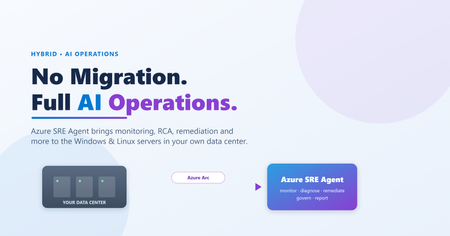
Modern AI-driven operations don't have to stop at the cloud boundary. By connecting on-premises Windows and Linux servers through Azure Arc and streaming their telemetry into Log Analytics, the Azure SRE Agent can bring its full operations capability set to the servers in your own data center — continuous monitoring, incident intake from Azure Monitor driven by a response plan, root-cause analysis, guided and remediation, patch planning, inventory and drift tracking, best-practice assessment, and more — all with human-in-the-loop governance. No workload migration required. This post explains the architecture, the capabilities, and shows the agent in action through four real sample reports (SQL memory-crash RCA, CAB patch plan, inventory/change tracking, and SQL BPA), plus a generic adoption path. The takeaway: good AI operations start with good telemetry — and with Arc, your on-premises servers can have both.328Views0likes2CommentsWhat’s new in Azure SRE Agent: October Update
There’s been a lot happening with Azure SRE Agent lately, with new guidance, examples, and resources to help teams get more out of the service. Whether you’re thinking through security and architecture, connecting tools like Splunk, or looking for practical ways to improve how your agents work, there’s plenty to dig into. So, we’ve pulled the latest updates together in one place. Here’s a look at what’s new and what to start. Understand how Azure SRE Agent handles security and data Security questions often come first when teams evaluate Azure SRE Agent: What can it access? Where does data go? How are actions controlled? Our updated security overview and data residency guidance answer those questions in one place. Our latest guidance brings those answers together. It explains how Azure SRE Agent approaches security through execution isolation, secretless credential management, customer separation, encryption, network controls, and logging. It also covers how data such as prompts, responses, conversation history, and resource analysis is stored and processed, including important data residency considerations when choosing a model provider. Explore the guidance docs: Security overview for Azure SRE Agent, Data residency and privacy in Azure SRE Agent and If you want a secure AI agent, start restricting its environment. Plan a governed enterprise deployment Get more from your agent from day one Creating an agent is the easy part. The real value comes from giving it the right scope, data, and operational context. Our new practical setup guide explains the choices that make the biggest difference. The guidance covers how to start with a focused set of resources, connect code and telemetry, configure incident integrations, and add the runbooks and knowledge your team already relies on. These steps help ground the agent in your environment so it can support real investigations, not just generic questions. Read the practical guide: Getting the best out of Azure SRE Agent. Enterprise Adoption Guide Getting started with Azure SRE Agent is one thing. Figuring out how to expand it across teams and make it part of the way your organization operates is another. In this two-part guide, we share practical lessons for both ends of that journey: how to get your first SRE Agent up and running, and how to build on that foundation as more teams and use cases come on board. The guides walk through resource design, identity, connec?tivity, governance, and integration patterns so platform and architecture teams can build an approach that fits and scale in their environment. Read the guidance: Part 1: deploying your SRE Agent and Part 2: from one team to enterprise-wide adoption. Connect operations and development with Azure SRE Agent Canvas in GitHub Copilot We are also introducing Azure SRE Agent Canvas in GitHub Copilot Apps and Copilot CLI, a new collaborative experience that brings operational findings and context into GitHub Copilot. It gives developers and operators a shared place to review evidence, work through an issue, and decide what to do next. To help you see how the experience works, we have put together three resources: Documentation: Learn how to use Azure SRE Agent Canvas in GitHub Copilot during an investigation. https://aka.ms/sreagent/canvas/doc Blog: Read more about how the experience helps operations and development teams work from the same context. https://aka.ms/sreagent/canvas/blog Demo: Watch Azure SRE Agent Canvas in GitHub Copilot support an investigation from initial findings through team handoff. https://aka.ms/sreagent/canvas/demo Azure SRE Agent Canvas in GitHub Copilot brings cloud operations context into a familiar developer workflow, helping teams investigate and resolve issues together without starting over in another tool. Extend Azure SRE Agent with plugins and response plans If your Splunk Enterprise environment is private, two new MCP samples can help you connect it to Azure SRE Agent without opening Splunk to inbound internet traffic. Each sample provides a starting point that you can adapt to your own network and production requirements. Both samples could be useful for anyone who uses SRE Agent and Splunk together. Choose the pattern that matches your setup: Same-region deployment: Run Azure SRE Agent and the private Splunk workload in the same Azure region and virtual network, with isolated subnets and private MCP traffic. Private Splunk MCP—same region Cross-region deployment: Keep Splunk in another Azure region and route private MCP traffic through Global VNet Peering and private DNS. Private Splunk MCP—cross region. You can now use a private Azure DevOps repo as a plugin marketplace for Azure SRE Agent. This gives your team one place to manage and share plugins and skills built around the tools, processes, and knowledge you already use. The Azure DevOps plugins blog shows how to connect a repo and install those capabilities in Azure SRE Agent. If your team uses ServiceNow, you can also create more advanced response plans based on the type of incident you are handling. The ServiceNow response plans blog walks through how to set up targeted plans that trigger the right investigation workflow while fitting into the ServiceNow processes your team already has in place. Where to start Not sure which resource to open first? Start with the question you are trying to answer: Evaluating security or compliance? Start with the security overview, data residency guidance, and Security and Governance white paper. Designing for production? Use the Enterprise Architecture Guide to align platform, identity, networking, and governance decisions. Configuring a new agent? Follow the practical setup guide to add the context that improves investigation quality. Want to connect operational work with developer collaboration? Explore the documentation, blog, and demo for Azure SRE Agent Canvas in GitHub Copilot. Connecting with plugins? Choose the right Splunk MCP sample and learn more from the Azure DevOps plugins blogs and ServiceNow responses plan blog. Additional resources: Get started: https://sre.azure.com/ Documentation: https://learn.microsoft.com/azure/sre-agent/ Azure SRE Agent on GitHub: https://aka.ms/sreagent/github Azure SRE Agent blogs: https://aka.ms/sreagent/blog Have feedback or a question? Join the discussion in the Azure SRE Agent GitHub repository.601Views0likes0Comments
Enterprise Adoption Guide for Azure SRE Agent, Part 2: From One Team to Enterprise-Wide Adoption
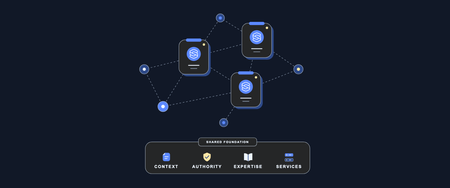
In Part 1: From First Use Case to Automated Workflows, we focused on identifying use cases and getting setup with your initial SRE Agent. Teams see the value, and now you need to decide how adoption should expand. These are the questions we increasingly hear from teams. Who should share an agent? When does another team need its own? How do separate agents collaborate? And how do you deploy and govern all of this without creating unnecessary complexity? Part 2 shares our recommendations for making those decisions. There is no single topology that fits every organization. Start from the work, context, permissions, and ownership involved, then create boundaries only where they are needed. This part answers three questions: How do we share an SRE Agent with more users? How do we expand from one team to multiple teams, and do we need one SRE Agent or multiple? How do we codify, deploy, and govern SRE Agents at enterprise scale? 1. How do we share an SRE Agent with more users? Once the first use case is producing useful results, you will likely want to share the agent with more users who can benefit from it. Sharing is not simply about giving people access to use the agent. It is about determining what each user is allowed to do. Teams must decide who can use the agent, who can change it, who can approve sensitive actions, and which safeguards should apply to everyone. Azure SRE Agent is a team agent: its connected knowledge, investigation history, memory, skills, custom agents, connectors, and configuration are shared within the agent. It does not create private context or state partitions for different users or teams. Once you decide that users can work within the same shared agent, Azure SRE Agent provides controls to define what each person can do, enforce guardrails on agent actions, and audit how the agent is used. The following sections walk through those controls. 1.1 Give each person the role required for their responsibility SRE Agent provides RBAC roles to control who can view, use, build, approve, or administer the agent. They govern actions within the shared agent; they do not create separate resource or context boundaries. Assign built-in SRE Agent roles according to what each person needs to do: use SRE Agent Reader for stakeholders who only need to view investigations and outcomes; use SRE Agent Standard User for team members who need to chat, investigate, and operate the agent; add SRE Agent Author for the smaller group that creates custom agents and response plans; and reserve SRE Agent Administrator for the few people who manage the agent and approve sensitive actions. A person who creates and tests workflows may need both Standard User and Author because the Author role alone does not provide chat or approval access. Azure Owner and Contributor roles also do not by themselves grant SRE Agent data-plane permissions. Start with these built-in roles. If none provides the required separation, use the SRE Agent permission matrix to define an Azure custom role containing only the necessary control-plane and data-plane actions. 1.2 Apply guardrails to the shared agent User roles determine what each person can do. As more people share the agent, its owners also need a consistent way to shape behavior, restrict sensitive operations and validate outputs. The following controls apply those guardrails across the shared agent. Use tool access policies to control which tools the shared agent may invoke, which operations require approval, and which operations are denied. Enable approval expiration so unreviewed approval and temporary authorization requests expire automatically. Set the timeout to match the expected administrator response window. Use hooks when inputs, tool calls, or outputs require deterministic validation, cleanup, or policy checks that should not depend on instructions alone. Choose the appropriate network control mode. For production agents that handle sensitive data or require egress controls, use Azure VNet so non-platform traffic follows enterprise DNS, firewall, NSG, and logging policies. Review the documented traffic exceptions because platform and connector traffic do not follow the same path. Use custom instructions to add administrator-defined instructions to the main SRE Agent's prompt. These instructions can establish which sources to prioritize, what evidence to include, how to structure an investigation, and when to stop and ask for approval. They augment the agent’s default behavior, so users do not have to repeat the same operating guidance in every request. Common prompts guide behavior; they are not a hard enforcement boundary. Set a maximum AAU limit as a cost budget for shared-agent usage. Start with a limit appropriate for the expected users and workflows, monitor consumption, and adjust it as adoption grows rather than leaving usage unconstrained. 1.3 Audit how the shared agent is used As more people use the agent, use its Application Insights audit telemetry to review tool calls, model invocations, agent activity and handoffs, incident activity, Azure CLI commands, and approval decisions. Use thread and call identifiers to follow a specific investigation and correlate related events. Use the Azure Activity Log to review who created, updated, or deleted the SRE Agent resource and its related managed identity and Application Insights resources. Together, roles, common prompts, tool access policies, hooks, and usage limits make it safer to share one agent. They do not create separate context boundaries inside it. That distinction leads to the next decision: when to keep expanding one SRE Agent and when to create another. 2. How do we expand from one team to multiple teams, and do we need one SRE Agent or multiple? Most enterprises want to transform how operations work across the organization. Once the teams adopt their first SRE Agent and saw their operational toil go down, the questions quickly shift: How do we expand from here? How many SRE Agents do we need? Where should the boundaries sit? And how should teams collaborate when work crosses those boundaries? When teams first think about this topology, they often start with the size of their environment. They look at the number of subscriptions, resource groups, applications, resources, or teams and assume that a larger environment automatically requires more SRE agents. Azure SRE Agent does not require one agent per subscription, resource group, application, resource, or team, and there is no platform-defined count at which another agent is required. A single agent can work across multiple Azure management groups, subscriptions, resource groups, and Azure regions when it has the required access and context. The way to think of topology is based on how your organization manages operations today, across the people responsible for the work and the systems they use. Consider the operational problems and workflows the SRE agent will support, the telemetry, source code, data, and knowledge required to perform that work, and the teams with domain expertise in the systems involved. Also consider what each group of users is permitted to see, what actions the agent is permitted to take, and who will create and maintain its workflows. The following factors can help you think through which work belongs together and where a separate agent may be useful. 2.1 Factors to help decide when to add a new SRE Agent Consider each factor separately. Teams may be able to share one aspect of an agent while another requires separation. Factor and questions Build on the existing SRE Agent when… Add a separate SRE Agent when… Required context What telemetry, source code, deployment history, operational data, knowledge, and dependency context are needed to investigate, analyze, or perform the task? The required context can be shared. All teams using the agent are permitted to use the required context. For example, application, platform, and network teams can share one agent when it can use context from all three layers. Some context must remain separate. Each team can use its own agent for unique context while each agent continues to use shared context where permitted. Domain expertise Who has domain expertise in the operational problems and systems involved? Who provides and reviews the agent's instructions, knowledge, runbooks, skills, tools, and custom agents? Teams agree on the guidance the agent should follow. They want to collaborate, and their contributions do not give the agent contradictory guidance. For example, platform and network teams can contribute compatible runbooks to the same investigation workflow. Teams need autonomy over their domain guidance. Their expertise applies only to their own workflows. Separate agents keep team-specific context and instructions from conflicting with guidance for another team’s workflows. For example, teams that use different remediation procedures can maintain that guidance in their own agents. User visibility Are users already permitted, outside the SRE agent, to see the context and resources the agent makes available? All users already have access to the context and resources exposed through the agent. This includes its shared context, memory, knowledge, workflows, and resources. For example, all users can already query the logs across all subscriptions and source code connected to the agent Some users must not see another group’s context or resources. For example, if some users cannot query logs for some applications outside the agent, access to a shared agent should not give them that visibility. Agent permissions on resources Which resources is the agent permitted to read or change? Can the same managed identity, credentials, and resource scopes support the required workflows? One identity and permission model can cover the required resources. For example, a infrastructure team's agent can use its managed identity to access the subscriptions and shared infrastructure. Different identities, credentials, or resource scopes are required. For example, each application team may require an SRE Agent that can access only the resources owned by that team. Action and approval policies Which actions may the agent perform autonomously? Which actions require a user to review or approve them? Which users may approve each action? The required action policies and approvers can be managed together. For example, multiple teams can align on the same action and governance policies that the agent can follow to perform various workflows. Teams need independent action policies or approvers. For example, a platform team may permit its agent to restart shared infrastructure autonomously, while an application team requires the service owner to approve every production change. Workflow ownership Who owns the workflows including the triggers, custom subagents, skills and tools that define the workflow? Which teams may view, create, edit, test, and maintain them? Teams want to co-own and collaborate on the workflows. They are comfortable with other users of the agent viewing or changing them and agree on how changes are reviewed, tested, and deployed. For example, application, platform, and network teams can jointly maintain a workflow or can add multiple workflows that analyzes issues across their systems. A team needs independent ownership of its workflows. Other teams must not view or change them, or the team needs to release changes without waiting for another team. Data residency Must data or processing remain within a particular tenant, region, or legal boundary? The same residency and processing requirements apply. For example, all connected data and processing can remain within the same approved region. Different residency or processing requirements apply. For example, European and US operations may require separate agents so their data remains within the required geography. Review the product’s data-residency and model-processing behavior. In a nutshell: Build on the same SRE Agent when teams can share the required context, guidance, access model, action policies, and workflow ownership. Applying the factors above, teams generally choose separate agents when they need: Autonomy: A team can configure, test, release, and operate its agent without depending on another team. Visibility and access: Users see only the context, memory, knowledge, workflows, and resources they are permitted to access. Domain expertise: Each team can shape the agent around its own systems, runbooks, skills, tools, and operating practices. Fewer context and guidance conflicts: Instructions or knowledge added by one team do not contradict or change the behavior expected by another team. Less coordination friction: Teams can update workflows, permissions, and policies at their own pace without negotiating every change across multiple groups. Distinct permissions and action policies: Each agent can have the resource access, autonomous actions, review requirements, and approvers appropriate for its team. A non-production testing boundary: Maintain at least one non-production agent to test material changes to instructions, tools, custom agents, permissions, policies, and workflows before introducing them into production. Required organizational boundaries: Residency, tenant, legal, compliance, or production requirements may require separation. Separate agents can still use permitted shared context and collaborate when work crosses their boundaries. 2.2 How can multiple SRE Agents collaborate? Once teams operate separate SRE Agents, operational work can still cross the systems those teams own. Collaboration does not require teams to combine their agents or share all of their context. It means passing work, evidence, and ownership to the team responsible for the next step. Common use cases include: An investigation crosses a team boundary. A team determines that the evidence points to another application, platform, network, identity, database, or data layer. It passes the evidence, what it has already checked, and the requested analysis or action to the team with the required ownership, domain expertise, permissions, or authority. A planned change spans several owners. Each team validates its part of the system before and after the change and records the results in the shared change record. A central team identifies work for a resource owner. A compliance, security, or cost-management team assigns the work with the supporting evidence and required outcome. Across these use cases, collaboration requires three things: pass enough context for the next team to act, choose how the work will move between agents, and preserve a shared record of the outcome. Pass the work as a structured handoff. Include the problem or task, its impact, links to the supporting evidence, what has already been checked, the current findings and uncertainty, and the specific analysis or action requested. This prevents the receiving team from repeating the investigation. The receiving team then returns its findings or completed action so the originating team can continue or close the broader task. Choose the handoff mechanism that fits the existing workflow: Operational tools and automation. One agent can reassign an incident, create a Jira ticket, or post a summary in Teams. Automation on the incident or ticket can invoke the receiving team’s SRE Agent and write the result back. This enables collaboration without requiring one agent to invoke another directly. HTTP triggers. An agent workflow or external automation can invoke a workflow in another SRE Agent and pass the context required for the next step. MCP-compatible clients and orchestrators. They can use the SRE Agent MCP server to ask the appropriate agent to investigate a question or continue work in an existing thread. 2.3 Two common multi-agent scenarios These examples show how enterprises can configure multiple SRE Agents while preserving the context and authority each team needs. Scenario 1: A shared platform agent collaborates with team-owned agents Imagine an organization with a platform team that operates infrastructure, networks, shared data services, and other common dependencies for many application teams. Frontline operations or the service desk routes an incident to the platform team’s SRE Agent first. The platform agent investigates using centralized infrastructure telemetry, infrastructure-as-code repositories, change history, and platform knowledge. It orchestrates work across its specialized platform capabilities and collaborates laterally with team-owned agents. If the issue is in the shared platform, the platform team continues the investigation and takes the actions within its authority. If the platform is healthy or the evidence points to an application, the agent hands the incident to the appropriate application team’s agent with the evidence already collected and the dependencies already checked. Application agents can also have permitted read visibility into shared platform dependencies. This helps application teams identify whether a problem originates in their service or the platform, while the platform team retains authority over platform changes. Scenario 2: Team-owned agents coordinate directly In another organization, each product or application team operates the services it builds and owns its operational context, telemetry, code, permissions, and workflows. Each team’s SRE Agent is the first responder for its services. When an investigation points to another service or shared dependency, the initiating agent packages the evidence and hands the work directly to the owning team’s agent. Teams whose operational work does not cross can continue to operate independently. Each agent investigates and acts within its own boundary, while collaborating teams use the same incident or ticket to maintain an end-to-end record. Shared enterprise standards can provide consistent identity, logging, security, deployment, and governance controls. Teams can also reuse approved skills, tools, and workflow templates without combining their runtime context or agent configuration. 3. How do we codify, deploy, and govern SRE Agents at enterprise scale? Whether an organization operates one SRE Agent or many, those agents continue to change after deployment. Teams add skills, subagents, tools, prompts, hooks, automations, and policies, while the agents accumulate knowledge and memories through operational use. Because these changes can affect how an agent investigates, analyzes, and acts, manage the agent’s configuration, artifacts, and learnings with the same discipline used for production code. This becomes especially important when teams move from a proof-of-concept or test agent to a production agent. They may need to create the production agent in the same region or another region while preserving the configuration, knowledge, memories, and operational refinements accumulated during testing. They also need to understand whether changes to a skill, subagent, tool, prompt, or policy changed the agent’s behavior. Our recommendation is to export an agent that has already been refined through real use, bring the export under version control, and use it as a repeatable baseline. Teams can then preserve its learnings, create production agents in the required environments, track how the configuration changes, and decide which parts should remain agent-specific or be shared with other agents. 3.1 Export the working agent as code The Azure SRE Agent team maintains the public microsoft/sre-agent repository with templates and scripts for deploying, exporting, cloning, and verifying agents. The repository includes Bash and PowerShell scripts that create a deploy-ready export of a working agent. The export includes the agent settings, connectors, skills, subagents, tools, hooks, common prompts, repositories, plugin configuration, scheduled tasks, incident filters, HTTP triggers, incident-platform configuration, knowledge, and expected configuration. By default, it also includes synthesized knowledge and workspace memories developed through prior investigations and interactions. Repository instructions can be included when needed. Review the export for sensitive information and keep connector credentials and other secrets outside the repository. Commit the approved export to Git so teams can preserve the agent’s accumulated knowledge, track configuration changes that may affect its behavior, identify drift, recreate the agent in the same or another region, and use a known agent-as-code baseline for future changes. 3.2 Standardize what should be shared Decide which parts of the baseline should apply to every agent. Use Bicep or Terraform and Git to define common identity, network, security, logging, audit, and deployment controls, while parameterizing the values that differ by agent or environment. The public SRE Agent templates provide examples for infrastructure as code, export, deployment, verification, and CI/CD. For reusable operational capabilities, use a private plugin marketplace backed by private GitHub or GitHub Enterprise. Teams can maintain approved skills and MCP integrations once, while agent owners install only the capabilities relevant to their agents. Each installation is pinned to a Git commit so teams can control when updates are adopted. Together, the version-controlled export, infrastructure as code, shared baseline, and private plugin marketplace provide a repeatable way to expand SRE Agent without making every agent identical. Share your thoughts There is no single enterprise topology to copy. The useful pattern is to start by looking inward at the operational toil your team owns, prove value with an initial agent, then share that agent where context and authority can be shared safely, and introduce new agents where organizational or operational boundaries require them. As you scale SRE Agent beyond a single team, where does sharing, governing, or coordinating agents still feel harder than it should? What could we build or improve to make enterprise-wide adoption easier, safer, or more manageable? What scenarios are you trying to solve next? We’d love to hear what is working, where you are getting stuck, and what you would like to see next. Share your experience and ideas in the comments below. Your feedback will help us understand where organizations need better guidance, stronger governance, or new capabilities in SRE Agent. Next steps Return to Part 1: From First Use Case to Automated Workflows. Open Azure SRE Agent and start your first use case. Create and set up an Azure SRE Agent. Explore the public SRE Agent templates for infrastructure as code, export, verification, and CI/CD examples.890Views0likes0CommentsEnterprise Adoption Guide for Azure SRE Agent, Part 1: Deploying Your First Azure SRE Agent
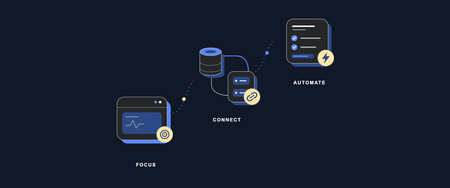
We have learned a lot from talking with teams that are bringing Azure SRE Agent into their day-to-day operations. Across those conversations, we have seen a common set of questions emerge as teams move from exploring an initial use case to adopting SRE Agent more broadly. Some teams are starting with a simple question: “Where should we begin?” Others have already seen value in reducing operational toil and improving incident response and are asking what comes next. How do we expand from one successful use case to more workflows? Can multiple teams share the same agent safely? When should we use one SRE Agent versus multiple agents? How should agents collaborate? And how do we deploy and govern them consistently across the enterprise? This two-part guide shares the patterns we have seen and our recommendations for navigating that journey, from the first use case to broader enterprise adoption. Our recommendation is to start with one operational problem your team understands, learn what the agent needs to solve it effectively, and expand from there. The goal is not to design your enterprise topology on day one. It is to make each next decision with better evidence. Part 1: Deploying Your First Azure SRE Agent Which operational problem should we start with? How do I run the first use case? Should I use SRE Agent’s built-in capabilities or customize it? How do we turn a successful first use case into more automated operational workflows? Part 2: From One Team to Enterprise-Wide Adoption How do we share an SRE Agent with more users? How do we expand from one team to multiple teams, and do we need one SRE Agent or multiple? How do we codify, deploy, and govern SRE Agents at enterprise scale? Part 1 focuses on proving and expanding the operational value. Part 2 addresses the questions that appear when more users, teams, and agents become involved. 1. Which operational problem should we start with? A strong first use case is a recurring, bounded problem that the team feels today and understands well enough to judge. Focus on work that affects reliability, consumes engineering time, slows incident response, or creates avoidable cost. Start with the operational pain your team feels most. Choose one well-bounded problem that matters to the team and is familiar enough to judge. If you are unsure where to begin, start by asking SRE Agent to investigate an issue or incident your team is already looking at. Give it the observed symptom or question, let it bring together telemetry, dependencies, source code, and recent changes, and see whether it can identify where the problem is likely occurring. That investigation can include root-cause analysis, deployment correlation, Azure resource health, and dependency analysis. The examples below are some of the use cases we have seen customers implement. Alert investigation: correlate alerts with telemetry, dependencies, source code, and recent changes to explain what happened and identify the next step. Incident auto-triage: collect the initial evidence, identify likely ownership and severity, remove known false positives, and prepare the incident for the responding team. Proactive availability: perform proactive health checks, reliability risks, degraded signals, or unhealthy dependencies before they become customer-facing incidents. Deployment correlation: correlate a failure or degradation with recent deployments, configuration changes, feature releases, and infrastructure updates. Production deployment validation: evaluate post-deployment telemetry, logs, dependencies, and service-health criteria to confirm that a production release is healthy. FinOps proactive cost optimization: identify unexpected cost changes, underused resources, and rightsizing opportunities before spend becomes a larger problem. Certificate expiry monitoring: identify certificates approaching expiration, determine the affected services and owners, and initiate the appropriate follow-up. 2. How do I run the first use case? Should I use SRE Agent’s built-in capabilities or customize it? Once the team has selected the operational pain it wants to address, the next step is to prove that SRE Agent can improve the outcome. Two questions matter at this stage: how should we set up SRE Agent to execute the first use case, and do we need to customize beyond its built-in capabilities? Keep the first use case deliberately small. Connect only the context required to solve the selected problem. For deployment validation, that may be the relevant telemetry source, code repository, deployment history, and runbook, not every repository, monitoring system, or resource the team may eventually use. For more guidance on setting up the first SRE Agent, see Getting the best out of Azure SRE Agent. Begin with diagnostic or read-only access. Use the agent’s managed identity and Azure RBAC as the starting point for Azure resource access. Grant only the resource scopes and permissions required for the use case. As the workflow demonstrates a need to perform write actions, add the narrowest permission at the narrowest practical scope rather than granting broad access up front. Test the agent against a few recent historical incidents the team understands. Use these cases to confirm that the agent can reach the right telemetry, code, deployment history, and operational knowledge, and to expose missing context before a live incident. Then use SRE Agent alongside the team’s normal response process when a real issue occurs. This is where teams begin to build trust: the agent surfaces the relevant evidence, identifies where the problem is likely occurring, connects it to a dependency or recent change, explains its reasoning, and helps responders reach the diagnosis faster. Define the outcomes you want to accomplish. Measure the outcome in the system that already records it, for example, mean time to resolution in the incident platform, alert volume or false-positive rate in monitoring, deployment failure or rollback rate in CI/CD. Choose the measure that matches the pain that justified the use case. Establish a baseline, then use an SRE Agent live report or an existing dashboard to track the result. 2.1 When do I customize SRE Agent, and do I need a skill, custom subagent, or tool? Always start small with SRE Agent’s built-in capabilities. Then add only what the workflow needs. Start with the expert skills and tools that come with SRE Agent. Out of the box, SRE Agent combines Azure-specific product knowledge and built-in operational capabilities for diagnosing issues and finding probable root causes across Azure. This expertise spans all of Azure, including compute, storage, networking, data, monitoring, and management services. Its native integrations connect Azure Monitor, Application Insights, and Log Analytics, GitHub, and Azure DevOps so the agent can correlate infrastructure state, telemetry, deployments, work items, and source code. General-purpose tools, including Azure CLI, Kusto queries, and code analysis, let it gather deeper evidence within its assigned permissions. For example, it can trace network connectivity, troubleshoot gateway and load-balancing paths, query application telemetry and logs, and correlate a degradation with a recent code or deployment change. Add a custom skill when SRE Agent needs to understand how your environment or organization works. Before writing a new skill, browse the plugin marketplace and the public Azure SRE Agent Plugins repository to see whether an existing plugin covers the scenario. A skill can teach the agent how to use and interpret a third-party telemetry source such as Dynatrace, which dashboards or signals matter, how your runbooks and escalation processes work, or how your organization performs a workflow such as pull-request validation, release-risk analysis, or compliance review. Even with a native integration, adding your operating instructions as a skill can help the agent find the right evidence faster. Add a custom tool when part of the workflow must run consistently. Use deterministic code when the agent must perform the same calculation, execute a predefined query, call an external API, or generate a report in an exact format every time. A skill explains when and how your organization performs the task; a tool performs the required action consistently. Prefer an existing built-in or connector tool before adding a custom Python tool, HTTP or Kusto tool, or MCP connector. Use a skill and tool together when the workflow needs both organizational guidance and deterministic execution. For example, a skill can describe how your organization evaluates deployment risk, while a tool calculates the risk score or generates the required report. For most workflows, built-in capabilities plus a custom skill are sufficient. Add a custom tool only when the workflow requires repeatable execution, external-system access, or an exact output. 2.2 When do I need a custom subagent? A custom subagent is a specialist within SRE Agent designed for a focused operational workflow. For most use cases, start with a skill. A skill is enough when the main SRE Agent needs to understand and apply your team’s instructions as part of a broader conversation or investigation. Create a custom subagent when you want to control the scope of that workflow, package a focused set of instructions, skills, and tools, test or invoke it independently, or connect it to a trigger. The use case itself does not determine the choice. The same deployment-validation guidance can remain a skill when an engineer asks the main agent to apply it during an investigation. Package that skill in a deployment-validation agent when the workflow should stay within a defined scope, use selected tools, and run after a deployment through an incident, schedule, HTTP trigger, or another workflow. Start with a skill. Use a custom subagent when the workflow needs tighter scope, focused instructions and tools, independent invocation, or trigger-based automation. 3. How do we turn a successful first use case into more automated operational workflows? Once the first use case proves the value, look at what the team still does manually around it. Where are engineers repeatedly gathering the same evidence, running the same diagnostics, monitoring the same risks, preparing the same updates, or handing off the same follow-up work? Use live reports to bring together incident, service-health, reliability, and cost signals so recurring patterns and remaining operational toil are easier to see. When the team understands the work and the result is repeatable, it is ready to become an automated workflow. Begin with the context already connected to the agent. Reuse the same telemetry, repositories, runbooks, resource access, and team knowledge where they apply. Add another source only when the workflow needs evidence the agent cannot currently reach. There are different ways to start that automation. Use a: Response plan when an incident or alert should start the investigation Scheduled task for recurring health, capacity, compliance, or reporting work HTTP trigger when a pipeline, external monitoring system, or another workflow should invoke the agent Start these workflows in Review mode, where a person can evaluate the agent’s reasoning and proposed actions. Autonomous mode is a good fit for actions the team has already approved its operators to perform without case-by-case review. Start with a human in the loop, build confidence in the workflow, and move approved actions to Autonomous mode when the team is comfortable allowing the agent to perform them on its own. Start automating the work the team now understands. Use the right trigger for each workflow, and use live reports to make the next source of operational toil visible. Continue to Part 2: From One Team to Enterprise-Wide Adoption Every team has operational work it wishes were faster, more consistent, or less manual. What is the recurring operational problem your team would most like to solve with SRE Agent? And what could we build or improve to make it easier to turn that problem into a trusted workflow? In part 1, we explored how your organization can go from zero to one with adoption of Azure SRE Agent to address this operational toil in your organization. We'd love for you to share your experience and ideas in the comments below. Your feedback will help us understand where teams need more guidance, better starting points, or new product capabilities. To continue on to scaling Azure SRE Agent across your enterprise, go on to: Part 2: From One Team to Enterprise-Wide Adoption. Next steps Continue to Part 2: From One Team to Enterprise-Wide Adoption. Open Azure SRE Agent and start your first use case. Create and set up an Azure SRE Agent. Explore the public SRE Agent templates for infrastructure as code, export, verification, and CI/CD examples.1.2KViews0likes0CommentsBring Azure SRE Agent into your developer workflow with the new canvas
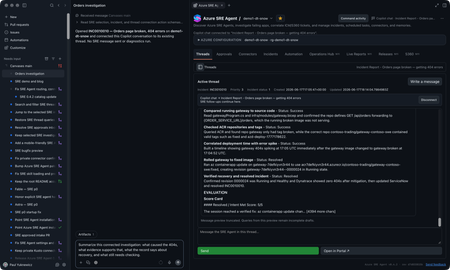
You’re on call. A customer-reported incident lands, Azure SRE Agent picks it up from your incident management system, investigates, and gives you a starting diagnosis. If you’re like me, you want to check that diagnosis yourself, and you want to do it where you already work: in GitHub Copilot, with your code, your tools, and your own access to the data. The new Azure SRE Agent canvas puts the investigation right next to your Copilot chat. A canvas is an interactive panel beside the conversation, with context and actions you and Copilot can both use. You get SRE Agent’s findings plus everything SRE doesn’t have: your code, your private data sources, and what you know about the app. In the GitHub Copilot App, sessions are on the left, Copilot chat is in the middle, and the SRE canvas is on the right. You can use the same canvas in Copilot CLI sessions that support canvases. I now have SRE's findings alongside my own context in Copilot chat. I can keep digging here and decide what to send back to SRE, and when. Let me show you the inner loop with an incident from September 22. It’s a Contoso demo, but it’s modeled on a real one we hit in production. Gateway health looked available while orders and payments failed. I'll use SRE's diagnosis as a starting point, check the historical telemetry with my own authorized access, and work out what the evidence does and doesn't establish. I’ll share findings with the team, and anything worth keeping goes back to SRE Agent. Start with the incident With the plugin enabled, I prompt Copilot to open Azure SRE Agent and choose my saved demo1-dt-snow favorite. I can also discover agents in a subscription I choose or connect through a caller-authorized external URL. For this investigation, I open INC0922001, "Trading order and payment requests failing while gateway health remains available," and choose Connect this thread. Selecting a row lets me browse; connecting makes it the investigation for this conversation. The September incident as recorded in SRE Agent. Then I ask: Summarize this connected September 22 investigation. Separate the reported diagnosis from observed evidence. Give the incident time window, and list what still needs independent verification. The SRE record reports a stopped PostgreSQL database. It says the gateway passed its health check, but Orders and payments requests failed after about 15 seconds. That's useful context, but a passing health check doesn't mean orders and payments are working. I want to check the logs for myself. SRE’s diagnosis and suggested recovery. Suggested isn’t the same as confirmed, which is where I start digging. Get the historical window right The first query assumption I check is the date. This incident needs September 22, 17:30 to 19:45 UTC, not the last 24 hours. I use the Log Analytics workspace behind the demo and ask: Reconstruct the failure check for this historical window. Show the complete query and target before running it. Then break down the request routes and status codes. The reconstructed query and its saved result give me something concrete to inspect. This is my own reconstruction, not a replay of SRE’s query, so the counts differ a little from SRE’s snapshot. The query runbook includes the complete KQL, working Log Analytics API route, and scope for review. The result contains 120 gateway Orders 500 records, 115 gateway payments 502 records, corresponding backend failures, and 119 database connection timeouts. These are telemetry records, not distinct customer requests: the gateway and backend can record the same call. Exporter authentication errors and later route 404s are separate signatures, not more examples of the same database failure. Inspect the requests, dependencies, and exceptions Grouped counts tell me where to look. To understand the failure, I want to look at some of the actual log entries from that time window, not just the totals: Show the Orders requests, downstream dependencies, and database timeouts for this window. Where operation IDs are populated, follow the same operation. Tell me what is correlated and what is only nearby in time. The saved exception signature says the connection to the database endpoint timed out. That supports a connectivity problem; it doesn't independently prove the database was stopped. To connect a particular exception to a particular request, I need matching trace identifiers, not just nearby timestamps. The raw-record and correlation queries are the next checks, with their own execution approval. Widen my check beyond Orders An Orders-focused query is a useful starting point, not an impact assessment. I ask: Keep the same source and time window, but remove the Orders operation and dependency-target restrictions. What else has 5xx failures or the same database-connectivity signature? Keep unrelated errors separate. The saved broader result already includes payments, which SRE also identified. My goal is to verify that scope independently and see whether the wider query adds anything. I won't turn two affected paths into an all-services outage. This data also has blank application-role names, so I use the recorded operations and dependency targets rather than invent an application-name filter. Test the competing explanation A gateway deployment or connection setting could also cause trouble. I want to compare that explanation with the database diagnosis: Preview the historical deployment and configuration records needed for this window, plus independent database state or availability evidence. Do not use today's settings or health as proof of September 22. If the records aren't available, leave the check open. The first SRE record reports the database as stopped, but its Activity Log check found no stop event and may not have covered the right scope. Independent incident-window records would help distinguish stopped state from configuration or network problems. Current settings can't establish historical state, and missing or expired change history can't rule out a deployment. For now, the logs support connectivity trouble. Historical database state and the competing configuration explanation still need checking. The first record also doesn't confirm completed recovery; a later recurrence doesn’t tell us what happened on September 22.. Bring in evidence SRE may not have, or go where it cannot The logs got me to a connectivity problem. The next question is capacity: was something starved? That evidence lives in a Kusto cluster SRE Agent can’t reach, but I can. Private Connectors let me use my own authorized access from inside the same investigation. Copilot-private connections are separate from the SRE Agent connectors. Teams is ready for the update. For a performance or capacity question, I can choose an authorized connection, review the source and complete query, and approve its time range and filters before execution. Then I can compare the relevant measurements and units. This is an extension of the investigation. Granting capacity is a separate action with its own approval. I can do it from here, but it’s my call, not the agent’s. The connection stays private to Copilot. Connecting an SRE investigation doesn't give the agent my datasource permissions. If I want SRE to use a finding, I separately preview and approve the evidence to share. For checks I run locally, I use my identity and network access; a cloud-backed connector uses its provider's network path. Review the updated team message The team update should carry the refined root-cause analysis, including its limits: SRE's reported diagnosis, the independently observed failures, the scope, and the checks still open. Next prompt: Draft a September 22 update to send to the team in Teams. Include the reported diagnosis, observed Orders and payments failures, connectivity evidence, competing explanations, and remaining checks. Include the investigation link. Show me the exact message and destination before sending. That gives the team a useful starting point for the next check, with a link back to the investigation. Continue in the terminal I can carry the same investigation into a canvas-capable Copilot CLI session. I connect INC0922001 explicitly in that conversation; the App's connection doesn't carry over. Connect to INC0922001 from September 22. Give me a TL;DR that separates the reported diagnosis, independently checked evidence, and remaining questions. The terminal is another place where I like to work, and I still want to follow the same evidence and use my own context and tools. The SRE canvas provides tools to Copilot CLI too. The IDE and terminal guide covers a separate connection through the Azure MCP Server. So who stopped the database? We did, for the demo. The real production incident that inspired this was resource exhaustion, which is less satisfying, because every engineer wants it to be the database. It’s better when you can prove it. Try the canvas for your next investigation The useful loop isn't just reading an incident summary from an agent. It's taking SRE's starting diagnosis into Copilot, inspecting the evidence, testing alternatives, and bringing in authorized data from my own tools. Sometimes that confirms SRE Agent got it right. Sometimes it doesn’t. Either way, what I learn goes back into the agent’s memory so the next incident starts smarter. In this one, I learned we’re not resilient enough to this kind of failure yet, and we have hardening work to do. Install from Customize > Plugins > Awesome Copilot > Azure SRE Agent, start a new session, and ask: Open Azure SRE Agent canvas. Watch the demo video, bring an existing investigation, and tell us what you think. The canvas guide has setup details. Also see the October SRE Agent update and explore the other Azure canvases.1.5KViews1like2CommentsBring Your Azure DevOps Repos to Azure SRE Agent Plugins
Plugins package the skills, agents, and connector settings your team wants every SRE Agent to have. A plugin marketplace is a Git repository that lists those plugins so any agent can install them. Until now, that repository had to be on GitHub. If your team keeps its runbooks and tooling in Azure DevOps, you had to mirror them somewhere else. Now you can point your agent at the Azure DevOps repository directly. Your team keeps authoring plugins in the repository it already uses. The agent reads from that repository and installs the plugins you choose, and a pinned version stays put until you change it. Connect a marketplace Azure DevOps marketplaces are rolling out now. You can use them today by turning on the preview feature. Open the Plugins page on your agent and select Connect marketplace . Paste the repository URL, for example https://dev.azure.com/<organization>/<project>/_git/<repository> . Sign in to Azure DevOps if the agent is not connected to that organization yet. Choose your account, a managed identity, or a personal access token. The marketplace is added as soon as the credential is saved. If the organization is already connected under Code access, the dialog uses that connection and skips the sign-in. When the repository finishes cloning, its plugins appear on the Plugins page. Select a plugin to review its skills and install it. The docs below cover each step, including managed identity setup. Use a personal access token or managed identity limited to the repositories you need rather than your own account. Try it Put one procedure your on-call team repeats into a plugin, push it to an Azure DevOps repository, and connect that repository to a test agent. If the skill runs as expected, connect the same marketplace to your other agents. Create or open your Azure SRE Agent to get started. Product documentation: Plugin marketplace overview Add a private marketplace, which now covers Azure DevOps Install a plugin from a marketplace Create a skill if you are not using a marketplace. You can build a custom skill directly in the agent, with no repository involved.555Views0likes0CommentsGetting the best out of Azure SRE Agent
A common question that we get from our customers is "Hey guys, we are excited about SRE agent and we 've created one but whats the best way to configure it?". The below guide aims at sharing some of the best practices that anyone can follow to make the most out of our SRE Agent. This guide is based on SRE Agent's own scoring system and we evaluated production telemetry of the agents performing best vs. the ones performing the worst and we tried understanding the key differences that led to one agent performing better than the other. Interestingly, agents doing the best work are usually not the most heavier ones. Some of the strongest agents we looked at had just one skill. On the other hand, some of the worst performing agents had large skill libraries, plenty of connectors, and insane number of tools. The difference almost always comes down to one thing: "whether the right work reaches the right handler" This guide walks through what to set up, roughly in the order you'd do it. It's written for someone configuring an agent for the first time, so it starts simple. The seven things that matter These are written in the order you'll most likely execute on them. "How much it matters" shows how much each aspect makes an agent significantly better (the goal is to help you quickly decide which ones to prioritize). What to do How much it matters 1 Connect your data first Critical — everything else depends on it 2 Start with the problem that annoys you most How to begin 3 Send the right incidents to the right specialist Critical — filter incidents in the response plan, not in the agent's instructions 4 Write a few skills that really teach something Worth getting right 5 Add custom agents when different problems need different help Worth getting right 6 Decide how much freedom to give, scenario by scenario High — can leave work waiting for approval 7 Check the agent can finish the job High — check permissions for the final step Start here: The One idea that is worth internalising Think of your agent less like an AI system but more like a new hire in your team, even though its hard to visulaize it that way. Do you burden a new hire with year old documents, PIR investigation reports, architecture documents that have drifted over years, information about systems that have become obsolete or telemetry logging that is long gone? The same hold true for an agent. An agent needs access to your systems. They need to know which problems they should be really solving. They need true context about how your service works. And they need to know when to act and when to check with someone first. If you get these things right, a fairly plain agent can do excellent work. Otherwise, you are just in a constant loop of updating prompts, changing tools, updating skills and getting frustrated. Everything below is a version of those four things. 1. Connect your data first You might have heard this phrase before - "Context is the King". Before writing a skill or an agent prompt, "empower" your agent first: your telemetry logs (most important), your incident system, your work tracking, your repositories. Agent without the right data is never going to succeed no matter how good prompt or skill is. Connect the "right" connectors and not "many" connectors. These are important so "do" these Connect telemetry and work tracking first — These help with most of the real investigative work. Add deployment history and service health next — this is what links a problem to the change that caused it. Index the systems where work already happens — your wiki and work items get used heavily; a separate document store barely gets touched. Connect Teams or email for delivery — findings should land where your team already works. Check connections are healthy, not just configured — a dead connector fails silently and takes your scheduled runs with it. Avoid doing these Don't connect a system until you need it — extra connections rarely get used, and you still have to keep them working. Don't treat Teams or email as investigation tools — they carry a fraction of the traffic because they're output, not input. Don't treat past incidents as the answer — use them as a starting point, then confirm with current data. Don't add connections to fix a struggling agent — the best and worst agents we studied had nearly identical, fully healthy connection sets. One scored 4.9, the other 2.3. The difference was routing. Never let the agent decide the source of truth. Feed it! 2. Start with the problem that annoys you most This goes back to the same new hire principal. Don't try to teach the agent your whole system. Pick an important component that wakes people up, or the investigation everyone dreads because it takes four hours and always ends the same way. Work that one scenario with the agent, interactively. The best to do is to "chat" with the agent without writing a new custom agent. Let it dig, correct it when it goes the wrong way, point it at the data it didn't knew about. When you and and the agent solve the issue together, ask the agent to turn what just happened into a skill or a custom agent. This approach is way more effective that perfecting the "correct" agent by starting with a lengthy prompt. Once you perfected one problem, move on to the next one. Each scenario is small, so it's quick to get right, and the context compounds. After a few weeks, you'll notice that the agent is helping with things you never "explicitly" taught it. It just learns (just like a good new hire). 3. Send the right incidents to the right specialist If you read only one section, read this one. Sending an agent the wrong work was one of the clearest problems we found. A response plan decides which incidents reach an agent. If the plan accepts every incident but sends them all to a specialist built for one problem, many incidents will arrive without the information that specialist needs. It stops without helping, and the incident is marked unresolved. The agent may look broken, but it was given work it wasn’t built to do. We saw this with an agent that handled scheduled work well, scoring 4.5 out of 5, but scored 1.7 out of 5 on incidents it received through a broad response plan. Another agent used 71 response plans, each directing a specific kind of incident to the right specialist. It scored 4.5 out of 5 on incidents, with fewer than 1% failing. These are examples from different agents, not a before-and-after test, but they show why it’s worth checking how incidents are routed. We recommend using response plans that match specific incidents to specialists that can handle them. Having many focused plans is fine; sending every incident through one broad plan to a narrow specialist is the problem. 4. Write a few skills that really teach something The number of skills an agent has matters less than what those skills teach it. In our study, some agents with no skills performed better than agents with several. The strongest results were associated with skills that gave clear, detailed guidance, while agents with vague or empty skill descriptions struggled. One agent had three skills with no descriptions at all. That doesn’t prove that writing more will improve results, but it does show why adding skills just to increase the count isn’t useful. Think of a skill as a briefing for a colleague - It should explain which question it answers, the words people might use when asking it, how to decide what to do, and when the skill does not apply. It should also warn about mistakes that are easy to make. We recommend writing a skill when you have specific knowledge or judgment to teach the agent. Make it detailed enough to guide a real decision, rather than adding a short description that only names a topic. Here are three examples of how to turn a vague skill description into guidance the agent can actually use. These are illustrative examples, not descriptions taken from the study. Billing issue Too vague: “Helps with billing problems.” Useful: “Use this when someone asks whether an order was charged, whether a missing charge will appear later, or how to recover a failed charge. Check the order and billing records before deciding. Don’t suggest creating a new billing record until you’ve ruled out an existing or delayed charge.” Deployment failure Too vague: “Investigates failed deployments.” Useful: “Use this when a deployment has failed or stopped making progress. Check its status, the failed step, and recent changes. Don’t recommend retrying until you know whether the previous attempt is still running or left work unfinished.” High error rate Too vague: “Handles service alerts.” Useful: “Use this when a service’s error rate rises. Check when the increase started, which requests are failing, and whether a deployment or dependency changed around the same time. Don’t blame the most recent deployment without evidence that it affected the failing requests.” The useful versions tell the agent when to use the skill, what to check, and which mistake to avoid. 5. Add custom agents when different problems need different help A custom agent has its own instructions, tools, and scope for a particular kind of work. Create one when a problem comes up often enough to need a clear owner—not just because the option is available. For example, a deployment custom agent could check rollout status, failed steps, and recent changes when an alert follows a release. A billing custom agent could check order and charge records, with instructions to avoid actions that might charge a customer twice. These jobs need different evidence and different safeguards. An occasional question doesn’t necessarily need its own custom agent. In our study, agents with one or two custom agents performed much like agents with none; agents with three or more tended to do better. That’s an observation, not a target number. Add them as distinct, recurring problems emerge. Be clear about when each custom agent runs. As the Zero Ops guidance explains, you can call one directly in chat or select it through a response plan or scheduled task. This lets you send a deployment alert to the deployment custom agent without sending every incident there. Limit access to what the job needs. Start with read access for investigation, and grant permission to make changes only where needed, with appropriate approval. Give each custom agent an explicit list of tools: for a custom agent, an empty tool list means default tool access, not “no tools.” The agent’s identity and permissions still set the outer boundary; a custom agent’s instructions alone are not a security control. 6. Decide how much freedom to give, scenario by scenario Review mode protects you by asking a person to approve actions. Use it where approval matters, but remember that work can sit unfinished while it waits. We saw this in two agents handling busy incident queues. Both followed their instructions well and rarely failed. One ran in review mode: 96% of its incident work was waiting for approval, and its overall score was 3.0 out of 5. The other worked autonomously and scored 4.8 out of 5. These are different agents, so the scores don’t prove that changing the mode alone would close the gap. They do show why it’s worth checking how much work is waiting. Choose the level of approval for each kind of work. For example: Investigating an alert: Let the agent read logs, check service health, and compare the alert with recent deployments without asking for approval at every step. Sharing findings: If your team is comfortable with it, let the agent post an investigation summary to the incident. If posts need review, let it prepare a draft instead. Restarting a service: Have the agent explain what it found and ask a person to approve the restart. Changing a database or network setting: Keep a person involved. These changes can affect more than the incident the agent is investigating. The goal isn’t to make the whole agent autonomous or put everything in review mode. Let routine investigation move forward, and require approval where the consequences of a mistake are greater. 7. Check the agent can finish the job An agent can do a good investigation and still fail at the last step. We saw several examples where an agent did useful work but couldn't complete the final step: One agent found three incidents that needed action, but the incident-management write tools it needed were unavailable. It could explain what to do, but couldn't complete its scheduled task. Another investigated an incident and found the right team to take over, but the transfer failed with an authorization error. The incident stayed unresolved. A third gathered evidence for an incident, but couldn't save a lasting update because it lacked permission to write back to the incident system. These can look like investigation failures when the actual blocker is access. That doesn't mean granting every agent write permission: decide which final steps it should perform, give it only the access those steps require, and make the human handoff clear for anything it shouldn't do itself. Before sending an agent to a live incident queue, try one example from start to finish. Check not only that it can find the answer, but that it can deliver the result in the way your team expects. Troubleshooting: When something isn't working, find out why Different problems can look alike. Check what happened before changing the agent's instructions. What you see What to check first An investigation stops quickly without using tools Did the response plan send it to the wrong custom agent? The agent does a lot of work but misses the task Does it need clearer instructions or a smaller task? Work is accurate but waiting for approval Is review mode stopping routine steps? The same error keeps appearing Is a connector broken, or is a permission missing? Two questions are especially useful: Did the agent use the tools it needed? And do failures look the same each time? No tool use during an investigation may point to a routing problem. Repeated identical errors may point to a broken connection or missing permission. If the mistakes vary, look more closely at the instructions, skills, and information the agent received. These are clues, not diagnoses on their own. If you already have an agent that's struggling Check the basics before rewriting its skills: Check routing. Are unrelated incidents reaching a custom agent built for a narrower problem? Check connections. Can the agent actually reach the systems it needs? Check what is waiting. Is review mode holding up work that could safely continue? Check the last step. Can the agent post its findings or complete an approved action? Then review its guidance. If the agent has the right work, access, and permissions but still makes different mistakes, improve its instructions or skills. How we know this We studied production SRE Agent activity. We set aside test and demo agents, looked at agents doing real scheduled work, incident response, and chat, and compared their results with how they were configured. The examples show patterns we observed, not before-and-after tests. An agent scoring differently on incidents and scheduled work is a useful clue, but it does not prove that routing was the only cause. Scores can also change when the evaluation changes, so use the numbers as context rather than promises of what a configuration change will achieve. Read scores in context. Compare incidents with incidents and scheduled tasks with scheduled tasks: open-ended chat often scores lower than work with a clear goal. Greetings aren't investigations, so don't use their scores to judge incident performance. And if an agent is marked down for a wordy answer, check whether its findings were useful before treating it as a failure. This is a starting point for teams to review and improve and we really hope this helps!958Views0likes0Comments
Azure SRE Agent: Introducing Live Reports
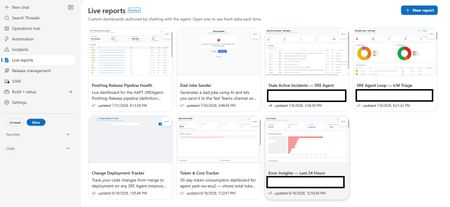
Today we're introducing Live Reports in Azure SRE Agent, now in public preview. You describe a dashboard in chat; the agent builds it, and it refreshes every time you open it. Ops teams ask the same handful of questions every morning: What's burning right now? What landed overnight? Who's on call? The answers usually live across multiple browser tabs, a one-off script only one person can run, or a chat prompt retyped daily and re-read as a fresh wall of text. Live Reports provides the missing piece: somewhere to author a view once and consume it many times. Frozen structure, live data This is the core design decision: the layout is deterministic, and the data is live. The agent authors the page once, then freezes it. Charts, thresholds, column order, and styling stay put. What refreshes on every open are the tool calls embedded in the page, so the shape is identical each morning, and the numbers are up to date. That's what separates a Live Report from a dashboard an LLM regenerates on every view. The chart looks consistent every day, and the page loads like a standard web page rather than a streaming chat response because there's no model in the render path. This leads to a key operational benefit: you only spend tokens when authoring the report. Opening a report built purely on tool calls uses no additional model tokens, no matter how many times you open it. (Reports that opt into AI-powered interpretation are the exception, as explained below.) This makes it practical for your entire team to open the report every morning without incurring ongoing LLM costs. When you want changes, simply ask the agent. It will edit the page in place and save a new version, preserving earlier revisions so you can always reference previous configurations. What you can build Report data sources include the connectors your agent already has access to: any connected MCP server, logs and metrics, source control, work items, and internal services. Charts are real visualizations. Reports pull vetted charting and grid libraries from a CDN, giving you interactive, sortable tables and graphics rather than static markdown tables. Reports can also reason at view time. Alongside tool calls, a report can send a focused prompt to a fast, lightweight model as it renders: classify alerts by severity, group issues by likely root cause, or summarize a discussion thread into a single line. Every reload re-fetches and re-interprets the data, keeping real-time judgment aligned with the latest telemetry. Note: AI-powered interpretation consumes tokens each time the report loads, which is why it is strictly opt-in per report. Reports can also take actions, but only the ones you wired in. A button invokes a write tool from a connector your agent is already connected to: acknowledge an incident, post to a discussion thread, assign an owner, open a work item. It cannot call an arbitrary URL or API of its own. Every button is limited to the exact tool names saved with that version of the report, and any tool that would ask for your approval in chat asks the same way when a button fires it. That's what turns a dashboard into something you operate from, without turning it into an open shell. The security model A model-authored page capable of calling production tools requires strict guardrails. It is constrained across four layers: Sandboxed origin: Reports render in an iframe with sandbox="allow-scripts" and deliberately omit allow-same-origin, ensuring the page runs at an opaque origin with no access to session tokens or cookies. Restricted network access: Report scripts cannot make direct API calls to arbitrary endpoints. All data requests route through the Live Reports runtime, which validates each call against the approved tool manifest for that specific report version. Per-version allowlists: A report can only invoke the exact tools it was configured with. Any unapproved call is rejected server-side at runtime, rather than relying on prompt-level instructions. Explicit human approval: When saving a report with connector access, the agent presents the exact tool descriptions provided by each connector. Nothing executes until you explicitly approve the configuration. Reports remain strictly bound to your agent's existing permission boundary. Exports are sanitized to a static, offline-safe file, which is safe to attach to a postmortem. Getting started Open the Live Reports tab and select New report. Describe your scenario in chat. The agent will inspect your available connectors, ask clarifying questions if needed, and generate the layout. Review and approve the tool permissions to add the report to your gallery. What's next We're continuing to expand connector support, build richer visualization primitives, and tighten the loop between observability and automated remediation. The best reports are often the ones we didn't anticipate. What is the operational view your team finds itself rebuilding by hand? Let us know in the comments. 👉 Try Live Reports in Azure SRE Agent1.4KViews1like0Comments