azure sql database
566 Topics
Make Estate yours: Focus on the databases and issues you own in Database Hub
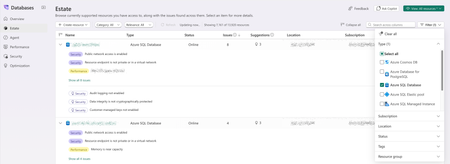
Database Hub in Microsoft Fabric is now in public preview. Estate experience brings every supported database you can access into one inventory, with the issues and suggestions found across them. In a large organization, that can mean thousands of resources. But most people own only part of the estate: a set of production databases, a few subscriptions, one resource group. This post shows how to shape Estate around your part, save it as a custom view, and use it to triage and bring in help. The examples use Azure SQL Database; the same steps work for PostgreSQL and Azure Cosmos DB. Which resources are mine? While in Estate view select Filter to narrow the list by Type, Subscription, Location, Status, Tags, or Resource group. The grid and the resource count update as you select values; Filter (1) shows how many dimensions are active, and Clear all resets them. Looking for one resource? Search across columns matches names, locations, subscriptions, and more. Which issues should I focus on? Each row shows its Issues and Suggestions counts and opens expanded, so findings are readable at a glance: issues with a filled Security or Performance tag, suggestions marked with a lightbulb. Open Category and select Security, Performance, Optimization, or a combination. Use Relevance to keep only resources with Issues or Suggestions. The grid is sorted by issue count, so the resources that need the most attention come first. How do I get back here tomorrow? Once Estate shows what you want, save it. An asterisk after the view name (View: All resources *) means your filters have unsaved changes. Select View > Save. Choose Save as new custom view and give it a name that describes the scope, such as sqlDB-sec-perf-issues. Select Apply. The view now appears under Custom views in the View menu. It saves filters, not results, so you always see the current state of those resources. What's wrong, and what should I do about it? Select an issue to open its detail page. Here, the top database reports Public network access is enabled. The Summary explains why it matters: public reachability increases exposure to credential attacks, scanning, and firewall mistakes. The Recommended action gives the fix and its precondition: Disable public network access after confirming that all clients can connect through approved private connectivity. Resolve in Azure portal opens the resource. Database Hub doesn't change the resource for you; you make the change in the tool that owns it, under your existing permissions. Back returns you to Estate with your view intact. Who can help me fix it? That precondition is often the hard part: confirming every client can connect privately may take your networking or application team. Bring them into the same view. Select View > Share, then Copy link. The link carries your current filters, so a colleague starts from the same scope. Each person still sees only the resources they already have access to; sharing never grants access. Need the list for a change ticket? Select Export view (as .csv). CSV files don't carry sensitivity labels, so handle the file according to your organization's data policies. What needs attention in my part of the estate? Your view isn't limited to Estate. Open Overview, select the same view from the View menu, and every card and chart rescopes to it: the Estate issues summary, the Security, Performance, and Optimization cards with their top issues, and the performance trends. Overview now summarizes your backlog instead of the whole estate. Views are managed in Estate; Manage views (Estate) takes you there. o the resources you own. More in Estate Look up a resource without leaving the list Select a resource name to open its details next to the list: subscription, resource group, and logical server (each linking to the Azure portal), status, location, pricing tier, max storage, and tags. Connection strings for ADO.NET, JDBC, ODBC, PHP, and Go use Microsoft Entra authentication, and Open in Azure portal, Open in VS Code, and Open in SSMS are at the top. The … menu on each row adds quick actions Copy connection string, Open in editor, Enable performance monitoring, Create monitor from template and Set alert from template. Create a database where you work Create resource starts a new database from Estate, grouped by engine: SQL database in Fabric, Azure SQL Database, SQL Server instance, Azure Database for PostgreSQL, and Azure Cosmos DB for NoSQL. Get started Open Estate, filter to the resources you own, focus on the categories you triage, and save the result as a view. Then select it on Overview and start with what needs attention. Database Hub is in public preview; capabilities vary by service and preview configuration. See the Database Hub documentation for supported services and setup, and use Feedback in Database Hub to tell us what you'd like next.125Views1like1Comment
Public Preview: Alerts for Azure SQL Database in Database Hub, powered by Fabric Activator
We're excited to announce the public preview of alerts for Azure SQL Database in Database Hub, powered by Fabric Activator. Last month, we brought performance monitoring for Azure SQL to Database Hub. That gave you one place to see how your databases are performing. Alerts are the next step. Instead of waiting for someone to spot a problem on a dashboard, Database Hub now watches your telemetry and tells you when a database needs attention. With alerts in Database Hub, you can: Create an alert on a database in a few clicks, starting from a built-in template Turn a chart on the Performance page into an alert that covers many databases at once Take action when an alert fires, from a Teams message to a Power Automate flow Why we built this When we talk with customers about database monitoring, the first question after "Can I see it?" is almost always "Can it alert me when something's wrong?" Setting up performance alerts for SQL at scale usually meant: Deploying a monitoring resource to collect telemetry Running a data store to hold it Setting up identities and permissions so the alerting service could read it Writing and maintaining alert queries for every new database We wanted alerting to work the way performance monitoring does in Database Hub. Turn it on, and it just works. Rather than build a new alerting engine, we built on Fabric Activator. Activator is the no-code detection and alerting engine that Fabric customers already use to keep an eye on their Fabric workloads. Today, teams use it to: Get alerted when a pipeline fails or a semantic model refresh doesn't finish Watch live data in eventstreams and Real-Time Dashboards Respond automatically, from a Teams message to a notebook or a Power Automate flow Now we've brought those same capabilities to the SQL resources in Database Hub. Database Hub brings the database context and the telemetry. Activator brings the rules engine and the actions. You don't have to learn a new alerting tool. Your database alerts live right alongside the rest of your Fabric alerts. Two ways to create an alert 1. Start from a template This is the fastest way to get started. Go to the Estate page in Database Hub. Hover over an Azure SQL database and open the quick actions menu. Select Set alert from template. Pick a template. Each template covers a common performance problem and comes with a default condition you can tune. For the current list of templates, see Alert templates. The query and the database are already filled in for you. All you need to decide is: How often to check. You can go as often as every minute. The condition thresholds for when to alert. Keep the default threshold or tune it for your workload. What to do when the alert fires (more details in the next section). Then select Create. 2. Alert on a Performance chart Sometimes you don't care which database it is. You just want to know when any of your databases are in trouble. Hover over a chart on the Performance page and select the lightning bolt icon. The query behind the chart becomes the query for your alert. For example, you can get notified whenever any of your databases have had high CPU for more than 5 minutes. Chart alerts cover every resource on the chart. That includes SQL Server on Azure VMs and SQL Server enabled by Azure Arc, even though templates for them aren't available yet. Choose what happens when an alert fires A notification is a good start. But Activator can do a lot more than send a message. Here are a few examples of what you can do when an alert fires: Send a Teams message, such as a post in your on-call channel Send an email Run a Fabric notebook that collects extra diagnostics for the affected database, so the evidence is waiting for you when you start investigating Trigger a Power Automate flow, such as opening an incident in the IT service management (ITSM) tool you already use Activator can also run other Fabric items, like pipelines and Spark jobs. For the full list of actions, see Configure actions for Activator rules. Every notification links you straight into Activator. There you'll see: The metric trend, with your threshold drawn on the chart Exactly when the condition was met The rule's run history, so you can confirm it's checking as often as you expect No identities or credentials to manage When you enable performance monitoring, telemetry is sent to a Microsoft-managed pipeline and data store. Activator rules query that data store, not your databases. That means: There are no additional credentials or identities to create on your databases Alert queries don't add load to your databases Alert rules run with your identity. You can alert on telemetry for any resource where you have the Reader role on its subscription. Keep in mind that anyone who can open your rule, or who receives its notifications, sees the telemetry it returns. They don't need their own access to those resources. Choose your workspace and recipients accordingly. Things to know during the preview Alerts run on Fabric capacity. Database Hub is free. Activator rules run in a Fabric workspace and use that workspace's capacity. Standard Activator capacity usage applies. See all your alerts in one place. The Rules page in Real-Time hub shows every Activator rule you have access to across workspaces. That includes the ones you create from Database Hub. Low end-to-end latency. How quickly an alert fires depends on two intervals: Collection interval. Each type of telemetry is collected on its own schedule. Fast-moving metrics like CPU are collected every 10 to 15 seconds. For the interval for each table, see Query performance monitoring telemetry. Query interval. Activator can run your alert query as often as every minute. What's next We're just getting started. Here's what we're working on: More templates for Azure SQL Database Templates for SQL Server on Azure VMs and SQL Server enabled by Azure Arc Templates for Azure SQL Managed Instance, once performance monitoring for Managed Instance is available Alerts for Azure Database for PostgreSQL and Azure Cosmos DB Handing an alert off to a database agent so it can start the investigation for you Get started Open Database Hub in Fabric. Turn on performance monitoring for your SQL resources. See Enable performance monitoring for Microsoft SQL. Make sure you have a Fabric workspace on a Fabric capacity to save your alerts in. A Fabric trial capacity works for trying it out. On the Estate page, hover over a database and open the quick actions menu. Then select Set alert from template. Pick a template and choose your action. Then select Create. For the full walkthrough, see Create Activator alerts for Microsoft SQL. Give it a try and let us know what you think in the comments. We especially want to hear which templates you want us to build next. Learn more Create Activator alerts for Microsoft SQL What is Fabric Activator? Public Preview: Performance monitoring for Azure SQL in Database Hub Database Hub in Fabric: Now in Public Preview Enable performance monitoring for Microsoft SQL Query performance monitoring telemetry86Views2likes2CommentsMI link support for multiple databases in an Always On availability group for SQL Server (Preview)
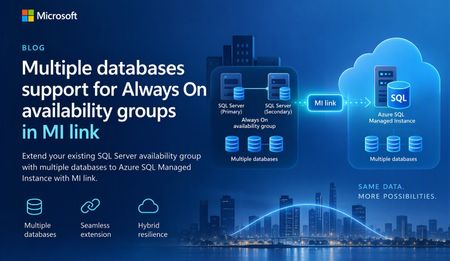
A simpler way to extend availability groups to Azure We are pleased to announce the preview of multi-database mode for Managed Instance link. The new mode lets you replicate multiple databases from an existing Always On availability group through a single link between SQL Server and Azure SQL Managed Instance. Managed Instance link uses distributed availability group technology to provide near-real-time replication between SQL Server and Azure SQL Managed Instance. It supports hybrid architectures, online migration, disaster recovery, and read-only workload offload. The link can be configured and managed through SQL Server Management Studio (SSMS), PowerShell, Azure CLI, and Azure APIs. Previously, each link supported one database. Customers with multi-database availability groups therefore had to split databases into separate availability groups and create a link for each database. Multi-database mode removes that limitation for supported SQL Server versions and editions, while the existing single-database mode remains available for earlier versions and other supported configurations. What you can do with multi-database link mode Migrate multiple databases to Azure SQL Managed Instance with minimal cutover downtime. Offload read-only workloads, including reporting and analytics, to the secondary replica. Use Azure SQL Managed Instance as a disaster recovery target for supported SQL Server versions. Start replication in either direction when the SQL Server version and Azure SQL Managed Instance update policy support that direction. Reverse primary and secondary roles through a planned failover. Build hybrid and multicloud topologies that place database groups where they are most useful. Preview requirements Requirement Details SQL Server SQL Server 2022 with CU27 and later or SQL Server 2025 with CU9 and later. Edition Enterprise or Developer edition. Standard edition is not supported for multi-database mode because Basic availability groups support only a single database. Azure SQL Managed Instance Use a compatible managed instance update policy , either SQL Server 2025, or Always-up-to-date. Note: Managed Instances with SQL Server 2022 update policy are not supported at this time. You can still use SQL Server 2022 to replicate your availability group to a Managed Instance with the SQL Server 2025 or Always-up-to-date update policy, but you will not be able to fail back to SQL Server 2022. We expect support for Managed Instances using the SQL Server 2022 update policy to become available in the coming weeks. This blog post will be updated when support becomes available. SSMS SSMS 22.10.2 or later for the multi-database link capability. Automation Az module 16.3.0 or later and Az.Sql 7.1.0 or later, or the corresponding Azure APIs. One link for an existing multi-database availability group If you already use an Always On availability group, multi-database link mode lets you extend the complete database group to Azure SQL Managed Instance without creating a separate availability group for every database. All databases in the link move together as one managed group. Databases on the primary are read-write, while their copies on the secondary are read-only. Use of your existing Always On AG listener endpoint is supported with multi-database mode MI link, allowing the link to remain operational after a local AG failover. Image 1: A multi-database Always On availability group replicated to Azure SQL Managed Instance through one Managed Instance link. The diagram illustrates the availability group relationship rather than a specific Azure SQL Managed Instance service-tier replica count. Managed Instance link is supported across all Azure SQL Managed Instance service tiers. Run multiple links in different directions A single SQL Server instance can participate in multiple links. Each link can carry a different availability group, and supported links can replicate in different directions at the same time. In the following example, AG1 (containing DB1, DB2, and DB3) replicates from SQL Server to Azure SQL Managed Instance through MI link 1. AG2 (containing DB4, DB5, and DB6) replicates from Azure SQL Managed Instance to SQL Server through MI link 2. Both links can operate at the same time between the two instances. Image 2: Two multi-database availability groups using separate links with opposite replication directions. Important: Database names must be unique in this configuration. A database cannot be renamed on the secondary while it is participating in replication to resolve a naming conflict. Replicate one availability group to multiple managed instances Multi-database mode also supports fan-out topologies. You can replicate multiple availability groups to one managed instance, or replicate the same availability group to different managed instances. For example, separate links can target managed instances in different Azure regions. Image 3: One multi-database availability group replicated through separate links to two Azure SQL managed instances. Get started To evaluate multi-database mode during preview: Confirm that the SQL Server version, edition, servicing level, and Azure SQL Managed Instance update policy meet the preview requirements. Upgrade to SSMS 22.10.2 or later, or use a supported automation interface. Enable multi-database mode before creating a multi-database link. Create the link from the existing Always On availability group and validate synchronization for every database. Review the Azure documentation for multi-database Managed Instance link configuration, limitations, monitoring, failover, and cleanup guidance. Share your feedback We would love to hear about your experience with multi-database mode. Please share questions, feedback, and feature suggestions through the Managed Instance link feedback form.425Views0likes0CommentsModern Query Editor for Azure SQL Database is now generally available
We're pleased to announce the general availability of Query Editor for Azure SQL Database. The updated experience brings a multi-tab query workspace, easier database exploration, and more interactive query results directly to the Azure portal, with no desktop tools to install. Whether you're checking data after a deployment, investigating an unexpected result, or trying out a query, you can get started from your database in the portal. Modern Query Editor brings these everyday tasks together in a refreshed workspace. Work across multiple queries Multiple query tabs let you keep related queries open and switch between them without replacing the SQL you're already working on. For example, you can keep a query open while writing a second query to investigate its results. When you're ready, run the selected SQL and review the output in the same workspace. Your work also stays with you. Open tabs and query text are restored as you move around the portal during your browser session, and you can save the queries you return to often in Queries. Saved queries are stored in your browser profile, so they're ready the next time you open Query editor in the same browser. Find objects and preview data The updated Object Explorer makes it easier to find what you need in your database. Search for objects by name and narrow the results by object type, rather than browsing through the full hierarchy. You can also open a table or view in a dedicated data-preview tab to inspect up to 1,000 rows without writing a query first. This gives you a quick way to get familiar with the data before building your query, without interrupting work in another tab. Do more with your query results The results grid lets you sort and filter returned data, resize columns, and copy cells, rows, or columns. You can inspect the output and focus on the values that matter without changing your SQL for every quick check. When you need to use the results outside the portal, export them as CSV, JSON, or Excel. That makes it straightforward to move from a quick database check to further analysis or sharing results with your team. Sort and filter results directly in the grid, then export them as CSV, JSON, or Excel Get started To try Modern Query Editor: Open your Azure SQL database in the Azure portal. Select Query editor from the database resource menu. Connect using Microsoft Entra authentication or SQL authentication, then explore your database or run a query. If something blocks the connection, such as a firewall rule or missing Microsoft Entra configuration, Query editor explains what went wrong and suggests the next step. For example, you can add your client IP address to the server firewall with a single click, or go straight to the relevant networking or Microsoft Entra settings. For connection requirements and more details, see the Query Editor documentation. Modern Query Editor is designed for lightweight querying and exploration. When you need a full desktop development or administration environment, use Open in to connect to the same database in Visual Studio Code or SQL Server Management Studio. Prefer the original experience? The classic Query editor remains available, and you can switch between the classic and modern experiences without losing your database context. Try the new experience and let us know what you think by selecting Feedback in the Query editor command bar.140Views0likes0CommentsManaged Instance link with failover groups (limited preview)
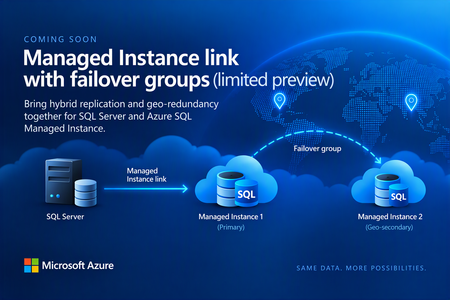
Before we kick off the preview, we’d like to hear from customers interested in trying it. The new capability will let you replicate data from SQL Server to a managed instance that’s part of a failover group, combining hybrid replication with geo-redundancy in Azure. The preview isn’t starting just yet. We expect to begin onboarding customers in the coming weeks, and capacity will be very limited. If this is something you’d like to try, let us know by filling out the sign-up form. Register your interest in the upcoming limited preview: https://aka.ms/milink-fog-signup What are the Managed Instance link and failover groups? The Managed Instance link enables near real-time data replication between SQL Server and Azure SQL Managed Instance. Built on distributed availability groups, it replicates user databases in near real time from SQL Server 2016 and later hosted anywhere to Azure SQL Managed Instance, or from Azure SQL Managed Instance to SQL Server 2022 or later. Customers use the Managed Instance link for: Offloading read-only workloads to Azure, or from Azure back to on-premises. Online migration from on-premises to Azure, or from Azure back to on-premises, with minimal downtime. Bidirectional disaster recovery between SQL Server and Azure. Failover groups, also known as geo-replication, manage the replication and failover of user databases from one managed instance to another managed instance in a different Azure region. They provide read-write and read-only listener endpoints that remain unchanged after a geo-failover, so applications don’t need connection-string changes. The geo-secondary can also take on read-only workloads. Until now, you couldn’t combine the two scenarios. Establishing a two-hop replication path from SQL Server to Managed Instance 1 and then to Managed Instance 2 presents a technical challenge and isn’t supported today. As a result, you’ve had to choose between using the MI link with a single managed instance or using failover groups without the MI link. The capability we’re getting ready to preview removes that trade-off. SQL Server replicates to MI-1 through the Managed Instance link, while the failover group keeps MI-2 in sync in a second Azure region, as shown in the figure below. Figure 1: SQL Server replicating to a primary managed instance through the Managed Instance link, with the failover group geo-replicating to a secondary managed instance in another region. Replication in both directions In this configuration, the link works bidirectionally. You can replicate from SQL Server to Azure and back from Azure to SQL Server. In practice, that means you can fail over to Azure and, when you’re ready, fail back to SQL Server. Version requirements follow the existing MI link documentation. Two-way replication and failback require SQL Server 2022 or SQL Server 2025, with the managed instance on the matching SQL Server 2022 or SQL Server 2025 update policy. SQL Server 2016 through 2019 support only one-way replication to Azure. What this unlocks Hybrid disaster recovery with regional resilience in Azure: Keep SQL Server as your primary, protected by Managed Instance in one Azure region and a geo-secondary Managed Instance in another Azure region. Migration to Azure with minimal downtime: Land directly in a geo-redundant configuration without having to re-seed or re-architect after cutover. Reverse migration: Move from a geo-redundant Azure configuration back to on-premises SQL Server. Read scale-out: Offload read-only workloads to a geo-redundant Azure SQL Managed Instance configuration. Reverse data replication: Replicate data from a geo-redundant Managed Instance configuration back to on-premises SQL Server. Who should apply and how the limited preview works If you run SQL Server workloads that could benefit from both hybrid replication and geo redundancy on Azure SQL Managed Instance, we’d love to hear from you. A few things to know The limited preview hasn’t started yet. Right now, we’re collecting interest from customers who would like to participate. We expect onboarding to begin in the coming weeks. Capacity will be limited, and the product team will contact selected participants directly. The preview isn’t intended for production workloads unless agreed with the product team. We’ll be looking for feedback from participating customers to help us shape the capability as it evolves. Interested? Let us know If combining the Managed Instance link with failover groups could simplify your hybrid, disaster recovery, or migration architecture, register your interest today. We’re looking forward to hearing about your scenarios and working with some of you as we get the preview underway. Register your interest in the upcoming limited preview: https://aka.ms/milink-fog-signup Learn more • Overview of the Managed Instance link • Overview of Failover groups for Azure SQL Managed Instance173Views2likes0CommentsLessons Learned #561: It is Fast on the Other Server —What Should We Compare First?
While working on a support case, our customer told us that a stored procedure was taking longer than expected. “It’s fast on the other server,” they explained. Our customer was executing the same stored procedure with the same parameter value in both environments. They had already compared the data and indexes and had not found an obvious explanation for the difference. At that point, we had a symptom, but we still needed evidence to explain it. My first question was simple: was the slower execution doing more work, or taking longer to do comparable work? To answer that question, we needed to look beyond the query text. We would compare the actual execution plans, logical reads, CPU time, and elapsed time, using each observation to guide the next step. In this article, I would like to share how I investigated the problem, step by step. For the demonstration, I will use two tables with identical data and equivalent indexes in the same Azure SQL Database. You can also run this example on two different servers, using one copy of the table on each server. Step 1: Collect evidence from both executions The customer had already compared the data and indexes. Before making any changes, I asked them to collect the same information from both environments: The actual execution plan. The output from SET STATISTICS IO ON. The output from SET STATISTICS TIME ON. We also needed to confirm that both tests used the same parameter value and returned the same results. The execution time told us that there was a difference. These additional details would help us understand why. Logical reads show how many page accesses an execution performs. CPU time shows how much processor time it uses, while elapsed time shows how long it takes. The actual execution plans help us connect those measurements to the operations performed. I wanted to compare this evidence before updating statistics, changing indexes, or recompiling the procedure. Those changes could alter the behavior we were trying to understand. Step 2: The slower execution was doing more work Once we had collected the execution plans and measurements, I started by comparing logical reads, CPU time, and elapsed time. The measurements showed a clear difference: Metric Execution A Execution B Logical reads 30,418 1,532,129 CPU time 219 ms 954 ms Elapsed time 216 ms 1,284 ms Physical reads 0 0 In this sample, execution B took almost six times as long and performed approximately 50 times as many logical reads. We now had an important clue: the slower execution was doing considerably more work. Both executions reported zero physical reads. However, that did not mean that accessing the data was free. Logical reads still represent page accesses through the buffer pool, and repeatedly accessing those pages consumes resources. The higher CPU time in B supported the same observation. Waiting could also contribute to its elapsed time, but waiting alone would not explain the additional logical reads. My next step was to inspect the actual execution plans: which operations were responsible for that extra work? Step 3: An Index Seek does not always mean less work The difference in logical reads gave us a direction. I opened both actual execution plans to see how each execution accessed the data. Execution A used a Clustered Index Scan. It read one million rows, selected the 500,000 that matched the customer, and calculated the total. Execution B used an Index Seek, followed by Nested Loops and a Key Lookup. At first glance, the seek might look like the better choice. It located the customer's orders through the nonclustered index. However, that index did not contain Amount, which the query needed to calculate the total. For each matching order, the plan retrieved the missing value from the clustered index. The Key Lookup executed 500,000 times. That helped explain the additional logical reads: execution B repeatedly accessed the clustered index to retrieve individual rows. Observation Execution A Execution B Access pattern Clustered Index Scan Index Seek followed by Key Lookups Estimated matching rows 500,000 100 Actual matching rows 500,000 500,000 Key Lookup executions None 500,000 The estimates provided our next clue. Execution A expected 500,000 matching rows and received 500,000. Execution B expected only 100, but received 500,000—5,000 times its estimate. A seek followed by a small number of lookups can be efficient. However, repeating those lookups half a million times can become expensive. The plans also used different execution modes: A used batch mode, while B used row mode. This was another difference to keep in mind when comparing CPU and duration. The question was no longer simply why B was slower. Why did its cached plan expect only 100 rows? Step 4: Same runtime parameter, different compiled values To understand the estimate of 100 rows, I checked the parameter information in both actual execution plans. We had executed both procedures with @CustomerId = 2. However, the plans showed an important difference: Parameter property Execution A Execution B ParameterCompiledValue 2 1 ParameterRuntimeValue 2 2 The XML made this easy to see. Execution A: <ColumnReference Column="@CustomerId" ParameterDataType="int" ParameterCompiledValue="(2)" ParameterRuntimeValue="(2)" /> Execution B: <ColumnReference Column="@CustomerId" ParameterDataType="int" ParameterCompiledValue="(1)" ParameterRuntimeValue="(2)" /> ParameterCompiledValue shows the value used when the plan was compiled. ParameterRuntimeValue shows the value used for the execution we captured. Both executions used customer 2, but their plans had been compiled for different customers. Both plans also reported that they were retrieved from cache. In our example, customer 1 has 100 orders, while customer 2 has 500,000. The estimate in B now made sense: its plan had been compiled for the customer with only 100 orders. Using a parameter value during compilation is normal behavior, commonly called parameter sniffing. It helps the optimizer use the available statistics to estimate how many rows the query will process. The difficulty appears when a plan suitable for one parameter value is reused for another value with very different needs. Here, the plan compiled for 100 orders was reused to process 500,000. Different compiled and runtime values alone do not prove a performance problem. In this investigation, however, they connected several observations: the estimate of 100 rows, the 500,000 actual rows, the repeated Key Lookups, and the additional logical reads. We had a strong explanation. Our next step was to test it by compiling for the current parameter and comparing the work again. Step 5: Test the explanation The parameter information gave us a strong clue, but I wanted to test whether a new plan compiled for the current customer would reduce the work. We executed procedure B with the same parameter, this time requesting recompilation: EXEC dbo.GetCustomerOrdersB @CustomerId = 2 WITH RECOMPILE; The new actual execution plan showed both the compiled and runtime parameter values as 2. Instead of the Index Seek followed by 500,000 Key Lookups, the optimizer selected a Clustered Index Scan. It estimated 500,000 matching rows and received 500,000. The measurements also changed: Metric B: original cached plan B: recompiled execution Logical reads 1,532,129 30,418 CPU time 954 ms 344 ms Statement elapsed time 1,284 ms 346 ms Estimated matching rows 100 500,000 Actual matching rows 500,000 500,000 These timings are individual observations, rather than benchmark averages. However, the reduction in logical reads clearly showed that the new execution performed less work. We had not changed the data, added an index, or updated statistics between these executions. The plan XML referenced the same statistics object with the same last-update timestamp and zero modifications. The important change was the plan compiled for the current parameter. It also used batch mode instead of the original plan's row mode. This supported our explanation: the original cached plan was suitable for a customer with few orders, but its repeated lookups became expensive when reused for a customer with 500,000 orders. Recompilation was useful here as a diagnostic test. However, recompiling every execution is not always the best long-term solution. We also need to consider how often the query runs, the cost of compilation, and the parameter values used by the application. What if the query is slower on another server? In this example, the execution history helped explain why equivalent queries performed different amounts of work. In a comparison between two servers, this is one possible cause, but it is not the only one. I would start with the same evidence: actual execution plans, logical reads, CPU time, and elapsed time. From there, we can decide whether to investigate different plans, waits, configuration, or other differences between the environments. For a broader troubleshooting approach, see Microsoft's guide: Troubleshoot a query that shows a significant performance difference between two servers. Can Azure SQL Database handle different parameter needs? Recompilation helped us test our explanation. But could the database use different plans for customers with different numbers of orders, without compiling the query on every execution? This is where Parameter Sensitive Plan optimization, or PSP, can help. For eligible queries, PSP can maintain multiple plan variants and select a variant according to the runtime parameter value. A customer with few orders and a customer with many orders can therefore use different plans for the same parameterized query. PSP is available in Azure SQL Database with compatibility level 160 or later, provided the feature is enabled. Eligibility still matters: enabling it does not guarantee that every query will receive multiple variants. See Parameter Sensitive Plan optimization for details. Our first test deliberately used compatibility level 150. Next, we will repeat the experiment with PSP enabled, keeping the data, indexes, and stored procedures unchanged. We will check both the measurements and the plans to see whether PSP actually intervenes. Step 6: Verify that the feature actually intervenes Next, I repeated the test at compatibility level 160, after enabling PSP in the laboratory database. We executed the procedure for the customer with 100 orders first, followed by the customer with 500,000 orders. The captured plans showed that both executions still used the same plan, compiled for customer 1. The second execution performed 500,000 Key Lookups and reported 1,532,129 logical reads. I also checked the XML for evidence of PSP variants. The captured plans did not contain a dispatcher or a query variant identifier. PSP was enabled, but the captured plans showed no evidence that it was being used. I needed to find out why it had not generated plan variants for this query. Step 7: Check PSP configuration SELECT DB_NAME() AS DatabaseName, compatibility_level FROM sys.databases WHERE database_id = DB_ID(); SELECT name, value FROM sys.database_scoped_configurations WHERE name IN ( 'PARAMETER_SENSITIVE_PLAN_OPTIMIZATION', 'PARAMETER_SNIFFING' ); The results confirmed the configuration/settings: Compatibility level: 160. PARAMETER_SNIFFING: 1. PARAMETER_SENSITIVE_PLAN_OPTIMIZATION: 1. The configuration was correct, so I used Extended Events to find out why PSP had been skipped. I captured the reason during a new compilation using an in-memory ring buffer. -- 1. Create the session DECLARE @sql nvarchar(max); SET @sql = N' CREATE EVENT SESSION Lab_PSP_Reason ON DATABASE ADD EVENT sqlserver.parameter_sensitive_plan_optimization_skipped_reason ( ACTION(sqlserver.sql_text, sqlserver.session_id) WHERE ([sqlserver].[session_id] = (' + CONVERT(nvarchar(12), @@SPID) + N')) ), ADD EVENT sqlserver.query_with_parameter_sensitivity ( ACTION(sqlserver.sql_text, sqlserver.session_id) WHERE ([sqlserver].[session_id] = (' + CONVERT(nvarchar(12), @@SPID) + N')) ) ADD TARGET package0.ring_buffer ( SET max_memory = 1024 ) WITH (MAX_DISPATCH_LATENCY = 1 SECONDS);'; EXEC sys.sp_executesql @sql; ALTER EVENT SESSION Lab_PSP_Reason ON DATABASE STATE = START; -- 2. Trigger a new compilation EXEC sys.sp_recompile N'dbo.GetCustomerOrdersB'; EXEC dbo.GetCustomerOrdersB @CustomerId = 1; EXEC dbo.GetCustomerOrdersB @CustomerId = 2; WAITFOR DELAY '00:00:02'; -- 3. Read the XML before stopping the session SELECT CAST(t.target_data AS xml) AS CapturedEvents FROM sys.dm_xe_database_session_targets AS t JOIN sys.dm_xe_database_sessions AS s ON s.address = t.event_session_address WHERE s.name = N'Lab_PSP_Reason' AND t.target_name = N'ring_buffer'; -- 4. Stop and delete the session ALTER EVENT SESSION Lab_PSP_Reason ON DATABASE STATE = STOP; DROP EVENT SESSION Lab_PSP_Reason ON DATABASE; Why did PSP not generate variants? The database was using compatibility level 160, and both PSP and parameter sniffing were enabled. However, the captured plans still showed the same plan being reused. To understand why, I captured the Extended Event parameter_sensitive_plan_optimization_skipped_reason during a new compilation. It reported: <data name="reason"> <value>30</value> <text>SkewnessThresholdNotMet</text> </data> For this compilation, the optimizer's skewness threshold for PSP was not met, so it did not generate plan variants. This did not mean that the original plan was efficient for both customers. Our earlier measurements had already shown the additional work caused by reusing it for the larger customer. That was another useful lesson from the investigation: check whether an optimization actually intervened, rather than assuming that enabling it resolved the problem. PSP can help eligible queries, but we still need to inspect their plans and measure their behavior. Step 8: Reduce the work behind the slow execution Recompilation had helped us validate the explanation. Next, I wanted to test a change that would reduce the work even when the plan was compiled for the smaller customer. The nonclustered index contained CustomerId, but the query also needed Amount. The original plan retrieved that missing value through a Key Lookup for every matching order. We extended the existing index to include Amount: CREATE NONCLUSTERED INDEX IX_Orders_CustomerId ON dbo.OrdersB (CustomerId) INCLUDE (Amount) WITH (DROP_EXISTING = ON); Then we repeated the sequence that had exposed the problem: compile for the customer with 100 orders, followed by executions for the customer with 500,000 orders. This time, we did not use WITH RECOMPILE for those executions. Metric for the larger customer Before the index change After: first execution After: second execution Logical reads 1,532,129 1,426 1,426 CPU time 984 ms 141 ms 156 ms Elapsed time 1,501 ms 144 ms 154 ms Key Lookup executions 500,000 0 0 These measurements were collected at compatibility level 160 before and after the index change. The new plan obtained the required values directly from the nonclustered index. It no longer needed to retrieve Amount separately from the clustered index for each order. An important detail remained: the plan was still compiled for customer 1 and reused for customer 2. It still estimated 100 matching rows and processed 500,000. We had not eliminated the estimation difference. We had removed the repeated lookups that made that difference expensive in this example. The improvement also did not depend on PSP generating variants: the captured executions reused the same ordinary cached plan. For this query and the tested parameter values, extending the index provided a more efficient access path. Before applying the same approach in production, we would also evaluate the additional index storage and the maintenance cost for data changes. The goal was to reduce the work that made the reused plan expensive. The actual plan and measurements showed that the change achieved that in our test. What I learned from this investigation “It’s fast on the other server” was the starting point. To investigate it, we needed to compare what happened during each execution. In our demonstration, equivalent data and indexes did not lead to equivalent execution plans. Both measured executions used the same parameter, but their cached plans had been compiled for different customers. The slower execution expected 100 matching rows and processed 500,000. Its repeated Key Lookups helped explain the additional logical reads and CPU consumption. Recompilation helped us test that explanation. We then extended the existing index to include Amount, allowing the query to retrieve the required values without those lookups. Even after the index change, the execution for the larger customer reused a plan compiled for the smaller customer. The estimate remained inaccurate for the larger customer, but the expensive lookups were gone. Logical reads dropped from 1,532,129 to 1,426 in our compatibility-level-160 test. We also verified PSP rather than assuming it would intervene. Although it was enabled, Extended Events reported SkewnessThresholdNotMet for the compilation we captured. For me, the practical lessons were: Compare logical reads and CPU alongside elapsed time. Inspect the actual work behind an Index Seek or Scan. Compare estimated and actual rows at the relevant operators. Check compiled and runtime parameter values. Validate a proposed improvement using the execution sequence that exposed the problem. Confirm whether an optimization feature actually participated. The index change addressed the additional work in this example. Other queries may need a different approach, and index changes should be evaluated against the wider workload. When a customer says, “It’s fast on the other server,” my next question is: “What do the two executions show us?” Further reading For a broader investigation of performance differences between servers, see Troubleshoot a query that shows a significant performance difference between two servers. For details about plan variants, eligibility, and diagnostic events, see Parameter Sensitive Plan optimization.205Views0likes0CommentsStop defragmenting and start living: auto index compaction is now generally available
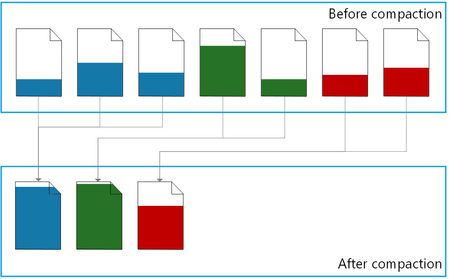
Executive summary Automatic index compaction is a built-in MSSQL database engine feature that compacts indexes in background and with minimal overhead. Now you can: Stop using scheduled index maintenance jobs. Reduce storage space consumption and save costs. Improve performance by reducing CPU, memory, and disk I/O consumption. Automatic index compaction is now generally available in Azure SQL Database, Azure SQL Managed Instance with the always-up-to-date update policy, and SQL database in Fabric. Index maintenance without maintenance jobs Enable automatic index compaction for a database with a single T-SQL command: ALTER DATABASE [database-name] SET AUTOMATIC_INDEX_COMPACTION = ON; Once enabled, you no longer need to set up, maintain, and monitor resource intensive index maintenance jobs, a time-consuming operational task for many DBA teams today. As the data in the database changes, a background process consolidates rows from partially filled data pages into a smaller number of filled up pages, and then removes the empty pages. Index bloat is eliminated – the same amount of data now uses a minimal amount of storage space. Resource consumption is reduced because the database engine needs fewer disk IOs and less CPU and memory to process the same amount of data. By design, the background compaction process acts on the recently modified pages only. This means that its own resource consumption is much lower compared to the traditional index maintenance operations (index rebuild and reorganize), which process all pages in an index or its partition. For a detailed description of how the feature works, a comparison between automatic index compaction and the traditional index maintenance operations, and the ways to monitor the compaction process, see automatic index compaction in documentation. Let the numbers speak As auto index compaction becomes generally available, it is already enabled in more than 6 million databases worldwide, most of them from Microsoft internal customers who helped validate the feature during preview. Hundreds of external customers also enabled auto compaction during preview and have been enjoying the benefits, with zero issues reported. Looking at our worldwide telemetry data for a 28-day window, automatic index compaction freed up approximately 14.3 petabytes of space in data files by consolidating 547.5 trillion rows on fewer pages, saving resources and improving query performance. Looking at the space freed up per database, the benefits range from a few megabytes per day for databases with already dense pages, to more than 500 gigabytes per day for databases that have gone through one-time extensive data modifications. Compaction in action To see the effects of automatic index compaction, we wrote a stored procedure that simulates a write-intensive OLTP workload. Each execution of the procedure inserts, updates, deletes, or selects a random number of rows, from 1 to 100, in a 50,000-row table with a clustered index. We executed this stored procedure using a popular SQLQueryStress tool, with 30 threads and 400 iterations on each thread. We measured the page density, the number pages in the leaf level of the table’s clustered index, and the number of logical reads (pages) used by a test query reading 1,000 rows, at three points in time: After initially inserting the data and before running the workload. Once the workload stopped running. Several minutes later, once the background process completed index compaction. Here are the results: Before workload After workload After compaction Logical reads 25 🟢 1,610 🔴⬆️ 35 🟢⬇️ Page density 99.51% 🟢 52.71% 🔴⬇️ 96.11% 🟢⬆️ Pages 962 🟢 4,394 🔴⬆️ 1,065 🟢⬇️ Before the workload starts, page density is high because nearly all pages are full. The number of logical reads required by the test query is minimal, and so is its resource consumption. The workload leaves a lot of empty space on pages and increases the number of pages because of row updates and deletions, and because of page splits. As a result, immediately after workload completion, the number of logical reads required for the same test query increases more than 60 times, which translates into a higher CPU and memory usage. But then within a few minutes, automatic index compaction removes the empty space from the index, increasing page density back to nearly 100%, reducing logical reads by about 98% and getting the index very close to its initial compact state. Less logical reads means that the query is faster and uses less CPU. All of this without any user action. With continuous workloads, index compaction is continuous as well, maintaining higher average page density and reducing resource usage by the workload over time. The T-SQL code we used in this demo is available in the Appendix. Conclusion Automatic index compaction delegates a routine database maintenance operation to the database engine itself, letting administrators and engineers focus on more important work without worrying about index maintenance. Making this feature generally available doesn’t mean that we stop working on it. Your feedback during preview helped us find new opportunities to fine-tune the compaction process. We thank you for that feedback and look forward to announcing new improvements in auto index compaction in the future. Appendix Here is the T-SQL code we used to demonstrate automatic index compaction. The type of executed statements and the number of affected rows is randomized to better represent an OLTP workload. While the results demonstrate the effectiveness of automatic index compaction, exact measurements may vary from one execution to the next. /* Enable automatic index compaction */ ALTER DATABASE CURRENT SET AUTOMATIC_INDEX_COMPACTION = ON; /* Reset to the initial state */ DROP TABLE IF EXISTS dbo.t; DROP SEQUENCE IF EXISTS dbo.s_id; DROP PROCEDURE IF EXISTS dbo.churn; /* Create a sequence to generate clustered index keys */ CREATE SEQUENCE dbo.s_id AS int START WITH 1 INCREMENT BY 1; /* Create a test table */ CREATE TABLE dbo.t ( id int NOT NULL CONSTRAINT df_t_id DEFAULT (NEXT VALUE FOR dbo.s_id), dt datetime2 NOT NULL CONSTRAINT df_t_dt DEFAULT (SYSDATETIME()), u uniqueidentifier NOT NULL CONSTRAINT df_t_uid DEFAULT (NEWID()), s nvarchar(100) NOT NULL CONSTRAINT df_t_s DEFAULT (REPLICATE('c', 1 + 100 * RAND())), CONSTRAINT pk_t PRIMARY KEY (id) ); /* Insert 50,000 rows */ INSERT INTO dbo.t (s) SELECT REPLICATE('c', 50) AS s FROM GENERATE_SERIES(1, 50000); GO /* Create a stored procedure that simulates a write-intensive OLTP workload. */ CREATE OR ALTER PROCEDURE dbo.churn AS SET NOCOUNT, XACT_ABORT ON; DECLARE @r float = RAND(CAST(CAST(NEWID() AS varbinary(4)) AS int)); /* Get the type of statement to execute */ DECLARE @StatementType char(6) = CASE WHEN @r <= 0.15 THEN 'insert' WHEN @r <= 0.30 THEN 'delete' WHEN @r <= 0.65 THEN 'update' WHEN @r <= 1 THEN 'select' ELSE NULL END; /* Get the maximum key value for the clustered index */ DECLARE @MaxKey int = ( SELECT CAST(current_value AS int) FROM sys.sequences WHERE name = 's_id' AND SCHEMA_NAME(schema_id) = 'dbo' ); /* Get a random key value within the key range */ DECLARE @StartKey int = 1 + RAND() * @MaxKey; /* Get a random number of rows, between 1 and 100, to modify or read */ DECLARE @RowCount int = 1 + RAND() * 99; /* Execute a statement */ IF @StatementType = 'insert' INSERT INTO dbo.t (id) SELECT NEXT VALUE FOR dbo.s_id FROM GENERATE_SERIES(1, @RowCount); IF @StatementType = 'delete' DELETE TOP (@RowCount) dbo.t WHERE id >= @StartKey; IF @StatementType = 'update' UPDATE TOP (@RowCount) dbo.t SET dt = DEFAULT, u = DEFAULT, s = DEFAULT WHERE id >= @StartKey; IF @StatementType = 'select' SELECT TOP (@RowCount) id, dt, u, s FROM dbo.t WHERE id >= @StartKey; GO /* The remainder of this script is executed three times: 1. Before running the workload using SQLQueryStress. 2. Immediately after the workload stops running. 3. Once automatic index compaction completes several minutes later. */ /* Monitor page density and the number of pages and records in the leaf level of the clustered index. */ SELECT avg_page_space_used_in_percent AS page_density, page_count, record_count FROM sys.dm_db_index_physical_stats(DB_ID(), OBJECT_ID('dbo.t'), 1, 1, 'DETAILED') WHERE index_level = 0; /* Run a test query and measure its logical reads. */ DROP TABLE IF EXISTS #t; SET STATISTICS IO ON; SELECT TOP (1000) id, dt, u, s INTO #t FROM dbo.t WHERE id >= 10000 SET STATISTICS IO OFF;7.4KViews3likes7CommentsWhat Really Happens When You Scale Azure SQL Database? How to Monitor Long-Running Scale Operations
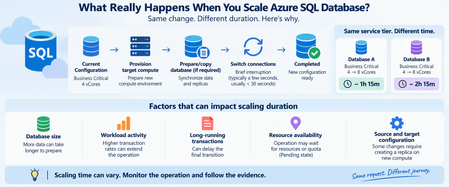
One of the advantages of Azure SQL Database is the ability to scale compute resources without managing the underlying infrastructure. Changing from 4 vCores to 8 vCores can be only a few clicks or a single command. But there is a question I frequently see when troubleshooting scaling operations: "Why is my Azure SQL Database scaling operation taking so long?" An even more interesting question appears when two databases undergo what looks like the same change: Database A Business Critical → Business Critical Scaling duration: ~1 hour 15 minutes Database B Business Critical → Business Critical Scaling duration: ~2 hours 15 minutes Same service tier. Similar scaling request. Very different completion time. At first glance, that might look unusual. However, a scale operation isn't simply Azure changing a configuration value from one number of vCores to another. Depending on the source and target configuration, Azure SQL Database can need to provision target compute, prepare or copy database data, transition connections to the target compute, and clean up the original environment. Microsoft specifically notes that creating a database replica on the new compute instance for some scaling combinations can strongly influence the overall latency. Let's look at what happens and, more importantly, how to monitor it. Scaling Is More Than Changing vCores When you submit a scaling request such as: Business Critical 4 vCores ↓ Business Critical 8 vCores it's tempting to imagine something like: CPU allocation: 4 → 8 Done. That isn't necessarily what happens. At a high level, Microsoft documents a scaling workflow involving two important stages: Create a new compute instance with the requested service tier and compute size Switch routing from the original compute instance to the new one For some combinations of service-tier and compute-size changes, Azure SQL Database must also create a replica on the new compute instance, involving data copying. A simplified view is: Scaling request ↓ Prepare target compute ↓ Prepare/copy database if required ↓ Bring target environment ready ↓ Switch connections ↓ Scaling complete The important takeaway is: A scale operation can involve moving database execution to a new compute environment, not simply increasing CPU on the existing environment. Why Can Two Similar Databases Take Different Amounts of Time? This is where troubleshooting becomes interesting. Imagine two databases: Database A 4 vCores → 8 vCores Completed in 75 minutes Database B 4 vCores → 8 vCores Completed in 135 minutes The natural question is: "If the source and destination configurations are the same, shouldn't the duration also be the same?" Not necessarily. The requested configuration tells us where the database needs to end up. It does not mean the work required to reach that state is identical. Several factors can affect the operation. 1. Database Size and Data Movement One of the most important factors can be the amount of data that must be prepared on the target compute. Microsoft's scaling documentation explicitly states that for some source/target combinations, a replica must be created on the new compute instance. That involves copying data and can significantly affect the overall scaling latency. Conceptually: Small database Provision ████ Data preparation ██████ Switch █ versus: Large database Provision ████ Data preparation ████████████████████████ Switch █ Database size alone doesn't provide a precise prediction of completion time, but it can influence the amount of work required during applicable scaling paths. 2. Workload Activity Matters A database also doesn't necessarily stop processing application traffic while Azure prepares the target environment. Microsoft states that during target compute creation, the database remains online and connections continue to the original compute instance. That creates an interesting challenge: Target environment preparing + Application still generating workload A highly active transactional database and a relatively idle database can therefore present different operational conditions during scaling. The practical lesson is: Two databases with the same service objective aren't necessarily in the same workload state when scaling begins. When investigating a slow scale operation, look at the activity around the scaling window, including: transaction volume; write activity; long-running transactions; workload peaks; batch operations; maintenance activity. 3. Long-Running Transactions Can Affect Switchover Toward the end of scaling, connections need to transition to the target compute instance. Microsoft documents that existing connections to the original compute are dropped and new connections are established to the target compute. The switch generally results in a short interruption, often only a few seconds and generally less than 30 seconds. However, there's an important exception. Microsoft notes that: If long-running transactions are active when connections are dropped, the switch can take longer because aborted transactions need to recover. Conceptually: Normal transition Target ready ↓ Switch ↓ Reconnect ↓ Done With a long-running transaction: Target ready ↓ Connection transition ↓ Transaction interruption ↓ Recovery work ↓ Reconnect ↓ Done This is one reason application workload should be considered when evaluating scaling duration. 4. Resource Availability Can Matter Another clue comes from Azure SQL's operation-status metadata. The sys.dm_operation_status DMV exposes several states for database operations, including: PENDING IN_PROGRESS COMPLETED FAILED CANCEL_IN_PROGRESS CANCELLED Importantly, Microsoft defines PENDING as an operation waiting for resource or quota availability. That means some of the elapsed time around an operation may occur before active processing progresses as expected. This is why comparing scale operations purely by database size or vCore count can be misleading. How Can I Monitor a Scaling Operation? Rather than repeatedly refreshing the Azure portal, there are several useful methods for inspecting progress. Method 1: Azure PowerShell with Get-AzSqlDatabaseActivity Azure PowerShell provides: Get-AzSqlDatabaseActivity Microsoft documents this cmdlet specifically for retrieving the status of operations against Azure SQL databases. For example: Get-AzSqlDatabaseActivity ` -ResourceGroupName "MyResourceGroup" ` -ServerName "myserver" ` -DatabaseName "mydatabase" This can help identify database operations associated with the selected database. For clearer output: Get-AzSqlDatabaseActivity ` -ResourceGroupName "MyResourceGroup" ` -ServerName "myserver" ` -DatabaseName "mydatabase" | Select-Object ` Operation, OperationId, DatabaseName, State, PercentComplete, StartTime, ErrorCode, ErrorMessage The specific fields returned can vary with module/API behavior, so always interpret them in the context of the operation being monitored. The important point is that you're no longer asking only: "Is scaling still happening?" You can inspect the operation itself. Method 2: Check Current and Requested Service Objectives Another useful PowerShell command is: Get-AzSqlDatabase Microsoft documents this cmdlet for retrieving Azure SQL Database properties. Its output includes service-objective information such as CurrentServiceObjectiveName and RequestedServiceObjectiveName. For example: Get-AzSqlDatabase ` -ResourceGroupName "MyResourceGroup" ` -ServerName "myserver" ` -DatabaseName "mydatabase" | Select-Object ` DatabaseName, Status, Edition, CurrentServiceObjectiveName, RequestedServiceObjectiveName During a change, comparing these fields can help establish the current and requested configuration. Think of it as: CurrentServiceObjectiveName ↓ Where am I now? RequestedServiceObjectiveName ↓ Where am I trying to go? Once the operation completes successfully, the current configuration should reflect the requested target. Method 3: Use sys.dm_operation_status For SQL-side monitoring, sys.dm_operation_status provides information about database operations such as CREATE and ALTER. For example: SELECT major_resource_id, operation, state_desc, percent_complete, start_time, last_modify_time, error_code, error_desc FROM sys.dm_operation_status ORDER BY start_time DESC; Useful columns include: operation state_desc percent_complete start_time last_modify_time error_code error_desc Microsoft defines the operation states as including PENDING, IN_PROGRESS, COMPLETED, and FAILED. Be Careful With PercentComplete This is an important detail. It is tempting to interpret: PercentComplete = 50 as: "Half of the work is finished, so half of the remaining time is left." That isn't necessarily correct. For sys.dm_operation_status, Microsoft documents percent_complete for most operations as: 0 = Operation not started 50 = Operation in progress 100 = Operation complete Restore operations are an important exception, where values between 1 and 99 can indicate more granular progress. So for a normal ALTER/scale operation: 50% should generally be interpreted as: The operation is in progress rather than: Exactly half the work remains. This distinction is very useful when communicating with application teams during long-running operations. A Practical Monitoring Script For PowerShell users, I like combining the configuration and operation views. First check the database: $db = Get-AzSqlDatabase ` -ResourceGroupName "MyResourceGroup" ` -ServerName "myserver" ` -DatabaseName "mydatabase" $db | Select-Object ` DatabaseName, Status, Edition, CurrentServiceObjectiveName, RequestedServiceObjectiveName Then check database operations: Get-AzSqlDatabaseActivity ` -ResourceGroupName "MyResourceGroup" ` -ServerName "myserver" ` -DatabaseName "mydatabase" This gives you two complementary perspectives: DATABASE STATE + OPERATION STATE ↓ Better understanding of scaling progress What About Application Availability During Scaling? One of the biggest concerns is: "Does the database remain available while scaling?" For Azure SQL Database, Microsoft states that the database remains online while the new compute environment is being prepared. Connections continue to the original compute during that stage. The important availability event occurs during the transition. At switchover: Existing connections ↓ Dropped ↓ Routing switches ↓ New connections ↓ Target compute Microsoft says the switch generally causes an interruption of less than 30 seconds and often only a few seconds. Applications should therefore implement appropriate transient-error handling and retry logic. Microsoft explicitly recommends retry logic for applications and components using the database while the service tier is being changed. Don't Immediately Cancel a "Slow" Scaling Operation A scale operation taking longer than expected does not automatically mean: Scaling is stuck. It could still be legitimately working through: Resource availability ↓ Target compute preparation ↓ Data/replica preparation ↓ Synchronization / workload handling ↓ Switchover Before assuming failure, gather evidence. Check: Operation state Current service objective Requested service objective Start time Last modification time Error details Workload activity Long-running transactions Then determine whether the operation is: Pending Actively progressing Completed or: Failed Troubleshooting Two Databases With Different Scaling Durations Suppose you're investigating: Database A Scale duration: 1h15 Database B Scale duration: 2h15 Here is the approach I recommend. 1. Verify that the changes truly match Compare: Source service tier Target service tier Source vCores Target vCores Compute tier Storage configuration Do not assume both operations were identical simply because both ended at, for example, Business Critical 8 vCores. 2. Compare database characteristics Look at: Database size Workload level Write activity Transaction volume Long-running transactions 3. Compare operation timing Retrieve: Start time State Last modification time Completion time sys.dm_operation_status exposes this operation metadata for Azure SQL database operations. 4. Determine whether either operation spent time pending Remember: PENDING can mean the operation is waiting for resource or quota availability. That represents a very different explanation from: "The database took longer to copy." 5. Check workload around the transition Look for: Large transactions Bulk writes ETL operations Maintenance High transaction rates Long-running transactions particularly around the switchover period. Scaling Duration Is Not an SLA Stopwatch This leads to perhaps the most important takeaway. If: Database A took 75 minutes you should not assume: Database B must take approximately 75 minutes. Even apparently similar scale operations can encounter different database and platform conditions. A better operational expectation is: Treat each scaling operation as an asynchronous platform operation whose duration depends on the work required to safely reach the requested configuration. Monitor the operation rather than predicting its completion from a previous database. Recommended Checklist Before scaling a production Azure SQL Database: Before Review workload activity. Identify long-running transactions or batch processes. Confirm the requested service objective. Ensure application retry logic is implemented. Record the UTC start time. Understand dependent application connection behavior. During Monitor: Get-AzSqlDatabaseActivity Get-AzSqlDatabase sys.dm_operation_status and watch: State CurrentServiceObjectiveName RequestedServiceObjectiveName StartTime LastModifyTime Error information After Confirm: Current service objective = requested target Database status = Online Application connectivity = Healthy Workload performance = Expected Also validate that applications successfully reconnected after the transition. Final Thoughts When Azure SQL Database scaling takes longer than expected, it's easy to think: "Something must be wrong." And when two similar databases take very different amounts of time, it's equally tempting to expect the durations to match. But a scale operation can involve substantially more than changing a vCore number. At a high level: Request scaling ↓ Provision target compute ↓ Prepare/copy database when required ↓ Transition connections ↓ Complete Microsoft's documentation confirms that data copying for applicable scale paths can strongly influence latency, that the switchover can take longer in the presence of long-running transactions, and that a pending operation might be waiting for resource or quota availability. So when someone asks: "Why is Azure SQL scaling taking so long?" my recommendation is not to start by guessing how many minutes it should take. Instead ask: "What state is the operation currently in, and what evidence do we have about its progress?" With Get-AzSqlDatabaseActivity, Get-AzSqlDatabase, and sys.dm_operation_status, you can turn an opaque waiting period into a much more structured investigation. References Scale single database resources in Azure SQL Database Scale resources in Azure SQL Database sys.dm_operation_status Get-AzSqlDatabaseActivity Get-AzSqlDatabase148Views0likes0CommentsLessons Learned #560: SQL Is Slow — What Can Query Store and SSMS Copilot Uncover?
In our recently delivered session, “SQL Is Slow — What Can Query Store and SSMS Copilot Uncover?”, we demonstrated step by step how to investigate a performance problem by combining Query Store with Copilot’s capabilities in SSMS. The demonstration starts with a PHP program executing queries while we grow a table from a few hundred to millions of rows. As different execution plans appear and performance changes, we follow the evidence in Query Store to uncover what is happening and decide what to investigate next. One clue stood out. The query took about 12 milliseconds per execution in one interval and almost 2.5 seconds in another interval under the same Plan ID. Other plans appeared during the complete lab. Understanding both the differences between plans and the changes within a plan became part of the investigation. Along the way, we demonstrated how a guided conversation with Copilot can become an Agent investigation, and how the investigation itself can be captured in a reusable skill. The useful result was a method that keeps asking for evidence before accepting an explanation. The session brings the two tools together: Query Store supplies the recorded history, and Copilot helps us examine it and decide what to investigate next. The same troubleshooting story lets the audience follow Ask mode, Agent mode and the reusable skill without losing the connection to the underlying SQL evidence. A growing table and several execution plans For our sessions, we use a PHP program that generates 16 different simulations of performance and connectivity problems, allowing us to demonstrate how to investigate these scenarios through practical demos. We also have code developed in .NET and Java. In this demonstration, we add records to dbo.Notes in stages, reaching approximately 200, 32,000, 65,000, 2 million, and 4 million rows, while the PHP program executes dbo.GiveNotes with different @N values. This lets us observe how performance and execution plans evolve as the data volume grows. Several execution plans accumulated during the complete demonstration. We compared all of them, then inspected the runtime intervals within each Plan ID. The reference run revealed this change within the history of one plan: Average per execution Healthy interval Degraded interval Approximate increase CPU 7.69 ms 1,443.19 ms 188 times Duration 12.39 ms 2,473.68 ms 200 times Logical reads 68.39 12,233.10 179 times The duration increase was approximately 200 times. This comparison covers two intervals for one Plan ID, not the whole sequence of table sizes. It does not assign a particular plan or timing to each row-count stage. These are lab observations; identifiers and timings vary between runs. The reads were particularly revealing. Each execution was touching far more pages. A later plan change could not, by itself, explain degradation that had already started while the earlier plan remained in use. The next step was to investigate what had increased the work per execution. Build the timeline before choosing the explanation We first compared workload contributors using total CPU, elapsed duration, logical reads and execution count. Total consumption identified where the workload impact was concentrated; averages per execution helped distinguish expensive executions from a high volume of individually inexpensive calls. Next, we collected every plan for the selected query and compared runtime intervals chronologically. We discovered the identifiers from the database instead of supplying fixed Query IDs or Plan IDs. We asked both when another plan appeared and whether the cost had already increased before that change. A plan summary alone can hide this story. One average across a plan’s entire history blends its healthy and degraded periods. The interval history shows when the work changed and whether that happened before another plan appeared. Aggregation mattered. When combining runtime statistics, we weighted each average by its execution count. A simple average of interval averages would give a lightly used interval the same influence as a heavily used one. We also kept units explicit and separated execution types where needed. Weighted average = SUM(average value * execution count) / SUM(execution count) The increase in logical reads directed the investigation toward the amount of data processed and the access path. Waits could help explain elapsed time, but waits alone would not explain that increase in reads. dbo.GiveNotes filtered dbo.Notes on ID < @N and grouped by Name. The clustered primary key was on id2, a different column from the predicate. As rows were added, a reused plan could process more data; changing @N could also change how many rows qualified. A new Plan ID was a separate event to investigate, not an explanation to assume. Different @N values can qualify different numbers of rows, and table growth can increase the work even with an unchanged plan. We inspected distribution, statistics and access paths to test that explanation. Query Store interval averages alone do not tell us the parameter used by every execution, and parameter-sensitive behavior does not automatically prove parameter sniffing. One investigation through three Copilot experiences In Ask mode, we guided the conversation one question at a time. We first requested the Query Store overview, then asked which contributor to investigate and how its plans behaved over time. The staged prompts delayed statistics, index and parameter analysis until the runtime evidence justified those questions. Where required, we ran generated diagnostic T-SQL and brought the results back into the conversation. In Agent mode, we supplied the investigation goal and allowed Copilot to choose and execute diagnostic steps using the available SQL tools. We reviewed the proposed actions and kept the investigation read-only. The agent could use each result to decide what to inspect next. Finally, we captured the sequence in an Agent Skill. We wanted the next investigation to preserve the critical question: did the query become more expensive while the same plan was still being reused? Agent Skills provide task-specific instructions that Copilot can discover and use in Agent mode. We also demonstrated the reusable method through GitHub Copilot CLI. Database execution still requires a configured SQL tool or MCP server; without that capability, the workflow must generate diagnostics for the engineer to run. What we put into the reusable skill The SQL Performance Investigator pack captures the diagnostic sequence alongside the calculation rules and starting prompts. The agent is instructed to: Identify the main workload contributor and retain its Query ID. Collect all associated plans and their runtime history. Check whether degradation began while the same plan remained in use. Investigate relevant selectivity, statistics and index evidence. Separate confirmed observations from hypotheses and propose validation. A skill makes the method reusable; it does not guarantee the diagnosis is correct. Missing history, incorrect aggregation or a plausible but unsupported inference still need an engineer’s attention. We kept discovery read-only, with SQL permissions enforcing the access boundary. A proposed index still needs evidence of improvement In the demonstration, we evaluated an index with ID as its leading key and Name as an included column: CREATE NONCLUSTERED INDEX NOTES_IX1 ON dbo.Notes (ID) INCLUDE (Name); The key matches the range predicate, while the included column makes Name available for the aggregation. Whether this improves the workload depends on selectivity, data volume and the competing plans. Its storage and write costs also matter. We treated this as a remediation candidate. Validation requires a comparable workload, including parameter distribution and concurrency, followed by a Query Store comparison of reads, CPU, duration and variability. We did not equate an index recommendation with a demonstrated improvement. Statistics also need careful interpretation. An index histogram describes its leading key; adding Name as an INCLUDE column does not create a histogram on Name. An existing auto-created statistic should not be dropped merely because its column appears in a covering index. The lesson we took from the demonstration The complete story contained a growing table and multiple plans. Within that history, one plan became much more expensive before a later plan could explain the change. Comparing plans and examining changes within each plan gave us complementary evidence. Copilot helped us follow it, and the skill preserved the investigation sequence for another database. We enjoyed presenting this session. For DBAs, developers and support engineers, the session offers a practical way to watch a performance investigation unfold, from the PHP workload and Query Store history to the prompts and reusable skill. We look forward to continuing this demonstration and discussion with SQL user groups and the wider technical community. If you have encountered a query that became slower while the same plan remained in use, which evidence helped you explain the change? We would be interested to hear how you approached it. References and prerequisites For the SSMS Agent and Skills experience described here, Microsoft documents SSMS 22.7 or later with the AI Assistance workload and GitHub Copilot access. Query Store must be enabled with relevant history available. Specify the target server and database in the Agent prompt rather than relying on the active editor context. Check the current documentation before reproducing the session. GitHub Copilot Agent mode in SSMS Agent Skills in SSMS Monitoring performance by using Query Store Query Store runtime statistics Try the investigation with our prompts These prompts offer a practical starting point for the method demonstrated in our session. The Ask prompt is the opening prompt from our session workflow. The Agent prompts are adapted from our accompanying pack to make the target server, database and investigation window explicit. Replace the angle-bracket placeholders before submitting them. Start with Ask mode We began with a request for evidence, deliberately postponing diagnosis. Run the generated diagnostic query against the intended lab database and use its results for the next questions. I want to start a SQL performance troubleshooting investigation using Query Store. Generate a single read-only T-SQL query that I can execute in the current database to identify the main performance contributors. The query must use Query Store and return, for each query: * Query ID * Query text * Object or stored procedure name, when available * Number of execution plans * Number of executions * Total CPU time * Average CPU time per execution * Total duration * Average duration per execution * Total logical reads * Average logical reads per execution Aggregate Query Store runtime statistics correctly across runtime intervals and execution plans. Use weighted calculations based on count_executions. Do not calculate averages by simply averaging Query Store average values. Return CPU and duration values in milliseconds. Rank the results by total CPU consumption, but include all the metrics above so that we can determine later which resource is having the highest impact. Do not perform root-cause analysis yet. Do not include execution plan analysis, parameter sensitivity, statistics analysis, index analysis, or remediation recommendations. Only generate the read-only diagnostic T-SQL query that I should execute. We then asked which resource deserved investigation, which query contributed most, how all its plans performed over time, and whether the same Plan ID had become more expensive. Only after those answers did we investigate selectivity, statistics and indexes. The complete session workflow contains the staged follow-up prompts. Convert the conversation into an Agent investigation We moved the recurring calculation rules and diagnostic sequence into sql-performance-investigator. The starting prompt could then state the goal, scope and execution boundaries. The skill supplies the detailed method; the available SQL tools supply execution capability. The agent retains the discovered query and plan identifiers within the investigation. It should not ask the engineer to copy them between steps or assume the identifiers from a previous lab run. Run the method in SSMS Agent mode Make the skill available to SSMS, select Agent mode and verify the SQL tools are enabled. Specify the target explicitly because Agent mode does not inherit the active query editor context. Investigate the SQL performance problem on server <server>, database <database>, using Query Store for <UTC start> to <UTC end>. Use the sql-performance-investigator skill. Use the available sql-tools to execute read-only diagnostics and continue through the investigation, requesting approval where the host requires it. Automatically discover the dominant performance metric, target query, Query ID, all Plan IDs, runtime history, and any same-plan degradation. Retain the discovered identifiers internally. Investigate the evidence needed to explain the change, including selectivity, data distribution, statistics and existing indexes when relevant. Do not assume a plan change caused the degradation or label it parameter sniffing without evidence. Keep confirmed evidence, inference, hypotheses and missing evidence separate. Use execution-weighted averages and explicit units. If the requested history or permissions are unavailable, report the limitation. Do not create/drop indexes, update/drop statistics, force plans, clear caches, modify Query Store, or change data/schema. Finish with a supported diagnosis or remaining uncertainty, a proposed remediation if justified, and a Query Store before/after validation plan. Do not execute remediation. Use the same method in GitHub Copilot Our pack places the skill at .github/skills/sql-performance-investigator/SKILL.md and the Custom Agent at .github/agents/sql-performance-investigator.agent.md. The skill references workflow.md and query-store-rules.md for the detailed method. In GitHub Copilot CLI, select the SQL Performance Investigator custom agent and use this adapted starting prompt: Use the SQL Performance Investigator custom agent and the sql-performance-investigator skill. Investigate SQL performance on <server>, database <database>, for <UTC start> to <UTC end>, using Query Store from evidence to diagnosis. If a SQL execution tool/MCP is available, run only read-only diagnostics and continue through the investigation. Discover Query IDs and Plan IDs automatically and retain them internally. Follow the host approval requirements. If no SQL execution capability is available, generate one self-contained read-only diagnostic batch for me to run, then continue when I provide the result. Do not claim that SQL was executed. Do not apply remediation. Propose an index/statistics action only after the evidence supports it. Finish with a before/after Query Store validation plan. The reusable asset is the investigation procedure behind these prompts. Query Store supplies the evidence, Copilot helps carry out the investigation, and the engineer reviews whether the explanation and proposed change are supported by the results.147Views0likes0CommentsAzure SQL Performance Troubleshooting: When High Latency Is Not High CPU
When an application connected to Azure SQL Database becomes slow or starts timing out, one of the first questions is usually: Is the database running out of CPU? It's a reasonable starting point, but CPU is only one part of the performance story. Some Azure SQL performance problems occur while CPU, Data IO, and worker utilization appear healthy. The database may have plenty of compute capacity while queries spend most of their time waiting rather than executing. The key troubleshooting question is therefore not simply: "How much CPU is Azure SQL using?" Instead, ask: "Where is the elapsed time being spent?" Start With Resources, But Don't Stop There Resource utilization should still be the first checkpoint. A simple query using sys.dm_db_resource_stats can help identify whether Azure SQL is approaching CPU, Data IO, Log IO, memory, or worker limits: SELECT DB_NAME() AS database_name, AVG(avg_cpu_percent) AS avg_cpu_percent, MAX(avg_cpu_percent) AS max_cpu_percent, MAX(avg_data_io_percent) AS max_data_io_percent, MAX(avg_log_write_percent) AS max_log_write_percent, MAX(avg_memory_usage_percent) AS max_memory_percent, MAX(max_worker_percent) AS max_worker_percent FROM sys.dm_db_resource_stats; If CPU is consistently near 100%, investigate CPU consumption. If Log IO reaches its limit, investigate transaction-log generation. If workers are exhausted, investigate concurrency. But if none of these resources is saturated, don't conclude that Azure SQL is healthy. Move to wait analysis. Follow the Waits A useful simplified model is: Query elapsed time = CPU execution If a query runs for 10 minutes but uses only 30 seconds of CPU, most of its elapsed time occurred somewhere else. Common wait patterns can point the investigation in different directions: Wait Area to investigate PAGELATCH_* In-memory page contention PAGEIOLATCH_* Storage reads LCK_M_* Blocking WRITELOG Transaction log LOG_RATE_GOVERNOR Log throughput RESOURCE_SEMAPHORE Memory grants ASYNC_NETWORK_IO Client/result consumption The wait type is not automatically the root cause. Think of it as a sign telling you: Look in this direction next. PAGELATCH Does Not Mean Slow Storage One important distinction is: PAGELATCH versus: PAGEIOLATCH Despite their similar names, they represent different problems. PAGEIOLATCH is associated with waiting for data pages involved in physical I/O. PAGELATCH, however, is synchronization around pages that are already in memory. Consider a highly concurrent workload: Hundreds of sessions ↓ Same memory page ↓ Latch contention ↓ Sessions wait ↓ Application CPU may still have available capacity. This is why increasing vCores doesn't necessarily eliminate latch contention. Additional compute provides more workload headroom, but it doesn't automatically remove a serialization point around a hot page. Microsoft's I/O troubleshooting guidance also distinguishes PAGEIOLATCH and other I/O-related waits when diagnosing storage-performance problems. Microsoft Learn: Troubleshoot SQL Server I/O performance Query Frequency Matters Too Another common mistake is focusing only on individually expensive queries. Imagine a query that takes only 20 milliseconds but executes hundreds of thousands of times, often concurrently. Its impact is better thought of as: Workload Impact = Cost per execution × Execution frequency × A small metadata lookup or initialization query can become significant when hundreds of application instances execute it simultaneously. This is where Query Store becomes particularly useful. Query Store preserves query, execution-plan, and runtime history, allowing you to compare executions, duration, CPU, plans, and other performance characteristics over time. Microsoft Learn: Monitor performance using Query Store Instead of asking only: "What's my most expensive query?" also ask: "What changed in the workload?" When Nine Hours of Duration Is Only One Minute of CPU Now consider the opposite problem. Suppose Query Store shows something like: Elapsed time 9 hours SQL CPU time 1 minute Returned rows 750,000+ Dominant wait ASYNC_NETWORK_IO Would adding CPU solve this? Probably not. CPU represents only a tiny fraction of the elapsed time. ASYNC_NETWORK_IO commonly occurs when SQL Server has results available but the client application is not consuming them quickly enough. Microsoft documents several possible causes, including: large result sets; slow application processing; applications fetching rows slowly; network-related delays. Microsoft Learn: Troubleshoot ASYNC_NETWORK_IO Importantly: ASYNC_NETWORK_IO does not automatically mean the network is slow. The bottleneck might actually be the application. Measure Time to First Row A useful troubleshooting technique is to separate database response time from result-consumption time. Instead of measuring only: Query start → Application finished measure: T0 = Query submitted T1 = First row received T2 = Last row received T3 = Application processing completed You can then separate: Database response = T1 - T0 Result consumption = T2 - T1 Application For example: First row received: 2 seconds Last row received: 2 hours Processing completed: 2.5 hours Calling this a "2.5-hour SQL query" would be misleading. SQL started returning results after two seconds. Most of the time was spent transferring or processing them. Don't Forget Blocking Low CPU can also be caused by blocking. If many sessions are waiting behind a transaction, increasing CPU isn't going to solve the problem. During an active incident, check requests and their waits: SELECT r.session_id, r.blocking_session_id, r.status, r.wait_type, r.wait_time, r.wait_resource, r.cpu_time, r.total_elapsed_time, st.text FROM sys.dm_exec_requests AS r CROSS APPLY sys.dm_exec_sql_text(r.sql_handle) AS st WHERE r.blocking_session_id <> 0 ORDER BY r.wait_time DESC; This helps determine whether the application is experiencing a resource problem or simply waiting behind another transaction. Why Scaling Can Be Misleading Imagine this sequence: Application slow ↓ Scale database ↓ Performance improves It's tempting to conclude: "We needed more CPU." But scaling can change more than CPU availability. Depending on the operation and environment, it can alter resource availability or execution conditions. Therefore: A successful mitigation does not automatically prove the root cause. Always distinguish between: What made the symptoms disappear? and: What originally caused the symptoms? A Practical Troubleshooting Workflow When investigating Azure SQL performance, I use the following approach: 1. Define the exact incident window Preferably using UTC timestamps. 2. Check core resources Look at: CPU Data IO Log IO memory workers 3. Compare CPU time with elapsed time If: Elapsed ≈ CPU investigate computational workload. If: Elapsed >>> CPU investigate waits. 4. Identify dominant waits Ask what prevented SQL from continuing execution. 5. Check blocking Determine whether requests are waiting behind other transactions. 6. Use Query Store Compare healthy and problematic periods for: execution count; CPU; duration; logical reads; plans; wait behavior. Microsoft provides Query Store examples specifically for workload and performance investigation. Microsoft Learn: Tune performance with Query Store 7. Inspect the execution plan Look for inefficient access patterns, cardinality problems, excessive reads, repeated lookups, spills, scans, or plan changes. 8. Investigate the application Especially when SQL CPU is low but result-transfer waits are high. Look at: rows returned; fetch size; batch size; application processing; concurrency; downstream dependencies. 9. Compare healthy vs unhealthy periods Don't analyze an incident in isolation. Ask: What changed? Common Misdiagnoses "CPU isn't 100%, so SQL is healthy." Not necessarily. Queries might simply be waiting. "ASYNC_NETWORK_IO means we have a network problem." Not necessarily. The client may be consuming results slowly. "PAGELATCH means storage is slow." No. Don't confuse PAGELATCH with PAGEIOLATCH. "Scaling fixed the problem, so CPU was the root cause." Not necessarily. Mitigation and root cause are different concepts. "The slowest query must be the problem." Not always. A small query executed extremely frequently can generate larger cumulative impact. Final Thought: Follow the Time When Azure SQL becomes slow, avoid jumping directly from: Slow database → Add more vCores Instead, work through: High latency ↓ Resource utilization ↓ CPU vs elapsed time ↓ Wait statistics ↓ Query Store ↓ Execution plan ↓ Application behavior ↓ Root cause ↓ Targeted optimization Performance troubleshooting becomes much easier once you stop asking only: "How busy is Azure SQL?" and start asking: "Where did the time go?" Because sometimes the database isn't busy at all. It's waiting. References Monitor Performance by Using the Query Store Tune performance with the Query Store Troubleshoot slow queries resulting from ASYNC_NETWORK_IO Troubleshoot slow SQL Server performance caused by I/O issues193Views0likes0Comments