azure sql database
7 TopicsCDK Global modernizes automotive CRM on Azure SQL Managed Instance
For automotive retailers, most customer relationships don't begin and end with a vehicle purchase. A customer might browse inventory online, visit a dealership weeks later, return for service months after that, and eventually purchase another vehicle years down the road. Every interaction creates information that helps dealerships better understand their customers and build stronger relationships over time. Helping dealerships manage those relationships is at the core of the CDK CRM platform. CDK is a leading provider of cloud-based software to dealerships and OEMs across automotive and related industries in the US and Canada, helping facilitate more than $540 billion in annual automotive commerce. It gives dealership teams visibility into customer interactions with their products and services and creates continuity across the conversations that shape the buying journey. As customer expectations evolve, CDK continues to look for new ways to help dealerships work more efficiently, make better use of information, and adapt quickly to market changes. Supporting that next phase of innovation required a technology foundation that could grow alongside the business. Working with Microsoft, CDK evolved its CRM platform on Microsoft Azure and Azure SQL Managed Instance. The project included a large migration to Azure SQL Managed Instance and marked an important step in the future of the CRM experience. Transforming a business-critical system at scale The size of the project reflected how central the CRM platform is to CDK’s business. The environment supports a broad set of applications for dealership operations and relies on a robust data foundation to keep information flowing. Microsoft and CDK worked together to implement a cloud architecture built on Azure App Service and Azure SQL Managed Instance. Additional Azure services support application delivery, networking, and data movement across the architecture. The teams developed a Terraform-based infrastructure-as-code framework that standardizes how environments are deployed and managed. That foundation brings greater consistency to the development process. Engineering teams can work within environments that are configured in a predictable way, reducing the likelihood of unexpected differences between testing and production. The project also provided an opportunity to strengthen security and governance practices. CDK updated applications to use managed identities, reducing reliance on static credentials, and implemented Microsoft Entra ID authentication and private connectivity patterns that help secure access to critical resources. While dealership users may not see these changes directly, they help deliver the stability and security that customers expect from the platform. Preserving continuity while moving to the cloud As CDK evaluated its cloud strategy, the database layer became one of the most important decisions in the project. The CRM platform supports business-critical dealership operations throughout the day. Customer interactions, sales activity, and service records all depend on information moving quickly and reliably between systems. Any technology transformation would need to preserve that experience while creating a path to future growth. Azure SQL Managed Instance stood out because it offered a familiar SQL Server environment while reducing much of the operational overhead associated with managing database infrastructure. It also aligned well with CDK’s long-term goals around resiliency, scalability, and continuous innovation. Equally important, Azure SQL Managed Instance provided a migration path that worked with the realities of the CRM environment. “One of the reasons Azure SQL Managed Instance appealed to us was that it allowed us to innovate without redesigning the CRM platform from the ground up,” says Stan Leong, Vice President of Modern Retailing Engineering at CDK. “We could preserve compatibility with the applications our dealerships depend on while taking advantage of a fully managed cloud service.” Unlike some projects that can move applications gradually, the CDK CRM platform required a coordinated transition. The databases that support the platform are highly interconnected, which meant the company needed an approach that would allow the environment to move together while minimizing disruption for customers. To prepare for that transition, CDK and Microsoft used Azure SQL Managed Instance link to establish near real-time replication between environments. This allowed teams to begin validating the migration long before the production cutover. Engineers could confirm that data was flowing correctly, identify potential issues, and gain confidence in the process before dealerships were ever affected. The approach also gave CDK an added layer of flexibility during the transition period. Rather than making a one-way move, the company could maintain a rollback option while teams validated production operations in Azure. Because Azure SQL Managed Instance link kept environments synchronized, CDK retained the ability to fail back to its on-premises environment if needed while preserving continuity for dealership operations. After failing over to Azure, the company continued running with synchronized environments for more than four weeks, allowing teams to validate production workloads before completing the final cutover. Executing a migration measured in terabytes That preparation became especially important because the migration would take place during a single maintenance window. By establishing synchronization ahead of time, CDK was able to keep data aligned between environments before the failover to Azure. When migration time arrived, production data was already synchronized in Azure, allowing the maintenance event to focus on transitioning operations rather than moving large volumes of data for the first time. Planning and architecture work that led to the migration spanned several months. The final migration preparation and validation effort was completed in just six weeks, with engineers working together to test migration scenarios, optimize replication performance, and validate data consistency ahead of production. CDK migrated more than 1,000 databases and hundreds of terabytes of data to Azure SQL Managed Instance. The environment now processes billions of database queries every day. The failover to Azure was completed during a single weekend with minimal failover time and no data loss. In many cases, database failovers completed in seconds, with most finishing within minutes. Microsoft engineering, product, support, and field teams remained engaged throughout the event, working alongside CDK to monitor the transition and address issues in real time. “This was one of the most significant technology initiatives we’ve undertaken for our CRM platform,” says Leong. “Working closely with Microsoft, we migrated more than 1,000 databases to Azure SQL Managed Instance while supporting dealerships throughout the process. The collaboration between our teams helped us execute the transition with minimal disruption to customers.” Strengthening reliability for dealership operations Delivering more than a new cloud environment, the migration also gave CDK an opportunity to evolve the CRM platform operations. As part of this effort, CDK implemented resilience architecture built on Azure. The design incorporates Azure Front Door, geo-redundant storage, and Azure SQL Managed Instance failover capabilities, allowing the company to maintain continuity when unexpected disruptions occur. These improvements rarely attract attention when everything is working as expected, but they help the platform remain available when it matters most. Since the migration, CDK has heard positive feedback from dealerships that report faster and more responsive application experiences. Preparing dealerships for what’s next With the CRM platform now running on Azure, CDK is focused on the next phase of its CRM strategy. Beyond supporting today’s dealership operations, the cloud-based foundation gives the company greater flexibility to introduce new functionality and continue advancing the platform over time. AI capabilities are already helping dealership employees surface relevant information at the right moment while reducing the effort required to complete routine tasks. And AI is accelerating software development and deployment, enabling engineering teams to deliver new capabilities more efficiently. CDK is also investing in new reporting experiences designed to make insights easier to access. Dealerships generate enormous amounts of data, but its value depends on how quickly users can find relevant information and act on it. The CRM migration has become an important reference point for future platform initiatives across the organization. By successfully moving a business-critical platform at this scale, CDK established a blueprint for future cloud initiatives. “The migration was an important milestone, but it’s really the starting point,” says Leong. “With Azure and Azure SQL Managed Instance, our teams can focus more energy on delivering new capabilities for dealerships while using AI to power experiences that help customers operate more efficiently.”619Views2likes0CommentsBuilding an Azure architecture that’s ready for every signature
At Exclaimer, we help organizations manage email signatures at scale, so every message can carry a consistent, compliant, on-brand signature without IT teams manually updating thousands of mailboxes. This is more difficult than it may seem, especially when you're doing it for more than 80,000 customers, around 9.6 million seats, and more than 21 billion emails a year. Every signature must show up in the right place, with the right details, for the right sender, recipient, device, and business rule. Behind that are constantly changing employee records, customer-specific policies, email chains, recipient lists, regional disclaimers, and brand requirements. Because our platform sits directly in the email flow, availability is critical. And because many of our customers operate in regulated industries, they also need confidence that data stays in-region and configured signatures are applied consistently. To support that level of scale and reliability, we’ve spent the last several years evolving our architecture on Microsoft Azure. Today, Azure Kubernetes Service (AKS), Azure SQL Database, Azure Database for PostgreSQL, Azure Cosmos DB, Azure Data Explorer, and Azure Databricks help us run a global platform that’s more responsive, more resilient, and more cost-efficient. Reading the signs that our architecture needed to change In the beginning, our cloud product ran more like a multi-server, on-premises product hosted on Azure Virtual Machines (VMs). The platform was split into a smaller number of core services, and the team relied heavily on VM-based infrastructure to keep those services running. As Exclaimer grew, our architecture had to keep pace with higher volumes, more regions, and more complex customer requirements. Regional demand shifted throughout the day, but scaling infrastructure up and down still relied on scripts, pre-baked VMs, and operational coordination. That created more risk during maintenance and failover. We run parallel data centers in regional pairs so we can move traffic away from one site when needed. But when traffic moves, the receiving environment has to be ready to handle the full load. In the VM world, that meant someone or something had to remember to scale up standby resources at the right moment. At the same time, our product was becoming more service-oriented. We were moving away from a smaller set of larger services toward well over 100 microservices. Every new service created more conversations about VM sizing, images, patching, and operational overhead. It was time for a model that could scale faster, run more efficiently, and reduce the amount of infrastructure work required to ship and operate the product. Signing on to AKS for faster, more efficient scaling By moving many workloads to Linux containers on AKS, we gained a smaller footprint, faster startup times, and a more consistent way to package and deploy services. AKS also gave us a managed Kubernetes foundation for running those containers at global scale, with autoscaling capabilities that better matched our traffic patterns. With Horizontal Pod Autoscaler, services can react to load in seconds rather than minutes. With Cluster Autoscaler, we can add or remove node capacity based on what the platform actually needs. That means we can pack workloads onto nodes more efficiently, scale down during quiet periods, and scale up quickly when demand returns. The operational difference is just as important. During an incident, maintenance event, or regional failover, our teams have fewer manual steps to think about. If traffic shifts, the platform can scale with it. That takes away one more thing for engineers to worry about when they should be focused on keeping the customer experience steady. The move to containers and a more streamlined CI/CD workflow also improved our deployment cadence by making it easier to build, test, and deploy changes across the platform. In 2021, we deployed 285 changes, features, and fixes to production over the course of the entire year. Today, we deploy that many every few days. Cost has improved, too. Since 2024, when the bulk of our migration to containerized services took place, we’ve reduced our average cost per user by about 39 percent, even as the product has grown more complex and we’ve added more capabilities for customers. We achieved that through a combination of containerized architecture, AKS autoscaling, and expanded reservations across compute and storage technologies. Choosing the right database for the right kind of data We started with a strong Microsoft SQL Server foundation, and Azure SQL Database remains core to our platform today. It stores critical customer configuration data and continues to give us the reliability, replication, resizing flexibility, and regional scale we need. But not every workload belongs in the same database. Customer configuration, relational service data, key-value storage, usage events, and business intelligence (BI) all have different access patterns. That principle led us to Azure Database for PostgreSQL flexible server for one of our most important migrations. We had used Azure Table storage for a core service that needed to retrieve customer data quickly. It was cost-effective and stable for a long time, but as the product evolved, the data became more relational, and we found ourselves adding complexity in application code that a relational database could handle more naturally. Azure Database for PostgreSQL gave us that relational model with low management overhead, fast read replicas, reserved instances for predictable workloads, and a path to future scale. After the migration, average request time for a critical service dropped from 18.6 milliseconds to 1.79 milliseconds. That’s a 90 percent improvement across a service that handles around 9 billion requests each month. Azure Cosmos DB plays a different role, supporting key-value and document storage where we need scale, availability, low latency, encryption at rest, and straightforward dev/test support. Optimized for unstructured data and high-performance reads and writes, it gives us a highly scalable foundation for workloads that don't fit a traditional relational model. We use it to store customer assets for signatures and video branding, high-volume metadata for internal message-processing operations, audit events that help customers track account changes, and tokens used to collect data from third-party systems on behalf of customers. It also gives us a clean way to keep data and services aligned. Azure Data Explorer solved another scaling challenge: usage and billing data. We need to be able to audit the number of messages we process for our customers so we can bill accurately, and at more than 20 billion emails a year, our previous SQL-based usage pipeline became difficult to manage. With Azure Data Explorer, we can ingest massive volumes of event data at low storage cost, connect to Azure Event Hubs, and avoid maintaining custom plumbing. That move reduced the cost of the system by around 70 percent. Azure Databricks rounds out the picture as our BI and data platform, giving our teams a shared foundation for transformations, analysis, and reporting across product and business data. Keeping every region ready for business Our customers are everywhere, so our platform has to be, too. Exclaimer runs in seven distinct geographic locations: Australia, Canada, Europe, Germany, the United Arab Emirates, the United Kingdom, and the United States. That global footprint helps us meet customer expectations around availability and data residency. Many organizations want their data to stay in-region, and Azure gives us the coverage we need to support that. Availability is especially important because our platform is part of a live communication flow. When someone sends an email, they expect it to keep moving. Our Azure architecture helps us support that expectation across the stack. AKS lets compute scale with regional demand. Azure SQL and Azure Database for PostgreSQL support critical relational workloads. Azure Cosmos DB gives us scalable, low-latency storage for document and key-value patterns. Azure Data Explorer handles very high-volume usage ingestion without the complexity of our former custom pipeline. Across the board, these managed Azure services reduce the amount of operational work our engineers have to carry. We can spend less time maintaining the basics and more time tuning performance, improving stability, and building the capabilities our customers need next. Building for the future on a stronger foundation The biggest sign that our architecture is working may be how little we have to reinvent when we build something new. As we develop upcoming product capabilities, we already have many of the foundational pieces in place: AKS for compute, Azure Cosmos DB for state, and Azure Service Bus for messaging. We also have Azure SQL for core data, Azure Database for PostgreSQL where relational service data needs room to scale, Azure Data Explorer for high-volume event analysis, and Azure Databricks for BI tooling. Together, these services make our platform faster, more efficient, and more resilient. Email signatures may look simple on the surface. Behind every one, there’s a set of decisions about performance, scale, data, availability, and trust. With Azure, we’ve built an architecture that helps us keep every signature moving, wherever our customers do business. About the authors Phil Vetter started in engineering at Exclaimer as a developer at the start of 2013, and now sits at the helm as VP of Engineering. Lee Jones started at Exclaimer in 2013 in the IT department, and now serves as Director of Platform Engineering, managing the infrastructure and resilience of Exclaimer Cloud.584Views1like0CommentsAzure SQL server get all users and their roles
Hello, what are the commands to get a list of all users that have access to an Azure SQL Server? We are using AAD - Universal with MFA to login. I have tried several different ways using Master and from the Database, but most of us are db_owners. So it only shows dbo for login. How do we get all the users that have this role? Thanks for any help. Denise64KViews1like5Comments
Problems with a tagging policy and moving Azure SQL Databases
We have a custom tagging policy that requires an ITSponsor tag on each Azure resource. A team has recently run into a problem moving an Azure SQL Database from one resource group to another. The error reported is: code: ResourceMovePolicyValidationFailed message: Resource 'master' was disallowed by policy. policy name: Require ITSponsor tag on resources Since the master (and tempdb) databases are not "visible" to the team in order to apply tags, this is a problem. I've tried to update the condition of the policy as follows, but it is still preventing the move. Any suggestions as to what the problem is, that the policy is still applying to the master (and, I assume, tempdb) databases? "if": { "allOf": [ { "field": "[concat('tags[', parameters('RequireITSponsorTagOnResourcesTagName'), ']')]", "exists": "false" }, { "not": { "allOf": [ { "field": "type", "equals": "Microsoft.Sql/servers/databases" }, { "anyOf": [ { "field": "name", "like": "*/master" }, { "field": "name", "like": "*/tempdb" } ] } ] } } ] }How Azure can help your company expand in multiple regions (2 of 5)
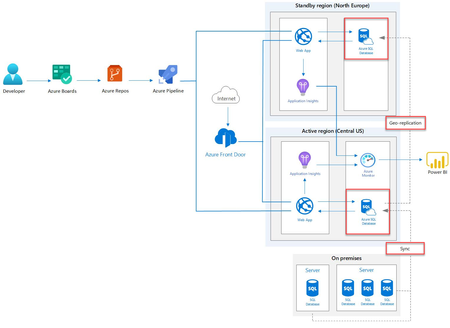
In my previous article, we created a proposal based on the company’s overview, goals, and technology, then highlighting the benefits of an architecture base on Azure resources and giving an overview of its flow. In today’s article, I am going to start guiding you by implementing the proposed architecture by creating an Azure SQL database resource in our main company’s database in Montana, replicating it in Europe, and then synchronizing it with the On-Premises database. Create an Azure SQL Database Sign in to the Azure portal. Select + Create a resource, filter the result for Databases, and click on SQL Database On the creation tab, select a resource group, insert a database name, create a new server in a Central US (primary location of the company), and select a database’s configuration. Click Review + create to create the Azure SQL database resource. Replicate the database Once the creation process is completed, select your SQL server, and click your SQL database from the list of available databases. Select the Geo-Replication tab and click North Europe (closest region to the company’s target audience). In the creation form, create a new server in North Europe, select the same configuration as the primary location, and click OK. Azure will then initialize the new instance and then seed the data from the primary database to your replica. Synchronize your On-Premise database to Azure SQL database Select your primary SQL database from the list of available databases. Click the Sync to other databases tab and click New Sync Group. On the creation tab, insert a group name, select the Existing database and enable the automatic synchronization. By doing so, you will set the frequency with which the primary instance of your Azure SQL database will synchronize with the group and resolve possible conflicts. The possible options are: Hub win: When conflicts occur, data in the hub database overwrite conflicting data in the member database. Member win: When conflicts occur, data in the member database overwrite conflicting data in the hub database. Once the synchronization for the group is created, you will see it in the status column, Not Ready. Select the synchronization group, click databases, and then click the Add an On-Premises Database button. To complete the configuration of an On-Premises database, we must set up an SQL Azure Data Sync agent on the machine where the SQL server is located and then Select which Database to sync. Set up the SQL Azure Data Sync Agent Click Choose the sync Agent Gateway. If you don’t have an agent already installed on your machine, select the Create a new agent radio button. Download the data sync agent from the following link https://www.microsoft.com/en-us/download/details.aspx?id=27693. Open the installer and start the installation wizard. Read and accept the License Agreement and Privacy Information, select Accept and click Next. Enter the credential of the account with Network Access to run Windows Service (for example, contoso\gtrekter) and click Next. Enter the location where you want to install the agent and click Next to start the installation. Once the installation is complete, launch the Microsoft SQL Data Sync Agent. Before continuing, go back to Azure, fill the agent name textbox, and click Create and Generate Key button. Once the key is generated, copy it to the clipboard. In the Microsoft SQL Data Sync, click the Submit Agent Key button. In the configuration window, add the Agent Key generated by Azure and the Login and Password fields. Enter the Azure SQL Database server’s credentials where the Hub database is located. Test that everything is working properly by clicking on the Test Connection button and then OK. Click the Register button, and in the SQL Server Configuration window, select the Authentication type, the Server, and the Database to synchronize. Once again, check that everything is fine by clicking on the Test Connection button and Save. Select the database To complete the configuration of your On-Premises database, follow the following steps: Click select the database. The tab that will appear, add a Sync Member Name, select the On-premises database that you have previously registered in the Microsoft SQL Data Sync and select the Sync Directions. The available options are: Bi-directional Sync: Data changes on either the on-premises SQL Server database or the hub database will be written to the other database. To the Hub: Changes in the on-premises SQL Server database are written to the hub database but not vice versa. From the Hub: Changes in the hub are written to the on-premises SQL Server, but not vice versa. Click OK Congratulations! You have successfully created an Azure SQL database resource, geo-replicated it in a secondary location, and synchronized it with your On-Premises database!762Views1like0CommentsNew! Professional Azure SQL Database Administration Packt E-book
Hi folks! Check out our recently launched free e-book for Azure SQL Database from Packt! Professional Azure SQL Database Administration This comprehensive guide from Packt provides an in-depth look at Azure SQL Database and includes detailed guidance and activity plans on how to migrate to Azure SQL Database or provision a new SQL database, backup and restore Azure SQL Databases, implement high availability and disaster recovery, monitor and optimize the performance of your cloud database and automate common management tasks using PowerShell. For database administrators, architects, big data engineers, and anyone else looking to migrate or modernize their on-premises data estate and wants flexibility, efficiency, and high performance. Currently available in EN:US only. In this e-book, you’ll get detailed, easy-to-follow guidance and activity plans on how to: Migrate to Azure SQL Database or provision a new SQL database. Backup and restore Azure SQL Databases. Implement high availability and disaster recovery. Monitor and optimize the performance of your cloud database. Automate common management tasks using PowerShell. Here's the URL link to your free copy: https://azure.microsoft.com/en-us/resources/professional-azure-sql-database-administration/1.3KViews0likes0Comments
GetArrayElement -> integer AND multiple rows
Hi guys, I have a question. I have a variable that can have multiple rows, so it looks like this: "Count": ["5", "4", "12", "0"]. First and major problem: I would like to put a 'case when count > 0 then whatever', but I would like it to verify the case on every row it has (so in this case if any of these 5 numbers is greater than 0 it would give, idk, an '1'). How do I achieve that when GetArrayElement command requires me to point one of these elements, not the bundle? Second problem: I would like to operate on it as it would be an integer, so use max, >, < operators. How do I do that? Like if above mentioned bundle is > 10 then '1' or something. Thanks in advance!702Views0likes0Comments