azure security center
15 Topics
Introducing the Azure Threat Research Matrix
When performing a security assessment, it’s common to find the assessment team attribute their actions to the MITRE ATT&CK knowledge base so that high-level stakeholders can visually see what techniques were successful and defenders can understand the techniques that were performed. However, the commonly utilized MITRE knowledge base lacks formal documentation of Azure or AzureAD-related tactics, techniques, or procedures (TTPs) that assessment teams can attribute to. Over the past year, Microsoft has worked with some of the top Azure security researchers to create the Azure Threat Research Matrix (ATRM), a matrix that provides details around the tactics & techniques a potential adversary may use to compromise an Azure Resource or Azure Active Directory.28KViews7likes6CommentsAZ-500: Microsoft Azure Security Technologies Study Guide
The AZ-500 certification provides professionals with the skills and knowledge needed to secure Azure infrastructure, services, and data. The exam covers identity and access management, data protection, platform security, and governance in Azure. Learners can prepare for the exam with Microsoft's self-paced curriculum, instructor-led course, and documentation. The certification measures the learner’s knowledge of managing, monitoring, and implementing security for resources in Azure, multi-cloud, and hybrid environments. Azure Firewall, Key Vault, and Azure Active Directory are some of the topics covered in the exam.23KViews4likes3CommentsSecuring the Clouds: Navigating Multi-Cloud Security with Advanced SIEM Strategies
Uncover the complexities of securing multiple clouds and the pitfalls of traditional SIEM tools in our latest blog series. Dive into strategies for achieving unified security with Microsoft's solutions, and gain strategic insights into the modern AI world. Stay ahead of adversaries with a threat-based approach. Authored by a team of experts, this series is your guide to establishing a comprehensive security posture in a multi-cloud environment. Explore now and transform your cloud security game! 💼🔒5.2KViews2likes0CommentsImproving Server Vulnerability Management Efforts
Discover a new way to transform vulnerability management with Microsoft Defender for Servers, Azure Automation Services, and Azure Arc. This blog post will guide you through moving pass the traditional vulnerability management approach toward implementing an automated and streamlined process for your servers on-premises and the cloud. Seamlessly integrate various tools in a 5-step solution that will make you rethink server vulnerability management. Don't miss the opportunity to add a new weapon to your cyber security strategy that aims at removing inefficiencies.
Securing the Clouds: Achieving a Unified Security Stance and threat-based approach to Use Cases
Uncover the complexities of obtaining full observability for your complex multiple cloud environment by adopting a proven approach based on a Threat assessment. Stay ahead of adversaries with a threat-based approach able to contrast even the most tricky vulnerabilities, including Zero Days. Dive into strategies for creating the perfect system to detect attacks and respond to them. Authored by a team of experts, this series is your guide to establishing a comprehensive security posture in a multi-cloud environment. Explore now and transform your cloud security game! 💼🔒Building a Strong Foundation: Prioritizing Developer Security at Microsoft Build 2023
Join us at Microsoft Build 2023 as we shine a spotlight on Developer Security, an imperative in today's evolving threat landscape. Engage with our experts in informative sessions and discover how Azure's industry-leading defense in depth approach and the Secure Supply Chain Consumption Framework empower developers to build resilient applications. Don't miss this opportunity to enhance your knowledge, network with industry leaders, and elevate your understanding of secure software development. Register now for Microsoft Build and be part of the conversation.3.6KViews3likes2CommentsMicrosoft Ignite 2025: Top Security Innovations You Need to Know
🤖 Security & AI -The Big Story This Year 2025 marks a turning point for cybersecurity. Rapid adoption of AI across enterprises has unlocked innovation but introduced new risks. AI agents are now part of everyday workflows-automating tasks and interacting with sensitive data—creating new attack surfaces that traditional security models cannot fully address. Threat actors are leveraging AI to accelerate attacks, making speed and automation critical for defense. Organizations need solutions that deliver visibility, governance, and proactive risk management for both human and machine identities. Microsoft Ignite 2025 reflects this shift with announcements focused on securing AI at scale, extending Zero Trust principles to AI agents, and embedding intelligent automation into security operations. As a Senior Cybersecurity Solution Architect, I’ve curated the top security announcements from Microsoft Ignite 2025 to help you stay ahead of evolving threats and understand the latest innovations in enterprise security. Agent 365: Control Plane for AI Agents Agent 365 is a centralized platform that gives organizations full visibility, governance, and risk management over AI agents across Microsoft and third-party ecosystems. Why it matters: Unmanaged AI agents can introduce compliance gaps and security risks. Agent 365 ensures full lifecycle control. Key Features: Complete agent registry and discovery Access control and conditional policies Visualization of agent interactions and risk posture Built-in integration with Defender, Entra, and Purview Available via the Frontier Program Microsoft Agent 365: The control plane for AI agents Deep dive blog on Agent 365 Entra Agent ID: Zero Trust for AI Identities Microsoft Entra is the identity and access management suite (covering Azure AD, permissions, and secure access). Entra Agent ID extends Zero Trust identity principles to AI agents, ensuring they are governed like human identities. Why it matters: Unmanaged or over-privileged AI agents can create major security gaps. Agent ID enforces identity governance on AI agents and reduces automation risks. Key Features: Provides unique identities for AI agents Lifecycle governance and sponsorship for agents Conditional access policies applied to agent activity Integrated with open SDKs/APIs for third‑party platforms Microsoft Entra Agent ID Overview Entra Ignite 2025 announcements Public Preview details Security Copilot Expansion Security Copilot is Microsoft’s AI assistant for security teams, now expanded to automate threat hunting, phishing triage, identity risk remediation, and compliance tasks. Why it matters: Security teams face alert fatigue and resource constraints. Copilot accelerates response and reduces manual effort. Key Features: 12 new Microsoft-built agents across Defender, Entra, Intune, and Purview. 30+ partner-built agents available in the Microsoft Security Store. Automates threat hunting, phishing triage, identity risk remediation, and compliance tasks. Included for Microsoft 365 E5 customers at no extra cost. Security Copilot inclusion in Microsoft 365 E5 Security Copilot Ignite blog Security Dashboard for AI A unified dashboard for CISOs and risk leaders to monitor AI risks, aggregate signals from Microsoft security services, and assign tasks via Security Copilot - included at no extra cost. Why it matters: Provides a single pane of glass for AI risk management, improving visibility and decision-making. Key Features: Aggregates signals from Entra, Defender, and Purview Supports natural language queries for risk insights Enables task assignment via Security Copilot Ignite Session: Securing AI at Scale Microsoft Security Blog Microsoft Defender Innovations Microsoft Defender serves as Microsoft’s CNAPP solution, offering comprehensive, AI-driven threat protection that spans endpoints, email, cloud workloads, and SIEM/SOAR integrations. Why It Matters Modern attacks target multi-cloud environments and software supply chains. These innovations provide proactive defense, reduce breach risks before exploitation, and extend protection beyond Microsoft ecosystems-helping organizations secure endpoints, identities, and workloads at scale. Key Features: Predictive Shielding: Proactively hardens attack paths before adversaries pivot. Automatic Attack Disruption: Extended to AWS, Okta, and Proofpoint via Sentinel. Supply Chain Security: Defender for Cloud now integrates with GitHub Advanced Security. What’s new in Microsoft Defender at Ignite Defender for Cloud innovations Global Secure Access & AI Gateway Part of Microsoft Entra’s secure access portfolio, providing secure connectivity and inspection for web and AI traffic. Why it matters: Protects against lateral movement and AI-specific threats while maintaining secure connectivity. Key Features: TLS inspection, URL/file filtering AI Prompt Injection protection Private access for domain controllers to prevent lateral movement attacks. Learn about Secure Web and AI Gateway for agents Microsoft Entra: What’s new in secure access on the AI frontier Purview Enhancements Microsoft Purview is the data governance and compliance platform, ensuring sensitive data is classified, protected, and monitored. Why it matters: Ensures sensitive data remains protected and compliant in AI-driven environments. Key Features: AI Observability: Monitor agent activities and prevent sensitive data leakage. Compliance Guardrails: Communication compliance for AI interactions. Expanded DSPM: Data Security Posture Management for AI workloads. Announcing new Microsoft Purview capabilities to protect GenAI agents Intune Updates Microsoft Intune is a cloud-based endpoint device management solution that secures apps, devices, and data across platforms. It simplifies endpoint security management and accelerates response to device risks using AI. Why it matters: Endpoint security is critical as organizations manage diverse devices in hybrid environments. These updates reduce complexity, speed up remediation, and leverage AI-driven automation-helping security teams stay ahead of evolving threats. Key Features: Security Copilot agents automate policy reviews, device offboarding, and risk-based remediation. Enhanced remote management for Windows Recovery Environment (WinRE). Policy Configuration Agent in Intune lets IT admins create and validate policies with natural language What’s new in Microsoft Intune at Ignite Your guide to Intune at Ignite Closing Thoughts Microsoft Ignite 2025 signals the start of an AI-driven security era. From visibility and governance for AI agents to Zero Trust for machine identities, automation in security operations, and stronger compliance for AI workloads-these innovations empower organizations to anticipate threats, simplify governance, and accelerate secure AI adoption without compromising compliance or control. 📘 Full Coverage: Microsoft Ignite 2025 Book of News3.2KViews2likes0Comments
New Blog | Taking Azure Firewall IDPS on a Test Drive
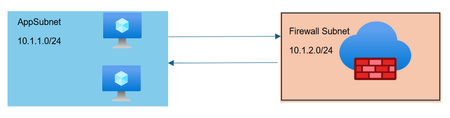
Written by Gopikrishna Kannan (Head of Products: Azure Firewall and Firewall Manager) Intrusion detection and prevention (IDPS) is an advanced threat prevention mechanism supported by the Azure Firewall Premium SKU. Unlike simple network filtering, IDPS matches traffic patterns to a set of known malicious signatures. Azure Firewall supports more than 60,000 malicious signatures which are updated in real time. These signatures apply when malicious patterns are detected under the right conditions. The conditions include traffic direction (inbound or outbound) and network scope (private network or public network). Below are examples to validate IDPS configuration in your environment. Read the full blog here: Taking Azure Firewall IDPS on a Test Drive - Microsoft Community Hub2.5KViews0likes0CommentsAuthorization and Governance for AI Agents: Runtime Authorization Beyond Identity at Scale
Designing Authorization‑Aware AI Agents at Scale Enforcing Runtime RBAC + ABAC with Approval Injection (JIT) Microsoft Entra Agent Identity enables organizations to govern and manage AI agent identities in Copilot Studio, improving visibility and identity-level control. However, as enterprises deploy multiple autonomous AI agents, identity and OAuth permissions alone cannot answer a more critical question: “Should this action be executed now, by this agent, for this user, under the current business and regulatory context?” This post introduces a reusable Authorization Fabric—combining a Policy Enforcement Point (PEP) and Policy Decision Point (PDP)—implemented as a Microsoft Entra‑protected endpoint using Azure Functions/App Service authentication. Every AI agent (Copilot Studio or AI Foundry/Semantic Kernel) calls this fabric before tool execution, receiving a deterministic runtime decision: ALLOW / DENY / REQUIRE_APPROVAL / MASK Who this is for Anyone building AI agents (Copilot Studio, AI Foundry/Semantic Kernel) that call tools, workflows, or APIs Organizations scaling to multiple agents and needing consistent runtime controls Teams operating in regulated or security‑sensitive environments, where decisions must be deterministic and auditable Why a V2? Identity is necessary—runtime authorization is missing Entra Agent Identity (preview) integrates Copilot Studio agents with Microsoft Entra so that newly created agents automatically get an Entra agent identity, manageable in the Entra admin center, and identity activity is logged in Entra. That solves who the agent is and improves identity governance visibility. But multi-agent deployments introduce a new risk class: Autonomous execution sprawl — many agents, operating with delegated privileges, invoking the same backends independently. OAuth and API permissions answer “can the agent call this API?” They do not answer “should the agent execute this action under business policy, compliance constraints, data boundaries, and approval thresholds?” This is where a runtime authorization decision plane becomes essential. The pattern: Microsoft Entra‑Protected Authorization Fabric (PEP + PDP) Instead of embedding RBAC logic independently inside every agent, use a shared fabric: PEP (Policy Enforcement Point): Gatekeeper invoked before any tool/action PDP (Policy Decision Point): Evaluates RBAC + ABAC + approval policies Decision output: ALLOW / DENY / REQUIRE_APPROVAL / MASK This Authorization Fabric functions as a shared enterprise control plane, decoupling authorization logic from individual agents and enforcing policies consistently across all autonomous execution paths. Architecture (POC reference architecture) Use a single runtime decision plane that sits between agents and tools. What’s important here Every agent (Copilot Studio or AI Foundry/SK) calls the Authorization Fabric API first The fabric is a protected endpoint (Microsoft Entra‑protected endpoint required) Tools (Graph/ERP/CRM/custom APIs) are invoked only after an ALLOW decision (or approval) Trust boundaries enforced by this architecture Agents never call business tools directly without a prior authorization decision The Authorization Fabric validates caller identity via Microsoft Entra Authorization decisions are centralized, consistent, and auditable Approval workflows act as a runtime “break-glass” control for high-impact actions This ensures identity, intent, and execution are independently enforced, rather than implicitly trusted. Runtime flow (Decision → Approval → Execution) Here is the runtime sequence as a simple flow (you can keep your Mermaid diagram too). ```mermaid flowchart TD START(["START"]) --> S1["[1] User Request"] S1 --> S2["[2] Agent Extracts Intent\n(action, resource, attributes)"] S2 --> S3["[3] Call /authorize\n(Entra protected)"] S3 --> S4 subgraph S4["[4] PDP Evaluation"] ABAC["ABAC: Tenant · Region · Data Sensitivity"] RBAC["RBAC: Entitlement Check"] Threshold["Approval Threshold"] ABAC --> RBAC --> Threshold end S4 --> Decision{"[5] Decision?"} Decision -->|"ALLOW"| Exec["Execute Tool / API"] Decision -->|"MASK"| Masked["Execute with Masked Data"] Decision -->|"DENY"| Block["Block Request"] Decision -->|"REQUIRE_APPROVAL"| Approve{"[6] Approval Flow"} Approve -->|"Approved"| Exec Approve -->|"Rejected"| Block Exec --> Audit["[7] Audit & Telemetry"] Masked --> Audit Block --> Audit Audit --> ENDNODE(["END"]) style START fill:#4A90D9,stroke:#333,color:#fff style ENDNODE fill:#4A90D9,stroke:#333,color:#fff style S1 fill:#5B5FC7,stroke:#333,color:#fff style S2 fill:#5B5FC7,stroke:#333,color:#fff style S3 fill:#E8A838,stroke:#333,color:#fff style S4 fill:#FFF3E0,stroke:#E8A838,stroke-width:2px style ABAC fill:#FCE4B2,stroke:#999 style RBAC fill:#FCE4B2,stroke:#999 style Threshold fill:#FCE4B2,stroke:#999 style Decision fill:#fff,stroke:#333 style Exec fill:#2ECC71,stroke:#333,color:#fff style Masked fill:#27AE60,stroke:#333,color:#fff style Block fill:#C0392B,stroke:#333,color:#fff style Approve fill:#F39C12,stroke:#333,color:#fff style Audit fill:#3498DB,stroke:#333,color:#fff ``` Design principle: No tool execution occurs until the Authorization Fabric returns ALLOW or REQUIRE_APPROVAL is satisfied via an approval workflow. Where Power Automate fits (important for readers) In most Copilot Studio implementations, Agents calls Power Automate (agent flows), is the practical integration layer that calls enterprise services and APIs. Copilot Studio supports “agent flows” as a way to extend agent capabilities with low-code workflows. For this pattern, Power Automate typically: acquires/uses the right identity context for the call (depending on your tenant setup), and calls the /authorize endpoint of the Authorization Fabric, returns the decision payload to the agent for branching. Copilot Studio also supports calling REST endpoints directly using the HTTP Request node, including passing headers such as Authorization: Bearer <token>. Protected endpoint only: Securing the Authorization Fabric with Microsoft Entra For this V2 pattern, the Authorization Fabric must be protected using Microsoft Entra‑protected endpoint on Azure Functions/App Service (built‑in auth). Microsoft Learn provides the configuration guidance for enabling Microsoft Entra as the authentication provider for Azure App Service / Azure Functions. Step 1 — Create the Authorization Fabric API (Azure Function) Expose an authorization endpoint: HTTP Step 2 — Enable Microsoft Entra‑protected endpoint on the Function App In Azure Portal: Function App → Authentication Add identity provider → Microsoft Choose Workforce configuration (enterprise tenant) Set Require authentication for all requests This ensures the Authorization Fabric is not callable without a valid Entra token. Step 3 — Optional hardening (recommended) Depending on enterprise posture, layer: IP restrictions / Private endpoints APIM in front of the Function for rate limiting, request normalization, centralized logging (For a POC, keep it minimal—add hardening incrementally.) Externalizing policy (so governance scales) To make this pattern reusable across multiple agents, policies should not be hardcoded inside each agent. Instead, store policy definitions in a central policy store such as Cosmos DB (or equivalent configuration store), and have the PDP load/evaluate policies at runtime. Why this matters: Policy changes apply across all agents instantly (no agent republish) Central governance + versioning + rollback becomes possible Audit and reporting become consistent across environments (For the POC, a single JSON document per policy pack in Cosmos DB is sufficient. For production, add versioning and staged rollout.) Store one PolicyPack JSON document per environment (dev/test/prod). Include version, effectiveFrom, priority for safe rollout/rollback. Minimal decision contract (standard request / response) To keep the fabric reusable across agents, standardize the request payload. Request payload (example) Decision response (deterministic) Example scenario (1 minute to understand) Scenario: A user asks a Finance agent to create a Purchase Order for 70,000. Even if the user has API permission and the agent can technically call the ERP API, runtime policy should return: REQUIRE_APPROVAL (threshold exceeded) trigger an approval workflow execute only after approval is granted This is the difference between API access and authorized business execution. Sample Policy Model (RBAC + ABAC + Approval) This POC policy model intentionally stays simple while demonstrating both coarse and fine-grained governance. 1) Coarse‑grained RBAC (roles → actions) FinanceAnalyst CreatePO up to 50,000 ViewVendor FinanceManager CreatePO up to 100,000 and/or approve higher spend 2) Fine‑grained ABAC (conditions at runtime) ABAC evaluates context such as region, classification, tenant boundary, and risk: 3) Approval injection (Agent‑level JIT execution) For higher-risk/high-impact actions, the fabric returns REQUIRE_APPROVAL rather than hard deny (when appropriate): How policies should be evaluated (deterministic order) To ensure predictable and auditable behavior, evaluate in a deterministic order: Tenant isolation & residency (ABAC hard deny first) Classification rules (deny or mask) RBAC entitlement validation Threshold/risk evaluation Approval injection (JIT step-up) This prevents approval workflows from bypassing foundational security boundaries such as tenant isolation or data sovereignty. Copilot Studio integration (enforcing runtime authorization) Copilot Studio can call external REST APIs using the HTTP Request node, including passing headers such as Authorization: Bearer <token> and binding response schema for branching logic. Copilot Studio also supports using flows with agents (“agent flows”) to extend capabilities and orchestrate actions. Option A (Recommended): Copilot Studio → Agent Flow (Power Automate) → Authorization Fabric Why: Flows are a practical place to handle token acquisition patterns, approval orchestration, and standardized logging. Topic flow: Extract user intent + parameters Call an agent flow that: calls /authorize returns decision payload Branch in the topic: If ALLOW → proceed to tool call If REQUIRE_APPROVAL → trigger approval flow; proceed only if approved If DENY → stop and explain policy reason Important: Tool execution must never be reachable through an alternate topic path that bypasses the authorization check. Option B: Direct HTTP Request node to Authorization Fabric Use the Send HTTP request node to call the authorization endpoint and branch using the response schema. This approach is clean, but token acquisition and secure secretless authentication are often simpler when handled via a managed integration layer (flow + connector). AI Foundry / Semantic Kernel integration (tool invocation gate) For Foundry/SK agents, the integration point is before tool execution. Semantic Kernel supports Azure AI agent patterns and tool integration, making it a natural place to enforce a pre-tool authorization check. Pseudo-pattern: Agent extracts intent + context Calls Authorization Fabric Enforces decision Executes tool only when allowed (or after approval) Telemetry & audit (what Security Architects will ask for) Even the best policy engine is incomplete without audit trails. At minimum, log: agentId, userUPN, action, resource decision + reason + policyIds approval outcome (if any) correlationId for downstream tool execution Why it matters: you now have a defensible answer to: “Why did an autonomous agent execute this action?” Security signal bonus: Denials, unusual approval rates, and repeated policy mismatches can also indicate prompt injection attempts, mis-scoped agents, or governance drift. What this enables (and why it scales) With a shared Authorization Fabric: Avoid duplicating authorization logic across agents Standardize decisions across Copilot Studio + Foundry agents Update governance once (policy change) and apply everywhere Make autonomy safer without blocking productivity Closing: Identity gets you who. Runtime authorization gets you whether/when/how. Copilot Studio can automatically create Entra agent identities (preview), improving identity governance and visibility for agents. But safe autonomy requires a runtime decision plane. Securing that plane as an Entra-protected endpoint is foundational for enterprise deployments. In enterprise environments, autonomous execution without runtime authorization is equivalent to privileged access without PIM—powerful, fast, and operationally risky.