azure policy
105 Topics
I built an open-source tool for running ARG governance checks on a schedule and tracking findings
Most of the Azure governance work I have done over the last ten years ended the same way. Someone writes a sharp Resource Graph query, it finds something real, it gets pasted into a chat, and then it lives in that person's terminal history until they move on. The failure that costs more is quieter. A check that stops running does not turn red. It stays green, and the estate keeps drifting behind a number that nobody has any reason to distrust. Disclosure before I name anything: I built the tool below and I maintain it. RuleBeat runs the governance checks your team writes for Azure on a schedule, tracks every finding over time, and never holds write access. A check is a rule you author against Azure Resource Graph or Microsoft Graph, in a visual builder or as raw KQL. It ships 158 checks out of the box, 15 built-in rules plus the 143-rule APRL pack. Findings keep their lifecycle across scans, so they move through new, active and fixed and reopen on their own, and a suppression needs a reason and can carry an expiry date. The trade-offs, so nobody has to discover them after installing: - Read-only, permanently. It never holds write credentials and never creates its own service principal. You create the credential, so you can see in Azure RBAC exactly what it was granted. The cost is real: there is no one-click fix. Remediation stays your action under your own identity. - Self-hosted, one container, SQLite inside. Nothing about your tenant leaves your deployment and there is no telemetry. The cost is that you run it. Demo mode runs the real UI over a generated database with no Azure credential, if you would rather look before wiring anything up. - Honest numbers. A rule that has never run, or whose last run failed, is reported as unknown rather than passing. The posture number is uglier for it, and that is the point. On where this does and does not belong next to the native stack: Azure Policy is for enforcing a standard, and it does that better than anything I would write. Defender for Cloud covers its own scope well. If your assignments are enforcing, your Workbook answers the question you actually ask, and one person owns the whole loop, you do not need this. Where I kept running out of road was the organization-specific check that no built-in standard covers, and the question of who owns a flagged row once more than one person has to care about it. It is open source under Apache-2.0 and free, and it is v0.2, early on purpose. I build it with AI assistance from Claude, which the public commit history shows in the co-author trailers, and every change is human-reviewed and gated by the test suite in CI before it ships. Repo: https://github.com/rulebeat/rulebeat Docs: https://docs.rulebeat.com The question I would rather ask than answer: for those of you running recurring governance checks today, what do you do with a finding that is accepted on purpose? Every version of this I have seen was a tag, a wiki page, or a spreadsheet, and all three drift away from the query that produced them. I would like to know what has actually held up for you.
Automate Defender for Cloud settings: FIM, Vulnerability Assessment, and Guest Configuration Agent
I’m working on automating the configuration of Microsoft Defender for Cloud – Server Plans across multiple subscriptions (100+), including any newly deployed subscriptions. The goal is to avoid manual changes and ensure compliance from day one. Current Setup: I’ve used the built-in policy: Configure Microsoft Defender for Servers plan, which successfully enables: Defender for Cloud Plan P2 Endpoint Protection Agentless scanning I attempted to copy this policy and add parameters for Vulnerability Assessment, but the assignment fails with an error. What I’ve Tried: For File Integrity Monitor: Policy name → Configure ChangeTracking Extension for Windows virtual machines For Vulnerability Assessment: Policy name → Configure machines to receive a vulnerability assessment provider Assigning these policies works on my non-prod subscription, but the toggle in Defender for Cloud → Environment Settings remains No. Challenge: How can I ensure these options (File Integrity Monitoring, Vulnerability Assessment, and preferably Guest Configuration Agent) are automatically enabled for: All existing subscriptions Any new subscriptions created in the future Goal: No manual intervention in Defender for Cloud portal Fully automated via Azure Policy or another recommended approach uestions: Is there a way to extend the built-in policy or create a custom initiative that enforces these settings at the subscription level? Are there ARM templates, Bicep modules, Powershell scripts or REST API calls that can toggle these settings programmatically? Any best practices for ensuring compliance across multiple subscriptions? Any help is much appreciated and looking forward to your expertise! Thank you in advance. Best Regards, Pascal Slot267Views1like0Comments
Announcing Microsoft cloud security benchmark v2 (public preview)
Overview Since its first introduction in 2019, the Azure Security Benchmark and its successor Microsoft cloud security benchmark announced in 2023, Microsoft cloud security benchmark (“the Benchmark”) has been widely used by our customers to secure their Azure environments, especially as a security bible and toolkit for Azure security implementation planning and helping the security compliance on various industry and government regulatory standards. What’s new? We’re thrilled to announce the Microsoft cloud security benchmark v2 (public preview), a new Benchmark version with the enhancement in following areas: Adding artificial intelligence security into our scope to address the threats and risks in this emerging domain. Expanding the prior simple basic control guideline to a more comprehensive, risk and threats-based control guide with more granular technical implementation examples and references details. Expanding the Azure Policy based control measurements from ~220 to ~420 to cover more new security controls and expanding the measurements on the existing controls. Expanding the control mappings to more industry regulations standards such as NIST CSF, PCI-DSS v4, ISO 27001, etc. Alignment with SFI objectives to introduce Microsoft internal security best practices to our customers. Microsoft Defender for Cloud update In addition, you will soon see the Benchmark dashboard embedded into the Microsoft Defender for Cloud with additional 200+ Azure Policy mapped to the respective controls, allowing you to monitor the Azure resources against the respective controls in the Benchmark. Value proposition recap Please also refer to How Microsoft cloud security benchmark helps you succeed in your cloud security journey if you want to understand more on the value proposition of Microsoft cloud security benchmark.2.7KViews1like0Comments
Misplacement of schema in AllowedHostPathVolumesInKubernetesClusterList Policy Parameter?
In the Microsoft Cloud Security Benchmark, the policy parameter `AllowedHostPathVolumesInKubernetesClusterList` defines a `schema` object nested under metadata. Is this placement intentional, or should the schema be defined at the top level of the parameter https://github.com/Azure/azure-policy/blob/303a0000a3b9d1aed7361c69edaafd4340d37df7/built-in-policies/policySetDefinitions/Azure%20Government/Security%20Center/AzureSecurityCenter.json#L4132259Views0likes2CommentsScript or Query for Management Group Compliance Statistics
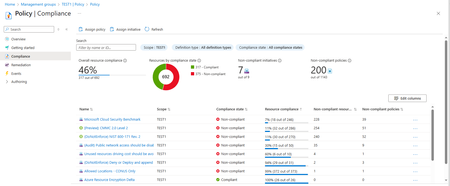
I've been trying to reproduce the Azure Portal Compliance statistics for a Management Group in a PowerShell script or Resource Graph query without much luck. What I'd like to do is reproduce the numbers like compliance percentage, number of compliant / non-compliant resources, in the portal display. And run a daily script or query to track the numbers over time. (Without doing screen shots every day.) Just to be clear, I've attached a screenshot of a compliance screen for management group TEST1. I want to automate calculation of the Overall Resource Compliance (46%, 317 out of 692), and the policies/initiatives compliance state and resource compliance percentages at the bottom of the screen. I'm only interested in the resource compliance percentages below a threshold like 90% in order to help guide our remediation efforts. I've found several scripts and resource graph queries online but none seem to address management group scope. And even the ones that produce numbers for subscription scope don't seem to match the portal numbers. Has anyone successfully reproduced the portal MG compliance numbers with a script or quiery? Or, is it possible to obtain the logic behind the portals' MG scope compliance code? Seems like we should be able to reproduce the numbers shown by the console. Thanks.
Protecting Your Azure Key Vault: Why Azure RBAC Is Critical for Security
Introduction In today’s cloud-centric landscape, misconfigured access controls remain one of the most critical weaknesses in the cyber kill chain. When access policies are overly permissive, they create opportunities for adversaries to gain unauthorized access to sensitive secrets, keys, and certificates. These credentials can be leveraged for lateral movement, privilege escalation, and establishing persistent footholds across cloud environments. A compromised Azure Key Vault doesn’t just expose isolated assets it can act as a pivot point to breach broader Azure resources, potentially leading to widespread security incidents, data exfiltration, and regulatory compliance failures. Without granular permissioning and centralized access governance, organizations face elevated risks of supply chain compromise, ransomware propagation, and significant operational disruption. The Role of Azure Key Vault in Security Azure Key Vault plays a crucial role in securely storing and managing sensitive information, making it a prime target for attackers. Effective access control is essential to prevent unauthorized access, maintain compliance, and ensure operational efficiency. Historically, Azure Key Vault used Access Policies for managing permissions. However, Azure Role-Based Access Control (RBAC) has emerged as the recommended and more secure approach. RBAC provides granular permissions, centralized management, and improved security, significantly reducing risks associated with misconfigurations and privilege misuse. In this blog, we’ll highlight the security risks of a misconfigured key vault, explain why RBAC is superior to legacy Access Policies and provide RBAC best practices, and how to migrate from access policies to RBAC. Security Risks of Misconfigured Azure Key Vault Access Overexposed Key Vaults create significant security vulnerabilities, including: Unauthorized access to API tokens, database credentials, and encryption keys. Compromise of dependent Azure services such as Virtual Machines, App Services, Storage Accounts, and Azure SQL databases. Privilege escalation via managed identity tokens, enabling further attacks within your environment. Indirect permission inheritance through Azure AD (AAD) group memberships, making it harder to track and control access. Nested AAD group access, which increases the risk of unintended privilege propagation and complicates auditing and governance. Consider this real-world example of the risks posed by overly permissive access policies: A global fintech company suffered a severe breach due to an overly permissive Key Vault configuration, including public network access and excessive permissions via legacy access policies. Attackers accessed sensitive Azure SQL databases, achieved lateral movement across resources, and escalated privileges using embedded tokens. The critical lesson: protect Key Vaults using strict RBAC permissions, network restrictions, and continuous security monitoring. Why Azure RBAC is Superior to Legacy Access Policies Azure RBAC enables centralized, scalable, and auditable access management. It integrates with Microsoft Entra, supports hierarchical role assignments, and works seamlessly with advanced security controls like Conditional Access and Defender for Cloud. Access Policies, on the other hand, were designed for simpler, resource-specific use cases and lack the flexibility and control required for modern cloud environments. For a deeper comparison, see Azure RBAC vs. access policies. Best Practices for Implementing Azure RBAC with Azure Key Vault To effectively secure your Key Vault, follow these RBAC best practices: Use Managed Identities: Eliminate secrets by authenticating applications through Microsoft Entra. Enforce Least Privilege: Precisely control permissions, granting each user or application only minimal required access. Centralize and Scale Role Management: Assign roles at subscription or resource group levels to reduce complexity and improve manageability. Leverage Privileged Identity Management (PIM): Implement just-in-time, temporary access for high-privilege roles. Regularly Audit Permissions: Periodically review and prune RBAC role assignments. Detailed Microsoft Entra logging enhances auditability and simplifies compliance reporting. Integrate Security Controls: Strengthen RBAC by integrating with Microsoft Entra Conditional Access, Defender for Cloud, and Azure Policy. For more on the Azure RBAC features specific to AKV, see the Azure Key Vault RBAC Guide. For a comprehensive security checklist, see Secure your Azure Key Vault. Migrating from Access Policies to RBAC To transition your Key Vault from legacy access policies to RBAC, follow these steps: Prepare: Confirm you have the necessary administrative permissions and gather an inventory of applications and users accessing the vault. Conduct inventory: Document all current access policies, including the specific permissions granted to each identity. Assign RBAC Roles: Map each identity to an appropriate RBAC role (e.g., Reader, Contributor, Administrator) based on the principle of least privilege. Enable RBAC: Switch the Key Vault to the RBAC authorization model. Validate: Test all application and user access paths to ensure nothing is inadvertently broken. Monitor: Implement monitoring and alerting to detect and respond to access issues or misconfigurations. For detailed, step-by-step instructions—including examples in CLI and PowerShell—see Migrate from access policies to RBAC. Conclusion Now is the time to modernize access control strategies. Adopting Role-Based Access Control (RBAC) not only eliminates configuration drift and overly broad permissions but also enhances operational efficiency and strengthens your defense against evolving threat landscapes. Transitioning to RBAC is a proactive step toward building a resilient and future-ready security framework for your Azure environment. Overexposed Azure Key Vaults aren’t just isolated risks — they act as breach multipliers. Treat them as Tier-0 assets, on par with domain controllers and enterprise credential stores. Protecting them requires the same level of rigor and strategic prioritization. By enforcing network segmentation, applying least-privilege access through RBAC, and integrating continuous monitoring, organizations can dramatically reduce the blast radius of a potential compromise and ensure stronger containment in the face of advanced threats. Want to learn more? Explore Microsoft's RBAC Documentation for additional details.
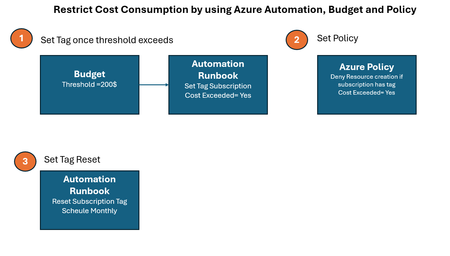
Restrict Cost Consumption by using Azure Automation, Budget and Policy
Video See the demo video by using below link Demonstration Video Automation Runbook Logic Logic which set tag value once threshold exceeds # Authenticate using Managed Identity (recommended for Automation Accounts) Connect-AzAccount -Identity # Define Subscription ID and Reset Tag $subscriptionId = (Get-AzContext).Subscription.Id $tags = @{ "cost exceeded" = "yes" } # Resetting the tag value # Update the tag Update-AzTag -ResourceId "/subscriptions/$subscriptionId" -Tag $tags -Operation Merge Write-Output "Tag 'cost exceeded' reset to 'yes' for subscription $subscriptionId" Logic which reset tag value every month # Authenticate using Managed Identity (recommended for Automation Accounts) Connect-AzAccount -Identity # Define Subscription ID and Reset Tag $subscriptionId = (Get-AzContext).Subscription.Id $tags = @{ "cost exceeded" = "no" } # Resetting the tag value # Update the tag Update-AzTag -ResourceId "/subscriptions/$subscriptionId" -Tag $tags -Operation Merge Write-Output "Tag 'cost exceeded' reset to 'no' for subscription $subscriptionId" Azure Policy Logic { "properties": { "displayName": "budget", "policyType": "Custom", "mode": "All", "metadata": { "version": "1.0.0", "createdBy": "f6bb4303-e52d-4cba-9790-01f0798164b7", "createdOn": "2025-03-13T05:08:05.8483517Z", "updatedBy": "f6bb4303-e52d-4cba-9790-01f0798164b7", "updatedOn": "2025-03-13T06:32:35.1740944Z" }, "version": "1.0.0", "parameters": {}, "policyRule": { "if": { "allOf": [ { "field": "type", "notEquals": "Microsoft.Resources/subscriptions" }, { "value": "[subscription().tags['cost exceeded']]", "equals": "yes" } ] }, "then": { "effect": "Deny" } }, "versions": [ "1.0.0" ] }, }
How to programmatically assign security standards on Defender for Cloud
Hi all, i would like to know if there is a way to programmatically (REST API, Terraform,...) activate custom secutity Standards on Defender for Cloud. Basically the step 6 on this guide https://learn.microsoft.com/en-us/azure/defender-for-cloud/update-regulatory-compliance-packages. I didn't found any way to do that. I have a policySet that i would like to activate in an automated way. Any ideas? Thank you in advance!293Views0likes0CommentsAKS Security Dashboard
In today’s digital landscape, the speed of development and security must go hand in hand. Applications are being developed and deployed faster than ever before. Containerized application developers and platform teams enjoy the flexibility and scale that Kubernetes has brought to the software development world. Open-source code and tools have transformed the industry - but with speed comes increased risk and a growing attack surface. However, in vast parts of the software industry, developers and platform engineering teams find it challenging to prioritize security. They are required to deliver features quickly and security practices can sometimes be seen as obstacles that slow down the development process. Lack of knowledge or awareness of the latest security threats and best practices make it challenging to build secure applications. The new Azure Kubernetes Service (AKS) security dashboard aims to alleviate these pains by providing comprehensive visibility and automated remediation capabilities for security issues, empowering platform engineering teams to secure their Kubernetes environment more effectively and easily. Consolidating security and operational data in one place directly within the AKS portal allows engineers to benefit from a unified view of their Kubernetes environment. Enabling more efficient detection, and remediation of security issues, with minimal disruption to their workflows. Eventually reducing the risk of oversight security issues and improving remediation cycles. To leverage the AKS security dashboard, navigate to the Microsoft Defender for Cloud section in the AKS Azure portal. If your cluster is already onboarded to Defender for Containers or Defender CSPM, security recommendations will appear on the dashboard. If not, it may take up to 24 hours after onboarding before Defender for Cloud scans your cluster and delivers insights. Security issues identified in the cluster, surfaced in the dashboard are prioritized to risk. Risk level is dynamically calculated by an automatic attack path engine operating behind the scenes. This engine assesses the exploitability of security issues by considering multiple factors, such as cluster RBAC (Role Based Access Control), known exploitability in the wild, internet exposure, and more. Learn more about how Defender for Cloud calculates risk. Security issues surfaced in the dashboard are divided into different tabs: Runtime environment vulnerability assessment: The dynamic and complex nature of Kubernetes environments means that vulnerabilities can arise from multiple sources, with different ownership for the fix. For vulnerabilities originating from the containerized application code, Defender for Cloud will point out every vulnerable container running in the cluster. For each vulnerable container Defender for cloud will surface remediation guidelines that include the list of vulnerable software packages and specify the version that contains the fix. The scanning of container images powered by Microsoft Defender Vulnerability Management (MDVM) includes scanning of both OS packages and language specific packages see the full list of the supported OS and their versions. For vulnerabilities originating from the AKS infrastructure, Defender for cloud will include a list of all identified CVEs (common vulnerabilities and exposures) and recommend next steps for remediation. Remediation may include upgrading the Node pool image version or the AKS version itself. Since new vulnerabilities are discovered daily, even if a scanning tool is deployed as part of the CI/CD process, runtime scan can’t be overlooked. Defender for cloud makes sure Kubernetes workloads are scanned daily compared to an up-to-date vulnerability list. Security misconfigurations: Security misconfigurations are also highlighted in the AKS security dashboard, empowering developers and platform teams to execute fixes that can significantly minimize the attack surface. In some cases, changing a single line of code in a container's YAML file, without affecting application functionality, can eliminate a significant attack vector. Each security misconfiguration highlighted in the AKS security dashboard includes manual remediation steps, and where applicable, an automated fix button is also available. For containers misconfigurations, a quick link to a built-in Azure policy is included for easily preventing future faulty deployments of that kind. This approach empowers DevOps & platform engineering teams to use the “Secure by Default” method for application development. To conclude - automated remediation and prevention can be a game changer in keeping the cluster secure- a proactive approach that can help prevent security breaches before they can cause damage, ensuring that the cluster remains secure and compliant with industry standards. Ultimately, automated remediation empowers security teams to focus on more strategic tasks, knowing that their Kubernetes environment is continuously monitored and protected. Assigning owners to security issues Since cluster administration and containers security issues remediation is not always the responsibility of a single team or person, it is recommended to use the “assign owner” button in the security dashboard to notify the correct owner about the issue need to be handled. It is also possible to filter the view using the built-in filters and assign multiple issues to the same person quickly. Get Started Today To start leveraging these new features in Microsoft Defender for Cloud, ensure either Defender for Container or Defender CSPM is enabled in your cloud environments. For additional guidance or support, visit our deployment guide for a full subscription coverage, or enable on a single cluster using the dashboard settings section. Learn More If you haven’t already, check out our previous blog post that introduced this journey: New Innovations in Container Security with Unified Visibility and Investigations. This new release continues to build on the foundation outlined in that post. With “Elevate your container posture: from agentless discovery to risk prioritization”, we’ve delivered capabilities that allow you to further strengthen your container security practices, while reducing operational complexities.1.4KViews4likes0Comments