azure network security
63 Topics
Troubleshooting Microsoft Entra ID OATH Hardware Token Upload Errors
Deploying hardware OATH-TOTP tokens in Microsoft Entra ID can significantly boost your organisation's multi-factor authentication (MFA) security posture. However, administrators frequently encounter vague validation errors during the CSV file upload process. To ensure a smooth, error-free import, follow these top 3 definitive deployment tips gathered from real-world customer support scenarios. 1. Request the Correct Seed Format at the Point of Order Most administrators assume that any CSV file provided by a hardware vendor will automatically work with Microsoft Entra ID. This is a common misconception. Many vendors default to providing secret keys encoded in Hexadecimal, whereas Entra ID strictly mandates Base32 encoding for CSV uploads. • The Tip: When purchasing hardware tokens, explicitly request that the vendor send the seed data in "Entra ID MFA CSV" format. • Example: Trusted vendors like Deepnet Security offer dedicated formatting profiles at the point of ordering to ensure the secrets are delivered natively in the required Base32 string layout. 2. Use a Text Editor and Enforce Lowercase Headers Using spreadsheet software like Microsoft Excel to modify your user principal names (UPNs) is one of the fastest ways to corrupt your token seed files. • The Tip: Never open or edit your token CSV files in Excel. Excel automatically treats long token serial numbers as large integers. When saved, it converts them into destructive scientific notation (e.g., 1.23E+11) or strips essential leading zeros, breaking the alignment with the hardware device. • Execution: Use a dedicated text editor (such as Notepad++, VS Code, or TextEdit) to append user details. Additionally, ensure that the first line containing your headers uses strictly lowercase letters (upn, serialnumber, secretkey, timeinterval, manufacturer, model). Capitalised headers (like UPN or SerialNumber) will cause Entra ID syntax validation to fail. 3. Optimise for Scale: Bulk Uploads and Graph API Integration Managing bulk token rollouts manually through the Entra portal can quickly become inefficient or hit portal limitations when dealing with thousands of users. • The Tip for Large Deployments: If you are uploading a massive quantity of tokens, look into online enablement helper tools to map and chunk the data smoothly. Utilities like the Deepnet Security Token Enrollment Assistant or the SafeID Token Service make assigning UPNs and structuring large lists much easier before final tenant ingestion. • The Tip for Graph API & Advanced Encoding: If your deployment architecture requires user self-enrolment, or if your hardware vendor supplies raw Base256 encoded seeds, a standard CSV upload will not work. In these advanced scenarios, you must format the token details into a structured JSON payload and import them directly using the Microsoft Graph API. Unambiguous Base32 Reference CSV Layout When validating your file, ensure your secretkey string is entirely comprised of characters within the true Base32 alphabet (A–Z and digits 2–7). upn,serialnumber,secretkey,timeinterval,manufacturer,model email address removed for privacy reasons,1234567,ORSXG5BRGIZTINJWG44TSTST,30,VendorName,ModelA email address removed for privacy reasons,7654321,MZXW6YTBOJUW423VORSXG5BR,60,VendorName,ModelB283Views0likes1Comment
Looking for a Microsoft FTE Co-Owner — New AVM Terraform Module: Network Security Perimeter
🔍 Looking for a Microsoft FTE Co-Owner — New AVM Terraform Module: Network Security Perimeter Hi EveryOne, I've just submitted a module proposal to the Azure Verified Modules (AVM) program for a Terraform resource module covering Azure Network Security Perimeter (Microsoft.Network/networkSecurityPerimeters). Module name: avm-res-network-networksecurityperimeter As a community contributor (non-FTE), I'm looking for a Microsoft FTE who is willing to take on the formal module owner role so we can move this forward together. I'm fully committed to doing the development work — building, testing, and maintaining the module to AVM specification — and I'm familiar with AVM standards, Terraform module structure, and the contribution flow. This module covers: - Network Security Perimeter resource lifecycle - Profile and access rule management (inbound/outbound) - PaaS resource associations - Diagnostic settings, locks, RBAC, and tags per AVM interface specs NSP is increasingly being mandated in enterprise Landing Zone deployments — especially in regulated industries — and there's currently no AVM Terraform representation for it. This is a great opportunity to fill a real gap in the ecosystem. If you're a Microsoft FTE interested in co-owning this module, please reply here or reach out directly. Happy to share the GitHub proposal link and discuss further. Thanks! #AzureVerifiedModules #Terraform #Azure #IaC #AzureLandingZones113Views0likes0Comments
How to find Azure Firewall SNAT exhaustion on a compute unit?
I have some applications on my AKS cluster which frequently hits a application server. This application server URL is behind Akamai. When ever applications want to establish an SSL connection with the external URL, it has to go through Azure Firewall. I have occasional connection timeouts if a connection is not establish to Akamai servers in 1s. I saw that the SNAT Utilization is in the range of 10 percent to 30%. I know this graph is smoothened out across instances and can't see which Azure Firewall compute unit is getting overloaded if I have frequent access to one URL which goes through Akamai? Is there any way to find out the reason for these occasional connection timeouts with the external IPs(Akamai)? through logs or by any other means? I believe lack of the SNAT metrics by firewall compute unit is responsible for such tough debugging.200Views0likes1CommentShare Your Expertise: Help Shape Our Network Practitioner Community
Hello Azure network practitioners, We’re working on refining our understanding of network practitioner personas and building stronger community engagement strategies for networking practitioners. Your insights as an MVP are invaluable to this effort. Could you take a few minutes to complete this short survey? Your feedback will directly influence how we design future programs and resources for the community. 👉 https://forms.office.com/r/dfgXxNwQd9 Thank you for helping us make the Azure networking community even better! Best regards, Dan Product Marketing Manager, Identity & Network Access Growth153Views0likes0Comments
New Blog | Monitoring Azure DDoS Protection Mitigation Triggers
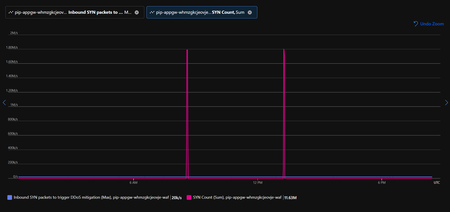
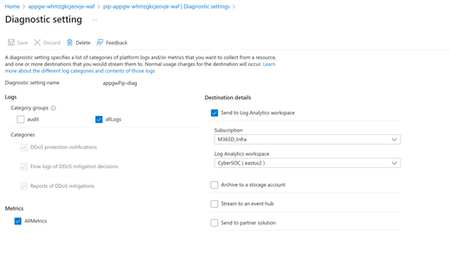
By Saleem Bseeu Monitoring Azure DDoS Protection Mitigation Triggers In today’s digital landscape, Distributed Denial of Service (DDoS) attacks pose a significant threat to the availability and performance of online services. Azure DDoS Protection provides robust mechanisms to protect your applications and services against such attacks. In this blog post, we’ll explore how to monitor Azure DDoS Protection metrics for public IPs and demonstrate how to fully utilize the available metrics to monitor your public IPs for DDoS attacks. Understanding Public IP and Azure DDoS Protection Metrics Azure DDoS Protection offers a variety of metrics that provide insights into potential threats targeting your resources. Additionally, there are public IP platform metrics that we can leverage for monitoring traffic patterns. These metrics are accessible through Azure Monitor and can be used to set up alerts and automated responses. Read the full post here: Monitoring Azure DDoS Protection Mitigation Triggers436Views1like0CommentsNew Blog | Getting Started with Azure DDoS Protection REST API: A Step-by-Step Guide
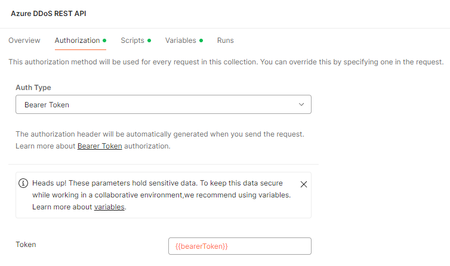
By David Frazee REST API is a cornerstone in the management of resources on Azure, providing a streamlined and efficient approach for executing create, read, update, and delete (CRUD) operations. By leveraging HTTP methods such as GET, POST, PUT, and DELETE, REST API simplifies resource manipulation for administrators. Moreover, REST API’s support for various data formats, including JSON and XML, enhances its versatility, making it indispensable for automating workflows and facilitating continuous deployment and integration practices. Focusing on Azure DDoS Protection, we will delve into its REST API integration, which enables the configuration of plans, association of virtual networks and individual resources, and real-time protection status. This integration is crucial for maintaining robust security in the fast-paced environment of cloud deployments. It ensures that security protocols are not only enhanced but also keep pace with the rapid deployment cycles characteristic of modern cloud infrastructures. Read the full post here: Getting Started with Azure DDoS Protection REST API: A Step-by-Step Guide389Views1like0CommentsNew Blog | Utilizing Azure DDoS Protection Workbook for DDoS attack traffic Analysis
By Shabaz Shaik In today's digital age, the security of applications, servers, and networks is paramount. One of the most significant threats to this security is Distributed Denial of Service (DDoS) attacks. These attacks can cripple your infrastructure, leading to downtime, loss of revenue, and damage to your reputation. Therefore, it is crucial to implement robust protection mechanisms to safeguard your digital assets. Azure DDoS Protection offers a comprehensive solution to defend against these malicious attacks. It provides automatic attack detection and mitigation, ensuring that your applications and services remain available even during an attack. Azure DDoS Protection is seamlessly integrated with Azure's native services, making it an ideal choice for businesses already leveraging the Azure ecosystem. Some of the salient features of Azure DDoS Protection include Adaptive Tuning, Attack Analytics and Metrics, DDoS Rapid Response etc. By leveraging Azure DDoS Protection, businesses can ensure the resilience and availability of their digital infrastructure, providing peace of mind in an increasingly hostile cyber environment. Read the full post here: Utilizing Azure DDoS Protection Workbook for DDoS attack traffic Analysis411Views0likes0CommentsNew Blog | Azure WAF’s Bot Manager 1.1 and JavaScript Challenge: Navigating the Bot Threat Terrain
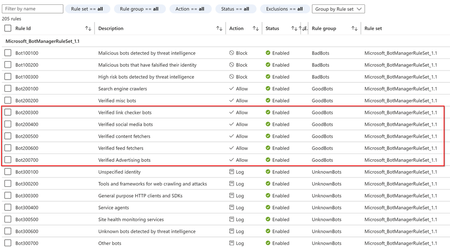
By Andrew Mathu Introduction Bots are a common presence on the internet, serving a range of functions from automating customer service to indexing pages for search engines. However, their capabilities can be exploited for malicious activities, such as launching botnet attacks that can compromise web applications and disrupt services. Businesses continuously face the delicate balancing act of allowing good bots to perform their functions while preventing bad bots from causing harm. To address these challenges, Azure Web Application Firewall (WAF) has new enhancements that provide advanced protection against such threats, ensuring the security and integrity of web applications. In this blog, we will explore Azure WAF Bot Manager 1.1 in Azure Front Door (AFD) and coming soon to Application Gateway WAF, as well as the WAF JavaScript Challenge which is available in both Application Gateway and Azure Front Door. These features offer comprehensive protection against malicious bots while ensuring that good bots can continue their work without interruption. Read the full post here: Azure WAF’s Bot Manager 1.1 and JavaScript Challenge: Navigating the Bot Threat Terrain462Views0likes0CommentsNew Blog | Configuration of Size Enforcement and Inspection Limits in Application Gateway WAF
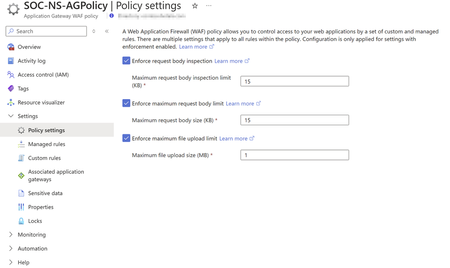
By Andrew Mathu Introduction In the constantly changing world of cybersecurity, both flexibility and effective security are essential for safeguarding applications. To meet these needs, Microsoft Azure recently released, in General Availability, the independent configuration of size enforcement limits and inspection limits in Web Application Firewall (WAF) integrated in Application Gateway v2. This update also allows users to disable size limits for both request body and file uploads without affecting request body inspections. This enhancement will enable users to fine-tune these settings - providing the ability to balance their application security needs against request size requirements. In this blog, we explore this innovative new feature, covering its key aspects and capabilities. Read the full post here: Independent Configuration of Size Enforcement and Inspection Limits in Application Gateway WAF577Views1like0Comments