azure logic apps
39 TopicsImportant Changes to App Service Managed Certificates: Is Your Certificate Affected?
Overview As part of an upcoming industry-wide change, DigiCert, the Certificate Authority (CA) for Azure App Service Managed Certificates (ASMC), is required to migrate to a new validation platform to meet multi-perspective issuance corroboration (MPIC) requirements. While most certificates will not be impacted by this change, certain site configurations and setups may prevent certificate issuance or renewal starting July 28, 2025. Update December 8, 2025 We’ve published an update in November about how App Service Managed Certificates can now be supported on sites that block public access. This reverses the limitation introduced in July 2025, as mentioned in this blog. Note: This blog post reflects a point-in-time update and will not be revised. For the latest and most accurate details on App Service Managed Certificates, please refer to official documentation or subsequent updates. Learn more about the November 2025 update here: Follow-Up to ‘Important Changes to App Service Managed Certificates’: November 2025 Update. August 5, 2025 We’ve published a Microsoft Learn documentation titled App Service Managed Certificate (ASMC) changes – July 28, 2025 that contains more in-depth mitigation guidance and a growing FAQ section to support the changes outlined in this blog post. While the blog currently contains the most complete overview, the documentation will soon be updated to reflect all blog content. Going forward, any new information or clarifications will be added to the documentation page, so we recommend bookmarking it for the latest guidance. What Will the Change Look Like? For most customers: No disruption. Certificate issuance and renewals will continue as expected for eligible site configurations. For impacted scenarios: Certificate requests will fail (no certificate issued) starting July 28, 2025, if your site configuration is not supported. Existing certificates will remain valid until their expiration (up to six months after last renewal). Impacted Scenarios You will be affected by this change if any of the following apply to your site configurations: Your site is not publicly accessible: Public accessibility to your app is required. If your app is only accessible privately (e.g., requiring a client certificate for access, disabling public network access, using private endpoints or IP restrictions), you will not be able to create or renew a managed certificate. Other site configurations or setup methods not explicitly listed here that restrict public access, such as firewalls, authentication gateways, or any custom access policies, can also impact eligibility for managed certificate issuance or renewal. Action: Ensure your app is accessible from the public internet. However, if you need to limit access to your app, then you must acquire your own SSL certificate and add it to your site. Your site uses Azure Traffic Manager "nested" or "external" endpoints: Only “Azure Endpoints” on Traffic Manager will be supported for certificate creation and renewal. “Nested endpoints” and “External endpoints” will not be supported. Action: Transition to using "Azure Endpoints". However, if you cannot, then you must obtain a different SSL certificate for your domain and add it to your site. Your site relies on *.trafficmanager.net domain: Certificates for *.trafficmanager.net domains will not be supported for creation or renewal. Action: Add a custom domain to your app and point the custom domain to your *.trafficmanager.net domain. After that, secure the custom domain with a new SSL certificate. If none of the above applies, no further action is required. How to Identify Impacted Resources? To assist with the upcoming changes, you can use Azure Resource Graph (ARG) queries to help identify resources that may be affected under each scenario. Please note that these queries are provided as a starting point and may not capture every configuration. Review your environment for any unique setups or custom configurations. Scenario 1: Sites Not Publicly Accessible This ARG query retrieves a list of sites that either have the public network access property disabled or are configured to use client certificates. It then filters for sites that are using App Service Managed Certificates (ASMC) for their custom hostname SSL bindings. These certificates are the ones that could be affected by the upcoming changes. However, please note that this query does not provide complete coverage, as there may be additional configurations impacting public access to your app that are not included here. Ultimately, this query serves as a helpful guide for users, but a thorough review of your environment is recommended. You can copy this query, paste it into Azure Resource Graph Explorer, and then click "Run query" to view the results for your environment. // ARG Query: Identify App Service sites that commonly restrict public access and use ASMC for custom hostname SSL bindings resources | where type == "microsoft.web/sites" // Extract relevant properties for public access and client certificate settings | extend publicNetworkAccess = tolower(tostring(properties.publicNetworkAccess)), clientCertEnabled = tolower(tostring(properties.clientCertEnabled)) // Filter for sites that either have public network access disabled // or have client certificates enabled (both can restrict public access) | where publicNetworkAccess == "disabled" or clientCertEnabled != "false" // Expand the list of SSL bindings for each site | mv-expand hostNameSslState = properties.hostNameSslStates | extend hostName = tostring(hostNameSslState.name), thumbprint = tostring(hostNameSslState.thumbprint) // Only consider custom domains (exclude default *.azurewebsites.net) and sites with an SSL certificate bound | where tolower(hostName) !endswith "azurewebsites.net" and isnotempty(thumbprint) // Select key site properties for output | project siteName = name, siteId = id, siteResourceGroup = resourceGroup, thumbprint, publicNetworkAccess, clientCertEnabled // Join with certificates to find only those using App Service Managed Certificates (ASMC) // ASMCs are identified by the presence of the "canonicalName" property | join kind=inner ( resources | where type == "microsoft.web/certificates" | extend certThumbprint = tostring(properties.thumbprint), canonicalName = tostring(properties.canonicalName) // Only ASMC uses the "canonicalName" property | where isnotempty(canonicalName) | project certName = name, certId = id, certResourceGroup = tostring(properties.resourceGroup), certExpiration = properties.expirationDate, certThumbprint, canonicalName ) on $left.thumbprint == $right.certThumbprint // Final output: sites with restricted public access and using ASMC for custom hostname SSL bindings | project siteName, siteId, siteResourceGroup, publicNetworkAccess, clientCertEnabled, thumbprint, certName, certId, certResourceGroup, certExpiration, canonicalName Scenario 2: Traffic Manager Endpoint Types For this scenario, please manually review your Traffic Manager profile configurations to ensure only “Azure Endpoints” are in use. We recommend inspecting your Traffic Manager profiles directly in the Azure portal or using relevant APIs to confirm your setup and ensure compliance with the new requirements. Scenario 3: Certificates Issued to *.trafficmanager.net Domains This ARG query helps you identify App Service Managed Certificates (ASMC) that were issued to *.trafficmanager.net domains. In addition, it also checks whether any web apps are currently using those certificates for custom domain SSL bindings. You can copy this query, paste it into Azure Resource Graph Explorer, and then click "Run query" to view the results for your environment. // ARG Query: Identify App Service Managed Certificates (ASMC) issued to *.trafficmanager.net domains // Also checks if any web apps are currently using those certificates for custom domain SSL bindings resources | where type == "microsoft.web/certificates" // Extract the certificate thumbprint and canonicalName (ASMCs have a canonicalName property) | extend certThumbprint = tostring(properties.thumbprint), canonicalName = tostring(properties.canonicalName) // Only ASMC uses the "canonicalName" property // Filter for certificates issued to *.trafficmanager.net domains | where canonicalName endswith "trafficmanager.net" // Select key certificate properties for output | project certName = name, certId = id, certResourceGroup = tostring(properties.resourceGroup), certExpiration = properties.expirationDate, certThumbprint, canonicalName // Join with web apps to see if any are using these certificates for SSL bindings | join kind=leftouter ( resources | where type == "microsoft.web/sites" // Expand the list of SSL bindings for each site | mv-expand hostNameSslState = properties.hostNameSslStates | extend hostName = tostring(hostNameSslState.name), thumbprint = tostring(hostNameSslState.thumbprint) // Only consider bindings for *.trafficmanager.net custom domains with a certificate bound | where tolower(hostName) endswith "trafficmanager.net" and isnotempty(thumbprint) // Select key site properties for output | project siteName = name, siteId = id, siteResourceGroup = resourceGroup, thumbprint ) on $left.certThumbprint == $right.thumbprint // Final output: ASMCs for *.trafficmanager.net domains and any web apps using them | project certName, certId, certResourceGroup, certExpiration, canonicalName, siteName, siteId, siteResourceGroup Ongoing Updates We will continue to update this post with any new queries or important changes as they become available. Be sure to check back for the latest information. Note on Comments We hope this information helps you navigate the upcoming changes. To keep this post clear and focused, comments are closed. If you have questions, need help, or want to share tips or alternative detection methods, please visit our official support channels or the Microsoft Q&A, where our team and the community can assist you.26KViews1like1CommentFollow-Up to ‘Important Changes to App Service Managed Certificates’: November 2025 Update
This post provides an update to the Tech Community article ‘Important Changes to App Service Managed Certificates: Is Your Certificate Affected?’ and covers the latest changes introduced since July 2025. With the November 2025 update, ASMC now remains supported even if the site is not publicly accessible, provided all other requirements are met. Details on requirements, exceptions, and validation steps are included below. Background Context to July 2025 Changes As of July 2025, all ASMC certificate issuance and renewals use HTTP token validation. Previously, public access was required because DigiCert needed to access the endpoint https://<hostname>/.well-known/pki-validation/fileauth.txt to verify the token before issuing the certificate. App Service automatically places this token during certificate creation and renewal. If DigiCert cannot access this endpoint, domain ownership validation fails, and the certificate cannot be issued. November 2025 Update Starting November 2025, App Service now allows DigiCert's requests to the https://<hostname>/.well-known/pki-validation/fileauth.txt endpoint, even if the site blocks public access. If there’s a request to create an App Service Managed Certificate (ASMC), App Service places the domain validation token at the validation endpoint. When DigiCert tries to reach the validation endpoint, App Service front ends present the token, and the request terminates at the front end layer. DigiCert's request does not reach the workers running the application. This behavior is now the default for ASMC issuance for initial certificate creation and renewals. Customers do not need to specifically allow DigiCert's IP addresses. Exceptions and Unsupported Scenarios This update addresses most scenarios that restrict public access, including App Service Authentication, disabling public access, IP restrictions, private endpoints, and client certificates. However, a public DNS record is still required. For example, sites using a private endpoint with a custom domain on a private DNS cannot validate domain ownership and obtain a certificate. Even with all validations now relying on HTTP token validation and DigiCert requests being allowed through, certain configurations are still not supported for ASMC: Sites configured as "Nested" or "External" endpoints behind Traffic Manager. Only "Azure" endpoints are supported. Certificates requested for domains ending in *.trafficmanager.net are not supported. Testing Customers can easily test whether their site’s configuration or set-up supports ASMC by attempting to create one for their site. If the initial request succeeds, renewals should also work, provided all requirements are met and the site is not listed in an unsupported scenario.25KViews2likes0CommentsIndustry-Wide Certificate Changes Impacting Azure App Service Certificates
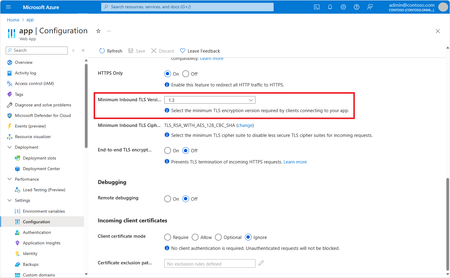
Executive Summary In early 2026, industry-wide changes mandated by browser applications and the CA/B Forum will affect both how TLS certificates are issued as well as their validity period. The CA/B Forum is a vendor body that establishes standards for securing websites and online communications through SSL/TLS certificates. Azure App Service is aligning with these standards for both App Service Managed Certificates (ASMC, free, DigiCert-issued) and App Service Certificates (ASC, paid, GoDaddy-issued). Most customers will experience no disruption. Action is required only if you pin certificates or use them for client authentication (mTLS). Update: February 17, 2026 We’ve published new Microsoft Learn documentation, Industry-wide certificate changes impacting Azure App Service , which provides more detailed guidance on these compliance-driven changes. The documentation also includes additional information not previously covered in this blog, such as updates to domain validation reuse, along with an expanding FAQ section. The Microsoft Learn documentation now represents the most complete and up-to-date overview of these changes. Going forward, any new details or clarifications will be published there, and we recommend bookmarking the documentation for the latest guidance. Who Should Read This? App Service administrators Security and compliance teams Anyone responsible for certificate management or application security Quick Reference: What’s Changing & What To Do Topic ASMC (Managed, free) ASC (GoDaddy, paid) Required Action New Cert Chain New chain (no action unless pinned) New chain (no action unless pinned) Remove certificate pinning Client Auth EKU Not supported (no action unless cert is used for mTLS) Not supported (no action unless cert is used for mTLS) Transition from mTLS Validity No change (already compliant) Two overlapping certs issued for the full year None (automated) If you do not pin certificates or use them for mTLS, no action is required. Timeline of Key Dates Date Change Action Required Mid-Jan 2026 and after ASMC migrates to new chain ASMC stops supporting client auth EKU Remove certificate pinning if used Transition to alternative authentication if the certificate is used for mTLS Mar 2026 and after ASC validity shortened ASC migrates to new chain ASC stops supporting client auth EKU Remove certificate pinning if used Transition to alternative authentication if the certificate is used for mTLS Actions Checklist For All Users Review your use of App Service certificates. If you do not pin these certificates and do not use them for mTLS, no action is required. If You Pin Certificates (ASMC or ASC) Remove all certificate or chain pinning before their respective key change dates to avoid service disruption. See Best Practices: Certificate Pinning. If You Use Certificates for Client Authentication (mTLS) Switch to an alternative authentication method before their respective key change dates to avoid service disruption, as client authentication EKU will no longer be supported for these certificates. See Sunsetting the client authentication EKU from DigiCert public TLS certificates. See Set Up TLS Mutual Authentication - Azure App Service Details & Rationale Why Are These Changes Happening? These updates are required by major browser programs (e.g., Chrome) and apply to all public CAs. They are designed to enhance security and compliance across the industry. Azure App Service is automating updates to minimize customer impact. What’s Changing? New Certificate Chain Certificates will be issued from a new chain to maintain browser trust. Impact: Remove any certificate pinning to avoid disruption. Removal of Client Authentication EKU Newly issued certificates will not support client authentication EKU. This change aligns with Google Chrome’s root program requirements to enhance security. Impact: If you use these certificates for mTLS, transition to an alternate authentication method. Shortening of Certificate Validity Certificate validity is now limited to a maximum of 200 days. Impact: ASMC is already compliant; ASC will automatically issue two overlapping certificates to cover one year. No billing impact. Frequently Asked Questions (FAQs) Will I lose coverage due to shorter validity? No. For App Service Certificate, App Service will issue two certificates to span the full year you purchased. Is this unique to DigiCert and GoDaddy? No. This is an industry-wide change. Do these changes impact certificates from other CAs? Yes. These changes are an industry-wide change. We recommend you reach out to your certificates’ CA for more information. Do I need to act today? If you do not pin or use these certs for mTLS, no action is required. Glossary ASMC: App Service Managed Certificate (free, DigiCert-issued) ASC: App Service Certificate (paid, GoDaddy-issued) EKU: Extended Key Usage mTLS: Mutual TLS (client certificate authentication) CA/B Forum: Certification Authority/Browser Forum Additional Resources Changes to the Managed TLS Feature Set Up TLS Mutual Authentication Azure App Service Best Practices – Certificate pinning DigiCert Root and Intermediate CA Certificate Updates 2023 Sunsetting the client authentication EKU from DigiCert public TLS certificates Feedback & Support If you have questions or need help, please visit our official support channels or the Microsoft Q&A, where our team and the community can assist you.10KViews1like0CommentsUnlock New AI and Cloud Potential with .NET 9 & Azure: Faster, Smarter, and Built for the Future
.NET 9, now available to developers, marks a significant milestone in the evolution of the .NET platform, pushing the boundaries of performance, cloud-native development, and AI integration. This release, shaped by contributions from over 9,000 community members worldwide, introduces thousands of improvements that set the stage for the future of application development. With seamless integration with Azure and a focus on cloud-native development and AI capabilities, .NET 9 empowers developers to build scalable, intelligent applications with unprecedented ease. Expanding Azure PaaS Support for .NET 9 With the release of .NET 9, a comprehensive range of Azure Platform as a Service (PaaS) offerings now fully support the platform’s new capabilities, including the latest .NET SDK for any Azure developer. This extensive support allows developers to build, deploy, and scale .NET 9 applications with optimal performance and adaptability on Azure. Additionally, developers can access a wealth of architecture references and sample solutions to guide them in creating high-performance .NET 9 applications on Azure’s powerful cloud services: Azure App Service: Run, manage, and scale .NET 9 web applications efficiently. Check out this blog to learn more about what's new in Azure App Service. Azure Functions: Leverage serverless computing to build event-driven .NET 9 applications with improved runtime capabilities. Azure Container Apps: Deploy microservices and containerized .NET 9 workloads with integrated observability. Azure Kubernetes Service (AKS): Run .NET 9 applications in a managed Kubernetes environment with expanded ARM64 support. Azure AI Services and Azure OpenAI Services: Integrate advanced AI and OpenAI capabilities directly into your .NET 9 applications. Azure API Management, Azure Logic Apps, Azure Cognitive Services, and Azure SignalR Service: Ensure seamless integration and scaling for .NET 9 solutions. These services provide developers with a robust platform to build high-performance, scalable, and cloud-native applications while leveraging Azure’s optimized environment for .NET. Streamlined Cloud-Native Development with .NET Aspire .NET Aspire is a game-changer for cloud-native applications, enabling developers to build distributed, production-ready solutions efficiently. Available in preview with .NET 9, Aspire streamlines app development, with cloud efficiency and observability at its core. The latest updates in Aspire include secure defaults, Azure Functions support, and enhanced container management. Key capabilities include: Optimized Azure Integrations: Aspire works seamlessly with Azure, enabling fast deployments, automated scaling, and consistent management of cloud-native applications. Easier Deployments to Azure Container Apps: Designed for containerized environments, .NET Aspire integrates with Azure Container Apps (ACA) to simplify the deployment process. Using the Azure Developer CLI (azd), developers can quickly provision and deploy .NET Aspire projects to ACA, with built-in support for Redis caching, application logging, and scalability. Built-In Observability: A real-time dashboard provides insights into logs, distributed traces, and metrics, enabling local and production monitoring with Azure Monitor. With these capabilities, .NET Aspire allows developers to deploy microservices and containerized applications effortlessly on ACA, streamlining the path from development to production in a fully managed, serverless environment. Integrating AI into .NET: A Seamless Experience In our ongoing effort to empower developers, we’ve made integrating AI into .NET applications simpler than ever. Our strategic partnerships, including collaborations with OpenAI, LlamaIndex, and Qdrant, have enriched the AI ecosystem and strengthened .NET’s capabilities. This year alone, usage of Azure OpenAI services has surged to nearly a billion API calls per month, illustrating the growing impact of AI-powered .NET applications. Real-World AI Solutions with .NET: .NET has been pivotal in driving AI innovations. From internal teams like Microsoft Copilot creating AI experiences with .NET Aspire to tools like GitHub Copilot, developed with .NET to enhance productivity in Visual Studio and VS Code, the platform showcases AI at its best. KPMG Clara is a prime example, developed to enhance audit quality and efficiency for 95,000 auditors worldwide. By leveraging .NET and scaling securely on Azure, KPMG implemented robust AI features aligned with strict industry standards, underscoring .NET and Azure as the backbone for high-performing, scalable AI solutions. Performance Enhancements in .NET 9: Raising the Bar for Azure Workloads .NET 9 introduces substantial performance upgrades with over 7,500 merged pull requests focused on speed and efficiency, ensuring .NET 9 applications run optimally on Azure. These improvements contribute to reduced cloud costs and provide a high-performance experience across Windows, Linux, and macOS. To see how significant these performance gains can be for cloud services, take a look at what past .NET upgrades achieved for Microsoft’s high-scale internal services: Bing achieved a major reduction in startup times, enhanced efficiency, and decreased latency across its high-performance search workflows. Microsoft Teams improved efficiency by 50%, reduced latency by 30–45%, and achieved up to 100% gains in CPU utilization for key services, resulting in faster user interactions. Microsoft Copilot and other AI-powered applications benefited from optimized runtime performance, enabling scalable, high-quality experiences for users. Upgrading to the latest .NET version offers similar benefits for cloud apps, optimizing both performance and cost-efficiency. For more information on updating your applications, check out the .NET Upgrade Assistant. For additional details on ASP.NET Core, .NET MAUI, NuGet, and more enhancements across the .NET platform, check out the full Announcing .NET 9 blog post. Conclusion: Your Path to the Future with .NET 9 and Azure .NET 9 isn’t just an upgrade—it’s a leap forward, combining cutting-edge AI integration, cloud-native development, and unparalleled performance. Paired with Azure’s scalability, these advancements provide a trusted, high-performance foundation for modern applications. Get started by downloading .NET 9 and exploring its features. Leverage .NET Aspire for streamlined cloud-native development, deploy scalable apps with Azure, and embrace new productivity enhancements to build for the future. For additional insights on ASP.NET, .NET MAUI, NuGet, and more, check out the full Announcing .NET 9 blog post. Explore the future of cloud-native and AI development with .NET 9 and Azure—your toolkit for creating the next generation of intelligent applications.10KViews2likes1Comment