azure logic apps
59 TopicsCalling APIs using private Certificate Authorities from Logic Apps
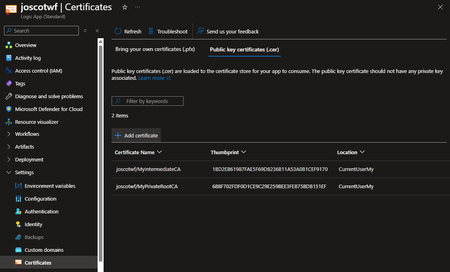
A colleague reached out to me to help with a customer's Logic App issue. They were trying to make what looked like a simple HTTP request to a Jira API but were getting back an SSL error. The root of the error was that the customer was securing the API endpoint with a certificate generated from a private Certificate Authority in their environment. Because this certificate was not signed by VeriSign, GoDaddy or other public certificate authority, and the Logic App HTTP Connector was failing as it did not trust the issuer. The fix for this is simple as it turns out but required a bit of reading the manual. First, go to Certificates and load the root CA and any intermediate CAs you might be using to the store. Then, to get the Logic App to load these certs, go to Environment Variables and add a new setting WEBSITE_LOAD_ROOT_CERTIFICATES and place the thumbprints of the added root and intermediate CAs as a comma delimited string (hat tip to Glen from our consulting team for figuring that one out). When you save the change, the service will restart and will now trust these private certificates. It should be noted that Logic Apps Standard is a flavor of Azure App Service, so this fix would also work for a regular App Service or a Function App as well. I hope this helps you out!Logic Apps, Windows auth, the On-Premises Data Gateway and you
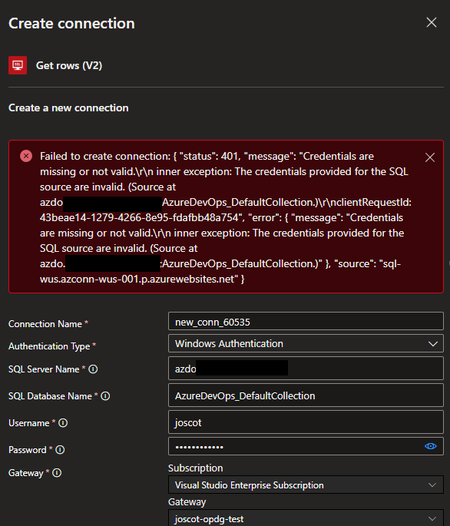
I was working with a customer recently who had a somewhat unusual situation, unusual in that I have become accustomed to most government customers having an Express Route or site-to-site VPN connection to connect their on-premises network to their Azure environment. However, this customer had a need to connect to an on-premises SQL instance via the on-premises data gateway (OPDG). The OPDG is installed as a Windows service on a machine inside the on-premises network and, when registered in Azure, allows Azure resources to connect to services on premises (more here). I did not have any direct experience with this tool but worked with the customer to get it installed on their network, which included getting it to work with their proxy (thanks to the larger Microsoft team for the assist and thanks to the customer for their patience figuring this out). We got the gateway registered in Azure and were ready to test it out. The customer is using Logic Apps and the SQL Connector to connect back to their on-premises SQL instance. The initial attempt to connect to SQL using SQL credentials was successful (Yay!!!) but the customer wanted to use Windows Authentication (which is a best practice). However, when trying to establish the connection with Windows Authentication, they were getting the error "status 401 - Credentials are missing or not valid...The credentials provided for the SQL source are invalid." Doing a little sleuthing in the Security logs on the SQL server, we could see that the authentication attempt being made, but with null credentials. Of course! We're passing our Windows credentials to the OPDG, but we haven't configured the gateway service account with delegation permissions to pass them on to SQL! To configure the on-premises data gateway account for delegation, do the following: Create a Service Principal Name (SPN) using the setspn command line tool for the OPDG service account: setspn -S gateway\gatewayMachineName domainname\gatewaySvcAcctName Open Active Directory Users and Computers (ADUC) and locate the OPDG service account Open the Delegation tab and select "Trust this user for delegation to specified services only" and "Use Kerberos Only" then add the services for which you want the OPDG to have delegation, e.g. SQL Server. Once this was done, we could create the Logic Apps SQL Connection successfully. A good check is to see if you can enumerate the list of tables in the database to which you are querying. As it turns out, there is fairly good documentation on this topic under the Power BI documentation, but searching for this under the context of Logic Apps didn't yield much success! In any case, I hope this helps someone else in the future!Building the agentic future together at JDConf 2026
JDConf 2026 is just weeks away, and I’m excited to welcome Java developers, architects, and engineering leaders from around the world for two days of learning and connection. Now in its sixth year, JDConf has become a place where the Java community compares notes on their real-world production experience: patterns, tooling, and hard-earned lessons you can take back to your team, while we keep moving the Java systems that run businesses and services forward in the AI era. This year’s program lines up with a shift many of us are seeing first-hand: delivery is getting more intelligent, more automated, and more tightly coupled to the systems and data we already own. Agentic approaches are moving from demos to backlog items, and that raises practical questions: what’s the right architecture, where do you draw trust boundaries, how do you keep secrets safe, and how do you ship without trading reliability for novelty? JDConf is for and by the people who build and manage the mission-critical apps powering organizations worldwide. Across three regional livestreams, you’ll hear from open source and enterprise practitioners who are making the same tradeoffs you are—velocity vs. safety, modernization vs. continuity, experimentation vs. operational excellence. Expect sessions that go beyond “what” and get into “how”: design choices, integration patterns, migration steps, and the guardrails that make AI features safe to run in production. You’ll find several practical themes for shipping Java in the AI era: connecting agents to enterprise systems with clear governance; frameworks and runtimes adapting to AI-native workloads; and how testing and delivery pipelines evolve as automation gets more capable. To make this more concrete, a sampling of sessions would include topics like Secrets of Agentic Memory Management (patterns for short- and long-term memory and safe retrieval), Modernizing a Java App with GitHub Copilot (end-to-end upgrade and migration with AI-powered technologies), and Docker Sandboxes for AI Agents (guardrails for running agent workflows without risking your filesystem or secrets). The goal is to help you adopt what’s new while hardening your long lived codebases. JDConf is built for community learning—free to attend, accessible worldwide, and designed for an interactive live experience in three time zones. You’ll not only get 23 practitioner-led sessions with production-ready guidance but also free on-demand access after the event to re-watch with your whole team. Pro tip: join live and get more value by discussing practical implications and ideas with your peers in the chat. This is where the “how” details and tradeoffs become clearer. JDConf 2026 Keynote Building the Agentic Future Together Rod Johnson, Embabel | Bruno Borges, Microsoft | Ayan Gupta, Microsoft The JDConf 2026 keynote features Rod Johnson, creator of the Spring Framework and founder of Embabel, joined by Bruno Borges and Ayan Gupta to explore where the Java ecosystem is headed in the agentic era. Expect a practitioner-level discussion on how frameworks like Spring continue to evolve, how MCP is changing the way agents interact with enterprise systems, and what Java developers should be paying attention to right now. Register. Attend. Earn. Register for JDConf 2026 to earn Microsoft Rewards points, which you can use for gift cards, sweepstakes entries, and more. Earn 1,000 points simply by signing up. When you register for any regional JDConf 2026 event with your Microsoft account, you'll automatically receive these points. Get 5,000 additional points for attending live (limited to the first 300 attendees per stream). On the day of your regional event, check in through the Reactor page or your email confirmation link to qualify. Disclaimer: Points are added to your Microsoft account within 60 days after the event. Must register with a Microsoft account email. Up to 10,000 developers eligible. Points will be applied upon registration and attendance and will not be counted multiple times for registering or attending at different events. Terms | Privacy JDConf 2026 Regional Live Streams Americas – April 8, 8:30 AM – 12:30 PM PDT (UTC -7) Bruno Borges hosts the Americas stream, discussing practical agentic Java topics like memory management, multi-agent system design, LLM integration, modernization with AI, and dependency security. Experts from Redis, IBM, Hammerspace, HeroDevs, AI Collective, Tekskills, and Microsoft share their insights. Register for Americas → Asia-Pacific – April 9, 10:00 AM – 2:00 PM SGT (UTC +8) Brian Benz and Ayan Gupta co-host the APAC stream, highlighting Java frameworks and practices for agentic delivery. Topics include Spring AI, multi-agent orchestration, spec-driven development, scalable DevOps, and legacy modernization, with speakers from Broadcom, Alibaba, CERN, MHP (A Porsche Company), and Microsoft. Register for Asia-Pacific → Europe, Middle East and Africa – April 9, 9:00 AM – 12:30 PM GMT (UTC +0) The EMEA stream, hosted by Sandra Ahlgrimm, will address the implementation of agentic Java in production environments. Topics include self-improving systems utilizing Spring AI, Docker sandboxes for agent workflow management, Retrieval-Augmented Generation (RAG) pipelines, modernization initiatives from a national tax authority, and AI-driven CI/CD enhancements. Presentations will feature experts from Broadcom, Docker, Elastic, Azul Systems, IBM, Team Rockstars IT, and Microsoft. Register for EMEA → Make It Interactive: Join Live Come prepared with an actual challenge you’re facing, whether you’re modernizing a legacy application, connecting agents to internal APIs, or refining CI/CD processes. Test your strategies by participating in live chats and Q&As with presenters and fellow professionals. If you’re attending with your team, schedule a debrief after the live stream to discuss how to quickly use key takeaways and insights in your pilots and projects. Learning Resources Java and AI for Beginners Video Series: Practical, episode-based walkthroughs on MCP, GenAI integration, and building AI-powered apps from scratch. Modernize Java Apps Guide: Step-by-step guide using GitHub Copilot agent mode for legacy Java project upgrades, automated fixes, and cloud-ready migrations. AI Agents for Java Webinar: Embedding AI Agent capabilities into Java applications using Microsoft Foundry, from project setup to production deployment. Java Practitioner’s Guide: Learning plan for deploying, managing, and optimizing Java applications on Azure using modern cloud-native approaches. Register Now JDConf 2026 is a free global event for Java teams. Join live to ask questions, connect, and gain practical patterns. All 23 sessions will be available on-demand. Register now to earn Microsoft Rewards points for attending. Register at JDConf.com321Views0likes0Comments
HTTP Triggers in Azure SRE Agent: From Jira Ticket to Automated Investigation
Introduction Many teams run their observability, incident management, ticketing, and deployment on platforms outside of Azure—Jira, Opsgenie, Grafana, Zendesk, GitLab, Jenkins, Harness, or homegrown internal tools. These are the systems where alerts fire, tickets get filed, deployments happen, and operational decisions are made every day. HTTP Triggers make it easy to connect any of them to Azure SRE Agent—turning events from any platform into automated agent actions with a simple HTTP POST. No manual copy-paste, no context-switching, no delay between detection and response. In this blog, we'll demonstrate by connecting Jira to SRE Agent—so that every new incident ticket automatically triggers an investigation, and the agent posts its findings back to the Jira ticket when it's done. The Scenario: Jira Incident → Automated Investigation Your team manages production applications backed by Azure PostgreSQL Flexible Server. You use Jira for incident tracking. Today, when a P1 or P2 incident is filed, your on-call engineer has to manually triage—reading through the ticket, checking dashboards, querying logs, correlating recent deployments—before they can even begin working on a fix. Some teams have Jira automations that route or label tickets, but the actual investigation still starts with a human. HTTP Triggers let you bring SRE Agent directly into that existing workflow. Instead of adding another tool for engineers to check, the agent meets them where they already work. Jira ticket created → SRE Agent automatically investigates → Agent writes findings back to Jira The on-call engineer opens the Jira ticket and the investigation is already there—root cause analysis, evidence from logs and metrics, and recommended next steps—posted as a comment by the agent. Here's how to set this up. Architecture Overview Here's the end-to-end flow we'll build: Jira — A new issue is created in your project Logic App — The Jira connector detects the new issue, and the Logic App calls the SRE Agent HTTP Trigger, using Managed Identity for authentication HTTP Trigger — The agent prompt is rendered with the Jira ticket details (key, summary, priority, etc.) via payload placeholders Agent Investigation — The agent uses Jira MCP tools to read the ticket and search related issues, queries Azure logs, metrics, and recent deployments, then posts its findings back to the Jira ticket as a comment How HTTP Triggers Work Every HTTP Trigger you create in Azure SRE Agent exposes a unique webhook URL: https://<your-agent>.<instance>.azuresre.ai/api/v1/httptriggers/trigger/<trigger-id> When an external system sends a POST request to this URL with a JSON payload, the SRE Agent: Validates the trigger exists and is enabled Renders your agent prompt by injecting payload values into {payload.X} placeholders Creates a new investigation thread (or reuses an existing one) Executes the agent with the rendered prompt—autonomously or in review mode Records the execution in the trigger's history for auditing Payload Placeholders The real power of HTTP Triggers is in payload placeholders. When you configure a trigger, you write an agent prompt with {payload.X} tokens that get replaced at runtime with values from the incoming JSON. For example, a prompt like: Investigate Jira incident {payload.key}: {payload.summary} (Priority: {payload.priority}) Gets rendered with actual incident data before the agent sees it, giving it immediate context to begin investigating. If your prompt doesn't use any placeholders, the raw JSON payload is automatically appended to the prompt, so the agent always has access to the full context regardless. Thread Modes HTTP Triggers support two thread modes: New Thread (recommended for incidents): Every trigger invocation creates a fresh investigation thread, giving each incident its own isolated workspace Same Thread: All invocations share a single thread, building up a continuous conversation—useful for accumulating alerts from a single source Authenticating External Platforms The HTTP Trigger endpoint is secured with Azure AD authentication, ensuring only authorized callers can create agent investigation threads. Every request requires a valid bearer token scoped to the SRE Agent's data plane. External platforms like Jira send standard HTTP webhooks and don't natively acquire Azure AD tokens. To bridge this, you can use any Azure service that supports Managed Identity as an intermediary—this approach means zero secrets to store or rotate in the external platform. Common options include: Approach Best For Azure Logic Apps Native connectors for many platforms, no code required, visual workflow designer Azure Functions Simple relay with ~15 lines of code, clean URL for any webhook source API Management (APIM) Enterprise environments needing rate limiting, IP filtering, or API key management All three support Managed Identity and can transparently acquire the Azure AD token before forwarding requests to the SRE Agent HTTP Trigger. In this walkthrough, we'll use Azure Logic Apps with the built-in Jira connector. Step-by-Step: Connecting Jira to SRE Agent Prerequisites An Azure SRE Agent resource deployed in your subscription A Jira Cloud project with API token access An Azure subscription for the Logic App Step 1: Set Up the Jira MCP Connector First, let's give the SRE Agent the ability to interact with Jira directly. In your agent's MCP Tool settings, add the Jira connector: Setting Value Package mcp-atlassian (npm, version 2.0.0) Transport STDIO Configure these environment variables: Variable Value ATLASSIAN_BASE_URL https://your-site.atlassian.net ATLASSIAN_EMAIL Your Jira account email ATLASSIAN_API_TOKEN Your Jira API token Once the connector is added, select the specific MCP tools you want the agent to use. The connector provides 18 Jira tools out of 80 available. For our incident investigation workflow, the key tools include: jira-mcp_read_jira_issue — Read details from a Jira issue by issue key jira-mcp_search_jira_issues — Search for Jira issues using JQL (Jira Query Language) jira-mcp_add_jira_comment — Add a comment to a Jira issue (post investigation findings back) jira-mcp_list_jira_projects — List available Jira projects jira-mcp_create_jira_issue — Create a new Jira issue This gives the SRE Agent bidirectional access to Jira—it can read ticket details, fetch comments, query related issues, and post investigation findings back as comments on the original ticket. This closes the loop so your on-call engineers see the agent's analysis directly in Jira without switching tools. Step 2: Create the HTTP Trigger Navigate to Builder → HTTP Triggers in the SRE Agent UI and click Create. Setting Value Name jira-incident-handler Agent Mode Autonomous Thread Mode New Thread (one investigation per incident) Sub-Agent (optional) Select a specialized incident response agent Agent Prompt: A new Jira incident has been filed that requires investigation: Jira Ticket: {payload.key} Summary: {payload.summary} Priority: {payload.priority} Reporter: {payload.reporter} Description: {payload.description} Jira URL: {payload.ticketUrl} Investigate this incident by: Identifying the affected Azure resources mentioned in the description Querying recent metrics and logs for anomalies Checking for recent deployments or configuration changes Providing a structured analysis with Root Cause, Evidence, and Recommended Actions Once your investigation is complete, use the Jira MCP tools to post a summary of your findings as a comment on the original ticket ({payload.key}). After saving, enable the trigger and open the trigger detail view. Copy the Trigger URL—you'll need it for the Logic App. Step 3: Create the Azure Logic App In the Azure Portal, create a new Logic App: Setting Value Type Consumption (Multi-tenant, Stateful) Name jira-sre-agent-bridge Region Same region as your SRE Agent (e.g., East US 2) Resource Group Same resource group as your SRE Agent (recommended for simplicity) Step 4: Enable Managed Identity In the Logic App → Identity → System assigned: Set Status to On Click Save Step 5: Assign the SRE Agent Admin Role Navigate to your SRE Agent resource → Access control (IAM) → Add role assignment: Setting Value Role SRE Agent Admin Assign to Managed Identity → select your Logic App This grants the Logic App's Managed Identity the data-plane permissions needed to invoke HTTP Triggers. Important: The Contributor role alone is not sufficient. Contributor covers the Azure control plane, but SRE Agent uses a separate data plane with its own RBAC. The SRE Agent Admin role provides the required data-plane permissions. Step 6: Create the Jira Connection Open the Logic App designer. When adding the Jira trigger, it will prompt you to create a connection: Setting Value Connection name jira-connection Jira instance https://your-site.atlassian.net Email Your Jira email API Token Your Jira API token Step 7: Configure the Logic App Workflow Switch to the Logic App Code view and paste this workflow definition: { "definition": { "$schema": "https://schema.management.azure.com/providers/Microsoft.Logic/schemas/2016-06-01/workflowdefinition.json#", "contentVersion": "1.0.0.0", "triggers": { "When_a_new_issue_is_created_(V2)": { "recurrence": { "interval": 3, "frequency": "Minute" }, "splitOn": "@triggerBody()", "type": "ApiConnection", "inputs": { "host": { "connection": { "name": "@parameters('$connections')['jira']['connectionId']" } }, "method": "get", "path": "/v2/new_issue_trigger/search", "queries": { "X-Request-Jirainstance": "https://YOUR-SITE.atlassian.net", "projectKey": "YOUR_PROJECT_ID" } } } }, "actions": { "Call_SRE_Agent_HTTP_Trigger": { "runAfter": {}, "type": "Http", "inputs": { "uri": "https://YOUR-AGENT.azuresre.ai/api/v1/httptriggers/trigger/YOUR-TRIGGER-ID", "method": "POST", "headers": { "Content-Type": "application/json" }, "body": { "key": "@{triggerBody()?['key']}", "summary": "@{triggerBody()?['fields']?['summary']}", "priority": "@{triggerBody()?['fields']?['priority']?['name']}", "reporter": "@{triggerBody()?['fields']?['reporter']?['displayName']}", "description": "@{triggerBody()?['fields']?['description']}", "ticketUrl": "@{concat('https://YOUR-SITE.atlassian.net/browse/', triggerBody()?['key'])}" }, "authentication": { "type": "ManagedServiceIdentity", "audience": "https://azuresre.dev" } } } }, "outputs": {}, "parameters": { "$connections": { "type": "Object", "defaultValue": {} } } }, "parameters": { "$connections": { "type": "Object", "value": { "jira": { "id": "/subscriptions/YOUR-SUB/providers/Microsoft.Web/locations/YOUR-REGION/managedApis/jira", "connectionId": "/subscriptions/YOUR-SUB/resourceGroups/YOUR-RG/providers/Microsoft.Web/connections/jira", "connectionName": "jira" } } } } } Replace the YOUR-* placeholders with your actual values. To find your Jira project ID, navigate to https://your-site.atlassian.net/rest/api/3/project/YOUR-PROJECT-KEY in your browser and find the "id" field in the JSON response. The critical piece is the authentication block: "authentication": { "type": "ManagedServiceIdentity", "audience": "https://azuresre.dev" } This tells the Logic App to automatically acquire an Azure AD token for the SRE Agent data plane and attach it as a Bearer token. No secrets, no expiration management, no manual token refresh. After pasting the JSON and clicking Save, switch back to the Designer view. The Logic App automatically generates the visual workflow from the code — you'll see the Jira trigger ("When a new issue is created (V2)") connected to the HTTP action ("Call SRE Agent HTTP Trigger") as a two-step flow, with all the field mappings and authentication settings already configured What Happens Inside the Agent When the HTTP Trigger fires, the SRE Agent receives a fully contextualized prompt with all the Jira incident data injected: A new Jira incident has been filed that requires investigation: Jira Ticket: KAN-16 Summary: Elevated API Response Times — PostgreSQL Table Lock Causing Request Blocking on Listings Service Priority: High Reporter: Vineela Suri Description: Severity: P2 — High. Affected Service: Production API (octopets-prod-postgres). Impact: End users experience slow or unresponsive listing pages. Jira URL: https://your-site.atlassian.net/browse/KAN-16 Investigate this incident by: Identifying the affected Azure resources mentioned in the description Querying recent metrics and logs for anomalies ... The agent then uses its configured tools to investigate—Azure CLI to query metrics, Kusto to analyze logs, and the Jira MCP connector to read the ticket for additional context. Once the investigation is complete, the agent posts its findings as a comment directly on the Jira ticket, closing the loop without any manual copy-paste. Each execution is recorded in the trigger's history with timestamp, thread ID, success status, duration, and an AI-generated summary—giving you full observability into your automated investigation pipeline. Extending to Other Platforms The pattern we built here works for any external platform that isn't natively supported by SRE Agent. The core architecture stays the same: External Platform → Auth Bridge (Managed Identity) → SRE Agent HTTP Trigger You only need to swap the inbound side of the bridge. For example: External Platform Auth Bridge Configuration Jira Logic App with Jira V2 connector (polling) OpsGenie Logic App with OpsGenie connector, or Azure Function relay receiving OpsGenie webhooks Datadog Azure Function relay or APIM policy receiving Datadog webhook notifications Grafana Azure Function relay or APIM policy receiving Grafana alert webhooks Splunk APIM with webhook endpoint and Managed Identity forwarding Custom / Internal tools Logic App HTTP trigger, Azure Function relay, or APIM — any service that supports Managed Identity The SRE Agent HTTP Trigger and the Managed Identity authentication remain the same regardless of the source platform. You configure the trigger once, set up the auth bridge, and connect as many external sources as needed. Each trigger can have its own tailored prompt, sub-agent, and thread mode optimized for the type of incoming event. Key Takeaways HTTP Triggers extend Azure SRE Agent's reach to any external platform: Connect What You Use: If your incident platform isn't natively supported, HTTP Triggers provide the integration point—no code changes to SRE Agent required Secure by Design: Azure AD authentication with Managed Identity keeps the data plane protected while making integration straightforward through standard Azure services Bidirectional with MCP: Combine HTTP Triggers (inbound) with MCP connectors (outbound) for full round-trip integration—receive incidents automatically and post findings back to the source platform Full Observability: Every trigger execution is recorded with timestamps, thread IDs, duration, and AI-generated summaries Flexible Context Injection: Payload placeholders let you craft precise investigation prompts from incident data, while raw payload passthrough ensures the agent always has full context Getting Started HTTP Triggers are available now in the Azure SRE Agent platform: Create a Trigger: Navigate to Builder → HTTP Triggers → Create. Define your agent prompt with {payload.X} placeholders Set Up an Auth Bridge: Use Logic Apps, Azure Functions, or APIM with Managed Identity to handle Azure AD authentication Connect Your Platform: Point your external platform at the bridge and create a test event Within minutes, you'll have an automated pipeline that turns every incident ticket into an AI-driven investigation. Learn More HTTP Triggers Documentation Agent Hooks Blog Post — Governance controls for automated investigations YAML Schema Reference SRE Agent Getting Started Guide Ready to extend your SRE Agent to platforms it doesn't support natively? Set up your first HTTP Trigger today at sre.azure.com.1.1KViews0likes0CommentsIndustry-Wide Certificate Changes Impacting Azure App Service Certificates
Executive Summary In early 2026, industry-wide changes mandated by browser applications and the CA/B Forum will affect both how TLS certificates are issued as well as their validity period. The CA/B Forum is a vendor body that establishes standards for securing websites and online communications through SSL/TLS certificates. Azure App Service is aligning with these standards for both App Service Managed Certificates (ASMC, free, DigiCert-issued) and App Service Certificates (ASC, paid, GoDaddy-issued). Most customers will experience no disruption. Action is required only if you pin certificates or use them for client authentication (mTLS). Update: February 17, 2026 We’ve published new Microsoft Learn documentation, Industry-wide certificate changes impacting Azure App Service , which provides more detailed guidance on these compliance-driven changes. The documentation also includes additional information not previously covered in this blog, such as updates to domain validation reuse, along with an expanding FAQ section. The Microsoft Learn documentation now represents the most complete and up-to-date overview of these changes. Going forward, any new details or clarifications will be published there, and we recommend bookmarking the documentation for the latest guidance. Who Should Read This? App Service administrators Security and compliance teams Anyone responsible for certificate management or application security Quick Reference: What’s Changing & What To Do Topic ASMC (Managed, free) ASC (GoDaddy, paid) Required Action New Cert Chain New chain (no action unless pinned) New chain (no action unless pinned) Remove certificate pinning Client Auth EKU Not supported (no action unless cert is used for mTLS) Not supported (no action unless cert is used for mTLS) Transition from mTLS Validity No change (already compliant) Two overlapping certs issued for the full year None (automated) If you do not pin certificates or use them for mTLS, no action is required. Timeline of Key Dates Date Change Action Required Mid-Jan 2026 and after ASMC migrates to new chain ASMC stops supporting client auth EKU Remove certificate pinning if used Transition to alternative authentication if the certificate is used for mTLS Mar 2026 and after ASC validity shortened ASC migrates to new chain ASC stops supporting client auth EKU Remove certificate pinning if used Transition to alternative authentication if the certificate is used for mTLS Actions Checklist For All Users Review your use of App Service certificates. If you do not pin these certificates and do not use them for mTLS, no action is required. If You Pin Certificates (ASMC or ASC) Remove all certificate or chain pinning before their respective key change dates to avoid service disruption. See Best Practices: Certificate Pinning. If You Use Certificates for Client Authentication (mTLS) Switch to an alternative authentication method before their respective key change dates to avoid service disruption, as client authentication EKU will no longer be supported for these certificates. See Sunsetting the client authentication EKU from DigiCert public TLS certificates. See Set Up TLS Mutual Authentication - Azure App Service Details & Rationale Why Are These Changes Happening? These updates are required by major browser programs (e.g., Chrome) and apply to all public CAs. They are designed to enhance security and compliance across the industry. Azure App Service is automating updates to minimize customer impact. What’s Changing? New Certificate Chain Certificates will be issued from a new chain to maintain browser trust. Impact: Remove any certificate pinning to avoid disruption. Removal of Client Authentication EKU Newly issued certificates will not support client authentication EKU. This change aligns with Google Chrome’s root program requirements to enhance security. Impact: If you use these certificates for mTLS, transition to an alternate authentication method. Shortening of Certificate Validity Certificate validity is now limited to a maximum of 200 days. Impact: ASMC is already compliant; ASC will automatically issue two overlapping certificates to cover one year. No billing impact. Frequently Asked Questions (FAQs) Will I lose coverage due to shorter validity? No. For App Service Certificate, App Service will issue two certificates to span the full year you purchased. Is this unique to DigiCert and GoDaddy? No. This is an industry-wide change. Do these changes impact certificates from other CAs? Yes. These changes are an industry-wide change. We recommend you reach out to your certificates’ CA for more information. Do I need to act today? If you do not pin or use these certs for mTLS, no action is required. Glossary ASMC: App Service Managed Certificate (free, DigiCert-issued) ASC: App Service Certificate (paid, GoDaddy-issued) EKU: Extended Key Usage mTLS: Mutual TLS (client certificate authentication) CA/B Forum: Certification Authority/Browser Forum Additional Resources Changes to the Managed TLS Feature Set Up TLS Mutual Authentication Azure App Service Best Practices – Certificate pinning DigiCert Root and Intermediate CA Certificate Updates 2023 Sunsetting the client authentication EKU from DigiCert public TLS certificates Feedback & Support If you have questions or need help, please visit our official support channels or the Microsoft Q&A, where our team and the community can assist you.11KViews1like0CommentsExciting Updates Coming to Conversational Diagnostics (Public Preview)
Last year, at Ignite 2023, we unveiled Conversational Diagnostics (Preview), a revolutionary tool integrated with AI-powered capabilities to enhance problem-solving for Windows Web Apps. This year, we're thrilled to share what’s new and forthcoming for Conversational Diagnostics (Preview). Get ready to experience a broader range of functionalities and expanded support across various Azure Products, making your troubleshooting journey even more seamless and intuitive.470Views0likes0CommentsSecure Unique Default Hostnames Now GA for Functions and Logic Apps
We are pleased to announce that Secure Unique Default Hostnames are now generally available (GA) for Azure Functions and Logic Apps (Standard). This expands the security model previously available for Web Apps to the entire App Service ecosystem and provides customers with stronger, more secure, and standardized hostname behavior across all workloads. Why This Feature Matters Historically, App Service resources have used default hostname format such as: <SiteName>.azurewebsites.net While straightforward, this pattern introduced potential security risks, particularly in scenarios where DNS records were left behind after deleting a resource. In those situations, a different user could create a new resource with the same name and unintentionally receive traffic or bindings associated with the old DNS configuration, creating opportunities for issues such as subdomain takeover. Secure Unique Default Hostnames address this by assigning a unique, randomized, region‑scoped hostname to each resource, for example: <SiteName>-<Hash>.<Region>.azurewebsites.net This change ensures that: No other customer can recreate the same default hostname. Apps inherently avoid risks associated with dangling DNS entries. Customers gain a more secure, reliable baseline behavior across App Service. Adopting this model now helps organizations prepare for the long‑term direction of the platform while improving security posture today. What’s New: GA Support for Functions and Logic Apps With this release, both Azure Functions and Logic Apps (Standard) fully support the Secure Unique Default Hostname capability. This brings these services in line with Web Apps and ensures customers across all App Service workloads benefit from the same secure and consistent default hostname model. Azure CLI Support The Azure CLI for Web Apps and Function Apps now includes support for the “--domain-name-scope” parameter. This allows customers to explicitly specify the scope used when generating a unique default hostname during resource creation. Examples: az webapp create --domain-name-scope {NoReuse, ResourceGroupReuse, SubscriptionReuse, TenantReuse} az functionapp create --domain-name-scope {NoReuse, ResourceGroupReuse, SubscriptionReuse, TenantReuse} Including this parameter ensures that deployments consistently use the intended hostname scope and helps teams prepare their automation and provisioning workflows for the secure unique default hostname model. Why Customers Should Adopt This Now While existing resources will continue to function normally, customers are strongly encouraged to adopt Secure Unique Default Hostnames for all new deployments. Early adoption provides several important benefits: A significantly stronger security posture. Protection against dangling DNS and subdomain takeover scenarios. Consistent default hostname behavior as the platform evolves. Alignment with recommended deployment practices and modern DNS hygiene. This feature represents the current best practice for hostname management on App Service and adopting it now helps ensure that new deployments follow the most secure and consistent model available. Recommended Next Steps Enable Secure Unique Default Hostnames for all new Web Apps, Function Apps, and Logic Apps. Update automation and CLI scripts to include the --domain-name-scope parameter when creating new resources. Begin updating internal documentation and operational processes to reflect the new hostname pattern. Additional Resources For readers who want to explore the technical background and earlier announcements in more detail, the following articles offer deeper coverage of unique default hostnames: Public Preview: Creating Web App with a Unique Default Hostname This article introduces the foundational concepts behind unique default hostnames. It explains why the feature was created, how the hostname format works, and provides examples and guidance for enabling the feature when creating new resources. Secure Unique Default Hostnames: GA on App Service Web Apps and Public Preview on Functions This article provides the initial GA announcement for Web Apps and early preview details for Functions. It covers the security benefits, recommended usage patterns, and guidance on how to handle existing resources that were created without unique default hostnames. Conclusion Secure Unique Default Hostnames now provide a more secure and consistent default hostname model across Web Apps, Function Apps, and Logic Apps. This enhancement reduces DNS‑related risks and strengthens application security, and organizations are encouraged to adopt this feature as the standard for new deployments.3KViews0likes0Comments
Stop Running Runbooks at 3 am: Let Azure SRE Agent Do Your On-Call Grunt Work
Your pager goes off. It's 2:47am. Production is throwing 500 errors. You know the drill - SSH into this, query that, check these metrics, correlate those logs. Twenty minutes later, you're still piecing together what went wrong. Sound familiar? The On-Call Reality Nobody Talks About Every SRE, DevOps engineer, and developer who's carried a pager knows this pain. When incidents hit, you're not solving problems - you're executing runbooks. Copy-paste this query. Check that dashboard. Run these az commands. Connect the dots between five different tools. It's tedious. It's error-prone at 3am. And honestly? It's work that doesn't require human creativity but requires human time. What if an AI agent could do this for you? Enter Azure SRE Agent + Runbook Automation Here's what I built: I gave SRE Agent a simple markdown runbook containing the same diagnostic steps I'd run manually during an incident. The agent executes those steps, collects evidence, and sends me an email with everything I need to take action. No more bouncing between terminals. No more forgetting a step because it's 3am and your brain is foggy. What My Runbook Contains Just the basics any on-call would run: az monitor metrics – CPU, memory, request rates Log Analytics queries – Error patterns, exception details, dependency failures App Insights data – Failed requests, stack traces, correlation IDs az containerapp logs – Revision logs, app configuration That's it. Plain markdown with KQL queries and CLI commands. Nothing fancy. What the Agent Does Reads the runbook from its knowledge base Executes each diagnostic step Collects results and evidence Sends me an email with analysis and findings I wake up to an email that says: "CPU spiked to 92% at 2:45am, triggering connection pool exhaustion. Top exception: SqlException (1,832 occurrences). Errors correlate with traffic spike. Recommend scaling to 5 replicas." All the evidence. All the queries used. All the timestamps. Ready for me to act. How to Set This Up (6 Steps) Here's how you can build this yourself: Step 1: Create SRE Agent Create a new SRE Agent in the Azure portal. No Azure resource groups to configure. If your apps run on Azure, the agent pulls context from the incident itself. If your apps run elsewhere, you don't need Azure resource configuration at all. Step 2: Grant Reader Permission (Optional) If your runbooks execute against Azure resources, assign Reader role to the SRE Agent's managed identity on your subscription. This allows the agent to run az commands and query metrics. Skip this if your runbooks target non-Azure apps. Step 3: Add Your Runbook to SRE Agent's Knowledge base You already have runbooks, they're in your wiki, Confluence, or team docs. Just add them as .md files to the agent's knowledge base. To learn about other ways to link your runbooks to the agent, read this Step 4: Connect Outlook Connect the agent to your Outlook so it can send you the analysis email with findings. Step 5: Create a Subagent Create a subagent with simple instructions like: "You are an expert in triaging and diagnosing incidents. When triggered, search the knowledge base for the relevant runbook, execute the diagnostic steps, collect evidence, and send an email summary with your findings." Assign the tools the agent needs: RunAzCliReadCommands – for az monitor, az containerapp commands QueryLogAnalyticsByWorkspaceId – for KQL queries against Log Analytics QueryAppInsightsByResourceId – for App Insights data SearchMemory – to find the right runbook SendOutlookEmail – to deliver the analysis Step 6: Set Up Incident Trigger Connect your incident management tool - PagerDuty, ServiceNow, or Azure Monitor alerts and setup the incident trigger to the subagent. When an incident fires, the agent kicks off automatically. That's it. Your agentic workflow now looks like this: This Works for Any App, Not Just Azure Here's the thing: SRE Agent is platform agnostic. It's executing your runbooks, whatever they contain. On-prem databases? Add your diagnostic SQL. Custom monitoring stack? Add those API calls. The agent doesn't care where your app runs. It cares about following your runbook and getting you answers. Why This Matters Lower MTTR. By the time you're awake and coherent, the analysis is done. Consistent execution. No missed steps. No "I forgot to check the dependencies" at 4am. Evidence for postmortems. Every query, every result, timestamped and documented. Focus on what matters. Your brain should be deciding what to do not gathering data. The Bottom Line On-call runbook execution is the most common, most tedious, and most automatable part of incident response. It's grunt work that pulls engineers away from the creative problem-solving they were hired for. SRE Agent offloads that work from your plate. You write the runbook once, and the agent executes it every time, faster and more consistently than any human at 3am. Stop running runbooks. Start reviewing results. Try it yourself: Create a markdown runbook with your diagnostic queries and commands, add it to your SRE Agent's knowledge base, and let the agent handle your next incident. Your 3am self will thank you.1.4KViews1like0CommentsImportant Changes to App Service Managed Certificates: Is Your Certificate Affected?
Overview As part of an upcoming industry-wide change, DigiCert, the Certificate Authority (CA) for Azure App Service Managed Certificates (ASMC), is required to migrate to a new validation platform to meet multi-perspective issuance corroboration (MPIC) requirements. While most certificates will not be impacted by this change, certain site configurations and setups may prevent certificate issuance or renewal starting July 28, 2025. Update December 8, 2025 We’ve published an update in November about how App Service Managed Certificates can now be supported on sites that block public access. This reverses the limitation introduced in July 2025, as mentioned in this blog. Note: This blog post reflects a point-in-time update and will not be revised. For the latest and most accurate details on App Service Managed Certificates, please refer to official documentation or subsequent updates. Learn more about the November 2025 update here: Follow-Up to ‘Important Changes to App Service Managed Certificates’: November 2025 Update. August 5, 2025 We’ve published a Microsoft Learn documentation titled App Service Managed Certificate (ASMC) changes – July 28, 2025 that contains more in-depth mitigation guidance and a growing FAQ section to support the changes outlined in this blog post. While the blog currently contains the most complete overview, the documentation will soon be updated to reflect all blog content. Going forward, any new information or clarifications will be added to the documentation page, so we recommend bookmarking it for the latest guidance. What Will the Change Look Like? For most customers: No disruption. Certificate issuance and renewals will continue as expected for eligible site configurations. For impacted scenarios: Certificate requests will fail (no certificate issued) starting July 28, 2025, if your site configuration is not supported. Existing certificates will remain valid until their expiration (up to six months after last renewal). Impacted Scenarios You will be affected by this change if any of the following apply to your site configurations: Your site is not publicly accessible: Public accessibility to your app is required. If your app is only accessible privately (e.g., requiring a client certificate for access, disabling public network access, using private endpoints or IP restrictions), you will not be able to create or renew a managed certificate. Other site configurations or setup methods not explicitly listed here that restrict public access, such as firewalls, authentication gateways, or any custom access policies, can also impact eligibility for managed certificate issuance or renewal. Action: Ensure your app is accessible from the public internet. However, if you need to limit access to your app, then you must acquire your own SSL certificate and add it to your site. Your site uses Azure Traffic Manager "nested" or "external" endpoints: Only “Azure Endpoints” on Traffic Manager will be supported for certificate creation and renewal. “Nested endpoints” and “External endpoints” will not be supported. Action: Transition to using "Azure Endpoints". However, if you cannot, then you must obtain a different SSL certificate for your domain and add it to your site. Your site relies on *.trafficmanager.net domain: Certificates for *.trafficmanager.net domains will not be supported for creation or renewal. Action: Add a custom domain to your app and point the custom domain to your *.trafficmanager.net domain. After that, secure the custom domain with a new SSL certificate. If none of the above applies, no further action is required. How to Identify Impacted Resources? To assist with the upcoming changes, you can use Azure Resource Graph (ARG) queries to help identify resources that may be affected under each scenario. Please note that these queries are provided as a starting point and may not capture every configuration. Review your environment for any unique setups or custom configurations. Scenario 1: Sites Not Publicly Accessible This ARG query retrieves a list of sites that either have the public network access property disabled or are configured to use client certificates. It then filters for sites that are using App Service Managed Certificates (ASMC) for their custom hostname SSL bindings. These certificates are the ones that could be affected by the upcoming changes. However, please note that this query does not provide complete coverage, as there may be additional configurations impacting public access to your app that are not included here. Ultimately, this query serves as a helpful guide for users, but a thorough review of your environment is recommended. You can copy this query, paste it into Azure Resource Graph Explorer, and then click "Run query" to view the results for your environment. // ARG Query: Identify App Service sites that commonly restrict public access and use ASMC for custom hostname SSL bindings resources | where type == "microsoft.web/sites" // Extract relevant properties for public access and client certificate settings | extend publicNetworkAccess = tolower(tostring(properties.publicNetworkAccess)), clientCertEnabled = tolower(tostring(properties.clientCertEnabled)) // Filter for sites that either have public network access disabled // or have client certificates enabled (both can restrict public access) | where publicNetworkAccess == "disabled" or clientCertEnabled != "false" // Expand the list of SSL bindings for each site | mv-expand hostNameSslState = properties.hostNameSslStates | extend hostName = tostring(hostNameSslState.name), thumbprint = tostring(hostNameSslState.thumbprint) // Only consider custom domains (exclude default *.azurewebsites.net) and sites with an SSL certificate bound | where tolower(hostName) !endswith "azurewebsites.net" and isnotempty(thumbprint) // Select key site properties for output | project siteName = name, siteId = id, siteResourceGroup = resourceGroup, thumbprint, publicNetworkAccess, clientCertEnabled // Join with certificates to find only those using App Service Managed Certificates (ASMC) // ASMCs are identified by the presence of the "canonicalName" property | join kind=inner ( resources | where type == "microsoft.web/certificates" | extend certThumbprint = tostring(properties.thumbprint), canonicalName = tostring(properties.canonicalName) // Only ASMC uses the "canonicalName" property | where isnotempty(canonicalName) | project certName = name, certId = id, certResourceGroup = tostring(properties.resourceGroup), certExpiration = properties.expirationDate, certThumbprint, canonicalName ) on $left.thumbprint == $right.certThumbprint // Final output: sites with restricted public access and using ASMC for custom hostname SSL bindings | project siteName, siteId, siteResourceGroup, publicNetworkAccess, clientCertEnabled, thumbprint, certName, certId, certResourceGroup, certExpiration, canonicalName Scenario 2: Traffic Manager Endpoint Types For this scenario, please manually review your Traffic Manager profile configurations to ensure only “Azure Endpoints” are in use. We recommend inspecting your Traffic Manager profiles directly in the Azure portal or using relevant APIs to confirm your setup and ensure compliance with the new requirements. Scenario 3: Certificates Issued to *.trafficmanager.net Domains This ARG query helps you identify App Service Managed Certificates (ASMC) that were issued to *.trafficmanager.net domains. In addition, it also checks whether any web apps are currently using those certificates for custom domain SSL bindings. You can copy this query, paste it into Azure Resource Graph Explorer, and then click "Run query" to view the results for your environment. // ARG Query: Identify App Service Managed Certificates (ASMC) issued to *.trafficmanager.net domains // Also checks if any web apps are currently using those certificates for custom domain SSL bindings resources | where type == "microsoft.web/certificates" // Extract the certificate thumbprint and canonicalName (ASMCs have a canonicalName property) | extend certThumbprint = tostring(properties.thumbprint), canonicalName = tostring(properties.canonicalName) // Only ASMC uses the "canonicalName" property // Filter for certificates issued to *.trafficmanager.net domains | where canonicalName endswith "trafficmanager.net" // Select key certificate properties for output | project certName = name, certId = id, certResourceGroup = tostring(properties.resourceGroup), certExpiration = properties.expirationDate, certThumbprint, canonicalName // Join with web apps to see if any are using these certificates for SSL bindings | join kind=leftouter ( resources | where type == "microsoft.web/sites" // Expand the list of SSL bindings for each site | mv-expand hostNameSslState = properties.hostNameSslStates | extend hostName = tostring(hostNameSslState.name), thumbprint = tostring(hostNameSslState.thumbprint) // Only consider bindings for *.trafficmanager.net custom domains with a certificate bound | where tolower(hostName) endswith "trafficmanager.net" and isnotempty(thumbprint) // Select key site properties for output | project siteName = name, siteId = id, siteResourceGroup = resourceGroup, thumbprint ) on $left.certThumbprint == $right.thumbprint // Final output: ASMCs for *.trafficmanager.net domains and any web apps using them | project certName, certId, certResourceGroup, certExpiration, canonicalName, siteName, siteId, siteResourceGroup Ongoing Updates We will continue to update this post with any new queries or important changes as they become available. Be sure to check back for the latest information. Note on Comments We hope this information helps you navigate the upcoming changes. To keep this post clear and focused, comments are closed. If you have questions, need help, or want to share tips or alternative detection methods, please visit our official support channels or the Microsoft Q&A, where our team and the community can assist you.26KViews1like1CommentFollow-Up to ‘Important Changes to App Service Managed Certificates’: November 2025 Update
This post provides an update to the Tech Community article ‘Important Changes to App Service Managed Certificates: Is Your Certificate Affected?’ and covers the latest changes introduced since July 2025. With the November 2025 update, ASMC now remains supported even if the site is not publicly accessible, provided all other requirements are met. Details on requirements, exceptions, and validation steps are included below. Background Context to July 2025 Changes As of July 2025, all ASMC certificate issuance and renewals use HTTP token validation. Previously, public access was required because DigiCert needed to access the endpoint https://<hostname>/.well-known/pki-validation/fileauth.txt to verify the token before issuing the certificate. App Service automatically places this token during certificate creation and renewal. If DigiCert cannot access this endpoint, domain ownership validation fails, and the certificate cannot be issued. November 2025 Update Starting November 2025, App Service now allows DigiCert's requests to the https://<hostname>/.well-known/pki-validation/fileauth.txt endpoint, even if the site blocks public access. If there’s a request to create an App Service Managed Certificate (ASMC), App Service places the domain validation token at the validation endpoint. When DigiCert tries to reach the validation endpoint, App Service front ends present the token, and the request terminates at the front end layer. DigiCert's request does not reach the workers running the application. This behavior is now the default for ASMC issuance for initial certificate creation and renewals. Customers do not need to specifically allow DigiCert's IP addresses. Exceptions and Unsupported Scenarios This update addresses most scenarios that restrict public access, including App Service Authentication, disabling public access, IP restrictions, private endpoints, and client certificates. However, a public DNS record is still required. For example, sites using a private endpoint with a custom domain on a private DNS cannot validate domain ownership and obtain a certificate. Even with all validations now relying on HTTP token validation and DigiCert requests being allowed through, certain configurations are still not supported for ASMC: Sites configured as "Nested" or "External" endpoints behind Traffic Manager. Only "Azure" endpoints are supported. Certificates requested for domains ending in *.trafficmanager.net are not supported. Testing Customers can easily test whether their site’s configuration or set-up supports ASMC by attempting to create one for their site. If the initial request succeeds, renewals should also work, provided all requirements are met and the site is not listed in an unsupported scenario.26KViews2likes0Comments