azure key vault
15 Topics
Azure Cloud HSM: Secure, Compliant & Ready for Enterprise Migration
Azure Cloud HSM is Microsoft’s single-tenant, FIPS 140-3 Level 3 validated hardware security module service, designed for organizations that need full administrative control over cryptographic keys in the cloud. It’s ideal for migration scenarios, especially when moving on-premises HSM workloads to Azure with minimal application changes. Onboarding & Availability No Registration or Allowlist Needed: Azure Cloud HSM is accessible to all customers no special onboarding or monetary policy required. Regional Availability: Private Preview: UK West Public Preview (March 2025): East US, West US, West Europe, North Europe, UK West General Availability (June 2025): All public, US Gov, and AGC regions where Azure Managed HSM is available Choosing the Right Azure HSM Solution Azure offers several key management options: Azure Key Vault (Standard/Premium) Azure Managed HSM Azure Payment HSM Azure Cloud HSM Cloud HSM is best for: Migrating existing on-premises HSM workloads to Azure Applications running in Azure VMs or Web Apps that require direct HSM integration Shrink-wrapped software in IaaS models supporting HSM key stores Common Use Cases: ADCS (Active Directory Certificate Services) SSL/TLS offload for Nginx and Apache Document and code signing Java apps needing JCE provider SQL Server TDE (IaaS) via EKM Oracle TDE Deployment Best Practices 1. Resource Group Strategy Deploy the Cloud HSM resource in a dedicated resource group (e.g., CHSM-SERVER-RG). Deploy client resources (VM, VNET, Private DNS Zone, Private Endpoint) in a separate group (e.g., CHSM-CLIENT-RG) 2. Domain Name Reuse Policy Each Cloud HSM requires a unique domain name, constructed from the resource name and a deterministic hash. Four reuse types: Tenant, Subscription, ResourceGroup, and NoReuse choose based on your naming and recovery needs. 3. Step-by-Step Deployment Provision Cloud HSM: Use Azure Portal, PowerShell, or CLI. Provisioning takes ~10 minutes. Register Resource Provider: (Register-AzResourceProvider -ProviderNamespace Microsoft.HardwareSecurityModules) Create VNET & Private DNS Zone: Set up networking in the client resource group. Create Private Endpoint: Connect the HSM to your VNET for secure, private access. Deploy Admin VM: Use a supported OS (Windows Server, Ubuntu, RHEL, CBL Mariner) and download the Azure Cloud HSM SDK from GitHub. Initialize and Configure Edit azcloudhsm_resource.cfg: Set the hostname to the private link FQDN for hsm1 (found in the Private Endpoint DNS config). Initialize Cluster: Use the management utility (azcloudhsm_mgmt_util) to connect to server 0 and complete initialization. Partition Owner Key Management: Generate the PO key securely (preferably offline). Store PO.key on encrypted USB in a physical safe. Sign the partition cert and upload it to the HSM. Promote Roles: Promote Precrypto Officer (PRECO) to Crypto Officer (CO) and set strong password Security, Compliance, and Operations Single-Tenant Isolation: Only your organization has admin access to your HSM cluster. No Microsoft Access: Microsoft cannot access your keys or credentials. FIPS 140-3 Level 3 Compliance: All hardware and firmware are validated and maintained by Microsoft and the HSM vendor. Tamper Protection: Physical and logical tamper events trigger key zeroization. No Free Tier: Billing starts upon provisioning and includes all three HSM nodes in the cluster. No Key Sharing with Azure Services: Cloud HSM is not integrated with other Azure services for key usage. Operational Tips Credential Management: Store PO.key offline; use environment variables or Azure Key Vault for operational credentials. Rotate credentials regularly and document all procedures. Backup & Recovery: Backups are automatic and encrypted; always confirm backup/restore after initialization. Support: All support is through Microsoft open a support request for any issues. Azure Cloud HSM vs. Azure Managed HSM Feature / Aspect Azure Cloud HSM Azure Managed HSM Deployment Model Single-tenant, dedicated HSM cluster (Marvell LiquidSecurity hardware) Multi-tenant, fully managed HSM service FIPS Certification FIPS 140-3 Level 3 FIPS 140-2 Level 3 Administrative Control Full admin control (Partition Owner, Crypto Officer, Crypto User roles) Azure manages HSM lifecycle; customers manage keys and RBAC Key Management Customer-managed keys and partitions; direct HSM access Azure-managed HSM; customer-managed keys via Azure APIs Integration PKCS#11, OpenSSL, JCE, KSP/CNG, direct SDK access Azure REST APIs, Azure CLI, PowerShell, Key Vault SDKs Use Cases Migration from on-prem HSMs, legacy apps, custom PKI, direct cryptographic ops Cloud-native apps, SaaS, PaaS, Azure-integrated workloads Network Access Private VNET only; not accessible by other Azure services Accessible by Azure services (e.g., Storage, SQL, Disk Encryption) Key Usage by Azure Services Not supported (no integration with Azure services) Supported (can be used for disk, storage, SQL encryption, etc.) BYOK/Key Import Supported (with key wrap methods) Supported (with Azure Key Vault import tools) Key Export Supported (if enabled at key creation) Supported (with exportable keys) Billing Hourly fee per cluster (3 HSMs per cluster); always-on Consumption-based (per operation, per key, per hour) Availability High availability via 3-node cluster; automatic failover and backup Geo-redundant, managed by Azure Firmware Management Microsoft manages firmware; customer cannot update Fully managed by Azure Compliance Meets strictest compliance (FIPS 140-3 Level 3, single-tenant isolation) Meets broad compliance (FIPS 140-2 Level 3, multi-tenant isolation) Best For Enterprises migrating on-prem HSM workloads, custom/legacy integration needs Cloud-native workloads, Azure service integration, simplified management When to Choose Each? Azure Cloud HSM is ideal if you: Need full administrative control and single-tenant isolation. Are migrating existing on-premises HSM workloads to Azure. Require direct HSM access for legacy or custom applications. Need to meet the highest compliance standards (FIPS 140-3 Level 3). Azure Managed HSM is best if you: Want a fully managed, cloud-native HSM experience. Need seamless integration with Azure services (Storage, SQL, Disk Encryption, etc.). Prefer simplified key management with Azure RBAC and APIs. Are building new applications or SaaS/PaaS solutions in Azure. Scenario Recommended Solution Migrating on-prem HSM to Azure Azure Cloud HSM Cloud-native app needing Azure service keys Azure Managed HSM Custom PKI or direct cryptographic operations Azure Cloud HSM SaaS/PaaS with Azure integration Azure Managed HSM Highest compliance, single-tenant isolation Azure Cloud HSM Simplified management, multi-tenant Azure Managed HSM Azure Cloud HSM is the go-to solution for organizations migrating HSM-backed workloads to Azure, offering robust security, compliance, and operational flexibility. By following best practices for onboarding, deployment, and credential management, you can ensure a smooth and secure transition to the cloud.
PL-200 Exam Success Story
I recently passed my PL-200 exam, and I owe a lot of my success to CertsExpert practice tests. Initially, preparing for the exam was tough, but these https://www.certsexpert.com/PL-200-exam-online.html changed the game for me. They were made by experts and helped me understand all the important concepts for the real test. On exam day, I felt confident and managed to answer all the questions easily, leading to great results. I'm really grateful for the help Certs Expert provided in my journey to success.
Key Vault drops "=" either while wrapping or unwrapping.
Hi, we have created an application for our customer. Somehow this week it stopped working. While debugging I found somehow "=" are dropped after unwrapping. I can verify this with the Rest API. First I wrap this: { "alg": "RSA-OAEP-256", "value": "08vUy8_Ub5mzmqbE7kZOXQ==" } And the result after unwrapping is this: { "kid": "https://XXXXX.vault.azure.net/keys/wrapkey/xxxxx", "value": "08vUy8_Ub5mzmqbE7kZOXQ" } This seemed to have changed recently. As we use rust in our application reverting the base64 now fails. I also tried with another value, which only had one =, which resulted in the same behavior. Did anyone experience the same?
Azure Policy Guardrail
Hi All, I have the following requirement to set the guardrails for the secrets stored in the AKV. Environment 1. I have 100s of Azure Subscriptions and in each subs, there are 1-2 AKV configured 2. There are few AKV spread across the subscriptions where very sensitive secrets are stored with a tag "sensitive" Requirements 1. No one should be able to change/modify the tags setup in the AKV where tags are configured as sensitive even user are assigned Subs Owner/key Vault admin permissions. 2. No human user should be able to read those secrets with a sensitive tags. 3. If possible, I want to configure the above requirements for everyone except 1-2 folks within a org. Can someone please guide me how to craft such policy. Thanks RajNew Blog Post | Azure resource entity page - your way to investigate Azure resources
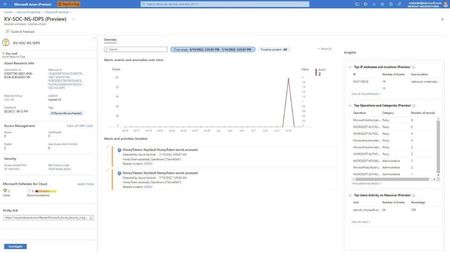
Azure resource entity page - your way to investigate Azure resources - Microsoft Tech Community Azure resources such as Azure Virtual Machines, Azure Storage Accounts, Azure Key Vault, Azure DNS, and more are essential parts of your network. Threat actors might attempt to obtain sensitive data from your storage account, gain access to your key vault and the secrets it contains, or infect your virtual machine with malware. The new Azure resource entity pages are designed to help your SOC investigate incidents that involve Azure resources in your environment, hunt for potential attacks, and assess risk.
New Blog Post | Azure Sentinel Notebooks - Azure cloud support, new visualizations
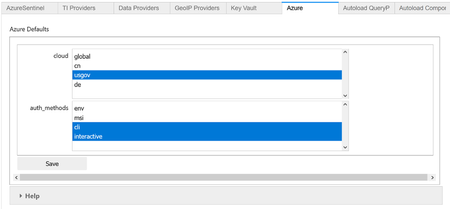
Azure sovereign clouds, Matrix visualization, Process Tree update in MSTICPy 1.4 (microsoft.com) The 1.4.2 release of MSTICPy includes three major features/updates: Support for Azure sovereign clouds for Azure Sentinel, Key Vault, Azure APIs, Azure Resource Graph and Azure Sentinel APIs A new visualization — the Matrix plot Significant update to the Process Tree visualization allowing you to use process data from Microsoft Defender for Endpoint, and generic process data from other sources. We have also consolidated our visualizations into a single pandas accessor to make them easier to invoke from any DataFrame.
Encryption in Az - Confusion
Hi everyone. I did not know how to answer these questions so maybe some of you have experiences with encryption. 1. The wording is quite difficult. Is Service-side enryption = Storage Service Encryption? Both use the SSE. 2. In the constraints i saw "Managed disks encrypted using customer-managed keys cannot also be encrypted with Azure Disk Encryption.". Why that? As i know, SSE with CMK and ADE are not same things, right? 3. The abbreviation KEK is confusing. I thought that's what is used in SSE (the CMK) respectively during ADE (when I add a key to the key vault and use it for the disk encryption). Now i saw there is in premium key vault the option "KEK for BYOK". Whats the difference, what is the KEK now? For what do i need that KEK for BYOK if i already have my KEK as i added key in key vault? 4. It is recommended to use a key in key vault for ADE? Kind regardsUnable to connect to the destination mentioned in the KeyVault URL
I am trying to use the Dynamics 365 Data export service to connect with my Azure SQL with Azure AD connection. When following this tutorial : https://www.youtube.com/watch?v=txms2Yvn6Vc and many more; i figured out how to export my D365 data export service but this tutorial is based on my SQL user. When I try to use a Azure AD user to do the authentication I keep getting the error "Unable to connect to the destination mentioned in the keyvaul URL error" What I did ATM is , used the D365 Powershell script like the tutorial mentioned to create a keyvault with the connection string and paste the keyvault url inside my D365 settings to validate. This works if i use the second connection string in the pic below But when I do the exact same thing with an Active directory connection string (second connection string in picture) This does not work !! Inside the SQL server I ensured that my Azure AD user has active directory admin roles. And the userID I use inside my connection string has all the rights inside the server and database to do the minimum for D365 Export service (create, insert table, ....) But still i got a fail inside my D365 . Tried everything ATM don't know where to look. Any body who had the same issues as me ? OR know which step I am missing ?SSL wildcard certificate renewal stuck on 'Waiting for certificate issuer'
My wildcard SSL cert recently expired, and after going through the domain verification process again, it is now stuck on 'Waiting for certificate issuer'. I have successfully made it through steps 1-2 in the configuration process, but am unable to go any further. The certificate is also not found when I try to import it into an App Service App. Can someone help?