azure hardware infrastructure
33 Topics
Microsoft at OCP Global Summit 2026
At OCP Global Summit 2026, Microsoft will showcase how we’re advancing the infrastructure needed to scale AI, from silicon and systems to the datacenter. Visit Microsoft at booth C73 At Booth C73, get a closer look at Cobalt 200 and Maia silicon, advanced cooling, sustainability demonstrations, and security technologies, and hear from Microsoft leaders and experts through our keynote and sessions, panels, and workshops across the summit. Purpose-built silicon • Cobalt 200 • Maia 200 • Maia 300 • Azure Boost Cooling • 3rd Gen Azure Heat Exchange Unit Sustainability • DC Waste Heat Recovery • Circularity Server Reuse Security • Caliptra 2.2 and Platform Attestation • Baremetal Architecture Hardware Partitioning • Integrated HSM Fleet reliability • OCP RAS API demo • Debug and diagnostics Featured Sessions KEYNOTE Intelligence Infrastructure: Scaling AI for the Frontier Era October 13 · 9:15 AM - 9:35 AM · SJCC, Street Level, South Hall AI infrastructure depends on co-design across silicon, systems, software, and sites. This keynote examines how Microsoft brings those layers together to build scalable, reliable, and efficient infrastructure with security embedded throughout. It explores the path from technology development to a global fleet, how requirements change at scale, and how those lessons shape next-generation platforms. The session also considers sustainable scaling through closed-loop cooling and lower-carbon construction, the role of grid reliability and workforce development in host communities, and the challenges that call for ecosystem innovation. EXECUTIVE SESSION Powering the AI Era: Building Sustainable and Efficient Infrastructure at Cloud Scale October 12 · 2:30 PM - 2:50 PM · SJCC, Concourse Level, 210AE The explosive growth of generative AI is driving an unprecedented increase in demand for computing infrastructure. As AI workloads scale from training to widespread inference, every layer of the cloud stack is being challenged, from power grids and datacenters to servers, silicon, and software systems. Meeting this demand sustainably requires rethinking how computing infrastructure is designed, operated, and optimized. Microsoft Breakout Sessions, Panels, and Workshops Explore Microsoft daily sessions and hear from experts shaping the future of cloud and AI infrastructure. Tuesday, October 13 9:55 - 10:00 AM KEYNOTE Women in OCP (WOCP) - Community First, AI Forward Speakers: Sung Kim - BP Castrol, Shruti Sethi - Microsoft, Allison Boen - Alcatex and Shell Fluid, Anu Ramamurthy - Microchip Location: SJCC - Street Level - South Hall 1:15 - 1:35 PM PRESENTATION | OIF Workshop Enabling AI Scale-Up: Why Standards Matter and the Need for Industry Alignment Speakers: Fotini Karinou - Microsoft Location: SJCC - Lower Level - LL20BCD 1:45 - 2:00 PM PRESENTATION | Networking Switch Platform Architecture: A Unified Network Switch Platform Reference Design Speakers: Tao Ren - Meta, Ying Xie - Microsoft Location: SJCC - Concourse Level - 210AE 1:50 - 2:15 PM PANEL | AI Open Data Center Beyond the Build: Autonomous Robotics and the Future of Data Center Operations Speakers: Shashank Gupta - Fleet Data Centers, Eric Xu - Meta, Rob Lawson-Shanks - Molg, Evan Johnson - Microsoft; Moderator: Joel Chakkalakal - PHS West Location: SJCC - Concourse Level - 210CG 1:55 - 2:20 PM PRESENTATION | Manageability Workshop Redfish Aliasing Support and Redfish Streaming Telemetry Enhancements Speakers: Bill Scherer - HPE, Hari Ramachandran - Microsoft Corporation, Jeff Autor - Vertiv Location: SJCC - Lower Level - LL21BC 2:20 - 2:45 PM PANEL | AI Open Data Center Material Handling Automation for Next-Generation Datacenter Operations Speakers: Rachel Soukup - Google; Ben Wong - Meta; Amir Porter - Microsoft; Moderator: Evan Johnson - Microsoft Location: SJCC - Concourse Level - 210CG 2:20 - 2:45 PM PANEL | AI Computing Continuum Two Years of x86 Ecosystem Collaboration: Open Infrastructure, AI Readiness, and Developer Predictability Speakers: Jeff McVeigh - Intel, Stephen Watt - Red Hat, Andrew Wheeler - HPE, Martin Dixon - Google, Jon Lange - Microsoft; Moderator: Robert Hormuth - AMD Location: SJCC - Concourse Level - 211 2:35 - 2:45 PM PRESENTATION | IPEC Workshop IPEC Presentation Speakers: Yawei Yin - Microsoft Location: SJCC - Concourse Level - 230A 3:15 - 3:45 PM PANEL | AI Open Data Center Automation-Ready Infrastructure Design: From Light to Compute Speakers: Mike McKee-Hector - Microsoft, Dave Evans - Google, Ryan Olson - Meta; Moderator: Eric Xu - Meta Location: SJCC - Concourse Level - 210CG 3:50 - 4:05 PM PRESENTATION | Cooling Environments Building a Scalable Waste Heat Ecosystem: Datacenter Waste Heat, Offtakers, and Market Platforms Speakers: Maria Viitaniemi - Microsoft, Bharath Ramakrishnan - Microsoft Location: SJCC - Concourse Level - 220C 4:00 - 4:20 PM PRESENTATION | Manageability Workshop Using SPDM for PLDM Firmware Updates: Authorization Policy and Measurement Manifest Capabilities Speakers: Patrick Caporale - Lenovo, Brett Henning - Broadcom Inc., Scott Phuong - Microsoft Location: SJCC - Lower Level - LL21BC 4:10 - 4:45 PM PRESENTATION | Cooling Environments Heat Reuse Sub-Project Overview and Updates + Economics Tool Contribution Speakers: Aime Comella - DayOne; Jack Kolar - Dataquarium; Gemma Reeves - Alfa Laval; Bharath Ramakrishnan - Microsoft; Ahliana Byrd - Ascentra Innovations Location: SJCC - Concourse Level - 220C Wednesday, October 14 8:00 - 8:25 AM PANEL | AI Open DC: Power Distribution +/-400V / 800V On-Board Power Delivery Requirements Speakers: James Sun - Microsoft, Sachin Madhusoodhanan - Google, LJ (Jian) Lu - Google, Shengwen Xu - Meta; Moderator: Michelle Badal - Google Location: SJCC - Concourse Level - 210CG 8:15 - 9:10 AM PANEL | Systems Management OCP Hardware Fault Management Workstreams Status and Relationship Speakers: Theodros Yigzaw - NVIDIA; Vilas Sridharan - AMD; Janusz Jurski - Intel; Shubhada Pugaonkar - NVIDIA; Samer El-Haj-Mahmoud - Arm; Moderator: Drew Walton - Microsoft Location: Concourse Level - 211 8:15 - 8:35 AM PRESENTATION | SONiC Workshop SONiC Community Year in Review: Powering the Open Network for the AI Era Speakers: Yanzhao Zhang - Microsoft, Xin Liu - Microsoft Location: SJCC - Concourse Level - 230A 8:20 - 8:40 AM PRESENTATION | Storage Comprehensive Testing for OCP Datacenter NVMe SSD Specification Compliance Speakers: Timothy Sharp - Microsoft Corp, Nick Kriczky - Teledyne Lecroy, Rick Walsh - SANBlaze Location: SJCC - Concourse Level - 212 8:25 - 8:50 AM PANEL | Market Impact & Adoption PG25 at Scale: What We've Learned and Where We're Going Speakers: Keegan Yaroch - DOW Chemical, Paul Artman - AMD, Jacob Paugh - ChemTreat, Cam Turner - Microsoft; Moderator: Chris Campbell - Vertiv Location: SJCC - Lower Level - LL21DE 8:30 - 8:50 AM PRESENTATION | OCP Special Focus: Photonics Optical Scale-Up AI Systems: Architectures, Standards, and Resiliency Strategies Speakers: Fotini Karinou - Microsoft, Adrian Motamedi - Microsoft Location: SJCC - Concourse Level - 210AE 8:45 - 9:05 AM PRESENTATION | Cooling Environments Air vs. Liquid: Where Does Air Cooling Still Win for General Compute? Speakers: Jayesh Shah - Microsoft, Stewart Nguyen - Lenovo Location: SJCC - Concourse Level - 220C 9:30 - 9:45 AM SYMPOSIUM: POSTER AND PRESENTATION | FTS: Keynotes & Awards Poster Session Break Speakers: Samir Rajadnya - Microsoft, Oren Benisty - UniFabriX, Konstantin Tiutin - RIVVOR Inc., Timour Paltachev - Rivvor, Nazym Paltachev - rivvor, Sangsu Park - Samsung, Tushar Krishna - Georgia Institute of Technology, Seyyed Ali Ghorashi - Danovo Energy Solutions, Daniel Bauer - LoadCrest, Weipeng Zhang - LightXcelerate Inc, Manchen Hu - LightXcelerate, Xinyu Zhang - XPerf, Rakesh Sambaraju - Infraeo Inc., Xufu Ren - University of Cambridge, Yunqi Zhang - University of Cambridge, Shawn Yan - Vulcadi Inc, David Gyulnazaryan - Impleon, ROGER BASU - Coreshell Technologies, Inc, Fanny Oukhemanou - Syensqo, Taner Dosluoglu - weeteq, Patrick McCluskey - University of Maryland at College Park, Ibaad Gandikota - University of Maryland, Sang woo Ham - Lawrence Berkeley National Laboratory, Sam Abdel-Rahman - Infineon Technologies, Shuyu Zhang - UC Berkeley Location: SJCC - Lower Level - LL20BCD 9:45 - 10:00 AM PRESENTATION | Server Scaling Hyperscale Cloud Networking from 400G to 800G: System Integration Lessons and Implications for OCP Platforms Speakers: Lucy Yu - MSFT, Faye Yang - Microsoft Location: SJCC - Lower Level - LL21BC 9:50 - 10:10 AM PRESENTATION | SONiC Workshop SONiC BMC for Unified Management and Next-Generation Liquid-Cooled Networks Speakers: Judy Joseph - Microsoft, Roger Liao - Nexthop Systems Inc. Location: SJCC - Concourse Level - 230A 10:05 - 10:20 AM PRESENTATION | OCP Special Focus: Photonics System-Level Evaluation of XPO for High-Density Optical Interconnects in AI Infrastructure Speakers: Daniel Mohaghegh - Microsoft, Sunil Priyadarshi - Arista Networks Location: SJCC - Concourse Level - 210AE 10:05 - 10:25 AM PRESENTATION | Market Impact & Adoption Upgrading OCP S.A.F.E. and S.O.L.I.D. for the AI age Speakers: Zahra Lak - Microsoft, Jeff Andersen - Google Location: SJCC - Lower Level - LL21DE 10:10 - 10:30 AM PRESENTATION | Systems Management System-Level Manageability for GPU Platforms — Progress in the OCP System GPU Management Workstream Speakers: John Leung - Intel, Hari Ramachandran - Microsoft Corporation Location: SJCC - Concourse Level - 211 10:40 - 11:00 AM PRESENTATION | SONiC Workshop Democratizing DPU High Availability with a SONiC-Driven DASH HA Control Plane Speakers: Changrong Wu - Microsoft, Sudharsan Dhamal Gopalarathnam - NVIDIA Location: SJCC - Concourse Level - 230A 10:50 - 11:10 AM PRESENTATION | Server Accelerating High-Power Server Design Through Board-Level Electro-Thermal Co-Simulation of VRMs and PDNs Speakers: Steven Chien - Wiwynn Corporation, Zi Ping Wu - Microsoft Location: SJCC - Lower Level - LL21BC 11:30 AM - 1:00 PM PANEL | Meals & Breaks Women in AI Luncheon presented by Women in OCP (WOCP) - Sponsored by Lenovo & NVIDIA Speakers: Casey Moran - Lenovo, Cathie Deal - IREN, Shruti Koparkar - NVIDIA, Shruti Sethi - Microsoft; Moderator: Allison Boen - Alcatex and Shell Fluid Location: San Jose Marriott - Level 2 - Salon III & IV 11:45 AM - 12:00 PM Expo Hall Sessions | SONiC Open, Trusted, and Secure SONiC at Scale presented by Cisco Speakers: Will Eatherton - Cisco; Dina Papagiannaki - Microsoft Location: SJCC – Concourse Level – Expo Hall Theater 12:30 - 12:50 PM PRESENTATION | SONiC Workshop Beyond the T2 PIN: Pizza-Box Disaggregation for Next-Gen Regional Hubs Speakers: Kamini Santhanagopalan - Broadcom, Rita Hui - Microsoft Location: SJCC - Concourse Level - 230A 12:55 - 1:15 PM PRESENTATION | Systems Management Runtime SBOMs: Extending DMTF Redfish to Connect Build-Time and Live Software State Speakers: Harsh Bhuwania - Microsoft, Prashant Dewan - Microsoft Location: SJCC - Concourse Level - 211 1:20 - 1:40 PM PRESENTATION | SONiC Workshop 6–12x Route Programming Acceleration in SONiC: A Collaborative Profiling and Optimization Journey Speakers: Deepak Singhal - Microsoft, Amol Rawal - Nokia Location: SJCC - Concourse Level - 230A 1:20 - 1:50 PM PRESENTATION | Systems Management GPU & CPU Diagnostics and RAS Standardization Advances for Hyperscale Infrastructure Speakers: Rama Bhimanadhuni - Microsoft, Taniya Siddiqua - Advanced Micro Devices, Inc. Location: SJCC - Concourse Level - 211 1:35 - 1:55 PM PRESENTATION | AI Open DC: Power Distribution Designing Safe 800 VDC Systems: Protection, Fault Management, and Operations Speakers: Mike Tu - NVIDIA, Xianyong Feng - Microsoft Location: SJCC - Concourse Level - 210CG 3:15 - 3:35 PM PRESENTATION | Systems Management From Lab to Fleet: A Secure, Unified Debug Framework for Cloud Systems Speakers: Suresh Duthiraru - Microsoft, Rolf Kuehnis - Lauterbach Inc. Location: SJCC - Concourse Level - 211 3:15 - 3:55 PM PANEL | Storage OCP Storage Specifications Update and What Customers Care About Speakers: David Black - Dell Technologies, Timothy Sharp - Microsoft Corp., Chris Sabol - Google, Jeff Wolford - HPE, Vineet Parekh - Meta; Moderator: Ross Stenfort - SanDisk Location: SJCC - Concourse Level - 212 3:40 - 4:00 PM PRESENTATION | SONiC Workshop Extending Community SONiC for Advanced Optics Telemetry Aligned with OCP Standards Speakers: Rajan Pai - Credo, Prince George - Microsoft Location: SJCC - Concourse Level - 230A 3:54 - 5:00 PM SYMPOSIUM: PRESENTATION ONLY | FTI Workshop: Short Reach Optical Interconnects Scale-up optical reliability and GPU/system resiliency to optical link flaps Speakers: Eduard Roytman - Microsoft, Lenin Patra - Marvell, Ashwin Gumaste - NVIDIA, Greg Link - Microsoft, Jeffrey Hutchins - Ranovus Location: SJCC - Lower Level - LL21BC 4:00 - 4:20 PM PRESENTATION | Storage Adopting high-capacity HDDs, navigating throughput and IOPS Limits using SAS/NVME interfaces for the AI Cloud Speakers: Hariharan Kumar - Microsoft, Balaji Natrajan - Microsoft Location: SJCC - Concourse Level - 212 4:10 - 4:30 PM PRESENTATION | Systems Management Operating OpenBMC at Hyperscale: What Works, What Breaks, and What Needs to Change Speakers: Thirupathaiah Annapureddy - Microsoft, Hari Ramachandran - Microsoft Corporation Location: SJCC - Concourse Level - 211 4:30 - 4:50 PM PRESENTATION | SONiC Workshop FIPS 140-3 Support in SONiC Speakers: Kenneth Cheung - Arista Networks, Qi Luo - Microsoft Location: SJCC - Concourse Level - 230A 4:30 - 5:00 PM PANEL | AI Clusters Scale-across Networking: Panel discussion on routing and transport equipment implications Speakers: Jeff Rahn - Meta, Yawei Yin - Microsoft, Xiguang - Henry Wu - Broadcom, Tad Hofmeister - Google; Moderator: Vijay Vusirikala - Arista Networks Location: SJCC - Concourse Level - 220B 4:35 - 5:00 PM PRESENTATION | Systems Management From Scale to Security: Evolving GPU Management Standards in 2026 Speakers: Krishna Sugumaran - AMD, Sujoy Sen - Google, Akkiah (Choudary) Maddukuri - Microsoft, Qian Wang - NVIDIA, Balaji Vembu - Meta Location: SJCC - Concourse Level - 211 Thursday, October 15 8:00 - 8:20 AM PRESENTATION | AI Clusters MX v1.1: Advancing Open Standards for Low-Precision AI with MicroXcaling formats Speakers: Partha Maji - Microsoft Location: SJCC - Concourse Level - 220B 8:00 - 8:25 AM PANEL | Sustainability Updates from an exciting year with the OCP Sustainability Project, DCF Sustainability Project & Roadmap ahead Speakers: Alexander Rakow - Schneider Electric, Sung Kim - BP Castrol, Shruti Sethi - Microsoft, Priya Chhiba - Google Location: SJCC - Lower Level - LL21DE 8:20 - 8:40 AM PRESENTATION | Security Integrated HSM: Bringing Silicon-Level Key Security to the Server Tray Speakers: Craig Barner - Marvell, Vishal Soni - Microsoft, Mohan Kumar - Oracle Cloud Infrastructure Location: SJCC - Concourse Level - 212 8:45 - 9:05 AM PRESENTATION | Test & Validation AI-Native Hardware Validation: Building a Local-Context Agentic Test and Debug Platform Speakers: Wenxi Yan - Microsoft Location: SJCC - Lower Level - LL20BCD 8:50 - 9:05 AM PRESENTATION | Sustainability Performance-Normalized Embodied Rack Carbon Intensity for Next-Generation Hardware Speakers: Kali Frost - Microsoft Location: SJCC - Lower Level - LL21DE 9:10 - 9:30 AM PRESENTATION | Networking ESUN: Open Ethernet for the AI Scale-Up Era Speakers: Pratik Marolia - Microsoft, Manoj Wadekar - Meta Location: SJCC - Concourse Level - 210AE 9:10 - 9:30 AM PRESENTATION | Test & Validation From Spec to Sign-off - How Microsoft is transforming the platform validation workflow leveraging AI-powered, agent-driven solutions. Speakers: Rahul Shah - Microsoft, Vikram Vemulapalli - Microsoft Location: SJCC - Lower Level - LL20BCD 9:10 - 9:30 AM PRESENTATION | Rack & Power Scaling Hyperscale Power Delivery: Managing Aggregated and Cascaded Power Shelf Architectures for High-Density GPU Systems Speakers: Praveen Kumar Velpuri - Microsoft, Yang Hsiung - Microsoft Location: SJCC - Concourse Level - 230A 9:45 - 10:20 AM PANEL | Server: Composable Memory Systems Addressing Memory Wall challenge for AI and General Compute platforms (CMS Sub-Project Technical Update) Speakers: Anjaneya "Reddy" Chagam - Microsoft Corporation, Grant Mackey - XCENA, Mohamad El-Batal - Seagate, Samir Rajadnya - Microsoft Location: SJCC - Lower Level - LL21BC 9:45 - 10:10 AM PANEL | AI Clusters USB to Rule Them All: One Manageability Interface for AI Platforms Speakers: MARIUSZ ORIOL - NVIDIA, Bharat Pillili - Microsoft, Samer El-Haj-Mahmoud - Arm, Mohan Kumar - Oracle Cloud Infrastructure, Supreeth Venkatesh - AMD; Moderator: Kasper Wszolek - NVIDIA Location: SJCC - Concourse Level - 220B 10:45 - 11:30 AM PANEL | Cooling: Cold Plate Pushing the Single-Phase Cold Plate Limit: Design Practice, Field Learnings, and the Runway Before Two-Phase Scales Speakers: Weihua Tang - Google, REMCO VAN ERP - Corintis, Oscar Farias Moguel - Microsoft, Yin Hang - Meta; Moderator: Joel Chakkalakal - Guardian Data- LLC Location: SJCC - Concourse Level - 220C 10:50 - 11:05 AM PRESENTATION | Networking Scaling AI Beyond the Cloud Boundary: High-Capacity Interconnects Between Hyperscalers and GPUaaS NeoClouds Speakers: Krithika Moorthy - Cisco, Anish Narsian - Microsoft Location: SJCC - Concourse Level - 210AE 10:50 - 11:05 AM PRESENTATION | Security Upgrading OCP S.A.F.E. and S.O.L.I.D. for the AI age Speakers: Zahra Lak - Microsoft, Jeff Andersen - Google Location: SJCC - Concourse Level - 212 11:00 - 11:25 AM PRESENTATION | Test & Validation Product Intercept learnings and Compliance measurement for Diagnostics Standardization Speakers: Rajat Madhusudan - Microsoft, Jennifer Lee - Intel Location: SJCC - Lower Level - LL20BCD 11:15 - 11:30 AM PRESENTATION | Sustainability Enabling Scalable Waste Heat Recovery: Operational Realities, Design Principles, and Value from the Datacenter Perspective Speakers: Emily Matys - Microsoft Location: SJCC - Lower Level - LL21DE 12:30 - 12:45 PM PRESENTATION | Security Baremetal Security Architecture Speakers: Bharat Pillili - Microsoft, Darpana Munjal Loodu - Microsoft Location: SJCC - Concourse Level - 212 12:30 - 12:50 PM PRESENTATION | Rack & Power Mitigating AI Training Power Oscillations: Utility Requirements and In-Rack Power Filtering Speakers: Bo Wen - Microsoft, Xianyong Feng - Microsoft Location: SJCC - Concourse Level - 230A 1:15 - 1:30 PM PRESENTATION | Sustainability From Silicon to System: Embedding Power Efficiency as a Core Design Principle for Scalable AI and Compute Infrastructure Speakers: Devang Soparkar - Microsoft, Nilanjan Palit - Intel Location: SJCC - Lower Level - LL21DE 1:45 - 2:00 PM PRESENTATION | Open Platform Firmware (OPF) Dynamic Platform Abstraction for BMC Firmware via Host-Delivered Libraries Speakers: Sarathy Jayakumar - AMD, Rama Bhimanadhuni - Microsoft Location: SJCC - Lower Level - LL20BCD 1:55 - 2:10 PM PRESENTATION | Sustainability Closing the Loop: Structural Steel Reuse in Hyperscale Datacenter Construction — A Scalable Blueprint from Microsoft's Newport Imperial Park Datacenter (CWL01) Speakers: John O’Sullivan - Microsoft, Anjali Bhagat - Microsoft Location: SJCC - Lower Level - LL21DE 1:55 - 2:10 PM PRESENTATION | Security Package-Aware Integrity: From Source-Agnostic Publication to Full-System Attestation Speakers: Felipe Zimmerle da Nobrega Costa - KonaSense, Dhananjay Phadke - Microsoft Location: SJCC - Concourse Level - 212 2:15 - 2:30 PM PRESENTATION | Networking MRC: A Purpose-Built RDMA Transport for AI Training Networks Speakers: Abdul Kabbani - Microsoft, Wael Noureddine - Microsoft Location: SJCC - Concourse Level - 210AE 2:45 - 3:00 PM PRESENTATION | Security BMC-Mediated Platform Composite Attestation via Redfish Speakers: Xiling Sun - Microsoft, Roksana Golizadeh Mojarad - Microsoft Location: SJCC - Concourse Level - 212 2:45 - 3:10 PM PANEL | Sustainability Product Category Rule-style Specification for Life Cycle Assessment on Datacenter ICT-Equipment: Collaborative Progress & Draft publication Speakers: Lisa Rivalin - Meta, Stephan Benecke - Google, Ines Sousa - Microsoft, Vincenzo Ferrero - Amazon; Moderator: Chris Eckstein - Fraunhofer Location: SJCC - Lower Level - LL21DE 2:45 - 3:15 PM PANEL | Open Platform Firmware (OPF) Scaling Memory Safe Security Across Firmware Stack Speakers: Giri Mudusuru - Microsoft, Tim Lewis - Insyde Software, Bertrand Achard - Google, Raj Kapoor - AMD, Oleg Ilyasov - American Megatrends (AMI); Moderator: Murugasamy Nachimuthu - Oracle Location: SJCC - Lower Level - LL20BCD 2:45 - 3:05 PM PRESENTATION | AI Open Data Center The Future of Fuel Cells in Datacenters - High Temperature Fuel Cells. Speakers: Afshin Majd - Microsoft, Priya Chhiba - Google, Alberto Ravagni - Net Zero Innovation Hub Location: SJCC - Concourse Level - 210CG 3:05 - 3:20 PM PRESENTATION | Security Caliptra Subsystem 2.2: USB 2.0 and OCP Streaming Boot Speakers: Caleb Whitehead - Microsoft, Bart Vertenten - NXP Semiconductors Location: SJCC - Concourse Level - 212 3:25 - 3:40 PM PRESENTATION | Security Architectural Masking for PQC: Adam’s Bridge 3.0 Leveraging NTT Linearity Speakers: Mojtaba Bisheh-Niasar - Microsoft, Kiran Upadhyayula - Microsoft Location: SJCC - Concourse Level - 212 3:35 - 4:00 PM PANEL | Sustainability Increasing Rigor in Data Center Carbon Disclosure Speakers: Andrea Desimone - Schneider Electric, Lalit Joshi - Microsoft, Malcolm Hegeman - Google, Miranda Gardiner - iMasons Climate Accord; Moderator: Nalintip Suwannakarn - Meta Location: SJCC - Lower Level - LL21DE 3:45 - 4:00 PM PRESENTATION | Security Beyond Static Identity: Enabling Secure Certificate Refresh in Silicon Roots of Trust Speakers: Emre Karabulut - Microsoft, VISHAL MHATRE - Microsoft Location: SJCC - Concourse Level - 212 Offsite Microsoft Workshops 8:00 AM - 3:00 PM WORKSHOP RAS Workshop (at capacity) Hyperscalers, silicon vendors, and ecosystem partners will collaborate on RAS, Debug, Diagnostics, and Manageability initiatives, focused on aligning current requirements, sharing implementations and tools, and discussing the future direction of key specifications and workstreams. Location: MTV Campus 8:30 AM - 2:00 PM; 2:00 - 5:00 PM WORKSHOP Caliptra and BoF Workshops (at capacity) Members of the open-source silicon security community will collaborate on hardware root of trust technologies and secure silicon initiatives through discussions on ongoing technical work, ecosystem collaboration, implementation experiences, roadmap planning, community engagement, and related open-source security efforts Location: MTV Campus Learn more Infrastructure for the frontier era: Scaling intelligence through open industry collaboration Advancing hardware security with open-source Integrated HSM technology Powering Azure Infrastructure from Grid to Chip Advancing AI fleet reliability through industry collaboration Networking for the AI Era: Building for Scale, Efficiency, and Openness1.5KViews0likes0CommentsScaling distributed AI infrastructure with Azure’s ExpressRoute and AI Points of Presence (AI PoPs)
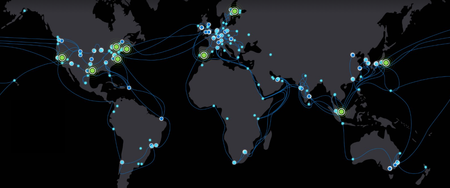
Rethinking connectivity for distributed AI infrastructure AI is changing more than the applications organizations build. It is reshaping where the infrastructure powering those applications is deployed. For years, cloud computing has been anchored by hyperscale regions that combine compute, storage, networking, security, and operations at massive scale. That model remains foundational to Microsoft Azure. At the same time, rapid AI growth is creating a more distributed infrastructure landscape. GPU capacity is increasingly being deployed across regions, providers, facilities, and operating environments wherever the right mix of power, space, cooling, and specialized infrastructure is available. That shift creates a practical challenge: how do organizations bring new GPU capacity online quickly while still giving AI workloads the Azure services, governance, security, and operational consistency they require? Microsoft’s approach: extending Azure to distributed AI infrastructure Microsoft is taking a platform approach to distributed AI infrastructure. For customers, Azure ExpressRoute offers the private connectivity experience for connecting remote sites and infrastructure to Azure. Behind that experience, AI PoPs provide Microsoft with a standardized infrastructure architecture for integrating distributed third-party GPU capacity into the Azure network and operating environment. Rather than building a unique network and operational integration for every external GPU deployment, Microsoft can use AI PoPs to onboard and aggregate GPU capacity wherever the GPUs may be, while customers continue to connect through familiar Azure networking products such as ExpressRoute. Azure ExpressRoute provides the private connectivity foundation for these customer-managed environments, enabling external GPU infrastructure to connect privately with Azure without traversing the public internet. Combined with the AI PoP architecture, this creates a repeatable model for integrating distributed GPU capacity with Azure, giving customers greater flexibility in where compute comes from while maintaining Azure as the platform connecting their AI environment. Based on current Microsoft deployment and provisioning data, Azure’s AI PoP operating model is already connecting and provisioning hundreds of thousands of GPUs across North America, Europe, and Asia Pacific, giving select preview customers a consistent Azure experience for using distributed AI infrastructure. The aim is simple: bring AI capacity to market faster, wherever it is located, while expanding the range of GPU providers and deployment locations. Customers receive a more consistent Azure experience regardless of where that capacity is located. Figure 1. Global deployment of Microsoft’s AI PoP infrastructure Microsoft is expanding AI PoPs to more than 10 planned sites across North America, Europe, and Asia over the next 12 months. Connecting distributed GPUs for faster connectivity and simpler operations for our customers AI workloads depend on more than chips. They need data, orchestration, identity, monitoring, security, and reliable high-bandwidth connectivity. ExpressRoute provides customers with private, high-bandwidth connectivity to Azure. Behind the scenes, AI PoP infrastructure helps Microsoft integrate and operate distributed third-party GPUs at scale. Together, this architecture can help customers: Connect privately to Azure: Use Azure ExpressRoute for private connectivity from remote sites and distributed infrastructure to Azure. Access distributed GPU capacity: Take advantage of GPU capacity across an expanding ecosystem of infrastructure providers without requiring customers to consume AI PoPs as a separate service. Use familiar Azure services: Connect workloads with Azure storage, orchestration, AI services, security, and operational tooling. Maintain a consistent Azure experience: Use established Azure networking and cloud services even as the physical GPU infrastructure becomes more distributed. For customers, this means less bespoke connectivity work and more focus on putting AI capacity to use. AI PoPs is part of the Microsoft infrastructure that enables Azure to integrate third-party GPU capacity into this experience, with ExpressRoute as a customer-facing service. For infrastructure providers, it creates a clearer path for integrating specialized GPU environments with the Microsoft Cloud. One Azure operating model, wherever AI capacity runs As GPU capacity becomes more distributed, customers should not have to adopt a new connectivity model for every provider or location. Azure ExpressRoute provides the customer connectivity experience, while AI PoPs give Microsoft a repeatable infrastructure architecture for integrating third-party GPU capacity into the Azure network and operating environment. That distinction matters as AI infrastructure spreads across regions and providers. Customers need flexibility in where capacity comes from, along with a reliable way to operate that capacity as part of a broader cloud environment. Microsoft is extending this model across regions to support Azure-connected AI capacity. The key principles behind the model are shown below (Figures 2–4). Figure 2. Example of aggregating capacity across multiple locations A single AI PoP can connect multiple GPU facilities and providers. Instead of treating each deployment as a unique project, new capacity can be onboarded through an established framework. This simplifies expansion, enables Microsoft to bring new capacity online faster, and makes it easier to scale as demand grows. Figure 3. Private connectivity to Azure services through Azure ExpressRoute and AI PoPs GPU capacity alone does not create an AI platform. Training and inference environments also depend on data, applications, orchestration, security, monitoring, and AI services. When GPU infrastructure sits outside Azure, the network becomes the critical bridge between compute and the Azure services it depends on. For customer-managed deployments, Azure ExpressRoute provides private connectivity between external infrastructure and Azure without sending traffic over the public internet. AI PoPs build on this connectivity model to provide a consistent approach for integrating distributed GPU environments with Azure services. Figure 4. AI PoPs deliver a consistent operating model Whether capacity is supplied by Microsoft, partners, or customers, AI PoPs are designed to provide a consistent connectivity and management experience. Standardization simplifies deployment, improves repeatability, and reduces the redesign required when introducing new providers or locations. Together, these design principles can reduce onboarding time, expand infrastructure choice, and provide a consistent Azure-connected experience. Looking ahead Demand for AI infrastructure continues to accelerate. Microsoft’s focus is not only on adding capacity, but also on making capacity available wherever it exists through a secure, reliable, and operationally consistent cloud platform. The next phase will focus on onboarding additional GPU providers, strengthening automation, and expanding Microsoft's ability to integrate distributed AI infrastructure with Azure. As AI PoP infrastructure scales behind Azure, customers can continue to use established Azure products such as ExpressRoute to privately connect remote sites and workloads, while gaining access to a broader ecosystem of distributed GPU capacity. As AI infrastructure becomes increasingly distributed, the ability to onboard capacity quickly, operate consistently across environments, and deliver a seamless Azure experience will become a meaningful differentiator. AI PoPs are one way Microsoft is helping shape that future.1.7KViews1like0Comments
Catalyst: Frontier stories of AI Infrastructure innovation
In the Catalyst series, we explore the transformative power of AI by showcasing visionary companies driving scientific and industry breakthroughs powered by Azure and NVIDIA. This video series spotlights how innovation ignites action and how today’s visionaries are shaping tomorrow with the power of AI and cloud innovation. Building resilience against extreme weather Tomorrow.io turns space-based data into AI-driven forecasting powered by Azure and NVIDIA at a global scale. Its high-performance AI models deliver real-time weather intelligence that helps governments and enterprises anticipate disruption, optimize operations, and act faster in the face of severe events. Expanding access in preventative healthcare Powered by Microsoft Azure and NVIDIA, Helfie uses multimodal AI to transform smartphone selfies into intelligent health screening at scale. By combining advanced models with real-time inference, it delivers rapid biometric insights that help identify risks earlier and expand access to remote and underserved communities. How AI is mapping the tree of life Powered by Azure and NVIDIA to build the world’s largest biological databases, Basecamp Research is decoding the complexity of biology to accelerate scientific breakthroughs. Building the next frontier of data Powered by Microsoft Azure and NVIDIA, Global Objects is digitizing the real world by creating high-fidelity digital twins of over 5 million physical items. These photorealistic 3D models are transforming immersive content creation across Hollywood, gaming, robotics, and cultural preservation. Changing how doctors diagnose diseases with AI Powered by Microsoft Azure and NVIDIA, Pangaea Data is closing care gaps by identifying untreated and under-treated patients across rare and hard-to-diagnose diseases faster, earlier, and more accurately. Learn more The Catalyst series explores how organizations are using AI infrastructure to tackle some of their most complex technical and business challenges, from accelerating scientific discovery to advancing autonomous systems and transforming core industries. Learn more about Catalyst. Learn more about Azure AI infrastructure.262Views2likes0CommentsExpanding access to specialized GPU infrastructure through Dapple and Azure
Enterprise AI has entered a new phase. For much of the past decade, the challenge was building enough compute for machine learning. Today, organizations need platforms for foundation model training, fine-tuning, large-scale inference, agentic systems, and enterprise AI. As these workloads grow in scale and sophistication, the infrastructure supporting them is undergoing a fundamental transformation. The defining characteristic of modern AI infrastructure is no longer compute alone. It is topology. Training state-of-the-art AI models requires coordinated communication across hundreds or thousands of accelerators. Performance increasingly depends on how GPUs are interconnected, how data moves across the network fabric, and how efficiently distributed systems synchronize at scale—making network architecture as critical as compute performance. This shift is driving purpose-built AI infrastructure built around tightly coupled GPU fabrics, accelerated networking back-end interconnects, specialized storage architectures, and operational models that treat physical topology as a first-class concern. The challenge is turning this infrastructure into AI production without creating a separate operational domain or adding complexity for platform teams, application developers, and infrastructure operators. A new approach to scaling purpose-built AI infrastructure Microsoft is expanding access to purpose-built GPU capacity through infrastructure partners, including Dapple. Customers can use this specialized infrastructure within the Azure environment they already rely on to operate and govern their workloads. Through our collaboration, Dapple’s dedicated, topology-aware GPU infrastructure (Dapple Private AI Cloud | Microsoft Marketplace) is integrated into an Azure-native operating model that preserves Azure governance, security, and operational consistency. This model for purpose-built AI infrastructure can benefit any organization running compute-intensive AI workloads, including large-scale pre-training, fine-tuning, and distributed inference. Why purpose-built AI infrastructure matters AI workloads place demands on infrastructure that differ fundamentally from traditional enterprise applications. Conventional cloud architectures support a broad range of workloads across diverse infrastructure pools. Large-scale AI training environments, by contrast, depend on highly deterministic infrastructure characteristics, including GPU proximity, network topology, bandwidth consistency, and low-latency communication across thousands of accelerators. As model sizes continue to grow, the efficiency of the underlying GPU fabric becomes a critical determinant of training performance, infrastructure utilization, and overall time-to-results. For this reason, many AI deployments are increasingly built around purpose-designed GPU clusters featuring: Fixed infrastructure topology Dedicated InfiniBand fabrics High-bandwidth, low-latency communication paths Topology-optimized storage architectures Rack-scale and cluster-scale operational boundaries These systems are designed as integrated AI platforms rather than collections of independent compute nodes. Purpose-built GPU infrastructure is organized around validated cluster blocks: groups of compute, network, and related resources managed as a single topology, readiness, and maintenance boundary within InfiniBand fabric domains. Kubernetes nodes remain workload-scheduling objects, while cluster blocks represent the infrastructure unit on which distributed-job performance and availability depend. Figure 1 highlights an important distinction between traditional cloud infrastructure and modern AI systems. In conventional environments, compute resources are often treated as interchangeable units. Distributed AI workloads operate differently. GPU placement, rack boundaries, InfiniBand connectivity, and cluster block relationships can directly influence training throughput, communication efficiency, and overall job completion time. Physical topology therefore becomes a first-class operational consideration. The scheduler must account not only for resource availability, but also for how GPUs, racks, fabric domains, and cluster blocks relate to one another. Extending Azure beyond traditional cloud boundaries Addressing this challenge requires more than connecting specialized AI infrastructure to Azure. Purpose-built infrastructure must operate as a natural extension of the Azure environment, with the governance, security, and operational experience customers already use. This is where Azure and enterprise AI clouds such as Dapple are taking a different approach. Rather than treating large-scale GPU clusters as isolated infrastructure islands, the architecture extends the Azure operational model into dedicated AI environments. Customers can continue using familiar Azure governance frameworks, security models, and operational tools while leveraging infrastructure specifically optimized for large-scale AI workloads. The result is an architecture that combines two complementary capabilities: Purpose-built AI infrastructure optimized for topology-aware GPU workloads An Azure-native operational experience that preserves governance, security, and lifecycle consistency This model enables organizations to focus on AI innovation without creating a separate operational domain for their most demanding AI infrastructure. The role of Azure Kubernetes Service as the operational control plane As AI infrastructure evolves, the role of Kubernetes is evolving alongside it. Kubernetes has become the dominant platform for orchestrating cloud-native applications, AI services, and distributed workloads. Increasingly, it is also becoming the operational abstraction layer that enables organizations to manage heterogeneous infrastructure through a consistent interface. Azure Kubernetes Service (AKS) plays a critical role in this evolution. In the Azure and Dapple architecture, AKS serves as the primary operational control plane for AI workloads running on purpose-built GPU infrastructure. The physical infrastructure remains optimized around the realities of large-scale AI systems, including GPU topology, InfiniBand fabrics, hardware maintenance domains, and infrastructure lifecycle management. At the same time, platform teams continue to interact through familiar Kubernetes constructs for workload deployment, scheduling policies, governance, and lifecycle management. Organizations gain access to infrastructure designed specifically for modern AI workloads while preserving the operational consistency of a Kubernetes-based platform. In practice, enterprises rarely operate a single orchestrator. Kubernetes provides the common substrate, but the layers above it differ by team: batch schedulers for large training runs, workflow engines for data and fine-tuning pipelines, and internal control planes built around a specific operating model. Many organizations run several of these concurrently. For this reason, orchestration is best treated as a customer-owned concern. The infrastructure layer remains responsible for presenting consistent topology, readiness, and lifecycle semantics to whichever orchestrators an organization already operates. Extending Kubernetes into topology-aware infrastructure While Kubernetes excels at abstracting infrastructure, large-scale AI systems frequently require orchestration platforms that understand physical topology, maintenance boundaries, network fabrics, and hardware relationships. Simply exposing GPUs to a scheduler is no longer sufficient. Infrastructure operations must account for cluster blocks, fabric domains, rack boundaries, node recovery workflows, and physical lifecycle management activities that do not naturally exist within traditional Kubernetes environments. To bridge this challenge, Azure and Dapple are collaborating on an architecture that extends Kubernetes operations into topology-aware AI infrastructure while maintaining a clear separation between workload intent and infrastructure intent. Within this model, AKS remains the authoritative control plane for Kubernetes operations. Platform teams continue to leverage: Kubernetes APIs GitOps workflows Policy management Application lifecycle operations Multi-cluster governance AI workload orchestration At the infrastructure layer, Dapple maintains awareness of: Cluster-block composition GPU fabric topology Network-domain relationships Hardware lifecycle operations Infrastructure maintenance events Recovery and repave workflows The Dapple Operator serves as the integration layer between these domains. Rather than exposing infrastructure complexity directly to platform teams, the operator translates Azure-native operational intent into topology-aware infrastructure actions while synchronizing infrastructure state back into the Kubernetes environment. When hardware maintenance, node replacement, cluster recovery, or lifecycle events occur, the operator coordinates state transitions across both layers, helping ensure that infrastructure operations and workload operations remain aligned. FlexNode connects external workers to AKS, while the Dapple Operator synchronizes cluster block identity, topology, fabric health, maintenance intent, and rejoin evidence with the underlying Dapple infrastructure. This architecture reflects an important design principle: AKS remains responsible for workload intent, while Dapple remains responsible for infrastructure intent. The result is a unified operational model that preserves the architectural characteristics of purpose-built AI infrastructure while enabling Azure-native operations. Learn more Dapple Private AI Cloud | Microsoft Marketplace Dapple | The Enterprise OS Cloud951Views2likes0CommentsAnnouncing Microsoft Azure Network Adapter (MANA) support for Existing VM SKUs
As a leader in cloud infrastructure, Microsoft ensures that Azure’s IaaS customers always have access to the latest hardware. Our goal is to consistently deliver technology to support business critical workloads with world class efficiency, reliability, and security. Customers benefit from cutting-edge performance enhancements and features, helping them to future proof their workloads while maintaining business continuity. Azure will be a deploying new hardware generation to support capacity demands for existing VM Size Families. The hardware is optimized for these VM sizes, utilizing Intel’s Emerald Rapid CPU, native NVMe SSD support for higher storage bandwidth and lower latency, and Microsoft Azure Network Adapter (MANA). Deployment timelines will be communicated via Service Health Advisory updates. The intent is to provide the benefits of new server hardware to customers of existing VM SKUs as they work towards migrating to newer SKUs. The deployments will be based on capacity needs and won’t be restricted by region. Once the hardware is available in a region, VMs can be deployed to it as needed. Workloads on operating systems which fully support MANA will benefit from sub-second Network Interface Card (NIC) firmware upgrades, higher throughput, lower latency, increased Security and Azure Boost-enabled data path accelerations. If your workload doesn't support MANA today, you'll still be able to access Azure’s network on MANA enabled SKUs, but performance will be comparable to previous generation (non-MANA) hardware. Check out the Azure Boost Overview and the Microsoft Azure Network Adapter (MANA) overview for more detailed information and OS compatibility. To determine whether your VMs are impacted and what actions (if any) you should take, start with MANA support for existing VM SKUs. This article provides additional information about which VM Sizes are eligible to be deployed on the new MANA-enabled hardware, what actions (if any) you should take, and how to determine if the workload has been deployed on MANA-enabled hardware.20KViews10likes8Comments
Modernizing TCP Applications with Azure Application Gateway Layer 4 TCP/TLS Proxy
The Layer 4 TCP/TLS Proxy capability in Azure Application Gateway expands ingress possibilities for organizations modernizing TCP-based workloads on Azure. By supporting TCP and TLS traffic alongside existing HTTP/HTTPS capabilities, organizations can move toward more unified ingress architectures while continuing to support traditional enterprise communication patterns. Features such as TLS pass-through and Proxy Protocol v1 support also help improve flexibility for enterprise networking scenarios where preserving client connection information and supporting encrypted traffic flows are important design requirements. As cloud adoption continues to evolve, Azure-native Layer 4 ingress capabilities can help simplify networking architectures while supporting scalable and resilient application connectivity.425Views0likes0Comments
CHERIoT-Ibex: Closing the door on memory safety vulnerabilities with hardware-enforced protection
Memory safety vulnerabilities—largely arising from widely used programming languages such as C and C++—remain a leading cause of exploitable software defects across systems, from embedded devices to cloud-scale infrastructure. In simple terms, memory safety ensures that software accesses only the data it is intended to use; when this protection fails, attackers can exploit these defects to gain control of devices or disrupt critical services. Industry data shows that about 70 percent of the vulnerabilities Microsoft assigns as Common Vulnerabilities and Exposures (CVE) each year are memory safety issues, highlighting how frequently these software defects translate into real-world security risk (CISA – The Urgent Need for Memory Safety in Software Products). Hardware-enforced protections such as CHERIoT-Ibex can help eliminate these vulnerabilities at their source, reducing the likelihood that low-level software flaws can be exploited to compromise devices or disrupt workloads, supporting more trustworthy infrastructure by design. An open and certified foundation for memory-safe embedded systems CHERIoT-Ibex is the first open-source production-quality implementation of the CHERIoT instruction set architecture and among the first cores certified by the CHERI Alliance (CHERI Alliance – CHERIoT). CHERIoT is an extension of the CHERI (Capability Hardware Enhanced RISC Instructions) instruction set, with a focus on embedded and Internet of Things (IoT) applications. Ibex is an open‑source 32‑bit RISC‑V core developed by LowRISC. CHERIoT‑Ibex builds on Ibex by including CHERIoT capability extensions to provide hardware‑enforced memory safety and fine‑grained compartmentalization. It is the result of a close partnership between Microsoft Research and Azure Hardware Systems & Infrastructure, combining advanced research innovation with industry-leading silicon IP development expertise. In 2023, Microsoft open-sourced the CHERIoT Platform to bring hardware-enforced memory safety to embedded systems, including an instruction set architecture, toolchain, real-time operating system, and the RTL implementation of the CHERIoT-Ibex core. The CHERI Alliance certification recognizes its ability to provide spatial and temporal memory safety, fine-grained compartmentalization, and compatibility with the broader CHERI ecosystem. Critically, CHERIoT-Ibex achieves these security guarantees with power and area efficiency comparable to low-cost microcontrollers, demonstrating that security doesn’t have to come at a premium. Why memory safety remains a foundational security challenge Traditional embedded and microcontroller-class designs rely on software hardening and coarse-grained hardware protections that struggle to prevent attacks such as buffer overflows and use-after-free vulnerabilities, often adding complexity while still leaving gaps in protection. Consider a controller that runs privileged firmware responsible for device initialization, telemetry, and system health monitoring, while also hosting networking functionality exposed to external inputs. A memory-safe vulnerability in the networking stack could allow attackers to execute unauthorized code within the firmware environment, potentially affecting other critical services on the device. In tightly integrated systems, these failures can propagate beyond a single component, increasing overall risk. Constraining failures with hardware-enforced isolation CHERIoT-Ibex enables hardware-enforced isolation between these components, helping ensure that even if the networking stack is compromised, its ability to impact system initialization or telemetry functions remains constrained. By limiting the blast radius of software failures, CHERIoT-Ibex supports a system-level approach to security rather than relying on individual components to defend themselves in isolation. Advancing memory-safe infrastructure by design CHERIoT-Ibex’s certification by the CHERI Alliance marks an important milestone for open-source memory-safe solutions. It validates that strong security guarantees can coexist with efficiency and transparency, reflecting Microsoft’s broader silicon-to-systems strategy of embedding security into the foundational hardware infrastructure. Explore and engage with the open-source CHERIoT ecosystem by visiting the CHERIoT Platform and the CHERIoT-Ibex GitHub repository (microsoft/cheriot-ibex). The repositories enable developers and researchers to experiment with, contribute to, and build on memory-safe hardware and software foundations.652Views0likes0Comments
Deploying Azure Redis Enterprise with Geo-Replication Using Terraform
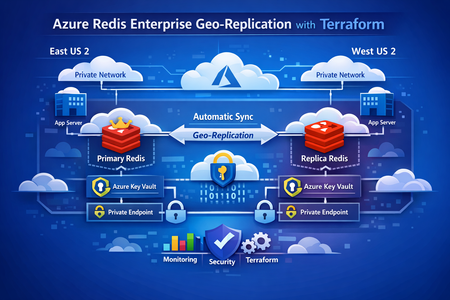
This post walks through a production‑proven pattern for running stateful services across Azure regions using Terraform. We’ll cover a primary–replica Redis architecture, regional isolation with Key Vault and networking, and a clean Terraform parameterization strategy that scales from development to production without duplication. Why Multi‑Region State Is Hard Running applications globally is easy when everything is stateless—if something fails, you redeploy. But stateful services tell a different story. Caches, message brokers, and data stores can’t be treated as disposable. They hold business‑critical data, and downtime or inconsistency quickly becomes customer‑visible. In real‑world systems, common requirements include: Low‑latency reads from multiple regions Automatic recovery when a region becomes unavailable Predictable data consistency Repeatable infrastructure from dev through production Manually configuring this per region doesn’t scale. Drift sets in. Failover is unclear. Backups get forgotten. That’s where Terraform + Azure Managed Redis geo‑replication shines. Github Link : https://github.com/vsakash5/Managed-redis.git High‑Level Architecture We use a primary–replica Redis Enterprise model: Primary Redis Single write endpoint Highly available inside its region Source of truth Replica Redis Read‑only Asynchronously synced from primary Can be promoted during disaster recovery Each region is fully isolated: Separate subnets Separate Key Vaults Private Endpoints only (no public exposure) This prevents shared failure domains and allows each region to operate independently if needed. The Terraform Design Principle Instead of maintaining separate Terraform stacks per region, the key idea is: One reusable module, one tfvars file per environment, multiple regions inside it. The module is written once. Regional differences are supplied via parameter suffixes like: _replica _secondary _tertiary This keeps logic centralized and environments consistent. Core Parameter Layers 1. Environment Identity (Shared) Terraform environment = "dev" # dev | staging | prod context_prefix = "app" Show more lines These values are reused everywhere—names, tags, and identifiers. 2. Primary Region Terraform location = "eastus2" resource_group_name = "rg-app-dev-primary" Show more lines 3. Replica Region Terraform location_replica = "uksouth" resource_group_name_replica = "rg-app-dev-replica" The symmetry is intentional. Terraform can now apply the same module twice without branching logic. Regional Isolation: Networking and Secrets Why isolation matters Geo‑replication copies data, not dependencies. If both Redis instances depend on: the same subnet the same Key Vault then a failure in one region can cascade into the other. Networking (One Subnet per Region) Benefits: Independent NSGs Independent routing Independent capacity planning Key Vault (One per Region) Why this matters: Redis credentials are not replicated Each region stores its own secrets A Key Vault outage doesn’t take both regions down Redis Configuration Primary Redis (Writes Enabled) The geo‑replication group name must match. That’s the logical binding Azure uses to link instances. Private Endpoint‑Only Access No Redis instance is exposed publicly. Each region uses: A private endpoint A workload subnet Internal DNS resolution This means: No public IPs No inbound attack surface Traffic stays on the Azure backbone Linking Primary and Replica Terraform explicitly defines the relationship: Terraform managed_redis_geo_replication_config = { primary_to_replica = { primary_redis_key = "primary" replica_keys = ["replica"] } } Terraform ensures: Primary is created first Replica is deployed second Geo‑replication is established last Environment Scaling: Dev → Staging → Prod The infrastructure pattern never changes. Only values do. Environment Group Name Dev dev-grp Staging stg-grp Prod prod-grp This is how you avoid “snowflake” environments. Disaster Recovery Strategy If the primary region fails: Applications fail over to the replica read endpoint Terraform configuration is updated to: Remove geo‑replication Promote replica config to primary Traffic is fully restored Once the original region recovers, roles can be re‑established cleanly. No click‑ops. No guesswork. Key Lessons Learned 1. Naming is Infrastructure Predictable names enable automation, discovery, and auditing. 2. Key Vault Isolation Beats Availability A shared Key Vault is a shared outage. 3. Parameterization Beats Copy‑Paste Fix once → benefit everywhere. 4. Geo‑Replication Is a Contract Matching replication group names is non‑negotiable. 5. The tfvars File Is the Source of Truth If it’s not in Terraform, it’s not real. Final Thoughts Running stateful services in multiple regions doesn’t require magic— it requires discipline: Isolate aggressively Parameterize consistently Automate everything Test failure often With this approach, adding a new region becomes configuration—not redesign. That’s how infrastructure scales.289Views1like0CommentsDemystifying On-Demand Capacity Reservations
About On-Demand Capacity Reservations Introducing the “parking garage” metaphor There are dozens of VM types available in Azure which span multiple generations of CPU across vendors and architectures. Within each Azure region are datacenters hosting pools of hardware which runs Azure services, such as virtual machines, of those types. As VMs are started and stopped by customers there is a constant ebb and flow of available capacity to run each type of VM within the region. Available capacity is driven by the rhythms of the business day, which creates variations in utilization on an hour-to-hour and even minute-to-minute basis. Longer cycles of demand such as holiday seasons, school calendars and other real-world events are also a factor. When you command an Azure Virtual Machine (VM) to start, the Azure Resource Manager (ARM) – the “engine” that manages resources in the Microsoft cloud -- needs to do a few things to make it happen. The most important of these is that it needs to identify hardware within the target region with sufficient capacity to bring the desired type and size of VM online at that moment in time. If ARM finds space for the desired VM size, the VM starts normally. However, if there is no room to start the desired VM, you will see an error similar to this one: This process of finding a place to start up an Azure VM has a lot of similarities to finding a place to park a vehicle. Parking facilities are built to handle typical demand for their location. If something is going on nearby, such as a large sporting event, which causes the need for parking to be much higher than normal then you might be out of luck when you try to find a spot because the garage is simply full. During periods of high demand in Azure this can result in VMs failing to start simply because there is nowhere to run them at that particular moment. If this happens to a VM which needed to be stopped for a configuration change or other reasons this can cause impact to your environment which you certainly want to avoid. On-Demand Capacity Reservations Azure has a resource called an On-Demand Capacity Reservation, or ODCR, which allows you to reserve a spot for a VM in the appropriate hardware within a region for a specific VM size. This is similar to “owning" a parking space: It’s a reserved place exclusively for the use of a specific VM. At a high level, the way this works is that you create an ODCR which matches the Azure region, availability zone and specific VM type, such as for a VM of type D16s_v6 in availability zone 2 of the Canada Central Azure region. Once the reservation is created, an Azure VM that matches that configuration can be associated to it so the VM now “owns” that “parking space”. This gives that VM priority over others of the same type when it needs to start because it already has a “parking space” assigned to it that can't be used by another one. More detail about VM startup Before we get further into what ODCRs are and how they work, it’s important to know a few more things about starting up a VM. Azure does not provide an explicit SLA for VM startup for virtual machines without an ODCR. The process of finding a hypervisor slot to boot up a VM is purely a “best effort” action on Azure’s part. Having quota headroom does not help with VM startup. Quota in Azure is your "credit limit" for creating VMs. Quota grants permission to create up to a certain number of cores’ worth of Virtual Machines from a particular family (like Ds_v6) but has no effect on whether you can actually start the machine once it’s created. Similarly, having a Reserved Instance purchase or a Savings Plan for a particular number of cores of a given VM family does not have any impact on the ability to start a VM either. These mechanisms are a discount mechanism only where the customer pre-pays for a certain amount of VM cores to be running 24x7 at a discounted rate. Assigning an ODCR to a virtual machine applies a formal SLA on startup for it. VMs with ODCRs get priority over ones that don’t so the likelihood of a successful startup is much higher for VMs that have one compared to those that do not, especially during times when Azure is experiencing a period of high demand for that particular VM type. The actual language of the ODCR SLA can be found in Microsoft's Service Level Agreements for Online Services document which can be downloaded from the linked site. Cost Implications of ODCRs These are the key points that you need to know about how billing works for ODCRs: The compute cost for the parking space capacity reservation for a VM is exactly the same as a running VM of the same size. There is no “double billing” for a VM to have an ODCR associated with it. Billing for the ODCR starts immediately if the quantity of reserved "parking spaces" is greater than zero. Stopping a VM that has an ODCR associated with it does not impact cost. This is because the ODCR is holding the reserved hypervisor slot even if the VM is not running. Having a Reserved Instance purchase or Savings Plan which covers the same scope as the ODCR means that the VM will be billed at the discounted rate. Are there any cases where using ODCRs results in paying more for a VM? There are two cases that I’ve identified where you pay for two ODCRs for the same VM. First, if you are using Azure Site Recovery to protect a VM in Azure by replicating it to another location, you have the option to associate the remote replica of the VM with a capacity reservation. This helps ensure that the replica will start when it’s called upon because it has a pre-allocated spot reserved for it. In this situation, if the original VM also is associated with an ODCR you are paying for both the original (running) VM and also for the reservation being held for its replica. Second, and similarly, when setting up replication for a VM that is preparing for migration into Azure via Azure Migrate, you can associate a capacity reservation with the replica for similar reasons to the above ASR example -- to ensure that the VM will start when its migrated replica is activated. If the source machine is also in Azure then you are again paying twice for the same machine. When should I use them? Capacity Reservations are an important element when designing for resiliency. They help ensure that VMs will be online when needed, even if they have to be shut down for some reason. For example, there was an incident where a customer had to shut down a VM that was serving as a firewall appliance to make an adjustment to its configuration and it failed to start up afterwards because of a capacity-related failure. This resulted in significant impact due to the loss of connectivity for systems dependent on the firewall for connectivity until they were able to bring it back online. Based on field experience and resiliency assessments, applying ODCRs to VMs that must be available 24x7 is strongly recommended. Examples of this include key functions like AD domain controllers, application servers and database servers. Also, any VM-based appliances that may be running as firewalls, load balancers or other infrastructure-support services should be considered as well. Microsoft offers assessments which review a workload for gaps that impact resiliency in many dimensions including outages in Azure. These assessments include checks for the presence of capacity reservations and will report any VM’s that do not have them as a high-risk finding. Not all VM stops in Azure are voluntary Even if you are careful to never stop a VM yourself it can sometimes happen. Not every shutdown of a VM in Azure is user-initiated. Involuntary shutdowns are rare but they can occur due to predictive hardware failures or other events which ARM will respond to by stopping the VM in order to move it out of harm's way. Creating On-Demand Capacity Reservations This section covers the components of an ODCR, the process of creating them and why creating them can fail. Components of an ODCR: An ODCR has two components to it. The first part is a Capacity Reservation Group (CRG) which is simply a "bucket" for any number of capacity reservations. To create a CRG you only need to provide its name, the region that it will be used for and which availability zones within that region it will have access to. The second -- and more important -- component is the actual Capacity Reservation which is created within a CRG. The capacity reservation requires: The name of the reservation. Including the VM size and other details in the name is useful to reduce ambiguity. An example could be “Zone1_D16s_v5” The specific VM size the reservation is for, such as “D16s_v5” The availability zone of the reservation. You can also create a regional reservation, where the VM is “zoneless”, as well. The number of parking spaces instances that the reservation holds. ODCRs can be created via the Azure portal, from the command line using PowerShell or the Azure CLI or deployed through IaC tools such as Bicep or Terraform. CRGs also can also be shared across subscriptions, which allows a CRG created and managed in one subscription to be utilized by VMs in a different subscription. When the ODCR is created, if the number of instances it contains is higher than zero then ARM will attempt to allocate the desired number of instances of the specified VM type in the target region/zone. If there is capacity available for this then the creation succeeds and you can move on to associating machines with it to give them the protection of the ODCR. If creating the ODCR is unsuccessful, the cause can be a variety of things, including: No open hypervisor slots for the desired VM in the target location – the “parking lot” was full at the moment the request was submitted. This can result from outages within Azure that reduce capacity as well as demand pressure. There is insufficient quota in the subscription to claim the necessary number of VM cores for the reservation in the region. The VM type is simply not available in the target region or AZ. Since not all Azure regions are provisioned with identical hardware this can be the cause, especially for VM types other than the popular D, E and F series machines. A restriction is applied to the subscription, zone or region that blocks creation of the reservation for some reason. What you can do if creating an ODCR fails Some things that may help if creating a capacity reservation fails and you know that quota or other restrictions are not a factor are below. Not coincidentally, these are the same recommendations that you should try when a VM fails to start because the same ARM action – finding and allocating hardware with free capacity to start the VM – is taking place. IN GENERAL, creating an ODCR outside of business hours has a higher probability of success. Demand for Azure services typically drops off at the end of the business day where the region is located. Consider using a different VM type, availability zone or a different Azure region. A script or other automation that retries at intervals until the reservation succeeds in claiming the desired number of spots can help, though it can take an unknown amount of time before this works. It may need to run for days or even weeks before it succeeds. Submitting a support ticket will create visibility to your situation from Microsoft. If the root cause is something other than capacity, support can identify that cause and provide guidance on how to resolve it. If the issue truly is a capacity squeeze, the ability of support to help get the reservation created is extremely limited because the support folks, while helpful, are not able to create capacity where none exists. In this case the support teams will usually refer you to the three options above. Protecting a VM with an ODCR Once you have the ODCR created, applying it to a VM is straightforward. To do this from the portal, open the configuration tab on the VM’s screen. Then scroll to the bottom of the panel that appears to find the “Capacity reservations” section. Select “Capacity reservation group” from the list. The list of capacity reservation groups that match the VM will appear in a drop-down menu below. Select the CRG that the VM should use and click “Apply”. If you are using an Infrastructure-as-Code approach such as Bicep or Terraform, an Azure VM is linked to a CRG by specifying the resource ID of the CRG in the appropriate property on the VM definition. Impact of associating a virtual machine with an ODCR: If the VM is not running then the change takes effect immediately. If the VM is running and has no zone assignment (a “regional” VM) then it must be stopped and restarted for the protection of the ODCR to apply. If the VM is running and has a zone assignment then the change is immediate and there is no disruption to the VM. Important note for Terraform users: There appears to be a critical behavior difference between how the AzureRM provider and the Azapi provider handle this change. If you use the AzureRM provider, Terraform will always perform an immediate stop/deallocate of the VM, apply the change and then start the VM up again. The Azapi provider works as documented above. I believe this a result of how Hashicorp coded the AzureRM provider to manage Azure resources. Where an ODCR is not the right answer ODCRs are most effective when they are used to protect VMs that need to always be running because they are providing essential services. Examples include AD domain controllers, firewall or load balancer appliances, database servers, integration servers that support workflows and the like. The primary thing to keep in mind is the cost impact of the ODCRs and whether they are necessary for the service to be functioning. Environments where machines come and go frequently, such as scale in/out setups used to minimize cost, are not ideal for ODCRs. For example, if you have a pool of app servers configured for scale-out, using ODCRs to cover the entire size of the pool means you would be paying for all machines, whether they are actually online or not. A possible approach in a scale-out environment is to determine the minimum number of VMs necessary for the service to be available -- even in a degraded state -- and use an ODCR to protect that number of instances. This way you can have confidence that at least that number of machines in the pool will always be running even if an attempt to scale out fails. Working with On-Demand Capacity Reservations (and three interesting behaviors that you should know about) This section discusses some ins and outs of working with ODCRs in your environment, especially if you need to apply them to existing machines. This is a common scenario when you are attempting to improve the resiliency of a set of VMs against impacts from maintenance, outages or other situations that may cause VMs to restart. “Associated” vs “Allocated” A capacity reservation group will always have ownership of some number of "parking spots" within a region. The number that it holds is referred to as the reservation's capacity which is expressed as a number of allocated instances. When you link a VM to a CRG, the VM becomes associated with the CRG and can take advantage of the protection that it offers from matching reservations that it contains. It is possible to associate more VMs to a CRG than it has allocated capacity for. This is called overallocation. When a CRG is overallocated, the VMs associated with it are protected on a first-come-first-served basis based on when they were started. If, for example, there are four VMs associated with a CRG but the CRG only has an allocated capacity of two, the first two associated machines which were started will receive protection but the others will not. “Interesting” On-Demand Capacity Reservation behavior #1: Here is the first of three interesting behaviors that you can use to your advantage when working with ODCRs. You can add a running VM to a capacity reservation group. As mentioned previously, if the VM is zonal then the change is immediate and nondisruptive. If the VM is regional then the VM must be stopped and restarted for the change to take effect. This is conceptually different from other Azure mechanisms used for resiliency such as Availability Sets. You can only add a VM to an availability set at the time the VM is created but you can add or remove a VM from a Capacity Reservation Group at any time whether the VM is running or not. “Interesting” On-Demand Capacity Reservation behavior #2 Interesting behavior #2 is deceptively simple. When creating a reservation, you can specify a capacity (number of allocated instances) of zero. This should always succeed because Azure needs to take no action to fulfill it -- this is just a metadata adjustment for the reservation within the CRG. This seems to not be terribly useful at first glance but keep reading. “Interesting” On-Demand Capacity Reservation behavior #3 If the number of associated VMs is higher than the allocated capacity of the reservation, you can increase the capacity of the reservation to cover the running VMs. Why does this work? Because running VMs, by definition, have a parking spot hypervisor allocation already so Azure doesn’t need to find one for it -- Azure can simply link the capacity reservation to the hypervisor slot that the running VM is using. The payoff! Or, using these three behaviors to your advantage Because ODCRs are relatively new and have not yet been adopted widely, a common finding to emerge from field resiliency assessments of running workloads is that the VMs that support the workload need to have ODCRs applied to them. In large environments there may be dozens or even hundreds of VMs that need to be protected. The process for doing this can seem daunting to a technical team that is not familiar with ODCRs. Thankfully, these three behaviors make it possible to easily protect any number of running machines with a very high probability of success -- and zero disruption if they are zonal VMs -- by proceeding in this order: Create a CRG with a reservation for the region, AZ and VM type for the machine(s) that need to be covered with a quantity of zero. (Interesting behavior #2) Associate the VMs to the capacity reservation group. At this point the CRG is overallocated so the machines are not yet protected. Remember that if the VMs are regional, a restart is required to finalize the ODCR assignment. (Interesting behavior #1) Update the reservation within the CRG to increase the number of allocated instances to match the number of running VMs. (Interesting behavior #3) When the number of instances on the reservation is equal to or higher than the number of VMs associated with it, all of the associated VMs are protected and you’re done! Final thoughts This leads to a final piece of advice about working with ODCRs, especially when you know that capacity is a challenge in the target region: As a field CSA, I recommend that you bring VMs online first, then apply a capacity reservation to them. Why? If you already have a set of running VMs that need to be protected then following what seems like the obvious process: Creating a CRG, creating reservations within it for the correct number of instances and then associating the VMs with the reservation – has a risk of failure at the step of creating the ODCR because Azure needs to find and allocate additional hypervisor slots for the reservation to own. This can be challenging when there is a lot of demand for the VM type. As the example in the previous section showed, it’s much easier to protect VMs that are already online by associating them with an existing capacity reservation, even if it doesn’t have enough instances allocated to it, and then increasing the capacity of the ODCR to cover the running machines. References: On-Demand Capacity Reservations Overview Monitor the list of restrictions on VM eligibility because it changes frequently SLA Details for On-Demand Capacity Reservations Legal fine print is in the consolidated SLA for Online Services (.docx) Some details about Overallocating capacity reservations Information on creating a Capacity Reservation Group via Bicep, Terraform or ARM template.2.2KViews4likes0CommentsProactive Resiliency in Azure for Specialized Workload i.e. Citrix VDI on Azure Design Framework.
In this post, I’ll share my perspective on designing cloud architectures for near-zero downtime. We’ll explore how adopting multi-region strategies and other best practices can dramatically improve reliability. The discussion will be technically and architecturally driven covering key decisions around network architecture, data replication, user experience continuity, and cost management but also touch on the business angle of why this matters. The goal is to inform and inspire you to strengthen your own systems, and guide you toward concrete actions such as engaging with Microsoft Cloud Solution Architects (CSAs), submitting workloads for resiliency reviews, and embracing multi-region design patterns. Resilience as a Shared Responsibility One fundamental truth in cloud architecture is that ensuring uptime is a shared responsibility between the cloud provider and you, the customer. Microsoft is responsible for the reliability of the cloud in other words, we build and operate Azure’s core infrastructure to be highly available. This includes the physical datacenters, network backbone, power/cooling, and built-in platform features for redundancy. We also provide a rich toolkit of resiliency features (think availability sets, Availability Zones, geo-redundant storage, service failover capabilities, backup services, etc.) that you can leverage to increase the reliability of your workloads. However, the reliability in the cloud of your specific applications and data is up to you. You control your application architecture, deployment topology, data replication, and failover strategies. If you run everything in a single region with no backups or fallbacks, even Azure’s rock-solid foundation can’t save you from an outage. On the other hand, if you architect smartly (using multiple regions, zones, and Azure resiliency features properly), you can achieve end-to-end high availability even through major platform incidents. In short: Microsoft ensures the cloud itself is resilient, but you must design resilience into your workload. It’s a true partnership one where both sides play a critical role in delivering robust, continuous services to end-users. I emphasize this because it sets the mindset: proactive resiliency is something we do with our customers. As you’ll see, Microsoft has programs and people (like CSAs) dedicated to helping you succeed in this shared model. Six Layers of Resilient Cloud Architecture for Citrix VDI workloads To systematically approach multi-region resiliency, it helps to break the problem down into layers. In my work, I arrived at a six-layer decision framework for designing resilient architectures. This was originally developed for a global Citrix DaaS deployment on Azure (hence some VDI flavor in the examples), but the principles apply broadly to cloud solutions. The layers ensure we cover everything from the ground-up network connectivity to the operational model for failover. 1. Network Fabric (the global backbone) Establish high-performance, low-latency links between regions. Preferred: Use Global VNet Peering for simplified any-to-any connectivity with minimal latency over Microsoft’s backbone (ideal for point-to-point replication traffic), rather than a more complex Azure Virtual WAN unless your topology demands it. 2. Storage Foundation (the bedrock ) In any distributed computing environment, storage is the "heaviest" component. Moving compute (VDAs) is instantaneous; moving data (profiles, user layers) is governed by bandwidth and the speed of light. The success of a multi-region DaaS deployment hinges on the performance and synchronization of the underlying storage subsystem. Use storage that can handle cross-region workload needs, especially for user data or state. In case of Citrix Daas, preferred approach is Azure NetApp Files (ANF) for consistent sub-millisecond latency and high throughput. ANF provides enterprise-grade performance (critical during “login storms” or peak I/O) and features like Cool Access tiering to optimize cost, outperforming standard Azure Files for this scenario. 3. User Profile & State (solving data gravity) Enable active-active availability of user data or application state across regions. Solution: FSLogix Cloud Cache (in a VDI context) or similar distributed caching/replication tech, which allows simultaneous read/write of profile data in multiple regions. In our case, Cloud Cache insulates the user session from WAN latency by writing to a local cache and asynchronously replicating to the secondary region, overcoming the challenge of traditional file locking. The principle extends to databases or state stores: use geo-replication or distributed databases to avoid any single-region state. 4. Access & Ingress (the intelligent front door) Ensure users/customers connect to the right region and can fail over seamlessly. Preferred: Deploy a global traffic management solution under your control e.g. customer-managed NetScaler (Citrix ADC) with Global Server Load Balancing (GSLB) to direct users to the nearest available datacenter. In our design, NetScaler’s GSLB uses DNS-based geo-routing and supports Local Host Cache for Citrix, meaning even if the cloud control plane (Citrix Cloud) is unreachable, users can still connect to their desktop apps. The general point: use Azure Front Door, Traffic Manager, or third-party equivalents to steer traffic, and avoid any solution that introduces a new single point of failure in the authentication or gateway path. 5. Master Image (ensuring global consistency) : If you rely on VM images or similar artifacts, replicate them globally. Use: Azure Compute Gallery (ACG) to manage and distribute images across regions. In our case, we maintain a single “golden” image for virtual desktops: it’s built once, then the Compute Gallery replicates it from West Europe to East US (and any other region) automatically. This ensures that when we scale out or recover in Region B, we’re launching the exact same app versions and OS as Region A. Consistency here prevents failover from causing functionality regressions. 6. Operations & Cost (smart economics at scale) Run an efficient DR strategy you want readiness without paying 2x all the time. Approach: Warm Standby with autoscaling. That means the secondary region isn’t serving full traffic during normal operations (some resources can be scaled down or even deallocated), but it can scale up rapidly when needed. For our scenario, we leverage Citrix Autoscale to keep the DR site in a minimal state only a small buffer of machines is powered on, just enough to handle a sudden failover until load-based scaling brings up the rest. This “active/passive” model (or hot-warm rather than hot-hot) strikes a balance: you pay only for what you use, yet you can meet your RTO (Recovery Time Objective) because resources spin up automatically on trigger. In cloud-native terms, you might use Azure Automation or scale sets to similar effect. The key is to avoid having an idle full duplicate environment incurring full costs 24/7, while still being prepared. Each of these layers corresponds to critical architectural choices that determine your overall resiliency. Neglect any one layer, and that’s where Murphy’s Law will strike next. For example, you might perfectly replicate your data across regions, but if you forgot about network connectivity, a regional hub outage could still cut off access. Or you have every system duplicated, but if users can’t be rerouted to the backup region in time, the benefit is lost. The six-layer framework helps make sure we cover all bases. Notably, these design best practices align very closely with Azure’s Well-Architected Framework (especially the Reliability pillar), and they’re exactly the kind of prescriptive guidance we provide through programs like the Proactive Resiliency Initiative. In fact, the PRI playbook essentially prioritizes these same steps for customers: First, harden the network foundation e.g. ensure ExpressRoute gateways are zone-redundant and circuits are “multi-homed” in at least two locations (so no single datacenter failure breaks connectivity). Next, address in-region resiliency – make sure critical workloads are distributed across Availability Zones and not vulnerable to a single zone outage. (As an aside: Microsoft’s internal data shows a huge payoff here; when we configured our top Azure services for zonal resilience, we saw a 68% reduction in platform outages that lead to support incidents!) Then, enable multi-region continuity (BCDR) – for those tier-0 and tier-1 workloads, set up cross-regional failover so even a region-wide disruption won’t take you down. Multi-region is described as the complement to (not a substitute for) zonal design: it’s about surviving the “black swan” of a region-level event, and also about supporting geo-distributed users and future growth. In other words, if you follow the six-layer approach, you’re doing exactly what our structured resiliency programs recommend.561Views1like0Comments