azure functions
294 TopicsMeet the Hosted Skills Canvas: Build, Run, and Debug in GitHub Copilot
Build, run, and debug event-driven AI apps right inside GitHub Copilot. The new Azure Functions Hosted Skills canvas brings instructions, triggers, and live results into one workspace—so you can spend less time switching tools and more time building. 494Views1like0Comments
Connect Azure Functions to more services with managed connectors
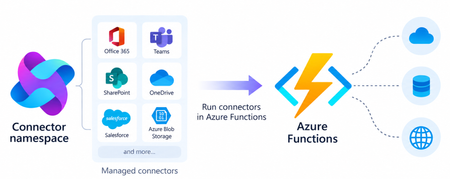
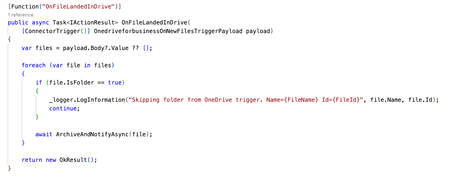
Azure Functions can already connect to many Azure services through triggers and bindings. With managed connectors, your functions can access about 1,700 connectors across services such as Microsoft 365, Microsoft Teams, Dataverse, SharePoint, OneDrive, and third-party systems. Connector triggers deliver events from these services to your function, while typed connector clients let your code take actions against them. You get this broader integration surface without writing the webhook registration code or managing the OAuth tokens required to connect to each service. Focus on your function's business logic and let Azure Connector Namespace handles the connection. Azure Functions integration with Connector Namespace is currently in public preview. It supports .NET isolated, Python, and Node.js. Review the managed connectors overview for current language, hosting plan, and regional availability. To demonstrate how connector triggers and actions work together, this article follows a .NET sample that automates RFP intake across SharePoint, Azure Content Understanding, and Teams. From an uploaded RFP to Teams notification Consider an organization that receives requests for proposals (RFPs) in a shared SharePoint document library. Someone must read each document, identify the requested capabilities, determine which subject-matter experts should respond, and notify the right team. The automated RFP intake sample turns that process into an event-driven workflow: A customer uploads an RFP to a SharePoint document library. A SharePoint connector trigger invokes an Azure Function when the file is created. The function uses a typed SharePoint connector client to retrieve the file contents. Azure Content Understanding extracts the document’s text and layout. The function applies deterministic rules to identify the customer, required capabilities, and recommended subject-matter experts. The function uses a typed Teams connector client to post the results as an Adaptive Card in a channel. Connector Namespace manages the SharePoint and Teams connections. The function controls file processing, document analysis, routing rules, error handling, and notification content How the sample works The .NET sample demonstrates both parts of the connector programming model: a connector trigger receives an event from SharePoint, and typed connector clients provided by the Connector SDKs to perform actions against SharePoint and Teams. The function starts when the SharePoint When a file is created trigger detects a new RFP. It declares the trigger using the ConnectorTrigger attribute and receives a typed payload containing the file’s properties: [Function("OnNewFile")] public async Task OnNewFile( [ConnectorTrigger] SharePointOnlineOnNewFileItemsTriggerPayload payload, CancellationToken cancellationToken) { // Process the newly uploaded file. } Because the trigger provides file properties rather than its contents, the function uses a typed SharePoint client to retrieve the document: byte[] response = await _sharePoint.GetFileContentAsync( Uri.EscapeDataString(siteAddress), fileIdentifier, cancellationToken: cancellationToken); byte[] document = SharePointFileContent.Decode(response); The SharePoint and Teams clients are registered through dependency injection. Each client uses the runtime URL of its Connector Namespace connection and authenticates with DefaultAzureCredential: services.AddSingleton( new SharePointOnlineClient( new Uri(sharePointRuntimeUrl), credential)); services.AddSingleton( new TeamsClient( new Uri(teamsRuntimeUrl), credential)); The function sends the document to Content Understanding’s prebuilt-layout analyzer, which extracts its text and structure. It then applies deterministic C# rules to identify the customer and required capabilities and map those capabilities to predefined subject-matter expert roles. Finally, the function creates an Adaptive Card containing the results and posts it to the configured Teams channel with the typed Teams client: await _teams.PostCardToConversationAsync( postAs, postIn, request, cancellationToken); Connector Namespace handles the SharePoint and Teams connections, while the function controls the document analysis, routing logic, error handling, and notification content. Try the sample The RFP intake sample includes the function code, Bicep infrastructure, Azure Developer CLI configuration, and supporting scripts. Its README explains how to test the workflow locally and deploy it to Azure. Common connector patterns Managed connectors are useful when a function must react to events or perform operations in external systems. Common patterns include: Event to action: React to an event in one service and take an action in another. Event to enrich to action: Retrieve additional information related to an event before acting. Event to document analysis to action: Extract text and structure from a document, apply application rules, and send the result through another connector. Event to AI to action: Analyze event data with an AI service and write the result back through a connector. Extend an existing function app: Add connector-based integrations alongside HTTP, timer, queue, Service Bus, Event Grid, or Durable Functions workloads. The RFP sample combines several of these patterns. A SharePoint event starts the workflow, a SharePoint action retrieves the document, Content Understanding extracts its contents, application code enriches the result, and a Teams action sends the notification. Closing thoughts Managed connectors extend the external systems that can trigger your functions and the services your function code can act on. This brings services such as SharePoint, Teams, Microsoft 365, and many third-party systems into the Azure Functions programming model without requiring you to build the underlying webhook and OAuth infrastructure. Choose Azure Functions with managed connectors when you want this broader integration surface in a code-first application and need custom branching, application libraries and SDKs, other Functions bindings, document or AI processing, or application-specific logic between the trigger and action. If the workload primarily orchestrates connector operations, involves little custom code, and would benefit from a visual designer, Azure Logic Apps is usually the simpler choice. Resources Documentations Overview of managed connectors in Azure Functions Azure Functions connector samples Azure Connector Namespace overview Content Understanding prebuilt-layout analyzer Connector SDK GitHub repos .NET SDK Python SDK Node.js SDK319Views0likes0CommentsEnable Dynamic Workflows in Azure Functions hosted skills
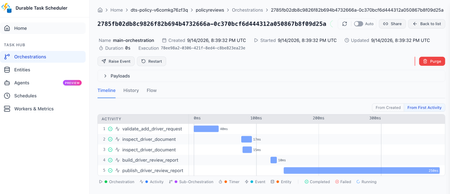
Azure Functions already gives you a familiar way to build event-driven apps. A queue message, HTTP request, timer, or event triggers the code that handles the work. Azure Functions hosted skills (formerly Serverless Agents) add AI reasoning to that model. A hosted skill can read a request, use the regular tools you give it to inspect context, and choose the next step, while your triggers, tools, and business logic stay in place. When the work needs to keep going Consider an insurance policy servicing request. A hosted skill can use its regular tools to understand the requested change, look up the policy, and inspect the submitted documents. If the information is ready and the request can finish now, the normal tool loop, where the model calls a tool, reads the result, and decides the next step, is a good fit. That changes when the work must continue after the initial request. An insurance policy servicing request may need to inspect several documents in parallel, wait for a configured delay before checking again for missing information, and build a review packet after the checks it depends on complete. In a normal tool loop, each result returns to the model before the skill can decide what happens next. The application must keep the job alive, save its progress, and deliver the final result. At that point, the work needs to keep running independently of the original interaction instead of relying on the model and application to coordinate every step. For a queue or other non-HTTP trigger, the final result also needs to be written or sent somewhere useful because there is no response channel. Introducing Dynamic Workflows Dynamic Workflows brings a programmatic tool-calling pattern to Azure Functions hosted skills. Instead of sending every tool result back to the model so it can decide the next call, the model creates a structured, validated workflow plan once. Durable Functions then executes the allowed workflow-safe tool calls, waits, and subagent tasks, passing intermediate results through the workflow instead of the model context. This can reduce model turns and token use for multi-step work while making the work durable. That separation addresses the limits of the normal tool loop: the workflow store keeps state and intermediate results out of the model's context, independent checks can run in parallel, and durable timers resume waits without holding a worker open. Because a Durable Functions orchestration handles execution, the work can continue after the original request or a Functions worker restart. To test the difference, we ran the same structured multi-step task with the regular tool loop and with Dynamic Workflows, using a Foundry gpt-5.4-mini deployment. We ran it with inputs for one service and then ten services. In the Dynamic Workflows version, the model made the plan once, while the runtime kept intermediate tool results in the workflow store instead of sending them back to the model after every tool call. Dynamic Workflows used 56% fewer total model tokens for the one-service run and 93% fewer for the ten-service run, while producing the same final reports. Results will vary by workload and model, and small jobs can have planning overhead. The savings are largest when intermediate tool results would otherwise return to the model after every tool call. How it works Enable workflows in the hosted skill's Markdown front matter. The runtime then adds the management tools: start_workflow, get_workflow_status, list_workflows, cancel_workflow, and terminate_workflow. You do not implement those tools. You choose the workflow-safe tools and subagents that a plan can use. At run time, the AI model uses the hosted skill's instructions to generate a structured plan, limited to the workflow-safe tools and subagents you explicitly allow. The hosted skill calls start_workflow with that plan; the runtime validates it, starts a Durable Functions orchestration, and returns a workflow ID right away. --- name: Add Driver Review description: Prepares an add-driver document review for an insurance representative. workflows: enabled: true trigger: type: queue_trigger args: queue_name: policy-service-requests connection: AzureWebJobsStorage --- Put workflow-safe handlers under tools/ and decorate them for use in a workflow. Each handler must run synchronously, accept one dict argument, return JSON-serializable data, and be idempotent. A worker failure can cause a handler to run more than once, which is why that last point matters. Ordinary tools retain their existing behavior unless you explicitly make them available to a workflow. workflow_tool( description=( "Inspect one document from an add-driver request. Args: " "{document: <document>, position: int}. Returns the document and evidence state." ) ) def inspect_driver_document(args: dict[str, Any]) -> dict[str, Any]: document = args["document"] evidence_state = { "received": "present", "missing": "missing", "expired": "needs_current_copy", }[document["status"]] return { "position": args["position"], "document_id": document["document_id"], "type": document["type"], "file_name": document["file_name"], "evidence_state": evidence_state, } Dynamic Workflows runs on Durable Functions. You can configure Durable Task Scheduler in host.json and use its dashboard to see per-instance task state, retry history, and controls for work that is still running. Durable timers let a workflow wait without keeping a worker busy, then resume the steps that are ready. The workflow stays visible and durable instead of depending on an open request or a best-effort background task. Get started Build your first Azure Functions hosted skill dynamic workflow with the quickstart, then use the overview and sample to go deeper: Follow the Dynamic Workflows quickstart. Read the Dynamic Workflows overview. Browse the insurance policy review sample for an end-to-end implementation.373Views0likes0CommentsSSL/TLS certificates and end-to-end encryption for Azure Functions Flex Consumption
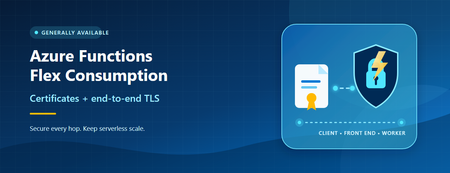
Azure Functions Flex Consumption now supports site-scoped TLS certificates and end-to-end TLS encryption. Learn how to secure custom domains, certificate-based scenarios, and traffic through the function worker.360Views0likes0Comments
Add AI to the workflows you already have using Serverless Agents in Azure Functions
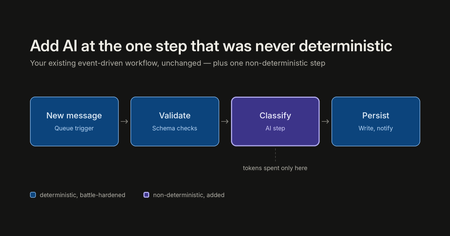
There are a lot of ways to build with AI right now: chat frontends, copilots, greenfield agent apps, orchestration frameworks. All of them have their place, and some customers are building entirely new applications this way. But across customer engagements, a consistent pattern has emerged: the most successful and most cost-effective AI projects are not rewrites. They are existing, deterministic, event-driven business workflows (queue processing, message handling, scheduled jobs) with AI added at exactly the one step that was never deterministic to begin with. This enables the parts that are battle hardened to remain as before, adding AI where non-deterministic smarts are needed. This creates a more robust application along with spending costs for tokens only where beneficial. That pattern has a natural home in Azure Function and Serverless Agents runtime now support non-Http triggers. This post walks through the pattern in three layers: the app you already have, what it takes to add AI processing onto it yourself, and what it looks like with Serverless Agents. Learn and try it here: Build serverless agents using Azure Functions | Microsoft Learn The scenario: expense processing Picture an expense approval pipeline. Expense and purchase-order requests arrive as messages on a queue: some as quick notes, some as forwarded emails, some as key-value text or JSON from intake tools. Most of the piping around the decision is deterministic and should stay that way: queueing, retries, policy storage, output queues, identity, and the audit trail. You do not want a language model reimplementing any of that. But one step in the middle has always resisted automation: understanding the request, choosing the policy that governs it, and applying a natural-language rulebook. "Booked a $450 round-trip flight to Denver for the customer onsite next week. — Albert" Turning that into a structured decision (amount, currency, vendor, category, policy applied, destination queue, reason) is exactly the kind of fuzzy, judgment-shaped work that used to mean either a human in the loop or a brittle pile of regexes and keyword lists. That one step is the AI part of the equation. Everything else stays as code. Layer 1: the app you already have If you're running message-based workloads on Azure Functions today, your expense processor looks something like this, using the standard Python v2 programming model with a queue trigger: import json import azure.functions as func app = func.FunctionApp() @app.queue_trigger(arg_name="msg", queue_name="expense-requests", connection="AzureWebJobsStorage") def process_expense(msg: func.QueueMessage): expense = json.loads(msg.get_body()) validate_expense(expense) if is_duplicate(expense): return decision = apply_expense_policy(expense) route_decision(decision) write_audit_record(expense, decision) This is good architecture, and nothing in this post asks you to change it. You get scale-out per message, retries with a poison queue after repeated failures, and scale to zero between messages. On the Flex Consumption plan you pay for execution, not for idle. The queue itself is doing real architectural work: it buffers spikes, absorbs backpressure, and decouples producers from processing. The limitation is only that process_expense can read only the schema for which it was written. Free text, email-shaped messages, and inconsistent key-value input require a parser before the deterministic policy code can use them, and selecting among category-specific policy documents means encoding more rules in code. Layer 2: the do-it-yourself middle step The obvious next move is to call a model from inside the function. The first version is deceptively short: # Sketch of the DIY approach: this is the version that grows client = get_model_client() # SDK setup, endpoint, credential prompt = build_prompt(expense) # prompt template you now maintain response = client.complete(prompt) # plus retry/backoff for 429s decision = parse_or_die(response) # LLM output isn't always valid JSON The problem isn't the first version. It's everything the first version turns into. Model SDK and auth wiring. Prompt templates living in Python strings. Retry and backoff logic for rate limits, on top of the queue's own retry semantics. Output parsing and re-prompting when the model returns almost-JSON. Then the requests start arriving: "can it look up the current policy documents?" (now you are building tool-calling), "can it run a calculation?" (now you need somewhere safe to execute generated code), "why did it say that?" (now you are building telemetry for model and tool activity). None of this is your expense pipeline. All of it becomes your code to own, patch, and secure. This is the middle step where a lot of AI-in-the-workflow projects stall, not because the idea was wrong, but because the glue outgrew the feature. Layer 3: the same trigger, with the Serverless Agents runtime The Serverless Agents runtime, collapses that middle layer. An agent is a markdown file, with instructions in the body and the trigger in YAML front matter, and it runs on the same Azure Functions triggers you already use. Here is the complete agent from the expense processor sample, expense_processor.agent.md: --- name: Expense Processor description: Reads one expense or purchase-order request that arrives on a queue in any format — free text, email, key-value, or JSON — chooses the spending policy that fits the expense category from a set of policy documents, applies it, and routes the decision. trigger: type: queue_trigger args: queue_name: expense-requests connection: AzureWebJobsStorage data_type: string --- You are an expense-approval agent. Each queue message is **one** expense or purchase-order request as raw text — it might be a quick note, an email, `key: value` lines, or JSON. Finance keeps several policy documents in storage: a general policy plus category-specific ones (travel, meals & entertainment, equipment & software). Your job is to understand the request, pick the policy that governs it, and route the decision. For each message: 1. **Extract** the details, whatever the format: `amount` (strip symbols, separators, and words — `$1,250`, `1.250,00`, and `twelve hundred dollars` are all numbers), `currency` (default `USD`), `vendor`, `category`, and an `expenseId` (use the one in the message, else generate `EXP-<6 hex>`). 2. **Select the policy.** Call `list_expense_policies` to see each policy and what it covers, then choose the one whose scope matches the expense. Use the general policy when nothing else fits. 3. **Fetch it.** Call `get_expense_policy` with that document's exact name, and apply what it says. 4. **Decide.** Work the policy's rules top to bottom; the first rule that matches wins. The amount is the backbone — for an ordinary in-scope USD expense the policy's amount thresholds decide the outcome, applied exactly at the boundaries. Never guess an exchange rate for a non-USD amount. The result is one of three queues: `expense-approved`, `expense-review`, or `expense-flagged`. 5. **Route** by calling `route_expense_decision` **once** with the destination queue and the decision JSON. If it errors, carry on — still return the decision. 6. **Respond** with the decision JSON so the outcome shows up in the logs: ```json { "expenseId": "EXP-1001", "vendor": "United Airlines", "category": "travel", "amount": 450.0, "currency": "USD", "policyApplied": "travel-policy.md", "decision": "approve", "routedTo": "expense-approved", "reason": "Travel expense of 450 USD is at or below the travel policy's 1,000 auto-approve threshold." } ``` Base every decision only on the policy you just fetched — never on rules remembered from an earlier message. Keep `reason` to one sentence, and always set `policyApplied` to the document you used. Note what the front matter is: the same queue_trigger configuration you would pass to the Functions decorator: queue name, connection setting, and string data type. If you know Azure Functions triggers, you already know how to trigger an agent. The entire function_app.py is bootstrap: from azure_functions_agents import create_function_app app = create_function_app() And app-wide defaults live in agents.config.yaml: # App-wide defaults for every agent in this function app. # # `model` is intentionally NOT set here so the runtime resolves it per provider: # - deployed (foundry provider): FOUNDRY_MODEL app setting (e.g. gpt-5.4) # - local (azure_openai provider): AZURE_OPENAI_DEPLOYMENT setting (e.g. gpt-5.4-mini) # Set AZURE_FUNCTIONS_AGENTS_MODEL to override in any environment. timeout: 900 When a message lands on expense-requests, the runtime invokes the agent once for that one item. The trigger's data_type: string and the host's messageEncoding: "none" keep the raw text human-readable, while the runtime serializes the queue message body and metadata before adding them to the agent prompt. The agent's instructions do fuzzy work; the results show up in your Function App logs and Application Insights like any other execution. For the expense scenario, the pattern points directly at the intake queue: the agent extracts the amount, currency, vendor, category, and expense ID; calls list_expense_policies and get_expense_policy to choose and read the current policy from Blob Storage; applies the rules; and calls route_expense_decision to send the result to expense-approved, expense-review, or expense-flagged. Queueing, policy storage, identity, and routing stay deterministic; the agent gets responsibility for the part that needs judgment. What changed between layer 2 and layer 3 Concern DIY (layer 2) Serverless Agents (layer 3) Trigger & scaling Yours (Functions) Yours (Functions, unchanged) Model client, auth, provider config Your code Runtime (Foundry, Azure OpenAI, or OpenAI) Prompt & instructions Python strings Markdown agent file Trigger payload handling Manual parsing Raw queue payload and metadata injected by the runtime Tool calling Build it yourself MCP servers, connectors, plain-Python @tool functions Safe code execution Build it yourself Sandboxed via Azure Container Apps dynamic sessions Model/tool telemetry Build it yourself Built-in, flows to Application Insights Retries & poison handling Queue semantics + your model retries Queue semantics, with dequeue_count right in the payload The economics follow from the architecture. On Flex Consumption, the app scales to zero between messages, so you pay when expense requests arrive, and the AI spend is confined to the single step that needs a model, instead of being architected into every request the way a chat-first design tends to force. This is a large part of why the augment-don't-rewrite engagements are the cost-effective ones: the deterministic 90% of the workload keeps running at deterministic-workload prices. Use all Event Driven triggers Queue Trigger is one row in a much longer table. The runtime supports the breadth of the Functions trigger model in .agent.md front matter: Service Bus queues and topics, Event Hubs, Event Grid, Blob Storage, Cosmos DB, Azure SQL, Kafka, timers, Dapr bindings, and connector triggers, alongside HTTP when you do want a chat endpoint. Wherever your events are already flowing, an agent can meet them there. Try it The sample deploys with the Azure Developer CLI: git clone https://github.com/Azure-Samples/serverless-agents-expense-processor.git cd serverless-agents-expense-processor azd up Then send one of the bundled requests to the provisioned expense-requests queue and read the decision queues: uv run scripts/send_expense.py --file samples/travel.txt --cloud uv run scripts/read_decision.py --queue all --peek --cloud The travel request is a $450 flight. Swap samples/travel.txt for samples/client-dinner.txt or samples/equipment.txt to see the same amount, select a different policy and route differently. The sample's README also covers running locally with Azurite and Core Tools. We are working on many more features to make it really easy for you to take your existing apps and make them intelligent, including Hybrid AI apps (your code + AI markdown binding), dynamic workflows and so on.715Views0likes0CommentsHow to build long-running MCP tools on Azure Functions
Recently, a customer building servers with the Azure Functions MCP extension reached out and asked: How do I handle tools that take longer than the client is willing to wait? This becomes especially relevant when tool calls move beyond simple request/response into multi-step workflows and long-running operations. At the same time, MCP is evolving to address exactly this. The Tasks extension is introduced in the 2026-07-28 release candidate, defining a standard way to model long-running work. In this post, we’ll walk through how to build long-running MCP tools on Azure Functions using Durable Functions , a framework for authoring stateful, long-running workflows as ordinary code, with checkpointing, scaling, and recovery handled automatically. MCP tools today Today, MCP tools are fundamentally request/response: the client issues a tools/call the server returns a result This works well for fast operations, but breaks down when: workflows take minutes execution depends on multiple steps latency is unpredictable In practice, clients enforce their own tool-call timeouts. These aren't standardized by the MCP spec and vary per client, but they're often in the ~30–60 second range. If a tool exceeds that window: In practice, clients often enforce short timeouts. If a tool exceeds that window: the client times out the agent observes a failed call the underlying work may still be running So the core issue is that you have synchronous tool calls don’t naturally model long-running work. The MCP Tasks extension The Tasks extension to address this. With the extension, a server can respond to a tools/call with an asynchronous task handle instead of a final result, and the client drives the lifecycle from there: tasks/get: poll the task's status tasks/update: submit input back to the server if the task reaches input_required tasks/cancel: cancel an in-flight task A task carries a status ("working", "input_required", "completed", "failed", or "cancelled") and on completion, the final result. Task creation is server-directed: the client advertises support by including the extension in its per-request capabilities, and the server decides per request whether to return a task. A server won't return a task to a client that hasn't advertised support. It's important to note that Tasks rely on ecosystem support. Clients must advertise the extension, and MCP SDKs must implement the task lifecycle, before servers can use it. So while Tasks is now a defined extension, broad client and SDK support is still in progress. Implement long-runng tasks with Durable Functions today Until the Tasks extension is broadly supported across clients, we need a pattern that works with existing request/response clients and supports long-running execution. The following samples show how, using Durable Functions: Python NET The long-running work in this sample mines a short chain of blocks. Each block requires solving a computational puzzle where the system keeps trying different inputs until it finds one that produces a result matching a specific pattern (for example, starting with a certain number of zeros). Because this involves lots of trial and error, it naturally takes time, making it a good example of a long-running workflow. The server in the sample exposes two tools: start_mining Starts a Durable Functions orchestration to mine the blocks Waits briefly (within a configurable budget) Returns result inline if completed within budget OR returns workflow_id if still running get_mining_result Takes the workflow_id Returns the current state, e.g. "completed", "running", "failed", or "not_found" To ensure that the agent calls the tools in the right order, workflow_id is a required parameter of get_mining_result, so the agent can't poll without starting a mining run first. Also, the "running" response carries a poll_after_seconds and a next instruction, ensuring the agent to poll again if work is not done rather than give up or assume completion. Even so, the poll path still relies on the agent correctly remembering, and not hallucinating, the workflow_id it was handed. If it garbles or invents an id, the poll lands on the wrong instance or none at all (which is why get_mining_result returns "not_found" rather than guessing). What changes with the Tasks extension Once the Tasks extension is fully implemented across clients and SDKs, the model becomes simpler and more reliable: the server returns a Task handle, the client manages the polling and lifecyle calls, and the SDK tracks execution state. This removes a key limitation of today’s solution, which requires the agent to remember and correctly pass identifiers like workflow_id. Call to action Try out the sample and let us know whether it addresses your MCP needs around long-running or workflow type tools!719Views0likes0CommentsAnnouncing Go support in Azure Functions (Preview)
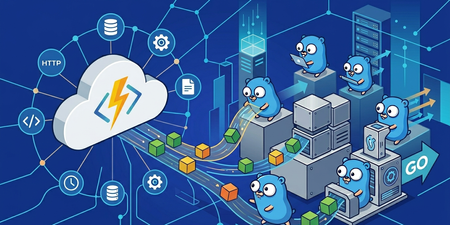
We're excited to announce that Azure Functions now supports Go as a first-class language, available today in public preview on the Flex Consumption plan. Go developers can now build event-driven, serverless applications using idiomatic Go, the standard toolchain they already love, and the full breadth of Azure Functions triggers, bindings, and operational capabilities. TL;DR: Write Functions in Go using a new code-first programming model and SDK (azure-functions-golang-worker). Use triggers across HTTP, Timer, Service Bus, Event Hubs, Event Grid, Cosmos DB, and Blob Storage. Why Go on Azure Functions Go has become a default choice for cloud-native APIs, platform services, networking tools, and high-throughput integration workloads. Until now, teams that standardized on Go on Azure had to either: Use Azure Functions through the custom handlers protocol, missing out on a first-class developer experience, or Build and operate their own serving, scaling, and eventing infrastructure on containers or VMs. With first-class Go support, those teams get the productivity of Go plus the operational leverage of serverless: automatic scaling, pay-per-use billing, integrated triggers across the Azure ecosystem, and built-in observability, without leaving the Go ecosystem. What's in the preview A new Go programming model and SDK: a code-first, idiomatic way to register Functions and declare triggers using functional options. Support for popular triggers: HTTP, Timer, Service Bus (queues and topics), Event Hubs, Event Grid, Cosmos DB, and Blob Storage. More to come. Native Go build pipeline: go build produces a single static binary that the Functions host invokes directly. No function.json, no interop shims at request time. Integrated observability: Application Insights logging, metrics, and distributed tracing. End-to-end tooling: local development with a preview build of Azure Functions Core Tools. Deployment via Core Tools, zip deploy, or GitHub Actions. Flex Consumption: fast elastic scale, scale-to-zero, per-second billing, VNet integration, and always-ready instances. A quick look at the programming model The Go model is code-first: you register functions and declare triggers in Go, with compile-time checks and full IDE support. No separate JSON metadata to keep in sync. Here's a minimal HTTP-triggered Function: package main import ( "fmt" "net/http" "github.com/azure/azure-functions-golang-worker/sdk" "github.com/azure/azure-functions-golang-worker/worker" ) func main() { app := sdk.FunctionApp() app.HTTP("hello", hello, sdk.WithMethods("GET", "POST"), sdk.WithAuth("anonymous"), ) worker.Start(app) } func hello(w http.ResponseWriter, r *http.Request) { name := r.URL.Query().Get("name") if name == "" { name = "world" } fmt.Fprintf(w, "Hello, %s!", name) } Notice the HTTP handler is a plain http.HandlerFunc, the same signature you'd use with net/http or any Go web framework. There's nothing Functions-specific to learn at the handler level. Registering other triggers The same pattern works across triggers. Non-HTTP handlers take a context.Context plus a typed payload: import ( "context" "log" "github.com/azure/azure-functions-golang-worker/sdk" "github.com/azure/azure-functions-golang-worker/sdk/bindings" ) // Timer: runs every 10 seconds func onTimer(ctx context.Context, t bindings.TimerInfo) error { log.Printf("timer fired; past due=%v", t.IsPastDue) return nil } app.Timer("cleanup", onTimer, sdk.WithSchedule("*/10 * * * * *"), ) // Service Bus queue func onOrder(ctx context.Context, msg bindings.ServiceBusMessage) error { log.Printf("order %s: %s", msg.MessageId, string(msg.Body)) return nil } app.ServiceBusQueue("processOrder", onOrder, sdk.WithQueueName("orders"), sdk.WithConnection("ServiceBusConnection"), ) // Event Hubs func onEvent(ctx context.Context, e bindings.EventHubMessage) error { log.Printf("event seq=%d body=%s", e.SequenceNumber, string(e.Body)) return nil } app.EventHub("ingest", onEvent, sdk.WithEventHubName("telemetry"), sdk.WithConnection("EventHubConnection"), ) // Cosmos DB change feed func onChange(ctx context.Context, docs []bindings.CosmosDocument) error { for _, d := range docs { log.Printf("doc %s: %s", d.ID, string(d.Data)) } return nil } app.CosmosDB("onChange", onChange, sdk.WithDatabase("ToDoList"), sdk.WithContainer("Items"), sdk.WithConnection("CosmosDBConnection"), ) // Event Grid func onGridEvent(ctx context.Context, e bindings.EventGridEvent) error { log.Printf("%s: %s", e.EventType, e.Subject) return nil } app.EventGrid("onEvent", onGridEvent) Extension triggers: real Azure SDK clients For triggers like Blob Storage, the Go SDK injects a fully-typed Azure SDK client directly into your handler. You opt in with a blank import, so your binary only includes the extensions you actually use: import ( "context" "io" "log" "github.com/Azure/azure-sdk-for-go/sdk/storage/azblob/blob" "github.com/azure/azure-functions-golang-worker/sdk" _ "github.com/azure/azure-functions-golang-worker/triggers/blob" // registers blob trigger client factory "github.com/azure/azure-functions-golang-worker/worker" ) func onUpload(ctx context.Context, client *blob.Client) error { log.Printf("blob: %s", client.URL()) resp, err := client.DownloadStream(ctx, nil) if err != nil { return err } defer resp.Body.Close() data, err := io.ReadAll(resp.Body) if err != nil { return err } log.Printf("size=%d", len(data)) return nil } app.Blob("onUpload", onUpload, sdk.WithPath("uploads/{name}"), sdk.WithConnection("AzureWebJobsStorage"), sdk.WithSource("EventGrid"), ) The handler receives a *blob.Client from github.com/Azure/azure-sdk-for-go/sdk/storage/azblob/blob, the same client you'd use in any other Go app. Because it's a real SDK client, you can DownloadStream blobs of any size without buffering the whole payload through the worker. Dependencies stay isolated per extension, so apps that don't use Blob never pull in azblob or azidentity. Project layout A Go function app is just a regular Go module plus the standard Functions config files: my-function-app/ ├── host.json ├── local.settings.json ├── go.mod ├── go.sum └── main.go No function.json and no generated metadata. Triggers are declared in main.go. go build, go test, and go mod tidy all just work. Get started Quickstart Install the preview tooling, scaffold your first Go function app, run it locally, and deploy to Flex Consumption. We can't wait to see what you build. Welcome to Functions, Gophers.717Views4likes0CommentsIntroducing the Azure Functions serverless agents runtime (preview)
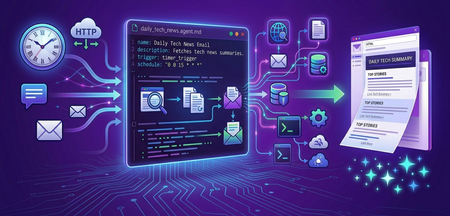
We're thrilled to announce the Azure Functions serverless agents runtime, now in public preview. It brings a new, markdown-first programming model for building AI agents as a first-class workload on Azure Functions, with the event-driven triggers, scale-to-zero economics, and operational integrations you know and love from the platform. A few things you could build in a matter of minutes: A daily briefing agent that wakes up on a timer, scours the web, and drops a summary in your Outlook inbox every morning. A Teams chat agent that triggers on every message and answers your team's questions, looking up data across your connected systems. An on-call troubleshooting agent that investigates incidents by querying logs in Azure Data Explorer and reports back what it found. Each one is a single markdown file with instructions plus a trigger, and deployed like any other function app and running on the Flex Consumption plan. Why a serverless agents runtime Building production agents today usually means stitching together a framework, a hosting layer, message queues, identity, secrets, observability, and a long list of per-service integrations. Most of that work is plumbing, not the agent. Azure Functions has spent years making event-driven compute simple: declare a trigger, write the handler, get autoscale and managed identity for free. The serverless agents runtime applies that same model to agents: Agents are the unit of work. You define behavior in natural language, not boilerplate. Trigger agents from almost any event. HTTP requests, timers, queues, database changes, Teams messages, Outlook mail, and more. Tools, MCP servers, connectors, and sandboxed execution are declared, not coded. Deploy and operate like any function app. Flex Consumption for scale-to-zero and per-second billing, managed identity, VNet integration, Application Insights, and the same deployment tools you already use. Markdown-first: what an agent looks like An agent is a .agent.md file. Your app can have multiple agents, each with its own metadata that declares the trigger. The markdown body becomes the agent's instructions. Here's a timer-triggered agent that summarizes the day's tech news and emails it: --- name: Daily Tech News Email description: Fetches top tech news and emails a summary daily. trigger: type: timer_trigger args: schedule: "0 0 15 * * *" --- You are a news assistant. When triggered, do the following: 1. Scour the web for today's top tech news headlines. Use reputable sources; Include links to the original articles. 2. Summarize the top stories in a concise, well-formatted HTML email body. 3. Email the summary to $TO_EMAIL with the subject "Daily Tech News Summary" followed by today's date. That's the whole function. Drop the file into your app, deploy, and it runs on the schedule. No framework wiring, no service-specific integration code. Your agents can share configuration and capabilities through a few files alongside the agent definitions. agents.config.yaml declares system tools and the default model. mcp.json lists the MCP servers your agents can call, including MCP-enabled Azure connections. A /tools folder holds custom Python tools and a /skills folder holds reusable prompt fragments. Everything here is optional and available to every agent automatically when present. In this example, the agent uses a Container Apps dynamic session to browse the web with Playwright, and a Microsoft Office 365 connection (exposed as an MCP server) to send the email: # agents.config.yaml system_tools: dynamic_sessions_code_interpreter: endpoint: $ACA_SESSION_POOL_ENDPOINT model: $AZURE_OPENAI_DEPLOYMENT // mcp.json { "servers": { "office365": { "type": "http", "url": "$MICROSOFT_365_CONNECTION_MCP_ENDPOINT", "auth": { "scope": "https://apihub.azure.com/.default" } } } } The function app's managed identity authenticates to the connection's MCP endpoint, so there are no secrets to manage. Any Azure connector that supports MCP, or any remote MCP server, can be added the same way. Any of these global settings can be overridden per agent in the agent's metadata. What you get in the preview Triggers across the Azure Functions catalog. HTTP, Timer, Queue, Service Bus, Event Hubs, Cosmos DB, Blob, Event Grid, plus new connection-backed triggers like Teams messages, Outlook mail, and calendar events. 1,400+ Azure connectors as tools. Create a connection, enable its MCP endpoint, and an agent can send mail, post to Teams, create records, query data, all without integration code or auth plumbing. Any remote MCP server as tools. Use any remote MCP server. Sandboxed code and browser automation. Run code or a Playwright-powered browser in Azure Container Apps dynamic sessions, isolated per agent session. Built-in chat UI, HTTP API, and MCP server endpoint with no extra code. Custom Python tools in a tools/ folder and reusable skills in a skills/ folder, shared across agents. Pluggable model providers. Microsoft Foundry, Azure OpenAI, and OpenAI out of the box. Where this fits The serverless agents runtime is designed for the agents most enterprises actually need to build: Scheduled background agents that summarize, monitor, or reconcile on a timer. Event-driven assistants that react to messages, emails, alerts, and database changes. Cross-system agents that tie multiple SaaS and enterprise apps together through connections. Trigger with a Teams message, look up the customer in Salesforce, send an email, and update a database record, all from one agent. Conversational front-ends that pair an HTTP or chat-UI entry point with the same agents your event triggers invoke. Agents as MCP servers that other agents and MCP clients can integrate with directly. We want your feedback The serverless agents runtime is in public preview, and we're actively building it out with input from real customer workloads. Tell us what you build, what's missing, and where the model should go next. Get started Docs: aka.ms/azure-functions-agents-docs Building agents on Azure Functions has never been easier. We can't wait to see what you create with the serverless agents runtime!3.7KViews2likes0CommentsAzure Functions MCP Extension: What's New at Build 2026
The Azure Functions MCP extension has had a breakout year! Since its initial preview, the extension has grown from a single trigger type into a full-featured platform for building remote MCP servers: with tool, resource, and prompt triggers across multiple languages, MCP Apps for interactive UIs, built-in MCP authentication, and feature enhancements. Here's what's new and what it means for developers building MCP servers on Azure Functions. The full MCP primitive set: Tools, resources, and prompts When the MCP extension first shipped, it supported tool triggers. Declare a function as an MCP tool, and any MCP client can discover and call it. That was the starting point. Since then, we've shipped the remaining MCP primitives: Resource triggers: expose a function as an MCP resource. Prompt triggers: expose a function as an MCP prompt, letting clients request structured prompt templates from your server. Like tool triggers, resource and prompt triggers are supported in multiple languages including .NET, Java, Python, TypeScript, and JavaScript. MCP Apps: interactive UI from your MCP server MCP Apps let your tools return interactive user interfaces instead of plain text. Combine tool triggers with resource triggers, and your MCP server can serve rich, rendered experiences to MCP-aware clients. The Azure Functions MCP extension supports MCP Apps natively, meaning the same function app that exposes tools and resources can also serve UI components. The launch blog post on the Azure Apps Blog walked through the pattern in detail. For .NET developers, the new fluent builder API (available in the latest NuGet release) makes it easier to compose MCP Apps by chaining tool and resource definitions in a declarative style. MCP authentication The extension supports built-in MCP authentication, implementing the requirements of the MCP auth spec. All samples in the aka.ms/remote-mcp repo enable built-in MCP auth by default with Microsoft Entra ID as the identity provider. Samples have also been updated to demonstrate how to exchange tokens in the On-Behalf-Of (OBO) flow, so your MCP tools can access downstream APIs using the invoking user's identity. Auth configuration in the Azure portal: Preview at Build is a one-click experience in the Azure portal for configuring built-in MCP auth. No more manual app registration creating, configuration and wiring to the server. Just open your server app on the portal and click to enable MCP auth. Try it out! Feature enhancements Beyond the headline primitives and auth, the extension has shipped a steady stream of capabilities the past few months. The following are the notable additions. Structured content Structured content lets you return machine-readable JSON metadata alongside your tool's response via the `structuredContent` field. Clients that support it can programmatically consume the data (e.g. parse fields, render tables, drive downstream logic) rather than just displaying text. Clients that don't support it still get the regular content blocks as a fallback. Rich content types Tools aren't limited to returning plain text. The extension supports the full set of MCP content block types, e.g. `TextContent`, `ImageContent`, `AudioContent`, `ResourceLink`, and `EmbeddedResource`, so your tools can return images, audio clips, references to resources, and inline file content alongside text. Input and output schemas `WithInputSchema` and `WithOutputSchema` give you explicit control over the JSON schemas advertised for your tools. This is especially useful when the auto-generated schema from function parameters doesn't capture the full contract. For example, when your tool accepts a complex nested object or returns a specific shape that clients depend on. Input and output schemas are currently supported in .NET, with support for other languages coming soon. builder.ConfigureMcpTool("SearchDocs") .WithOutputSchema(""" { "type": "object", "properties": { "results": { "type": "array", "items": { "type": "string" } }, "query": { "type": "string" } }, "required": ["results", "query"] } """); Fluent configuration APIs in .NET A set of fluent builder APIs that let you configure MCP primitives declaratively in `Program.cs`: ConfigureMcpTool: add properties, metadata, input/output schemas, or promote a tool to an MCP App ConfigureMcpResource: attach metadata to resources ConfigureMcpPrompt: define prompt arguments and metadata builder.ConfigureMcpTool("sayhello") .WithProperty("name", McpToolPropertyType.String, "Name of the user", required: true) .WithMetadata("ui", new { resourceUri = "ui://index.html" }); What's next Usage of the MCP extension has grown steadily since its preview launch. Tool execution volume has increased 15x over the past several months as more customers move from experimentation to production. As adoption grows, so do the expectations. Developers building production MCP servers are hitting real friction around auth complexity, client configuration, and observability. We're continuing to invest in the extension to address these gaps and help customers be more successful building and hosting MCP servers on Azure Functions. Here's where we're focusing next. Continued auth simplification Auth remains the biggest barrier to getting an MCP server into production. We'll work on: Smoother client setup: making it easier to connect any MCP client to an authenticated Azure Functions MCP server, not just VS Code. Simplified OBO flow: streamlining the experience of On-Behalf-Of authentication so developers can delegate user identity to downstream services with less configuration. Our goal: the secure path should be the easy path. Deeper integration with Microsoft Foundry We'll build tighter integration between Azure Functions MCP servers and Microsoft Foundry. This includes surfacing MCP servers in Foundry Toolbox, a new feature introduced to help Foundry agents discover and consume tools from a single endpoint. Developers will be able to publish an MCP server from Functions and have it available to Foundry agents through Toolbox without manual endpoint configuration. Continued feature enhancement We prioritize based on feedback from the community raised in our GitHub repo. For example, support for streaming output and pagination are top items in our backlog today based on user demand. We also track the MCP spec's evolution closely and will continue shipping support for strategic features as they land. Examples of proposals we're following: MCP Tasks: the Tasks extension (SEP-2663) defines a standard pattern for async, long-running tool calls with durable task handles. This replaces hand-rolled polling patterns and aligns well with Functions' execute-and-return model. Stateless MCP: SEP-2575 proposes removing the mandatory initialization handshake, which is a natural fit for serverless platforms like Azure Functions where fresh instances can handle any request. Have something you'd like us to prioritize? Let us know by filing a request on GitHub. Get started Samples: Samples showcasing most up-to-date features: aka.ms/remote-mcp Documentation: Model Context Protocol for Azure Functions MCP Extension GitHub repo: Azure Functions MCP Extension778Views1like0CommentsAnnouncing managed connectors for Azure Functions (Preview)
Azure Functions now includes managed connectors in public preview - the same 1,400+ connector ecosystem behind Logic Apps and Power Platform - as first-class triggers in your Functions code, plus typed SDKs for invoking connector actions from your function body. Build event-driven integrations with Microsoft 365, Salesforce, ServiceNow, SAP, Dynamics 365, and 1,400+ other systems using familiar Functions syntax. This release is the result of close collaboration between the Azure Functions team and the Connectors team, the same team that builds and maintains the connector ecosystem behind Logic Apps and Power Platform. Triggers, SDKs, and the connection runtime were designed together so that connectors feel native to Functions, and so that the connector library that already powers thousands of Logic Apps workflows in production is available to Functions developers. The integration is built on the new Connector Namespace service, which brings the Logic Apps/Power Platform connector runtime to developers as a programmable integration layer. A quick look: new Outlook email → post to Teams Here's a function example (adapted from the sample app): the Office 365 trigger fires on every new email in the watched inbox, and the function posts a notification to a Teams channel using the Teams connector SDK. using Microsoft.Azure.Functions.Worker; using Microsoft.Azure.Functions.Worker.Extensions.Connector; using Azure.Connectors.Sdk.Office365.Models; using Azure.Connectors.Sdk.Teams; using Azure.Connectors.Sdk.Teams.Models; public class ProcessEmail(TeamsClient teams) { private readonly string _teamId = Environment.GetEnvironmentVariable("TEAMS_TEAM_ID")!; private readonly string _channelId = Environment.GetEnvironmentVariable("TEAMS_CHANNEL_ID")!; [Function("OnNewEmail")] public async Task Run([ConnectorTrigger] Office365OnNewEmailTriggerPayload payload) { foreach (var email in payload.Body?.Value ?? []) { var message = new PostMessageRequest { Recipient = new() { GroupId = _teamId, ChannelId = _channelId }, MessageBody = $"<b>📧 New email</b><br/><b>From:</b> {email.From}<br/><b>Subject:</b> {email.Subject}" }; await teams.PostMessageToConversationAsync("Flow bot", "Channel", message); } } private sealed class PostMessageRequest : DynamicPostMessageRequest { public RecipientInfo Recipient { get; set; } = new(); public string MessageBody { get; set; } = ""; } private sealed class RecipientInfo { public string GroupId { get; set; } = ""; public string ChannelId { get; set; } = ""; } } The TeamsClient is registered with DI at startup against the Teams connection's runtime URL — the same managed identity the trigger uses authenticates the outbound call. No OAuth code in the function. No HTTP client. No token handling. For the complete end-to-end samples see the Functions Connectors Samples repo. What's shipping in preview Connector triggers. First-class Functions triggers backed by Connector Namespace connections - Office 365 new-email, Teams message-posted, SharePoint item-created/updated, Dataverse row-changed, Salesforce record-updated, calendar events, and more. Configured via the [ConnectorTrigger] attribute (C#) and equivalent decorators as language SDKs roll out. Typed connector SDKs. Strongly-typed client libraries for invoking connector actions from inside your function — OutlookClient, TeamsClient, Office365UsersClient, DataverseClient, SalesforceClient, and growing. Built jointly by the Connectors and Functions teams. Auth via managed identity and built-in authentication. Configure the function app with built-in authentication to allow only the Connector Namespace to trigger the function. See .NET sample: built-in authentication with managed identity. Observability. Every connector trigger run is recorded with information about the run. End to end tracing into the Function App is on the roadmap. Typed SDKs are rolling out incrementally. Not all 1,400+ connectors have strongly-typed SDKs today, and language coverage will expand over time. You can see the ones supported in the different SDK repos for .NET, Python, and Node.js. The connector catalog The full catalog is the Logic Apps connector library is in scope. Below are the categories most relevant to enterprise integrations: Microsoft 365 Outlook (Office 365) — send email, create drafts, search mailbox, read calendar, manage events Microsoft Teams — post messages, create channels, list team members, manage meetings and tabs SharePoint — read and write lists and document libraries, subscribe to item-created/updated events OneDrive for Business — upload and download files, manage folders, track changes Excel Online (Business) — read and write worksheets, add rows, call named functions in workbooks CRM and operations Dataverse / Dynamics 365 — full entity CRUD across all standard and custom tables; use ODATA filters Salesforce — query and write contacts, leads, opportunities, and cases via SOQL ServiceNow — create and update incidents, change requests, and CMDB records Workday — read worker, position, and organization data ERP and data SAP — call BAPIs and read tables (uses on-premises data gateway for SAP behind a firewall) SQL Server — execute queries, stored procedures, and table operations Oracle Database — same surface as SQL Server PostgreSQL — query and write via the generic SQL connector Developer and platform Azure DevOps — read and write work items, pipelines, repositories, and pull requests GitHub — manage issues, PRs, and repository content. More trigger examples // Office 365 — new email [Function("OnNewEmail")] public Task OnNewEmail([ConnectorTrigger] Office365OnNewEmailTriggerPayload payload) { /* ... */ } // Teams — new channel message [Function("OnTeamsMessage")] public Task OnTeamsMessage([ConnectorTrigger] TeamsOnNewChannelMessageTriggerPayload payload) { /* ... */ } // SharePoint — list item created [Function("OnTicketCreated")] public Task OnTicketCreated([ConnectorTrigger] SharePointOnNewListItemTriggerPayload payload) { /* ... */ } // Salesforce — record updated [Function("OnOpportunityUpdated")] public Task OnOpportunityUpdated([ConnectorTrigger] SalesforceOnRecordUpdatedTriggerPayload payload) { /* ... */ } The connection that backs each trigger is configured on the Connector Namespace as part of deployment, so trigger declarations stay focused on the event payload, not on auth or connection wiring. Pricing There is no extra cost for the integration itself. You pay: Existing Azure Functions pricing for execution (Flex Consumption per-second billing). Existing Logic Apps connector pricing for connector calls, billed at the same per-action rates Logic Apps customers pay today. See the Logic Apps pricing page for current connector rates and standard/enterprise connector tiers. Preview restrictions Language and runtime support: typed SDKs and the [ConnectorTrigger] attribute ship first for C# (.NET 10 isolated worker), followed closely by Python and Node.js. Java, and PowerShell are on the roadmap. Typed SDK coverage: not every connector in the 1,400+ catalog has a typed SDK yet but coverage is expanding. Regional availability: connector triggers are enabled per region as Connector Namespace rolls out. Check the documentation for the current region list. Calls to action Developers building integrations with SaaS or enterprise systems should explore managed connectors in Azure Functions to reduce integration complexity and accelerate delivery. Partners can position this for customers migrating from on-premises integration platforms or looking to modernize custom integration code into a serverless, event-driven architecture. Customers running both Logic Apps and Functions today can consolidate integration logic: keep workflow-style orchestrations in Logic Apps, and move code-first event-driven integrations into Functions with the same connector library. Get started Documentation: Azure Functions integration with managed connectors Samples: Azure Functions integration with managed connectors in Azure Functions samples Looking for connectors as tools for AI agents? That's covered in the serverless agents Azure Functions runtime, which builds on this same Connector Namespace integration to expose connections as MCP tool servers for the agents runtime.1.3KViews1like0Comments