azure functions
43 TopicsBest Practices for API Error Handling: A Comprehensive Guide
APIs (Application Programming Interfaces) play a critical role in modern software development, allowing different systems to communicate and interact with each other. However, working with APIs comes with its challenges, one of the most crucial being error handling. When an API encounters an issue, it's essential to handle errors gracefully to maintain system reliability and ensure a good user experience. In this article, we'll discuss best practices for API error handling that can help developers manage errors effectively. Why is API Error Handling Important? API error handling is crucial for several reasons: Maintaining System Reliability: Errors are inevitable in any system. Proper error handling ensures that when errors occur, they are handled in a way that prevents them from cascading and causing further issues. Enhancing User Experience: Clear, informative error messages can help users understand what went wrong and how to resolve the issue, improving overall user satisfaction. Security: Proper error handling helps prevent sensitive information from being exposed in error messages, reducing the risk of security breaches. Debugging and Monitoring: Effective error handling makes it easier to identify and debug issues, leading to quicker resolutions and improved system performance. Best Practices for API Error Handling 1. Use Standard HTTP Status Codes HTTP status codes provide a standard way to communicate the outcome of an API request. Use status codes such as 200 (OK), 400 (Bad Request), 404 (Not Found), and 500 (Internal Server Error) to indicate the result of the request. Choosing the right status code helps clients understand the nature of the error without parsing the response body. 2. Provide Descriptive Error Messages Along with HTTP status codes, include descriptive error messages in your API responses. Error messages should be clear, concise, and provide actionable information to help users understand the problem and how to fix it. Avoid technical jargon and use language that is understandable to your target audience. 3. Use Consistent Error Response Formats Maintain a consistent format for your error responses across all endpoints. This makes it easier for clients to parse and handle errors consistently. A typical error response may include fields like status, error, message, code, and details, providing a structured way to convey error information. 4. Avoid Exposing Sensitive Information Ensure that error messages do not expose sensitive information such as database details, API keys, or user credentials. Use generic error messages that do not reveal internal system details to potential attackers. 5. Implement Retry Logic for Transient Errors For errors that are likely to be transient, such as network timeouts or service disruptions, consider implementing retry logic on the client side. However, retries should be implemented judiciously to avoid overwhelming the server with repeated requests. 6. Document Common Errors Provide comprehensive documentation that includes common error codes, messages, and their meanings. This helps developers quickly identify and troubleshoot common issues without needing to contact support. 7. Use Logging and Monitoring Implement logging and monitoring to track API errors and performance metrics. Logging helps you understand the root cause of errors, while monitoring allows you to proactively identify and address issues before they impact users. 8. Handle Rate Limiting and Throttling Implement rate limiting and throttling to protect your API from abuse and ensure fair usage. Return appropriate error codes (e.g., 429 - Too Many Requests) when rate limits are exceeded, and provide guidance on how users can adjust their requests to comply with rate limits. 9. Provide Support for Localization If your API serves a global audience, consider providing support for localization in your error messages. This allows users to receive error messages in their preferred language, improving the user experience for non-English speakers. 10. Test Error Handling Finally, thoroughly test your API's error handling capabilities to ensure they work as expected. Test various scenarios, including valid requests, invalid requests, and edge cases, to identify and address potential issues. Conclusion Effective error handling is essential for building reliable and user-friendly APIs. By following these best practices, you can ensure that your API handles errors gracefully, provides meaningful feedback to users, and maintains high availability and security. Implementing robust error handling practices will not only improve the reliability of your API but also enhance the overall user experience.10KViews0likes0Comments
How to host moodle on azure
Hello everyone, I am here for help, I am an IT specialist my employer asked me to host a Moodle LMS on azure to be accessible for our program, I have no idea how to do it because I don't have experience on hosting websites and Azure as well. I am willing to learn about azure and how to use to make Moodle available to our benfieries. could you please give me a detailed guideline about that? I am having a free azure subscription right now but I will purchase other packages later once I got a clear idea how to use it. I am looking for your kind answers. Thanks, Barzan9.4KViews0likes2Comments
Azure Function - You do not have permission to view this directory or page.
I have created an azure function and required that the authentication to be of type "Function" When I try to view this function in browser like the following: https://myfunctionapp.azurewebsites.net/api/myfunction?code=dJHl33LeP6zYUnHA I got the url above from my azure function when I copied the url of my function, however, I get the error: You do not have permission to view this directory or page. .. I am following a tutorial like in this video: https://youtu.be/uST0CyqRIHA?t=846 Video starts at the time where he made a request to Azure from postman and it was successful. What am I missing here? One thing I can think of is that the key am using is much shorter than the one in the video am not sure why. Thanks.6.4KViews0likes0Comments
Authentication (EasyAuth) on Linux consumption plan
Is support for authentication (EasyAuth) on Linux consumption plan in the works? Is there an alternative right now? I'm currently utilising the premium plan to get the authentication functionality...fortunately I need the hot start for this use case, but there are other use cases coming up where a pure consumption plan approach would be more appropriate.5.7KViews2likes8Comments
Azure Function and scaling
I'm just starting to investigate Azure Functions and have a question. Suppose I have a function that takes some input performs a (lengthy) calculation on it and then returns the result. If I make 2 calls on this function such that the first is still running when I call the second, does the second one just wait until the first is complete? Does Azure run up another copy? What if I make 50 or a 100 calls? At what point does Azure do it's magic to do something about the backlog? (For the purposes of this question, I'm going to assume that the cost is not an issue)Solved5.5KViews0likes1Comment
Using Claude Opus 4.6 in Github Copilot
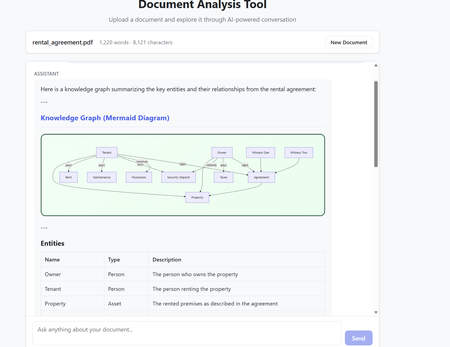
The model selection in Github Copilot got richer with the addition of Claude Opus 4.6. The Model capability along with the addition of agents makes it a powerful combination to build complex code which requires many hours or days. Claude Opus 4.6 is better in coding skills as compared to the previous models. It also plans more carefully, performs more reliably in larger codebases, and has better code review as well as debugging skills to catch its own mistakes. In my current experiment, I used it multiple times to review its own code and while it took time (understandably) to get familiar with the code base. After that initial effort on the evaluation, the suggestions for fixes/improvements were on dot and often even better than a human reviewer (me in this case). Opus 4.6 also can run agentic tasks for longer. Following the release of the model, Anthropic published a paper on using Opus 4.6 to build C Compiler with a team of parallel Claudes. The compiler was built by 16 agents from scratch to get a Rust-based C compiler which was capable of compiling the Linux kernel. This is an interesting paper (shared in resources). Using Claude Opus 4.6 in Agentic Mode In less than an hour, I built a document analyzer to analyse the content, extract insights, build knowledge graphs and summarize elements. The code was built using Claude Opus 4.6 alongwith Claude Agents in Visual Studio Code. The initial prompt built the code and in the next hour after a few more interactions - unit tests were added and the UI worked as expected specifically for rendering the graphs. In the second phase, I converted the capabilities into Agents with tools and skills making the codebase Agentic. All this was done in Visual Studio using Github Copilot. Adding the complexity of Agentic execution was staggered across phases but the coding agent may well have built it right in the first instance with detailed specifications and instructions. The Agent could also fix UI requirements and problems in graph rendering from the snapshot shared in the chat window. That along with the logging was sufficient to quickly get to an application which worked as expected. The final graph rendering used mermaid diagrams in javascript while the backend was in python. Knowledge Graph rendering using mermaid What are Agents? Agents perform complete coding tasks end-to-end. They understand your project, make changes across multiple files, run commands, and adapt based on the results. An agent runs in the local, background, cloud, or third-party mode. An agent takes a high-level task and it breaks the task down into steps. It executes those steps with tools and self-corrects on errors. Multiple agent sessions can run in parallel, each focused on a different task. On creating a new agent session, the previous session remains active and can be accessed between tasks via the agent sessions list. The Chat window in Visual Studio Code allows for changing the model and also the Agent Mode. The Agent mode can be local for Local Agents or run in the background or on Cloud. Additionally, Third Party Agents are also available for coding. In the snapshot below, the Claude Agent (Third Party Agent) is used. In this project Azure GPT 4.1 was used in the code to perform the document analysis but this can be changed to any model of choice. I also used the ‘Ask before edits” mode to track the command runs. Alternatively, the other option was to let the Agent run autonomously. Visual Studio Code - Models and Agent Mode The local Agentic mode was also a good option and I used it a few times specifically as it is not constrained by network connectivity. But when the local compute does not suffice, the cloud mode is the next best option. Background agents are CLI-based agents, such as Copilot CLI running in the background on your local machine. They operate autonomously in the editor and Background agents use Git worktrees to work in an isolated environment from your main workspace to prevent conflicts with your active work. How to get the model? The model is accessible to GitHub Copilot Pro/Pro+, business, and enterprise users. Opus 4.6 operates more reliably in large codebases, offering improved code review and debugging skills. The Fast mode for Claude Opus 4.6, rolled out in research preview, provides a high-speed option with output token delivery speeds up to 2.5 times faster while maintaining comparable capabilities to Opus 4.6. Resources https://www.anthropic.com/news/claude-opus-4-6 https://www.anthropic.com/engineering/building-c-compiler https://github.blog/changelog/2026-02-05-claude-opus-4-6-is-now-generally-available-for-github-copilot https://code.visualstudio.com/docs/copilot/agents/overview5.2KViews1like2Comments
Trying to use retryOptions for service bus trigger on Azure Functions
I am just trying to follow https://docs.microsoft.com/en-us/azure/azure-functions/functions-bindings-service-bus#additional-settings-for-version-5x in order to customize retrying behavior on the service bus trigger (which is I believe 10 attempts with a small interval in between). It seems to be not working (It runs 10 times before service bus message goes to dead letter. It does not take into account appropriate settings from host.json file) I have https://www.nuget.org/packages/Microsoft.Azure.WebJobs.Extensions.ServiceBus/5.0.0-beta.3 5.x Extension referenced by Nuget. Here is my very basic example: using System; using Microsoft.Azure.WebJobs; using Microsoft.Azure.WebJobs.Host; using Microsoft.Extensions.Logging; namespace CH.AF.SampleBox { public static class TestSbRetry { [FunctionName("TestSbRetry")] //[FixedDelayRetry(5, "00:00:30")] public static void Run([ServiceBusTrigger("test2", Connection = "Sbus2")]string myQueueItem, ILogger log) { log.LogInformation($"Attempt to run dunction at {DateTime.Now}"); log.LogInformation($"C# ServiceBus queue trigger function processed message: {myQueueItem}"); throw new ApplicationException("artificial exception to test retry"); } } } And the host.json { "version": "2.0", "extensions": { "serviceBus": { "serviceBusOptions": { "retryOptions": { "mode": "fixed", "tryTimeout": "00:01:00", "delay": "00:00:20.00", "maxDelay": "00:01:00", "maxRetries": 2 } } } }, "logging": { "fileLoggingMode": "always", "logLevel": { "default": "Trace", "function": "Trace", "Host.Aggregator": "Trace" }, "applicationInsights": { "samplingSettings": { "isEnabled": false }, "enableLiveMetrics": true } } } Does anybody have any idea what I am missing?4.7KViews0likes0Comments
OTP Service on Azure Functions
Hi all, I am building an OTP Service using an Azure Functions backend. It'll be 2 APIs, one to create an OTP and store it in an azure storage / cosmos DB, which will call an outside API to send the OTP via SMS/Email. Once the user enters the received code, it'll call the 2nd API which will verify it against the DB/Storage. My question is, this will serve a public facing website which will provide sensitive data to users that are not authenticated otherwise. Is it a safe / secure way to provide user data? Thank you in advance!4KViews0likes1CommentBest way to secure Azure Function
So far, I am able to create azure functions that are accessible anonymously. However I'd like to secure those functions so that they only run from a specific Microsoft Flow. I am reading the docs and watching videos and am kinda lost on how to secure azure functions. What I did was I went to my function app, to Authentication / Authorization, and set the "App Service Authentication" to "On". I chose Log in with Azure Active Directory, and choose Advanced. In the client ID, I pasted the client ID that's added in app registrations. However I left the "issuer url" and "Allowed Token Audiences" empty as the docs aren't really clear on what these values should be. However when trying to execute the Azure function this way, am getting "id_token" is not enabled for your app. So I went to my app registration, and clicked on "Token configuration" from the left menu, I clicked on "Add optional claim" and chose ID and checked all the claims, and hit Add. But that didn't solve the issue. Is there a clear documentation of what should be done exactly? A lot of talking in the docs about theories and how authentication works but nothing practical to actually teach people to secure their functions step by step.3.8KViews2likes1Comment