azure functions
43 Topics
Authentication (EasyAuth) on Linux consumption plan
Is support for authentication (EasyAuth) on Linux consumption plan in the works? Is there an alternative right now? I'm currently utilising the premium plan to get the authentication functionality...fortunately I need the hot start for this use case, but there are other use cases coming up where a pure consumption plan approach would be more appropriate.5.7KViews2likes8Comments
Best way to secure Azure Function
So far, I am able to create azure functions that are accessible anonymously. However I'd like to secure those functions so that they only run from a specific Microsoft Flow. I am reading the docs and watching videos and am kinda lost on how to secure azure functions. What I did was I went to my function app, to Authentication / Authorization, and set the "App Service Authentication" to "On". I chose Log in with Azure Active Directory, and choose Advanced. In the client ID, I pasted the client ID that's added in app registrations. However I left the "issuer url" and "Allowed Token Audiences" empty as the docs aren't really clear on what these values should be. However when trying to execute the Azure function this way, am getting "id_token" is not enabled for your app. So I went to my app registration, and clicked on "Token configuration" from the left menu, I clicked on "Add optional claim" and chose ID and checked all the claims, and hit Add. But that didn't solve the issue. Is there a clear documentation of what should be done exactly? A lot of talking in the docs about theories and how authentication works but nothing practical to actually teach people to secure their functions step by step.3.8KViews2likes1Comment
Using Claude Opus 4.6 in Github Copilot
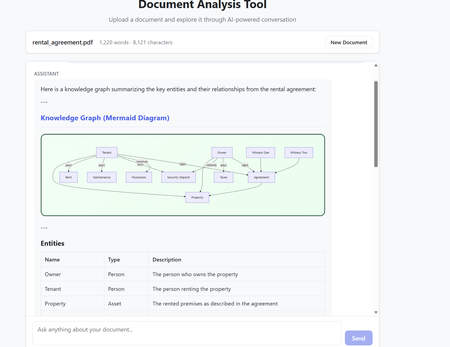
The model selection in Github Copilot got richer with the addition of Claude Opus 4.6. The Model capability along with the addition of agents makes it a powerful combination to build complex code which requires many hours or days. Claude Opus 4.6 is better in coding skills as compared to the previous models. It also plans more carefully, performs more reliably in larger codebases, and has better code review as well as debugging skills to catch its own mistakes. In my current experiment, I used it multiple times to review its own code and while it took time (understandably) to get familiar with the code base. After that initial effort on the evaluation, the suggestions for fixes/improvements were on dot and often even better than a human reviewer (me in this case). Opus 4.6 also can run agentic tasks for longer. Following the release of the model, Anthropic published a paper on using Opus 4.6 to build C Compiler with a team of parallel Claudes. The compiler was built by 16 agents from scratch to get a Rust-based C compiler which was capable of compiling the Linux kernel. This is an interesting paper (shared in resources). Using Claude Opus 4.6 in Agentic Mode In less than an hour, I built a document analyzer to analyse the content, extract insights, build knowledge graphs and summarize elements. The code was built using Claude Opus 4.6 alongwith Claude Agents in Visual Studio Code. The initial prompt built the code and in the next hour after a few more interactions - unit tests were added and the UI worked as expected specifically for rendering the graphs. In the second phase, I converted the capabilities into Agents with tools and skills making the codebase Agentic. All this was done in Visual Studio using Github Copilot. Adding the complexity of Agentic execution was staggered across phases but the coding agent may well have built it right in the first instance with detailed specifications and instructions. The Agent could also fix UI requirements and problems in graph rendering from the snapshot shared in the chat window. That along with the logging was sufficient to quickly get to an application which worked as expected. The final graph rendering used mermaid diagrams in javascript while the backend was in python. Knowledge Graph rendering using mermaid What are Agents? Agents perform complete coding tasks end-to-end. They understand your project, make changes across multiple files, run commands, and adapt based on the results. An agent runs in the local, background, cloud, or third-party mode. An agent takes a high-level task and it breaks the task down into steps. It executes those steps with tools and self-corrects on errors. Multiple agent sessions can run in parallel, each focused on a different task. On creating a new agent session, the previous session remains active and can be accessed between tasks via the agent sessions list. The Chat window in Visual Studio Code allows for changing the model and also the Agent Mode. The Agent mode can be local for Local Agents or run in the background or on Cloud. Additionally, Third Party Agents are also available for coding. In the snapshot below, the Claude Agent (Third Party Agent) is used. In this project Azure GPT 4.1 was used in the code to perform the document analysis but this can be changed to any model of choice. I also used the ‘Ask before edits” mode to track the command runs. Alternatively, the other option was to let the Agent run autonomously. Visual Studio Code - Models and Agent Mode The local Agentic mode was also a good option and I used it a few times specifically as it is not constrained by network connectivity. But when the local compute does not suffice, the cloud mode is the next best option. Background agents are CLI-based agents, such as Copilot CLI running in the background on your local machine. They operate autonomously in the editor and Background agents use Git worktrees to work in an isolated environment from your main workspace to prevent conflicts with your active work. How to get the model? The model is accessible to GitHub Copilot Pro/Pro+, business, and enterprise users. Opus 4.6 operates more reliably in large codebases, offering improved code review and debugging skills. The Fast mode for Claude Opus 4.6, rolled out in research preview, provides a high-speed option with output token delivery speeds up to 2.5 times faster while maintaining comparable capabilities to Opus 4.6. Resources https://www.anthropic.com/news/claude-opus-4-6 https://www.anthropic.com/engineering/building-c-compiler https://github.blog/changelog/2026-02-05-claude-opus-4-6-is-now-generally-available-for-github-copilot https://code.visualstudio.com/docs/copilot/agents/overview5.3KViews1like2Comments
Enabling and disabling forwarding rule
Hello, We need to turn on a mail forwarding rule on a single mailbox, within 365. We looked at using a Azure Function App and copilot got us most of the way there but need some help with a 400 error. Failed to enable rule: The remote server returned an error: (400) Bad Request. The API authenticates and has the Mail.ReadWrite and Mail.Send and seems to be happy there. Is there a reason why this is giving a 400 error as all the details (I thought) were in order. # Azure AD App details $clientId = "your-client-id" $clientSecret = "your-client-secret" $tenantId = "your-tenant-id" # Function parameters $mailbox = "email address removed for privacy reasons" $ruleId = "086b4cfe-b18a-4ca0-b8a6-c0cc13ab963e3208025663109857281" # Provided rule ID without backslash # Get OAuth token $body = @{ client_id = $clientId client_secret = $clientSecret scope = "https://graph.microsoft.com/.default" grant_type = "client_credentials" } try { $response = Invoke-RestMethod -Uri "https://login.microsoftonline.com/$tenantId/oauth2/v2.0/token" -Method Post -ContentType "application/x-www-form-urlencoded" -Body $body $token = $response.access_token Write-Output "Token acquired successfully." } catch { Write-Error "Failed to get OAuth token: $_" return } # Enable the existing rule $headers = @{ Authorization = "Bearer $token" ContentType = "application/json" } $body = @{ isEnabled = $true } try { $jsonBody = $body | ConvertTo-Json Write-Output "JSON Body: $jsonBody" $response = Invoke-RestMethod -Uri "https://graph.microsoft.com/v1.0/users/$mailbox/mailFolders/inbox/messageRules/$ruleId" -Method Patch -Headers $headers -Body $jsonBody Write-Output "Rule enabled successfully: $($response | ConvertTo-Json)" } catch { Write-Error "Failed to enable rule: $_" Write-Output "Response Status Code: $($_.Exception.Response.StatusCode)" Write-Output "Response Status Description: $($_.Exception.Response.StatusDescription)" if ($_.Exception.Response -ne $null) { $responseContent = $_.Exception.Response.Content.ReadAsStringAsync().Result Write-Output "Response Content: $responseContent" } else { Write-Output "No response content available." } } # Return response Write-Output "Script completed."Solved228Views1like3CommentsApplication Consent when all are blocked?
Hi, When the consents for Enterprise Applications are set into very restricted level: User consent for applications: Users can request admin consent to apps they are unable to consent to Then come the application xyz which needs to be registered into company's tenant, and when users are trying to do this, they just get the following: Or they go to the web services like Microsoft's own msrc portal, they get the following when trying to sign-in with they work accout: Is there a way to avoid these? And how such a consent should be done so that end users does not need to be disturbed, is there a way to Administrators to do this before hand for end users?1.5KViews1like2Comments