azure function
20 TopicsAzure Database for MySQL bindings for Azure Functions (General Availability)
We’re thrilled to announce the general availability (GA) of Azure Database for MySQL Input and Output bindings for Azure Functions—a powerful way to build event-driven, serverless applications that seamlessly integrate with your MySQL databases. Key Capabilities With this GA release, your applications can use: Input bindings that allow your function to retrieve data from a MySQL database without writing any connection or query logic. Output bindings that allow your function to insert or update data in a MySQL table without writing explicit SQL commands. In addition you can use both the input and output bindings in the same function to read-modify-write data patterns. For example, retrieve a record, update a field, and write it back—all without managing connections or writing SQL. These bindings are fully supported for both in-process and isolated worker models, giving you flexibility in how you build and deploy your Azure Functions. How It Works Azure Functions bindings abstract away the boilerplate code required to connect to external services. With the MySQL Input and Output bindings, you can now declaratively connect your serverless functions to your Azure Database for MySQL database with minimal configuration. You can configure these bindings using attributes in C#, decorators in Python, or annotations in JavaScript/Java. The bindings use the MySql.Data.MySqlClient library under the hood and support Azure Database for MySQL Flexible Server. Getting Started To use the bindings, install the appropriate NuGet or npm package: # For isolated worker model (C#) dotnet add package Microsoft.Azure.Functions.Worker.Extensions.MySql # For in-process model (C#) dotnet add package Microsoft.Azure.WebJobs.Extensions.MySql Then, configure your function with a connection string and binding metadata. Full samples for all the supported programming frameworks are available in our github repository. Here is a sample C# in-process function example where you want to retrieve a user by ID, increment their login count, and save the updated record back to the MySQL database for lightweight data transformations, modifying status fields or updating counters and timestamps. public class User { public int Id { get; set; } public string Name { get; set; } public int LoginCount { get; set; } } public static class UpdateLoginCountFunction { [FunctionName("UpdateLoginCount")] public static async Task<IActionResult> Run( [HttpTrigger(AuthorizationLevel.Function, "post", Route = "user/{id}/login")] HttpRequest req, [MySql("SELECT * FROM users WHERE id = @id", CommandType = System.Data.CommandType.Text, Parameters = "@id={id}", ConnectionStringSetting = "MySqlConnectionString")] User user, [MySql("users", ConnectionStringSetting = "MySqlConnectionString")] IAsyncCollector<User> userCollector, ILogger log) { if (user == null) { return new NotFoundObjectResult("User not found."); } // Modify the user object user.LoginCount += 1; // Write the updated user back to the database await userCollector.AddAsync(user); return new OkObjectResult($"Login count updated to {user.LoginCount} for user {user. Name}."); } } Learn More Azure Functions MySQL Bindings Azure Functions Conclusion With input and output bindings for Azure Database for MySQL now generally available, building serverless apps on Azure with MySQL has never been simpler or more efficient. By eliminating the need for manual connection management and boilerplate code, these bindings empower you to focus on what matters most: building scalable, event-driven applications with clean, maintainable code. Whether you're building real-time dashboards, automating workflows, or syncing data across systems, these bindings unlock new levels of productivity and performance. We can’t wait to see what you’ll build with them. If you have any feedback or questions about the information provided above, please leave a comment below or email us at AskAzureDBforMySQL@service.microsoft.com. Thank you!
Visualizing meeting room availability using Microsoft365 and LoraWan BusyLight
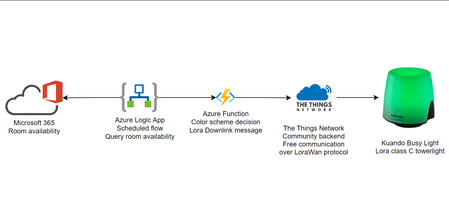
Visualizing meeting room availability using Microsoft 365 and LoraWan Kuando BusyLight. Send downlink messages to The Things Network Lora backend via Azure Functions based on LogicApps actions. Read the full story at: https://sandervandevelde.wordpress.com/2023/10/19/visualizing-meeting-room-availability-with-outlook-and-lorawan-busylight/
How to connect Azure Function App to On-prem DNS Server?
I am creating a .NET application that validates domain from an on-prem DNS server. I would like to know how can I integrate my Azure function app to perform nslookup on the on-prem DNS server. Is there a way without using virtual networks or powershell script?1KViews0likes2CommentsAutomatic Grading with Azure OpenAI Services ChatGPT Virtual Assistant
Don’t waste your time grading assignments by hand. Let AI do it for you! Learn how our AI virtual assistant can help students and teachers with their assignments in a fair, effective, and eco-friendly way. Plus, discover the secrets of choosing the best model, parameter, and prompt design for your tasks. ChatGPT 4 is not always the best option!8.2KViews1like0Comments
Trigger ADF pipeline using Storage event trigger over private network.
Project Technology: Azure function, ADF, Azure Synapse, ADLS Issue description: Customer has a strict regulatory compliance requirement, due to which they need to block all outbound (public endpoint) connections. Hence, most of our products were not able to provide the expected result as we have a dependency on public endpoints.6.7KViews0likes2Comments
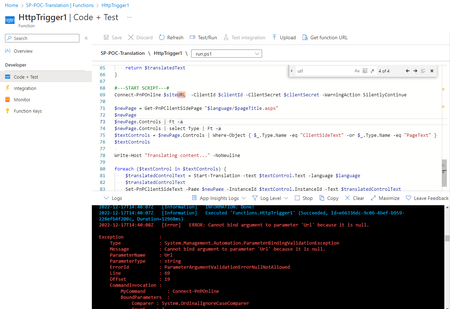
Connect-PnPOnline in Azure function : parameter 'Url' because it is null
Dear community, Connect-Pnponline command is not accpting in Azure function, Always gettings below error "Cannot bind argument to parameter 'Url' because it is null." * the same script is working in local system. I followed MS guide to resolve the issue but no luck. appriciate your help and ides to solve the issue. https://learn.microsoft.com/en-us/sharepoint/dev/declarative-customization/site-design-pnp-provisioning#upload-the-pnp-powershell-module-for-your-azure-function,3KViews0likes4CommentsNo Metrics in Application Insights
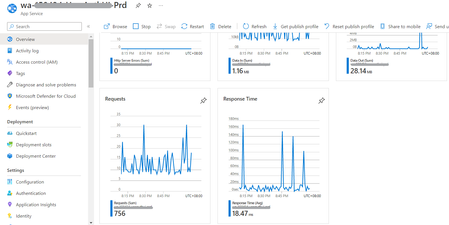
I have a web app hosted in Azure. I created function apps and app service with application insights enabled on each resource. As you can see from the screenshot of my app service, there is a metric data: But when I checked its application insights, there are no data in the metrics: I also checked traces from the logs and there are data being logged. I would like to know why data is not reflected on the application insights. The instrumentation key are matched with the app settings of function app/app service. Hope you can help me on this issue. Thanks!1.1KViews0likes0CommentsAzure Function with Blob Output Binding returning 404 on GetProperties check before writing the Blob
Hi. This question is similar: https://stackoverflow.com/questions/64546302/how-to-disable-blob-existence-check-in-azure-function-output-binding But I'm wondering if there are other answers or comments out there, and more recent. I have an Azure Function with an HTTP Trigger input binding and a Blob Storage output binding. For every execution, the output binding looks like it tries to get Blob Properties first, resulting in a 404. Quite rightly, as the data to be written is going to a new Blob. But this will always fail and in this case is redundant. It takes time to go through these steps - admittedly milliseconds, but still. Presumably it's also logging somewhere, so that's a storage cost - might be negligible now, but something to not be ignored. I'm not 100% sure where that logging would be stored, either, to go and manage it. The positive is that the overall function execution is fine. But it's still recording all these failures, and we're getting 10s of thousands through it a day. Is there a way to use the concise output binding code but not do this prior if-exists-get-properties check? My options seem to be live with it, or rewrite to use BlobContainer, BlobClient and so on instead of the Blob attribute output binding. Anyone got some clever ideas?2.1KViews0likes1CommentEnhancing GitHub Classroom with Azure serverless services
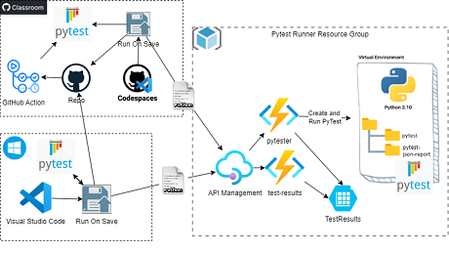
GitHub classroom auto grader uses GitHub Actions and Unit Test under student's repository. However students can get full mark by simply changing the workflow or tests. Students push code themselves, so they can copy from other and push! This post is an opensource Azure Serverless application to address those to problem for Python programming course with CodeSpace and Visual Code.3.1KViews2likes0Comments