azure firewall
26 Topics
Azure VM Losing Network Connectivity after Doomain Removal
I currently have Azure VM domain joined servers running Server 2019 Std which are being upgraded via an in-place upgrade to Server 2025 Std. After the upgrade I will be un-joining from the domain and then joining a WORKGROUP to allow Entra ID joining of the servers. I have completed this on a non-critical server but upon removing from the domain the server appears to have lost network connectivity and displays a Computer Icon with a flashing cable, then eventually fails. I noticed the Ethernet displays now “Public” so I changed back to “Private” and removed “Network Level Authentication” from RDP. I also removed the Custom DNS server settings that were on the NIC in Azure Portal and set to “Virtual Network Inherited” to allow Azure DNS. Unfortunately, the same events occur time and time again with no network connectivity. I have reset the NIC and network via Powershell and CMD commands as suggested in most Google searches along with recreating the VM NIC in Azure, but still the same! Does anyone have any idea what could be causing the issue and how to resolve it as someone must have experienced similar in the past when unjoining an Azure VM from a corporate domain? I have been directing all traffic from server via the Azure FW using a Route table with a route directing all traffic via Azure FW and associating the subnets being used: Address Prefix: 0.0.0.0/0 - Next Hop type: Virtual Appliance – Next Hop IP address: <IP of Azure FW Private IP> I assume this would remain the same too? Please any advice or suggestions would be greatly appreciated? Thanks267Views0likes2Comments
Traffic processing BGP Azure VPN gateway A/A
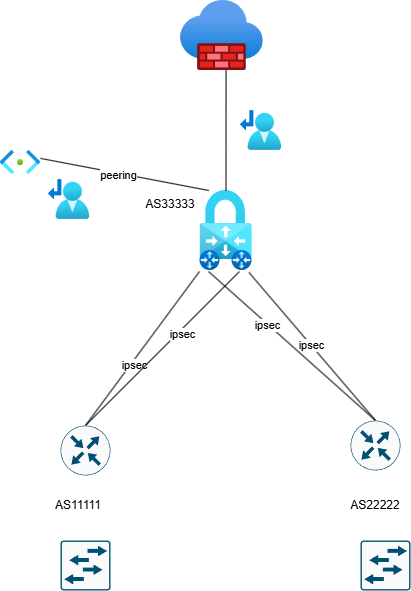
Hello, Can someone explain how Azure processes the traffic with implemented a VPN gateway in Active Active mode?. Azure firewall premium is also configured. BGP is without preferences. The user route definition is set up to the next hop Azure firewall . Is it possible in this scenario occurs the asymmetric routing with traffic drop by azure firewall ? In my understand is that, if we need to configure User route definition on Gateway subnet to inspect traffic to peering subnet, so the firewall don't see traffic passing through VPN gateway. Traffic going through ipsec tunnels can go different paths and firewall do not interfere because everything is routed to it by user route definition.482Views0likes5CommentsHelp! - How is VNet traffic reaching vWAN/on‑prem when the VNet isn’t connected to the vWAN hub
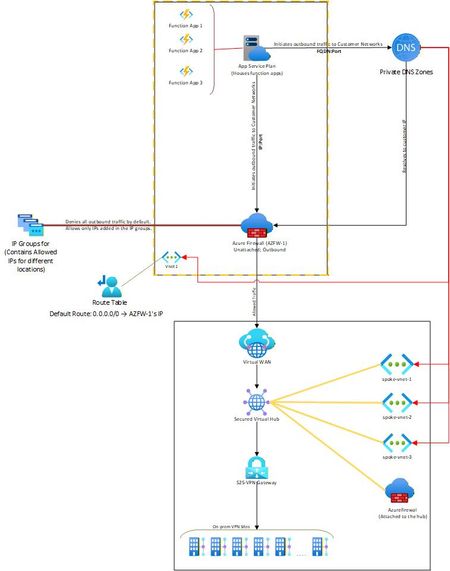
Hello, I needed some clarity on how the following is working: Attached is a network diagram of our current setup. The function apps (in VNet-1) initiate a connection(s) to a specific IP:Port or FQDN:Port in the on-premises network(s). A Private DNS zone ensures that any FQDN is resolved to the correct internal IP address of the on-prem endpoint. In our setup, both the function app and the external firewall reside in the same VNet. This firewall is described as “Unattached” because it is not the built-in firewall of a secured vWAN hub, but rather an independent Azure Firewall deployed in that VNet. The VNet has a user-defined default route (0.0.0.0/0) directing all outbound traffic to the firewall’s IP. The firewall then filters the traffic, allowing only traffic destined to whitelisted on-premises IP: Port or FQDN: Port combinations (using IP Groups), and blocking everything else. The critical question and the part that I am unable to figure out is: Once the firewall permits a packet, how does Azure know to route it to the vWAN hub and on to the site-to-site VPN? Because VNet-1 truly has no connection at all to the vWAN hub (no direct attachment, no peering, no VPN from the NVA). But the traffic is still reaching the on-prem sites. Unable to figure out how this is happening. Am I missing something obvious? Any help on this would be appreciated. Thank you!535Views0likes4Comments
Spoke-Hub-Hub Traffic with VPN Gateway BGP and Firewall Issue
Hello, I’m facing a situation where I’m trying to have Azure Firewall Inspection on the VPN Gateway VNET-VNET Connectivity. It seems to work if I go from SpokeA-HubAFirewall-HubAVPN—HubBVPN-SpokeB but if I try to go from SpokeA-HubAFirewall-HubAVPN-HubBVM or Inbound Resolver it fails to route correctly according to Connectivity Troubleshooter it stops at HubAVPN with Local Error: RouteMissing but then reaches destination health so makes me believe it’s getting there but not following the route I want it to take which might be causing routing issues. What Am I missing here? This connectivity was working before introducing the Azure Firewall for Inspection with the UDR. Is what I’m trying to accomplish not possible? I’ve tried different types of UDR rules on the Gateway Subnet, and this is my most recent configuration. The reason I’m trying to accomplish this is because I’m seeing a similar error in our Hub-Spoke Hybrid environment and I’m trying to replicate the issue. Current Configuration 2x Hubs with Spoke networks attached so example Hub-Spoke-A Configuration: Hub-A Contains following subnets and Resources VPN Gateway - GateWaySubnet Azure Firewall - AzureFirewallSubnet Inbound Private Resolver - PrivateResolverSubnet Virtual Machine – VM Subnet Gateway Subnet has an attached UDR with the following routes Propagation - True Prefix Destination – Hub-B Next Hop Type – Virtual Appliance Next Hope IP – Hub-A Firewall Prefix Destination – Spoke-B Next Hop Type – Virtual Appliance Next Hope IP – Hub-A Firewall Hub-Spoke-B Configuration: Hub-B Contains following subnets and Resources VPN Gateway - GateWaySubnet Azure Firewall - AzureFirewallSubnet Inbound Private Resolver - PrivateResolverSubnet Virtual Machine – VM Subnet Gateway Subnet has an attached UDR with the following Routes Propagation - True Prefix Destination – Hub-A Next Hop Type – Virtual Appliance Next Hope IP – Hub-B Firewall Prefix Destination – Spoke-A Next Hop Type – Virtual Appliance Next Hope IP – Hub-B Firewall Spoke Subnets has an attached UDR with the following Routes Propagation - True Prefix Destination – 0.0.0.0/0 Next Hop Type – Virtual Appliance Next Hope IP – HubA/HubB Firewall (Depending on what hub its peered to) VPN Gateways HA VNET-VNET with BGP Enabled. I can see that it knows the routes and like I said this was working prior introducing the UDRs for force traffic through the azure firewall.599Views0likes2Comments
Azure Firewall has no capacity to maintain source IP on outbound traffic?
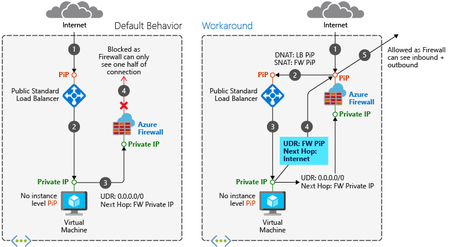
Hello all, My use case: To have multiple static public IP addresses attached to Azure Firewall with SNAT rules configured so that the public IP isn't just randomly selected. We have multiple services that have whitelisting configured for specific public load balancer IPs and now we are trying to move them behind Azure Firewall. Since there is whitelisting on the destination, the public IP being randomly selected won't work. My resources: One instance of premium SKU Azure Firewall. Hub and spoke architecture. Route tables being used to force traffic through Firewall (routed to private IP of firewall) The research I have conducted: I have tried absolutely everything I can think of before coming to this forum and from what I can tell the 4 ways of outbound connectivity provided by Azure are: Default outbound connectivity. Against best practice to do this and won't work since its routing through a virtual appliance (firewall) Associate a NAT gateway to a subnet. This won't work since we have only one instance of Azure Firewall and the requirement for multiple public IPs to be used. Assign a public IP to a virtual machine. Not applicable, sitting in backend pool of a load balancer, single public IP to be used for multiple member servers. Using the frontend IP address(es) of a load balancer for outbound via outbound rules. Needs to go through the firewall, impossible unless we can somehow integrate the firewall between the load balancer and the backend pool? Expanding more on the load balancer scenario, I ran across this documentation in Microsoft Learn. This looks great to tackle the asymmetric routing issue, however, we are only interested in maintaining the source IP for outbound traffic, this would again just use the firewalls public IP for outbound traffic and again randomly select it. Consensus: It seems bizarre to me that Azure has no capacity for static SNAT configuration like most firewalls do. I would have thought a large amount of use cases would require this function. Am I missing something? Is there another workaround? Or is Azure just behind the 8ball with networking. Thanks heaps in advance for any help :) Much Appreciated, usernameone101Solved983Views0likes2CommentsProduct Manager question - Azure Firewall
I would like to know if Azure Firewall team has plans to integrate geoblocking based on country codes into Azure Firewall policies? Today, we have to enlist a third party country code list and rebuild IPGroups into our AzFw policies daily. Other products such as WAF and Conditional Access allow for selecting a country code instead of IPv4 addresses.235Views0likes1CommentAz-firewall-mon(itor) - near real time Azure Firewall flow log analyser
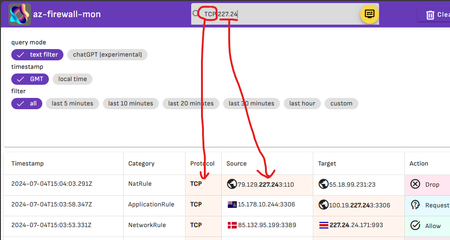
Hello, networking expert! I’m excited to share with you an update on my personal open source project: az-Firewall-mon: Az-firewall-monitor is an open-source tool that helps you answer to the following question: what is happening in my azure Firewall right now? It provides an alternative and opinionable way to access and inspect Azure Firewall logs, without using Log Analytics or Kusto queries. It provides a simple and intuitive interface that shows you what is happening on your firewall right now (or almost). to filter your data you can use both a full text search or natural language thanks to his integration with chatGPT4. Here a sample full text search interaction: here a sample natural language interaction Try out az-firewall-monitor at https://az-firewall-mon.duckiesfarm.com/ or have a look at the source code on GitHub at https://github.com/nicolgit/azure-firewall-mon Thank you!247Views1like0Comments
Internal API : Virtual Network support for Power Platform
Hello Everyone, We are using Custom Connectors from Power Automate Flows to initiate a call to the Internal API that is hosted in Azure through the MuleSoft Data Gateway. Since we are unable to activate the private endpoint for this internal API, we are seeking guidance on how to securely connect to the API via V-Net integration. Please advise. As per the Microsoft Documentation : Use custom connectors (preview) to securely connect to your services that are protected by private endpoints in Azure or services that are hosted within your private network. https://learn.microsoft.com/en-us/power-platform/admin/vnet-support-overview Thanks, -Sri726Views0likes1Comment
Issue with Azure VM Conditional Access for Office 365 and Dynamic Public IP Detection
Hi all, I have a VM in Azure where I need to allow an account with MFA to bypass the requirement on this specific server when using Office 365. I've tried to achieve this using Conditional Access by excluding locations, specifically the IP range of my Azure environment. Although I’ve disconnected any public IPs from this server, the Conditional Access policy still isn’t working as intended. The issue seems to be that it continues to detect a public IP, which changes frequently, making it impossible to exclude. What am I doing wrong?2KViews0likes5CommentsPublic IPs on Azure
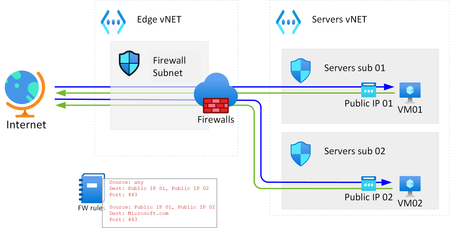
Hi, I have been trying to read documentation, but most likely I have used wrong search terms. But does anybody knows if the following kind of setup is possible on Azure? The main idea behind this question is, if I have servers and willing to have centralized FW control for the traffic coming in or out to/from these VMs, is this an option? Or if I assign the public IP to the VM, that can go out directly and skipping the centralized FW? All documents what I have see are speak about assigning the Public IP to the VMs, or having NATing, but with that we hit to the problem when port ranges extends widely.1.8KViews0likes5Comments