azure event hubs
77 Topics
How to consume Azure Event Grid messages on local desktop application?
Hello All, I am new to Azure Platform, Need some inputs on how can one consume Azure Event Grid messages on local environment. I already went through the documentation of the same but all I could find was references related to those apps which runs on Azure PaaS. If anyone can guide me in the right direction, I would be very much appreciate it. Thank you.1.3KViews0likes1Comment
"No-Ops" Kafka Experience: Why Event Hubs is Your Default Destination for Streaming on Azure
For many engineering teams, the promise of real-time data streaming is often overshadowed by the "operational tax" of maintaining the infrastructure. Managing an Apache Kafka® cluster traditionally means wrestling with broker patches, Zookeeper (or KRaft) orchestration, disk rebalancing, and the constant anxiety of manual scaling during peak loads. As a Product Manager for Azure Event Hubs, my conversations with customers usually start with a simple question: "How can I get the power of the Apache Kafka® ecosystem without the headache of managing it?" The answer is Azure Event Hubs. It isn’t just a service that talks to Kafka; it is the de facto way to run Kafka on Azure. If you are building on the Azure cloud, there is no longer a need to look at self-hosted, semi-managed, or complex virtual machine-based solutions. Event Hubs is the native, cloud-scale engine designed to be your default streaming destination. Your Code, Our Infrastructure The most compelling reason to choose Azure Event Hubs is its protocol compatibility. We provide a Kafka-compliant endpoint that allows your existing applications, frameworks, and tools to interact with Event Hubs seamlessly. Because the service is built on a multi-protocol engine, you keep the rich ecosystem of Apache Kafka®—including Kafka Connect and existing client libraries—while offloading the entire operational burden to Azure. Whether you are migrating an existing workload or starting fresh, you can leverage the industry-standard Kafka APIs while benefiting from a platform designed for the cloud. Choosing the Right Tier for Your Journey We believe that high-scale streaming should be accessible to everyone, from three-person startups to global enterprises. Our tiers are structured to support your growth at every stage: Standard Tier: The Cost-Effective Entry Point For many common use cases—like basic log aggregation, website clickstream analysis, or simple pub-sub messaging—the Standard Tier is the perfect fit. It supports core Apache Kafka® protocol features and provides a reliable, managed experience that allows teams to prove out concepts without heavy financial or operational commitments. Premium & Dedicated Tiers: Enterprise-Grade Power When your workloads become mission-critical, our Premium and Dedicated tiers unlock the full potential of the platform. These tiers are built for high-throughput, low-latency scenarios and include advanced Kafka-specific features such as: Kafka Transactions: Essential for exactly-once processing requirements. Kafka Streams: Support for stateful stream processing. Advanced Compression & Dynamic Partitioning: For optimized scaling and cost management. Geo-replication: Turnkey replication of metadata and data across regions with customer managed RPO (including RPO=0). The Hub of the Modern Data Stack Event Hubs is the "nervous system" of the Azure ecosystem. It doesn't just ingest data; it bridges the gap between raw events and actionable insights through deep, native integrations: Serverless Scaling: Features like Auto-Inflate allow your throughput to scale automatically as traffic spikes, ensuring you never drop a message during a surprise surge. Microsoft Fabric & Real-Time Intelligence: With the emergence of Microsoft Fabric, Event Hubs serves as the primary feeder for real-time analytics. You can stream Kafka data directly into a Fabric Lakehouse with zero-code integrations, making "real-time" a reality for your entire data team. One-Click Archival: Use Event Hubs Capture to automatically batch and move streaming data into Azure Data Lake Storage for long-term cold storage or batch processing. The Bottom Line If you are building on Azure, running your own Kafka infrastructure is technical debt you don't need to carry. Azure Event Hubs provides the reliability of a battle-tested cloud-native engine with the familiarity of the Apache Kafka® ecosystem. It is the most robust, scalable, and integrated way to bring streaming to your organization. Ready to Migrate? If you are currently running a Kafka cluster and are ready to offload the operational burden, our documentation provides a comprehensive roadmap. Migrate to Azure Event Hubs for Apache Kafka Ecosystems204Views0likes1CommentProtect Your Streaming Data in Use: Confidential Computing for Azure Event Hubs Dedicated
For organizations in regulated industries — financial services, healthcare, government, defense — the security conversation around data has always revolved around two states: data at rest and data in transit. Encrypt your storage. Encrypt your network traffic. Check, check. But there's a third state that's been much harder to address: data in use. What happens to your events while they're being actively processed by the streaming infrastructure? While they're in memory on the broker, being indexed, being replicated? That's the gap that confidential computing closes. Today, we're announcing confidential computing support for Azure Event Hubs Dedicated clusters, available now in Korea Central and UAE North. Event Hubs already provides a comprehensive security model: Entra ID authentication, RBAC, TLS 1.2+ in transit, encryption at rest with Microsoft-managed or customer-managed keys, private endpoints, and network isolation. Confidential computing completes the picture. It uses hardware-based Trusted Execution Environments (TEEs) — an industry standard defined by the Confidential Computing Consortium, of which Microsoft is a founding member — to protect your event data while it's being actively processed. The TEE creates an encrypted boundary at the silicon level, preventing unauthorized access even from privileged software or compromised infrastructure operators. Your data is now protected across all three states: at rest, in transit, and in use. Why This Is a Natural Fit for Dedicated Event Hubs Dedicated already provides single-tenant, hardware-isolated clusters. Your resources aren't shared with any other customer. Confidential computing extends that isolation model to the compute layer itself — the dedicated hardware your events run on now operates inside a Trusted Execution Environment. And the best part for your engineering teams: confidential computing requires zero changes to your applications. Your producers and consumers continue to use the same Event Hubs SDK or Apache Kafka® APIs. Connection strings, authentication, partition strategies — nothing changes. You create a new Dedicated cluster with confidential computing enabled, provision your namespaces on it, and the protection is transparent from that point forward. Defense in Depth Confidential computing is most powerful when combined with other Event Hubs security capabilities. For maximum data protection, pair it with customer-managed keys backed by Azure Key Vault Managed HSM: Layer Protection Data in use Confidential computing (TEE) — New Data in transit TLS 1.2+, always-on Data at rest Customer-managed keys in Managed HSM Identity Microsoft Entra ID + RBAC + managed identities Network Private endpoints, VNet rules, IP firewall Infrastructure Single-tenant dedicated clusters Governance Azure Policy enforcement With this combination, your encryption keys are stored in FIPS 140-2 Level 3 validated hardware security modules, your data is encrypted with keys only you control, and your compute is isolated at the hardware level. No single party — including the cloud provider — can access unencrypted data. You can also use Azure Policy to enforce that all Dedicated clusters in your organization have confidential computing enabled, ensuring consistent security posture across your environment. What You Need to Know Tier: Dedicated only. Regions: Korea Central and UAE North. New clusters required: Confidential computing must be enabled at cluster creation time. You cannot enable it on existing clusters. If you're running a Dedicated cluster today and want this capability, you'll need to create a new cluster with confidential computing enabled and provision your namespaces on it. Impact to applications: None. Zero code changes required. Your producers and consumers connect to the new namespace the same way they always have. Get Started If you're already running an Event Hubs Dedicated cluster and need confidential computing, the path is straightforward: create a new Dedicated cluster with confidential computing enabled in a supported region, then create your namespaces on that new cluster. Since your applications require zero code changes, this is an infrastructure migration — not an application migration. We recommend validating with a non-production workload first to confirm your applications behave identically. If you're evaluating Event Hubs Dedicated for a new workload with strict security requirements, confidential computing gives you one more reason to choose the Dedicated tier: hardware-level protection you can point to when your compliance team asks "how is the data protected while it's being processed?" For step-by-step instructions — including portal walkthrough, Bicep templates, ARM templates, and Azure Policy definitions — see the full documentation: ➡️ Confidential computing for Azure Event Hubs277Views0likes0CommentsJSON Structure: A JSON schema language you'll love
We talk to many customers moving structured data through queues and event streams and topics, and we see a strong desire to create more efficient and less brittle communication paths governed by rich data definitions well understood by all parties. The way those definitions are often shared are schema documents. While there is great need, the available schema options and related tool chains are often not great. JSON Schema is popular for its relative simplicity in trivial cases, but quickly becomes unmanageable as users employ more complex constructs. The industry has largely settled on "Draft 7," with subsequent releases seeing weak adoption. There's substantial frustration among developers who try to use JSON Schema for code generation or database mapping—scenarios it was never designed for. JSON Schema is a powerful document validation tool, but it is not a data definition language. We believe it's effectively un-toolable for anything beyond pure validation; practically all available code-generation tools agree by failing at various degrees of complexity. Avro and Protobuf schemas are better for code generation, but tightly coupled to their respective serialization frameworks. For our own work in Microsoft Fabric, we're initially leaning on an Avro-compatible schema with a small set of modifications, but we ultimately need a richer type definition language that ideally builds on people's familiarity with JSON Schema. This isn't just a Microsoft problem. It's an industry-wide gap. That's why we've submitted JSON Structure as a set of Internet Drafts to the IETF, aiming for formal standardization as an RFC. We want a vendor-neutral, standards-track schema language that the entire industry can adopt. What Is JSON Structure? JSON Structure is a modern, strictly typed data definition language that describes JSON-encoded data such that mapping to and from programming languages and databases becomes straightforward. It looks familiar—if you've written "type": "object", "properties": {...} before, you'll feel right at home. But there's a key difference: JSON Structure is designed for code generation and data interchange first, with validation as an optional layer rather than the core concern. This means you get: Precise numeric types: int32 , int64 , decimal with precision and scale, float , double Rich date/time support: date , time , datetime , duration —all with clear semantics Extended compound types: Beyond objects and arrays, you get set , map , tuple , and choice (discriminated unions) Namespaces and modular imports: Organize your schemas like code Currency and unit annotations: Mark a decimal as USD or a double as kilograms Here's a compact example that showcases these features. We start with the schema header and the object definition: { "$schema": "https://json-structure.org/meta/extended/v0/#", "$id": "https://example.com/schemas/OrderEvent.json", "name": "OrderEvent", "type": "object", "properties": { Objects require a name for clean code generation. The $schema points to the JSON Structure meta-schema, and the $id provides a unique identifier for the schema itself. Now let's define the first few properties—identifiers and a timestamp: "orderId": { "type": "uuid" }, "customerId": { "type": "uuid" }, "timestamp": { "type": "datetime" }, The native uuid type maps directly to Guid in .NET, UUID in Java, and uuid in Python. The datetime type uses RFC3339 encoding and becomes DateTimeOffset in .NET, datetime in Python, or Date in JavaScript. No format strings, no guessing. Next comes the order status, modeled as a discriminated union: "status": { "type": "choice", "choices": { "pending": { "type": "null" }, "shipped": { "type": "object", "name": "ShippedInfo", "properties": { "carrier": { "type": "string" }, "trackingId": { "type": "string" } } }, "delivered": { "type": "object", "name": "DeliveredInfo", "properties": { "signedBy": { "type": "string" } } } } }, The choice type is a discriminated union with typed payloads per case. Each variant can carry its own structured data— shipped includes carrier and tracking information, delivered captures who signed for the package, and pending carries no payload at all. This maps to enums with associated values in Swift, sealed classes in Kotlin, or tagged unions in Rust. For monetary values, we use precise decimals: "total": { "type": "decimal", "precision": 12, "scale": 2 }, "currency": { "type": "string", "maxLength": 3 }, The decimal type with explicit precision and scale ensures exact monetary math—no floating-point surprises. A precision of 12 with scale 2 gives you up to 10 digits before the decimal point and exactly 2 after. Line items use an array of tuples for compact, positional data: "items": { "type": "array", "items": { "type": "tuple", "properties": { "sku": { "type": "string" }, "quantity": { "type": "int32" }, "unitPrice": { "type": "decimal", "precision": 10, "scale": 2 } }, "tuple": ["sku", "quantity", "unitPrice"], "required": ["sku", "quantity", "unitPrice"] } }, Tuples are fixed-length typed sequences—ideal for time-series data or line items where position matters. The tuple array specifies the exact order: SKU at position 0, quantity at 1, unit price at 2. The int32 type maps to int in all mainstream languages. Finally, we add extensible metadata using set and map types: "tags": { "type": "set", "items": { "type": "string" } }, "metadata": { "type": "map", "values": { "type": "string" } } }, "required": ["orderId", "customerId", "timestamp", "status", "total", "currency", "items"] } The set type represents unordered, unique elements—perfect for tags. The map type provides string keys with typed values, ideal for extensible key-value metadata without polluting the main schema. Here's what a valid instance of this schema looks like: { "orderId": "f47ac10b-58cc-4372-a567-0e02b2c3d479", "customerId": "7c9e6679-7425-40de-944b-e07fc1f90ae7", "timestamp": "2025-01-15T14:30:00Z", "status": { "shipped": { "carrier": "Litware", "trackingId": "794644790323" } }, "total": "129.97", "currency": "USD", "items": [ ["SKU-1234", 2, "49.99"], ["SKU-5678", 1, "29.99"] ], "tags": ["priority", "gift-wrap"], "metadata": { "source": "web", "campaign": "summer-sale" } } Notice how the choice is encoded as an object with a single key indicating the active case— {"shipped": {...}} —making it easy to parse and route. Tuples serialize as JSON arrays in the declared order. Decimals are encoded as strings to preserve precision across all platforms. Why Does This Matter for Messaging? When you're pushing events through Service Bus, Event Hubs, or Event Grid, schema clarity is everything. Your producers and consumers often live in different codebases, different languages, different teams. A schema that generates clean C# classes, clean Python dataclasses, and clean TypeScript interfaces—from the same source—is not a luxury. It's a requirement. JSON Structure's type system was designed with this polyglot reality in mind. The extended primitive types map directly to what languages actually have. A datetime is a DateTimeOffset in .NET, a datetime in Python, a Date in JavaScript. No more guessing whether that "string with format date-time" will parse correctly on the other side. SDKs Available Now We've built SDKs for the languages you're using today: TypeScript, Python, .NET, Java, Go, Rust, Ruby, Perl, PHP, Swift, and C. All SDKs validate both schemas and instances against schemas. A VS Code extension provides IntelliSense and inline diagnostics. Code and Schema Generation with Structurize Beyond validation, you often need to generate code or database schemas from your type definitions. The Structurize tool converts JSON Structure schemas into SQL DDL for various database dialects, as well as self-serializing classes for multiple programming languages. It can also convert between JSON Structure and other schema formats like Avro, Protobuf, and JSON Schema. Here's a simple example: a postal address schema on the left, and the SQL Server table definition generated by running structurize struct2sql postaladdress.json --dialect sqlserver on the right: JSON Structure Schema Generated SQL Server DDL { "$schema": "https://json-structure.org/meta/extended/v0/#", "$id": "https://example.com/schemas/PostalAddress.json", "name": "PostalAddress", "description": "A postal address for shipping or billing", "type": "object", "properties": { "id": { "type": "uuid", "description": "Unique identifier for the address" }, "street": { "type": "string", "description": "Street address with house number" }, "city": { "type": "string", "description": "City or municipality" }, "state": { "type": "string", "description": "State, province, or region" }, "postalCode": { "type": "string", "description": "ZIP or postal code" }, "country": { "type": "string", "description": "ISO 3166-1 alpha-2 country code" }, "createdAt": { "type": "datetime", "description": "When the address was created" } }, "required": ["id", "street", "city", "postalCode", "country"] } CREATE TABLE [PostalAddress] ( [id] UNIQUEIDENTIFIER, [street] NVARCHAR(200), [city] NVARCHAR(100), [state] NVARCHAR(50), [postalCode] NVARCHAR(20), [country] NVARCHAR(2), [createdAt] DATETIME2, PRIMARY KEY ([id], [street], [city], [postalCode], [country]) ); EXEC sp_addextendedproperty 'MS_Description', 'A postal address for shipping or billing', 'SCHEMA', 'dbo', 'TABLE', 'PostalAddress'; EXEC sp_addextendedproperty 'MS_Description', 'Unique identifier for the address', 'SCHEMA', 'dbo', 'TABLE', 'PostalAddress', 'COLUMN', 'id'; EXEC sp_addextendedproperty 'MS_Description', 'Street address with house number', 'SCHEMA', 'dbo', 'TABLE', 'PostalAddress', 'COLUMN', 'street'; -- ... additional column descriptions The uuid type maps to UNIQUEIDENTIFIER , datetime becomes DATETIME2 , and the schema's description fields are preserved as SQL Server extended properties. The tool supports PostgreSQL, MySQL, SQLite, and other dialects as well. Mind that all this code is provided "as-is" and is in a "draft" state just like the specification set. Feel encouraged to provide feedback and ideas in the GitHub repos for the specifications and SDKs at https://github.com/json-structure/ Learn More We've submitted JSON Structure as a set of Internet Drafts to the IETF, aiming for formal standardization as an RFC. This is an industry-wide issue, and we believe the solution needs to be a vendor-neutral standard. You can track the drafts at the IETF Datatracker. Main site: json-structure.org Primer: JSON Structure Primer Core specification: JSON Structure Core Extensions: Import | Validation | Alternate Names | Units | Composition IETF Drafts: IETF Datatracker GitHub: github.com/json-structure7.7KViews8likes1Comment
General Availability: Large Message Support in Azure Event Hubs
Azure Event Hubs is a cloud-native service that streams millions of events per second with minimal latency, fully compatible with Apache Kafka and requiring no code changes for existing Kafka workloads. Today, we are excited to announce the general availability of Large Message Support in Azure Event Hubs, enabling you to send and receive messages up to 20 MB in self-serve scalable Dedicated clusters, with enhanced reliability for seamless handling of large messages and greater flexibility for your data streaming solutions. This feature enables fast and reliable processing of larger, indivisible events. Large Message Support works with both AMQP and Apache Kafka protocols, allowing you to send bigger payloads as usual without changing your client code. It is advisable to check your client settings to ensure that timeouts and maximum message size limits are not set too low on the client side. To enable Large Message Support, simply configure your eligible event hubs dedicated clusters using the Azure Portal. For further details and eligibility, please visit aka.ms/largemessagesupportforeh. Your feedback is invaluable to us, and we look forward to hearing about your experiences. Read more: Azure Event Hubs for Apache Kafka - Azure Event Hubs | Microsoft Learn Quickstart: Send and Receive Large Messages with Azure Event Hubs (Preview) - Azure Event Hubs | Microsoft Learn295Views1like0CommentsGeo-Replication is Here! Now generally available for Event Hubs Premium & Dedicated
Today, we are thrilled to announce the General Availability of the Geo-replication feature for Azure Event Hubs, now available in both Premium and Dedicated tiers. This milestone marks a significant enhancement in our service, providing our customers with robust business continuity and disaster recovery capabilities – ensuring high availability for their mission-critical applications. The Geo-replication feature allows you to replicate your Event Hubs data across multiple regions either synchronously or asynchronously, ensuring that your data remains accessible in the event of maintenance activities, regional degradation, or a regional outage. With Geo-replication, you can seamlessly promote a secondary region to a primary, minimizing downtime and ensuring business continuity. Before failover (promotion of secondary to primary) After failover (promotion of secondary to primary) With general availability, we are excited to announce that the Geo-replication feature now supports all the features that are generally available in the service today. This includes private networking, customer-managed key encryption, Event Hubs Capture, and many more. These enhancements ensure that you can leverage the full capabilities of Event Hubs while benefiting from the added reliability of Geo-replication. We have also increased visibility into the health and metrics of your replicas. This means you can now monitor the status of your replicas more effectively and know exactly when it is appropriate to promote your secondary to primary. This added visibility ensures that you can make informed decisions and maintain the high availability of your applications. Since the announcement of public preview, we’ve had several customers try out the Geo-replication feature and appreciate the enhanced reliability and peace of mind that comes with having a robust disaster recovery solution in place. Learn more Learn more about geo-replication concepts and the pricing model and try out this quickstart to learn how to setup geo-replication for your premium and dedicated tier namespaces. We encourage our customers to try out the Geo-replication feature and experience the benefits of turnkey business continuity and disaster recovery features firsthand. Your feedback is invaluable to us, and we look forward to hearing about your experiences.1.1KViews3likes0CommentsAnnouncing the Event Hubs Data Explorer: a handy tool for getting started and debugging
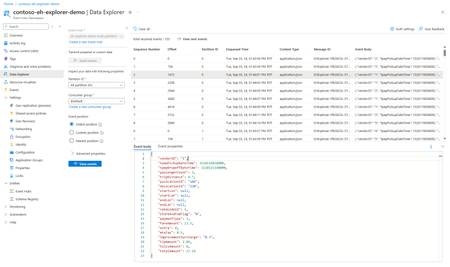
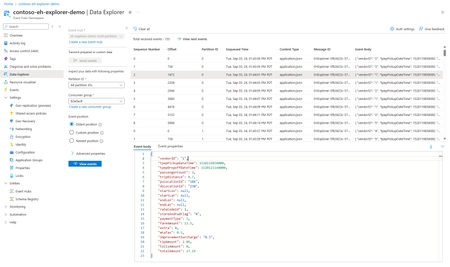
Transform your event-driven architectures with the new Event Hubs Data Explorer! Whether you're debugging, optimizing, or just getting started, this tool offers a unified interface for producing and consuming event data, providing invaluable insights. Explore the endless possibilities with Event Hubs Data Explorer!3KViews3likes3CommentsAnnouncing the General Availability of Event Hubs Data Explorer
We are excited to announce the general availability of the Event Hubs Data Explorer in the Azure portal! Ever since our preview announcement in September, we've heard customers rave about how the Event Hubs Data Explorer has already made its way into their daily workflows to onboard, debug and review the data in their Event Hubs with very little effort. Customer-Centric Design We listened to your feedback and designed the Event Hubs Data Explorer to address your needs. We've had a lot of customers try this tool and share feedback on how its saving them significant time and effort when it comes to viewing their Event Hubs in action and performing basic debugging tasks. Simplified Onboarding and Debugging The Event Hubs Data Explorer is perfect for both new and experienced users. It provides a comprehensive view of event data, making it easy to test event producers and consumers. You can quickly validate your setup with custom workloads or predefined datasets, ensuring everything is configured correctly. Debugging is now more straightforward than ever. With the ability to inspect data at specific timestamps or offsets, you can quickly identify and resolve issues, optimizing your event processing workflows. Getting Started To start using the Event Hubs Data Explorer, navigate to your Event Hubs namespace in the Azure portal. From there, you can access the Data Explorer and begin sending and viewing events with just a few clicks. You can also check out the documentation here. We are excited to see how you leverage the Event Hubs Data Explorer to drive innovation and efficiency in your projects. Your feedback has been instrumental in shaping this tool, and we look forward to continuing to improve our offerings based on your insights.470Views1like0CommentsIntroducing Kafka Support in Event Hubs emulator
Azure Event Hubs is a cloud-native data streaming service that streams millions of events per second with low latency, from any source to any destination. Compatible with Apache Kafka®, it allows you to run existing Kafka workloads without code changes. Earlier this year, we released the Event Hubs emulator for local development, which initially only supported AMQP protocol. We are now excited to announce Apache Kafka® protocol support in the Event Hubs emulator. Why emulator? Developers across the globe love emulators! While there are numerous compelling reasons to use emulators, here are just a few of those reasons to consider: Optimized Development Loop: The emulator speeds up dev/testing against Azure Event Hubs. Pre-migration Trial: Try Azure Event Hubs for Apache Kafka® using your existing Kafka applications before migrating to the cloud. Isolated Environment: Use the emulator for dev/test setup without network latency or cloud resource constraints. Cost-efficient: The emulator is free and can be run on your local machine for dev/testing. Note: The emulator is intended only for development and testing. It should not be used for production workloads. Official support is not provided, and any issues or suggestions should be reported via GitHub. Kickstart development with Event Hubs emulator The emulator is available as a Docker image on Microsoft Artifact Registry and is platform-agnostic – it can run on Windows, macOS, and Linux. You can either use our automated scripts from the Installer repository or spin up the emulator container using the docker compose command. The producer and consumer APIs are currently compatible with the emulator. Additional API support will be provided in future incremental versions. To test Apache Kafka® applications locally with the Event Hubs emulator, visit aka.ms/devtestwithehemulator. Learn more about Event Hubs: Azure Event Hubs: Data streaming platform with Kafka support - Azure Event Hubs | Microsoft Learn Introduction to Apache Kafka® in Event Hubs on Azure Cloud - Azure Event Hubs | Microsoft Learn We appreciate your feedback and encourage you to share it with us. Please provide feedback or report any issues at our GitHub repository: Issues · Azure/azure-event-hubs-emulator-installer May the Event Hubs emulator light up your test cases in green! 😊996Views0likes0Comments