azure event grid
22 Topics
Announcing Public Preview of Autoscale for Azure Event Grid Namespaces
Today we are pleased to announce the public preview of Autoscale for Azure Event Grid namespaces. With this capability, an Event Grid namespace in the Standard tier automatically adjusts its throughput unit (TU) allocation in response to real-time workload utilization. This removes the need to manually provision capacity ahead of traffic changes or react to throttling after the fact. How Autoscale fits with existing capacity management Event Grid namespaces already provide control over capacity through throughput units. Each Throughput Unit defines a fixed rate of event ingress, event egress, MQTT publish, and MQTT client connections. Until now, customers set the Throughput Unit count at namespace creation and adjusted it manually when traffic patterns changed. Autoscale builds on this model. It automates the adjustment of Throughput Unit count based on observed utilization. Customers still control the boundaries: a minimum Throughput Unit floor that guarantees baseline capacity, and a maximum Throughput Unit ceiling that caps cost. Event Grid handles all scaling decisions within those bounds. No manual intervention is required. Why this matters Event-driven and IoT workloads are rarely steady-state. MQTT device fleets connect in waves as regions come online. Event broker ingress spikes during batch processing windows or in response to external triggers. Multi-tenant platforms see delivery volumes shift across tenants throughout the day. Fixed-capacity provisioning forces a trade-off: provision for peak and pay for idle capacity, or provision for average and accept throttling during spikes. Autoscale addresses both sides by adding capacity when utilization is high and releasing it when utilization drops. Scenarios where Autoscale helps IoT and MQTT workloads Device fleets connect and disconnect on their own schedule. Message fan-out and subscription counts shift rapidly as devices move between online and offline states. With Autoscale, the namespace adds capacity as connection counts grow and releases it as devices go idle, keeping the MQTT broker responsive without manual resizing. Example A logistics company operates a fleet of 50,000 delivery vehicles. Each vehicle publishes GPS location and engine telemetry via MQTT every 10 seconds. During the morning dispatch window (6–8 AM), all vehicles come online simultaneously, generating a connection surge that is 5× the steady-state rate. Previously, the operations team had to pre-scale the namespace each morning and scale it back at night. With Autoscale, the namespace detects the connection ramp-up within seconds, provisions additional TUs to absorb the spike, and scales back down overnight when most vehicles are parked and idle—without any manual intervention. Bursty event broker workloads Periodic batch uploads, demand-driven spikes, or seasonal traffic patterns create short-lived peaks that are difficult to plan for. Autoscale provisions additional capacity during the burst and releases it once traffic returns to baseline, keeping costs aligned with actual usage rather than worst-case projections. Example An e-commerce platform processes order events through Event Grid. On regular days, ingress sits at approximately 2,000 events per second. During flash sales, ingress spikes to 40,000 events per second for 15-20 minutes before returning to normal. Before Autoscale, the team provisioned for peak capacity around the clock, paying for 20x the baseline even when traffic was low. With Autoscale, the namespace scales from 2 Throughput Units to the required capacity within seconds of detecting the spike, handles the burst without throttling, and releases the extra Throughput Units once the sale ends - aligning cost directly with the duration and intensity of each event. How it works Autoscale is a namespace-level configuration. Customers enable it and set a minimum and maximum TU count. Event Grid continuously evaluates utilization across all scaling categories. When utilization crosses internal thresholds, Event Grid adjusts the Throughput Unit allocation up or down within the customer-defined bounds. Full details on scaling behavior are available in the Autoscale in Azure Event Grid namespaces (preview) - Azure Event Grid | Microsoft Learn. What customers control The configuration is intentionally simple: Select Autoscale on the Scale tab to turn the capability on. Minimum throughput units: The namespace will not scale below this value. Set this to cover baseline traffic so the workload is never throttled while the system detects a change. Maximum throughput units: The namespace will not scale above this value. This caps cost exposure during peak traffic. Everything else is managed by Event Grid internally. There are no scaling rules to configure or maintain. Availability Autoscale is available in public preview for Event Grid namespaces in the Standard tier. It can be enabled through the Azure portal, ARM templates or REST API. For detailed steps, refer to the how-to guide on Microsoft Learn. What's next This is a public preview release. We are actively evolving the experience and welcome your feedback. Feedback can be shared by contacting our support team directly.116Views1like0CommentsAzure Event Grid: Powering IoT and Event-Driven Applications at Scale
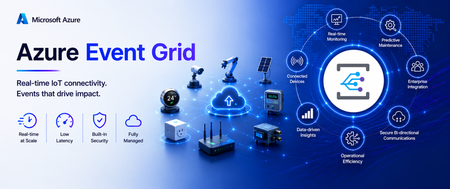
Modern IoT and event-driven applications demand more than reliable messaging. They require the ability to handle larger payloads, efficiently route data at scale, and automatically adapt to changing workloads. Today, we're excited to introduce a new set of capabilities in Azure Event Grid Namespace (MQTT Broker & Event Broker) that help organizations build more scalable, resilient, and cost-efficient connected solutions. With support for MQTT v5 Subscription Identifiers, larger messages(1MB), and Auto scale-up and scale-down, customers can simplify architecture, reduce operational overhead, and accelerate deployments across manufacturing, automotive, retail, energy, and other connected industries. Event Grid Standard: MQTT v5 Subscription Identifier (GA) What it solves In many MQTT applications, one client subscribes to several topics at the same time. When a message arrives, the application needs a quick way to tell which subscription triggered it and what should happen next. Which subscription triggered this message? Which business rule should process it? What’s new MQTT v5 Subscription Identifier is now generally available in Event Grid MQTT broker. Each subscription can have an ID, and that ID is included when the message is delivered. Each subscription can have an ID, and when a message is delivered, that ID comes with it. Why it matters Faster message routing Cleaner application logic No need to parse topic strings Simple example Example subscriptions: Subscription ID 101 = factory/line1/temperature Subscription ID 202 = factory/line1/vibration When a message arrives If the message comes in with Subscription ID 101, the app immediately knows it is temperature data and can send it to the correct processing path without inspecting the topic string. Common use cases Manufacturing lines with hundreds of sensors Automotive telemetry platforms Multi‑tenant IoT solutions Rule engines and stream processors Event Grid Standard: 1MB Message Support (GA) - Coming Soon Applies to both MQTT and non-MQTT workloads. What it solves As devices and applications become more capable, the events they send are becoming richer too. In many real-world scenarios, a single message may need to include things like: Sensor batches Telemetry snapshots Diagnostics data Configuration payloads Before this, customers often had to split large messages into smaller pieces or store the payload somewhere else and send only a reference. What’s new Event Grid Standard Namespace now supports larger event payloads upto 1MB for both MQTT and non-MQTT scenarios. That means customers can send more complete information in one message and reduce complex workarounds in design. Why it matters Fewer architectural components Simpler producers and consumers Lower latency for real‑time decisions Example Before: A factory device sent the main payload to storage and then published a small event that pointed to that file. Now: The same device can publish the full event payload directly through Event Grid, making the flow easier to build and easier to operate. Example: A smart machine can send a larger diagnostic package in one event, including the machine ID, a batch of readings, and a timestamp, instead of splitting the information across multiple services. Common use cases Smart manufacturing telemetry Vehicle diagnostics and firmware data Batch sensor readings from edge devices Rich business events for analytics Event Grid Standard: Autoscale Up and Down (Preview) - Coming Soon Applies to both MQTT and non-MQTT workloads. What it solves Event-driven systems rarely operate at a constant rate. Traffic patterns fluctuate throughout the day, with predictable peaks, seasonal surges, and unexpected bursts that can quickly overwhelm static infrastructure. Think about: Morning factory startup Fleet check‑ins at the top of the hour Flash sales or system bursts Manually sizing infrastructure leads to: Over‑provisioning (higher cost) Under‑provisioning (missed events) What’s new Azure Event Grid Standard Namespace now supports Autoscale Up and Down, automatically adjusting capacity based on real-time workload demand. Whether you're running MQTT-based IoT workloads or event-driven applications using HTTP, AMQP, or CloudEvents, Event Grid dynamically scales resources to match traffic patterns without manual intervention. As demand grows, Event Grid automatically adds capacity to absorb increased traffic and maintain performance. When activity subsides, resources scale back down to optimize efficiency and reduce costs. Why it matters With Autoscale, customers can focus on building applications instead of managing infrastructure and reap benefits like: Scale seamlessly during traffic spikes without pre-provisioning for peak demand. Reduce costs during quieter periods by automatically scaling capacity down. Maintain consistent performance and reliability across changing workloads. Eliminate manual tuning and capacity planning, reducing operational overhead. Optimize resource utilization while supporting millions of devices and high-volume event streams. Use case: A Modern Event-Driven Manufacturing Platform A smart manufacturing company uses Microsoft to connect factory machines, sensors, edge gateways, and enterprise applications through a single scalable eventing platform. Devices publish rich telemetry and diagnostic payloads using MQTT, while cloud applications send operational and business events using HTTP. The company has steady traffic during the day, a large spike during shift changes, and much lower usage overnight. With autoscale, Event Grid adjusts capacity automatically, so performance stays strong when traffic is high and costs stay more efficient when traffic is low. Common use cases Shift‑based manufacturing systems Connected vehicle platforms Event‑driven commerce backends Analytics pipelines with bursty data Building IoT platforms, manufacturing and automotive solutions, or high-scale event-driven applications? Azure Event Grid MQTT Broker now delivers larger messages, subscription Identifiers, and autoscale up/down, helping you simplify operations, improve performance, and optimize costs all on a single eventing platform. Event Grid Basic: Powering Event Driven Payments with Stripe (GA) Developers can seamlessly route Stripe events into Azure Event Grid to build scalable, event driven architectures without managing webhooks or custom brokers. Event Grid acts as a fully managed event broker between Stripe and Azure services. Azure Event Grid now delivers Stripe events directly to Azure subscribers, including: Azure Functions Logic Apps Event Hubs Service Bus And more With Event Grid’s native integration with Microsoft Fabric, Stripe events can also be ingested as continuous streams, enabling real time transformation, enrichment, and analytics within Fabric. Learn more.256Views0likes0CommentsBuild Smarter, Simpler IoT Messaging with Azure Event Grid MQTT Broker
Why this matters for modern IoT solutions As IoT solutions grow, teams need messaging that is reliable, scalable, and simple enough to operate across devices, apps, and cloud services. Azure Event Grid MQTT broker helps organizations connect devices and applications using standard MQTT patterns while also integrating with Azure services for downstream processing and automation. The result is a managed, cloud-native approach to messaging that supports both technical flexibility and business agility. With support for MQTT v3.1.1 and MQTT v5, Azure Event Grid MQTT broker enables device-to-device, device-to-cloud, and server-to-device communication patterns. It is especially useful in scenarios where customers want to ingest telemetry, send commands, broadcast alerts, and route data into analytics or workflow systems without building and maintaining broker infrastructure themselves. In this post, we focus on four capabilities that make the experience even more powerful and easier to adopt: MQTT Retain support, Shared Subscriptions, HTTP Publish of MQTT messages, and Subscription Identifiers. These features help new subscribers get context immediately, allow multiple consumers to scale out work, let HTTP-native back-end services participate in MQTT workflows, and make message handling more efficient for clients. Four features that make MQTT messaging easier to use These capabilities are designed to solve everyday problems that customers face when building real-world IoT systems. MQTT Retain support helps newly connected clients get the latest known value right away. Shared Subscriptions help distribute message processing across multiple consumers for better scale and resilience. HTTP Publish of MQTT messages enables back-end services to send MQTT messages without keeping long-lived MQTT sessions open. Subscription Identifiers help clients understand which subscription matched a received message, making routing and processing simpler. Together, these features reduce application complexity, improve responsiveness, and make it easier for teams to build user-friendly, production-ready IoT experiences. MQTT Retain support: Give new subscribers the latest known value instantly One of the most helpful MQTT patterns is the ability to retain the latest message on a topic. With MQTT Retain support in Azure Event Grid, the broker stores the last known good value for a topic and delivers it immediately to a new subscriber. That means a client does not have to wait for the next live publish to understand the current state. This is especially valuable for scenarios such as device state, configuration settings, last reported sensor readings, and control values. When a new application, dashboard, or device comes online, it can immediately understand the current state of the system and take action faster. Example Imagine a smart factory dashboard subscribing to the topic factory/line1/status. If the latest retained message says Running, a newly opened dashboard can display that status immediately instead of waiting for the next update. Retained messages ensure new subscribers instantly receive the latest device state without waiting for the next publish Why customers like it Faster onboarding for newly connected devices and apps Better user experience in dashboards and operator tools Less waiting for current state information Simpler application logic for recovering context Common use cases Device online or offline state Latest environmental reading such as temperature or humidity Machine mode, recipe, or configuration profile Current command state for field equipment Shared Subscriptions: Scale message processing without extra complexity As message volume grows, a single subscriber may not be enough to process all incoming data efficiently. Shared Subscriptions solve this by allowing multiple consumers to share the work for a subscription. Instead of every consumer receiving every message, the broker distributes messages across members of the shared group. This is a powerful pattern for scaling out telemetry processing, command handling, or event enrichment pipelines. It also helps improve resilience because work can continue even if one consumer instance goes offline. Example Suppose you have a fleet of connected vehicles publishing telemetry to vehicles/+/telemetry. A back-end processing service might run three worker instances subscribed through a shared subscription. Rather than each worker processing all messages, the workload is divided across the three instances, which improves throughput and reduces duplicate effort. Shared subscriptions distribute telemetry messages across multiple worker nodes for scalable, load-balanced, and resilient stream processing. Why customers like it Easier horizontal scaling for high-volume topics Improved throughput for back-end processing Better fault tolerance for worker-based applications Cleaner architecture for stream processing pipelines Common use cases Telemetry ingestion at scale Alarm processing pipelines Order or command handling across multiple workers Message transformation before routing to analytics platforms Shared Subscriptions help teams grow from pilot projects to production-scale deployments without redesigning their application model. They make it easier to add processing capacity as business needs expand. HTTP Publish of MQTT messages: Bring HTTP-native back-end systems into MQTT workflows Not every application wants to maintain a persistent MQTT connection. Many back-end systems are built around stateless HTTP APIs and prefer simple request-based interactions. Azure Event Grid supports publishing MQTT messages over HTTP, which makes it easier for server-side applications to send messages into MQTT-based solutions. This capability is a strong fit for server-to-device command and control, updates from enterprise systems, and retained message management. It also helps protect broker stability by reducing the need for a large number of long-lived sessions from services that do not truly need them. Example Imagine a support application that needs to send a message to a field device asking it to refresh its configuration. Instead of opening an MQTT session, the application can make an HTTP POST request that maps to an MQTT publish operation and sends the command to the desired topic. Why customers like it Simple integration for HTTP-native applications No need for persistent broker sessions in back-end services Consistent messaging flow across HTTP and MQTT publishers Easier integration with business systems and automation workflows Common use cases Server-to-device commands Application-driven updates and prompts Retained message management Integration with business processes, portals, and line-of-business apps Subscription Identifiers: Make client-side message handling smarter As applications grow, a single client may subscribe to many topic filters at the same time. Subscription Identifiers help the client understand which subscription matched a delivered message. This makes application logic cleaner because the client does not have to guess why a message arrived or manually compare it against every subscribed filter. In practical terms, this is useful when one client is listening for different kinds of data such as telemetry, alerts, and control acknowledgments. Instead of writing extra parsing logic, the client can use the identifier to route the message to the right processing path immediately. Example A monitoring application subscribes to one filter for devices/+/telemetry and another for devices/+/alerts. When a message arrives, the subscription identifier helps the application know whether the message should be shown on a live dashboard, routed to alert handling, or stored for analysis. Why customers like it Simpler client code Cleaner separation of processing paths Easier troubleshooting and observability Better support for sophisticated MQTT v5 client applications Common use cases Applications subscribing to multiple topic categories Edge gateways handling mixed streams Dashboards that separate operational data from alerts Services that apply different business logic based on subscription intent Putting it all together: A simple customer scenario Consider a smart manufacturing plant. Machines, PLCs, and industrial sensors continuously publish telemetry such as production counts, machine health, vibration, and temperature. Operations dashboards subscribe to real-time machine status and line performance. Maintenance systems send commands to equipment when anomalies or thresholds are detected. Meanwhile, analytics workers process high-volume telemetry streams in parallel for quality monitoring, predictive maintenance, and throughput optimization. In this scenario, MQTT Retain support ensures that a newly opened operations dashboard immediately sees the latest machine state without waiting for the next update. Shared Subscriptions enable multiple analytics workers to process telemetry streams in parallel, improving scalability and avoiding duplicate processing. HTTP Publish of MQTT messages allows MES or maintenance applications to send commands to machines through simple HTTP requests, without needing a persistent MQTT connection. Subscription Identifiers help downstream systems distinguish between telemetry, alerts, and control signals, enabling clean routing to the right processing pipelines. The result is a unified, event-driven architecture that is scalable, efficient, and easier to operate—supporting real-time visibility, faster decision-making, and continuous optimization across the manufacturing floor. Azure Event Grid MQTT broker continues to make cloud-scale MQTT messaging more approachable for customers building modern IoT and event-driven solutions. Features such as MQTT Retain support, Shared Subscriptions, HTTP Publish of MQTT messages, and Subscription Identifiers help simplify application design while improving responsiveness, scale, and operational efficiency. For teams looking to build customer-ready solutions faster, these capabilities can reduce custom code, accelerate onboarding, and create a smoother path from proof of concept to production. Whether you are building connected products, industrial monitoring systems, smart spaces, or data-driven operations, Azure Event Grid MQTT broker provides a flexible foundation for reliable communication across devices, services, and applications. Now is a great time to explore how these features can help simplify your architecture and unlock new patterns for device connectivity and cloud integration.340Views0likes0Comments
Stripe Events + Azure Event Grid: Now Generally Available
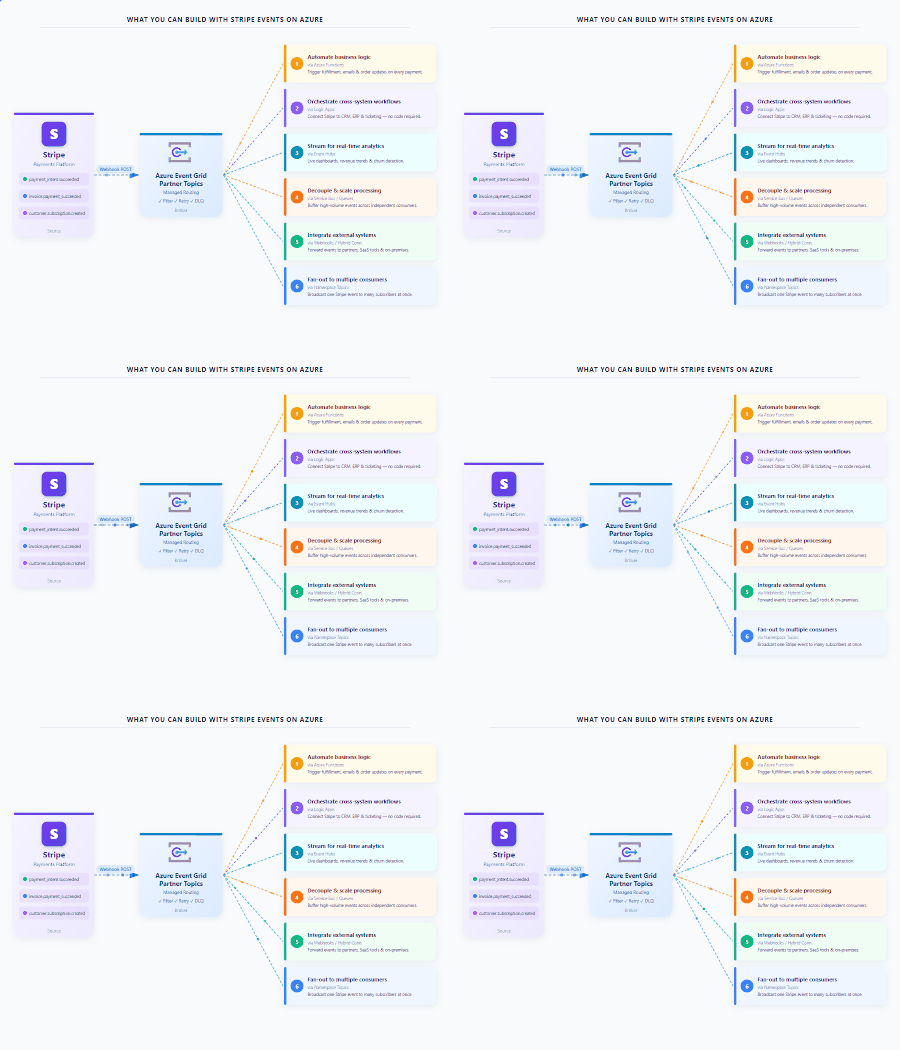
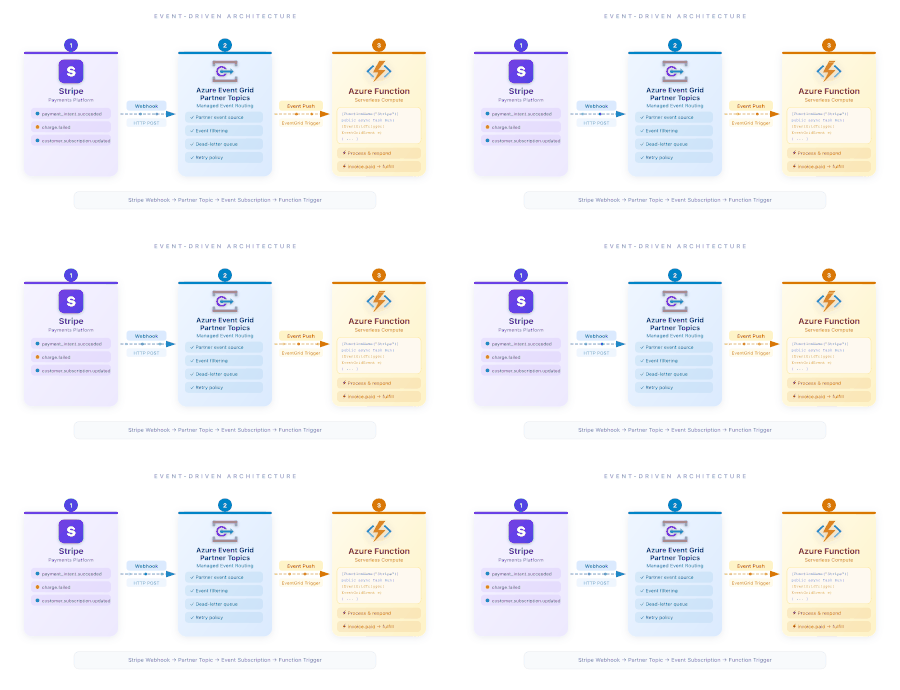
Stripe events give developers real-time visibility into everything happening in their Stripe accounts — payments, subscriptions, refunds, disputes, and more. With Azure Event Grid as a destination for Stripe events, now Generally Available, teams can route those signals directly into Azure and build scalable, event-driven architectures without managing webhook infrastructure. Stripe events meet Azure Event Grid Stripe produces events for changes across payments, customers, subscriptions, accounts, meters, and more — covering hundreds of distinct event types. Azure Event Grid acts as a fully managed event broker, routing those events directly into Azure so teams can build reactive, real-time workflows without managing custom webhook infrastructure. Here are some of the scenarios this enables: Automate business logic on every payment: Use Azure Functions to react instantly to payment completions, refunds, or disputes — triggering fulfillment, updating inventory, or sending confirmation emails in real time. Orchestrate cross-system workflows: Use Logic Apps to connect Stripe events to CRM systems, ERP platforms, or ticketing tools — automatically syncing data and triggering multi-step processes without writing code. Stream events for real-time analytics: Route Stripe events to Azure Event Hubs and connect them to Microsoft Fabric Eventstream to power live dashboards, revenue trend analysis, and churn detection as events happen. Decouple and scale payment processing: Send events to Service Bus or Storage Queues to buffer and distribute high-volume payment workloads across independent consumers, ensuring reliability and scalability under load. Integrate with external systems and partners: Use Webhooks or Hybrid Connections to forward Stripe events to third-party platforms, on-premises systems, or partner services — without exposing internal infrastructure. Fan out events across multiple consumers: Publish to Azure Event Grid Namespace Topics to broadcast a single Stripe event to multiple subscribers simultaneously, enabling parallel processing across different teams or services. This creates a clean separation between event ingestion, routing, and processing, following modern event-driven design principles. Deep Dive: Processing Core Payment Events with Azure Event Grid To build a production-ready integration that reacts to business-critical signals like successful payments or disputes, follow these steps to route Stripe events through Azure Event Grid. Set up Partner Authorization in Azure: Register the Event Grid resource provider in the Azure portal and create a Partner Authorization to grant Stripe permission to create Partner Topics. Configure the Event Destination in Stripe: In the Stripe Dashboard, configure the event destination by providing your Azure subscription ID, resource group, and region to connect the accounts. Activate the Partner Topic: Once Stripe creates the Partner Topic in your Azure resource group, you must activate it in the Azure portal within seven days to begin receiving events. Create an Event Subscription and Handler: Set up an Event Subscription to route events from the Partner Topic to an Azure service, such as an Azure Function or Logic App, which acts as your event handler. Process the Payment Event Object: Your handler will receive event objects formatted using the CloudEvents schema. Parse these objects and implement your application logic to react to specific event types like payment_intent.succeeded or charge.dispute.created. Retrieve Full Resource Data (Hydration): For full context, use "thin event hydration" to fetch the complete resource object (e.g., the full Charge or PaymentIntent) via a call to the Stripe API using the object ID provided in the event data. Production and Reliability Notes Switch your integration to use live mode API keys and data sources for production readiness. Stripe automatically retries failed deliveries for up to three days in live mode. Event ordering is not guaranteed through Event Grid. Note: Events are delivered using the CloudEvents schema, and Stripe provides automatic retries for failed deliveries for up to three days. Extending Stripe events into Fabric Real-Time Intelligence Every payment, subscription change, and customer action in Stripe carries a signal. The question is how fast your business can act on it. Azure Event Grid namespaces connect natively with Microsoft Fabric Real-Time Intelligence through Eventstream, turning Stripe events into continuous data streams — no custom ingestion pipelines required. As events flow in, they can be transformed, enriched, and joined with other business signals in real time. This opens a new layer of intelligence on top of your commerce data: revenue anomalies surfaced as they happen, churn patterns detected before they compound, and live dashboards that reflect the actual state of your business — not yesterday’s batch. For teams already invested in Fabric, this means Stripe becomes a first-class real-time data source alongside the rest of your operational data. Getting started The Stripe destination for Azure Event Grid is now Generally Available. To get started, configure Azure Event Grid as an event destination in your Stripe dashboard. Stripe provides clear guidance for setting up the Azure Event Grid destination and sending events into your Azure environment: Stripe documentation for Azure Event Grid. Once configured, events can be routed to Azure services or streamed into Fabric Eventstream for real-time analytics and insights. Building on Public Preview This release marks the General Availability of the Stripe destination for Azure Event Grid, which was first introduced in Public Preview. If you missed the initial announcement, you can read the original blog post: Powering Event-Driven Payments with Stripe and Azure Event Grid.289Views0likes0CommentsPowering Event Driven Payments with Stripe and Azure Event Grid
Introduction Modern commerce systems are increasingly event-driven. Payments, subscriptions, refunds, disputes, and customer updates all generate signals that downstream systems must react quickly and reliably. Stripe events give developers real-time visibility into what is happening inside their Stripe accounts. With the new Azure Event Grid destination for events from Stripe — now available in Public Preview — developers can now route those events directly into Azure and build scalable, event-driven architectures without managing webhook infrastructure or custom brokers. Stripe events meet Azure Event Grid Stripe produces events for changes across a wide range of objects, including payments, customers, subscriptions, accounts, meters, and more, covering hundreds of distinct event types. These events allow developers to react in near real time to business-critical changes. Azure Event Grid acts as a fully managed event broker between Stripe and Azure services. By configuring Azure Event Grid as an event destination in Stripe, events are automatically delivered to Azure subscribers such as: Azure Functions Logic Apps Event Hubs Service Bus Storage queues Hybrid Connections Azure Event Grid Namespace Topics Webhooks This creates a clean separation between event ingestion, routing, and processing, following modern event-driven design principles. Extending Stripe events into Fabric Real-Time Intelligence Beyond operational workflows, Stripe events can also power real-time analytics scenarios using Microsoft Fabric Real-Time Intelligence. Azure Event Grid namespaces integrate with Fabric through a native connector that allows events to flow directly into Eventstream. This makes it possible to ingest Stripe events into Fabric as continuous streams, where they can be transformed, enriched, and analyzed in real time. With this integration, teams can: Stream Stripe events into Fabric without building custom ingestion pipelines Correlate payment and subscription events with other business signals Build real-time dashboards and analytics over live commerce data Enable downstream consumers such as KQL databases, dashboards, and analytics workloads This unlocks an end-to-end flow where Stripe events move seamlessly from operational systems into real-time analytics, helping organizations gain immediate insight into payment behavior, revenue trends, and customer activity as events happen. Common use cases enabled by Stripe events on Azure Developers can unlock a wide range of scenarios by combining Stripe events with Azure services: Payment and transaction fulfillment: React to payment completions, refunds, disputes, and payment method updates to trigger downstream business logic. Subscription and billing lifecycle management: Track subscription creation, renewals, cancellations, and plan changes to automate billing workflows. Customer notifications and communications: Trigger emails, push notifications, or in-app messages in response to payment or account events. Financial operations and reconciliation: Stream transaction events into accounting systems or data stores to keep financial records in sync. Monitoring and real-time analytics: Build real-time dashboards and insights on customer behavior, revenue trends, or churn indicators. Customer lifecycle management: Synchronize customer updates with CRM systems and other business platforms. Getting started The Stripe destination for Azure Event Grid is currently available in Public Preview. To get started, configure Azure Event Grid as an event destination in your Stripe dashboard. Stripe provides clear guidance for setting up the Azure Event Grid destination and sending events into your Azure environment: Stripe documentation for Azure Event Grid. Once configured, events can be routed to Azure services or streamed into Fabric Eventstream for real-time analytics and insights.569Views1like0CommentsAzure Event Grid MQTT Broker: Enterprise-Grade Messaging for the Connected World
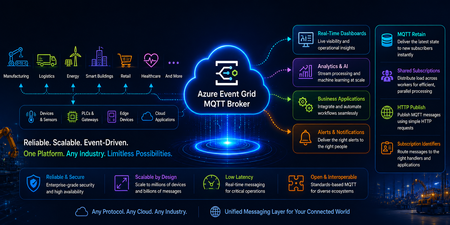
Azure Messaging · What's New · March 2026 The Enterprise MQTT Broker for Every Connected Ecosystem Scale to millions of devices, enforce zero-trust security, and route real-time events across every service, system, and application — all on Azure's hyperscaler-grade messaging backbone. 1,000 msg/sec/session 5M+ concurrent connections 1 MB large message support TLS 1.2+ enforced encryption The Modern Broker for Every Connected Ecosystem Whether you're connecting vehicles, factory floors, edge devices, retail infrastructure, financial systems, or cloud-native services — Azure Event Grid MQTT Broker is the enterprise messaging backbone that scales from prototype to planet. With deep Azure integration, full MQTT compliance, and hyperscaler-grade security, it's the broker you ship on when it truly matters. Core Protocol 📡 Full MQTT Protocol Coverage End-to-end MQTT compliance across all versions, transports, and messaging patterns — so any client, any device, any stack just connects. MQTT v3.1.1 Full compliance MQTT v5.0 Rich features + user props TCP Transport Low-latency, always-on WebSocket Browser + web-native HTTP Publish REST-based ingestion 💬 MQTT v5 Enhancements Richer error signaling, user properties, message expiry, and request–response patterns built in. GA 🌐 HTTP Publish (REST Bridge) Non-MQTT services publish via HTTPS. Ideal for REST backends, legacy systems, and webhooks joining real-time workflows. GA 🔀 Shared Subscriptions Load-balance messages across consumer groups. Scale processing horizontally without duplication. Preview Zero-Trust Security 🔒 Enterprise Authentication Stack Multi-layered security for every fleet size — from embedded devices to enterprise IAM platforms. Every connection authenticated, every access authorized. 🏛️ Microsoft Entra ID / OAuth 2.0 JWT Authenticate via any OIDC-compliant identity provider — Entra ID, Auth0, custom IAM platforms. GA 📜 X.509 Certificate Authentication Hardware-rooted identity for devices. Mutual TLS, cert fingerprint validation, and PKI integration. GA 🪝 Custom Webhook Authentication Dynamically validate clients via Azure Functions or external services. SAS keys, API keys, cert fingerprints — full programmatic control. GA 🌐 TLS 1.2+ Enforced Transport-layer encryption enforced by default. No downgrade paths. Compliant with regulated industries. GA Assigned Client Identifiers — Deterministic Identity Pre-assign approved MQTT client IDs for session continuity, enhanced diagnostics, and audit trails. Critical for regulated industries, long-lived device connections, and operational compliance across large fleets. Hyperscaler Performance ⚡ Built for Massive Scale From startup-scale prototypes to workloads with up to 5M+ concurrent device connections — Event Grid MQTT Broker grows with your ambitions. 1,000 messages/sec/session (ingress) View Quotas & Limits → High-frequency industrial and automotive signal processing at full speed, per session. 15 topic segments (GA) View Quotas & Limits → Deep hierarchical topic modeling for structured fleets, factories, and telemetry pipelines. 🔢 1 MB Large Message Support Send high-res images, video frames, and large telemetry batches. No pre-chunking needed. Preview 📈 Auto Scale Up & Down Elastic namespace scaling that responds to demand in real time — pay for what you use, never throttle a workload. Coming Soon in Preview 🌐 IPv6 Support Native dual-stack networking for modern infrastructure, next-gen telecom, and global device deployments. Coming Soon in Preview 🚀 Up to 5M+ Connections Running large-scale workloads? Talk to us — we'll onboard your production workload with dedicated hands-on support. Contact Us → 📦 Bulk Client Onboarding API Register thousands of devices in a single API call — credentials, certificates, and auth rules in batch. CI/CD-native. Preview 📤 High Egress Throughput Up to 500 msg/sec/instance egress for high fan-out scenarios. Perfect for dashboards, monitoring, and analytics consumers. Preview Azure Native Integration 🔀 MQTT Events, Everywhere in Azure Route MQTT streams directly into Azure's full analytics, automation, and real-time intelligence stack — seamlessly connected to every Azure service you already use. 🌊 Fabric Eventstreams 📊 Azure Data Explorer 📨 Event Hubs ⚙️ Azure Functions 🔗 Logic Apps 🌟 First-Class Microsoft Fabric Integration Route MQTT messages and CloudEvents directly from Event Grid Namespaces to Fabric Eventstreams — enabling real-time analytics, storage, and visualization of IoT data without an Event Hub intermediary. Reference architectures for every industrial vertical are available on Microsoft Learn and via the RTI Reference Architectures. State & Presence 💡 Last Will & Testament + Retained Messages Know the last known state of every device, and be instantly notified when something goes offline — essential for mission-critical connected systems. 📣 Last Will & Testament (LWT) Immediately notify downstream subscribers when a device disconnects unexpectedly. Critical for industrial automation, fleet monitoring, and health-critical telemetry. GA 📌 Retained Messages Subscribers receive the latest device value immediately on connect. Configurable expiry, on-demand clearing, Get/List API, and portal experience coming soon. GA Industry 4.0 🏭 Sparkplug B on Azure — Smart Factory, Unlocked The industrial MQTT standard runs natively on Event Grid MQTT Broker — bringing real-time factory floor intelligence to Azure analytics pipelines. Learn more about Sparkplug B support → 🔴 Device Lifecycle (BIRTH/DEATH) Track when machines come online and offline. LWT handles unexpected disconnects with zero configuration. 🔧 SCADA Integration Auto-discover tags in Ignition SCADA with Cirrus Link Chariot. Seamless edge-to-cloud tag sync and live machine vitals. 📊 Azure Data Explorer / Fabric Industrial binary Sparkplug payloads ingested into ADE or Fabric for real-time dashboards and automated alerting. Edge to Cloud: How It Flows 1 Sensors on the factory floor Machines publish temperature, RPM, and status as Sparkplug B messages via edge gateways. 2 Azure Event Grid MQTT Broker ingests QoS 1 delivery, TLS secured, with LWT for device state awareness and retained messages for new subscribers. 3 SCADA auto-discovers tags Ignition SCADA with Chariot Cirrus Link sees all published tags in real time — zero manual configuration. 4 Azure Data Explorer / Fabric analytics Same stream bifurcated — live operational view and cloud-scale analytics for predictive maintenance and automated alerting. Operational Visibility 📊 Deep Metrics for Every Deployment Full operational telemetry across all broker functions — detect issues, optimize throughput, and ensure SLA compliance at any scale. ⏱️ CONNACK / PUBACK Latency Measure end-to-end connection and publish acknowledgment times. Baseline and alert on latency degradation. ✅ Publish / Subscribe Success Rates Track success, failure, and throttling events per topic and per session to quickly isolate problems. 🔌 Active Connections Real-time view of live connections, throughput, and session health across your entire device fleet. Customer Impact 🌍 Built for Every Connected Industry From connected vehicles to financial trading infrastructure to smart retail — Event Grid MQTT Broker powers the most demanding workloads across every sector. 🚗 Connected Automotive → Real-time vehicle telemetry at fleet scale → Over-the-air event routing and signaling → Edge-to-cloud V2X messaging pipelines → TLS/mTLS for per-vehicle identity → High-frequency CAN bus signal ingestion 🏭 Smart Manufacturing → Sparkplug B + SCADA tag auto-discovery → Predictive maintenance event pipelines → Factory floor machine state monitoring → Bulk device onboarding for plant rollouts → QoS 1 delivery for critical control signals 🖥️ DCIM / Data Centre → Real-time rack power and thermal monitoring → High-frequency sensor event ingestion → Automated alerting and threshold triggers → Secure multi-tenant device namespaces → Fabric Eventstreams for real-time dashboards 🏦 Finance & Payments → Low-latency event streaming for trading signals → Real-time payment status notifications → Fraud detection event pipelines → OAuth 2.0 / Entra ID for regulated access → Audit-ready assigned client identifiers 🛒 Retail & Commerce → Real-time inventory and shelf sensor updates → Point-of-sale event routing at scale → Connected checkout and payment device streams → In-store IoT device fleet management → Live promotions and pricing event broadcast 🏢 Smart Buildings → HVAC, lighting, and energy sensor telemetry → Access control and occupancy event streams → Elevator and facility equipment monitoring → Multi-tenant building namespace isolation → Retained messages for last-known device state What's Next 🔭 Coming Soon to Preview These capabilities are entering preview soon — start evaluating for your workloads today. Preview Large Message Packets (1 MB) Send images, video frames, and large telemetry batches without chunking. Streamlines edge-to-cloud ingestion. Preview Shared Subscriptions Load-balance across consumer groups for parallel message processing at scale — no duplication, built-in fault tolerance. Preview Subscription Identifier MQTT v5 compliance — tag subscriptions for routing, multiplexing, and fine-grained handler dispatch. Preview Bulk Client Onboarding API Provision entire device fleets in a single API call. Automate with CI/CD pipelines for factory and field deployments. Coming Soon Auto Scale Up & Down Elastic namespace scaling that automatically expands and contracts broker capacity in response to real-time load. Coming Soon IPv6 Support Dual-stack connectivity for next-gen networks, modern telecom infrastructure, and global IoT deployments. Want early access to any of these previews? We're actively onboarding early customers for all upcoming preview capabilities. Whether you're running a connected fleet, industrial workload, or large-scale IoT deployment — get in touch and we'll get you started. Contact Us for Early Access → Ready to Connect Everything? Azure Event Grid MQTT Broker is generally available. Start building enterprise-grade connected ecosystems today — or talk to us about your production workload. Get Started on Azure Talk to an Expert → Explore Reference Architectures © 2026 Microsoft Azure · Event Grid MQTT Broker Azure MQTT IoT Event Grid433Views0likes0CommentsJSON Structure: A JSON schema language you'll love
We talk to many customers moving structured data through queues and event streams and topics, and we see a strong desire to create more efficient and less brittle communication paths governed by rich data definitions well understood by all parties. The way those definitions are often shared are schema documents. While there is great need, the available schema options and related tool chains are often not great. JSON Schema is popular for its relative simplicity in trivial cases, but quickly becomes unmanageable as users employ more complex constructs. The industry has largely settled on "Draft 7," with subsequent releases seeing weak adoption. There's substantial frustration among developers who try to use JSON Schema for code generation or database mapping—scenarios it was never designed for. JSON Schema is a powerful document validation tool, but it is not a data definition language. We believe it's effectively un-toolable for anything beyond pure validation; practically all available code-generation tools agree by failing at various degrees of complexity. Avro and Protobuf schemas are better for code generation, but tightly coupled to their respective serialization frameworks. For our own work in Microsoft Fabric, we're initially leaning on an Avro-compatible schema with a small set of modifications, but we ultimately need a richer type definition language that ideally builds on people's familiarity with JSON Schema. This isn't just a Microsoft problem. It's an industry-wide gap. That's why we've submitted JSON Structure as a set of Internet Drafts to the IETF, aiming for formal standardization as an RFC. We want a vendor-neutral, standards-track schema language that the entire industry can adopt. What Is JSON Structure? JSON Structure is a modern, strictly typed data definition language that describes JSON-encoded data such that mapping to and from programming languages and databases becomes straightforward. It looks familiar—if you've written "type": "object", "properties": {...} before, you'll feel right at home. But there's a key difference: JSON Structure is designed for code generation and data interchange first, with validation as an optional layer rather than the core concern. This means you get: Precise numeric types: int32 , int64 , decimal with precision and scale, float , double Rich date/time support: date , time , datetime , duration —all with clear semantics Extended compound types: Beyond objects and arrays, you get set , map , tuple , and choice (discriminated unions) Namespaces and modular imports: Organize your schemas like code Currency and unit annotations: Mark a decimal as USD or a double as kilograms Here's a compact example that showcases these features. We start with the schema header and the object definition: { "$schema": "https://json-structure.org/meta/extended/v0/#", "$id": "https://example.com/schemas/OrderEvent.json", "name": "OrderEvent", "type": "object", "properties": { Objects require a name for clean code generation. The $schema points to the JSON Structure meta-schema, and the $id provides a unique identifier for the schema itself. Now let's define the first few properties—identifiers and a timestamp: "orderId": { "type": "uuid" }, "customerId": { "type": "uuid" }, "timestamp": { "type": "datetime" }, The native uuid type maps directly to Guid in .NET, UUID in Java, and uuid in Python. The datetime type uses RFC3339 encoding and becomes DateTimeOffset in .NET, datetime in Python, or Date in JavaScript. No format strings, no guessing. Next comes the order status, modeled as a discriminated union: "status": { "type": "choice", "choices": { "pending": { "type": "null" }, "shipped": { "type": "object", "name": "ShippedInfo", "properties": { "carrier": { "type": "string" }, "trackingId": { "type": "string" } } }, "delivered": { "type": "object", "name": "DeliveredInfo", "properties": { "signedBy": { "type": "string" } } } } }, The choice type is a discriminated union with typed payloads per case. Each variant can carry its own structured data— shipped includes carrier and tracking information, delivered captures who signed for the package, and pending carries no payload at all. This maps to enums with associated values in Swift, sealed classes in Kotlin, or tagged unions in Rust. For monetary values, we use precise decimals: "total": { "type": "decimal", "precision": 12, "scale": 2 }, "currency": { "type": "string", "maxLength": 3 }, The decimal type with explicit precision and scale ensures exact monetary math—no floating-point surprises. A precision of 12 with scale 2 gives you up to 10 digits before the decimal point and exactly 2 after. Line items use an array of tuples for compact, positional data: "items": { "type": "array", "items": { "type": "tuple", "properties": { "sku": { "type": "string" }, "quantity": { "type": "int32" }, "unitPrice": { "type": "decimal", "precision": 10, "scale": 2 } }, "tuple": ["sku", "quantity", "unitPrice"], "required": ["sku", "quantity", "unitPrice"] } }, Tuples are fixed-length typed sequences—ideal for time-series data or line items where position matters. The tuple array specifies the exact order: SKU at position 0, quantity at 1, unit price at 2. The int32 type maps to int in all mainstream languages. Finally, we add extensible metadata using set and map types: "tags": { "type": "set", "items": { "type": "string" } }, "metadata": { "type": "map", "values": { "type": "string" } } }, "required": ["orderId", "customerId", "timestamp", "status", "total", "currency", "items"] } The set type represents unordered, unique elements—perfect for tags. The map type provides string keys with typed values, ideal for extensible key-value metadata without polluting the main schema. Here's what a valid instance of this schema looks like: { "orderId": "f47ac10b-58cc-4372-a567-0e02b2c3d479", "customerId": "7c9e6679-7425-40de-944b-e07fc1f90ae7", "timestamp": "2025-01-15T14:30:00Z", "status": { "shipped": { "carrier": "Litware", "trackingId": "794644790323" } }, "total": "129.97", "currency": "USD", "items": [ ["SKU-1234", 2, "49.99"], ["SKU-5678", 1, "29.99"] ], "tags": ["priority", "gift-wrap"], "metadata": { "source": "web", "campaign": "summer-sale" } } Notice how the choice is encoded as an object with a single key indicating the active case— {"shipped": {...}} —making it easy to parse and route. Tuples serialize as JSON arrays in the declared order. Decimals are encoded as strings to preserve precision across all platforms. Why Does This Matter for Messaging? When you're pushing events through Service Bus, Event Hubs, or Event Grid, schema clarity is everything. Your producers and consumers often live in different codebases, different languages, different teams. A schema that generates clean C# classes, clean Python dataclasses, and clean TypeScript interfaces—from the same source—is not a luxury. It's a requirement. JSON Structure's type system was designed with this polyglot reality in mind. The extended primitive types map directly to what languages actually have. A datetime is a DateTimeOffset in .NET, a datetime in Python, a Date in JavaScript. No more guessing whether that "string with format date-time" will parse correctly on the other side. SDKs Available Now We've built SDKs for the languages you're using today: TypeScript, Python, .NET, Java, Go, Rust, Ruby, Perl, PHP, Swift, and C. All SDKs validate both schemas and instances against schemas. A VS Code extension provides IntelliSense and inline diagnostics. Code and Schema Generation with Structurize Beyond validation, you often need to generate code or database schemas from your type definitions. The Structurize tool converts JSON Structure schemas into SQL DDL for various database dialects, as well as self-serializing classes for multiple programming languages. It can also convert between JSON Structure and other schema formats like Avro, Protobuf, and JSON Schema. Here's a simple example: a postal address schema on the left, and the SQL Server table definition generated by running structurize struct2sql postaladdress.json --dialect sqlserver on the right: JSON Structure Schema Generated SQL Server DDL { "$schema": "https://json-structure.org/meta/extended/v0/#", "$id": "https://example.com/schemas/PostalAddress.json", "name": "PostalAddress", "description": "A postal address for shipping or billing", "type": "object", "properties": { "id": { "type": "uuid", "description": "Unique identifier for the address" }, "street": { "type": "string", "description": "Street address with house number" }, "city": { "type": "string", "description": "City or municipality" }, "state": { "type": "string", "description": "State, province, or region" }, "postalCode": { "type": "string", "description": "ZIP or postal code" }, "country": { "type": "string", "description": "ISO 3166-1 alpha-2 country code" }, "createdAt": { "type": "datetime", "description": "When the address was created" } }, "required": ["id", "street", "city", "postalCode", "country"] } CREATE TABLE [PostalAddress] ( [id] UNIQUEIDENTIFIER, [street] NVARCHAR(200), [city] NVARCHAR(100), [state] NVARCHAR(50), [postalCode] NVARCHAR(20), [country] NVARCHAR(2), [createdAt] DATETIME2, PRIMARY KEY ([id], [street], [city], [postalCode], [country]) ); EXEC sp_addextendedproperty 'MS_Description', 'A postal address for shipping or billing', 'SCHEMA', 'dbo', 'TABLE', 'PostalAddress'; EXEC sp_addextendedproperty 'MS_Description', 'Unique identifier for the address', 'SCHEMA', 'dbo', 'TABLE', 'PostalAddress', 'COLUMN', 'id'; EXEC sp_addextendedproperty 'MS_Description', 'Street address with house number', 'SCHEMA', 'dbo', 'TABLE', 'PostalAddress', 'COLUMN', 'street'; -- ... additional column descriptions The uuid type maps to UNIQUEIDENTIFIER , datetime becomes DATETIME2 , and the schema's description fields are preserved as SQL Server extended properties. The tool supports PostgreSQL, MySQL, SQLite, and other dialects as well. Mind that all this code is provided "as-is" and is in a "draft" state just like the specification set. Feel encouraged to provide feedback and ideas in the GitHub repos for the specifications and SDKs at https://github.com/json-structure/ Learn More We've submitted JSON Structure as a set of Internet Drafts to the IETF, aiming for formal standardization as an RFC. This is an industry-wide issue, and we believe the solution needs to be a vendor-neutral standard. You can track the drafts at the IETF Datatracker. Main site: json-structure.org Primer: JSON Structure Primer Core specification: JSON Structure Core Extensions: Import | Validation | Alternate Names | Units | Composition IETF Drafts: IETF Datatracker GitHub: github.com/json-structure7.6KViews8likes1CommentWhat’s New in Azure Event Grid
Azure Event Grid continues to evolve with new capabilities in General Availability and Public Preview – intended to help you enhance performance, security, and interoperability in modern event-driven systems. These enhancements strengthen Azure Event Grid’s foundational messaging layer for distributed systems—supporting real-time telemetry, automation, and hybrid workloads. With support for advanced MQTT features and flexible authentication models, Event Grid now offers: Stronger security posture through OAuth 2.0 and Custom Webhook authentication Operational efficiency with static client identifiers and message retention Broader integration across devices, applications, and cloud services General Availability Features MQTT OAuth 2.0 Authentication Authenticate MQTT clients using JSON Web Tokens (JWTs) issued by any OpenID Connect (OIDC)-compliant identity provider. This enables seamless integration with Microsoft Entra ID (formerly Azure AD), custom identity platforms, or third-party IAM solutions. MQTT Custom Webhook Authentication Use external webhooks or Azure Functions to dynamically validate client connections. Authorize using shared access signatures (SAS), API keys, custom credentials, or X.509 certificate fingerprints. This is a powerful feature for scenarios requiring granular control across large, dynamic fleets of devices or multitenant environments. MQTT Assigned Client Identifiers Assign deterministic, pre-approved client identifiers to MQTT clients. This enables enhanced session continuity, better device tracking, simplified diagnostics, and improved auditability—critical for managing long-lived connections and operational visibility in regulated industries. Assign deterministic, pre-approved client identifiers to MQTT clients. This enables enhanced session continuity, better device tracking, simplified diagnostics, and improved auditability—critical for managing long-lived connections and operational visibility in regulated industries. First Class integration with Fabric Route MQTT messages and Cloud Events from Event Grid Namespace to Fabric Event Streams for real-time analytics, storage, visualization of IoT data without having to hop thru Event Hub. Public Preview Features HTTP Publish Bridge traditional HTTP-based applications into event-driven ecosystems by allowing HTTP clients to publish messages directly to Event Grid topics. This enables RESTful services, legacy systems, and webhooks to participate in real-time event workflows, complementing MQTT and cloud-native integrations. MQTT Retain Support Support for retained MQTT messages allows clients to receive the latest value on a topic immediately upon subscription—without waiting for the next publish. This is particularly useful in IoT telemetry scenarios, stateful dashboards, and device shadow synchronization. Retained messages are stored per topic with configurable expiry and can be cleared on demand. Unlocking Smart Factory Insights with Sparkplug B on Azure Event Grid MQTT Broker In the age of Industry 4.0, factories are becoming smarter, more connected, and increasingly data driven. A key enabler of this transformation is Sparkplug B, an MQTT-based protocol purpose-built for industrial IoT (IIoT). And now, with Azure Event Grid MQTT Broker, Sparkplug B comes to life in the cloud—securely, reliably, and at scale. What is Sparkplug B? Think of Sparkplug B as the common language for industrial devices. It defines how sensors, gateways, and SCADA systems talk to each other—sharing not just telemetry data (like temperature or RPM) but also device lifecycle information such as when a machine comes online (BIRTH) or goes offline (DEATH). Why it Matters for Manufacturers Real-time factory monitoring – View live machine vitals across distributed plants. Predictive maintenance – Anticipate failures by analyzing trends. Seamless SCADA integration – Auto-discover tags in systems like Ignition SCADA with Cirrus Link. Edge-to-cloud bridge – Bring legacy factory systems into Azure for analytics, AI, and automation. Azure Event Grid MQTT Broker + Sparkplug B With Azure Event Grid MQTT Broker, manufacturers can run Sparkplug B workloads with enterprise-grade reliability. A connected factory floor where insights flow seamlessly from edge devices to cloud-unlocking efficiency, uptime, and innovation using the following capabilities: QoS 1 for reliability (at-least-once delivery). Last Will & Testament (LWT) for real-time device state awareness. Retained messages to ensure new subscribers always see the last known good value. Native support for binary Sparkplug payloads over secure TLS. From Factory Floor to Cloud Insights Sensors measure machine temperature and RPM. Edge gateways publish Sparkplug B messages to Azure Event Grid MQTT Broker. Ignition SCADA with Chariot Cirrus Link auto-discovers and displays these tags. Azure Data Explorer or Fabric ingests the same data for real-time dashboards, predictive analytics, or automated alerts. Ready to Get Started? Learn more about Azure Event Grid MQTT Broker Sparkplug B Support731Views0likes0CommentsAnnouncing new features and updates in Azure Event Grid
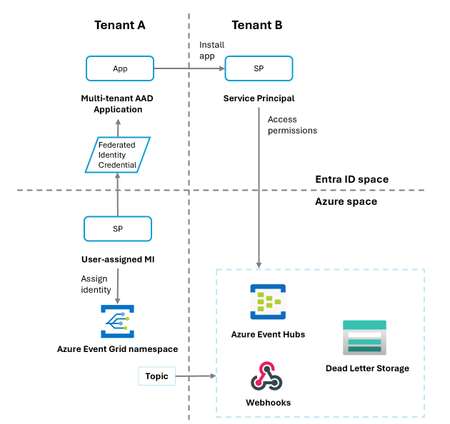
Discover powerful new features in Azure Event Grid, enhancing its functionality and user experience. This fully managed event broker now supports multi-protocol interoperability, including MQTT, for scalable messaging. It seamlessly connects Microsoft-native and third-party services, enabling robust event-driven applications. Streamline event management with flexible push-pull communication patterns. We are thrilled to announce General Availability of the Cross-tenant delivery to Event Hubs, Service Bus, Storage Queues, and dead letter storage using managed identity with federated identity credentials (FIC) from Azure Event Grid topics, domains, system topics, and partner topics. New cross-tenant scenarios, currently in Public Preview enable delivery to Event Hubs, webhooks, and dead letter storage in Azure Event Grid namespaces. This includes system topics, partner topics, and domains, offering seamless integration. The update enhances flexibility for event-driven applications across tenants. Azure Event Grid now also offers managed identity support for webhook delivery for all their resources. Public Preview features for new cross-tenant scenarios and managed identity support for webhook delivery are currently available in West Central, West Europe, UK South, Central US, and more regions will be supported soon. We are also introducing the Public Preview for the support of Network Security Perimeter (NSP) in Azure Event Grid topics and domains, for inbound and outbound communication. This perimeter defines a boundary with implicit trust access between each resource, where you can have sets of inbound and outbound access rules. By incorporating these advanced security measures, Azure Event Grid enhances the defense against a wide range of cyber threats, helping organizations to safeguard their event-driven workloads. In addition to this, Azure Event Grid has introduced message ordering support within single MQTT client sessions, ensuring reliable sequential event delivery, and a connection rate limit of one attempt per second per session, which maintains system stability. Furthermore, the expansion to support up to 15 MQTT topic segments per topic or filter offers greater flexibility in topic hierarchies. High throughput messaging, supporting up to 1,000 messages per second per session, is now in Public Preview, making it ideal for demanding scenarios such as IoT telemetry and real-time analytics. Azure Event Grid now also offers OAuth 2.0 JWT authentication for MQTT clients in Public Preview. This feature enables secure client authentication via JSON Web Tokens (JWT) issued by OpenID Connect (OIDC) compliant providers, providing a lightweight, secure, and flexible authentication option for clients not provisioned in Azure. Additionally, Custom Webhook Authentication has been introduced, allowing dynamic client authentication through webhooks or Azure Functions, with Entra ID JWT validation for centralized and customizable strategies. Finally, Assigned Client Identifiers in Public Preview provide consistent client IDs, improving session management and operational control, further enhancing the scalability and flexibility of client authentication workflows. We believe these updates will greatly enhance your Azure Event Grid experience. We welcome your feedback and appreciate your ongoing partnership as we work to deliver top features and services.1.2KViews0likes0CommentsAnnouncing new features and updates in Azure Event Grid
We are excited to share several new updates and features in Azure Event Grid that enhance our service's capabilities and improve your experience. In this article, you will find more information about the General Availability of Webhook Endpoints, and custom domain names in Azure Event Grid, as well as the introduction of new Public Previews like the cross-tenant delivery, and namespace topic to namespace topic forwarding support. Azure Event Grid is a highly integrated event broker designed to simplify the development of event-driven applications. It features pub-sub scenarios with a rich variety of event sources and handlers, including first-party and third-party integrations. Its flexible design supports multi-protocol interoperability, push and pull delivery, as well as MQTT, allowing for diverse message consumption patterns. Below, we detail the latest additions and improvements now available. We are pleased to announce General Availability of the webhook endpoints in Azure Event Grid namespace topics. This feature allows for efficient and reliable push delivery to webhooks, expanding the possibilities for event-driven architectures and integrations. We are also excited to announce that custom domain names support is now Generally Available in Azure Event Grid’s MQTT broker. This new feature allows you to assign your own domain names to the MQTT and HTTP endpoints within your Azure Event Grid namespaces. By doing so, you can enhance security and simplify client configuration. Additionally, assigning custom domain names to namespaces can help improve availability, manage capacity, and facilitate cross-region client mobility. We are also excited to announce the General Availability of Microsoft Graph API events that provide notifications about state changes of resources in Microsoft Outlook, Teams, SharePoint, Microsoft Entra ID, Microsoft Conversations, and security alerts. In Public Preview, we are introducing support for cross-tenant delivery to Event Hubs, Service Bus, and Storage Queues using managed identity with federated identity credentials (FIC) in Azure Event Grid topics, domains, system topics and partner topics. This enhancement enables secure and efficient cross-tenant communication for basic resources. Lastly, we are launching the Public Preview for namespace topic to namespace topic forwarding, enabling seamless event forwarding between topics hosted in the same or different namespaces, simplifying the event routing and management. We are confident that these updates will provide significant benefits and improvements to your Azure Event Grid experience. We look forward to your feedback and continued partnership as we strive to deliver the best possible features and services.541Views0likes0Comments