azure event grid
22 TopicsJSON Structure: A JSON schema language you'll love
We talk to many customers moving structured data through queues and event streams and topics, and we see a strong desire to create more efficient and less brittle communication paths governed by rich data definitions well understood by all parties. The way those definitions are often shared are schema documents. While there is great need, the available schema options and related tool chains are often not great. JSON Schema is popular for its relative simplicity in trivial cases, but quickly becomes unmanageable as users employ more complex constructs. The industry has largely settled on "Draft 7," with subsequent releases seeing weak adoption. There's substantial frustration among developers who try to use JSON Schema for code generation or database mapping—scenarios it was never designed for. JSON Schema is a powerful document validation tool, but it is not a data definition language. We believe it's effectively un-toolable for anything beyond pure validation; practically all available code-generation tools agree by failing at various degrees of complexity. Avro and Protobuf schemas are better for code generation, but tightly coupled to their respective serialization frameworks. For our own work in Microsoft Fabric, we're initially leaning on an Avro-compatible schema with a small set of modifications, but we ultimately need a richer type definition language that ideally builds on people's familiarity with JSON Schema. This isn't just a Microsoft problem. It's an industry-wide gap. That's why we've submitted JSON Structure as a set of Internet Drafts to the IETF, aiming for formal standardization as an RFC. We want a vendor-neutral, standards-track schema language that the entire industry can adopt. What Is JSON Structure? JSON Structure is a modern, strictly typed data definition language that describes JSON-encoded data such that mapping to and from programming languages and databases becomes straightforward. It looks familiar—if you've written "type": "object", "properties": {...} before, you'll feel right at home. But there's a key difference: JSON Structure is designed for code generation and data interchange first, with validation as an optional layer rather than the core concern. This means you get: Precise numeric types: int32 , int64 , decimal with precision and scale, float , double Rich date/time support: date , time , datetime , duration —all with clear semantics Extended compound types: Beyond objects and arrays, you get set , map , tuple , and choice (discriminated unions) Namespaces and modular imports: Organize your schemas like code Currency and unit annotations: Mark a decimal as USD or a double as kilograms Here's a compact example that showcases these features. We start with the schema header and the object definition: { "$schema": "https://json-structure.org/meta/extended/v0/#", "$id": "https://example.com/schemas/OrderEvent.json", "name": "OrderEvent", "type": "object", "properties": { Objects require a name for clean code generation. The $schema points to the JSON Structure meta-schema, and the $id provides a unique identifier for the schema itself. Now let's define the first few properties—identifiers and a timestamp: "orderId": { "type": "uuid" }, "customerId": { "type": "uuid" }, "timestamp": { "type": "datetime" }, The native uuid type maps directly to Guid in .NET, UUID in Java, and uuid in Python. The datetime type uses RFC3339 encoding and becomes DateTimeOffset in .NET, datetime in Python, or Date in JavaScript. No format strings, no guessing. Next comes the order status, modeled as a discriminated union: "status": { "type": "choice", "choices": { "pending": { "type": "null" }, "shipped": { "type": "object", "name": "ShippedInfo", "properties": { "carrier": { "type": "string" }, "trackingId": { "type": "string" } } }, "delivered": { "type": "object", "name": "DeliveredInfo", "properties": { "signedBy": { "type": "string" } } } } }, The choice type is a discriminated union with typed payloads per case. Each variant can carry its own structured data— shipped includes carrier and tracking information, delivered captures who signed for the package, and pending carries no payload at all. This maps to enums with associated values in Swift, sealed classes in Kotlin, or tagged unions in Rust. For monetary values, we use precise decimals: "total": { "type": "decimal", "precision": 12, "scale": 2 }, "currency": { "type": "string", "maxLength": 3 }, The decimal type with explicit precision and scale ensures exact monetary math—no floating-point surprises. A precision of 12 with scale 2 gives you up to 10 digits before the decimal point and exactly 2 after. Line items use an array of tuples for compact, positional data: "items": { "type": "array", "items": { "type": "tuple", "properties": { "sku": { "type": "string" }, "quantity": { "type": "int32" }, "unitPrice": { "type": "decimal", "precision": 10, "scale": 2 } }, "tuple": ["sku", "quantity", "unitPrice"], "required": ["sku", "quantity", "unitPrice"] } }, Tuples are fixed-length typed sequences—ideal for time-series data or line items where position matters. The tuple array specifies the exact order: SKU at position 0, quantity at 1, unit price at 2. The int32 type maps to int in all mainstream languages. Finally, we add extensible metadata using set and map types: "tags": { "type": "set", "items": { "type": "string" } }, "metadata": { "type": "map", "values": { "type": "string" } } }, "required": ["orderId", "customerId", "timestamp", "status", "total", "currency", "items"] } The set type represents unordered, unique elements—perfect for tags. The map type provides string keys with typed values, ideal for extensible key-value metadata without polluting the main schema. Here's what a valid instance of this schema looks like: { "orderId": "f47ac10b-58cc-4372-a567-0e02b2c3d479", "customerId": "7c9e6679-7425-40de-944b-e07fc1f90ae7", "timestamp": "2025-01-15T14:30:00Z", "status": { "shipped": { "carrier": "Litware", "trackingId": "794644790323" } }, "total": "129.97", "currency": "USD", "items": [ ["SKU-1234", 2, "49.99"], ["SKU-5678", 1, "29.99"] ], "tags": ["priority", "gift-wrap"], "metadata": { "source": "web", "campaign": "summer-sale" } } Notice how the choice is encoded as an object with a single key indicating the active case— {"shipped": {...}} —making it easy to parse and route. Tuples serialize as JSON arrays in the declared order. Decimals are encoded as strings to preserve precision across all platforms. Why Does This Matter for Messaging? When you're pushing events through Service Bus, Event Hubs, or Event Grid, schema clarity is everything. Your producers and consumers often live in different codebases, different languages, different teams. A schema that generates clean C# classes, clean Python dataclasses, and clean TypeScript interfaces—from the same source—is not a luxury. It's a requirement. JSON Structure's type system was designed with this polyglot reality in mind. The extended primitive types map directly to what languages actually have. A datetime is a DateTimeOffset in .NET, a datetime in Python, a Date in JavaScript. No more guessing whether that "string with format date-time" will parse correctly on the other side. SDKs Available Now We've built SDKs for the languages you're using today: TypeScript, Python, .NET, Java, Go, Rust, Ruby, Perl, PHP, Swift, and C. All SDKs validate both schemas and instances against schemas. A VS Code extension provides IntelliSense and inline diagnostics. Code and Schema Generation with Structurize Beyond validation, you often need to generate code or database schemas from your type definitions. The Structurize tool converts JSON Structure schemas into SQL DDL for various database dialects, as well as self-serializing classes for multiple programming languages. It can also convert between JSON Structure and other schema formats like Avro, Protobuf, and JSON Schema. Here's a simple example: a postal address schema on the left, and the SQL Server table definition generated by running structurize struct2sql postaladdress.json --dialect sqlserver on the right: JSON Structure Schema Generated SQL Server DDL { "$schema": "https://json-structure.org/meta/extended/v0/#", "$id": "https://example.com/schemas/PostalAddress.json", "name": "PostalAddress", "description": "A postal address for shipping or billing", "type": "object", "properties": { "id": { "type": "uuid", "description": "Unique identifier for the address" }, "street": { "type": "string", "description": "Street address with house number" }, "city": { "type": "string", "description": "City or municipality" }, "state": { "type": "string", "description": "State, province, or region" }, "postalCode": { "type": "string", "description": "ZIP or postal code" }, "country": { "type": "string", "description": "ISO 3166-1 alpha-2 country code" }, "createdAt": { "type": "datetime", "description": "When the address was created" } }, "required": ["id", "street", "city", "postalCode", "country"] } CREATE TABLE [PostalAddress] ( [id] UNIQUEIDENTIFIER, [street] NVARCHAR(200), [city] NVARCHAR(100), [state] NVARCHAR(50), [postalCode] NVARCHAR(20), [country] NVARCHAR(2), [createdAt] DATETIME2, PRIMARY KEY ([id], [street], [city], [postalCode], [country]) ); EXEC sp_addextendedproperty 'MS_Description', 'A postal address for shipping or billing', 'SCHEMA', 'dbo', 'TABLE', 'PostalAddress'; EXEC sp_addextendedproperty 'MS_Description', 'Unique identifier for the address', 'SCHEMA', 'dbo', 'TABLE', 'PostalAddress', 'COLUMN', 'id'; EXEC sp_addextendedproperty 'MS_Description', 'Street address with house number', 'SCHEMA', 'dbo', 'TABLE', 'PostalAddress', 'COLUMN', 'street'; -- ... additional column descriptions The uuid type maps to UNIQUEIDENTIFIER , datetime becomes DATETIME2 , and the schema's description fields are preserved as SQL Server extended properties. The tool supports PostgreSQL, MySQL, SQLite, and other dialects as well. Mind that all this code is provided "as-is" and is in a "draft" state just like the specification set. Feel encouraged to provide feedback and ideas in the GitHub repos for the specifications and SDKs at https://github.com/json-structure/ Learn More We've submitted JSON Structure as a set of Internet Drafts to the IETF, aiming for formal standardization as an RFC. This is an industry-wide issue, and we believe the solution needs to be a vendor-neutral standard. You can track the drafts at the IETF Datatracker. Main site: json-structure.org Primer: JSON Structure Primer Core specification: JSON Structure Core Extensions: Import | Validation | Alternate Names | Units | Composition IETF Drafts: IETF Datatracker GitHub: github.com/json-structure7.8KViews8likes1Comment
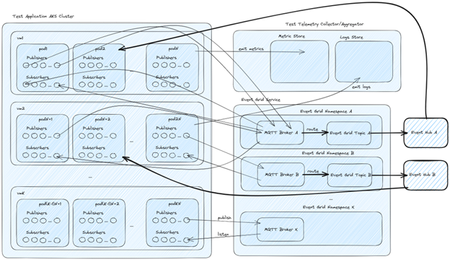
Announcing public preview of MQTT protocol and pull message delivery in Azure Event Grid
Azure Event Grid now supports MQTT protocol for bi-directional communication between IoT devices and cloud application, and pull delivery of messages on custom topics, for flexible messaging at high scale. 19KViews8likes27Comments
Fully managed MQTT broker, flexible consumption patterns and more new features in Azure Event Grid
General availability of MQTT broker and pull delivery and public preview of push delivery in Azure Event Grid namespace, with higher scale to support IoT solutions and event driven architectures. 7.1KViews3likes0Comments
Announcing Public Preview of Autoscale for Azure Event Grid Namespaces
Today we are pleased to announce the public preview of Autoscale for Azure Event Grid namespaces. With this capability, an Event Grid namespace in the Standard tier automatically adjusts its throughput unit (TU) allocation in response to real-time workload utilization. This removes the need to manually provision capacity ahead of traffic changes or react to throttling after the fact. How Autoscale fits with existing capacity management Event Grid namespaces already provide control over capacity through throughput units. Each Throughput Unit defines a fixed rate of event ingress, event egress, MQTT publish, and MQTT client connections. Until now, customers set the Throughput Unit count at namespace creation and adjusted it manually when traffic patterns changed. Autoscale builds on this model. It automates the adjustment of Throughput Unit count based on observed utilization. Customers still control the boundaries: a minimum Throughput Unit floor that guarantees baseline capacity, and a maximum Throughput Unit ceiling that caps cost. Event Grid handles all scaling decisions within those bounds. No manual intervention is required. Why this matters Event-driven and IoT workloads are rarely steady-state. MQTT device fleets connect in waves as regions come online. Event broker ingress spikes during batch processing windows or in response to external triggers. Multi-tenant platforms see delivery volumes shift across tenants throughout the day. Fixed-capacity provisioning forces a trade-off: provision for peak and pay for idle capacity, or provision for average and accept throttling during spikes. Autoscale addresses both sides by adding capacity when utilization is high and releasing it when utilization drops. Scenarios where Autoscale helps IoT and MQTT workloads Device fleets connect and disconnect on their own schedule. Message fan-out and subscription counts shift rapidly as devices move between online and offline states. With Autoscale, the namespace adds capacity as connection counts grow and releases it as devices go idle, keeping the MQTT broker responsive without manual resizing. Example A logistics company operates a fleet of 50,000 delivery vehicles. Each vehicle publishes GPS location and engine telemetry via MQTT every 10 seconds. During the morning dispatch window (6–8 AM), all vehicles come online simultaneously, generating a connection surge that is 5× the steady-state rate. Previously, the operations team had to pre-scale the namespace each morning and scale it back at night. With Autoscale, the namespace detects the connection ramp-up within seconds, provisions additional TUs to absorb the spike, and scales back down overnight when most vehicles are parked and idle—without any manual intervention. Bursty event broker workloads Periodic batch uploads, demand-driven spikes, or seasonal traffic patterns create short-lived peaks that are difficult to plan for. Autoscale provisions additional capacity during the burst and releases it once traffic returns to baseline, keeping costs aligned with actual usage rather than worst-case projections. Example An e-commerce platform processes order events through Event Grid. On regular days, ingress sits at approximately 2,000 events per second. During flash sales, ingress spikes to 40,000 events per second for 15-20 minutes before returning to normal. Before Autoscale, the team provisioned for peak capacity around the clock, paying for 20x the baseline even when traffic was low. With Autoscale, the namespace scales from 2 Throughput Units to the required capacity within seconds of detecting the spike, handles the burst without throttling, and releases the extra Throughput Units once the sale ends - aligning cost directly with the duration and intensity of each event. How it works Autoscale is a namespace-level configuration. Customers enable it and set a minimum and maximum TU count. Event Grid continuously evaluates utilization across all scaling categories. When utilization crosses internal thresholds, Event Grid adjusts the Throughput Unit allocation up or down within the customer-defined bounds. Full details on scaling behavior are available in the Autoscale in Azure Event Grid namespaces (preview) - Azure Event Grid | Microsoft Learn. What customers control The configuration is intentionally simple: Select Autoscale on the Scale tab to turn the capability on. Minimum throughput units: The namespace will not scale below this value. Set this to cover baseline traffic so the workload is never throttled while the system detects a change. Maximum throughput units: The namespace will not scale above this value. This caps cost exposure during peak traffic. Everything else is managed by Event Grid internally. There are no scaling rules to configure or maintain. Availability Autoscale is available in public preview for Event Grid namespaces in the Standard tier. It can be enabled through the Azure portal, ARM templates or REST API. For detailed steps, refer to the how-to guide on Microsoft Learn. What's next This is a public preview release. We are actively evolving the experience and welcome your feedback. Feedback can be shared by contacting our support team directly.188Views1like0Comments
Powering Event Driven Payments with Stripe and Azure Event Grid
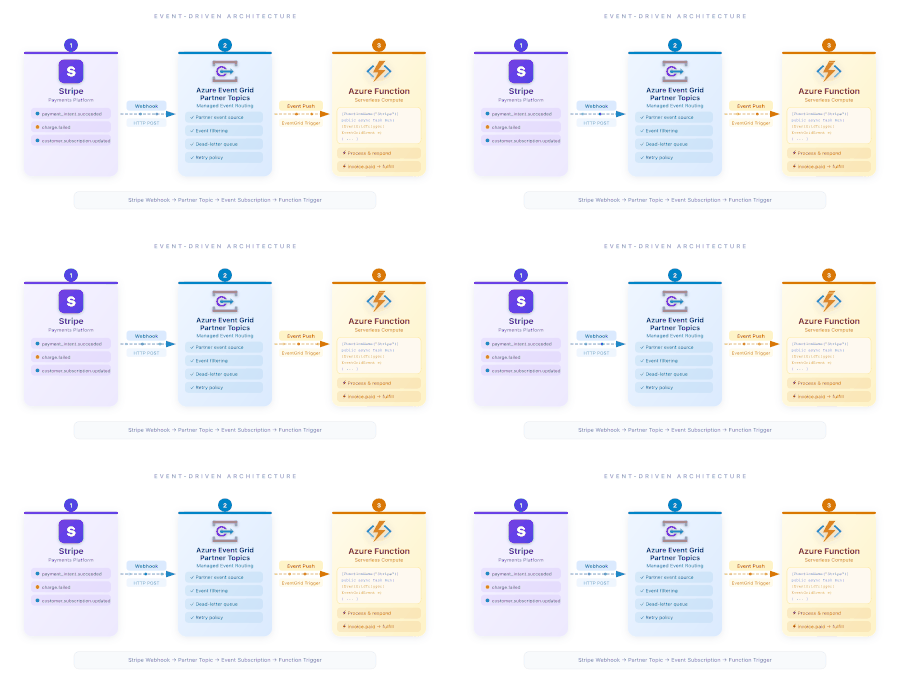
Introduction Modern commerce systems are increasingly event-driven. Payments, subscriptions, refunds, disputes, and customer updates all generate signals that downstream systems must react quickly and reliably. Stripe events give developers real-time visibility into what is happening inside their Stripe accounts. With the new Azure Event Grid destination for events from Stripe — now available in Public Preview — developers can now route those events directly into Azure and build scalable, event-driven architectures without managing webhook infrastructure or custom brokers. Stripe events meet Azure Event Grid Stripe produces events for changes across a wide range of objects, including payments, customers, subscriptions, accounts, meters, and more, covering hundreds of distinct event types. These events allow developers to react in near real time to business-critical changes. Azure Event Grid acts as a fully managed event broker between Stripe and Azure services. By configuring Azure Event Grid as an event destination in Stripe, events are automatically delivered to Azure subscribers such as: Azure Functions Logic Apps Event Hubs Service Bus Storage queues Hybrid Connections Azure Event Grid Namespace Topics Webhooks This creates a clean separation between event ingestion, routing, and processing, following modern event-driven design principles. Extending Stripe events into Fabric Real-Time Intelligence Beyond operational workflows, Stripe events can also power real-time analytics scenarios using Microsoft Fabric Real-Time Intelligence. Azure Event Grid namespaces integrate with Fabric through a native connector that allows events to flow directly into Eventstream. This makes it possible to ingest Stripe events into Fabric as continuous streams, where they can be transformed, enriched, and analyzed in real time. With this integration, teams can: Stream Stripe events into Fabric without building custom ingestion pipelines Correlate payment and subscription events with other business signals Build real-time dashboards and analytics over live commerce data Enable downstream consumers such as KQL databases, dashboards, and analytics workloads This unlocks an end-to-end flow where Stripe events move seamlessly from operational systems into real-time analytics, helping organizations gain immediate insight into payment behavior, revenue trends, and customer activity as events happen. Common use cases enabled by Stripe events on Azure Developers can unlock a wide range of scenarios by combining Stripe events with Azure services: Payment and transaction fulfillment: React to payment completions, refunds, disputes, and payment method updates to trigger downstream business logic. Subscription and billing lifecycle management: Track subscription creation, renewals, cancellations, and plan changes to automate billing workflows. Customer notifications and communications: Trigger emails, push notifications, or in-app messages in response to payment or account events. Financial operations and reconciliation: Stream transaction events into accounting systems or data stores to keep financial records in sync. Monitoring and real-time analytics: Build real-time dashboards and insights on customer behavior, revenue trends, or churn indicators. Customer lifecycle management: Synchronize customer updates with CRM systems and other business platforms. Getting started The Stripe destination for Azure Event Grid is currently available in Public Preview. To get started, configure Azure Event Grid as an event destination in your Stripe dashboard. Stripe provides clear guidance for setting up the Azure Event Grid destination and sending events into your Azure environment: Stripe documentation for Azure Event Grid. Once configured, events can be routed to Azure services or streamed into Fabric Eventstream for real-time analytics and insights.645Views1like0Comments