azure event grid
57 TopicsJSON Structure: A JSON schema language you'll love
We talk to many customers moving structured data through queues and event streams and topics, and we see a strong desire to create more efficient and less brittle communication paths governed by rich data definitions well understood by all parties. The way those definitions are often shared are schema documents. While there is great need, the available schema options and related tool chains are often not great. JSON Schema is popular for its relative simplicity in trivial cases, but quickly becomes unmanageable as users employ more complex constructs. The industry has largely settled on "Draft 7," with subsequent releases seeing weak adoption. There's substantial frustration among developers who try to use JSON Schema for code generation or database mapping—scenarios it was never designed for. JSON Schema is a powerful document validation tool, but it is not a data definition language. We believe it's effectively un-toolable for anything beyond pure validation; practically all available code-generation tools agree by failing at various degrees of complexity. Avro and Protobuf schemas are better for code generation, but tightly coupled to their respective serialization frameworks. For our own work in Microsoft Fabric, we're initially leaning on an Avro-compatible schema with a small set of modifications, but we ultimately need a richer type definition language that ideally builds on people's familiarity with JSON Schema. This isn't just a Microsoft problem. It's an industry-wide gap. That's why we've submitted JSON Structure as a set of Internet Drafts to the IETF, aiming for formal standardization as an RFC. We want a vendor-neutral, standards-track schema language that the entire industry can adopt. What Is JSON Structure? JSON Structure is a modern, strictly typed data definition language that describes JSON-encoded data such that mapping to and from programming languages and databases becomes straightforward. It looks familiar—if you've written "type": "object", "properties": {...} before, you'll feel right at home. But there's a key difference: JSON Structure is designed for code generation and data interchange first, with validation as an optional layer rather than the core concern. This means you get: Precise numeric types: int32 , int64 , decimal with precision and scale, float , double Rich date/time support: date , time , datetime , duration —all with clear semantics Extended compound types: Beyond objects and arrays, you get set , map , tuple , and choice (discriminated unions) Namespaces and modular imports: Organize your schemas like code Currency and unit annotations: Mark a decimal as USD or a double as kilograms Here's a compact example that showcases these features. We start with the schema header and the object definition: { "$schema": "https://json-structure.org/meta/extended/v0/#", "$id": "https://example.com/schemas/OrderEvent.json", "name": "OrderEvent", "type": "object", "properties": { Objects require a name for clean code generation. The $schema points to the JSON Structure meta-schema, and the $id provides a unique identifier for the schema itself. Now let's define the first few properties—identifiers and a timestamp: "orderId": { "type": "uuid" }, "customerId": { "type": "uuid" }, "timestamp": { "type": "datetime" }, The native uuid type maps directly to Guid in .NET, UUID in Java, and uuid in Python. The datetime type uses RFC3339 encoding and becomes DateTimeOffset in .NET, datetime in Python, or Date in JavaScript. No format strings, no guessing. Next comes the order status, modeled as a discriminated union: "status": { "type": "choice", "choices": { "pending": { "type": "null" }, "shipped": { "type": "object", "name": "ShippedInfo", "properties": { "carrier": { "type": "string" }, "trackingId": { "type": "string" } } }, "delivered": { "type": "object", "name": "DeliveredInfo", "properties": { "signedBy": { "type": "string" } } } } }, The choice type is a discriminated union with typed payloads per case. Each variant can carry its own structured data— shipped includes carrier and tracking information, delivered captures who signed for the package, and pending carries no payload at all. This maps to enums with associated values in Swift, sealed classes in Kotlin, or tagged unions in Rust. For monetary values, we use precise decimals: "total": { "type": "decimal", "precision": 12, "scale": 2 }, "currency": { "type": "string", "maxLength": 3 }, The decimal type with explicit precision and scale ensures exact monetary math—no floating-point surprises. A precision of 12 with scale 2 gives you up to 10 digits before the decimal point and exactly 2 after. Line items use an array of tuples for compact, positional data: "items": { "type": "array", "items": { "type": "tuple", "properties": { "sku": { "type": "string" }, "quantity": { "type": "int32" }, "unitPrice": { "type": "decimal", "precision": 10, "scale": 2 } }, "tuple": ["sku", "quantity", "unitPrice"], "required": ["sku", "quantity", "unitPrice"] } }, Tuples are fixed-length typed sequences—ideal for time-series data or line items where position matters. The tuple array specifies the exact order: SKU at position 0, quantity at 1, unit price at 2. The int32 type maps to int in all mainstream languages. Finally, we add extensible metadata using set and map types: "tags": { "type": "set", "items": { "type": "string" } }, "metadata": { "type": "map", "values": { "type": "string" } } }, "required": ["orderId", "customerId", "timestamp", "status", "total", "currency", "items"] } The set type represents unordered, unique elements—perfect for tags. The map type provides string keys with typed values, ideal for extensible key-value metadata without polluting the main schema. Here's what a valid instance of this schema looks like: { "orderId": "f47ac10b-58cc-4372-a567-0e02b2c3d479", "customerId": "7c9e6679-7425-40de-944b-e07fc1f90ae7", "timestamp": "2025-01-15T14:30:00Z", "status": { "shipped": { "carrier": "Litware", "trackingId": "794644790323" } }, "total": "129.97", "currency": "USD", "items": [ ["SKU-1234", 2, "49.99"], ["SKU-5678", 1, "29.99"] ], "tags": ["priority", "gift-wrap"], "metadata": { "source": "web", "campaign": "summer-sale" } } Notice how the choice is encoded as an object with a single key indicating the active case— {"shipped": {...}} —making it easy to parse and route. Tuples serialize as JSON arrays in the declared order. Decimals are encoded as strings to preserve precision across all platforms. Why Does This Matter for Messaging? When you're pushing events through Service Bus, Event Hubs, or Event Grid, schema clarity is everything. Your producers and consumers often live in different codebases, different languages, different teams. A schema that generates clean C# classes, clean Python dataclasses, and clean TypeScript interfaces—from the same source—is not a luxury. It's a requirement. JSON Structure's type system was designed with this polyglot reality in mind. The extended primitive types map directly to what languages actually have. A datetime is a DateTimeOffset in .NET, a datetime in Python, a Date in JavaScript. No more guessing whether that "string with format date-time" will parse correctly on the other side. SDKs Available Now We've built SDKs for the languages you're using today: TypeScript, Python, .NET, Java, Go, Rust, Ruby, Perl, PHP, Swift, and C. All SDKs validate both schemas and instances against schemas. A VS Code extension provides IntelliSense and inline diagnostics. Code and Schema Generation with Structurize Beyond validation, you often need to generate code or database schemas from your type definitions. The Structurize tool converts JSON Structure schemas into SQL DDL for various database dialects, as well as self-serializing classes for multiple programming languages. It can also convert between JSON Structure and other schema formats like Avro, Protobuf, and JSON Schema. Here's a simple example: a postal address schema on the left, and the SQL Server table definition generated by running structurize struct2sql postaladdress.json --dialect sqlserver on the right: JSON Structure Schema Generated SQL Server DDL { "$schema": "https://json-structure.org/meta/extended/v0/#", "$id": "https://example.com/schemas/PostalAddress.json", "name": "PostalAddress", "description": "A postal address for shipping or billing", "type": "object", "properties": { "id": { "type": "uuid", "description": "Unique identifier for the address" }, "street": { "type": "string", "description": "Street address with house number" }, "city": { "type": "string", "description": "City or municipality" }, "state": { "type": "string", "description": "State, province, or region" }, "postalCode": { "type": "string", "description": "ZIP or postal code" }, "country": { "type": "string", "description": "ISO 3166-1 alpha-2 country code" }, "createdAt": { "type": "datetime", "description": "When the address was created" } }, "required": ["id", "street", "city", "postalCode", "country"] } CREATE TABLE [PostalAddress] ( [id] UNIQUEIDENTIFIER, [street] NVARCHAR(200), [city] NVARCHAR(100), [state] NVARCHAR(50), [postalCode] NVARCHAR(20), [country] NVARCHAR(2), [createdAt] DATETIME2, PRIMARY KEY ([id], [street], [city], [postalCode], [country]) ); EXEC sp_addextendedproperty 'MS_Description', 'A postal address for shipping or billing', 'SCHEMA', 'dbo', 'TABLE', 'PostalAddress'; EXEC sp_addextendedproperty 'MS_Description', 'Unique identifier for the address', 'SCHEMA', 'dbo', 'TABLE', 'PostalAddress', 'COLUMN', 'id'; EXEC sp_addextendedproperty 'MS_Description', 'Street address with house number', 'SCHEMA', 'dbo', 'TABLE', 'PostalAddress', 'COLUMN', 'street'; -- ... additional column descriptions The uuid type maps to UNIQUEIDENTIFIER , datetime becomes DATETIME2 , and the schema's description fields are preserved as SQL Server extended properties. The tool supports PostgreSQL, MySQL, SQLite, and other dialects as well. Mind that all this code is provided "as-is" and is in a "draft" state just like the specification set. Feel encouraged to provide feedback and ideas in the GitHub repos for the specifications and SDKs at https://github.com/json-structure/ Learn More We've submitted JSON Structure as a set of Internet Drafts to the IETF, aiming for formal standardization as an RFC. This is an industry-wide issue, and we believe the solution needs to be a vendor-neutral standard. You can track the drafts at the IETF Datatracker. Main site: json-structure.org Primer: JSON Structure Primer Core specification: JSON Structure Core Extensions: Import | Validation | Alternate Names | Units | Composition IETF Drafts: IETF Datatracker GitHub: github.com/json-structure7.6KViews8likes1Comment
Announcing public preview of MQTT protocol and pull message delivery in Azure Event Grid
Azure Event Grid now supports MQTT protocol for bi-directional communication between IoT devices and cloud application, and pull delivery of messages on custom topics, for flexible messaging at high scale. 19KViews8likes27Comments
Performance Tuning and Scaling Optimization for Large-Scale Azure Workloads
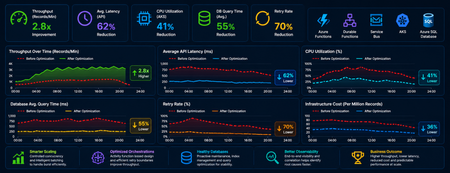
Summary As cloud-native systems scale, performance challenges rarely stem from a single bottleneck. Instead, they emerge from the interaction between compute, orchestration, and data layers under load. This article captures a practical optimization journey of a high-volume Azure-based workload and highlights how controlled scaling, improved orchestration design, and proactive database maintenance can significantly outperform brute-force scaling. Introduction Distributed systems are often designed with the assumption that scaling out will solve performance issues. However, for orchestration-heavy and database-intensive workloads, this approach can introduce more problems than it solves. In this scenario, the system processed millions of transactional records through Azure Functions, Durable Functions, messaging pipelines, APIs, and SQL databases. As the workload grew, the platform began experiencing: CPU and memory spikes Slower SQL queries Service Bus throttling Increased retries and execution delays What stood out was that these issues were not due to insufficient resources, but due to inefficient execution patterns at scale. The optimization effort therefore focused on controlling how the system scaled and executed, rather than simply increasing capacity. Understanding Workload Behavior A critical early step was identifying the nature of the workload—specifically, whether it was CPU-heavy or data-heavy. Rethinking Scaling: More Is Not Always Better One of the most important lessons was that scaling out aggressively can degrade performance. As more function instances processed messages in parallel: Database calls increased sharply API traffic surged Lock contention intensified Retry rates increased This created a cascading effect where retries amplified load, further slowing down the system. To address this, scaling was intentionally controlled using: Concurrency limits on function execution Batch-based processing instead of full parallel fan-out Small delays to smooth traffic spikes Chunking of large datasets into manageable units This shift from maximum parallelism to controlled throughput significantly improved system stability. Compute Optimization: CPU and Memory After stabilizing scaling behavior, the next step was optimizing compute usage. CPU Optimization CPU spikes were largely caused by excessive parallel execution and orchestration overhead. Improvements included: Breaking large workloads into smaller units Reducing unnecessary fan-outs of processes Limiting concurrent executions This resulted in more predictable CPU usage and improved execution consistency. Memory Optimization Memory pressure was primarily driven by large payloads and batch processing. Optimizations focused on: Processing data in smaller chunks Avoiding large in-memory payloads and memory leaks Reducing orchestration state size These changes improved system reliability and reduced execution failures under load. Scaling Approaches: Practical Trade-Offs Both vertical and horizontal scaling were used, but with careful consideration. Scale Up (Vertical Scaling) Quick to implement No architectural changes required Useful for immediate stabilization However, it had cost and scalability limits. Scale Out (Horizontal Scaling) Better suited for long-term scalability Enables workload distribution But without control, it can: Increase database contention Amplify retries Introduce instability Key Insight The most effective approach was not choosing one over the other but combining both with strict control over concurrency and execution patterns. Durable Functions: Orchestration Optimization Durable Functions were central to the system, making orchestration design a key factor in performance. Challenges Observed The initial design relied heavily on nested sub-orchestrators, which introduced: High orchestration overhead Increased replay and persistence operations Slower execution at scale Key Improvements Refactoring unnecessary sub-orchestrators into Activity Functions simplified execution and improved throughput. The benefits included: Reduced orchestration latency Faster execution cycles Lower infrastructure cost Note: However, sub-orchestrators remain the right choice when the design requires composing multiple dependent steps, managing scoped retry/error logic, or isolating orchestration history. The decision should be driven by the complexity and reuse requirements of each workflow segment and not applied as a blanket rule. Improved Retry Strategy Retry behavior was also optimized by redefining execution boundaries. Previously: One activity processed multiple records A single failure triggered a retry of the entire batch After optimization: One activity handled one logical unit of work This enabled: Granular retries Better failure isolation Reduced duplicate processing Database Hygiene: A Critical Foundation The database emerged as a major bottleneck due to fragmentation and stale statistics caused by continuous high-volume operations. Issues Identified Fragmented indexes Inefficient query plans Increased query execution time Optimization Approach A proactive maintenance strategy was implemented using scheduled jobs to: Update statistics regularly Rebuild indexes Maintain query performance consistency Controlled Database Load For heavy long-running workloads in multi-tenant architecture, execution of DB intensive process was intentionally run in singleton fashion at a tenant level to reduce contention. This approach: Prevented concurrent heavy operations Improved overall system stability Delivered more predictable throughput Observability: Finding the Real Problem A major challenge during optimization was distinguishing between symptoms and root causes. For example: Slow APIs were often caused by database contention High retries were triggered by upstream throttling Orchestration delays originated from downstream dependencies To address this, end-to-end observability was established using: Application-level tracing Load testing correlations Cross-service telemetry analysis This enabled accurate root cause identification and prevented misdirected optimization efforts. Key Takeaways Some key principles emerged from this optimization journey: Scaling more does not always mean performing better Controlled parallelism is more effective than unrestricted concurrency Orchestration design directly impacts system performance Database maintenance must be proactive Retry strategies should align with logical units of work Observability is essential for correct diagnosis Conclusion Performance tuning in distributed systems is less about adding resources and more about using them efficiently. By focusing on controlled scaling, simplifying orchestration, maintaining database health, and improving observability, the system achieved higher throughput, lower cost, and significantly improved stability. These lessons are broadly applicable to any Azure-based system handling large-scale, orchestration-heavy workloads and can help teams design more predictable and resilient architectures.787Views5likes0Comments
How to Fix Azure Event Grid Entra Authentication issue for ACS and Dynamics 365 integrated Webhooks
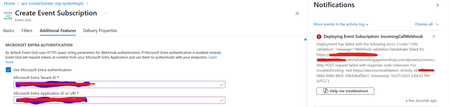
Introduction: Azure Event Grid is a powerful event routing service that enables event-driven architectures in Azure. When delivering events to webhook endpoints, security becomes paramount. Microsoft provides a secure webhook delivery mechanism using Microsoft Entra ID (formerly Azure Active Directory) authentication through the AzureEventGridSecureWebhookSubscriber role. Problem Statement: When integrating Azure Communication Services with Dynamics 365 Contact Center using Microsoft Entra ID-authenticated Event Grid webhooks, the Event Grid subscription deployment fails with an error: "HTTP POST request failed with unknown error code" with empty HTTP status and code. For example: Important Note: Before moving forward, please verify that you have the Owner role assigned on app to create event subscription. Refer to the Microsoft guidelines below to validate the required prerequisites before proceeding: Set up incoming calls, call recording, and SMS services | Microsoft Learn Why This Happens: This happens because AzureEventGridSecureWebhookSubscriber role is NOT properly configured on Microsoft EventGrid SP (Service Principal) and event subscription entra ID or application who is trying to create event grid subscription. What is AzureEventGridSecureWebhookSubscriber Role: The AzureEventGridSecureWebhookSubscriber is an Azure Entra application role that: Enables your application to verify the identity of event senders Allows specific users/applications to create event subscriptions Authorizes Event Grid to deliver events to your webhook How It Works: Role Creation: You create this app role in your destination webhook application's Azure Entra registration Role Assignment: You assign this role to: Microsoft Event Grid service principal (so it can deliver events) Either Entra ID / Entra User or Event subscription creator applications (so they can create event grid subscriptions) Token Validation: When Event Grid delivers events, it includes an Azure Entra token with this role claim Authorization Check: Your webhook validates the token and checks for the role Key Participants: Webhook Application (Your App) Purpose: Receives and processes events App Registration: Created in Azure Entra Contains: The AzureEventGridSecureWebhookSubscriber app role Validates: Incoming tokens from Event Grid Microsoft Event Grid Service Principal Purpose: Delivers events to webhooks App ID: Different per Azure cloud (Public, Government, etc.) Public Azure: 4962773b-9cdb-44cf-a8bf-237846a00ab7 Needs: AzureEventGridSecureWebhookSubscriber role assigned Event Subscription Creator Entra or Application Purpose: Creates event subscriptions Could be: You, Your deployment pipeline, admin tool, or another application Needs: AzureEventGridSecureWebhookSubscriber role assigned Although the full PowerShell script is documented in the below Event Grid documentation, it may be complex to interpret and troubleshoot. Azure PowerShell - Secure WebHook delivery with Microsoft Entra Application in Azure Event Grid - Azure Event Grid | Microsoft Learn To improve accessibility, the following section provides a simplified step-by-step tested solution along with verification steps suitable for all users including non-technical: Steps: STEP 1: Verify/Create Microsoft.EventGrid Service Principal Azure Portal → Microsoft Entra ID → Enterprise applications Change filter to Application type: Microsoft Applications Search for: Microsoft.EventGrid Ideally, your Azure subscription should include this application ID, which is common across all Azure subscriptions: 4962773b-9cdb-44cf-a8bf-237846a00ab7. If this application ID is not present, please contact your Azure Cloud Administrator. STEP 2: Create the App Role "AzureEventGridSecureWebhookSubscriber" Using Azure Portal: Navigate to your Webhook App Registration: Azure Portal → Microsoft Entra ID → App registrations Click All applications Find your app by searching OR use the Object ID you have Click on your app Create the App Role: Display name: AzureEventGridSecureWebhookSubscriber Allowed member types: Both (Users/Groups + Applications) Value: AzureEventGridSecureWebhookSubscriber Description: Azure Event Grid Role Do you want to enable this app role?: Yes In left menu, click App roles Click + Create app role Fill in the form: Click Apply STEP 3: Assign YOUR USER to the Role Using Azure Portal: Switch to Enterprise Application view: Azure Portal → Microsoft Entra ID → Enterprise applications Search for your webhook app (by name) Click on it Assign yourself: In left menu, click Users and groups Click + Add user/group Under Users, click None Selected Search for your user account (use your email) Select yourself Click Select Under Select a role, click None Selected Select AzureEventGridSecureWebhookSubscriber Click Select Click Assign STEP 4: Assign Microsoft.EventGrid Service Principal to the Role This step MUST be done via PowerShell or Azure CLI (Portal doesn't support this directly as we have seen) so PowerShell is recommended You will need to execute this step with the help of your Entra admin. # Connect to Microsoft Graph Connect-MgGraph -Scopes "AppRoleAssignment.ReadWrite.All" # Replace this with your webhook app's Application (client) ID $webhookAppId = "YOUR-WEBHOOK-APP-ID-HERE" #starting with c5 # Get your webhook app's service principal $webhookSP = Get-MgServicePrincipal -Filter "appId eq '$webhookAppId'" Write-Host " Found webhook app: $($webhookSP.DisplayName)" # Get Event Grid service principal $eventGridSP = Get-MgServicePrincipal -Filter "appId eq '4962773b-9cdb-44cf-a8bf-237846a00ab7'" Write-Host " Found Event Grid service principal" # Get the app role $appRole = $webhookSP.AppRoles | Where-Object {$_.Value -eq "AzureEventGridSecureWebhookSubscriber"} Write-Host " Found app role: $($appRole.DisplayName)" # Create the assignment New-MgServicePrincipalAppRoleAssignment ` -ServicePrincipalId $eventGridSP.Id ` -PrincipalId $eventGridSP.Id ` -ResourceId $webhookSP.Id ` -AppRoleId $appRole.Id Write-Host "Successfully assigned Event Grid to your webhook app!" Verification Steps: Verify the App Role was created: Your App Registration → App roles You should see: AzureEventGridSecureWebhookSubscriber Verify your user assignment: Enterprise application (your webhook app) → Users and groups You should see your user with role AzureEventGridSecureWebhookSubscriber Verify Event Grid assignment: Same location → Users and groups You should see Microsoft.EventGrid with role AzureEventGridSecureWebhookSubscriber Sample Flow: Analogy For Simplification: Lets think it similar to the construction site bulding where you are the owner of the building. Building = Azure Entra app (webhook app) Building (Azure Entra App Registration for Webhook) ├─ Building Name: "MyWebhook-App" ├─ Building Address: Application ID ├─ Building Owner: You ├─ Security System: App Roles (the security badges you create) └─ Security Team: Azure Entra and your actual webhook auth code (which validates tokens) like doorman Step 1: Creat the badge (App role) You (the building owner) create a special badge: - Badge name: "AzureEventGridSecureWebhookSubscriber" - Badge color: Let's say it's GOLD - Who can have it: Companies (Applications) and People (Users) This badge is stored in your building's system (Webhook App Registration) Step 2: Give badge to the Event Grid Service: Event Grid: "Hey, I need to deliver messages to your building" You: "Okay, here's a GOLD badge for your SP" Event Grid: *wears the badge* Now Event Grid can: - Show the badge to Azure Entra - Get tokens that say "I have the GOLD badge" - Deliver messages to your webhook Step 3: Give badge to yourself (or your deployment tool) You also need a GOLD badge because: - You want to create event grid event subscriptions - Entra checks: "Does this person have a GOLD badge?" - If yes: You can create subscriptions - If no: "Access denied" Your deployment pipeline also gets a GOLD badge: - So it can automatically set up event subscriptions during CI/CD deployments Disclaimer: The sample scripts provided in this article are provided AS IS without warranty of any kind. The author is not responsible for any issues, damages, or problems that may arise from using these scripts. Users should thoroughly test any implementation in their environment before deploying to production. Azure services and APIs may change over time, which could affect the functionality of the provided scripts. Always refer to the latest Azure documentation for the most up-to-date information. Thanks for reading this blog! I hope you found it helpful and informative for this specific integration use case 😀745Views4likes1Comment
Introducing native Service Bus message publishing from Azure API Management (Preview)
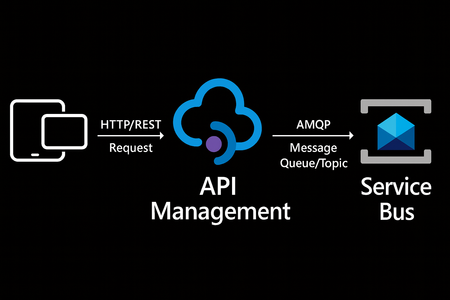
We’re excited to announce a preview capability in Azure API Management (APIM) — you can now send messages directly to Azure Service Bus from your APIs using a built-in policy. This enhancement, currently in public preview, simplifies how you connect your API layer with event-driven and asynchronous systems, helping you build more scalable, resilient, and loosely coupled architectures across your enterprise. Why this matters? Modern applications increasingly rely on asynchronous communication and event-driven designs. With this new integration: Any API hosted in API Management can publish to Service Bus — no SDKs, custom code, or middleware required. Partners, clients, and IoT devices can send data through standard HTTP calls, even if they don’t support AMQP natively. You stay in full control with authentication, throttling, and logging managed centrally in API Management. Your systems scale more smoothly by decoupling front-end requests from backend processing. How it works The new send-service-bus-message policy allows API Management to forward payloads from API calls directly into Service Bus queues or topics. High-level flow A client sends a standard HTTP request to your API endpoint in API Management. The policy executes and sends the payload as a message to Service Bus. Downstream consumers such as Logic Apps, Azure Functions, or microservices process those messages asynchronously. All configurations happen in API Management — no code changes or new infrastructure are required. Getting started You can try it out in minutes: Set up a Service Bus namespace and create a queue or topic. Enable a managed identity (system-assigned or user-assigned) on your API Management instance. Grant the identity the “Service Bus data sender” role in Azure RBAC, scoped to your queue/ topic. Add the policy to your API operation: <send-service-bus-message queue-name="orders"> <payload>@(context.Request.Body.As<string>())</payload> </send-service-bus-message> Once saved, each API call publishes its payload to the Service Bus queue or topic. 📖 Learn more. Common use cases This capability makes it easy to integrate your APIs into event-driven workflows: Order processing – Queue incoming orders for fulfillment or billing. Event notifications – Trigger internal workflows across multiple applications. Telemetry ingestion – Forward IoT or mobile app data to Service Bus for analytics. Partner integrations – Offer REST-based endpoints for external systems while maintaining policy-based control. Each of these scenarios benefits from simplified integration, centralized governance, and improved reliability. Secure and governed by design The integration uses managed identities for secure communication between API Management and Service Bus — no secrets required. You can further apply enterprise-grade controls: Enforce rate limits, quotas, and authorization through APIM policies. Gain API-level logging and tracing for each message sent. Use Service Bus metrics to monitor downstream processing. Together, these tools help you maintain a consistent security posture across your APIs and messaging layer. Build modern, event-driven architectures With this feature, API Management can serve as a bridge to your event-driven backbone. Start small by queuing a single API’s workload, or extend to enterprise-wide event distribution using topics and subscriptions. You’ll reduce architectural complexity while enabling more flexible, scalable, and decoupled application patterns. Learn more: Get the full walkthrough and examples in the documentation 👉 here5.1KViews4likes10CommentsAzure Event Grid Domain Creation: Overcoming AZ CLI's TLS Parameter Limitations with Workaround
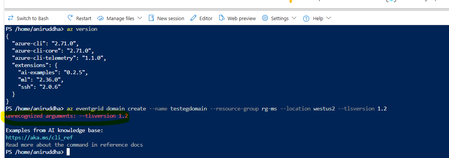
Introduction: The Intersection of Security Policies and DevOps Automation In the modern cloud landscape, organizations increasingly enforce strict security requirements through platform policies. One common requirement is mandating latest TLS versions for example TLS 1.2 across all deployed resources to protect data in transit. While this is an excellent security practice, it can sometimes conflict with the available configuration options in deployment tools, particularly in the Azure CLI. This blog explores a specific scenario that many Azure DevOps teams encounter: how to deploy an Azure Event Grid domain when your organization has a custom policy requiring latest version considering TLS 1.2, but the Azure CLI command doesn't provide a parameter to configure this setting. The Problem: Understanding the Gap Between Policy and Tooling What Is Azure Event Grid? Azure Event Grid is a serverless event routing service that enables event-driven architectures. It manages the routing of events from various sources (like Azure services, custom applications, or SaaS products) to different handlers such as Azure Functions, Logic Apps, or custom webhooks. An Event Grid domain provides a custom topic endpoint that can receive events from multiple sources, offering a way to organize and manage events at scale. The Policy Requirement: Many organizations implement Azure Policy to enforce security standards across their cloud infrastructure. A common policy might look like this: { "policyRule": { "if": { "allOf": [ { "field": "type", "equals": "Microsoft.EventGrid/domains" }, { "anyOf": [ { "field": "Microsoft.EventGrid/domains/minimumTlsVersion", "exists": false }, { "field": "Microsoft.EventGrid/domains/minimumTlsVersion", "notEquals": "1.2" } ] } ] }, "then": { "effect": "deny" } } } This policy blocks the creation of any Event Grid domain that doesn't explicitly set TLS 1.2 as the minimum TLS version. The CLI Limitation: Now, let's examine the Azure CLI command to create an Event Grid domain: az eventgrid domain | Microsoft Learn TLS property is unrecognized with the latest version of AZ CLI version. Current Status of This Limitation: It's worth noting that this limitation has been recognized by the Azure team. There is an official GitHub feature request tracking this issue, which you can find at => Please add TLS support while creation of Azure Event Grid domain through CLI · Issue #31278 · Azure/azure-cli Before implementing this workaround described in this article, I recommend checking the current status of this feature request. The Azure CLI is continuously evolving, and by the time you're reading this, the limitation might have been addressed. However, as of April 2025, this remains a known limitation in the Azure CLI, necessitating the alternative approach outlined below. Why This Matters: This limitation becomes particularly problematic in CI/CD pipelines or Infrastructure as Code (IaC) scenarios where you want to automate the deployment of Event Grid domain resources. Workaround: You can utilize below ARM template and deploy it through AZ CLI in your deployment pipeline as below: Working ARM template: { "$schema": "https://schema.management.azure.com/schemas/2019-04-01/deploymentTemplate.json#", "contentVersion": "1.0.0.0", "parameters": { "domainName": { "type": "string", "metadata": { "description": "Name of the Event Grid Domain" } }, "location": { "type": "string", "defaultValue": "[resourceGroup().location]", "metadata": { "description": "Azure region for the domain" } } }, "resources": [ { "type": "Microsoft.EventGrid/domains", "apiVersion": "2025-02-15", "name": "[parameters('domainName')]", "location": "[parameters('location')]", "properties": { "minimumTlsVersionAllowed": "1.2" } } ] } Please note I've used latest API version from below official Microsoft documentation : Microsoft.EventGrid/domains - Bicep, ARM template & Terraform AzAPI reference | Microsoft Learn Working AZ CLI command: az deployment group create --resource-group <rg> --template-file <armtemplate.json> --parameters domainName=<event grid domain name> You can store this ARM template in your configuration directory with replacement for Azure CLI command. It explicitly sets TLS 1.2 for Event Grid domains, ensuring security compliance where the CLI lacks this parameter. For example: az deployment group create --resource-group <rg> --template-file ./config/<armtemplate.json> --parameters domainName=<event grid domain name> Disclaimer: The sample scripts provided in this article are provided AS IS without warranty of any kind. The author is not responsible for any issues, damages, or problems that may arise from using these scripts. Users should thoroughly test any implementation in their environment before deploying to production. Azure services and APIs may change over time, which could affect the functionality of the provided scripts. Always refer to the latest Azure documentation for the most up-to-date information. Thanks for reading this blog! I hope you've found this workaround valuable for addressing the Event Grid domain TLS parameter limitation in Azure CLI. 😊254Views4likes0Comments