azure essentials
71 Topics
Is there no way to get better support for Azure - esp for SEV A tickets
We have had a sev A ticket open for over 5 days, and are incurring thousands in losses every day, and despite assurances from the Azure Support that it is being solved in hours and then having confirmations that it is solved, the issue is still not solved. I have asked numerous times to get our teams in touch with actual microsoft employees, not front end contractors, who is more like level 1 support, and just running messages between customer and back end team, and really are powerless to handle any suport issues themselves, and they are on complete mercy of "other teams" yet as a customer, apparantly we cant even get on a call with these other teams, and the poor front end contractors are getting the brunt of our pain. Absolutely are in the dark, as to what is actually happening in the back end, other than "trust me bro" we are working on it. No eta, no explanation.. hard to fathom how this can go on like this576Views3likes6Comments
Can I connect a DELL Wyse 3040 Thin Client to an Azure Virtual Desktop WITHOUT WMS?
The organisation I work for has moved away from WYSE 3040s with an on-premise RDS farm. We now use laptops, docks and Microsoft 365/SharePoint the whole thing. Intune management too. This is working fine but I have had "an idea". I now have a box of some 30 old thin clients. WYSE 3040 Thin OS 9.1.4234 Can I use a WYSE 3040 to connect straight to an Azure Virtual Desktop? Reason: We have some volunteer staff who come in to the office for just 2-3 hours one day a week. They do basic processing of physical paper forms, updating spreadsheets, entering invoice details etc etc, boring but essential tasks. They dont need anything fancy. BUT ... We (a charity) cant afford to buy them a laptop for 2-3 hours a week. So I have set up an AVD successfully, hoorah for me. I can access the AVD no problem using the Windows App on a Windows laptop or on a Mac device. Can I point a WYSE device straight at the AVD WITHOUT using Wyse Management Suite? The old WMS is on the local server which will be decommissioned. I dont want to use that. When I do a factory reset on a WYSE and go to configure Windows Virtual Desktop it does not seem to do anything. It does prompt me for MFA and does show our tenant welcome page background image so it is doing "something" Has anyone done this successfully?823Views0likes3CommentsCloud-Native vs. Hybrid for the 2026 Workplace
When to choose Cloud-Native vs. Hybrid for the 2026 Workplace? Hi everyone, I am starting a discussion on the foundational phase of one project. As a Computer Engineer, I believe the most critical decision we face in 2026 is determining exactly when to step to a Full Cloud model versus maintaining a Hybrid Infrastructure. In my view, the decision is not about cost, it is about resiliency, high availability and more avalability. I would like to exchange views with other engineers on these area: latency, edge requirements, integration and aglility. In your experience, what are the Tipps that makes you choose one over the other for a 2026 environment? I'm looking for technical architectural insights, not sales approaches.337Views0likes4CommentsApplying DevOps Principles on Lean Infrastructure. Lessons From Scaling to 102K Users.
Hi Azure Community, I'm a Microsoft Certified DevOps Engineer, and I want to share an unusual journey. I have been applying DevOps principles on traditional VPS infrastructure to scale to 102,000 users with 99.2% uptime. Why am I posting this in an Azure community? Because I'm planning migration to Azure in 2026, and I want to understand: What mistakes am I already making that will bite me during migration? THE CURRENT SETUP Platform: Social commerce (West Africa) Users: 102,000 active Monthly events: 2 million Uptime: 99.2% Infrastructure: Single VPS Stack: PHP/Laravel, MySQL, Redis Yes - one VPS. No cloud. No Kubernetes. No microservices. WHY I HAVEN'T USED AZURE YET Honest answer: Budget constraints in emerging market startup ecosystem. At our current scale, fully managed Azure services would significantly increase monthly burn before product-market expansion. The funding we raised needs to last through growth milestones. The trade: I manually optimize what Azure would auto-scale. I debug what Application Insights would catch. I do by hand what Azure Functions would automate. DEVOPS PRACTICES THAT KEPT US RUNNING Even on single-server infrastructure, core DevOps principles still apply: CI/CD Pipeline (GitHub Actions) • 3-5 deployments weekly • Zero-downtime deploys • Automated rollback on health check failures • Feature flags for gradual rollouts Monitoring & Observability • Custom monitoring (would love Application Insights) • Real-time alerting • Performance tracking and slow query detection • Resource usage monitoring Automation • Automated backups • Automated database optimization • Automated image compression • Automated security updates Infrastructure as Code • Configs in Git • Deployment scripts • Environment variables • Documented procedures Testing & Quality • Automated test suite • Pre-deployment health checks • Staging environment • Post-deployment verification KEY OPTIMIZATIONS Async Job Processing • Upload endpoint: 8 seconds → 340ms • 4x capacity increase Database Optimization • Feed loading: 6.4 seconds → 280ms • Strategic caching • Batch processing Image Compression • 3-8MB → 180KB (94% reduction) • Critical for mobile users Caching Strategy • Redis for hot data • Query result caching • Smart invalidation Progressive Enhancement • Server-rendered pages • 2-3 second loads on 4G WHAT I'M WORRIED ABOUT FOR AZURE MIGRATION This is where I need your help: Architecture Decisions • App Service vs Functions + managed services? • MySQL vs Azure SQL? • When does cost/benefit flip for managed services? Cost Management • How do startups manage Azure costs during growth? • Reserved instances vs pay-as-you-go? • Which Azure services are worth the premium? Migration Strategy • Lift-and-shift first, or re-architect immediately? • Zero-downtime migration with 102K active users? • Validation approach before full cutover? Monitoring & DevOps • Application Insights - worth it from day one? • Azure DevOps vs GitHub Actions for Azure deployments? • Operational burden reduction with managed services? Development Workflow • Local development against Azure services? • Cost-effective staging environments? • Testing Azure features without constant bills? MY PLANNED MIGRATION PATH Phase 1: Hybrid (Q1 2026) • Azure CDN for static assets • Azure Blob Storage for images • Application Insights trial • Keep compute on VPS Phase 2: Compute Migration (Q2 2026) • App Service for API • Azure Database for MySQL • Azure Cache for Redis • VPS for background jobs Phase 3: Full Azure (Q3 2026) • Azure Functions for processing • Full managed services • Retire VPS QUESTIONS FOR THIS COMMUNITY Question 1: Am I making migration harder by waiting? Should I have started with Azure at higher cost to avoid technical debt? Question 2: What will break when I migrate? What works on VPS but fails in cloud? What assumptions won't hold? Question 3: How do I validate before cutting over? Parallel infrastructure? Gradual traffic shift? Safe patterns? Question 4: Cost optimization from day one? What to optimize immediately vs later? Common cost mistakes? Question 5: DevOps practices that transfer? What stays the same? What needs rethinking for cloud-native? THE BIGGER QUESTION Have you migrated from self-hosted to Azure? What surprised you? I know my setup isn't best practice by Azure standards. But it's working, and I've learned optimization, monitoring, and DevOps fundamentals in practice. Will those lessons transfer? Or am I building habits that cloud will expose as problematic? Looking forward to insights from folks who've made similar migrations. --- About the Author: Microsoft Certified DevOps Engineer and Azure Developer. CTO at social commerce platform scaling in West Africa. Preparing for phased Azure migration in 2026. P.S. I got the Azure certifications to prepare for this migration. Now I need real-world wisdom from people who've actually done it!409Views0likes1CommentHow to Fix Azure Event Grid Entra Authentication issue for ACS and Dynamics 365 integrated Webhooks
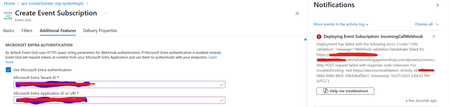
Introduction: Azure Event Grid is a powerful event routing service that enables event-driven architectures in Azure. When delivering events to webhook endpoints, security becomes paramount. Microsoft provides a secure webhook delivery mechanism using Microsoft Entra ID (formerly Azure Active Directory) authentication through the AzureEventGridSecureWebhookSubscriber role. Problem Statement: When integrating Azure Communication Services with Dynamics 365 Contact Center using Microsoft Entra ID-authenticated Event Grid webhooks, the Event Grid subscription deployment fails with an error: "HTTP POST request failed with unknown error code" with empty HTTP status and code. For example: Important Note: Before moving forward, please verify that you have the Owner role assigned on app to create event subscription. Refer to the Microsoft guidelines below to validate the required prerequisites before proceeding: Set up incoming calls, call recording, and SMS services | Microsoft Learn Why This Happens: This happens because AzureEventGridSecureWebhookSubscriber role is NOT properly configured on Microsoft EventGrid SP (Service Principal) and event subscription entra ID or application who is trying to create event grid subscription. What is AzureEventGridSecureWebhookSubscriber Role: The AzureEventGridSecureWebhookSubscriber is an Azure Entra application role that: Enables your application to verify the identity of event senders Allows specific users/applications to create event subscriptions Authorizes Event Grid to deliver events to your webhook How It Works: Role Creation: You create this app role in your destination webhook application's Azure Entra registration Role Assignment: You assign this role to: Microsoft Event Grid service principal (so it can deliver events) Either Entra ID / Entra User or Event subscription creator applications (so they can create event grid subscriptions) Token Validation: When Event Grid delivers events, it includes an Azure Entra token with this role claim Authorization Check: Your webhook validates the token and checks for the role Key Participants: Webhook Application (Your App) Purpose: Receives and processes events App Registration: Created in Azure Entra Contains: The AzureEventGridSecureWebhookSubscriber app role Validates: Incoming tokens from Event Grid Microsoft Event Grid Service Principal Purpose: Delivers events to webhooks App ID: Different per Azure cloud (Public, Government, etc.) Public Azure: 4962773b-9cdb-44cf-a8bf-237846a00ab7 Needs: AzureEventGridSecureWebhookSubscriber role assigned Event Subscription Creator Entra or Application Purpose: Creates event subscriptions Could be: You, Your deployment pipeline, admin tool, or another application Needs: AzureEventGridSecureWebhookSubscriber role assigned Although the full PowerShell script is documented in the below Event Grid documentation, it may be complex to interpret and troubleshoot. Azure PowerShell - Secure WebHook delivery with Microsoft Entra Application in Azure Event Grid - Azure Event Grid | Microsoft Learn To improve accessibility, the following section provides a simplified step-by-step tested solution along with verification steps suitable for all users including non-technical: Steps: STEP 1: Verify/Create Microsoft.EventGrid Service Principal Azure Portal → Microsoft Entra ID → Enterprise applications Change filter to Application type: Microsoft Applications Search for: Microsoft.EventGrid Ideally, your Azure subscription should include this application ID, which is common across all Azure subscriptions: 4962773b-9cdb-44cf-a8bf-237846a00ab7. If this application ID is not present, please contact your Azure Cloud Administrator. STEP 2: Create the App Role "AzureEventGridSecureWebhookSubscriber" Using Azure Portal: Navigate to your Webhook App Registration: Azure Portal → Microsoft Entra ID → App registrations Click All applications Find your app by searching OR use the Object ID you have Click on your app Create the App Role: Display name: AzureEventGridSecureWebhookSubscriber Allowed member types: Both (Users/Groups + Applications) Value: AzureEventGridSecureWebhookSubscriber Description: Azure Event Grid Role Do you want to enable this app role?: Yes In left menu, click App roles Click + Create app role Fill in the form: Click Apply STEP 3: Assign YOUR USER to the Role Using Azure Portal: Switch to Enterprise Application view: Azure Portal → Microsoft Entra ID → Enterprise applications Search for your webhook app (by name) Click on it Assign yourself: In left menu, click Users and groups Click + Add user/group Under Users, click None Selected Search for your user account (use your email) Select yourself Click Select Under Select a role, click None Selected Select AzureEventGridSecureWebhookSubscriber Click Select Click Assign STEP 4: Assign Microsoft.EventGrid Service Principal to the Role This step MUST be done via PowerShell or Azure CLI (Portal doesn't support this directly as we have seen) so PowerShell is recommended You will need to execute this step with the help of your Entra admin. # Connect to Microsoft Graph Connect-MgGraph -Scopes "AppRoleAssignment.ReadWrite.All" # Replace this with your webhook app's Application (client) ID $webhookAppId = "YOUR-WEBHOOK-APP-ID-HERE" #starting with c5 # Get your webhook app's service principal $webhookSP = Get-MgServicePrincipal -Filter "appId eq '$webhookAppId'" Write-Host " Found webhook app: $($webhookSP.DisplayName)" # Get Event Grid service principal $eventGridSP = Get-MgServicePrincipal -Filter "appId eq '4962773b-9cdb-44cf-a8bf-237846a00ab7'" Write-Host " Found Event Grid service principal" # Get the app role $appRole = $webhookSP.AppRoles | Where-Object {$_.Value -eq "AzureEventGridSecureWebhookSubscriber"} Write-Host " Found app role: $($appRole.DisplayName)" # Create the assignment New-MgServicePrincipalAppRoleAssignment ` -ServicePrincipalId $eventGridSP.Id ` -PrincipalId $eventGridSP.Id ` -ResourceId $webhookSP.Id ` -AppRoleId $appRole.Id Write-Host "Successfully assigned Event Grid to your webhook app!" Verification Steps: Verify the App Role was created: Your App Registration → App roles You should see: AzureEventGridSecureWebhookSubscriber Verify your user assignment: Enterprise application (your webhook app) → Users and groups You should see your user with role AzureEventGridSecureWebhookSubscriber Verify Event Grid assignment: Same location → Users and groups You should see Microsoft.EventGrid with role AzureEventGridSecureWebhookSubscriber Sample Flow: Analogy For Simplification: Lets think it similar to the construction site bulding where you are the owner of the building. Building = Azure Entra app (webhook app) Building (Azure Entra App Registration for Webhook) ├─ Building Name: "MyWebhook-App" ├─ Building Address: Application ID ├─ Building Owner: You ├─ Security System: App Roles (the security badges you create) └─ Security Team: Azure Entra and your actual webhook auth code (which validates tokens) like doorman Step 1: Creat the badge (App role) You (the building owner) create a special badge: - Badge name: "AzureEventGridSecureWebhookSubscriber" - Badge color: Let's say it's GOLD - Who can have it: Companies (Applications) and People (Users) This badge is stored in your building's system (Webhook App Registration) Step 2: Give badge to the Event Grid Service: Event Grid: "Hey, I need to deliver messages to your building" You: "Okay, here's a GOLD badge for your SP" Event Grid: *wears the badge* Now Event Grid can: - Show the badge to Azure Entra - Get tokens that say "I have the GOLD badge" - Deliver messages to your webhook Step 3: Give badge to yourself (or your deployment tool) You also need a GOLD badge because: - You want to create event grid event subscriptions - Entra checks: "Does this person have a GOLD badge?" - If yes: You can create subscriptions - If no: "Access denied" Your deployment pipeline also gets a GOLD badge: - So it can automatically set up event subscriptions during CI/CD deployments Disclaimer: The sample scripts provided in this article are provided AS IS without warranty of any kind. The author is not responsible for any issues, damages, or problems that may arise from using these scripts. Users should thoroughly test any implementation in their environment before deploying to production. Azure services and APIs may change over time, which could affect the functionality of the provided scripts. Always refer to the latest Azure documentation for the most up-to-date information. Thanks for reading this blog! I hope you found it helpful and informative for this specific integration use case 😀1KViews4likes1CommentPipeline Intelligence is live and open-source real-time Azure DevOps monitoring powered by AI .
Every DevOps team I've worked with had the same problem: Slow pipelines. Zero visibility. No idea where to start. So I stopped complaining and built the solution. So I built something about it. ⚡ Pipeline Intelligence is a full-stack Azure DevOps monitoring dashboard that: ✅ Connects to your real Azure DevOps organization via REST API ✅ Detects bottlenecks across all your pipelines automatically ✅ Calculates exactly how much time your team is wasting per month ✅ Uses Gemini AI to generate prioritized fixes with ready-to-paste YAML solutions ✅ JWT-secured, Docker-ready, and fully open-source Tech Stack: → React 18 + Vite + Tailwind CSS → Node.js + Express + Azure DevOps API v7 → Google Gemini 1.5 Flash → JWT Authentication + Docker 𝗪𝗵𝗮𝘁 𝗺𝗮𝗸𝗲𝘀 𝗶𝘁 𝗱𝗶𝗳𝗳𝗲𝗿𝗲𝗻𝘁? Most tools show you generic estimates. Pipeline Intelligence reads your actual cluster config, node count, and pipeline structure and gives you recommendations specific to your infrastructure. 🎯 This year, I set myself a personal challenge: Build and open-source a series of production-grade tools exclusively focused on Azure services tools that solve real problems for real DevOps teams. This project represents weeks of research, architecture decisions, and late-night debugging sessions. I'm sharing it with the community because I believe great tooling should be accessible to everyone not locked behind enterprise paywalls. If this resonates with you, I have one simple ask: 👉 A like, a comment, or a share takes 3 seconds but it helps this reach the DevOps engineers who need it most. Your support is what keeps me building. ❤️ GitHub: https://github.com/HlaliMedAmine/pipeline-intelligence367Views0likes1CommentExcited to share my latest open-source project: KubeCost Guardian
After seeing how many DevOps teams struggle with Kubernetes cost visibility on Azure, I built a full-stack cost optimization platform from scratch. 𝗪𝗵𝗮𝘁 𝗶𝘁 𝗱𝗼𝗲𝘀: ✅ Real-time AKS cluster monitoring via Azure SDK ✅ Cost breakdown per namespace, node, and pod ✅ AI-powered recommendations generated from actual cluster state ✅ One-click optimization actions ✅ JWT-secured dashboard with full REST API 𝗧𝗲𝗰𝗵 𝗦𝘁𝗮𝗰𝗸: - React 18 + TypeScript + Vite - Tailwind CSS + shadcn/ui + Recharts - Node.js + Express + TypeScript - Azure SDK (@azure/arm-containerservice) - JWT Authentication + Azure Service Principal 𝗪𝗵𝗮𝘁 𝗺𝗮𝗸𝗲𝘀 𝗶𝘁 𝗱𝗶𝗳𝗳𝗲𝗿𝗲𝗻𝘁: Most cost tools show you generic estimates. KubeCost Guardian reads your actual VM size, node count, and cluster configuration to generate recommendations that are specific to your infrastructure not averages. For example, if your cluster has only 2 nodes with no autoscaler enabled, it immediately flags the HA risk and calculates exactly how much you'd save by switching to Spot instances based on your actual VM size. This project is fully open-source and built for the DevOps community. ⭐ GitHub: https://github.com/HlaliMedAmine/kubecost-guardian This project represents hours of hard work, and passion. I decided to make it open-source so everyone can benefit from it 🤝 ,If you find it useful, I’d really appreciate your support . Your support motivates me to keep building and sharing more powerful projects 👌. More exciting ideas are coming soon… stay tuned! 🔥.349Views0likes1CommentPAAS resource metrics using Azure Data Collection Rule to Log Analytics Workspace
Hi Team, I want to build a use case to pull the Azure PAAS resources metrics using azure DCR and push that data metrics to log analytics workspace which eventually will push the data to azure event hub through streaming and final destination as azure postgres to store all the resources metrics information in a centralized table and create KPIs and dashboard for the clients for better utilization of resources. I have not used diagnose setting enabling option since it has its cons like we need to manually enable each resources settings also we get limited information extracted from diagnose setting. But while implementing i saw multiple articles stating DCR is not used for pulling PAAS metrics its only compatible for VM metrics. Want to understand is it possible to use DCR for PAAS metrics? Thanks in advance for any inputs.Solved371Views0likes2Comments
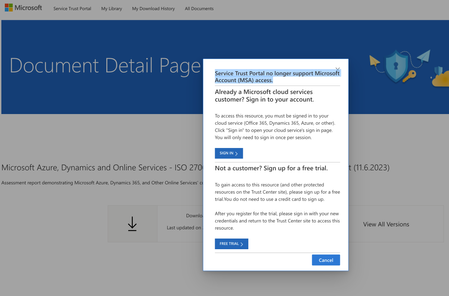
Service Trust Portal no longer support Microsoft Account (MSA) access
Dear all, We need to access certain documents (i.e., SOC 2 or ISO 27xxx) on the https://servicetrust.microsoft.com/DocumentPage/d013b518-c1fe-462c-8124-de901f3b68dc. To download documents you need to be signed in first. However, when I click on "sign in" (using the same email/account as for our azure account) I get the error message "Service Trust Portal no longer support Microsoft Account (MSA) access." (see screenshot below). It seems that I am not the only one since other users had similar issues but they also could not find a solution (or at least it was not mentioned in their post): https://techcommunity.microsoft.com/t5/security-compliance-and-identity/cannot-login-to-service-trust-portal/m-p/3632978 I have been trying this now since more than a week and also created a support ticket (which has not been assigned to a support agent yet). It is quite cumbersome and I hope some of you could have an idea since getting these documents is quite crucial for us.2.7KViews0likes7Comments
AZ-900 exam free voucher Azure
Hello, I recently finished Azure Fundamentals (https://learn.microsoft.com/en-us/credentials/certifications/azure-fundamentals/?practice-assessment-type=certification) But I see, to take final exam and then claim certificate, it is needed to pay around $50-$90 based on region. So my question is, are there currently any absolutely free vouchers for that exam? -100% I have been looking for it for around month, still no clue. Please help, and best regards to You Microsoft Learners.413Views0likes1Comment