azure essentials
71 TopicsAzure Essentials - Free Training
At Ignite 2017, we launched the new Microsoft Azure Essentials, the best place to get started with and learn more about Azure. Don`t know what is Azure, or want to learn more about Azure and Cloud? Just choose a topic and use the curated set of demo videos, hands-on labs, and product trials to learn about and try Azure at your own pace. Be sure to also check out the Azure learning paths, and Azure certification. You can access all this content for free at Azure.com/Essentials21KViews20likes12CommentsAzure Essentials just got an upgrade - Free learning resources
Forget Moore’s Law. It seems like the pace of migration to the cloud is doubling every month now. We see the shift to the cloud and love to hear about how it’s helping your organization and your career. Azure Essentials is meeting your need to expand your skills and is the single best resource to learn Azure, get training and have access to practical and free learning resources. Now we’ve made it even easier for you get exactly what you need with these upgrades: New Azure Essentials topics have been added. Watch the short video, do the Hands-on Labs and practice what you learned in a live environment with these new topics: Managing VM’s and Resources Data Visualization and Modeling Data Analytics The new Progress Tracker (requires log in) gives you a quick view of what you’ve already completed and allows you to add items to your queue for later. You will also see what is new since your last visit. No more need to log in to access most of the learning resources so accessing the content is even easier. Whether you’re picking up where you left off or starting your Azure education from scratch, Azure Essentials is more capable and accessible than ever. Take a look. Whether you’re picking up where you left off or starting your Azure education from scratch, Azure Essentials is more capable and accessible than ever. Take a look.8.2KViews19likes13Comments
How to Fix Azure Event Grid Entra Authentication issue for ACS and Dynamics 365 integrated Webhooks
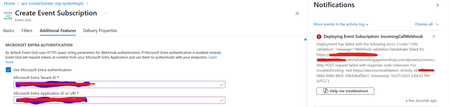
Introduction: Azure Event Grid is a powerful event routing service that enables event-driven architectures in Azure. When delivering events to webhook endpoints, security becomes paramount. Microsoft provides a secure webhook delivery mechanism using Microsoft Entra ID (formerly Azure Active Directory) authentication through the AzureEventGridSecureWebhookSubscriber role. Problem Statement: When integrating Azure Communication Services with Dynamics 365 Contact Center using Microsoft Entra ID-authenticated Event Grid webhooks, the Event Grid subscription deployment fails with an error: "HTTP POST request failed with unknown error code" with empty HTTP status and code. For example: Important Note: Before moving forward, please verify that you have the Owner role assigned on app to create event subscription. Refer to the Microsoft guidelines below to validate the required prerequisites before proceeding: Set up incoming calls, call recording, and SMS services | Microsoft Learn Why This Happens: This happens because AzureEventGridSecureWebhookSubscriber role is NOT properly configured on Microsoft EventGrid SP (Service Principal) and event subscription entra ID or application who is trying to create event grid subscription. What is AzureEventGridSecureWebhookSubscriber Role: The AzureEventGridSecureWebhookSubscriber is an Azure Entra application role that: Enables your application to verify the identity of event senders Allows specific users/applications to create event subscriptions Authorizes Event Grid to deliver events to your webhook How It Works: Role Creation: You create this app role in your destination webhook application's Azure Entra registration Role Assignment: You assign this role to: Microsoft Event Grid service principal (so it can deliver events) Either Entra ID / Entra User or Event subscription creator applications (so they can create event grid subscriptions) Token Validation: When Event Grid delivers events, it includes an Azure Entra token with this role claim Authorization Check: Your webhook validates the token and checks for the role Key Participants: Webhook Application (Your App) Purpose: Receives and processes events App Registration: Created in Azure Entra Contains: The AzureEventGridSecureWebhookSubscriber app role Validates: Incoming tokens from Event Grid Microsoft Event Grid Service Principal Purpose: Delivers events to webhooks App ID: Different per Azure cloud (Public, Government, etc.) Public Azure: 4962773b-9cdb-44cf-a8bf-237846a00ab7 Needs: AzureEventGridSecureWebhookSubscriber role assigned Event Subscription Creator Entra or Application Purpose: Creates event subscriptions Could be: You, Your deployment pipeline, admin tool, or another application Needs: AzureEventGridSecureWebhookSubscriber role assigned Although the full PowerShell script is documented in the below Event Grid documentation, it may be complex to interpret and troubleshoot. Azure PowerShell - Secure WebHook delivery with Microsoft Entra Application in Azure Event Grid - Azure Event Grid | Microsoft Learn To improve accessibility, the following section provides a simplified step-by-step tested solution along with verification steps suitable for all users including non-technical: Steps: STEP 1: Verify/Create Microsoft.EventGrid Service Principal Azure Portal → Microsoft Entra ID → Enterprise applications Change filter to Application type: Microsoft Applications Search for: Microsoft.EventGrid Ideally, your Azure subscription should include this application ID, which is common across all Azure subscriptions: 4962773b-9cdb-44cf-a8bf-237846a00ab7. If this application ID is not present, please contact your Azure Cloud Administrator. STEP 2: Create the App Role "AzureEventGridSecureWebhookSubscriber" Using Azure Portal: Navigate to your Webhook App Registration: Azure Portal → Microsoft Entra ID → App registrations Click All applications Find your app by searching OR use the Object ID you have Click on your app Create the App Role: Display name: AzureEventGridSecureWebhookSubscriber Allowed member types: Both (Users/Groups + Applications) Value: AzureEventGridSecureWebhookSubscriber Description: Azure Event Grid Role Do you want to enable this app role?: Yes In left menu, click App roles Click + Create app role Fill in the form: Click Apply STEP 3: Assign YOUR USER to the Role Using Azure Portal: Switch to Enterprise Application view: Azure Portal → Microsoft Entra ID → Enterprise applications Search for your webhook app (by name) Click on it Assign yourself: In left menu, click Users and groups Click + Add user/group Under Users, click None Selected Search for your user account (use your email) Select yourself Click Select Under Select a role, click None Selected Select AzureEventGridSecureWebhookSubscriber Click Select Click Assign STEP 4: Assign Microsoft.EventGrid Service Principal to the Role This step MUST be done via PowerShell or Azure CLI (Portal doesn't support this directly as we have seen) so PowerShell is recommended You will need to execute this step with the help of your Entra admin. # Connect to Microsoft Graph Connect-MgGraph -Scopes "AppRoleAssignment.ReadWrite.All" # Replace this with your webhook app's Application (client) ID $webhookAppId = "YOUR-WEBHOOK-APP-ID-HERE" #starting with c5 # Get your webhook app's service principal $webhookSP = Get-MgServicePrincipal -Filter "appId eq '$webhookAppId'" Write-Host " Found webhook app: $($webhookSP.DisplayName)" # Get Event Grid service principal $eventGridSP = Get-MgServicePrincipal -Filter "appId eq '4962773b-9cdb-44cf-a8bf-237846a00ab7'" Write-Host " Found Event Grid service principal" # Get the app role $appRole = $webhookSP.AppRoles | Where-Object {$_.Value -eq "AzureEventGridSecureWebhookSubscriber"} Write-Host " Found app role: $($appRole.DisplayName)" # Create the assignment New-MgServicePrincipalAppRoleAssignment ` -ServicePrincipalId $eventGridSP.Id ` -PrincipalId $eventGridSP.Id ` -ResourceId $webhookSP.Id ` -AppRoleId $appRole.Id Write-Host "Successfully assigned Event Grid to your webhook app!" Verification Steps: Verify the App Role was created: Your App Registration → App roles You should see: AzureEventGridSecureWebhookSubscriber Verify your user assignment: Enterprise application (your webhook app) → Users and groups You should see your user with role AzureEventGridSecureWebhookSubscriber Verify Event Grid assignment: Same location → Users and groups You should see Microsoft.EventGrid with role AzureEventGridSecureWebhookSubscriber Sample Flow: Analogy For Simplification: Lets think it similar to the construction site bulding where you are the owner of the building. Building = Azure Entra app (webhook app) Building (Azure Entra App Registration for Webhook) ├─ Building Name: "MyWebhook-App" ├─ Building Address: Application ID ├─ Building Owner: You ├─ Security System: App Roles (the security badges you create) └─ Security Team: Azure Entra and your actual webhook auth code (which validates tokens) like doorman Step 1: Creat the badge (App role) You (the building owner) create a special badge: - Badge name: "AzureEventGridSecureWebhookSubscriber" - Badge color: Let's say it's GOLD - Who can have it: Companies (Applications) and People (Users) This badge is stored in your building's system (Webhook App Registration) Step 2: Give badge to the Event Grid Service: Event Grid: "Hey, I need to deliver messages to your building" You: "Okay, here's a GOLD badge for your SP" Event Grid: *wears the badge* Now Event Grid can: - Show the badge to Azure Entra - Get tokens that say "I have the GOLD badge" - Deliver messages to your webhook Step 3: Give badge to yourself (or your deployment tool) You also need a GOLD badge because: - You want to create event grid event subscriptions - Entra checks: "Does this person have a GOLD badge?" - If yes: You can create subscriptions - If no: "Access denied" Your deployment pipeline also gets a GOLD badge: - So it can automatically set up event subscriptions during CI/CD deployments Disclaimer: The sample scripts provided in this article are provided AS IS without warranty of any kind. The author is not responsible for any issues, damages, or problems that may arise from using these scripts. Users should thoroughly test any implementation in their environment before deploying to production. Azure services and APIs may change over time, which could affect the functionality of the provided scripts. Always refer to the latest Azure documentation for the most up-to-date information. Thanks for reading this blog! I hope you found it helpful and informative for this specific integration use case 😀1KViews4likes1CommentIs there no way to get better support for Azure - esp for SEV A tickets
We have had a sev A ticket open for over 5 days, and are incurring thousands in losses every day, and despite assurances from the Azure Support that it is being solved in hours and then having confirmations that it is solved, the issue is still not solved. I have asked numerous times to get our teams in touch with actual microsoft employees, not front end contractors, who is more like level 1 support, and just running messages between customer and back end team, and really are powerless to handle any suport issues themselves, and they are on complete mercy of "other teams" yet as a customer, apparantly we cant even get on a call with these other teams, and the poor front end contractors are getting the brunt of our pain. Absolutely are in the dark, as to what is actually happening in the back end, other than "trust me bro" we are working on it. No eta, no explanation.. hard to fathom how this can go on like this597Views3likes6CommentsHow to Learn Microsoft Azure in 2020
How to Learn Microsoft Azure in 2020 🎉☁🎓 The year 2019 is almost over, and usually, we take the time to look back at the year and also to find some New Year’s resolutions for the new year. Why not take all that energy and prepare for the cloud computing era and advance your career by learning Microsoft Azure. In this post, I try to give you a quick look at how you can get started to learn Microsoft Azure in 2020. You can read more here: https://www.thomasmaurer.ch/2019/12/how-to-learn-microsoft-azure-in-2020/2KViews3likes0Comments
Comparision on Azure Cloud Sync and Traditional Entra connect Sync.
Introduction In the evolving landscape of identity management, organizations face a critical decision when integrating their on-premises Active Directory (AD) with Microsoft Entra ID (formerly Azure AD). Two primary tools are available for this synchronization: Traditional Entra Connect Sync (formerly Azure AD Connect) Azure Cloud Sync While both serve the same fundamental purpose, bridging on-prem AD with cloud identity, they differ significantly in architecture, capabilities, and ideal use cases. Architecture & Setup Entra Connect Sync is a heavyweight solution. It installs a full synchronization engine on a Windows Server, often backed by SQL Server. This setup gives administrators deep control over sync rules, attribute flows, and filtering. Azure Cloud Sync, on the other hand, is lightweight. It uses a cloud-managed agent installed on-premises, removing the need for SQL Server or complex infrastructure. The agent communicates with Microsoft Entra ID, and most configurations are handled in the cloud portal. For organizations with complex hybrid setups (e.g., Exchange hybrid, device management), is Cloud Sync too limited?1.4KViews1like2CommentsLearn Live – Scale your cloud resources with elasticity
One of the best parts of being an Azure Cloud Advocate is the community interaction with people just getting their feet wet in the world of tech. I was recently asked to take part in the Learn Live series of live streams to help people take their first steps in understanding why elasticity makes the cloud move. All of these sessions are based on Microsoft Learn modules that can provide you with the skills to start becoming a cloud pro. This time, we cover the “Scale your cloud resources with elasticity” Microsoft Learn module. In this session, I am joined by Dwitrisha Saha, Microsoft Student Ambassador, to dig deep into how to optimize your cloud service. We describe common load patterns and how these patterns drive the need to scale, they’ll discuss strategies and considerations in scaling cloud applications, show the importance of load balancing and provide methods to achieve it. Finally, we also discuss the benefits of serverless computing and serverless functions. Cloud elasticity is the ability of your cloud service to continually reallocate and redistribute resources to adapt to changing demands. With proper automation and strategy, you can increase your service’s computing power to better support your development. With metrics, loadbalancers, autoscaling, and good strategy you can ensure greater reliability We were extremely lucky to have Senior Cloud Advocate and incredible artist, Nitya Narasimhan to watch our session and “sketchnote” the ideas conveyed. This artifact is so helpful to be able to trace the different parts of our presentation with a visual representation. You can review all of Nitya’s Cloud Skills Visualized sketchnotes at this website. You’ll find high-resolution versions of these images for all of our different sessions. These sessions are all streamed on Microsoft LearnTV! LearnTV is your digital home to countless programs on expanding your knowledge of Microsoft products, features, announcements, and of course technical demos! Want to catch up on the rest of the series? No problem! Head over to the Channel 9 Learn Live page to review the other prior and future sessions. You’ll learn to Sharpen Your Cloud Skills with Microsoft Principal Program Manager Lee Stott , along with Dr. Majd Sakr and Marshall An from Carnegie Mellon University, and a recent graduate from the course, David R. Galbreath. Take on Cloud Security with Dean Bryen, Christina Pardali, and Carnegie Mellon University. There’s plenty to learn, so let’s learn live together.925Views1like0CommentsMultiple Azure tenants > best practice (one microsoft account or more?)
We deliver an web application (SQL database and webserver). We host this application from an Azure tenant. No we are setting up an (separate) Azure tenant for a customer. In the future this will be the way we will deliver our application to our customers. So we might end up with (for example) 20 Azure tenants. What will be the best practice for setting up these tenants. Shall I use my Microsoft account I use for my first Azure account (someaccount@outlook.com) for all the tenants or shall I create a new microsoft account for all tenants (tenant1@outlook.com, tenant2@outlook.com, etc)? Or is there a better way to do this? Thanks, MikeSolved30KViews1like5Comments