azure dns
11 Topics
Azure VM Losing Network Connectivity after Doomain Removal
I currently have Azure VM domain joined servers running Server 2019 Std which are being upgraded via an in-place upgrade to Server 2025 Std. After the upgrade I will be un-joining from the domain and then joining a WORKGROUP to allow Entra ID joining of the servers. I have completed this on a non-critical server but upon removing from the domain the server appears to have lost network connectivity and displays a Computer Icon with a flashing cable, then eventually fails. I noticed the Ethernet displays now “Public” so I changed back to “Private” and removed “Network Level Authentication” from RDP. I also removed the Custom DNS server settings that were on the NIC in Azure Portal and set to “Virtual Network Inherited” to allow Azure DNS. Unfortunately, the same events occur time and time again with no network connectivity. I have reset the NIC and network via Powershell and CMD commands as suggested in most Google searches along with recreating the VM NIC in Azure, but still the same! Does anyone have any idea what could be causing the issue and how to resolve it as someone must have experienced similar in the past when unjoining an Azure VM from a corporate domain? I have been directing all traffic from server via the Azure FW using a Route table with a route directing all traffic via Azure FW and associating the subnets being used: Address Prefix: 0.0.0.0/0 - Next Hop type: Virtual Appliance – Next Hop IP address: <IP of Azure FW Private IP> I assume this would remain the same too? Please any advice or suggestions would be greatly appreciated? Thanks309Views0likes2CommentsHelp! - How is VNet traffic reaching vWAN/on‑prem when the VNet isn’t connected to the vWAN hub
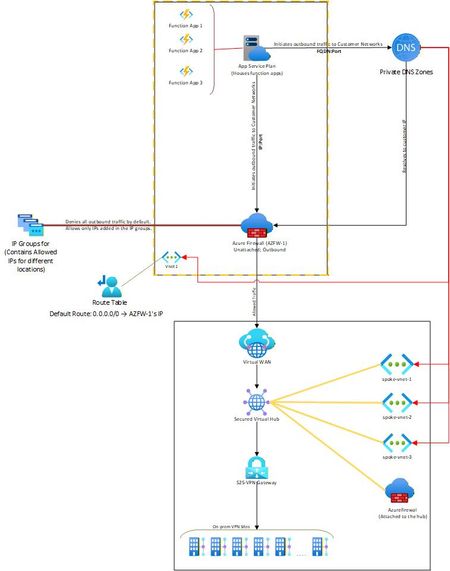
Hello, I needed some clarity on how the following is working: Attached is a network diagram of our current setup. The function apps (in VNet-1) initiate a connection(s) to a specific IP:Port or FQDN:Port in the on-premises network(s). A Private DNS zone ensures that any FQDN is resolved to the correct internal IP address of the on-prem endpoint. In our setup, both the function app and the external firewall reside in the same VNet. This firewall is described as “Unattached” because it is not the built-in firewall of a secured vWAN hub, but rather an independent Azure Firewall deployed in that VNet. The VNet has a user-defined default route (0.0.0.0/0) directing all outbound traffic to the firewall’s IP. The firewall then filters the traffic, allowing only traffic destined to whitelisted on-premises IP: Port or FQDN: Port combinations (using IP Groups), and blocking everything else. The critical question and the part that I am unable to figure out is: Once the firewall permits a packet, how does Azure know to route it to the vWAN hub and on to the site-to-site VPN? Because VNet-1 truly has no connection at all to the vWAN hub (no direct attachment, no peering, no VPN from the NVA). But the traffic is still reaching the on-prem sites. Unable to figure out how this is happening. Am I missing something obvious? Any help on this would be appreciated. Thank you!574Views0likes4Comments
Can only remote into azure vm from DC
Hi all, I have set up a site to site connection from on prem to azure and I can remote in via the main dc on prem but not any other server or ping from any other server to the azure. Why can I only remote into the azure VM from the server that has Routing and remote access? Any ideas on how I can fix this?1.1KViews0likes2CommentsWhat is impact of Azure Firewall update from default to custom DNS on other Vnets routing to FW
I have 4 Azure Vnets, One Prod(VMs and AKS), 2nd Dev(VMs and AKS), 3rd(Domain Controllers), 4th Azure Firewall and Application gateway. External traffic is only come from 4th Vnet resources. Vnets peering is set from 1to4, 2to4, 3to4, Route table from 1st, 2nd, 3rd vnets are set to Azure Firewall private IP. All Vnets have DNS server added of Domain controller private IPs. Azure firewall has DNS setting disabled. I am going to enable Firewall DNS settings and add the Domain Controllers DNS and enable DNS proxy. For testing, I am going to add Firewall private IP in DNS of Dev Vnet and restart VMs. But I did not added this in Prod Vnet. What will be the impact on Prod Vnet Apps if they are trying to resolve IPs from domain controller? What will be the impact of Prod apps if they are trying to access azure resources(SQL, storage account)?1KViews0likes1CommentAzure traffic to storage account
Hello, I’ve set up a storage account in Tenant A, located in the AUEast region, with public access. I also created a VM in Tenant B, in the same region (AUEast). I’m able to use IP whitelisting on the storage account in Tenant A to allow traffic only from the VM in Tenant B. However, in the App Insights logs, the traffic appears as 10.X.X.X, likely because the VM is in the same region. I'm unsure why the public IP isn't reflected in the logs. Moreover, I am not sure about this part https://learn.microsoft.com/en-us/azure/storage/common/storage-network-security-limitations#:~:text=You%20can%27t%20use%20IP%20network%20rules%20to%20restrict%20access%20to%20clients%20in%20the%20same%20Azure%20region%20as%20the%20storage%20account.%20IP%20network%20rules%20have%20no%20effect%20on%20requests%20that%20originate%20from%20the%20same%20Azure%20region%20as%20the%20storage%20account.%20Use%20Virtual%20network%20rules%20to%20allow%20same%2Dregion%20requests. This seems contradictory, as IP whitelisting is working on the storage account. I assume the explanation above applies only when the client is hosted in the same tenant and region as the storage account, and not when the client is in a different tenant, even if it's in the same region. I’d appreciate it if someone could shed some light on this. Thanks, Mohsen382Views0likes3Comments
WordPress App how to restrict access to specific pages on the site
Hello all, I have a WordPress App hosted on Azure and I am struggling with how I can secure specific pages from public access. For example: http://www.mysite.com/wp-admin http://www.mysite.com/info.php I'd like it so that only specific IP addresses or Microsoft user accounts can access some, such as admin pages and for some pages I'd like no access at all, to where it just blocks any sort of visit. I've viewed the documentation for Front Door and some networking restrictions but that seems to be just IP addresses and I'm confused about how I can set those rule for specific pages within the App. I know WordPress offer plugins which have this sort of functionality but I'd like to take advantage of Azure's security features rather than plugins from WordPress. Any help is very appreciated. Thank you699Views0likes1CommentAZ-700 Step by Step Guide for Azure Private DNS
This article is part of our AZ-700 series, offering a step-by-step guide on configuring Azure Private DNS, based on https://www.youtube.com/watch?v=UU77GrbCtZg. I highly recommend watching the video to gain a solid understanding of the concepts covered in this article. Through this guide, you'll gain hands-on experience in setting up and managing Azure Private DNS, enabling efficient DNS resolution, network segmentation, and seamless automation within Microsoft Azure. In today’s cloud environment, managing network resources and ensuring secure connectivity across virtual networks (vNets) can be complex, particularly when DNS management comes into play. This article provides a comprehensive, hands-on guide to setting up and configuring Azure Private DNS for efficient DNS resolution, network segmentation, and seamless automation in Microsoft Azure. Follow along as we explore the essential elements, from linking vNets and subnets to DNS automation. Why Azure Private DNS? Azure Private DNS allows you to manage and resolve DNS names within a virtual network without exposing them to the public internet. It simplifies domain name resolution, enhances security, and enables automation for dynamic environments. Key benefits of using Azure Private DNS: Dynamic DNS Management: Automatically updates DNS records for new or deleted resources, eliminating stale or "dangling" DNS entries. Domain Delegation: Allows centralized DNS management by delegating your corporate domain to Azure Private DNS. Enhanced Security: DNS records are automatically removed when resources are deleted, ensuring up-to-date and secure network configuration. Quick Recap: Azure Networking Fundamentals Before diving into Azure Private DNS, let’s revisit some foundational concepts from our previous discussions: vNet (Virtual Network): Similar to a traditional VLAN but without broadcast support, a vNet enables secure and scalable resource management. Subnet: Subdivision within a vNet, allowing more granular control over resource segmentation. Azure allows you to set up a single vNet with multiple subnets, maximizing network organization and security without the broadcast overhead typical in traditional networks. Step 1: Understanding Azure Private DNS Azure Private DNS enables the automatic registration of DNS names for resources within your vNet. For example, when you create a virtual machine (VM) in a vNet linked to a private DNS zone, the VM’s name and IP address automatically register within the zone. This streamlines DNS management, especially for dynamic environments where resources are created and deleted frequently. Key Features Automatic DNS Registration: Automatically updates the DNS zone with new or removed resources. Domain Delegation: You can delegate your corporate domain to the private DNS zone, managing DNS records centrally within Azure. Support for All DNS Record Types: Azure DNS supports a full range of DNS records, including A, AAAA, CNAME, and MX records. Step 2: Setting Up the Private DNS Zone 1. Create a Private DNS Zone In the Azure Portal, navigate to Private DNS Zones and create a new zone. Define a name for the DNS zone, such as yourdomain.private. Deploy the DNS zone and navigate to the resource. 2. Link vNets for Automatic DNS Registration Within the Private DNS Zone resource, select Virtual Network Links to connect vNets to the DNS zone. For each vNet (e.g., Core Services, West Europe, Asia), specify the vNet link and enable Auto Registration. This enables seamless DNS name resolution across linked vNets and allows automatic DNS record updates when resources are created or deleted. Step 3: Verifying DNS Resolution and Connectivity Verify DNS Records in the Private DNS Zone: Go to DNS Management under the Private DNS zone and check that the A records for the VMs appear. Connect to VMs via DNS: Use Remote Desktop to access one VM, then attempt to connect to the other VM by its DNS name (rather than IP address). This confirms that the Private DNS setup allows for name-based connectivity. If issues arise (e.g., timeouts), ensure that firewall settings permit connectivity between the VMs. Step 4: DNS Zone Peering Across Regions With Azure Private DNS, you can link vNets across different regions, allowing resources in different geographic locations to resolve names and connect seamlessly. Link vNets Across Regions: Connect the vNets in regions like West Europe, East US, and Asia to the Private DNS zone. Verify Regional Connectivity: From a VM in one region (e.g., Asia), test connectivity to a VM in another region (e.g., East US) using DNS names. Azure Private DNS allows DNS name resolution across regions, ensuring consistent and reliable network connectivity. Summary Setting up Azure Private DNS is a powerful way to automate and centralize DNS management within a virtual network environment. This guide provides a practical framework for deploying Private DNS zones, linking vNets, and verifying connectivity. By configuring Azure Private DNS, organizations can streamline DNS management, secure network configurations, and enhance connectivity across geographically dispersed resources. Next Steps In future tutorials, we’ll explore VNet peering for advanced network configurations, allowing secure communication between isolated virtual networks. Be sure to subscribe and stay tuned for more Azure networking tips and tricks! Let’s enhance your Azure network management with practical, hands-on solutions.2.6KViews2likes1Comment
DNS Private Resolver forwarding ruleset resiliency
We are using DNS Private Resolver for all our tenant's Azure DNS resolution. We have a DNS forwarding ruleset set up that forwards all DNS requests for "ourcompany.com." to 10.0.0.100 (primary onprem DNS server IP) and 10.0.0.200 (secondary onprem DNS server IP). This is all working fine. We have just been looking at the resiliency of this setup. If both IPs were unreachable for five minutes, would the DNS private resolver return any cached DNS results for *.ourcompany.com or would the queries simply fail? If only the primary IP (10.0.0.100) were unavailable, presumably DNS queries would still succeed due to use of the secondary IP, but would there be any noticeable increase in the time to respond to DNS queries as a result?738Views0likes1CommentIssue with Azure VM Conditional Access for Office 365 and Dynamic Public IP Detection
Hi all, I have a VM in Azure where I need to allow an account with MFA to bypass the requirement on this specific server when using Office 365. I've tried to achieve this using Conditional Access by excluding locations, specifically the IP range of my Azure environment. Although I’ve disconnected any public IPs from this server, the Conditional Access policy still isn’t working as intended. The issue seems to be that it continues to detect a public IP, which changes frequently, making it impossible to exclude. What am I doing wrong?2KViews0likes5Comments
Azure DNS Private Resolver Query
HI All, Need help to understand more about Azure DNS Private Resolver. When Azure Private Resolver released my understanding was it is for Azure private endpoint DNS resolution from on premises to Azure Private DNS, as initially we had to create a VM in Azure and in on premises DNS we have to provide Azure DNS VM IP as a forwarder in the on premises DNS, after reading Azur Private DNS Resolver in details I now have an understanding that does not matter the on-premises environment needs it or not Private resolver should be created in the VNET and it will help to resolve DNS Queries, the exact simple question is do i have to provision it even if my on-prem environment does not need to resolve the Azure Private DNS for Private Endpoint? how about in HUB/Spoke scenario do i need to provision Azure Private DNS Resolver in a HUB VNET even my on premises environment does not need to resolve the Azure Private DNS for Private Endpoint? In a single subscription scenario where i do not have HUB/Spoke model i have one subscription i do not have On premises DNS resolution requirement, do I still need to provision Private Resolver? I believe not because linking to private DNS Zone will do the needful but not sure if something is changed. Thanks4.3KViews0likes6Comments