azure dns
32 Topics
Azure VM Losing Network Connectivity after Doomain Removal
I currently have Azure VM domain joined servers running Server 2019 Std which are being upgraded via an in-place upgrade to Server 2025 Std. After the upgrade I will be un-joining from the domain and then joining a WORKGROUP to allow Entra ID joining of the servers. I have completed this on a non-critical server but upon removing from the domain the server appears to have lost network connectivity and displays a Computer Icon with a flashing cable, then eventually fails. I noticed the Ethernet displays now “Public” so I changed back to “Private” and removed “Network Level Authentication” from RDP. I also removed the Custom DNS server settings that were on the NIC in Azure Portal and set to “Virtual Network Inherited” to allow Azure DNS. Unfortunately, the same events occur time and time again with no network connectivity. I have reset the NIC and network via Powershell and CMD commands as suggested in most Google searches along with recreating the VM NIC in Azure, but still the same! Does anyone have any idea what could be causing the issue and how to resolve it as someone must have experienced similar in the past when unjoining an Azure VM from a corporate domain? I have been directing all traffic from server via the Azure FW using a Route table with a route directing all traffic via Azure FW and associating the subnets being used: Address Prefix: 0.0.0.0/0 - Next Hop type: Virtual Appliance – Next Hop IP address: <IP of Azure FW Private IP> I assume this would remain the same too? Please any advice or suggestions would be greatly appreciated? Thanks267Views0likes2Comments
Azure DNS introduces Traffic Manager linked records (Public Preview)
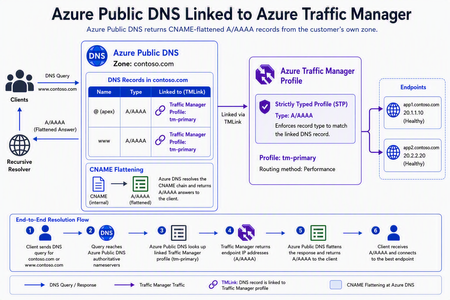
We're excited to announce the public preview of Traffic Manager linked records, a new Azure DNS capability that enables customers to directly associate Azure Public DNS record sets with Azure Traffic Manager profiles without using a CNAME to trafficmanager.net. With this capability, customers can use Traffic Manager's DNS-based load balancing capabilities without exposing the intermediate trafficmanager.net domain in DNS responses. Azure DNS and Traffic Manager now work together to provide a more seamless, integrated DNS experience for applications running across Azure, hybrid, and multi-cloud environments. Simplifying DNS-based traffic routing Traditionally, customers using Azure DNS with Traffic Manager relied on CNAME records that returned a Traffic Manager hostname. DNS clients would then perform an additional lookup to resolve that hostname before reaching the application endpoint. Traffic Manager linked records simplifies this process by allowing Azure DNS to resolve Traffic Manager routing decisions internally and return the appropriate endpoint information directly to clients. The result is a cleaner DNS resolution path while preserving all of Traffic Manager's existing routing methods, health monitoring, and failover capabilities. Key benefits Better integration between Azure DNS and Azure Traffic Manager Traffic Manager linked records allow Azure DNS record sets to directly reference Traffic Manager profiles, including nested profile configurations. This enables sophisticated traffic routing architectures without relying on intermediate CNAME records, making complex global deployments easier to build and manage. Improved security and DNS hygiene Because DNS responses no longer expose the intermediate trafficmanager.net domain, organizations can simplify firewall rules and reduce reliance on intermediate DNS names. Traffic Manager linked records also help eliminate a common source of dangling subdomains caused by orphaned or misconfigured trafficmanager.net records, strengthening overall DNS hygiene and reducing operational risk. DNSSEC for Traffic Manager Traffic Manager routing decisions are now resolved within Azure DNS, If the DNS zone is a DNSSEC signed zone the answers supplied by linked Traffic Manager profiles are automatically signed as well. This enables customer to use Traffic Manager profiles with DNSSEC, unlike a CNAME to trafficmanager.net which would break the DNSSEC end to end validation chain as trafficmanager.net is not a signed zone. Zone apex load balancing Traffic Manager Linked Records enable DNS-based load balancing directly at the zone apex (for example, contoso.com), where traditional CNAME records are prohibited by DNS standards. Customers can now bring Traffic Manager routing to root domains without complex workarounds. This is similar to ALIAS records but with much better integration and scale. Cleaner & faster DNS responses Clients now receive the final endpoint directly from Azure DNS instead of first resolving a trafficmanager.net hostname. By removing an extra DNS lookup, applications can experience lower DNS resolution latency while benefiting from Traffic Manager's intelligent routing decisions. Built-in operational safeguards with strictly typed profiles Traffic Manager Linked Records integrate with strictly typed profiles in Azure Traffic Manager, providing validation that helps ensure DNS record types remain compatible with their associated Traffic Manager profiles. In simpler words this features ensures that type of response served by the traffic manager profile matches the type of DNS records it is linked to. The feature also prevents accidental deletion of Traffic Manager profiles that are still referenced by Azure DNS records, reducing the risk of configuration errors and improving operational safety. Getting started Traffic Manager linked records are available today in public preview. Following record types can be used with Traffic Manager Linked Records A AAAA CNAME Traffic Manager linked records are designed to make DNS-based load balancing simpler, faster, and more secure while preserving the flexibility and reliability customers expect from Azure Traffic Manager. To learn more and start using Traffic Manager linked records today, see the DNS Traffic Management documentation.832Views4likes0CommentsHelp! - How is VNet traffic reaching vWAN/on‑prem when the VNet isn’t connected to the vWAN hub
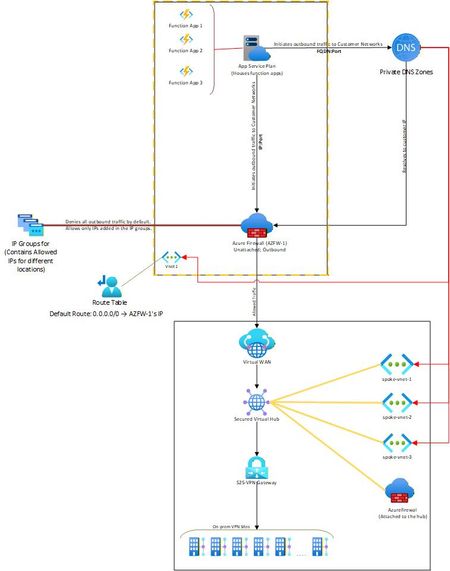
Hello, I needed some clarity on how the following is working: Attached is a network diagram of our current setup. The function apps (in VNet-1) initiate a connection(s) to a specific IP:Port or FQDN:Port in the on-premises network(s). A Private DNS zone ensures that any FQDN is resolved to the correct internal IP address of the on-prem endpoint. In our setup, both the function app and the external firewall reside in the same VNet. This firewall is described as “Unattached” because it is not the built-in firewall of a secured vWAN hub, but rather an independent Azure Firewall deployed in that VNet. The VNet has a user-defined default route (0.0.0.0/0) directing all outbound traffic to the firewall’s IP. The firewall then filters the traffic, allowing only traffic destined to whitelisted on-premises IP: Port or FQDN: Port combinations (using IP Groups), and blocking everything else. The critical question and the part that I am unable to figure out is: Once the firewall permits a packet, how does Azure know to route it to the vWAN hub and on to the site-to-site VPN? Because VNet-1 truly has no connection at all to the vWAN hub (no direct attachment, no peering, no VPN from the NVA). But the traffic is still reaching the on-prem sites. Unable to figure out how this is happening. Am I missing something obvious? Any help on this would be appreciated. Thank you!535Views0likes4Comments
Consistent DNS resolution in a hybrid hub spoke network topology
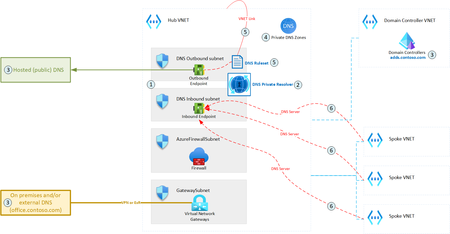
DNS is one of the most essential networking services, next to IP routing. A modern hybrid cloud network may have various sources of DNS: Azure Private DNS Zones, public DNS, domain controllers, etc. Some organizations may also prefer to route their public Internet DNS queries through a specific DNS provider. Therefore, it is crucial to ensure consistent DNS resolution across the whole (hybrid) network. This article describes how DNS Private Resolver can be leveraged to build such architecture.19KViews6likes5Comments
Enabling fallback to internet for Azure Private DNS Zones in hybrid architectures
Introduction Azure Private Endpoint enables secure connectivity to Azure PaaS services such as: Azure SQL Managed Instance Azure Container Registry Azure Key Vault Azure Storage Account through private IP addresses within a virtual network. When Private Endpoint is enabled for a service, Azure DNS automatically changes the name resolution path using CNAME Redirection Example: myserver.database.windows.net ↓ myserver.privatelink.database.windows.net ↓ Private IP Azure Private DNS Zones are then used to resolve this Private Endpoint FQDN within the VNet. However, this introduces a critical DNS limitation in: Hybrid cloud architectures (AWS → Azure SQL MI) Multiregion deployments (DR region access) Crosstenant / Crosssubscription access MultiVNet isolated networks If the Private DNS zone does not contain a corresponding record, Azure DNS returns: NXDOMAIN (NonExistent Domain) When a DNS resolver receives a negative response (NXDOMAIN), it sends no DNS response to the DNS client and the query fails. This results in: ❌ Application connectivity failure ❌ Database connection timeout ❌ AKS pod DNS resolution errors ❌ DR failover application outage Problem statement In traditional Private Endpoint DNS resolution: DNS query is sent from the application. Azure DNS checks linked Private DNS Zone. If no matching record exists: NXDOMAIN returned DNS queries for Azure Private Link and network isolation scenarios across different tenants and resource groups have unique name resolution paths which can affect the ability to reach Private Linkenabled resources outside a tenant's control. Azure does not retry resolution using public DNS by default. Therefore: Public Endpoint resolution never occurs DNS query fails permanently Application cannot connect Microsoft native solution Fallback to internet (NxDomainRedirect) Azure introduced a DNS resolution policy: resolutionPolicy = NxDomainRedirect This property enables public recursion via Azure’s recursive resolver fleet when an authoritative NXDOMAIN response is received for a Private Link zone. When enabled: ✅ Azure DNS retries the query ✅ Public endpoint resolution occurs ✅ Application connectivity continues ✅ No custom DNS forwarder required Fallback policy is configured at: Private DNS Zone → virtualnetwork link Resolution policy is enabled at the virtual network link level with the NxDomainRedirect setting. In the Azure portal this appears as: Enable fallback to internet How it works Without fallback: Application → Azure DNS → Private DNS Zone → Record missing → NXDOMAIN returned → Connection failure With fallback enabled: Application → Azure DNS → Private DNS Zone → Record missing → NXDOMAIN returned → Azure recursive resolver → Public DNS resolution → Public endpoint IP returned → Connection successful Azure recursive resolver retries the query using the public endpoint QNAME each time NXDOMAIN is received from the private zone scope Real world use case AWS Application Connecting to Azure SQL Managed Instance You are running: SQL MI in Azure Private Endpoint enabled Private DNS Zone: privatelink.database.windows.net AWS application tries to connect: my-mi.database.windows.net If DR region DNS record is not available: Without fallback: DNS query → NXDOMAIN → App failure With fallback enabled: DNS query → Retry public DNS → Connection success Step-by-step configuration Method 1 – Azure portal Go to: Private DNS Zones Select your Private Link DNS Zone: Example: privatelink.database.windows.net Select: Virtual network links Open your linked VNet Enable: ✅ Enable fallback to internet Click: Save Method 2 – Azure CLI You can configure fallback policy using: az network private-dns link vnet update \ --resource-group RG-Network \ --zone-name privatelink.database.windows.net \ --name VNET-Link \ --resolution-policy NxDomainRedirect Validation steps Run from Azure VM: nslookup my-mi.database.windows.net Expected: ✔ Private IP (if available) ✔ Public IP (if fallback triggered) Security considerations Fallback to internet: ✅ Does NOT expose data ✅ Only impacts DNS resolution ✅ Network traffic still governed by: NSG Azure Firewall UDR Service Endpoint Policies DNS resolution fallback only triggers on NXDOMAIN and does not change networklevel firewall controls. When should you enable this? Recommended in: Hybrid AWS → Azure connectivity Multiregion DR deployments AKS accessing Private Endpoint services CrossTenant connectivity Private Link + VPN / ExpressRoute scenarios Conclusion Fallback to Internet using NxDomainRedirect provides: Seamless hybrid connectivity Reduced DNS complexity No custom forwarders Improved application resilience and simplifies DNS resolution for modern Private Endpointenabled architectures.1.1KViews0likes0CommentsSave the date - January 26, 2026 - AMA: Best practices for applying Zero Trust using Intune
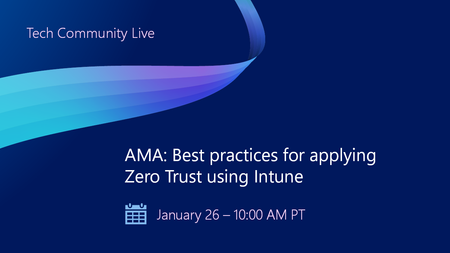
Join us on January 26 at 10:00 AM PT, to Ask Microsoft Anything (AMA) and get the answers you need to implement the right policies, security settings, device configurations, and more. Never trust, always verify. Tune in for tips and insights to help you secure your endpoints using Microsoft Intune as part of your larger Zero Trust strategy. Find out how you can use Intune to protect both access and data on organization-owned devices and personal devices used for work. Go to aka.ms/AMA/IntuneZeroTrust and select "attend" to add this event to your calendar. Have questions? Submit them early by signing in to Tech Community and posting them on the event page!
Announcing Azure DNS security policy with Threat Intelligence feed general availability
Azure DNS security policy with Threat Intelligence feed allows early detection and prevention of security incidents on customer Virtual Networks where known malicious domains sourced by Microsoft’s Security Response Center (MSRC) can be blocked from name resolution. Azure DNS security policy with Threat Intelligence feed is being announced to all customers and will have regional availability in all public regions.3.2KViews3likes0CommentsCan only remote into azure vm from DC
Hi all, I have set up a site to site connection from on prem to azure and I can remote in via the main dc on prem but not any other server or ping from any other server to the azure. Why can I only remote into the azure VM from the server that has Routing and remote access? Any ideas on how I can fix this?1.1KViews0likes2CommentsWhat is impact of Azure Firewall update from default to custom DNS on other Vnets routing to FW
I have 4 Azure Vnets, One Prod(VMs and AKS), 2nd Dev(VMs and AKS), 3rd(Domain Controllers), 4th Azure Firewall and Application gateway. External traffic is only come from 4th Vnet resources. Vnets peering is set from 1to4, 2to4, 3to4, Route table from 1st, 2nd, 3rd vnets are set to Azure Firewall private IP. All Vnets have DNS server added of Domain controller private IPs. Azure firewall has DNS setting disabled. I am going to enable Firewall DNS settings and add the Domain Controllers DNS and enable DNS proxy. For testing, I am going to add Firewall private IP in DNS of Dev Vnet and restart VMs. But I did not added this in Prod Vnet. What will be the impact on Prod Vnet Apps if they are trying to resolve IPs from domain controller? What will be the impact of Prod apps if they are trying to access azure resources(SQL, storage account)?1KViews0likes1CommentAzure traffic to storage account
Hello, I’ve set up a storage account in Tenant A, located in the AUEast region, with public access. I also created a VM in Tenant B, in the same region (AUEast). I’m able to use IP whitelisting on the storage account in Tenant A to allow traffic only from the VM in Tenant B. However, in the App Insights logs, the traffic appears as 10.X.X.X, likely because the VM is in the same region. I'm unsure why the public IP isn't reflected in the logs. Moreover, I am not sure about this part https://learn.microsoft.com/en-us/azure/storage/common/storage-network-security-limitations#:~:text=You%20can%27t%20use%20IP%20network%20rules%20to%20restrict%20access%20to%20clients%20in%20the%20same%20Azure%20region%20as%20the%20storage%20account.%20IP%20network%20rules%20have%20no%20effect%20on%20requests%20that%20originate%20from%20the%20same%20Azure%20region%20as%20the%20storage%20account.%20Use%20Virtual%20network%20rules%20to%20allow%20same%2Dregion%20requests. This seems contradictory, as IP whitelisting is working on the storage account. I assume the explanation above applies only when the client is hosted in the same tenant and region as the storage account, and not when the client is in a different tenant, even if it's in the same region. I’d appreciate it if someone could shed some light on this. Thanks, Mohsen356Views0likes3Comments