azure dns
13 Topics
Consistent DNS resolution in a hybrid hub spoke network topology
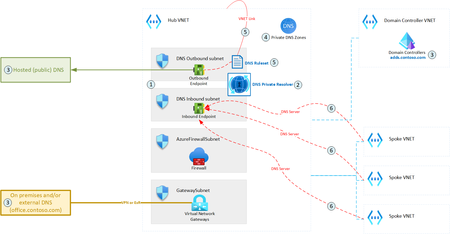
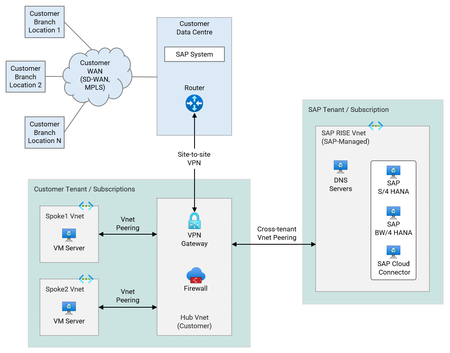
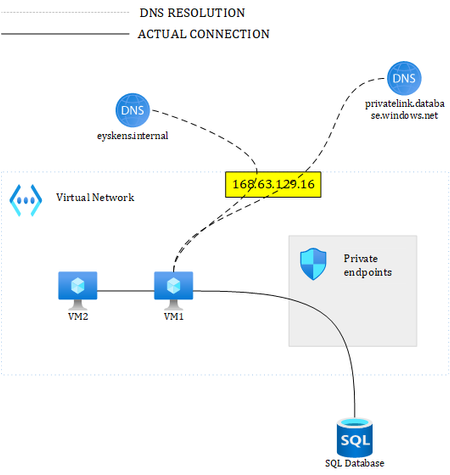
DNS is one of the most essential networking services, next to IP routing. A modern hybrid cloud network may have various sources of DNS: Azure Private DNS Zones, public DNS, domain controllers, etc. Some organizations may also prefer to route their public Internet DNS queries through a specific DNS provider. Therefore, it is crucial to ensure consistent DNS resolution across the whole (hybrid) network. This article describes how DNS Private Resolver can be leveraged to build such architecture.19KViews6likes5Comments
Azure DNS Traffic Manager linked records are now generally available
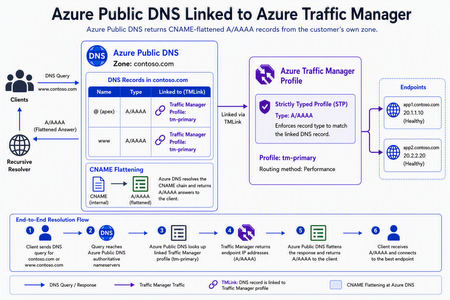
We're excited to announce the general availability of Azure Traffic Manager linked records, a new Azure DNS capability that enables customers to directly associate Azure Public DNS record sets with Azure Traffic Manager profiles without using a CNAME to trafficmanager.net. With this capability, customers can use Traffic Manager's DNS-based load balancing capabilities without exposing the intermediate trafficmanager.net domain in DNS responses. Azure DNS and Traffic Manager now work together to provide a more seamless, integrated DNS experience for applications running across Azure, hybrid, and multi-cloud environments. Simplifying DNS-based traffic routing Traditionally, customers using Azure DNS with Traffic Manager relied on CNAME records that returned a Traffic Manager hostname. DNS clients would then perform an additional lookup to resolve that hostname before reaching the application endpoint. Traffic Manager linked records simplifies this process by allowing Azure DNS to resolve Traffic Manager routing decisions internally and return the appropriate endpoint information directly to clients. The result is a cleaner DNS resolution path while preserving all of Traffic Manager's existing routing methods, health monitoring, and failover capabilities. Key benefits Better integration between Azure DNS and Azure Traffic Manager Traffic Manager linked records allow Azure DNS record sets to directly reference Traffic Manager profiles, including nested profile configurations. This enables sophisticated traffic routing architectures without relying on intermediate CNAME records, making complex global deployments easier to build and manage. Improved security and DNS hygiene Because DNS responses no longer expose the intermediate trafficmanager.net domain, organizations can simplify firewall rules and reduce reliance on intermediate DNS names. Traffic Manager linked records also help eliminate a common source of dangling subdomains caused by orphaned or misconfigured trafficmanager.net records, strengthening overall DNS hygiene and reducing operational risk. DNSSEC for Traffic Manager Traffic Manager routing decisions are now resolved within Azure DNS, If the DNS zone is a DNSSEC signed zone the answers supplied by linked Traffic Manager profiles are automatically signed as well. This enables customer to use Traffic Manager profiles with DNSSEC, unlike a CNAME to trafficmanager.net which would break the DNSSEC end to end validation chain as trafficmanager.net is not a signed zone. Zone apex load balancing Traffic Manager Linked Records enable DNS-based load balancing directly at the zone apex (for example, contoso.com), where traditional CNAME records are prohibited by DNS standards. Customers can now bring Traffic Manager routing to root domains without complex workarounds. This is similar to ALIAS records but with much better integration and scale. Cleaner & faster DNS responses Clients now receive the final endpoint directly from Azure DNS instead of first resolving a trafficmanager.net hostname. By removing an extra DNS lookup, applications can experience lower DNS resolution latency while benefiting from Traffic Manager's intelligent routing decisions. Built-in operational safeguards with strictly typed profiles Traffic Manager linked records integrate with strictly typed profiles in Azure Traffic Manager, providing validation that helps ensure DNS record types remain compatible with their associated Traffic Manager profiles. In simpler words, this feature ensures that type of response served by the traffic manager profile matches the type of DNS records it is linked to. The feature also prevents accidental deletion of Traffic Manager profiles that are still referenced by Azure DNS records, reducing the risk of configuration errors and improving operational safety. Getting started Traffic Manager linked records are generally available today. Following record types can be used with Traffic Manager Linked Records A AAAA CNAME Traffic Manager linked records are designed to make DNS-based load balancing simpler, faster, and more secure while preserving the flexibility and reliability customers expect from Azure Traffic Manager. To learn more and start using Traffic Manager linked records today, see the DNS Traffic Management documentation.889Views4likes0CommentsAzure Networking Portfolio Consolidation
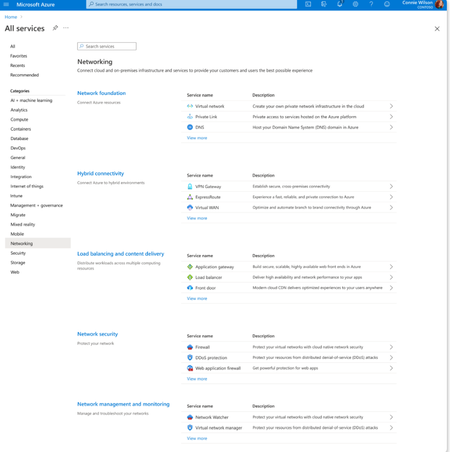
Overview Over the past decade, Azure Networking has expanded rapidly, bringing incredible tools and capabilities to help customers build, connect, and secure their cloud infrastructure. But we've also heard strong feedback: with over 40 different products, it hasn't always been easy to navigate and find the right solution. The complexity often led to confusion, slower onboarding, and missed capabilities. That's why we're excited to introduce a more focused, streamlined, and intuitive experience across Azure.com, the Azure portal, and our documentation pivoting around four core networking scenarios: Network foundations: Network foundations provide the core connectivity for your resources, using Virtual Network, Private Link, and DNS to build the foundation for your Azure network. Try it with this link: Network foundations Hybrid connectivity: Hybrid connectivity securely connects on-premises, private, and public cloud environments, enabling seamless integration, global availability, and end-to-end visibility, presenting major opportunities as organizations advance their cloud transformation. Try it with this link: Hybrid connectivity Load balancing and content delivery: Load balancing and content delivery helps you choose the right option to ensure your applications are fast, reliable, and tailored to your business needs. Try it with this link: Load balancing and content delivery Network security: Securing your environment is just as essential as building and connecting it. The Network Security hub brings together Azure Firewall, DDoS Protection, and Web Application Firewall (WAF) to provide a centralized, unified approach to cloud protection. With unified controls, it helps you manage security more efficiently and strengthen your security posture. Try it with this link: Network security This new structure makes it easier to discover the right networking services and get started with just a few clicks so you can focus more on building, and less on searching. What you’ll notice: Clearer starting points: Azure Networking is now organized around four core scenarios and twelve essential services, reflecting the most common customer needs. Additional services are presented within the context of these scenarios, helping you stay focused and find the right solution without feeling overwhelmed. Simplified choices: We’ve merged overlapping or closely related services to reduce redundancy. That means fewer, more meaningful options that are easier to evaluate and act on. Sunsetting outdated services: To reduce clutter and improve clarity, we’re sunsetting underused offerings such as white-label CDN services and China CDN. These capabilities have been rolled into newer, more robust services, so you can focus on what’s current and supported. What this means for you Faster decision-making: With clearer guidance and fewer overlapping products, it's easier to discover what you need and move forward confidently. More productive sales conversations: With this simplified approach, you’ll get more focused recommendations and less confusion among sellers. Better product experience: This update makes the Azure Networking portfolio more cohesive and consistent, helping you get started quickly, stay aligned with best practices, and unlock more value from day one. The portfolio consolidation initiative is a strategic effort to simplify and enhance the Azure Networking portfolio, ensuring better alignment with customer needs and industry best practices. By focusing on top-line services, combining related products, and retiring outdated offerings, Azure Networking aims to provide a more cohesive and efficient product experience. Azure.com Before: Our original Solution page on Azure.com was disorganized and static, displaying a small portion of services in no discernable order. After: The revised solution page is now dynamic, allowing customers to click deeper into each networking and network security category, displaying the top line services, simplifying the customer experience. Azure Portal Before: With over 40 networking services available, we know it can feel overwhelming to figure out what’s right for you and where to get started. After: To make it easier, we've introduced four streamlined networking hubs each built around a specific scenario to help you quickly identify the services that match your needs. Each offers an overview to set the stage, key services to help you get started, guidance to support decision-making, and a streamlined left-hand navigation for easy access to all services and features. Documentation For documentation, we looked at our current assets as well as created new assets that aligned with the changes in the portal experience. Like Azure.com, we found the old experiences were disorganized and not well aligned. We updated our assets to focus on our top-line networking services, and to call out the pillars. Our belief is these changes will allow our customers to more easily find the relevant and important information they need for their Azure infrastructure. Azure Network Hub Before the updates, we had a hub page organized around different categories and not well laid out. In the updated hub page, we provided relevant links for top-line services within all of the Azure networking scenarios, as well as a section linking to each scenario's hub page. Scenario Hub pages We added scenario hub pages for each of the scenarios. This provides our customers with a central hub for information about the top-line services for each scenario and how to get started. Also, we included common scenarios and use cases for each scenario, along with references for deeper learning across the Azure Architecture Center, Well Architected Framework, and Cloud Adoption Framework libraries. Scenario Overview articles We created new overview articles for each scenario. These articles were designed to provide customers with an introduction to the services included in each scenario, guidance on choosing the right solutions, and an introduction to the new portal experience. Here's the Load balancing and content delivery overview: Documentation links Azure Networking hub page: Azure networking documentation | Microsoft Learn Scenario Hub pages: Azure load balancing and content delivery | Microsoft Learn Azure network foundation documentation | Microsoft Learn Azure hybrid connectivity documentation | Microsoft Learn Azure network security documentation | Microsoft Learn Scenario Overview pages What is load balancing and content delivery? | Microsoft Learn Azure Network Foundation Services Overview | Microsoft Learn What is hybrid connectivity? | Microsoft Learn What is Azure network security? | Microsoft Lea Improving user experience is a journey and in coming months we plan to do more on this. Watch out for more blogs over the next few months for further improvements.3.3KViews4likes0Comments
Announcing Azure DNS security policy with Threat Intelligence feed general availability
Azure DNS security policy with Threat Intelligence feed allows early detection and prevention of security incidents on customer Virtual Networks where known malicious domains sourced by Microsoft’s Security Response Center (MSRC) can be blocked from name resolution. Azure DNS security policy with Threat Intelligence feed is being announced to all customers and will have regional availability in all public regions.3.2KViews3likes0Comments
What if your Azure Databricks workspaces have overlapping CIDRs?
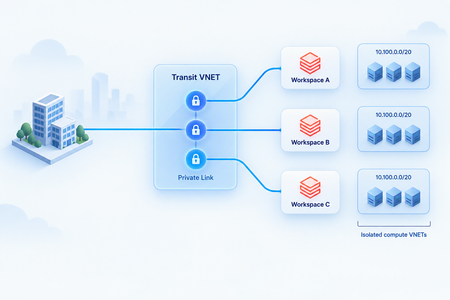
Explore an Azure networking pattern for providing private access to multiple Azure Databricks workspaces with overlapping CIDRs using Azure Private Link and a shared Transit VNET, while keeping overlapping compute networks isolated from the enterprise routing domain.120Views1like1Comment
Accelerate designing, troubleshooting & securing your network with Gen-AI powered tools, now GA.
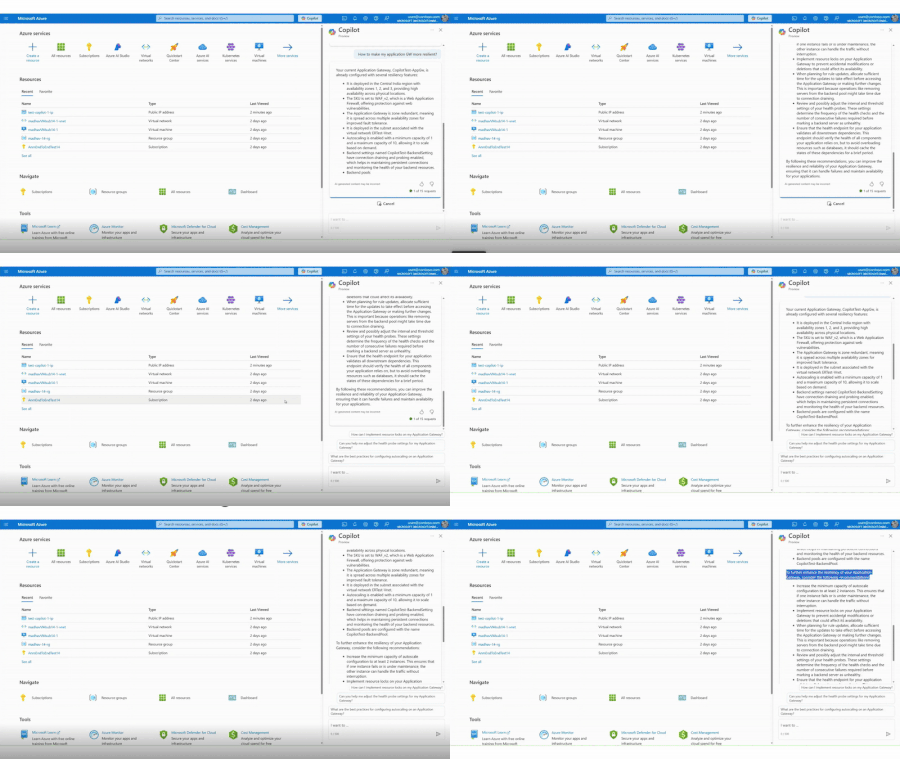
We are thrilled to announce the general availability of Azure Networking skills in Copilot, an extension of Copilot in Azure and Security Copilot designed to enhance cloud networking experience. Azure Networking Copilot is set to transform how organizations design, operate, and optimize their Azure Network by providing contextualized responses tailored to networking-specific scenarios and using your network topology.2.1KViews1like1Comment