azure ddos protection
83 Topics
Azure DDoS Protection & Azure WAF: A Layered Defense for Modern DDoS Attacks
Introduction: The Need for Layered DDoS Defense Organizations today operate in an environment where Distributed Denial of Service (DDoS) attacks continue to evolve across both network and application layers. To help organizations build resilient, internet-facing applications and services, Microsoft Azure provides a comprehensive and layered set of protections designed to address different types of DDoS threats. These capabilities range from platform-level defenses through Azure Infrastructure Protection, dedicated Layer 3/4 DDoS mitigation through Azure DDOS Protection and application-layer protections through Azure Web Application Protection (WAF). Together, these services form a defense-in-depth strategy that helps organizations strengthen availability, improve resilience, and protect critical applications from both large-scale network attacks and sophisticated application-layer threats. This blog explores how these services work together to deliver comprehensive DDoS protection across modern cloud environments. Understanding DDoS at Different Layers: Network vs. Application Not all DDoS attacks are alike. Broadly speaking, network-layer (Layer 3/4) DDoS attacks try to flood a network or transport layer with traffic – for example, overwhelming a server or network connection with a massive volume of packets (think UDP floods, SYN floods, or amplification attacks). These aim to saturate the available bandwidth or crash network devices, knocking entire services offline. On the other hand, application-layer (Layer 7) DDoS attacks strike at the application itself – typically using HTTP(S) requests that appear legitimate but are maliciously crafted. For instance, a botnet might repeatedly hit a search API or login page with valid-looking requests that each trigger expensive operations (database queries, authentication processes, etc.). In short, network-layer DDoS attacks target the plumbing of your infrastructure (bandwidth, network connectivity), whereas application-layer DDoS attacks target the brains of your application (the code and logic handling requests). Because these attack vectors are different, defending against them requires different tools and tactics. Azure’s approach to DDoS defense embraces this reality with a layered model, where each security layer specializes in stopping certain types of attacks and complements the others. Azure’s multi-layered DDoS Protection Strategy Azure provides three main layers of DDoS protection: Azure’s Infrastructure DDoS Protection (Platform Protection) Azure DDoS Protection (Network Protection for customers’ resources) Azure Web Application Firewall (WAF) (App Protection) Let’s explore each layer and how they work together. Azure DDoS Infrastructure Protection (Always-On Baseline) All of the Azure Platform and shared services, automatically benefit from Azure’s built-in DDoS infrastructure protection. Think of this as Azure’s global, always-on “baseline” DDoS defense. It continuously monitors traffic across the Azure network, and if a massive DDoS campaign tries to bring down Azure’s infrastructure or a customer’s public endpoint, Azure will detect and absorb the malicious traffic at the platform level. This baseline protection uses Azure’s global network capacity to scrub much of the unwanted traffic before it ever reaches your resources. There’s no extra cost or configuration needed for this default protection. It’s a fundamental safety net that ensures Azure services (including multi-tenant services like Azure DNS) are not easily taken offline by large-scale DDoS events. However, the platform-level protection is designed primarily to protect Azure’s overall infrastructure and does not provide fine-grained controls or visibility for individual customers. That’s where Azure’s next layer comes in. Azure DDoS Protection: Shielding the Network (L3/L4) To safeguard your own internet-facing resources and workloads against network-layer DDoS attacks beyond the default baseline, Azure offers L3/L4 DDoS Protection (DDoS Network Protection and DDoS IP Protection) against volumetric floods. This is an opt-in service you configure for your Virtual Network or specific Public IP resources. Azure DDoS Protection is purpose-built to handle the classic L3/L4 DDoS scenarios: large volumetric floods, protocol attacks, and other network-level exploits like reflection or amplification attacks. A key benefit of Azure DDoS Protection is its adaptive tuning feature alongside the telemetry it provides. During peacetime, the service establishes a baseline of normal traffic behavior for your services and continuously updates that baseline to reflect changing patterns. When traffic deviates from that baseline and an attack is detected, mitigation is triggered automatically to block or absorb malicious traffic while minimizing false positives. Another important aspect of Azure DDoS Protection is visibility and response capabilities. The service provides detailed metrics, alerts, and attack analytics during and after an event, so your teams can understand what happened. Azure DDoS Network Protection plan also includes support from Azure’s DDoS Rapid Response (DRR) team and offers a cost protection guarantee – credits to offset any unexpected Azure scale-out costs that result from a documented DDoS attack. In short, Azure DDoS Protection is your dedicated shield at the network layer. It's worthwhile to note that Azure DDOS Protection goes beyond just blunt filtering; it employs multiple mitigation techniques like dropping illegitimate packets (for instance, filtering out spoofed source IPs or malformed packets), DDoS booters (e.g. DDoS-for-hire services), protocol compliance checks, and intelligent rate limiting as a last resort. It further employs multiple policies with varied thresholds each for UDP, TCP and TCP SYN due to the nature of attacks for these protocols. The goal is to scrub out the attack traffic while letting legitimate users continue to reach your services with minimal disruption. Azure WAF: Guarding Applications at the HTTP Layer (L7) Azure DDoS Protection defends against network-level floods and protocol exploits, but application-layer attacks like HTTP request floods require separate L7 protection which is available via Azure Web Application Firewall (WAF). Azure WAF is deployed on services like Azure Application Gateway, Azure Front Door and Azure Gateway for Containers to inspect incoming HTTP(S) requests to your web applications. WAF’s primary role is to block common web exploits (e.g., SQL injections, cross-site scripting) via managed rule sets, rate Limit traffic using its Custom Rules as well as providing protection from malicious bots using its Bot Ruleset. Now, Azure WAF also includes the HTTP DDOS Ruleset to protect against application-level DDoS attacks. HTTP DDOS Ruleset is a new adaptive ruleset (currently in public preview for Application Gateway and Front Door services) that uses machine learning to dynamically learn normal HTTP traffic patterns for your application and automatically identify unusual surges in requests. If a burst of traffic appears malicious (for example, a sudden wave of requests to an expensive API call), the WAF can selectively block offending clients by placing them in a temporary “penalty box” without manual intervention. This dynamic approach goes beyond static thresholds, adjusting to your app’s normal load profiles. Along with that, adding the existing approaches such as custom rate limiting that lets you define granular thresholds for incoming requests on specific paths or for specific clients will further enhance the protection against DDOS attacks. For instance, you might limit a single IP to a certain number of login attempts per minute or cap the request rate to an expensive search endpoint. Rate limiting ensures that even if an attacker tries to slowly overwhelm your application with a moderate stream of requests (under the radar of network DDoS detection), WAF can throttle or block them at the application entry point. JavaScript challenges and CAPTCHA-based validation can also serve as effective protection mechanisms against automated bot traffic. These techniques help distinguish legitimate users from non-human clients by requiring the requester to successfully execute browser-based checks or complete a human verification step, making them useful for reducing unwanted bot activity such as scraping, credential stuffing, and abusive request automation. Further, the Bot Protection ruleset that includes integration of Microsoft’s threat intelligence to identify known malicious bot networks automatically block bad bots. Microsoft Threat Intelligence feeds continuously update the list of dangerous bot IPs and prevents these bots from consuming your application’s resources. This is especially useful against DDoS scenarios carried out by automated botnets that have known fingerprints. Together these capabilities enable Azure WAF to act as a critical inner layer of DDoS defense in front of your applications (via an Application Gateway or Front Door). Azure WAF focuses on application-specific attacks, and it can discern whether a burst of requests to your app is likely malicious based on patterns and behavior, not just volume. Combined with network-level DDoS protection, WAF ensures that even low-bandwidth but high-impact attacks (like repeated login attempts or bot-driven scraping) are mitigated. Layered DDOS Protection: Azure’s DDoS strategy is best imagined as a series of concentric rings around your application. The outermost ring is the platform’s infrastructure DDoS protection (automatically absorbing massive network floods aimed at Azure at large). The next ring is Azure DDoS Protection for your environment, which provides dedicated L3/L4 defenses with tuning and telemetry – it will handle the heavy lifting against volumetric and protocol attacks targeted at your specific resources. The next ring inward is your Azure WAF (with its HTTP DDoS ruleset, rate limiting, and bot controls enabled) catching the application-layer anomalies that network defenses can’t see. And finally, the innermost ring might be endpoint-specific configurations or app-level controls (like strict rate limits on crucial API operations or even adaptive app logic) that protect the most sensitive parts of your application from abuse. This layered approach is essential. Each layer addresses different threat vectors and failure modes; together they fill the gaps and provide a robust, end-to-end DDoS mitigation strategy. Quick Comparison: Azure DDoS Protection vs Azure WAF Note: This comparison focuses on Azure DDoS Protection and Azure WAF because they are the paid offerings; Azure DDoS Infrastructure Protection is included by default. To crystallize the differences and synergy between these services, here’s a quick side-by-side comparison of Azure DDoS Protection (Network level) and Azure WAF (Application level) in the context of DDoS defense: Service Azure DDoS Protection (Network-Level) Azure WAF – Application (Layer 7) DDoS Protection Protection Layer Network (OSI Layers 3 & 4): Protects Internet facing resources in virtual networks. Application (OSI Layer 7): Protects web apps and APIs at the HTTP request layer. Protected Resource Internet facing resources in virtual networks. Web apps and API endpoints. Primary Purpose Shield against high-volume network floods (e.g. UDP/TCP floods, SYN floods, amplification attacks) that aim to overwhelm bandwidth or network resources. Ensures your Azure services stay reachable during massive DDoS assaults. Filter and stop malicious HTTP(S) traffic (e.g. HTTP GET/POST floods, bot-driven requests, slowloris attacks) that could exhaust your application’s compute resources. Keeps your web applications responsive even under targeted L7 attack patterns. How It Works Always-on network monitoring. Uses Azure’s global network to absorb and scrub malicious traffic before it reaches your resources. No per-app manual tuning needed – it profiles traffic and triggers mitigation when volumes exceed safe baselines. Employs adaptive techniques (drops spoofed packets, protocol checks, limits rate as last resort) to block attacks while letting legitimate traffic flow. Policy-driven rules integrated at the application edge (via Application Gateway or Front Door). Can rate-limit or block suspicious clients based on IP, behavior, or patterns. Includes managed rule sets for common web threats and a new adaptive HTTP DDoS managed ruleset that auto-learns normal behavior per app and blocks abnormal request surges (reducing need for manual emergency configuration). When to Use Ideal for any Azure resource exposed to the public internet. Especially critical for high-bandwidth endpoints (gaming servers, large websites, etc.) or anything that can’t risk downtime due to massive traffic floods. Typically enabled on Virtual Networks or specific public IP addresses. Essential for any internet-facing web application (websites, web services, REST APIs). Particularly important for applications with resource-intensive operations (e.g., login pages, search functionality) where even moderate traffic spikes can degrade service. Deployed via a WAF Policy on an Application Gateway or Front Door that fronts your app. Role in Defense-in-Depth Handles the “heavy lifting” against bulk traffic attacks at the network edge – drastically reduces attacking traffic volume before it can hit your servers. Prevents upstream network pipe saturation or crashes, ensuring your application gets a chance to handle legitimate user traffic. Provides a fine-grained, application-aware filter for attacks that get past network defenses. Targets “surgical” low-bandwidth attacks that hide within normal traffic patterns. Together with Azure DDoS Protection, WAF completes a full-stack DDoS defense, covering gaps that pure network protection would miss. Conclusion: The key takeaway is that modern DDoS defense is no longer about relying on a single control, but about applying defense-in-depth, the right protection at the right layer. With a layered approach that spans infrastructure, network, and application security, organizations are better positioned to preserve availability, protect user experience, and maintain business continuity even as DDoS attacks grow more sophisticated.847Views0likes0Comments
Designing Cloud Landing Zones by Traffic Flow: A Defence‑in‑Depth, DMZ‑First Architecture
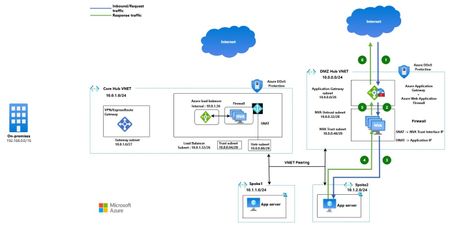
As enterprises adopt Microsoft Azure for large‑scale and regulated workloads, security architecture must be driven by traffic trust boundaries and inspection intent, not connectivity alone. Regulatory frameworks consistently require a clear separation between Internet‑untrusted and private enterprise traffic, enforced through defence‑in‑depth controls aligned to the OSI model. This drives the adoption of a DMZ‑first landing zone architecture, where volumetric protection, application‑layer inspection, and perimeter controls are enforced at well‑defined trust boundaries. Security enforcement is prioritised before access, rather than being an afterthought of connectivity. A distributed hub architecture enables this model at scale, delivering consistent controls while improving resiliency, fault isolation, and operational clarity. Traffic Classification in an Enterprise Landing Zone Enterprise traffic flows are classified based on origin, destination, and trust level, which directly dictates inspection requirements: Internet Inbound (North–South): Traffic from the public Internet to Azure‑hosted applications Internet Outbound (South–North): Egress traffic from private workloads to the Internet East–West: Traffic between virtual networks within or across regions Hybrid Connectivity: Traffic between Azure, on‑premises, and multi‑cloud environments Each flow presents a distinct risk profile, making a uniform connectivity and inspection model unsuitable for enterprise and regulated environments. Hub‑and‑Spoke as the Foundation for Centralised Security Enterprises commonly adopt a Hub‑and‑Spoke topology using VNET peering or Azure Virtual WAN, extending hybrid connectivity via Site‑to‑Site VPN or ExpressRoute. The hub provides a centralised, datapath‑centric layer for shared networking and security services, while spoke VNETs host application workloads and remain private, typically without public IPs. Ingress and egress are handled through shared, centrally managed endpoints. This model consolidates critical controls—Azure Firewall, Azure WAF, and DDoS protection—at controlled entry and exit points, significantly reducing the attack surface. Integration with Microsoft Sentinel enables cross‑layer visibility, threat hunting, and detection of risks such as unauthorised access and data exfiltration. Why a Single Hub Is Not Sufficient Using a single hub to process all traffic types introduces operational and security challenges at scale by forcing Internet‑untrusted and private traffic through the same inspection tier. Key limitations include: Coupled Internet and private security policies Rapid firewall rule sprawl and management overhead A single blast radius across all traffic types Throughput and SNAT scalability constraints Increased difficulty meeting regulatory separation requirements These issues become more pronounced as environments scale across regions and workloads. Multi‑Hub as an Enterprise‑Grade Evolution A multi‑hub architecture resolves these challenges by separating inspection responsibilities across dedicated hubs: DMZ Hub VNET: Internet‑facing traffic and perimeter security enforcement Core Hub VNET: Outbound Internet access, East‑West, and hybrid traffic inspection This separation aligns security controls with traffic intent, reduces policy complexity, limits blast radius, and simplifies operations. In the next section, we explore multi‑hub architecture patterns and examine how each traffic flow is inspected and governed in practice. Scenario 1 – Third‑Party Firewall–Centric Multi‑Hub Design In this scenario, third‑party firewalls provide inspection for all traffic flows—Internet inbound, Internet outbound, East‑West, and hybrid connectivity—while Azure WAF and Azure DDoS Protection are used to defend against volumetric attacks, application‑layer threats, and malicious bot traffic. Architecture Overview The design uses two dedicated hub virtual networks, with spoke VNets peered to both hubs to maintain traffic separation based on trust and inspection requirements: DMZ Hub VNET (Internet Ingress Hub) Core Hub VNET (Egress, East‑West, and Hybrid Hub) DMZ Hub VNET – Internet Inbound (North–South) Traffic The DMZ hub establishes a dedicated perimeter for Internet‑facing applications. Internet traffic lands on a public Application Gateway with Azure WAF, protected by an Azure DDoS Protection Plan applied to the public frontend IP. Third‑party firewalls are deployed behind the Application Gateway to perform deep packet inspection. Firewalls operate in active‑active mode as standalone appliances, using three dedicated network interfaces (Untrust, Trust, and Management), each placed in separate subnets. Application Gateway provides load balancing and health probing, ensuring firewall availability and resiliency. Core Hub VNET – Egress, East‑West, and Hybrid Traffic The core hub handles all non‑Internet‑inbound traffic flows, including private inter‑VNET communication and hybrid connectivity. Third‑party firewalls are deployed behind an internal Azure Load Balancer, which maintains high availability using health probes. Firewalls follow the same active‑active, three‑NIC design for consistent policy enforcement and operational symmetry. Azure NAT Gateway is associated with the firewall Untrust subnet to scale outbound SNAT and simplify Internet egress with deterministic public IP. Site‑to‑site VPN or ExpressRoute terminate in this hub for on‑premises and multi‑cloud connectivity, ensuring private and regulated traffic bypasses Internet‑facing controls. Architecture Patterns - Traffic Flow 1.1 North–South (Internet Inbound) Traffic Flow This flow applies when applications hosted on Azure (VMs, VM Scale Sets, or services behind Internal Load Balancer / Internal Application Gateway) are published to the Internet. As shown in the diagram, Internet-bound client requests enter Azure through a dedicated DMZ Hub, where perimeter security controls are enforced before traffic reaches private application spokes. Inbound Request Flow (Blue Path) Client → Application Gateway (WAF) A client request (for example, app1.example.com) is resolved via DNS and lands on the public endpoint of Azure Application Gateway. Azure WAF performs Layer‑7 inspection, bot protection, and rule evaluation. Application Gateway → Firewall (DMZ Hub) Based on hostname and routing rules, Application Gateway forwards traffic to the firewalls while preserving the client’s real IP using the X‑Forwarded‑For (XFF) header. Firewall → Application (Spoke VNET) The firewall performs DNAT to the internal destination (Internal Application Gateway or Internal Load Balancer) and SNAT to its trust‑interface IP to ensure symmetric return traffic. Traffic is then routed over VNET peering to the private application workload. Response Flow (Green Path) Application → Firewall The application responds using its private IP, with the firewall trust interface as the destination. Firewall → Application Gateway The firewall forwards the response based on its session state. Application Gateway → Client Application Gateway returns the response to the Internet client. DDoS Protection Azure DDoS Protection continuously monitors the Application Gateway public IP and mitigates volumetric attacks before they reach the application stack. Key Design Considerations Application Gateway routing - Use a multi‑site listener with hostname‑based rules to steer traffic to the appropriate firewall backend. Firewall backend mapping - Register firewall VMs in a single backend pool and differentiate applications using distinct backend settings (same protocol, different ports). Application steering at firewall - Firewalls perform port‑based DNAT (or private FQDN‑based DNAT where supported) to forward traffic to the correct application private IP in spoke VNets. Traffic symmetry - Source NAT is applied on the firewall trust interface to maintain symmetric return paths. Protocol support - The same pattern applies to TCP/UDP workloads, using an External Azure Load Balancer instead of Application Gateway where WAF is not required. Client IP visibility Application Gateway enables WAF inspection using the real client IP, preserved downstream via X‑Forwarded‑For. With Azure Load Balancer, client IP is retained up to the firewall for IP‑based enforcement, with Azure DDoS Protection safeguarding the public frontend. 1.2 Hybrid Connectivity Traffic Flow Hybrid connectivity represents communication between Azure workloads and on‑premises environments using Site‑to‑Site VPN or ExpressRoute. Traffic Flow Request (Blue: 1–4): Traffic originates from applications in spoke VNETs and is forwarded via UDRs to the Internal Load Balancer, through active‑active firewalls, and then to on‑premises via VPN or ExpressRoute. Response (Green: 5–8): Return traffic follows the same path in reverse. Key Design Considerations Source and destination IP addresses remain unchanged end‑to‑end, despite firewalls operating behind an Internal Load Balancer. UDRs steer both outbound and inbound hybrid traffic to the Internal Load Balancer as the next hop. Spoke VNET subnets should be associated with custom route tables with Propagate Gateway Routes set to No, preventing gateway-learned routes from bypassing the intended security inspection path configured via UDR. However, VPN Gateway Subnet Route table should have route table with Propagate Gateway Routes set to Yes. Azure Virtual Network Manager can be used to manage and scale UDR deployment centrally across Hub and spoke networks. 1.3 East-West Traffic flow This traffic flow represents the connectivity between resources across VNETs through Firewall. Considerations remain same as “Hybrid Connectivity Traffic flow” mentioned above. 1.4 Egress/Outbound Connectivity Traffic flow This traffic flow represents the connectivity from the resources hosted inside VNETs to Internet through Firewalls deployed behind Internal Load Balancer in Core Hub VNET. Egress/Outbound Connectivity Traffic flow Key Considerations: A default route (0.0.0.0/0) UDR directs Internet-bound traffic to the Internal Load Balancer for firewall inspection. Firewall performs SNAT to its untrusted interface, after which Azure NAT Gateway translates traffic to a fixed public IP. Alternatively, a public IP can be assigned to the firewall untrusted interface to perform SNAT directly, removing the need for NAT Gateway and reducing cost. Spoke VNET subnets should be associated with custom route tables with Propagate Gateway Routes set to No, preventing gateway-learned routes from bypassing the intended security inspection path configured via UDR. However, VPN Gateway Subnet Route table should have route table with Propagate Gateway Routes set to Yes. However, with horizontal firewall scaling, outbound public IPs become non-deterministic. Scenario 2: Third‑Party Firewalls for Ingress, Azure Firewall for Private Flows In this scenario, third‑party firewalls secure Internet‑facing traffic, while Azure Firewall handles Egress, East–West, and Hybrid flows. This separation enables organisations to retain existing perimeter security investments while adopting a fully managed, cloud‑native control and data plane for internal traffic flows. As private traffic patterns scale, particularly for chatty East–West communication, Azure Firewall helps simplify operations and improves scalability by offloading traffic inspection to a managed service. This approach reduces operational overhead and provides consistent policy enforcement across internal and hybrid flows. Setup DMZ Hub design remains unchanged from Scenario 1. Core Hub VNET use Azure Firewall for better scalability, built‑in resilience, and simplified operations. Azure Firewall eliminates the need for load balancers and reduces complexity for chatty east‑west traffic. It requires a single subnet (unless force tunnelling is enabled), optimising IP consumption. Outbound traffic is SNATed by Azure Firewall and further translated via Azure NAT Gateway. Firewall‑based SNAT to public IP can be used to avoid NAT Gateway costs when deterministic egress IPs or higher SNAT scale are not required. Traffic Flow North–South (Internet Inbound) Traffic Flow represented with Numbers. Request flow represented with Blue: 1–3 Response flow represented with Brown: 4–6 Egress/Outbound Connectivity Traffic flow represented with alphabets. Request flow represented with Green: A–C Response flow represented with Blue: D–F Hybrid flow represented with purple Architecture Diagram: Third‑Party Firewalls for Ingress, Azure Firewall for Private Flows Further if you want to use Azure Firewall for the Internet Ingress flow, you can use it as well. Below is the architecture diagram explaining the same pattern. Azure Firewalls for Ingress and Private Flows Key Considerations: Application Gateway behaviour remains the same as Scenario 1; however, backend pools use IP‑based targets. Internal applications should be exposed via internal Application Gateway or internal load balancer to provide stable backend IPs. To optimise traffic flow and avoid unnecessary network address translation, the private IP address of the Application Gateway or internal Load Balancer should be configured in the backend pool of External Load Balancer in DMZ Hub VNET. This design does not need Azure Firewall to perform both source NAT (SNAT) and destination NAT (DNAT) operations. Further, implementing User Defined Routes (UDRs) in the Application Gateway subnet—specifically for spoke VNet CIDR ranges steers traffic routing through the Firewall. For non-web (TCP/UDP) workloads, applications can be directly exposed through the firewall public IP, with Azure DDoS Protection applied to mitigate volumetric attacks. Spoke VNET subnets should be associated with custom route tables with Propagate Gateway Routes set to No, preventing gateway-learned routes from bypassing the intended security inspection path configured via UDR. However, VPN Gateway Subnet Route table should have route table with Propagate Gateway Routes set to Yes. Scenario 3 - Overcoming Peering Complexity at Scale with Azure Virtual WAN In environments where each application is hosted in its own dedicated VNET for isolation and stronger security, a traditional hub‑and‑spoke model quickly becomes complex. With a single hub, "N" spoke VNETs require "N" peering's; introducing multiple hubs increases this to "2N", significantly amplifying operational overhead—especially across multiple regions. Azure Virtual WAN addresses this challenge by eliminating the need for extensive VNET peering. As a global, managed service, it simplifies large‑scale and multi‑region architectures while providing built‑in scalability and operational consistency. Setup DMZ Hub design and components remain unchanged from Scenario 1 keeping defense in depth principles intact for Internet Inbound or North-South traffic. Core Hub VNET is replaced with Azure Virtual WAN Secure Hub which has Azure Firewall inside the managed Secure Hub VNETs. This further eliminates the need for creating Azure Firewall Subnet, Azure NAT Gateway resources for East-West, Egress and Hybrid connectivity and provides same level of security protection as mentioned in Scenario 2. Secure Hub design using Virtual WAN removes the routing and inspection complexity which was unless required in Scenario 2 by removing UDR configurations in Spoke VNETs, Gateway Subnet and Azure Firewall Subnet. This provides simplified design and operations with built-in resiliency by leveraging the managed platform. Azure Firewall eliminates the need for load balancers and reduces complexity for chatty east‑west traffic. East-West, Egress, and Hybrid connectivity happens via VPN Gateway and Express Route Gateway present in Virtual Hub. All private and Internet Egress traffic is inspected by Azure Firewall present in secure Hub. Outbound traffic is SNATed to Public IP by Azure Firewall thus avoiding the need of Azure NAT Gateway. Firewall‑based SNAT to public IP can be used to avoid NAT Gateway costs when deterministic egress IPs or higher SNAT scale are not required. Traffic Flow North–South (Internet Inbound) Traffic Flow represented with Numbers. Request flow represented with Blue: 1–5 Response flow represented with Green: 6–10 Egress/Outbound Connectivity Traffic flow represented with Red Hybrid flow represented with Green East-West connectivity flow represented with black Architecture Diagram: Key Considerations Virtual WAN has additional cost Refer to architecture diagram above for different traffic flows. The DMZ VNET components consideration remains same as per scenario 1 You can use your own managed public IP on Azure Firewall for applying standard IP/Network DDoS protection plan. Benefits of multi-Hub approach over single Hub You can use this table as decision matrix to choose the best option for your application requirements. Dimensions Multi-Hub Design Resiliency · Independent scaling of DMZ and Core firewalls · Failure in Internet inspection does not impact East‑West traffic · Easier multi‑region active‑active designs Security & Compliance Clear trust boundaries Auditable inspection points Easier alignment with Zero Trust & regulatory frameworks Operational Simplicity Smaller, purpose‑built firewall policies Clear ownership (Perimeter vs Core team) Faster troubleshooting due to deterministic flows Cost Optimisation Avoids over‑inspection of East‑West traffic by DMZ firewalls Smaller firewall SKUs per hub Better scale‑unit consumption Performance Efficiency Reduced latency for private traffic No unnecessary hair‑pinning Optimised SNAT and connection tracking Key Takeaways Security‑first landing zones should not be designed as one‑size‑fits‑all networks. By designing hubs based on traffic trust level and inspection intent, rather than convenience, organisations gain: o Stronger security boundaries and better fault isolation o Predictable operations at scale o Lower long‑term cost and complexity o Design for traffic flows, not just connectivity o Use DMZ hubs exclusively for Internet‑untrusted traffic o Use Core hubs for East‑West, outbound, and hybrid connectivity o Map security controls to OSI layers o Avoid single‑hub designs for large, regulated, or multi‑region environments This distributed hub‑and‑DMZ landing zone provides a clean, scalable, and secure foundation for enterprise workloads in any Hyperscaler. For regulated, internet‑exposed, or multi‑region environments, a distributed hub with a dedicated DMZ is no longer optional — it is a foundational architecture decision.5.3KViews1like2CommentsHow Azure network security can help you meet NIS2 compliance
With the adoption of the NIS2 Directive EU 2022 2555, cybersecurity obligations for both public and private sector organizations have become more strict and far reaching. NIS2 aims to establish a higher common level of cybersecurity across the European Union by enforcing stronger requirements on risk management, incident reporting, supply chain protection, and governance. If your organization runs on Microsoft Azure, you already have powerful services to support your NIS2 journey. In particular Azure network security products such as Azure Firewall, Azure Web Application Firewall WAF, and Azure DDoS Protection provide foundational controls. The key is to configure and operate them in a way that aligns with the directive’s expectations. Important note This article is a technical guide based on the NIS2 Directive EU 2022 2555 and Microsoft product documentation. It is not legal advice. For formal interpretations, consult your legal or regulatory experts. What is NIS2? NIS2 replaces the original NIS Directive 2016 and entered into force on 16 January 2023. Member states must transpose it into national law by 17 October 2024. Its goals are to: Expand the scope of covered entities essential and important entities Harmonize cybersecurity standards across member states Introduce stricter supervisory and enforcement measures Strengthen supply chain security and reporting obligations Key provisions include: Article 20 management responsibility and governance Article 21 cybersecurity risk management measures Article 23 incident notification obligations These articles require organizations to implement technical, operational, and organizational measures to manage risks, respond to incidents, and ensure leadership accountability. Where Azure network security fits The table below maps common NIS2 focus areas to Azure network security capabilities and how they support compliance outcomes. NIS2 focus area Azure services and capabilities How this supports compliance Incident handling and detection Azure Firewall Premium IDPS and TLS inspection, Threat Intelligence mode, Azure WAF managed rule sets and custom rules, Azure DDoS Protection, Azure Bastion diagnostic logs Detect, block, and log threats across layers three to seven. Provide telemetry for triage and enable response workflows that are auditable. Business continuity and resilience Azure Firewall availability zones and autoscale, Azure Front Door or Application Gateway WAF with zone redundant deployments, Azure Monitor with Log Analytics, Traffic Manager or Front Door for failover Improve service availability and provide data for resilience reviews and disaster recovery scenarios. Access control and segmentation Azure Firewall policy with DNAT, network, and application rules, NSGs and ASGs, Azure Bastion for browser based RDP SSH without public IPs, Private Link Enforce segmentation and isolation of critical assets. Support Zero Trust and least privilege for inbound and egress. Vulnerability and misconfiguration defense Azure WAF Microsoft managed rule set based on OWASP CRS. Azure Firewall Premium IDPS signatures Reduce exposure to common web exploits and misconfigurations for public facing apps and APIs. Encryption and secure communications TLS policy: Application Gateway SSL policy; Front Door TLS policy; App Service/PaaS minimum TLS. Inspection: Azure Firewall Premium TLS inspection Inspect and enforce encrypted communication policies and block traffic that violates TLS requirements. Inspect decrypted traffic for threats. Incident reporting and evidence Azure Network Security diagnostics, Log Analytics, Microsoft Sentinel incidents, workbooks, and playbooks Capture and retain telemetry. Correlate events, create incident timelines, and export reports to meet regulator timelines. NIS2 articles in practice Article 21 cybersecurity risk management measures Azure network controls contribute to several required measures: Prevention and detection. Azure Firewall blocks unauthorized access and inspects traffic with IDPS. Azure DDoS Protection mitigates volumetric and protocol attacks. Azure WAF prevents common web exploits based on OWASP guidance. Logging and monitoring. Azure Firewall, WAF, DDoS, and Bastion resources produce detailed resource logs and metrics in Azure Monitor. Ingest these into Microsoft Sentinel for correlation, analytics rules, and automation. Control of encrypted communications. Azure Firewall Premium provides TLS inspection to reveal malicious payloads inside encrypted sessions. Supply chain and service provider management. Use Azure Policy and Defender for Cloud to continuously assess configuration and require approved network security baselines across subscriptions and landing zones. Article 23 incident notification Build an evidence friendly workflow with Sentinel: Early warning within twenty four hours. Use Sentinel analytics rules on Firewall, WAF, DDoS, and Bastion logs to generate incidents and trigger playbooks that assemble an initial advisory. Incident notification within seventy two hours. Enrich the incident with additional context such as mitigation actions from DDoS, Firewall and WAF. Final report within one month. Produce a summary that includes root cause, impact, and corrective actions. Use Workbooks to export charts and tables that back up your narrative. Article 20 governance and accountability Management accountability. Track policy compliance with Azure Policy initiatives for Firewall, DDoS and WAF. Use exemptions rarely and record justification. Centralized visibility. Defender for Cloud’s network security posture views and recommendations give executives and owners a quick view of exposure and misconfigurations. Change control and drift prevention. Manage Firewall, WAF, and DDoS through Network Security Hub and Infrastructure as Code with Bicep or Terraform. Require pull requests and approvals to enforce four eyes on changes. Network security baseline Use this blueprint as a starting point. Adapt to your landing zone architecture and regulator guidance. Topology and control plane Hub and spoke architecture with a centralized Azure Firewall Premium in the hub. Enable availability zones. Deploy Azure Bastion Premium in the hub or a dedicated management VNet; peer to spokes. Remove public IPs from management NICs and disable public RDP SSH on VMs. Use Network Security Hub for at-scale management. Require Infrastructure as Code for all network security resources. Web application protection Protect public apps with Azure Front Door Premium WAF where edge inspection is required. Use Application Gateway WAF v2 for regional scenarios. Enable the Microsoft managed rule set and the latest version. Add custom rules for geo based allow or deny and bot management. enable rate limiting when appropriate. DDoS strategy Enable DDoS Network Protection on virtual networks that contain internet facing resources. Use IP Protection for single public IP scenarios. Configure DDoS diagnostics and alerts. Stream to Sentinel. Define runbooks for escalation and service team engagement. Firewall policy Enable IDPS in alert and then in alert and deny for high confidence signatures. Enable TLS inspection for outbound and inbound where supported. Enforce FQDN and URL filtering for egress. Require explicit allow lists for critical segments. Deny inbound RDP SSH from the internet. Allow management traffic only from Bastion subnets or approved management jump segments. Logging, retention, and access Turn on diagnostic settings for Firewall, WAF, DDoS, and Application Gateway or Front Door. Send to Log Analytics and an archive storage account for long term retention. Set retention per national law and internal policy. Azure Monitor Log Analytics supports table-level retention and archive for up to 12 years, many teams keep a shorter interactive window and multi-year archive for audits. Restrict access with Azure RBAC and Customer Managed Keys where applicable. Automation and playbooks Build Sentinel playbooks for regulator notifications, ticket creation, and evidence collection. Maintain dry run versions for exercises. Add analytics for Bastion session starts to sensitive VMs, excessive failed connection attempts, and out of hours access. Conclusion Azure network security services provide the technical controls most organizations need in order to align with NIS2. When combined with policy enforcement, centralized logging, and automated detection and response, they create a defensible and auditable posture. Focus on layered protection, secure connectivity, and real time response so that you can reduce exposure to evolving threats, accelerate incident response, and meet NIS2 obligations with confidence. References NIS2 primary source Directive (EU) 2022/2555 (NIS2). https://eur-lex.europa.eu/eli/dir/2022/2555/oj/eng Azure Firewall Premium features (TLS inspection, IDPS, URL filtering). https://learn.microsoft.com/en-us/azure/firewall/premium-features Deploy & configure Azure Firewall Premium. https://learn.microsoft.com/en-us/azure/firewall/premium-deploy IDPS signature categories reference. https://learn.microsoft.com/en-us/azure/firewall/idps-signature-categories Monitoring & diagnostic logs reference. https://learn.microsoft.com/en-us/azure/firewall/monitor-firewall-reference Web Application Firewall WAF on Azure Front Door overview & features. https://learn.microsoft.com/en-us/azure/frontdoor/web-application-firewall WAF on Application Gateway overview. https://learn.microsoft.com/en-us/azure/web-application-firewall/overview Examine WAF logs with Log Analytics. https://learn.microsoft.com/en-us/azure/application-gateway/log-analytics Rate limiting with Front Door WAF. https://learn.microsoft.com/en-us/azure/web-application-firewall/afds/waf-front-door-rate-limit Azure DDoS Protection Service overview & SKUs (Network Protection, IP Protection). https://learn.microsoft.com/en-us/azure/ddos-protection/ddos-protection-overview Quickstart: Enable DDoS IP Protection. https://learn.microsoft.com/en-us/azure/ddos-protection/manage-ddos-ip-protection-portal View DDoS diagnostic logs (Notifications, Mitigation Reports/Flows). https://learn.microsoft.com/en-us/azure/ddos-protection/ddos-view-diagnostic-logs Azure Bastion Azure Bastion overview and SKUs. https://learn.microsoft.com/en-us/azure/bastion/bastion-overview Deploy and configure Azure Bastion. https://learn.microsoft.com/en-us/azure/bastion/tutorial-create-host-portal Disable public RDP and SSH on Azure VMs. https://learn.microsoft.com/en-us/azure/virtual-machines/security-baseline Azure Bastion diagnostic logs and metrics. https://learn.microsoft.com/en-us/azure/bastion/bastion-diagnostic-logs Microsoft Sentinel Sentinel documentation (onboard, analytics, automation). https://learn.microsoft.com/en-us/azure/sentinel/ Azure Firewall solution for Microsoft Sentinel. https://learn.microsoft.com/en-us/azure/firewall/firewall-sentinel-overview Use Microsoft Sentinel with Azure WAF. https://learn.microsoft.com/en-us/azure/web-application-firewall/waf-sentinel Architecture & routing Hub‑spoke network topology (reference). https://learn.microsoft.com/en-us/azure/architecture/networking/architecture/hub-spoke Azure Firewall Manager & secured virtual hub. https://learn.microsoft.com/en-us/azure/firewall-manager/secured-virtual-hub1.5KViews0likes4CommentsAssess Azure DDoS Protection Status Across Your Environment
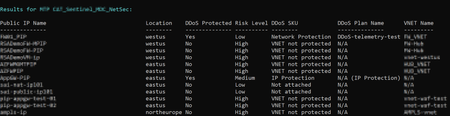
Introduction Distributed Denial of Service (DDoS) attacks continue to be one of the most prevalent threats facing organizations with internet-facing workloads. Azure DDoS Protection provides cloud-scale protection against L3/4 volumetric attacks, helping ensure your applications remain available during an attack. However, as Azure environments grow, maintaining visibility into which resources are protected and whether diagnostic logging is properly configured becomes increasingly challenging. Security teams often struggle to answer basic questions: Which Public IP addresses are protected by Azure DDoS Protection? Are we using IP Protection or Network Protection (DDoS Protection Plan)? Is diagnostic logging enabled for protected resources? To address these questions at scale, we’ve developed a PowerShell script that assesses your Azure DDoS Protection posture across all subscriptions. Understanding Azure DDoS Protection SKUs Azure offers three DDoS Protection tiers: Protection Type Description Scope Network Protection Enterprise-grade protection via a DDoS Protection Plan attached to VNETs All Public IPs in protected VNETs IP Protection Per-IP protection for individual Public IP addresses Individual Public IP For more details, see Azure DDoS Protection overview. The Assessment Script The Check-DDoSProtection.ps1 script provides a full view of DDoS Protection status across your Azure environment. This section covers the script’s key capabilities and the resource types it supports. Key Features Multi-subscription support: Scan a single subscription or all subscriptions you have access to DDoS Protection status: Identifies which Public IPs are protected and which SKU is being used VNET correlation: Automatically determines the VNET associated with each Public IP to assess Network Protection inheritance Diagnostic logging check: Verifies if DDoS diagnostic logs are configured for protected resources CSV export: Export results for further analysis or reporting Prerequisites Before running the script, ensure you have: Azure PowerShell modules installed: Run the following commands in PowerShell (version 5.1+) or PowerShell Core to install the required Azure modules. No special permissions are needed, these will install in your user profile. Install-Module -Name Az.Accounts -Scope CurrentUser -Force Install-Module -Name Az.Network -Scope CurrentUser -Force Install-Module -Name Az.Monitor -Scope CurrentUser -Force Appropriate Azure permissions: o Reader role on subscriptions you want to scan o Microsoft.Network/publicIPAddresses/read o Microsoft.Network/virtualNetworks/read o Microsoft.Insights/diagnosticSettings/read Azure login: Authenticate to Azure before running the script. This opens a browser window for interactive sign-in. Connect-AzAccount How to Use the Script Run the script from a PowerShell session where you’ve already authenticated with Connect-AzAccount. The account must have Reader role on the subscriptions you want to scan. Download the Script You can download the script from: - GitHub: Check-DDoSProtection.ps1 Basic Usage: Scan Current Subscription Scans only the subscription currently selected in your Azure context. .\Check-DDoSProtection.ps1 Scan a Specific Subscription Scans a single subscription by its ID. .\Check-DDoSProtection.ps1 -SubscriptionId "12345678-1234-1234-1234-123456789012" Scan All Subscriptions Scans every subscription your account has Reader access to. .\Check-DDoSProtection.ps1 -AllSubscriptions Export Results to CSV Exports the assessment results to a CSV file for reporting or further analysis. .\Check-DDoSProtection.ps1 -AllSubscriptions -ExportPath "C:\Reports\DDoS-Report.csv" Large Environment Options For organizations with many subscriptions or thousands of Public IPs, use the following parameters to handle errors gracefully and avoid API throttling. .\Check-DDoSProtection.ps1 -AllSubscriptions ` -ContinueOnError ` -SavePerSubscription ` -ExportPath "C:\Reports\DDoS-Report.csv" ` -ThrottleDelayMs 200 Parameters for large environments: Parameter Description -ContinueOnError Continue scanning even if a subscription fails (e.g., access denied) -SavePerSubscription Save a separate CSV file for each subscription -ThrottleDelayMs Delay between API calls to avoid throttling (default: 100ms) Understanding the Output The script provides both console output and optional CSV export. This section covers what each output type contains. Console Output The script displays a summary table for each subscription: Summary Statistics At the end of each subscription scan: CSV Export Columns Column Description Subscription Name of the Azure subscription Public IP Name Name of the Public IP resource Resource Group Resource group containing the Public IP Location Azure region IP Address Actual IP address (or “Dynamic” if not allocated) IP SKU Basic or Standard DDoS Protected Yes/No Risk Level High (unprotected) / Low (protected) DDoS SKU Network Protection, IP Protection, or None DDoS Plan Name Name of the DDoS Protection Plan (if applicable) VNET Name Associated Virtual Network name Associated Resource Resource the Public IP is attached to Resource Type Type of associated resource (VM, AppGw, LB, etc.) Diagnostic Logging Configured/Not Configured/N/A Log Destination Log Analytics, Storage, Event Hub, or None Recommendation Suggested action for unprotected resources Sample Scenarios Scenario 1: Protected Application Gateway Public IP Name: appgw-frontend-pip DDoS Protected: Yes DDoS SKU: Network Protection DDoS Plan Name: contoso-ddos-plan VNET Name: production-vnet Diagnostic Logging: Configured (Log Analytics) Risk Level: Low Explanation: The Application Gateway’s Public IP inherits protection from the VNET which has a DDoS Protection Plan attached. Diagnostic logging is properly configured. Scenario 2: Unprotected External Load Balancer Public IP Name: external-lb-pip DDoS Protected: No DDoS SKU: VNET not protected VNET Name: (External LB) Diagnostic Logging: N/A Risk Level: High Recommendation: Enable DDoS Protection on associated VNET or enable IP Protection Explanation: This external Load Balancer’s Public IP is not in a protected VNET. The script flags this as high risk. Scenario 3: IP Protection Without Logging Public IP Name: standalone-api-pip DDoS Protected: Yes DDoS SKU: IP Protection VNET Name: - Diagnostic Logging: Not Configured Risk Level: Low Recommendation: Configure diagnostic logging for DDoS-protected resources Explanation: The IP has IP Protection enabled, but diagnostic logging is not configured. While protected, you won’t have visibility into attack telemetry. Troubleshooting Script Doesn’t Find All Subscriptions Use the following command to list your Azure role assignments and verify you have Reader access to the target subscriptions. Run this from Azure Cloud Shell or a local PowerShell session after authenticating with Connect-AzAccount. # Check your role assignments Get-AzRoleAssignment -SignInName (Get-AzContext).Account.Id | Select-Object Scope, RoleDefinitionName API Throttling The script includes built-in retry logic for API throttling. If you still experience rate limit errors, increase the delay between API calls. Run this from the directory containing the script. .\Check-DDoSProtection.ps1 -AllSubscriptions -ThrottleDelayMs 500 Access Denied for Specific Resources The script displays “(Access Denied)” for VNETs or resources you don’t have permission to read. This doesn’t affect the overall assessment but may result in incomplete VNET information. Summary This guide covered how to use the Check-DDoSProtection.ps1 script to identify unprotected Public IP addresses, determine which DDoS SKU (Network Protection vs. IP Protection) is in use, verify diagnostic logging configuration, and assess risk levels across all subscriptions. Running this script periodically helps security teams track protection coverage as their Azure environment evolves. Related Resources Azure DDoS Protection Overview Azure DDoS Protection SKU Comparison Configure DDoS Protection Diagnostic Logging Best Practices for Azure DDoS Protection Zero Trust with Azure DDoS Protection429Views1like0CommentsSave the date - January 26, 2026 - AMA: Best practices for applying Zero Trust using Intune
Join us on January 26 at 10:00 AM PT, to Ask Microsoft Anything (AMA) and get the answers you need to implement the right policies, security settings, device configurations, and more. Never trust, always verify. Tune in for tips and insights to help you secure your endpoints using Microsoft Intune as part of your larger Zero Trust strategy. Find out how you can use Intune to protect both access and data on organization-owned devices and personal devices used for work. Go to aka.ms/AMA/IntuneZeroTrust and select "attend" to add this event to your calendar. Have questions? Submit them early by signing in to Tech Community and posting them on the event page!
Navigating the 2025 holiday season: Insights into Azure’s DDoS defense
The holiday season continues to be one of the most demanding periods for online businesses. Traffic surges, higher transaction volumes, and user expectations for seamless digital experiences all converge, making reliability a non-negotiable requirement. For attackers, this same period presents an opportunity: even brief instability can translate into lost revenue, operational disruption, and reputational impact. This year, the most notable shift wasn’t simply the size of attacks, but how they were executed. We observed a rise in burst‑style DDoS events, fast-ramping, high-intensity surges distributed across multiple resources, designed to overwhelm packet processing and connection-handling layers before traditional bandwidth metrics show signs of strain. From November 15, 2025 through January 5, 2026, Azure DDoS Protection helped customers maintain continuity through sustained Layer 3 and Layer 4 attack traffic, underscoring two persistent realities: Most attacks remain short, automated, and frequently create constant background attack traffic. The upper limit of attacker capability continues to grow, with botnets across the industry regularly demonstrating multi‑Tbps scale. The holiday season once again reinforced that DDoS resilience must be treated as a continuous operational discipline. Rising volume and intensity Between November 15 and January 5, Azure mitigated approximately 174,054 inbound DDoS attacks. While many were small and frequent, the distribution revealed the real shift: 16% exceeded 1M packets per second (pps). ~3% surpassed 10M pps, up significantly from 0.2% last year. Even when individual events are modest, the cumulative impact of sustained attack traffic can be operationally draining—consuming on-call cycles, increasing autoscale and egress costs, and creating intermittent instability that can provide cover for more targeted activity. Operational takeaway: Treat DDoS mitigation as an always-on requirement. Ensure protection is enabled across all internet-facing entry points, align alerting to packet rate trends, and maintain clear triage workflows. What the TCP/UDP mix is telling us this season TCP did what it usually does during peak season: it carried the fight. TCP floods made up ~72% of activity, and ACK floods dominated (58.7%) a reliable way to grind down packet processing and connection handling. UDP was ~24%, showing up as sharp, high-intensity bursts; amplification (like NTP) appeared, but it wasn’t the main play. Put together, it’s a familiar one-two punch: sustain TCP/ACK pressure to exhaust the edge, then spike UDP to jolt stability and steal attention. The goal isn’t just to saturate bandwidth, it’s to push services into intermittent instability, where things technically stay online but feel broken to users. TCP-heavy pressure: Make sure your edge and backends can absorb a surge in connections without falling over—check load balancer limits, connection/state capacity, and confirm health checks won’t start flapping during traffic spikes. UDP burst patterns: Rely on automated detection and mitigation—these bursts are often over before a human can respond. Reduce exposure: Inventory any internet-facing UDP services and shut down, restrict, or isolate anything you don’t truly need. Attack duration: Attackers continued to favor short-lived bursts designed to outrun manual response, but we also saw a notable shift in “who” felt the impact most. High-sensitivity workloads, especially gaming, experienced some of the highest packet-per-second and bandwidth-driven spikes, often concentrated into bursts lasting from a few minutes to several minutes. Even when these events were brief, the combination of high PPS + high bandwidth can be enough to trigger jitter, session drops, match instability, or rapid scaling churn. Overall, 34% of attacks lasted 5 minutes or less, and 83% ended within 40 minutes, reinforcing the same lesson: modern DDoS patterns are optimized for speed and disruption, not longevity. For latency- and session-sensitive services, “only a few minutes” can still be a full outage experience. Attack duration is an attacker advantage when defenses rely on humans to notice, diagnose, and react. Design for minute-long spikes: assume attacks will be short, sharp, and high PPS such that your protections should engage automatically. Watch the right signals: alert on PPS spikes and service health (disconnect rates, latency/jitter), not bandwidth alone. Botnet-driven surges: Azure observed rapid rotation of botnet traffic associated with Aisuru and KimWolf targeting public-facing endpoints. The traffic was highly distributed across regions and networks. In several instances, when activity was mitigated in one region, similar traffic shifted to alternate regions or segments shortly afterward. “Relocation” behavior is the operational signature of automated botnet playbooks: probe → hit → shift → retry. If defenses vary by region or endpoint, attackers will find the weakest link quickly. Customers should standardize protection posture, ensure consistent DDoS policies and thresholds across regions. Monitor by setting the right alerts and notifications. The snapshot below captures the Source-side distribution at that moment, showing which industry verticals were used to generate the botnet traffic during the observation window The geography indicators below reflect where the traffic was observed egressing onto the internet, and do not imply attribution or intent by any provider or country. Preparing for 2026 As organizations transition into 2026, the lessons from the 2025 holiday season marked by persistent and evolving DDoS threats, including the rise of DDoS-for-hire services, massive botnets underscore the critical need for proactive, resilient cybersecurity. Azure's proven ability to automatically detect, mitigate, and withstand advanced attacks (such as record-breaking volumetric incidents) highlights the value of always-on protections to maintain business continuity and safeguard digital services during peak demand periods. Adopting a Zero Trust approach is essential in this landscape, as it operates on the principle of "never trust, always verify," assuming breaches are inevitable and requiring continuous validation of access and traffic principles that complement DDoS defenses by limiting lateral movement and exposure even under attack. To achieve comprehensive protection, implement layered security: deploy Azure DDoS Protection for network-layer (Layers 3 and 4) volumetric mitigation with always-on monitoring, adaptive tuning, telemetry, and alerting; combine it with Azure Web Application Firewall (WAF) to defend the application layer (Layer 7) against sophisticated techniques like HTTP floods; and integrate Azure Firewall for additional network perimeter controls. Key preparatory steps include identifying public-facing exposure points, establishing normal traffic baselines, conducting regular DDoS simulations, configuring alerts for active mitigations, forming a dedicated response team, and enabling expert support like the DDoS Rapid Response (DRR) team when needed. By prioritizing these multi-layered defenses and a well-practiced response plan, organizations can significantly enhance resilience against the evolving DDoS landscape in 2026.511Views0likes0CommentsA Practical Guide to Azure DDoS Protection Cost Optimization
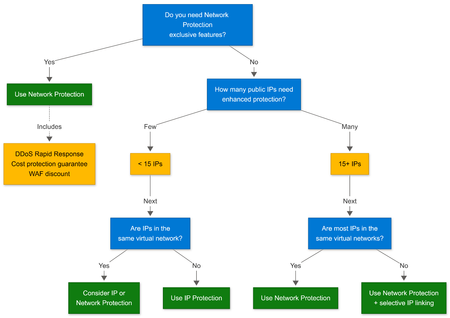
Introduction Azure provides infrastructure-level DDoS protection by default to protect Azure’s own platform and services. However, this protection does not extend to customer workloads or non-Microsoft managed resources like Application Gateway, Azure Firewall, or virtual machines with public IPs. To protect these resources, Azure offers enhanced DDoS protection capabilities (Network Protection and IP Protection) that customers can apply based on workload exposure and business requirements. As environments scale, it’s important to ensure these capabilities are applied deliberately and aligned with actual risk. For more details on how Azure DDoS protection works, see Understanding Azure DDoS Protection: A Closer Look. Why Cost Optimization Matters Cost inefficiencies related to Azure DDoS Protection typically emerge as environments scale: New public IPs are introduced Virtual networks evolve Workloads change ownership Protection scope grows without clear alignment to workload exposure The goal here is deliberate, consistent application of enhanced protection matched to real risk rather than historical defaults. Scoping Enhanced Protection Customer workloads with public IPs require enhanced DDoS protection to be protected against targeted attacks. Enhanced DDoS protection provides: Advanced mitigation capabilities Detailed telemetry and attack insights Mitigation tuned to specific traffic patterns Dedicated support for customer workloads When to apply enhanced protection: Workload Type Enhanced Protection Recommended? Internet-facing production apps with direct customer impact Yes Business-critical systems with compliance requirements Yes Internal-only workloads behind private endpoints Typically not needed Development/test environments Evaluate based on exposure Best Practice: Regularly review public IP exposure and workload criticality to ensure enhanced protection aligns with current needs. Understanding Azure DDoS Protection SKUs Azure offers two ways to apply enhanced DDoS protection: DDoS Network Protection and DDoS IP Protection. Both provide DDoS protection for customer workloads. Comparison Table Feature DDoS Network Protection DDoS IP Protection Scope Virtual network level Individual public IP Pricing model Fixed base + overage per IP Per protected IP Included IPs 100 public IPs N/A DDoS Rapid Response (DRR) Included Not available Cost protection guarantee Included Not available WAF discount Included Not available Best for Production environments with many public IPs Selective protection for specific endpoints Management Centralized Granular Cost efficiency Lower per-IP cost at scale (100+ IPs) Lower total cost for few IPs (< 15) DDoS Network Protection DDoS Network Protection can be applied in two ways: VNet-level protection: Associate a DDoS Protection Plan with virtual networks, and all public IPs within those VNets receive enhanced protection Selective IP linking: Link specific public IPs directly to a DDoS Protection Plan without enabling protection for the entire VNet This flexibility allows you to protect entire production VNets while also selectively adding individual IPs from other environments to the same plan. For more details on selective IP linking, see Optimizing DDoS Protection Costs: Adding IPs to Existing DDoS Protection Plans. Ideal for: - Production environments with multiple internet-facing workloads - Mixed environments where some VNets need full coverage and others need selective protection - Scenarios requiring centralized visibility, management, and access to DRR, cost protection, and WAF discounts DDoS IP Protection DDoS IP Protection allows enhanced protection to be applied directly to individual public IPs, with per-IP billing. This is a standalone option that does not require a DDoS Protection Plan. Ideal for: Environments with fewer than 15 IPs requiring protection Cases where DRR, cost protection, and WAF discounts are not needed Quick enablement without creating a protection plan Decision Tree: Choosing the Right SKU Now that you know the main scenarios, the decision tree below can help you determine which SKU best fits your environment based on feature requirements and scale: Network Protection exclusive features: DDoS Rapid Response (DRR): Access to Microsoft DDoS experts during active attacks Cost protection: Resource credits for scale-out costs incurred during attacks WAF discount: Reduced pricing on Azure Web Application Firewall Consolidating Protection Plans at Tenant Level A single DDoS Protection Plan can protect multiple virtual networks and subscriptions within a tenant. Each plan includes: Fixed monthly base cost 100 public IPs included Overage charges for additional IPs beyond the included threshold Cost Comparison Example Consider a customer with 130 public IPs requiring enhanced protection: Configuration Plans Base Cost Overage Total Monthly Cost Two separate plans 2 $2,944 × 2 = $5,888 $0 ~$5,888 Single consolidated plan 1 $2,944 30 IPs × $30 = $900 ~$3,844 Savings: ~$2,044/month ($24,528/year) by consolidating to a single plan. In both cases, the same public IPs receive the same enhanced protection. The cost difference is driven entirely by plan architecture. How to Consolidate Plans Use the PowerShell script below to list existing DDoS Protection Plans and associate virtual networks with a consolidated plan. Run this script from Azure Cloud Shell or a local PowerShell session with the [Az module](https://learn.microsoft.com/powershell/azure/install-azure-powershell) installed. The account running the script must have Network Contributor role (or equivalent) on the virtual networks being modified and Reader access to the DDoS Protection Plan. # List all DDoS Protection Plans in your tenant Get-AzDdosProtectionPlan | Select-Object Name, ResourceGroupName, Id # Associate a virtual network with an existing DDoS Protection Plan $ddosPlan = Get-AzDdosProtectionPlan -Name "ConsolidatedDDoSPlan" -ResourceGroupName "rg-security" $vnet = Get-AzVirtualNetwork -Name "vnet-production" -ResourceGroupName "rg-workloads" $vnet.DdosProtectionPlan = New-Object Microsoft.Azure.Commands.Network.Models.PSResourceId $vnet.DdosProtectionPlan.Id = $ddosPlan.Id $vnet.EnableDdosProtection = $true Set-AzVirtualNetwork -VirtualNetwork $vnet Preventing Protection Drift Protection drift occurs when the resources covered by DDoS protection no longer align with the resources that actually need it. This mismatch can result in wasted spend (protecting resources that are no longer critical) or security gaps (missing protection on newly deployed resources). Common causes include: Applications are retired but protection remains Test environments persist longer than expected Ownership changes without updating protection configuration Quarterly Review Checklist List all public IPs with enhanced protection enabled Verify each protected IP maps to an active, production workload Confirm workload criticality justifies enhanced protection Review ownership tags and update as needed Remove protection from decommissioned or non-critical resources Validate DDoS Protection Plan consolidation opportunities Sample Query: List Protected Public IPs Use the following PowerShell script to identify all public IPs currently receiving DDoS protection in your environment. This helps you audit which resources are protected and spot candidates for removal. Run this from Azure Cloud Shell or a local PowerShell session with the Az module installed. The account must have Reader access to the subscriptions being queried. # List all public IPs with DDoS protection enabled Get-AzPublicIpAddress | Where-Object { $_.DdosSettings.ProtectionMode -eq "Enabled" -or ($_.IpConfiguration -and (Get-AzVirtualNetwork | Where-Object { $_.EnableDdosProtection -eq $true }).Subnets.IpConfigurations.Id -contains $_.IpConfiguration.Id) } | Select-Object Name, ResourceGroupName, IpAddress, @{N='Tags';E={$_.Tag | ConvertTo-Json -Compress}} For a comprehensive assessment of all public IPs and their DDoS protection status across your environment, use the DDoS Protection Assessment Tool. Making Enhanced Protection Costs Observable Ongoing visibility into DDoS Protection costs enables proactive optimization rather than reactive bill shock. When costs are surfaced early, you can spot scope creep before it impacts your budget, attribute spending to specific workloads, and measure whether your optimization efforts are paying off. The following sections cover three key capabilities: budget alerts to notify you when spending exceeds thresholds, Azure Resource Graph queries to analyze protection coverage, and tagging strategies to attribute costs by workload. Setting Up Cost Alerts Navigate to Azure Cost Management + Billing Select Cost alerts > Add Configure: o Scope: Subscription or resource group o Budget amount: Based on expected DDoS Protection spend o Alert threshold: 80%, 100%, 120% o Action group: Email security and finance teams Tagging Strategy for Cost Attribution Apply consistent tags to track DDoS protection costs by workload: # Tag public IPs for cost attribution $pip = Get-AzPublicIpAddress -Name "pip-webapp" -ResourceGroupName "rg-production" $tags = @{ "CostCenter" = "IT-Security" "Workload" = "CustomerPortal" "Environment" = "Production" "DDoSProtectionTier" = "NetworkProtection" } Set-AzPublicIpAddress -PublicIpAddress $pip -Tag $tags Summary This guide covered how to consolidate DDoS Protection Plans to avoid paying multiple base costs, select the appropriate SKU based on IP count and feature needs, apply protection selectively with IP linking, and prevent configuration drift through regular reviews. These practices help ensure you're paying only for the protection your workloads actually need. References Review Azure DDoS Protection pricing Enable DDoS Network Protection for a virtual network Configure DDoS IP Protection Configure Cost Management alerts707Views0likes0CommentsZero Trust with Azure Firewall, Azure DDoS Protection and Azure WAF: A practical use case
Introduction Zero Trust has emerged as the defining security ethos of the modern enterprise. It is guided by a simple but powerful principle: “Never trust, always verify.” This principle is more relevant now than ever as cyberattacks continue to trend upward in both frequency and impact, affecting organizations of every size and industry. No entity large or small can assume immunity. As a result, adopting Zero Trust is no longer optional, it is a foundational requirement for designing secure, resilient architectures. A key tenet of Zero Trust is the assumption of breach, thus designing systems with the expectation that threats may already exist both outside and inside the network perimeter. To implement this principle, you need multiple, independent security controls that inspect traffic at different layers and enforce least privilege access continuously. Relying on a single security control, even a highly capable one, leaves gaps that modern attackers are adept at exploiting. It is within this context that combining the use of Azure Firewall, Azure DDoS Protection and Azure Web Application Firewall (WAF) services to secure Web Applications while protecting the network perimeter becomes important. Together, these services deliver comprehensive protection across the network and application layers. Defense-in-depth: Why Azure WAF, Azure DDoS Protection and Azure Firewall are essential for Zero Trust In these sections ahead, we examine the common network and application-layer attack vectors that target modern web applications and illustrate how Azure WAF, Azure DDoS protection, and Azure Firewall, when layered strategically, work in tandem to mitigate these threats. The architecture The test environment was designed to reflect a common Azure deployment pattern: Azure DDoS Protection at the edge, to defend against a comprehensive set of network layer (layer 3/4) attacks Azure Application Gateway with WAF, inspecting inbound HTTP traffic for application-layer threats Azure Firewall Premium behind the gateway, providing network-layer protection, deep packet inspection, and outbound traffic governance. A backend subnet hosting an intentionally vulnerable application (OWASP Juice Shop) to simulate real-world attack scenarios. Traffic flows through the DDoS first, then WAF, and then the firewall, before reaching the backend. Outbound traffic from the backend is routed through the firewall for inspection. This ensures that all inbound and outbound traffic is scrutinized. Two access paths that will be tested: Via the Application Gateway public IP, where traffic passes through DDoS, WAF and Firewall. Via the Firewall public IP using a DNAT rule, where traffic bypasses WAF and is inspected only by the Firewall. The following scenarios illustrate how this complementary protection strengthens overall resilience: Scenario 1: SQL injection (application-layer attack) Let’s say an attacker on the internet attempts to access the application’s login endpoint via the Application Gateway IP address and injects a SQL payload into the input field. For example, the attacker submits a request containing the following payload in the User ID field: ?id=' OR 1=1 -- Azure WAF will receive the request, analyze, and if Azure WAF is deployed in Prevention mode, it will immediately detect the SQL injection attempt using its built-in Managed Ruleset. Upon detection, Azure WAF will return a WAF block page, preventing the request from ever reaching the application. By contrast, when the same application is accessed through a firewall-only path (for example, via a DNAT rule on Azure Firewall that exposes the application on port 443), Azure Firewall allows the traffic as it does not perform deep Application layer inspection and SQL injection payloads when embedded within the HTTP request body, appear legitimate at the network layer. Here is a snapshot of the attacker gaining access to the admin role when they insert this SQL injection attack without Azure WAF and only Azure Firewall in the path. Scenario 2: Volumetric and application-layer DDoS attacks Next, the attacker launches a volumetric network layer DDoS (SYN/UDP floods) to saturate bandwidth, but Azure DDoS Network Protection absorbs and scrubs the attack at the edge, so no traffic reaches Application Gateway, WAF, or Firewall. When the network layer attack fails, they shift to HTTP flood attack at the application layer, overwhelming the web application with a high volume of requests. Some requests include exploit attempts, while others are designed purely to exhaust application resources. Azure WAF here, can identify malicious patterns such as: Automated bots lacking proper headers Abnormal request rates Known exploit payloads embedded within requests Malicious IP addresses Note: Azure DDoS Protection is a comprehensive service that provides protection across network layers (Layer 3 and 4), while HTTP DDoS Protection specifically targets application-layer attacks (Layer 7) and is integrated with Azure WAF. They are complementary services designed to defend against different types of threats within the Azure environment. Additionally, if the botnet’s IPs are known threat actors or malicious traffic, Azure Firewall’s threat intelligence and IDPS will be able to flag this traffic too. Together, these services form a complementary, defense-in-depth strategy for protecting Azure workloads against distributed denial-of-service attacks. Scenario 3: Path Traversal Attempt/Information leak: (Application-Layer Attack) Next, the attacker sends HTTP requests to access sensitive system files such as /etc/passwd by sending crafted HTTP requests to the application via the Application Gateway public IP address. The request successfully passes through Azure Application Gateway WAF, as it does not trigger a managed rule violation in this case. However, when the request reaches Azure Firewall, the Firewall’s IDPS detects the malicious pattern in the HTTP header and blocks the connection before it can reach the backend workload. Because the backend connection is denied by Azure Firewall, Application Gateway is unable to establish a successful response and returns a 504 Gateway Timeout to the client, rather than a 403 Forbidden response that would typically be generated by WAF when it blocks traffic. Below is the log from Azure Firewall showing that its able to detect this traffic as – Attempted Information Leak. As seen below, the traffic passed Application Gateway+WAF but was caught by Azure Firewall: This scenario highlights an important architectural outcome: The combination of WAF and Azure Firewall provides layered enforcement, even if an attack manages to slip past Azure WAF, Azure Firewall adds an additional enforcement layer to ensure the application remains protected. Now, let’s look at some more Network Layer attacks: Scenario 4: Network reconnaissance and breach In this scenario, port 3389 is exposed on Application Gateway using the L4 TCP Proxy option. Now, the attacker attempts to scan the Application Gateway on all the ports/protocols and found that port 3389 was open along with other ports such as ports 80, 8080, 3000. Azure WAF will alert us for Layer 7/Application exploit but cannot verify/validate the attack on port 3389 since it was purely Layer 3/4 and contained no HTTP payload for WAF inspection. The L4 proxy listener on App Gateway simply forwards the raw TCP connections to the Azure Firewall behind it. Azure Firewall, however, performs full network‑layer inspection across all ports and protocols, allowing it to detect and alert on this type of L3/L4 reconnaissance even when App Gateway had the port open via the TCP proxy feature. As seen below the traffic passed Application Gateway+WAF but was caught by Azure Firewall since it is non-HTTP: The attacker then tries a different approach: Now the attacker somehow compromises a workstation inside our network and attempts to move laterally to the web server via RDP on port 3389 and/or attempts to exfiltrate and try to access something outside of the network. Azure Firewall located inside the VNet blocks the RDP attempt (if there is no rule allowing it) and if there is, its IDPS flags/blocks the traffic as suspicious. In this case, Azure WAF will not be involved but Azure Firewall inspects this internal and/or outbound traffic and blocks it. This illustrates how a combination of the two stops the attacker at multiple points: firewall foiled the reconnaissance and lateral movement/exfiltration, WAF foiled the application exploit. We can see below the outbound malicious attempt caught by Azure Firewall IDPS: In summary, Azure WAF is like the “bodyguard at the application’s front door” – inspecting every HTTP request in detail and ejecting those carrying hidden weapons or exhibiting bad behavior. It focuses on the web layer, which Azure Firewall or DDoS alone cannot fully protect. If we only had the WAF and no network firewall or DDoS, we’d be safe from many web attacks but would remain exposed to network-level threats (e.g., someone trying to RDP into a VM, or flooding a non-HTTP service). Conversely, if we had only the firewall, a crafty attacker could still exploit a vulnerability in our web app with a well-crafted HTTP request that looks “allowed” to the firewall – that’s where the WAF comes in to catch it. Azure Firewall on the other hand, acts as the “moat and drawbridge” to your cloud network: it keeps out the obvious bad guys at the gate, tightly limits what’s allowed in or out (no implicit trust for internal IPs), and uses threat intel + signatures to sniff out known threats in any traffic it passes, even outbound traffic. The table below shows the traffic flow that will be filtered by Azure WAF vs Azure Firewall. As you can see, layered security is fundamental to Zero Trust Conclusion In a Zero Trust architecture, security cannot rely on implicit trust or a single layer of defense. The combination of Azure Firewall Premium, Azure DDoS protection and Azure Application Gateway WAF exemplifies defense-in-depth by protecting both network and application layers. Organizations hosting internet-facing applications should adopt this layered strategy to reduce exposure to modern threats, prevent lateral movement, and maintain strict control over outbound traffic. By implementing these services together, you align with Microsoft’s recommended best practices for Zero Trust and significantly strengthen your cloud security posture. References: Implement a Zero Trust network for web applications by using Azure Firewall and Azure Application Gateway What is Azure Web Application Firewall? Azure DDoS Protection Overview | Microsoft Learn What is Azure Firewall? Architecture designs using Azure WAF and Azure Firewall together Zero Trust Assessment Overview | Microsoft Learn3.4KViews3likes2CommentsApplication layer DDoS protection using the HTTP DDoS Ruleset in Azure WAF
Today, Distributed Denial of Service (DDoS) attacks can strike as soon as public connectivity is enabled, highlighting their widespread prevalence. Factors such as easily accessible botnets, the explosion of IoT devices, and the growth of API-driven workloads, e-commerce platforms, and global web applications have made these attacks easier to launch and more impactful. Importantly, attackers are no longer focusing solely on the network layer, they increasingly target the application layer. Application-layer DDoS attacks often mimic normal user activity, making detection and mitigation far more challenging than traditional network-layer attacks. The most common types of Application layer/HTTP based DDOS attacks are outlined below. Common HTTP-based DDoS attacks: HTTP floods: Large volumes of valid looking GET or POST requests are sent to webpages or APIs, overwhelming application gateways and backend services without saturating network bandwidth. API abuse attacks: Attackers repeatedly call specific API endpoints, such as authentication, search, or checkout that trigger expensive backend operations, quickly exhausting compute and database resources. Slow HTTP attacks: Connections are deliberately kept open by sending data very slowly, consuming server threads and connection limits while generating relatively little traffic. TLS-intensive attacks: A high number of encrypted connections are initiated to increase CPU usage during TLS handshakes, impacting application gateways and load balancers. In order to defend against these sophisticated threats, organizations need application-aware protection that can identify abnormal behavior patterns rather than relying only on traffic volume. This is precisely the capability provided by the HTTP DDoS Ruleset for Azure Application Gateway WAF. What Is the HTTP DDoS Ruleset? The HTTP DDoS Ruleset is a built-in capability of Azure Application Gateway WAF designed to protect your applications from large-scale HTTP floods at the application layer. Unlike static rate-limiting or manual IP blocking, this ruleset uses adaptive learning to understand what “normal” traffic looks like for your gateway and then automatically mitigates anomalies. Key features Baseline learning: The ruleset observes traffic for about 24 hours to establish a normal request pattern per gateway. Dynamic detection: When incoming requests exceed the learned baseline, the ruleset identifies potential abuse (Client-specific or IP specific limits are applied only when the overall request volume to the gateway exceeds its learned baseline). Automated mitigation: Offending clients are blocked and are placed in a “penalty box” for the defined time (15 minutes). Sensitivity levels: Choose low, medium, or high to control aggressiveness. Medium is recommended for most workloads. Leverages Microsoft’s vast global network’s threat intelligence to establish a stricter baseline for suspected botnet traffic and when exceeded, blocks them and places those suspected bots into the penalty box. Threat intelligence plays a critical role here. By continuously aggregating data from global telemetry, threat intelligence systems can identify sources that are likely participating in coordinated attacks. When applied to HTTP DDoS protection, this intelligence allows suspected bot traffic to be treated differently from normal user traffic. Instead of relying only on static blocklists, botnet-aware defenses use reputation, behavior, and historical signals to apply throttling or penalties dynamically. This approach reduces the attack surface, limits the impact of distributed bot-driven floods, and avoids unnecessary disruption to legitimate users. Threat intelligence shifts DDoS defense from a purely reactive posture to a more informed, proactive one, making it far more effective against today’s botnet-driven application-layer attacks. Enabling and validating the HTTP DDoS Ruleset: Getting started with the HTTP DDoS Ruleset on Application Gateway WAF is simple. Enable the Ruleset: In the Azure portal, open your WAF policy. Note: Currently the ruleset is available only in the preview portal: https://preview.portal.azure.com/ Under Managed Rules, Click on Assign and then assign the HTTP DDoS Ruleset_1.0 (Preview) and save. Each rule can be configured to either Log traffic for observation or Deny traffic for active mitigation. Sensitivity can be adjusted to High, Medium, or Low, allowing you to balance detection speed and accuracy. Higher sensitivity enforces lower thresholds and detects anomalies sooner, while lower sensitivity raises thresholds to reduce false positives. Medium sensitivity is the default and recommended setting for most workloads. Once enabled, the ruleset is evaluated early in the WAF pipeline, before custom rules are processed. This ensures that HTTP-based DDoS protection cannot be bypassed by DDoS protection. The ruleset works alongside the Default Rule Set (DRS) and any custom rules for comprehensive security. After the policy is applied to an Application Gateway, the ruleset enters a learning phase that lasts at least 24 hours. During this time, it observes traffic patterns to establish normal baselines for the gateway. No detection or blocking occurs during this period, allowing the ruleset to understand typical application behavior before enforcement begins. Metrics: Once the learning phase completes, traffic surges that exceed the learned baseline are reflected in the Application Gateway metrics. These metrics provide immediate visibility into when the HTTP DDoS ruleset is actively detecting and mitigating abnormal behavior. Metric – WAF Penalty Box Size This metric shows how many IP addresses are currently inside the penalty box, meaning that the WAF has detected them exceeding the learned HTTP DDoS baseline and is temporarily blocking them. A spike here indicates that multiple clients crossed their thresholds at the same time, often during an attack or load-test scenario. Metric – WAF Penalty Box Hits This metric represents how many IPs entered the penalty box. Every time a client breaches its threshold, the ruleset logs a hit and places that IP into the penalty box for approximately 15 minutes. Multiple hits often correlate with repeated spikes or sustained abusive traffic patterns. Logs: For deeper analysis, enabling diagnostic settings allows you to inspect HTTP DDoS Ruleset events directly in the logs. These logs provide granular details about which IPs were flagged, why they were flagged, and how far they exceeded expected thresholds. Example of DetailedData from a log: RemoteAddress: 4.x.x.x (Public IP) crossed threshold. Expected: 4400.000000 request per 900 seconds, Actual: 8407.000000 requests per 900 seconds. KQL queries to retrieve these logs: Resource specific logs: AGWFirewallLogs | where RuleSetType == "Microsoft_HTTPDDoSRuleSet" Diagnostic logs: AzureDiagnostics | where Category == "ApplicationGatewayFirewallLog" | where ruleSetType_s == "Microsoft_HTTPDDoSRuleSet" Note: Identify IPs repeatedly flagged and confirm they’re malicious, not legitimate clients. Conclusion: The threat landscape continues to evolve, and defenses must evolve with it. Leveraging the HTTP DDoS Ruleset in Azure Application Gateway WAF helps ensure protections keep pace with modern application-layer attacks. With built-in visibility through metrics and logs, teams can better understand traffic behavior and operate their WAF with greater confidence. Next Steps: Access the HTTP DDoS ruleset for Application Gateway via the preview portal: https://preview.portal.azure.com/ HTTP DDoS Ruleset (Preview) - Application Gateway WAF | Microsoft Learn Azure Web Application Firewall (WAF) policy overview | Microsoft Learn1.2KViews1like0Comments
Can only remote into azure vm from DC
Hi all, I have set up a site to site connection from on prem to azure and I can remote in via the main dc on prem but not any other server or ping from any other server to the azure. Why can I only remote into the azure VM from the server that has Routing and remote access? Any ideas on how I can fix this?974Views0likes2Comments