azure cosmos db
8 TopicsBuilding an Azure architecture that’s ready for every signature
At Exclaimer, we help organizations manage email signatures at scale, so every message can carry a consistent, compliant, on-brand signature without IT teams manually updating thousands of mailboxes. This is more difficult than it may seem, especially when you're doing it for more than 80,000 customers, around 9.6 million seats, and more than 21 billion emails a year. Every signature must show up in the right place, with the right details, for the right sender, recipient, device, and business rule. Behind that are constantly changing employee records, customer-specific policies, email chains, recipient lists, regional disclaimers, and brand requirements. Because our platform sits directly in the email flow, availability is critical. And because many of our customers operate in regulated industries, they also need confidence that data stays in-region and configured signatures are applied consistently. To support that level of scale and reliability, we’ve spent the last several years evolving our architecture on Microsoft Azure. Today, Azure Kubernetes Service (AKS), Azure SQL Database, Azure Database for PostgreSQL, Azure Cosmos DB, Azure Data Explorer, and Azure Databricks help us run a global platform that’s more responsive, more resilient, and more cost-efficient. Reading the signs that our architecture needed to change In the beginning, our cloud product ran more like a multi-server, on-premises product hosted on Azure Virtual Machines (VMs). The platform was split into a smaller number of core services, and the team relied heavily on VM-based infrastructure to keep those services running. As Exclaimer grew, our architecture had to keep pace with higher volumes, more regions, and more complex customer requirements. Regional demand shifted throughout the day, but scaling infrastructure up and down still relied on scripts, pre-baked VMs, and operational coordination. That created more risk during maintenance and failover. We run parallel data centers in regional pairs so we can move traffic away from one site when needed. But when traffic moves, the receiving environment has to be ready to handle the full load. In the VM world, that meant someone or something had to remember to scale up standby resources at the right moment. At the same time, our product was becoming more service-oriented. We were moving away from a smaller set of larger services toward well over 100 microservices. Every new service created more conversations about VM sizing, images, patching, and operational overhead. It was time for a model that could scale faster, run more efficiently, and reduce the amount of infrastructure work required to ship and operate the product. Signing on to AKS for faster, more efficient scaling By moving many workloads to Linux containers on AKS, we gained a smaller footprint, faster startup times, and a more consistent way to package and deploy services. AKS also gave us a managed Kubernetes foundation for running those containers at global scale, with autoscaling capabilities that better matched our traffic patterns. With Horizontal Pod Autoscaler, services can react to load in seconds rather than minutes. With Cluster Autoscaler, we can add or remove node capacity based on what the platform actually needs. That means we can pack workloads onto nodes more efficiently, scale down during quiet periods, and scale up quickly when demand returns. The operational difference is just as important. During an incident, maintenance event, or regional failover, our teams have fewer manual steps to think about. If traffic shifts, the platform can scale with it. That takes away one more thing for engineers to worry about when they should be focused on keeping the customer experience steady. The move to containers and a more streamlined CI/CD workflow also improved our deployment cadence by making it easier to build, test, and deploy changes across the platform. In 2021, we deployed 285 changes, features, and fixes to production over the course of the entire year. Today, we deploy that many every few days. Cost has improved, too. Since 2024, when the bulk of our migration to containerized services took place, we’ve reduced our average cost per user by about 39 percent, even as the product has grown more complex and we’ve added more capabilities for customers. We achieved that through a combination of containerized architecture, AKS autoscaling, and expanded reservations across compute and storage technologies. Choosing the right database for the right kind of data We started with a strong Microsoft SQL Server foundation, and Azure SQL Database remains core to our platform today. It stores critical customer configuration data and continues to give us the reliability, replication, resizing flexibility, and regional scale we need. But not every workload belongs in the same database. Customer configuration, relational service data, key-value storage, usage events, and business intelligence (BI) all have different access patterns. That principle led us to Azure Database for PostgreSQL flexible server for one of our most important migrations. We had used Azure Table storage for a core service that needed to retrieve customer data quickly. It was cost-effective and stable for a long time, but as the product evolved, the data became more relational, and we found ourselves adding complexity in application code that a relational database could handle more naturally. Azure Database for PostgreSQL gave us that relational model with low management overhead, fast read replicas, reserved instances for predictable workloads, and a path to future scale. After the migration, average request time for a critical service dropped from 18.6 milliseconds to 1.79 milliseconds. That’s a 90 percent improvement across a service that handles around 9 billion requests each month. Azure Cosmos DB plays a different role, supporting key-value and document storage where we need scale, availability, low latency, encryption at rest, and straightforward dev/test support. Optimized for unstructured data and high-performance reads and writes, it gives us a highly scalable foundation for workloads that don't fit a traditional relational model. We use it to store customer assets for signatures and video branding, high-volume metadata for internal message-processing operations, audit events that help customers track account changes, and tokens used to collect data from third-party systems on behalf of customers. It also gives us a clean way to keep data and services aligned. Azure Data Explorer solved another scaling challenge: usage and billing data. We need to be able to audit the number of messages we process for our customers so we can bill accurately, and at more than 20 billion emails a year, our previous SQL-based usage pipeline became difficult to manage. With Azure Data Explorer, we can ingest massive volumes of event data at low storage cost, connect to Azure Event Hubs, and avoid maintaining custom plumbing. That move reduced the cost of the system by around 70 percent. Azure Databricks rounds out the picture as our BI and data platform, giving our teams a shared foundation for transformations, analysis, and reporting across product and business data. Keeping every region ready for business Our customers are everywhere, so our platform has to be, too. Exclaimer runs in seven distinct geographic locations: Australia, Canada, Europe, Germany, the United Arab Emirates, the United Kingdom, and the United States. That global footprint helps us meet customer expectations around availability and data residency. Many organizations want their data to stay in-region, and Azure gives us the coverage we need to support that. Availability is especially important because our platform is part of a live communication flow. When someone sends an email, they expect it to keep moving. Our Azure architecture helps us support that expectation across the stack. AKS lets compute scale with regional demand. Azure SQL and Azure Database for PostgreSQL support critical relational workloads. Azure Cosmos DB gives us scalable, low-latency storage for document and key-value patterns. Azure Data Explorer handles very high-volume usage ingestion without the complexity of our former custom pipeline. Across the board, these managed Azure services reduce the amount of operational work our engineers have to carry. We can spend less time maintaining the basics and more time tuning performance, improving stability, and building the capabilities our customers need next. Building for the future on a stronger foundation The biggest sign that our architecture is working may be how little we have to reinvent when we build something new. As we develop upcoming product capabilities, we already have many of the foundational pieces in place: AKS for compute, Azure Cosmos DB for state, and Azure Service Bus for messaging. We also have Azure SQL for core data, Azure Database for PostgreSQL where relational service data needs room to scale, Azure Data Explorer for high-volume event analysis, and Azure Databricks for BI tooling. Together, these services make our platform faster, more efficient, and more resilient. Email signatures may look simple on the surface. Behind every one, there’s a set of decisions about performance, scale, data, availability, and trust. With Azure, we’ve built an architecture that helps us keep every signature moving, wherever our customers do business. About the authors Phil Vetter started in engineering at Exclaimer as a developer at the start of 2013, and now sits at the helm as VP of Engineering. Lee Jones started at Exclaimer in 2013 in the IT department, and now serves as Director of Platform Engineering, managing the infrastructure and resilience of Exclaimer Cloud.595Views1like0CommentsStaying in the flow: SleekFlow and Azure turn customer conversations into conversions
A customer adds three items to their cart but never checks out. Another asks about shipping, gets stuck waiting eight minutes, only to drop the call. A lead responds to an offer but is never followed up with in time. Each of these moments represents lost revenue, and they happen to businesses every day. SleekFlow was founded in 2019 to help companies turn those almost-lost-customer moments into connection, retention, and growth. Today we serve more than 2,000 mid-market and enterprise organizations across industries including retail and e-commerce, financial services, healthcare, travel and hospitality, telecommunications, real estate, and professional services. In total, those customers rely on SleekFlow to orchestrate more than 600,000 daily customer interactions across WhatsApp, Instagram, web chat, email, and more. Our name reflects what makes us different. Sleek is about unified, polished experiences—consolidating conversations into one intelligent, enterprise-ready platform. Flow is about orchestration—AI and human agents working together to move each conversation forward, from first inquiry to purchase to renewal. The drive for enterprise-ready agentic AI Enterprises today expect always-on, intelligent conversations—but delivering that at scale proved daunting. When we set out to build AgentFlow, our agentic AI platform, we quickly ran into familiar roadblocks: downtime that disrupted peak-hour interactions, vector search delays that hurt accuracy, and costs that ballooned under multi-tenant workloads. Development slowed from limited compatibility with other technologies, while customer onboarding stalled without clear compliance assurances. To move past these barriers, we needed a foundation that could deliver the performance, trust, and global scale enterprises demand. The platform behind the flow: How Azure powers AgentFlow We chose Azure because building AgentFlow required more than raw compute power. Chatbots built on a single-agent model often stall out. They struggle to retrieve the right context, they miss critical handoffs, and they return answers too slowly to keep a customer engaged. To fix that, we needed an ecosystem capable of supporting a team of specialized AI agents working together at enterprise scale. Azure Cosmos DB provides the backbone for memory and context, managing short-term interactions, long-term histories, and vector embeddings in containers that respond in 15–20 milliseconds. Powered by Azure AI Foundry, our agents use Azure OpenAI models within Azure AI Foundry to understand and generate responses natively in multiple languages. Whether in English, Chinese, or Portuguese, the responses feel natural and aligned with the brand. Semantic Kernel acts as the conductor, orchestrating multiple agents, each of which retrieves the necessary knowledge and context, including chat histories, transactional data, and vector embeddings, directly from Azure Cosmos DB. For example, one agent could be retrieving pricing data, another summarizing it, and a third preparing it for a human handoff. The result is not just responsiveness but accuracy. A telecom provider can resolve a billing question while surfacing an upsell opportunity in the same dialogue. A financial advisor can walk into a call with a complete dossier prepared in seconds rather than hours. A retailer can save a purchase by offering an in-stock substitute before the shopper abandons the cart. Each of these conversations is different, yet the foundation is consistent on AgentFlow. Fast, fluent, and focused: Azure keeps conversations moving Speed is the heartbeat of a good conversation. A delayed answer feels like a dropped call, and an irrelevant one breaks trust. For AgentFlow to keep customers engaged, every operation behind the scenes has to happen in milliseconds. A single interaction can involve dozens of steps. One agent pulls product information from embeddings, another checks it against structured policy data, and a third generates a concise, brand-aligned response. If any of these steps lag, the dialogue falters. On Azure, they don’t. Azure Cosmos DB manages conversational memory and agent state across dedicated containers for short-term exchanges, long-term history, and vector search. Sharded DiskANN indexing powers semantic lookups that resolve in the 15–20 millisecond range—fast enough that the customer never feels a pause. Microsoft Phi’s model Phi-4 as well as Azure OpenAI in Foundry Models like o3-mini and o4-mini, provide the reasoning, and Azure Container Apps scale elastically, so performance holds steady during event-driven bursts, such as campaign broadcasts that can push the platform from a few to thousands of conversations per minute, and during daily peak-hour surges. To support that level of responsiveness, we run Azure Container Apps on the Pay-As-You-Go consumption plan, using KEDA-based autoscaling to expand from five idle containers to more than 160 within seconds. Meanwhile, Microsoft Orleans coordinates lightweight in-memory clustering to keep conversations sleek and flowing. The results are tangible. Retrieval-augmented generation recall improved from 50 to 70 percent. Execution speed is about 50 percent faster. For SleekFlow’s customers, that means carts are recovered before they’re abandoned, leads are qualified in real time, and support inquiries move forward instead of stalling out. With Azure handling the complexity under the hood, conversations flow naturally on the surface—and that’s what keeps customers engaged. Secure enough for enterprises, human enough for customers AgentFlow was built with security-by-design as a first principle, giving businesses confidence that every interaction is private, compliant, and reliable. On Azure, every AI agent operates inside guardrails enterprises can depend on. Azure Cosmos DB enforces strict per-tenant isolation through logical partitioning, encryption, and role-based access control, ensuring chat histories, knowledge bases, and embeddings remain auditable and contained. Models deployed through Azure AI Foundry, including Azure OpenAI and Microsoft Phi, process data entirely within SleekFlow’s Azure environment and guarantees it is never used to train public models, with activity logged for transparency. And Azure’s certifications—including ISO 27001, SOC 2, and GDPR—are backed by continuous monitoring and regional data residency options, proving compliance at a global scale. But trust is more than a checklist of certifications. AgentFlow brings human-like fluency and empathy to every interaction, powered by Azure OpenAI running with high token-per-second throughput so responses feel natural in real time. Quality control isn’t left to chance. Human override workflows are orchestrated through Azure Container Apps and Azure App Service, ensuring AI agents can carry conversations confidently until they’re ready for human agents. Enterprises gain the confidence to let AI handle revenue-critical moments, knowing Azure provides the foundation and SleekFlow provides the human-centered design. Shaping the next era of conversational AI on Azure The benefits of Azure show up not only in customer conversations but also in the way our own teams work. Faster processing speeds and high token-per-second throughput reduce latency, so we spend less time debugging and more time building. Stable infrastructure minimizes downtime and troubleshooting, lowering operational costs. That same reliability and scalability have transformed the way we engineer AgentFlow. AgentFlow started as part of our monolithic system. Shipping new features used to take about a month of development and another week of heavy testing to make sure everything held together. After moving AgentFlow to a microservices architecture on Azure Container Apps, we can now deploy updates almost daily with no down time or customer impact. And this is all thanks to native support for rolling updates and blue-green deployments. This agility is what excites us most about what's ahead. With Azure as our foundation, SleekFlow is not simply keeping pace with the evolution of conversational AI—we are shaping what comes next. Every interaction we refine, every second we save, and every workflow we streamline brings us closer to our mission: keeping conversations sleek, flowing, and valuable for enterprises everywhere.800Views3likes0Comments
Fetching JSON object from Cosmos DB in Azure Synapse Studio fails
Hi everyone! Facing an issue while fetching document from linked Cosmos DB in Azure Synapse Studio I've tried: fetching this object as: VARCHAR(MAX) NVARCHAR(MAX) identifying full path in WITH clause: failing_complex_object VARCHAR(MAX) '$.failing_complex_object' trying to decompose it in SELECT clause: ,JSON_QUERY([target_table].[failing_complex_object]) ,JSON_VALUE(failing_complex_object, '$.failing_complex_object') It always returns NULL. Complex objects without issue are bigger size and one of them is JSON object, the other one is JSON array. Complex object with issue is a valid JSON object. The question is: WHY two complex objects are fetching fine but this one fails. Data examples are below. Any help would be greatly appreciated. P.S. Due to NDA cannot share with you the actual DB data but I assure you that SCHEME is absolutely the same. P.S. P.S. Sorry for JSON and SQL examples. Couldn't load all the examples using "Insert code sample" tool. It didn't work. fetch example Document example { "field_01": "title", "field_02": "12345678", "complex_object_01": [ { "field_01": 1, "field_02": "data" }, { "field_01": 2, "field_02": "data" } ], "complex_object_02": { "rows": [ { "field_01": 0.1, "field_02": 0.0, "field_03": 0.1, "rowIndex": 0 } ] }, "failing_complex_object": { "data_01": { "field_01": 0, "field_02": 0 }, "data_02": { "field_01": 0, "field_02": 0 } } } script example SELECT field_01, field_02, complex_object_01, complex_object_02, failing_complex_object FROM OPENROWSET ( PROVIDER = 'CosmosDB', CONNECTION = '', OBJECT = 'target_table') WITH ( field_01 VARCHAR(MAX), field_02 VARCHAR(MAX), complex_object_01 VARCHAR(MAX), complex_object_02 VARCHAR(MAX), failing_complex_object VARCHAR(MAX) ) AS [target_table] WHERE field_01 = 'title' AND field_02 = '12345678'688Views0likes1CommentBuilding an AI-Powered ESG Consultant Using Azure AI Services: A Case Study
In today's corporate landscape, Environmental, Social, and Governance (ESG) compliance has become increasingly important for stakeholders. To address the challenges of analyzing vast amounts of ESG data efficiently, a comprehensive AI-powered solution called ESGai has been developed. This blog explores how Azure AI services were leveraged to create a sophisticated ESG consultant for publicly listed companies. https://youtu.be/5-oBdge6Q78?si=Vb9aHx79xk3VGYAh The Challenge: Making Sense of Complex ESG Data Organizations face significant challenges when analyzing ESG compliance data. Manual analysis is time-consuming, prone to errors, and difficult to scale. ESGai was designed to address these pain points by creating an AI-powered virtual consultant that provides detailed insights based on publicly available ESG data. Solution Architecture: The Three-Agent System ESGai implements a sophisticated three-agent architecture, all powered by Azure's AI capabilities: Manager Agent: Breaks down complex user queries into manageable sub-questions containing specific keywords that facilitate vector search retrieval. The system prompt includes generalized document headers from the vector database for context. Worker Agent: Processes the sub-questions generated by the Manager, connects to the vector database to retrieve relevant text chunks, and provides answers to the sub-questions. Results are stored in Cosmos DB for later use. Director Agent: Consolidates the answers from the Worker agent into a comprehensive final response tailored specifically to the user's original query. It's important to note that while conceptually there are three agents, the Worker is actually a single agent that gets called multiple times - once for each sub-question generated by the Manager. Current Implementation State The current MVP implementation has several limitations that are planned for expansion: Limited Company Coverage: The vector database currently stores data for only 2 companies, with 3 documents per company (Sustainability Report, XBRL, and BRSR). Single Model Deployment: Only one GPT-4o model is currently deployed to handle all agent functions. Basic Storage Structure: The Blob container has a simple structure with a single directory. While Azure Blob storage doesn't natively support hierarchical folders, the team plans to implement virtual folders in the future. Free Tier Limitations: Due to funding constraints, the AI Search service is using the free tier, which limits vector data storage to 50MB. Simplified Vector Database: The current index stores all 6 files (3 documents × 2 companies) in a single vector database without filtering capabilities or schema definition. Azure Services Powering ESGai The implementation of ESGai leverages multiple Azure services for a robust and scalable architecture: Azure AI Services: Provides pre-built APIs, SDKs, and services that incorporate AI capabilities without requiring extensive machine learning expertise. This includes access to 62 pre-trained models for chat completions through the AI Foundry portal. Azure OpenAI: Hosts the GPT-4o model for generating responses and the Ada embedding model for vectorization. The service combines OpenAI's advanced language models with Azure's security and enterprise features. Azure AI Foundry: Serves as an integrated platform for developing, deploying, and governing generative AI applications. It offers a centralized management centre that consolidates subscription information, connected resources, access privileges, and usage quotas. Azure AI Search (formerly Cognitive Search): Provides both full-text and vector search capabilities using the OpenAI ada-002 embedding model for vectorization. It's configured with hybrid search algorithms (BM25 RRF) for optimal chunk ranking. Azure Storage Services: Utilizes Blob Storage for storing PDFs, Business Responsibility Sustainability Reports (BRSRs), and other essential documents. It integrates seamlessly with AI Search using indexers to track database changes. Cosmos DB: Employs MongoDB APIs within Cosmos DB as a NoSQL database for storing chat history between agents and users. Azure App Services: Hosts the web application using a B3-tier plan optimized for cost efficiency, with GitHub Actions integrated for continuous deployment. Project Evolution: From Concept to Deployment The development of ESGai followed a structured approach through several phases: Phase 1: Data Cleaning Extracted specific KPIs from XML/XBRL datasets and BRSR reports containing ESG data for 1,000 listed companies Cleaned and standardized data to ensure consistency and accuracy Phase 2: RAG Framework Development Implemented Retrieval-Augmented Generation (RAG) to enhance responses by dynamically fetching relevant information Created a workflow that includes query processing, data retrieval, and response generation Phase 3: Initial Deployment Deployed models locally using Docker and n8n automation tools for testing Identified the need for more scalable web services Phase 4: Transition to Azure Services Migrated automation workflows from n8n to Azure AI Foundry services Leveraged Azure's comprehensive suite of AI services, storage solutions, and app hosting capabilities Technical Implementation Details Model Configurations: The GPT model is configured with: Model version: 2024-11-20 Temperature: 0.7 Max Response Token: 800 Past Messages: 10 Top-p: 0.95 Frequency/Presence Penalties: 0 The embedding model uses OpenAI-text-embedding-Ada-002 with 1536 dimensions and hybrid semantic search (BM25 RRF) algorithms. Cost Analysis and Efficiency A detailed cost breakdown per user query reveals: App Server: $390-400 AI Search: $5 per query RAG Query Processing: $4.76 per query Agent-specific costs: Manager: $0.05 (30 input tokens, 210 output tokens) Worker: $3.71 (1500 input tokens, 1500 output tokens) Director: $1.00 (600 input tokens, 600 output tokens) Challenges and Solutions The team faced several challenges during implementation: Quota Limitations: Initial deployments encountered token quota restrictions, which were resolved through Azure support requests (typically granted within 24 hours). Cost Optimization: High costs associated with vectorization required careful monitoring. The team addressed this by shutting down unused services and deploying on services with free tiers. Integration Issues: GitHub Actions raised errors during deployment, which were resolved using GitHub's App Service Build Service. Azure UI Complexity: The team noted that Azure AI service naming conventions were sometimes confusing, as the same name is used for both parent and child resources. Free Tier Constraints: The AI Search service's free tier limitation of 50MB for vector data storage restricts the amount of company information that can be included in the current implementation. Future Roadmap The current implementation is an MVP with several areas for expansion: Expand the database to include more publicly available sustainability reports beyond the current two companies Optimize token usage by refining query handling processes Research alternative embedding models to reduce costs while maintaining accuracy Implement a more structured storage system with virtual folders in Blob storage Upgrade from the free tier of AI Search to support larger data volumes Develop a proper schema for the vector database to enable filtering and more targeted searches Scale to multiple GPT model deployments for improved performance and redundancy Conclusion ESGai demonstrates how advanced AI techniques like Retrieval-Augmented Generation can transform data-intensive domains such as ESG consulting. By leveraging Azure's comprehensive suite of AI services alongside a robust agent-based architecture, this solution provides users with actionable insights while maintaining scalability and cost efficiency. https://youtu.be/5-oBdge6Q78?si=Vb9aHx79xk3VGYAh348Views0likes0CommentsMigration from Cosmos DB to Cosmos DB
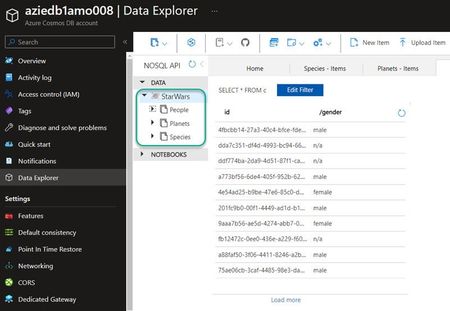
A few weeks ago, I was looking for how to migrate, data from a Cosmos DB NoSQL type account to a second Cosmos DB NoSQL account too. On paper it seems at first glance rather simple, but ultimately not so much. So some might ask why? In fact, for one of my critical projects, we initially decided to deploy a Cosmos DB account in Serverless mode, because we had to have users exclusively in Western Europe. But a few months later, the scope of the project radically changed. Now data must be accessible worldwide: Ok, no worries. 1. Potential solution: Geo-replication That's good, the https://learn.microsoft.com/en-us/azure/cosmos-db/introduction?WT.mc_id=AZ-MVP-5005062 service offers a geo-replication feature. The problem is that this feature is not available with Serverless mode, only with Provisioned Throughput mode, which ultimately seems consistent. So I cannot use that way. 2. Potential solution: Data restoration After a few minutes of thinking, I tell myself that it does not matter, just restore the data via the Point In Time Restore (PiTR) option. But I meet a new disappointment, because during the restore, the new Cosmos DB account created, is the same as the initial one, in my case a Serverless account. Ok, for now, I am not lucky. 3. Potential solution: Well I have to look, but why not a migration? So I start my research like https://en.wikipedia.org/wiki/Sherlock_Holmes with my pipe, my magnifying glass and my K-way (sorry I didn't have a raincoat handy). After a few minutes, I come across the https://learn.microsoft.com/en-us/azure/cosmos-db/migration-choices?WT.mc_id=AZ-MVP-5005062 page whose title is Options to migrate your on-premises or cloud data to Azure Cosmos DB Hum, given the title, I might be interested, so I'm starting to take off my K-way because it's really hot. The documentation is quite well done, as often to be honest with Microsoft, it offers different scenarios, and in addition, two types of migration are offered, namely "Online" and/or "Offline. 4. Potential solution: Migration proposed by Microsoft I find many migration use cases there, with as a source, different types of DB such as Azure Cosmos DB of course, but also json or csv files, not to mention Oracle and Apache Cassandra. After a few moments, I list what seems to work for my use case: Offline mode: Using Azure Data Factory Using Azure Cosmos DB Spark connector Using Azure Cosmos DB Spark connector + Change Feed sample Using Custom tool with Azure Cosmos DB bulk executor library Online way: Using a Spark Azure Cosmos DB Connector + Change Feed Using Azure Cosmos DB Functions + ChangeFeed API With my magnifying glass, I look at the various proposed solutions available to me... ... and the more I advance, the more I realize that they require a lot of efforts and for some of them, the deployment of new services is required. Hm, okay ! Before going any further, I go back to my Cosmos DB account to see what it contains. Then I count 1 DB with 3 containers, and in addition, it contains relatively little data. When I weigh the pros and cons of each solutions, I quickly see that it almost takes a gas plant for a relatively simple need. But on the other hand, I have no choice, this migration is mandatory, and as Terence Hill and Bud Spencer said in their movie: Go for It! But there is no urgency, so I'll see if I can find something simpler, and in the worst case, I'll always have a reversal solution with those seen previously. 5. Considered solution: Migration with Azure Cosmos DB data migration tool Continuing my research, I came across an announcement from Microsoft dating from April 2015, talking about the https://azure.microsoft.com/en-us/updates/documentdb-data-migration-tool/?WT.mc_id=AZ-MVP-5005062. Well I recognize that 2015 is far, but I'm going to dig a little so I exchange my pipe, against a small shovel. This open source tool allows to import data to Azure Cosmos DB, from different data sources like: JSON files CSV files SQLServer MongoDB Azure Table storage Amazon DynamoDB HBase Azure Cosmos containers You saw like me, Cosmos DB to Cosmos DB! The pupil of my eyes has started to dilate, my hair (well what I have left of it) has fallen out, and I find myself in my underwear saying: My precious! Once back to my normal appearance, well, my appearance at all, I start to browse the various links mentioned in the announcement and come across the https://github.com/azure/azure-documentdb-datamigrationtool/?WT.mc_id=AZ-MVP-5005062 of the tool. I have the impression that luck has finally changed side, but when I come across the 1st sentence and I read: The Azure Cosmos DB data migration tool is undergoing a full refactor to restructure the project... Ahhhhhhhhhhhhhhh this is driving me crazy, someone is playing with me, there's no other way! But as I'm tenacious, I still decide to visit the https://github.com/Azure/azure-documentdb-datamigrationtool/tree/archive/?WT.mc_id=AZ-MVP-5005062 of the project and end up downloading https://github.com/Azure/azure-documentdb-datamigrationtool/releases/download/1.8.3/azure-documentdb-datamigrationtool-1.8.3.zip which dates from August 2021, which isn't so bad when you think about it. 6. Azure Cosmos DB data migration tool testing I launch the tool via the executable dtui.exe (Yes, I work on Windows, and I'm proud of it ), I go through the doc and the operation seems very simple. There are some prerequisites: A source Azure Cosmos DB account A destination Azure Cosmos DB account Connection strings for each account The name of your databases (DB) The name of your containers As you can see from my example below, my source is aziedb1amo008 and my destination is aziedb1amo900: So I wish to migrate my DB StarWars as well as the various containers, which it has namely People, Planets and Species. What? I told you that it was a critical project Step 1: The first thing to do is therefore to define our source account by specifying the connection string, accompanied by the name of the database at the end of the fields, as well as the collection which is none other than our container. We click on Verify in order to validate that the connection to the account is established correctly. Bingo, we can go to the next step. Step 2: Next, we will define our destination account. As in the previous step, we define the connection string, the name of the DB which will be created automatically if it does not exist, the collection and the partition key. Step 3: If you want, you can define a log file in csv format. Step 4: And finally the last step allows you to have a small summary, and you just have to click on Import. Et voila! Well, not quite because I also wanted to migrate the Planets and Species containers, so I follow the same steps to achieve my goal. After a minute or two, you can therefore see that I find my DB, my containers, and even my data on the new Cosmos DB account, which is quite nice. And of course, it also works with data other than Star Wars, like Pikachu or Marvel! But you can also try with your own dataset6.4KViews2likes0Comments
Manual Backup Cosmos DB
Hi, Tried to export data in CosmosDB but it was not successful. According to https://docs.microsoft.com/en-us/azure/cosmos-db/storage-explorer, by using this tool I can export the data inside the cosmosdb, but no option to export. Tried to do the instructions here https://azure.microsoft.com/en-us/updates/documentdb-data-migration-tool/ and https://docs.microsoft.com/en-us/azure/cosmos-db/import-data#JSON, but error is being encountered. Can you help me how to do this in Data Factory or any steps just to manual backup cosmos DB? Thank you.2.5KViews0likes0Comments