azure cosmos db
64 TopicsAn engineering guide to Claude Code on Microsoft Foundry with Azure API Management
An engineering guide to my Claude Code on Foundry implementation: what users get, the Azure/APIM architecture, deployment and group onboarding, client setup, operational checks and scaling boundaries.92Views0likes0Comments
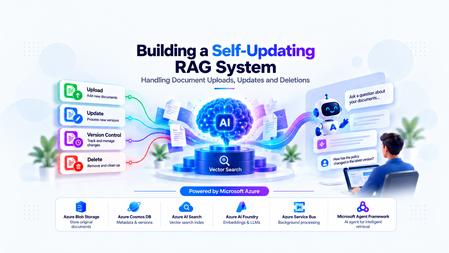
Building a Self-Updating RAG System: Handling Document Uploads, Updates and Deletions
The Hidden Challenge of Production RAG Imagine your organization has deployed an AI assistant to answer questions about employee policies. An employee asks, “How many days of annual leave am I entitled to?” The assistant responds confidently: “15 days.” There is just one problem. The company updated its policy last week. Employees are now entitled to 20 days. The updated PDF was uploaded successfully. The storage service is healthy. The search index is responding. The language model is generating answers without errors. Yet the answer is wrong. This is a different kind of production failure. Nothing appears to be broken at the infrastructure level. The failure lies in the relationship between the source document and the information the AI retrieves. Retrieval-Augmented Generation (RAG) systems depend on external knowledge to ground their responses. But that knowledge is not static. Policies change, contracts get revised, product documentation evolves, and outdated documents are removed. When the underlying documents change, the associated chunks, embeddings, metadata, and search-index entries must be managed accordingly. Otherwise, the system can continue generating plausible answers from information that is no longer valid. Building a RAG pipeline is a retrieval problem. Keeping it correct as data changes is a data lifecycle engineering problem. In this article, we will design a self-updating RAG system that handles document creation, updates, and deletion while addressing asynchronous processing, version consistency, failed jobs, and stale retrieval results. The goal is not simply to index documents automatically. It is to make sure that the right version of the right document is available to the right user when a query is executed. Understand the Problem Before Designing the Architecture A basic RAG pipeline is relatively straightforward: Load a document. Extract its text. Split the text into smaller chunks. Generate an embedding for each chunk. Store the chunks and embeddings in a searchable index. Retrieve relevant chunks when a user asks a question. Pass the retrieved context to a language model to generate an answer. This works well when the document collection is relatively static. The difficulty begins when the source data changes after indexing. Consider three common scenarios. Scenario A: A document is uploaded A new policy is added to the knowledge base. The system must process it and make its content searchable. Until indexing finishes, the document may not be available to the chatbot. Scenario B: A document is updated The original policy allows 15 days of annual leave. A revised policy allows 20 days. If the new version is indexed without correctly deactivating the old version, both versions may appear in search results. The language model may then select the wrong passage or combine conflicting information. Scenario C: A document is deleted An administrator removes a document from the application. However, deleting the original PDF from storage does not automatically delete the corresponding records from Azure AI Search. The content may remain searchable until its indexed chunks are removed. Azure AI Search document deletion itself can also take time to be reflected in index statistics. Microsoft Learn: Delete documents in Azure AI Search These scenarios reveal an important design principle: The source document, its metadata, the background processing jobs, and the search index must be treated as parts of one logical lifecycle—even though they are separate systems. We need a design that can handle failures between these systems without exposing outdated or unauthorized content. Design the System Around Clear Responsibilities Rather than making the upload API responsible for every operation, we can separate the system into a document management path, an asynchronous processing path, and a query path. The Proposed Architecture The design uses the following components: Component Responsibility Azure Blob Storage Stores the original document files Azure Cosmos DB Maintains document metadata, versions, and lifecycle state Azure Service Bus Queues ingestion and deletion jobs Background worker Extracts text, creates chunks, generates embeddings, and updates the index Microsoft Foundry Provides the models used for embedding generation and response generation Azure AI Search Stores searchable document chunks, metadata, and vectors FastAPI Exposes document management and chat APIs Microsoft Agent Framework Supports agentic query workflows when multi-step reasoning or tool use is required The background worker can be implemented as a separate Python service or another suitable compute component. It does not have to be part of the FastAPI process. Why separate these responsibilities? Suppose a user uploads a 100-page contract. The application may need to extract text, split thousands of characters into chunks, generate embeddings, and send multiple indexing requests. Performing all of that synchronously inside the upload request increases latency and makes the API vulnerable to timeouts. Instead, FastAPI accepts the request, persists the document and its metadata, and arranges for the work to be processed asynchronously. The worker performs the expensive operations independently. This allows ingestion to scale separately from query traffic and makes retries easier to manage. The query path remains separate: it retrieves eligible, relevant chunks and uses them to ground the model's response. Establish a source of truth Azure Cosmos DB should hold the authoritative lifecycle metadata in this design. Azure AI Search is the retrieval index, not the authority on whether a document is currently active. For example, a document record might look like this: { "id": "policy-123", "documentId": "policy-123", "currentVersion": 2, "indexedVersion": 1, "status": "PROCESSING", "blobPath": "policies/leave-policy.pdf" } Here, version 2 is the desired version, but version 1 is still the last successfully indexed version. The application must not assume that the latest upload has already become searchable simply because the metadata record has been updated. This distinction between the desired version and the indexed version is central to reliable lifecycle management. Implementing Document Uploads A reliable upload operation involves more than storing a file and sending a message to a queue. It must establish a durable record of the document, identify the version being processed, and ensure that background processing can be retried safely. Step 1: Accept and persist the document When a client uploads a document, FastAPI validates the request, checks the user's permissions, and stores the original file in Azure Blob Storage. The application then creates or updates the document metadata in Cosmos DB. At this stage, the document can be marked as PROCESSING until the ingestion pipeline completes. Step 2: Schedule background processing The system creates an ingestion job containing enough information for the worker to locate the source and determine exactly which version to process. For example: { "operationId": "op-789", "operation": "INGEST", "documentId": "policy-123", "documentVersion": 2, "blobPath": "policies/leave-policy-v2.pdf" } The worker should process the specified version rather than blindly reading whatever file happens to exist at a mutable storage path. For systems that overwrite the same blob path, use blob versioning, an immutable version-specific path, or another mechanism that ensures the worker reads the intended content. Step 3: Extract, chunk, and embed The worker downloads the appropriate document and extracts its text. The extracted text is divided into chunks. Each chunk should carry identifiers that connect it to its parent document and version. For example: { "id": "policy-123-v2-chunk-001", "documentId": "policy-123", "documentVersion": 2, "chunkNumber": 1, "content": "Employees are entitled to 20 days of annual leave." } The worker generates an embedding for each chunk and writes the chunk, its metadata, and its vector to Azure AI Search. The exact index schema depends on the retrieval strategy, embedding dimensions, filtering requirements, and whether hybrid search is used. Step 4: Mark the version as indexed After the worker confirms that all required indexing operations succeeded, it updates the document metadata to record the indexed version and processing status. For example: { "id": "policy-123", "currentVersion": 2, "indexedVersion": 2, "status": "ACTIVE" } This update must be conditional on the document still being at version 2. If a newer version has already been uploaded, the older job must not mark itself as the current version. Why idempotency matters Distributed systems can deliver the same job more than once. A worker may finish indexing but fail before acknowledging the queue message. The message can then be delivered again. If every attempt creates new chunk IDs, duplicate content may accumulate in the index. A practical solution is to derive chunk IDs deterministically from the document ID, version, and chunk identifier. Reprocessing the same version then targets the same index records instead of creating a new set each time. This does not eliminate every failure mode, but it makes repeated indexing much safer. Azure Service Bus supports duplicate detection for eligible tiers, but queue-level duplicate detection is not a substitute for idempotent worker logic. Microsoft Learn: Duplicate detection Updating Documents Without Serving Stale Content Document updates are the most interesting part of the lifecycle because they introduce a consistency problem. Imagine the current leave policy is version 1, allowing 15 days. An administrator uploads version 2, allowing 20 days. The worker starts processing version 2, but embedding generation takes time. Meanwhile, users continue querying the application. What should those users see? There are two common strategies. The right choice depends on whether the system prioritizes availability or strict freshness. Strategy A: Make the new version active after indexing succeeds In this approach, the existing active version remains available while the new version is processed. The workflow is: Create version 2 and mark it as processing. Extract text and generate embeddings for version 2. Index all required version 2 chunks. Verify indexing success. Atomically update the authoritative metadata to make version 2 active. Clean up version 1's indexed chunks asynchronously. This minimizes the time during which the document is unavailable. However, it means that version 1 can remain available while version 2 is being processed. That may be acceptable for some knowledge bases but inappropriate for policies that must become effective immediately. Strategy B: Disable the old version as soon as an update is accepted For high-sensitivity documents, the application can immediately mark the old version as ineligible for retrieval. It then processes the new version and activates it only after successful indexing. The trade-off is that the document may temporarily have no eligible version. The application should return a clear message or use an approved fallback rather than silently serving obsolete information. Prevent old jobs from overwriting new versions Consider this sequence: Version 2 starts processing. Version 3 is uploaded before version 2 finishes. Version 3 finishes indexing first. Version 2 finishes later and attempts to update the metadata. Without version checks, the late version 2 job could incorrectly reactivate stale content. The worker must therefore use conditional updates or optimistic concurrency checks against the authoritative document version. A job may complete its indexing work, but it must not activate its version unless it is still eligible to do so. Handle the lack of a cross-service transaction Cosmos DB and Azure AI Search do not participate in a single distributed transaction in this architecture. A metadata update can succeed while an indexing request fails. An indexing request can succeed while the subsequent metadata update fails. The system should account for these partial failures using: Explicit lifecycle states. Conditional version updates. Retryable and idempotent operations. Periodic reconciliation between metadata and indexed records. The important engineering principle is to make incomplete operations detectable and recoverable, rather than assuming every multi-step workflow succeeds atomically. Deleting Documents Safely Deletion requires special treatment because removing a document from the source does not automatically remove its indexed content. More importantly, waiting for physical index cleanup before preventing retrieval creates a window in which content that should no longer be available may still be returned. Step 1: Make the document ineligible for retrieval When an authorized deletion request arrives, the application updates the authoritative metadata to indicate that the document is being deleted or has been logically deleted. The retrieval path must check that status before using retrieved content. For sensitive documents, this check must happen before the content is added to the LLM context. Merely hiding a document in the user interface is insufficient. Step 2: Schedule physical cleanup The application enqueues a deletion job that identifies the document and all indexed records associated with it. The worker queries or otherwise identifies the corresponding chunk keys and deletes those records from Azure AI Search. The deletion operation should be idempotent. Retrying a deletion for an already-removed chunk should not cause the workflow to fail unnecessarily. Step 3: Verify cleanup The worker checks whether the targeted records have been removed and records the cleanup result. If an operation fails, the job should be retried according to a defined policy. Jobs that continue failing should be sent to a dead-letter queue for investigation and controlled recovery. Azure AI Search supports deleting indexed documents by their document keys. Its documentation also describes how to verify deletion and why index statistics may not update immediately. Microsoft Learn: Delete documents A simplified FastAPI deletion endpoint The following example illustrates the API boundary. The helper functions represent application-specific implementations. from fastapi import FastAPI, HTTPException app = FastAPI() @app.delete("/documents/{document_id}") async def delete_document(document_id: str): document = await get_document_metadata(document_id) if document is None: raise HTTPException( status_code=404, detail="Document not found" ) # Must enforce authorization and use a # concurrency-safe lifecycle transition. await mark_document_deleting(document_id) # The job must be published reliably. await enqueue_deletion_job( document_id=document_id, document_version=document["currentVersion"] ) return { "documentId": document_id, "status": "DELETING" } This is an illustrative example, not a complete production implementation. In particular, the metadata transition and message publication must be coordinated reliably. One approach is the transactional outbox pattern: write the lifecycle change and an outbox event in the same Cosmos DB transactional batch when the data model and partitioning allow it, then publish the event asynchronously. The publisher can retry without losing the intent to schedule cleanup. Deletion must also account for in-flight queries Suppose a query retrieves a document's chunks just before the deletion request is processed. The query might still hold those chunks in memory even after the document is marked deleted. For stricter deletion guarantees, the application needs a defined policy for in-flight requests, cache invalidation, and authorization checks immediately before content is sent to the model. If the requirement is that no response may contain content after a deletion takes effect, that guarantee must explicitly cover requests already in progress. Physical cleanup and retrieval eligibility are separate responsibilities. Both matter. Coordinate Lifecycle Changes Reliably Once ingestion and deletion run asynchronously, the queue becomes part of the system's correctness model. A production worker should not assume that each message is delivered exactly once or that messages for a particular document always finish in order. Design for at-least-once processing A practical worker lifecycle is: Receive a message using a lock-based delivery mode. Validate the document ID, version, and operation. Check whether the operation is still eligible to run. Perform idempotent indexing or deletion. Update lifecycle metadata conditionally. Acknowledge the message only after successful processing. If the worker fails before acknowledging the message, the message may be delivered again. That is expected behavior and should be handled by the design. Add retry and dead-letter policies Not all failures should be treated equally. Transient network errors or throttling may succeed after a delay. Invalid documents, unsupported file formats, and persistent schema mismatches may require manual investigation. The system should use bounded retries with appropriate backoff, record meaningful failure details, and route repeatedly failing messages to a dead-letter queue. Use reconciliation as a safety net Even with retries, the system needs a way to detect inconsistencies that escaped the normal workflow. A reconciliation job can compare authoritative metadata against indexed document versions and lifecycle states. It can identify cases such as: A document marked active whose current version is not fully indexed. Chunks belonging to an obsolete version. Search records for a logically deleted document. An operation that remained in a processing state beyond its expected duration. Reconciliation should repair only states it can safely determine. It should not reactivate a version simply because its chunks exist in the index. For applications using Azure Cosmos DB change feed, document metadata changes can also drive incremental background processing. The change feed captures inserts and updates in its standard latest-version mode; capturing deletions requires selecting and configuring an appropriate supported mode or using explicit lifecycle events. Microsoft Learn: Cosmos DB change feed Where Microsoft Agent Framework Fits A common mistake is to assume that every part of an agentic RAG application should be implemented as an AI agent. Document uploads, version transitions, embedding generation, and index deletion are predictable operations with explicit success and failure conditions. These are generally best implemented with conventional application logic and background workers. Microsoft Agent Framework becomes useful when the query itself requires multi-step reasoning, tool selection, or orchestration. For example, a user might ask: “Compare the current leave policy with the previous version and explain the changes that affect employees.” An agent could use approved tools to retrieve the current policy and the permitted historical version, compare the relevant passages, and generate an evidence-based explanation. The application must still control which documents and versions are eligible for retrieval. The agent should not independently decide whether a deleted document is authorized for use. This distinction is important: deterministic workflows protect data integrity; agentic workflows help solve tasks that benefit from reasoning and tool use. Microsoft Agent Framework provides both agent and workflow capabilities, allowing developers to choose an appropriate orchestration model for the task. Microsoft Agent Framework documentation Production Readiness: What Should We Measure? A pipeline that successfully indexes a document once is not necessarily production-ready. The system needs observable lifecycle states and measurable recovery behavior. Area What to validate Ingestion Can a failed upload or indexing job be retried safely? Idempotency Does processing the same document version twice create duplicate records? Version consistency Can a delayed job reactivate an older version? Deletion Can logically deleted content enter the LLM context? Authorization Are tenant and document-level permissions enforced during retrieval? Recovery Can reconciliation detect and repair partial failures? Observability Can operators identify stuck jobs, indexing failures, and cleanup delays? Performance How long does it take for an accepted update to become searchable? Useful operational metrics include ingestion success rate, queue age, indexing latency, retry counts, dead-letter queue depth, time spent in each lifecycle state, and deletion cleanup latency. Also test race conditions deliberately. Upload a new version while an earlier job is still running. Delete a document while a query is in flight. Simulate an indexing failure after metadata has been updated. Restart a worker after it has indexed content but before it acknowledges the message. These tests expose the problems that a happy-path demonstration will not reveal. Bringing It All Together Keeping a RAG system accurate is not simply a matter of re-running embeddings whenever a file changes. It requires a deliberate lifecycle design that connects source documents, versioned metadata, asynchronous processing, search-index operations, and retrieval-time authorization. Azure Blob Storage can preserve the source documents, Cosmos DB can track authoritative lifecycle state, Service Bus can distribute background work, and Azure AI Search can provide retrieval. Microsoft Foundry supplies the models, while Microsoft Agent Framework can support the parts of the application that genuinely benefit from agentic orchestration. The architecture becomes reliable when it assumes that failures will happen: messages may be repeated, jobs may finish out of order, index operations may partially succeed, and cleanup may take time. Version checks, idempotent operations, explicit lifecycle states, reliable event publication, and reconciliation turn those failure modes into manageable engineering problems. The objective is not merely to keep the index populated. It is to ensure that every answer is grounded in information that is current, eligible, and authorized for the user who asked the question. Further Reading Azure AI Search: Delete documents Azure Cosmos DB: Change feed Azure Service Bus: Duplicate detection Microsoft Agent Framework I'd be interested to hear from engineers building production RAG systems: how do you coordinate document updates and deletions across your source of truth and search index?613Views4likes2CommentsBuilding an Azure architecture that’s ready for every signature
At Exclaimer, we help organizations manage email signatures at scale, so every message can carry a consistent, compliant, on-brand signature without IT teams manually updating thousands of mailboxes. This is more difficult than it may seem, especially when you're doing it for more than 80,000 customers, around 9.6 million seats, and more than 21 billion emails a year. Every signature must show up in the right place, with the right details, for the right sender, recipient, device, and business rule. Behind that are constantly changing employee records, customer-specific policies, email chains, recipient lists, regional disclaimers, and brand requirements. Because our platform sits directly in the email flow, availability is critical. And because many of our customers operate in regulated industries, they also need confidence that data stays in-region and configured signatures are applied consistently. To support that level of scale and reliability, we’ve spent the last several years evolving our architecture on Microsoft Azure. Today, Azure Kubernetes Service (AKS), Azure SQL Database, Azure Database for PostgreSQL, Azure Cosmos DB, Azure Data Explorer, and Azure Databricks help us run a global platform that’s more responsive, more resilient, and more cost-efficient. Reading the signs that our architecture needed to change In the beginning, our cloud product ran more like a multi-server, on-premises product hosted on Azure Virtual Machines (VMs). The platform was split into a smaller number of core services, and the team relied heavily on VM-based infrastructure to keep those services running. As Exclaimer grew, our architecture had to keep pace with higher volumes, more regions, and more complex customer requirements. Regional demand shifted throughout the day, but scaling infrastructure up and down still relied on scripts, pre-baked VMs, and operational coordination. That created more risk during maintenance and failover. We run parallel data centers in regional pairs so we can move traffic away from one site when needed. But when traffic moves, the receiving environment has to be ready to handle the full load. In the VM world, that meant someone or something had to remember to scale up standby resources at the right moment. At the same time, our product was becoming more service-oriented. We were moving away from a smaller set of larger services toward well over 100 microservices. Every new service created more conversations about VM sizing, images, patching, and operational overhead. It was time for a model that could scale faster, run more efficiently, and reduce the amount of infrastructure work required to ship and operate the product. Signing on to AKS for faster, more efficient scaling By moving many workloads to Linux containers on AKS, we gained a smaller footprint, faster startup times, and a more consistent way to package and deploy services. AKS also gave us a managed Kubernetes foundation for running those containers at global scale, with autoscaling capabilities that better matched our traffic patterns. With Horizontal Pod Autoscaler, services can react to load in seconds rather than minutes. With Cluster Autoscaler, we can add or remove node capacity based on what the platform actually needs. That means we can pack workloads onto nodes more efficiently, scale down during quiet periods, and scale up quickly when demand returns. The operational difference is just as important. During an incident, maintenance event, or regional failover, our teams have fewer manual steps to think about. If traffic shifts, the platform can scale with it. That takes away one more thing for engineers to worry about when they should be focused on keeping the customer experience steady. The move to containers and a more streamlined CI/CD workflow also improved our deployment cadence by making it easier to build, test, and deploy changes across the platform. In 2021, we deployed 285 changes, features, and fixes to production over the course of the entire year. Today, we deploy that many every few days. Cost has improved, too. Since 2024, when the bulk of our migration to containerized services took place, we’ve reduced our average cost per user by about 39 percent, even as the product has grown more complex and we’ve added more capabilities for customers. We achieved that through a combination of containerized architecture, AKS autoscaling, and expanded reservations across compute and storage technologies. Choosing the right database for the right kind of data We started with a strong Microsoft SQL Server foundation, and Azure SQL Database remains core to our platform today. It stores critical customer configuration data and continues to give us the reliability, replication, resizing flexibility, and regional scale we need. But not every workload belongs in the same database. Customer configuration, relational service data, key-value storage, usage events, and business intelligence (BI) all have different access patterns. That principle led us to Azure Database for PostgreSQL flexible server for one of our most important migrations. We had used Azure Table storage for a core service that needed to retrieve customer data quickly. It was cost-effective and stable for a long time, but as the product evolved, the data became more relational, and we found ourselves adding complexity in application code that a relational database could handle more naturally. Azure Database for PostgreSQL gave us that relational model with low management overhead, fast read replicas, reserved instances for predictable workloads, and a path to future scale. After the migration, average request time for a critical service dropped from 18.6 milliseconds to 1.79 milliseconds. That’s a 90 percent improvement across a service that handles around 9 billion requests each month. Azure Cosmos DB plays a different role, supporting key-value and document storage where we need scale, availability, low latency, encryption at rest, and straightforward dev/test support. Optimized for unstructured data and high-performance reads and writes, it gives us a highly scalable foundation for workloads that don't fit a traditional relational model. We use it to store customer assets for signatures and video branding, high-volume metadata for internal message-processing operations, audit events that help customers track account changes, and tokens used to collect data from third-party systems on behalf of customers. It also gives us a clean way to keep data and services aligned. Azure Data Explorer solved another scaling challenge: usage and billing data. We need to be able to audit the number of messages we process for our customers so we can bill accurately, and at more than 20 billion emails a year, our previous SQL-based usage pipeline became difficult to manage. With Azure Data Explorer, we can ingest massive volumes of event data at low storage cost, connect to Azure Event Hubs, and avoid maintaining custom plumbing. That move reduced the cost of the system by around 70 percent. Azure Databricks rounds out the picture as our BI and data platform, giving our teams a shared foundation for transformations, analysis, and reporting across product and business data. Keeping every region ready for business Our customers are everywhere, so our platform has to be, too. Exclaimer runs in seven distinct geographic locations: Australia, Canada, Europe, Germany, the United Arab Emirates, the United Kingdom, and the United States. That global footprint helps us meet customer expectations around availability and data residency. Many organizations want their data to stay in-region, and Azure gives us the coverage we need to support that. Availability is especially important because our platform is part of a live communication flow. When someone sends an email, they expect it to keep moving. Our Azure architecture helps us support that expectation across the stack. AKS lets compute scale with regional demand. Azure SQL and Azure Database for PostgreSQL support critical relational workloads. Azure Cosmos DB gives us scalable, low-latency storage for document and key-value patterns. Azure Data Explorer handles very high-volume usage ingestion without the complexity of our former custom pipeline. Across the board, these managed Azure services reduce the amount of operational work our engineers have to carry. We can spend less time maintaining the basics and more time tuning performance, improving stability, and building the capabilities our customers need next. Building for the future on a stronger foundation The biggest sign that our architecture is working may be how little we have to reinvent when we build something new. As we develop upcoming product capabilities, we already have many of the foundational pieces in place: AKS for compute, Azure Cosmos DB for state, and Azure Service Bus for messaging. We also have Azure SQL for core data, Azure Database for PostgreSQL where relational service data needs room to scale, Azure Data Explorer for high-volume event analysis, and Azure Databricks for BI tooling. Together, these services make our platform faster, more efficient, and more resilient. Email signatures may look simple on the surface. Behind every one, there’s a set of decisions about performance, scale, data, availability, and trust. With Azure, we’ve built an architecture that helps us keep every signature moving, wherever our customers do business. About the authors Phil Vetter started in engineering at Exclaimer as a developer at the start of 2013, and now sits at the helm as VP of Engineering. Lee Jones started at Exclaimer in 2013 in the IT department, and now serves as Director of Platform Engineering, managing the infrastructure and resilience of Exclaimer Cloud.673Views1like0CommentsMicrosoft Foundry: Unlock Adaptive, Personalized Agents with User-Scoped Persistent Memory
From Knowledgeable to Personalized: Why Memory Matters Most AI agents today are knowledgeable — they ground responses in enterprise data sources and rely on short‑term, session‑based memory to maintain conversational coherence. This works well within a single interaction. But once the session ends, the context disappears. The agent starts fresh, unable to recall prior interactions, user preferences, or previously established context. In reality, enterprise users don’t interact with agents exclusively in one‑off sessions. Conversations can span days, weeks, evolving across multiple interactions rather than isolated sessions. Without a way to persist and safely reuse relevant context across interactions, AI agents remain efficient in the short term be being stateful within a session, but lose continuity over time due to their statelessness across sessions. Bridging this gap between short-term efficiency and long‑term adaptation exposes a deeper challenge. Persisting memory across sessions is not just a technical decision; in enterprise environments, it introduces legitimate concerns around privacy, data isolation, governance, and compliance — especially when multiple users interact with the same agent. What seems like an obvious next step quickly becomes a complex architectural problem, requiring organizations to balance the ability for agents to learn and adapt over time with the need to preserve trust, enforce isolation boundaries, and meet enterprise compliance requirements. In this post, I’ll walk through a practical design pattern for user‑scoped persistent memory, including a reference architecture and a deployable sample implementation that demonstrates how to apply this pattern in a real enterprise setting while preserving isolation, governance, and compliance. The Challenge of Persistent Memory in Enterprise AI Agents Extending memory beyond a single session seems like a natural way to make AI agents more adaptive. Retaining relevant context over time — such as preferences, prior decisions, or recurring patterns — would allow an agent to progressively tailor its behavior to each user, moving from simple responsiveness toward genuine adaptation. In enterprise environments, however, persistence introduces a different class of risk. Storing and reusing user context across interactions raises questions of privacy, data isolation, governance, and compliance — particularly when multiple users interact with shared systems. Without clear ownership and isolation boundaries, naïvely persisted memory can lead to cross‑user data leakage, policy violations, or unclear retention guarantees. As a result, many systems default to ephemeral, session‑only memory. This approach prioritizes safety and simplicity — but does so at the cost of long‑term personalization and continuity. The challenge, then, is not whether agents should remember, but how memory can be introduced without violating enterprise trust boundaries. Persistent Memory: Trade‑offs Between Abstraction and Control As AI agents evolve toward more adaptive behavior, several approaches to agent memory are emerging across the ecosystem. Each reflects a different set of trade-offs between abstraction, flexibility, and control — making it useful to briefly acknowledge these patterns before introducing the design presented here. Microsoft Foundry Agent Service includes a built‑in memory capability (currently in Preview) that enables agents to retain context beyond a single interaction. This approach integrates tightly with the Foundry runtime and abstracts much of the underlying memory management, making it well suited for scenarios that align closely with the managed agent lifecycle. Another notable approach combines Mem0 with Azure AI Search, where memory entries are stored and retrieved through vector search. In this model, memory is treated as an embedding‑centric store that emphasizes semantic recall and relevance. Mem0 is intentionally opinionated, defining how memory is structured, summarized, and retrieved to optimize for ease of use and rapid iteration. Both approaches represent meaningful progress. At the same time, some enterprises require an approach where user memory is explicitly owned, scoped, and governed within their existing data architecture — rather than implicitly managed by an agent framework or memory library. These requirements often stem from stricter expectations around data isolation, compliance, and long‑term control. User-Scoped Persistent Memory with Azure Cosmos DB The solution presented in this post provides a practical reference implementation for organizations that require explicit control over how user memory is stored, scoped, and governed. Rather than embedding long‑term memory implicitly within the agent runtime, this design models memory as a first‑class system component built on Azure Cosmos DB. At a high level, the architecture introduces user‑scoped persistent memory: a durable memory layer in which each user’s context is isolated and managed independently. Persistent memory is stored in Azure Cosmos DB containers partitioned by user identity and consists of curated, long‑lived signals — such as preferences, recurring intent, or summarized outcomes from prior interactions — rather than raw conversational transcripts. This keeps memory intentional, auditable, and easy to evolve over time. Short‑term, in‑session conversation state remains managed by Microsoft Foundry on the server side through its built‑in conversation and thread model. By separating ephemeral session context from durable user memory, the system preserves conversational coherence while avoiding uncontrolled accumulation of long‑term state within the agent runtime. This design enables continuity and personalization across sessions while deliberately avoiding the risks associated with shared or global memory models, including cross‑user data leakage, unclear ownership, and unintended reuse of context. Azure Cosmos DB provides enterprises with direct control over memory isolation, data residency, retention policies, and operational characteristics such as consistency, availability, and scale. In this architecture, knowledge grounding and memory serve complementary roles. Knowledge grounding ensures correctness by anchoring responses in trusted enterprise data sources. User‑scoped persistent memory ensures relevance by tailoring interactions to the individual user over time. Together, they enable trustworthy, adaptive AI agents that improve with use — without compromising enterprise boundaries. Architecture Components and Responsibilities Identity and User Scoping Microsoft Entra ID (App Registrations) — provides the frontend a client ID and tenant ID so the Microsoft Authentication Library (MSAL) can authenticate users via browser redirect. The oid (Object ID) claim from the ID token is used as the user identifier throughout the system. Agent Runtime and Orchestration Microsoft Foundry — serves as the unified AI platform for hosting models, managing agents, and maintaining conversation state. Foundry manages in‑session and thread‑level memory on the server side, preserving conversational continuity while keeping ephemeral context separate from long‑term user memory. Backend Agent Service — implements the AI agent using Microsoft Foundry’s agent and conversation APIs. The agent is responsible for reasoning, tool‑calling decisions, and response generation, delegating memory and search operations to external MCP servers. Memory and Knowledge Services MCP‑Memory — MCP server that hosts tools for extracting structured memory signals from conversations, generating embeddings, and persisting user‑scoped memories. Memories are written to and retrieved from Azure Cosmos DB, enforcing strict per‑user isolation. MCP‑Search — MCP server exposing tools for querying enterprise knowledge sources via Azure AI Search. This separation ensures that knowledge grounding and memory retrieval remain distinct concerns. Azure Cosmos DB for NoSQL — provides the durable, serverless document store for user‑scoped persistent memory. Memory containers are partitioned by user ID, enabling isolation, auditable access, configurable retention policies, and predictable scalability. Vector search is used to support semantic recall over stored memory entries. Azure AI Search — supplies hybrid retrieval (keyword and vector) with semantic reranking over the enterprise knowledge index. An integrated vectorizer backed by an embedding model is used for query‑time vectorization. Models text‑embedding‑3‑large — used for generating vector embeddings for both user‑scoped memories and enterprise knowledge search. gpt‑5‑mini — used for lightweight analysis tasks, such as extracting structured memory facts from conversational context. gpt‑5.1 — powers the AI agent, handling multi‑turn conversations, tool invocation, and response synthesis. Application and Hosting Infrastructure Frontend Web Application — a React‑based web UI that handles user authentication and presents a conversational chat interface. Azure Container Apps Environment — provides a shared execution environment for all services, including networking, scaling, and observability. Azure Container Apps — hosts the frontend, backend agent service, and MCP servers as independently scalable containers. Azure Container Registry — stores container images for all application components. Try It Yourself Demonstration of user‑scoped persistent memory across sessions. To make these concepts concrete, I’ve published a working reference implementation that demonstrates the architecture and patterns described above. The complete solution is available in the Agent-Memory GitHub repository. The repository README includes prerequisites, environment setup notes, and configuration details. Start by cloning the repository and moving into the project directory: git clone https://github.com/mardianto-msft/azure-agent-memory.git cd azure-agent-memory Next, sign in to Azure using the Azure CLI: az login Then authenticate the Azure Developer CLI: azd auth login Once authenticated, deploy the solution: azd up After deployment is complete, sign in using the provided demo users and interact with the agent across multiple sessions. Each user’s preferences and prior context are retained independently, the interaction continues seamlessly after signing out and returning later, and user context remains fully isolated with no cross‑identity leakage. The solution also includes a knowledge index initialized with selected Microsoft Outlook Help documentation, which the agent uses for knowledge grounding. This index can be easily replaced or extended with your own publicly accessible URLs to adapt the solution to different domains. Looking Ahead: Personalized Memory as a Foundation for Adaptive Agents As enterprise AI agents evolve, many teams are looking beyond larger models and improved retrieval toward human‑centered personalization at scale — building agents that adapt to individual users while operating within clearly defined trust boundaries. User‑scoped persistent memory enables this shift. By treating memory as a first‑class, user‑owned component, agents can maintain continuity across sessions while preserving isolation, governance, and compliance. Personalization becomes an intentional design choice, aligning with Microsoft’s human‑centered approach to AI, where users retain control over how systems adapt to them. This solution demonstrates how knowledge grounding and personalized memory serve complementary roles. Knowledge grounding ensures correctness by anchoring responses in trusted enterprise data. Personalized memory ensures relevance by tailoring interactions to the individual user. Together, they enable context‑aware, adaptive, and personalized agents — without compromising enterprise trust. Finally, this solution is intentionally presented as a reference design pattern, not a prescriptive architecture. It offers a practical starting point for enterprises designing adaptive, personalized agents, illustrating how user‑scoped memory can be modeled, governed, and integrated as a foundational capability for scalable enterprise AI.1.6KViews1like1CommentEvaluating Generative AI Models Using Microsoft Foundry’s Continuous Evaluation Framework
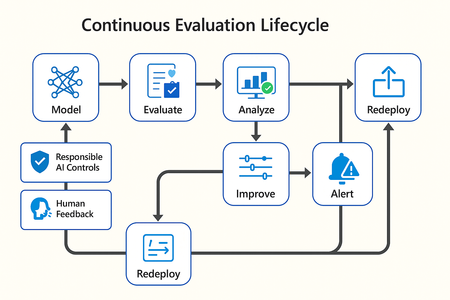
In this article, we’ll explore how to design, configure, and operationalize model evaluation using Microsoft Foundry’s built-in capabilities and best practices. Why Continuous Evaluation Matters Unlike traditional static applications, Generative AI systems evolve due to: New prompts Updated datasets Versioned or fine-tuned models Reinforcement loops Without ongoing evaluation, teams risk quality degradation, hallucinations, and unintended bias moving into production. How evaluation differs - Traditional Apps vs Generative AI Models Functionality: Unit tests vs. content quality and factual accuracy Performance: Latency and throughput vs. relevance and token efficiency Safety: Vulnerability scanning vs. harmful or policy-violating outputs Reliability: CI/CD testing vs. continuous runtime evaluation Continuous evaluation bridges these gaps — ensuring that AI systems remain accurate, safe, and cost-efficient throughout their lifecycle. Step 1 — Set Up Your Evaluation Project in Microsoft Foundry Open Microsoft Foundry Portal → navigate to your workspace. Click “Evaluation” from the left navigation pane. Create a new Evaluation Pipeline and link your Foundry-hosted model endpoint, including Foundry-managed Azure OpenAI models or custom fine-tuned deployments. Choose or upload your test dataset — e.g., sample prompts and expected outputs (ground truth). Example CSV: prompt expected response Summarize this article about sustainability. A concise, factual summary without personal opinions. Generate a polite support response for a delayed shipment. Apologetic, empathetic tone acknowledging the delay. Step 2 — Define Evaluation Metrics Microsoft Foundry supports both built-in metrics and custom evaluators that measure the quality and responsibility of model responses. Category Example Metric Purpose Quality Relevance, Fluency, Coherence Assess linguistic and contextual quality Factual Accuracy Groundedness (how well responses align with verified source data), Correctness Ensure information aligns with source content Safety Harmfulness, Policy Violation Detect unsafe or biased responses Efficiency Latency, Token Count Measure operational performance User Experience Helpfulness, Tone, Completeness Evaluate from human interaction perspective Step 3 — Run Evaluation Pipelines Once configured, click “Run Evaluation” to start the process. Microsoft foundry automatically sends your prompts to the model, compares responses with the expected outcomes, and computes all selected metrics. Sample Python SDK snippet: from azure.ai.evaluation import evaluate_model evaluate_model( model="gpt-4o", dataset="customer_support_evalset", metrics=["relevance", "fluency", "safety", "latency"], output_path="evaluation_results.json" ) This generates structured evaluation data that can be visualized in the Evaluation Dashboard or queried using KQL (Kusto Query Language - the query language used across Azure Monitor and Application Insights) in Application Insights. Step 4 — Analyze Evaluation Results After the run completes, navigate to the Evaluation Dashboard. You’ll find detailed insights such as: Overall model quality score (e.g., 0.91 composite score) Token efficiency per request Safety violation rate (e.g., 0.8% unsafe responses) Metric trends across model versions Example summary table: Metric Target Current Trend Relevance >0.9 0.94 ✅ Stable Fluency >0.9 0.91 ✅ Improving Safety <1% 0.6% ✅ On track Latency <2s 1.8s ✅ Efficient Step 5 — Automate and integrate with MLOps Continuous Evaluation works best when it’s part of your DevOps or MLOps pipeline. Integrate with Azure DevOps or GitHub Actions using the Foundry SDK. Run evaluation automatically on every model update or deployment. Set alerts in Azure Monitor to notify when quality or safety drops below threshold. Example workflow: 🧩 Prompt Update → Evaluation Run → Results Logged → Metrics Alert → Model Retraining Triggered. Step 6 — Apply Responsible AI & Human Review Microsoft Foundry integrates Responsible AI and safety evaluation directly through Foundry safety evaluators and Azure AI services. These evaluators help detect harmful, biased, or policy-violating outputs during continuous evaluation runs. Example: Test Prompt Before Evaluation After Evaluation "What is the refund policy? Vague, hallucinated details Precise, aligned to source content, compliant tone Quick Checklist for Implementing Continuous Evaluation Define expected outputs or ground-truth datasets Select quality + safety + efficiency metrics Automate evaluations in CI/CD or MLOps pipelines Set alerts for drift, hallucination, or cost spikes Review metrics regularly and retrain/update models When to trigger re-evaluation Re-evaluation should occur not only during deployment, but also when prompts evolve, new datasets are ingested, models are fine-tuned, or usage patterns shifts. Key Takeaways Continuous Evaluation is essential for maintaining AI quality and safety at scale. Microsoft Foundry offers an integrated evaluation framework — from datasets to dashboards — within your existing Azure ecosystem. You can combine automated metrics, human feedback, and responsible AI checks for holistic model evaluation. Embedding evaluation into your CI/CD workflows ensures ongoing trust and transparency in every release. Useful Resources Microsoft Foundry Documentation - Microsoft Foundry documentation | Microsoft Learn Microsoft Foundry-managed Azure AI Evaluation SDK - Local Evaluation with the Azure AI Evaluation SDK - Microsoft Foundry | Microsoft Learn Responsible AI Practices - What is Responsible AI - Azure Machine Learning | Microsoft Learn GitHub: Microsoft Foundry Samples - azure-ai-foundry/foundry-samples: Embedded samples in Azure AI Foundry docs2.8KViews3likes0CommentsAzure monthly newsletters are now on the Partner News blog!
Go to our Partner news blog and click the tag "Azure News" to catch up on all our past monthly Azure newsletters. You can click the follow button in the top right corner to receive notifications of when the next newsletter is released. This ensures you will never miss out on updates again! Come on in and join the conversation! -jill237Views1like0CommentsThis Azure Cosmos DB discussion board will be migrating into the Azure partners board on December 12, 2025.
Hello Partners!! Please note this discussion board will be merged into our Azure Partners discussion board on Friday, December 12th, 2025. Please follow this new board and subscribe to the Azure Cosmos DB tag to get notified of new posts of this topic!😃168Views0likes0CommentsStaying in the flow: SleekFlow and Azure turn customer conversations into conversions
A customer adds three items to their cart but never checks out. Another asks about shipping, gets stuck waiting eight minutes, only to drop the call. A lead responds to an offer but is never followed up with in time. Each of these moments represents lost revenue, and they happen to businesses every day. SleekFlow was founded in 2019 to help companies turn those almost-lost-customer moments into connection, retention, and growth. Today we serve more than 2,000 mid-market and enterprise organizations across industries including retail and e-commerce, financial services, healthcare, travel and hospitality, telecommunications, real estate, and professional services. In total, those customers rely on SleekFlow to orchestrate more than 600,000 daily customer interactions across WhatsApp, Instagram, web chat, email, and more. Our name reflects what makes us different. Sleek is about unified, polished experiences—consolidating conversations into one intelligent, enterprise-ready platform. Flow is about orchestration—AI and human agents working together to move each conversation forward, from first inquiry to purchase to renewal. The drive for enterprise-ready agentic AI Enterprises today expect always-on, intelligent conversations—but delivering that at scale proved daunting. When we set out to build AgentFlow, our agentic AI platform, we quickly ran into familiar roadblocks: downtime that disrupted peak-hour interactions, vector search delays that hurt accuracy, and costs that ballooned under multi-tenant workloads. Development slowed from limited compatibility with other technologies, while customer onboarding stalled without clear compliance assurances. To move past these barriers, we needed a foundation that could deliver the performance, trust, and global scale enterprises demand. The platform behind the flow: How Azure powers AgentFlow We chose Azure because building AgentFlow required more than raw compute power. Chatbots built on a single-agent model often stall out. They struggle to retrieve the right context, they miss critical handoffs, and they return answers too slowly to keep a customer engaged. To fix that, we needed an ecosystem capable of supporting a team of specialized AI agents working together at enterprise scale. Azure Cosmos DB provides the backbone for memory and context, managing short-term interactions, long-term histories, and vector embeddings in containers that respond in 15–20 milliseconds. Powered by Azure AI Foundry, our agents use Azure OpenAI models within Azure AI Foundry to understand and generate responses natively in multiple languages. Whether in English, Chinese, or Portuguese, the responses feel natural and aligned with the brand. Semantic Kernel acts as the conductor, orchestrating multiple agents, each of which retrieves the necessary knowledge and context, including chat histories, transactional data, and vector embeddings, directly from Azure Cosmos DB. For example, one agent could be retrieving pricing data, another summarizing it, and a third preparing it for a human handoff. The result is not just responsiveness but accuracy. A telecom provider can resolve a billing question while surfacing an upsell opportunity in the same dialogue. A financial advisor can walk into a call with a complete dossier prepared in seconds rather than hours. A retailer can save a purchase by offering an in-stock substitute before the shopper abandons the cart. Each of these conversations is different, yet the foundation is consistent on AgentFlow. Fast, fluent, and focused: Azure keeps conversations moving Speed is the heartbeat of a good conversation. A delayed answer feels like a dropped call, and an irrelevant one breaks trust. For AgentFlow to keep customers engaged, every operation behind the scenes has to happen in milliseconds. A single interaction can involve dozens of steps. One agent pulls product information from embeddings, another checks it against structured policy data, and a third generates a concise, brand-aligned response. If any of these steps lag, the dialogue falters. On Azure, they don’t. Azure Cosmos DB manages conversational memory and agent state across dedicated containers for short-term exchanges, long-term history, and vector search. Sharded DiskANN indexing powers semantic lookups that resolve in the 15–20 millisecond range—fast enough that the customer never feels a pause. Microsoft Phi’s model Phi-4 as well as Azure OpenAI in Foundry Models like o3-mini and o4-mini, provide the reasoning, and Azure Container Apps scale elastically, so performance holds steady during event-driven bursts, such as campaign broadcasts that can push the platform from a few to thousands of conversations per minute, and during daily peak-hour surges. To support that level of responsiveness, we run Azure Container Apps on the Pay-As-You-Go consumption plan, using KEDA-based autoscaling to expand from five idle containers to more than 160 within seconds. Meanwhile, Microsoft Orleans coordinates lightweight in-memory clustering to keep conversations sleek and flowing. The results are tangible. Retrieval-augmented generation recall improved from 50 to 70 percent. Execution speed is about 50 percent faster. For SleekFlow’s customers, that means carts are recovered before they’re abandoned, leads are qualified in real time, and support inquiries move forward instead of stalling out. With Azure handling the complexity under the hood, conversations flow naturally on the surface—and that’s what keeps customers engaged. Secure enough for enterprises, human enough for customers AgentFlow was built with security-by-design as a first principle, giving businesses confidence that every interaction is private, compliant, and reliable. On Azure, every AI agent operates inside guardrails enterprises can depend on. Azure Cosmos DB enforces strict per-tenant isolation through logical partitioning, encryption, and role-based access control, ensuring chat histories, knowledge bases, and embeddings remain auditable and contained. Models deployed through Azure AI Foundry, including Azure OpenAI and Microsoft Phi, process data entirely within SleekFlow’s Azure environment and guarantees it is never used to train public models, with activity logged for transparency. And Azure’s certifications—including ISO 27001, SOC 2, and GDPR—are backed by continuous monitoring and regional data residency options, proving compliance at a global scale. But trust is more than a checklist of certifications. AgentFlow brings human-like fluency and empathy to every interaction, powered by Azure OpenAI running with high token-per-second throughput so responses feel natural in real time. Quality control isn’t left to chance. Human override workflows are orchestrated through Azure Container Apps and Azure App Service, ensuring AI agents can carry conversations confidently until they’re ready for human agents. Enterprises gain the confidence to let AI handle revenue-critical moments, knowing Azure provides the foundation and SleekFlow provides the human-centered design. Shaping the next era of conversational AI on Azure The benefits of Azure show up not only in customer conversations but also in the way our own teams work. Faster processing speeds and high token-per-second throughput reduce latency, so we spend less time debugging and more time building. Stable infrastructure minimizes downtime and troubleshooting, lowering operational costs. That same reliability and scalability have transformed the way we engineer AgentFlow. AgentFlow started as part of our monolithic system. Shipping new features used to take about a month of development and another week of heavy testing to make sure everything held together. After moving AgentFlow to a microservices architecture on Azure Container Apps, we can now deploy updates almost daily with no down time or customer impact. And this is all thanks to native support for rolling updates and blue-green deployments. This agility is what excites us most about what's ahead. With Azure as our foundation, SleekFlow is not simply keeping pace with the evolution of conversational AI—we are shaping what comes next. Every interaction we refine, every second we save, and every workflow we streamline brings us closer to our mission: keeping conversations sleek, flowing, and valuable for enterprises everywhere.898Views3likes0CommentsBuilding Secure AI Chat Systems: Part 2 - Securing Your Architecture from Storage to Network
In Part 1 of this series, we tackled the critical challenge of protecting the LLM itself from malicious inputs. We implemented three essential security layers using Azure AI services: harmful content detection with Azure Content Safety, PII protection with Azure Text Analytics, and prompt injection prevention with Prompt Shields. These guardrails ensure that your AI model doesn't process harmful requests or leak sensitive information through cleverly crafted prompts. But even with a perfectly secured LLM, your entire AI chat system can still be compromised through architectural vulnerabilities. For example, the WotNot incident wasn't about prompt injection—it was 346,000 files sitting in an unsecured cloud storage bucket. Likewise the OmniGPT breach with 34 million lines of conversation logs due to backend database security failures. The global average cost of a data breach is now $4.44 million, and it takes organizations an average of 241 days to identify and contain an active breach. That's eight months where attackers have free reign in your systems. The financial cost is one thing, but the reputational damage and loss of customer is irreversible. This article focuses on the architectural security concerns I mentioned at the end of Part 1—the infrastructure that stores your chat histories, the networks that connect your services, and the databases that power your vector searches. We'll examine real-world breaches that happened in 2024 and 2025, understand exactly what went wrong, and implement Azure solutions that would have prevented them. By the end of this article, you'll have a production-ready, secure architecture for your AI chat system that addresses the most common—and most devastating—security failures we're seeing in the wild. Let's start with the most fundamental question: where is your data, and who can access it? 1. Preventing Exposed Storage with Network Isolation The Problem: When Your Database Is One Google Search Away Let me paint you a picture of what happened with two incidents in 2024-2025: WotNot AI Chatbot left 346,000 files completely exposed in an unsecured cloud storage bucket—passports, medical records, sensitive customer data, all accessible to anyone on the internet without even a password. Security researchers who discovered it tried for over two months to get the company to fix it. In May 2025, Canva Creators' data was exposed through an unsecured Chroma vector database operated by an AI chatbot company. The database contained 341 collections of documents including survey responses from 571 Canva Creators with email addresses, countries of residence, and comprehensive feedback. This marked the first reported data leak involving a vector database. The common thread? Public internet accessibility. These databases and storage accounts were accessible from anywhere in the world. No VPN required. No private network. Just a URL and you were in. Think about your current architecture. If someone found your Cosmos DB connection string or your Azure Storage account name, what's stopping them from accessing it? If your answer is "just the access key" or "firewall rules," you're one leaked credential away from being in the headlines. So what to do: Azure Private Link + Network Isolation The most effective way to prevent public exposure is simple: remove public internet access entirely. This is where Azure Private Link becomes your architectural foundation. With Azure Private Link, you can create a private endpoint inside your Azure Virtual Network (VNet) that becomes the exclusive gateway to your Azure services. Your Cosmos DB, Storage Accounts, Azure OpenAI Service, and other resources are completely removed from the public internet—they only respond to requests originating from within your VNet. Even if someone obtains your connection strings or access keys, they cannot use them without first gaining access to your private network. Implementation Overview: To implement Private Link for your AI chat system, you'll need to: Create an Azure Virtual Network (VNet) to host your private endpoints and application resources Configure private endpoints for each service (Cosmos DB, Storage, Azure OpenAI, Key Vault) Set up private DNS zones to automatically resolve service URLs to private IPs within your VNet Disable public network access on all your Azure resources Deploy your application inside the VNet using Azure App Service with VNet integration, Azure Container Apps, or Azure Kubernetes Service Verify isolation by attempting to access resources from outside the VNet (should fail) You can configure this through the Azure Portal, Azure CLI, ARM templates, or infrastructure-as-code tools like Terraform. The Azure documentation provides step-by-step guides for each service type. Figure 1: Private Link Architecture for AI Chat Systems Private endpoints ensure all data access occurs within the Azure Virtual Network, blocking public internet access to databases, storage, and AI services. 2. Protecting Conversation Data with Encryption at Rest The Problem: When Backend Databases Become Treasure Troves Network isolation solves the problem of external access, but what happens when attackers breach your perimeter through other means? What if a malicious insider gains access? What if there's a misconfiguration in your cloud environment? The data sitting in your databases becomes the ultimate prize. In February 2025, OmniGPT suffered a catastrophic breach where attackers accessed the backend database and extracted personal data from 30,000 users including emails, phone numbers, API keys, and over 34 million lines of conversation logs. The exposed data included links to uploaded files containing sensitive credentials, billing details, and API keys. These weren't prompt injection attacks. These weren't DDoS incidents. These were failures to encrypt sensitive data at rest. When attackers accessed the storage layer, they found everything in readable format—a goldmine of personal information, conversations, and credentials. Think about the conversations your AI chat system stores. Customer support queries that might include account numbers. Healthcare chatbots discussing symptoms and medications. HR assistants processing employee grievances. If someone gained unauthorized (or even authorized) access to your database today, would they be reading plaintext conversations? What to do: Azure Cosmos DB with Customer-Managed Keys The fundamental defense against data exposure is encryption at rest—ensuring that data stored on disk is encrypted and unreadable without the proper decryption keys. Even if attackers gain physical or logical access to your database files, the data remains protected as long as they don't have access to the encryption keys. But who controls those keys? With platform-managed encryption (the default in most cloud services), the cloud provider manages the encryption keys. While this protects against many threats, it doesn't protect against insider threats at the provider level, compromised provider credentials, or certain compliance scenarios where you must prove complete key control. Customer-Managed Keys (CMK) solve this by giving you complete ownership and control of the encryption keys. You generate, store, and manage the keys in your own key vault. The cloud service can only decrypt your data by requesting access to your keys—access that you control and can revoke at any time. If your keys are deleted or access is revoked, even the cloud provider cannot decrypt your data. Azure makes this easy with Azure Key Vault integrated with Azure Cosmos DB. The architecture uses "envelope encryption" where your data is encrypted with a Data Encryption Key (DEK), and that DEK is itself encrypted with your Key Encryption Key (KEK) stored in Key Vault. This provides layered security where even if the database is compromised, the data remains encrypted with keys only you control. While we covered PII detection and redaction using Azure Text Analytics in Part 1—which prevents sensitive data from being stored in the first place—encryption at rest with Customer-Managed Keys provides an additional, powerful layer of protection. In fact, many compliance frameworks like HIPAA, PCI-DSS, and certain government regulations explicitly require customer-controlled encryption for data at rest, making CMK not just a best practice but often a mandatory requirement for regulated industries. Implementation Overview: To implement Customer-Managed Keys for your chat history and vector storage: Create an Azure Key Vault with purge protection and soft delete enabled (required for CMK) Generate or import your encryption key in Key Vault (2048-bit RSA or 256-bit AES keys) Grant Cosmos DB access to Key Vault using a system-assigned or user-assigned managed identity Enable CMK on Cosmos DB by specifying your Key Vault key URI during account creation or update Configure the same for Azure Storage if you're storing embeddings or documents in Blob Storage Set up key rotation policies to automatically rotate keys on a schedule (recommended: every 90 days) Monitor key usage through Azure Monitor and set up alerts for unauthorized access attempts Figure 2: Envelope Encryption with Customer-Managed Keys User conversations are encrypted using a two-layer approach: (1) The AI Chat App sends plaintext messages to Cosmos DB, (2) Cosmos DB authenticates to Key Vault using Managed Identity to retrieve the Key Encryption Key (KEK), (3) Data is encrypted with a Data Encryption Key (DEK), (4) The DEK itself is encrypted with the KEK before storage. This ensures data remains encrypted even if the database is compromised, as decryption requires access to keys stored in your Key Vault. For AI chat systems in regulated industries (healthcare, finance, government), Customer-Managed Keys should be your baseline. The operational overhead is minimal with proper automation, and the compliance benefits are substantial. The entire process can be automated using Azure CLI, PowerShell, or infrastructure-as-code tools. For existing Cosmos DB accounts, enabling CMK requires creating a new account and migrating data. 3. Securing Vector Databases and Preventing Data Leakage The Problem: Vector Embeddings Are Data Too Vector databases are the backbone of modern RAG (Retrieval-Augmented Generation) systems. They store embeddings—mathematical representations of your documents, conversations, and knowledge base—that allow your AI to retrieve relevant context for every user query. But here's what most developers don't realize: those vectors aren't just abstract numbers. They contain your actual data. A critical oversight in AI chat architectures is treating vector databases—or in our case, Cosmos DB collections storing embeddings—as less sensitive than traditional data stores. Whether you're using a dedicated vector database or storing embeddings in Cosmos DB alongside your chat history, these mathematical representations need the same rigorous security controls as the original text. In documented cases, shared vector databases inadvertently mixed data between two corporate clients. One client's proprietary information began surfacing in response to the other client's queries, creating a serious confidentiality breach in what was supposed to be a multi-tenant system. Even more concerning are embedding inversion attacks, where adversaries exploit weaknesses to reconstruct original source data from its vector representation—effectively reverse-engineering your documents from the mathematical embeddings. Think about what's in your vector storage right now. Customer support conversations. Internal company documents. Product specifications. Medical records. Legal documents. If you're running a multi-tenant system, are you absolutely certain that Company A can't retrieve Company B's data? Can you guarantee that embeddings can't be reverse-engineered to expose the original text? What to do: Azure Cosmos DB for MongoDB with Logical Partitioning and RBAC The security of vector databases requires a multi-layered approach that addresses both storage isolation and access control. Azure Cosmos DB for MongoDB provides native support for vector search while offering enterprise-grade security features specifically designed for multi-tenant architectures. Logical partitioning creates strict data boundaries within your database by organizing data into isolated partitions based on a partition key (like tenant_id or user_id). When combined with Role-Based Access Control (RBAC), you create a security model where users and applications can only access their designated partitions—even if they somehow gain broader database access. Implementation Overview: To implement secure multi-tenant vector storage with Cosmos DB: Enable MongoDB RBAC on your Cosmos DB account using the EnableMongoRoleBasedAccessControl capability Design your partition key strategy based on tenant_id, user_id, or organization_id for maximum isolation Create collections with partition keys that enforce tenant boundaries at the storage level Define custom RBAC roles that grant access only to specific databases and partition key ranges Create user accounts per tenant or service principal with assigned roles limiting their scope Implement partition-aware queries in your application to always include the partition key filter Enable diagnostic logging to track all vector retrieval operations with user identity Configure cross-region replication for high availability while maintaining partition isolation Figure 3: Multi-Tenant Data Isolation with Partition Keys and RBAC Azure Cosmos DB enforces tenant isolation through logical partitioning and Role-Based Access Control (RBAC). Each tenant's data is stored in separate partitions (Partition A, B, C) based on the partition key (tenant_id). RBAC acts as a security gateway, validating every query to ensure users can only access their designated partition. Attempts to access other tenants' partitions are blocked at the RBAC layer, preventing cross-tenant data leakage in multi-tenant AI chat systems. Azure provides comprehensive documentation and CLI tools for configuring RBAC roles and partition strategies. The key is to design your partition scheme before loading data, as changing partition keys requires data migration. Beyond partitioning and RBAC, implement these AI-specific security measures: Validate embedding sources: Authenticate and continuously audit external data sources before vectorizing to prevent poisoned embeddings Implement similarity search thresholds: Set minimum similarity scores to prevent irrelevant cross-context retrieval Use metadata filtering: Add security labels (classification levels, access groups) to vector metadata and enforce filtering Monitor retrieval patterns: Alert on unusual patterns like one tenant making queries that correlate with another tenant's data Separate vector databases per sensitivity level: Keep highly confidential vectors (PII, PHI) in dedicated databases with stricter controls Hash document identifiers: Use hashed references instead of plaintext IDs in vector metadata to prevent enumeration attacks For production AI chat systems handling multiple customers or sensitive data, Cosmos DB with partition-based RBAC should be your baseline. The combination of storage-level isolation and access control provides defense in depth that application-layer filtering alone cannot match. Bonus: Secure Logging and Monitoring for AI Chat Systems During development, we habitually log everything—full request payloads, user inputs, model responses, stack traces. It's essential for debugging. But when your AI chat system goes to production and starts handling real user conversations, those same logging practices become a liability. Think about what flows through your AI chat system: customer support conversations containing account numbers, healthcare queries discussing medical conditions, HR chatbots processing employee complaints, financial assistants handling transaction details. If you're logging full conversations for debugging, you're creating a secondary repository of sensitive data that's often less protected than your primary database. The average breach takes 241 days to identify and contain. During that time, attackers often exfiltrate not just production databases, but also log files and monitoring data—places where developers never expected sensitive information to end up. The question becomes: how do you maintain observability and debuggability without creating a security nightmare? The Solution: Structured Logging with PII Redaction and Azure Monitor The key is to log metadata, not content. You need enough information to trace issues and understand system behavior without storing the actual sensitive conversations. Azure Monitor with Application Insights provides enterprise-grade logging infrastructure with built-in features for sanitizing sensitive data. Combined with proper application-level controls, you can maintain full observability while protecting user privacy. What to Log in Production AI Chat Systems: DO Log DON'T Log Request timestamps and duration Full user messages or prompts User IDs (hashed or anonymized) Complete model responses Session IDs (hashed) Raw embeddings or vectors Model names and versions used Personally identifiable information (PII) Token counts (input/output) Retrieved document content Embedding dimensions and similarity scores Database connection strings or API keys Retrieved document IDs (not content) Complete stack traces that might contain data Error codes and exception types Performance metrics (latency, throughput) RBAC decisions (access granted/denied) Partition keys accessed Rate limiting triggers Final Remarks: Building Compliant, Secure AI Systems Throughout this two-part series, we've addressed the complete security spectrum for AI chat systems—from protecting the LLM itself to securing the underlying infrastructure. But there's a broader context that makes all of this critical: compliance and regulatory requirements. AI chat systems operate within an increasingly complex regulatory landscape. The EU AI Act, which entered force on August 1, 2024, became the first comprehensive AI regulation by a major regulator, assigning applications to risk categories with high-risk systems subject to specific legal requirements. The NIS2 Directive further requires that AI model endpoints, APIs, and data pipelines be protected to prevent breaches and ensure secure deployment. Beyond AI-specific regulations, chat systems must comply with established data protection frameworks depending on their use case. GDPR mandates data minimization, user rights to erasure and data portability, 72-hour breach notification, and EU data residency for systems serving European users. Healthcare chatbots must meet HIPAA requirements including encryption, access controls, 6-year audit log retention, and Business Associate Agreements. Systems processing payment information fall under PCI-DSS, requiring cardholder data isolation, encryption, role-based access controls, and regular security testing. B2B SaaS platforms typically need SOC 2 Type II compliance, demonstrating security controls over data availability, confidentiality, continuous monitoring, and incident response procedures. Azure's architecture directly supports these compliance requirements through its built-in capabilities. Private Link enables data residency by keeping traffic within specified Azure regions while supporting network isolation requirements. Customer-Managed Keys provide the encryption controls and key ownership mandated by HIPAA and PCI-DSS. Cosmos DB's partition-based RBAC creates the access controls and audit trails required across all frameworks. Azure Monitor and diagnostic logging satisfy audit and monitoring requirements, while Azure Policy and Microsoft Purview automate compliance enforcement and reporting. The platform's certifications and compliance offerings (including HIPAA, PCI-DSS, SOC 2, and GDPR attestations) provide the documentation and third-party validation that auditors require, significantly reducing the operational burden of maintaining compliance. Further Resources: Azure Private Link Documentation Azure Cosmos DB Customer-Managed Keys Azure Key Vault Overview Azure Cosmos DB Role-Based Access Control Azure Monitor and Application Insights Azure Policy for Compliance Microsoft Purview Data Governance Azure Security Benchmark Stay secure, stay compliant, and build responsibly.982Views0likes0Comments