azure cosmos db
63 TopicsIntroducing Azure AI Agent Service
Introducing Azure AI Agent Service at Microsoft Ignite 2024 Discover how Azure AI Agent Service is revolutionizing the development and deployment of AI agents. This service empowers developers to build, deploy, and scale high-quality AI agents tailored to business needs within hours. With features like rapid development, extensive data connections, flexible model selection, and enterprise-grade security, Azure AI Agent Service sets a new standard in AI automation90KViews10likes8CommentsDP-900: Microsoft Azure Data Fundamentals Study Guide
Microsoft Azure provides an array of services that enable businesses and organizations to undergo digital transformation by making quick and informed decisions. The DP-900 Microsoft Azure Data Fundamentals exam evaluates learners' understanding of data concepts such as relational, non-relational, big data, and analytics. The exam requires learners to demonstrate their knowledge of core data concepts, relational and non-relational data, and Azure data services. Microsoft offers resources such as Microsoft Learn self-paced curriculum, an instructor-led course, and related documentation to help students prepare for the exam. Understanding Azure data principles is vital for more advanced Azure certifications like Azure Database Administrator Associate and Azure Data Engineer Associate.15KViews8likes0CommentsCreating Intelligent Video Summaries and Avatar Videos with Azure AI Services
Unlock the true value of your organization’s video content! In this post, I share how we built an end-to-end AI video analytics platform using Microsoft Azure. Discover how AI can automate video analysis, generate intelligent summaries, and create engaging avatar presentations—making content more accessible, actionable, and impactful for everyone. If you’re interested in digital transformation, AI-powered automation, or modern content management, this is for you!1.3KViews5likes1CommentMigrating Google Firebase Firestore Database to Azure Cosmos DB
In today's rapidly evolving digital landscape, data is the lifeblood of any application or service. Developers and businesses often find themselves needing to adapt and scale their databases to meet changing requirements. One common scenario is the migration from Firebase Firestore, a popular NoSQL database, to Azure Cosmos DB, Microsoft's globally distributed, multi-model database service. This migration can be driven by various factors, such as performance optimization, scalability needs, compliance requirements, or a shift in the cloud ecosystem.8.8KViews5likes0Comments
Building a Self-Updating RAG System: Handling Document Uploads, Updates and Deletions
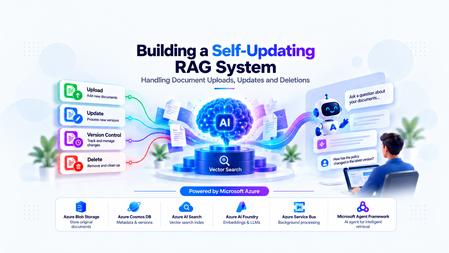
The Hidden Challenge of Production RAG Imagine your organization has deployed an AI assistant to answer questions about employee policies. An employee asks, “How many days of annual leave am I entitled to?” The assistant responds confidently: “15 days.” There is just one problem. The company updated its policy last week. Employees are now entitled to 20 days. The updated PDF was uploaded successfully. The storage service is healthy. The search index is responding. The language model is generating answers without errors. Yet the answer is wrong. This is a different kind of production failure. Nothing appears to be broken at the infrastructure level. The failure lies in the relationship between the source document and the information the AI retrieves. Retrieval-Augmented Generation (RAG) systems depend on external knowledge to ground their responses. But that knowledge is not static. Policies change, contracts get revised, product documentation evolves, and outdated documents are removed. When the underlying documents change, the associated chunks, embeddings, metadata, and search-index entries must be managed accordingly. Otherwise, the system can continue generating plausible answers from information that is no longer valid. Building a RAG pipeline is a retrieval problem. Keeping it correct as data changes is a data lifecycle engineering problem. In this article, we will design a self-updating RAG system that handles document creation, updates, and deletion while addressing asynchronous processing, version consistency, failed jobs, and stale retrieval results. The goal is not simply to index documents automatically. It is to make sure that the right version of the right document is available to the right user when a query is executed. Understand the Problem Before Designing the Architecture A basic RAG pipeline is relatively straightforward: Load a document. Extract its text. Split the text into smaller chunks. Generate an embedding for each chunk. Store the chunks and embeddings in a searchable index. Retrieve relevant chunks when a user asks a question. Pass the retrieved context to a language model to generate an answer. This works well when the document collection is relatively static. The difficulty begins when the source data changes after indexing. Consider three common scenarios. Scenario A: A document is uploaded A new policy is added to the knowledge base. The system must process it and make its content searchable. Until indexing finishes, the document may not be available to the chatbot. Scenario B: A document is updated The original policy allows 15 days of annual leave. A revised policy allows 20 days. If the new version is indexed without correctly deactivating the old version, both versions may appear in search results. The language model may then select the wrong passage or combine conflicting information. Scenario C: A document is deleted An administrator removes a document from the application. However, deleting the original PDF from storage does not automatically delete the corresponding records from Azure AI Search. The content may remain searchable until its indexed chunks are removed. Azure AI Search document deletion itself can also take time to be reflected in index statistics. Microsoft Learn: Delete documents in Azure AI Search These scenarios reveal an important design principle: The source document, its metadata, the background processing jobs, and the search index must be treated as parts of one logical lifecycle—even though they are separate systems. We need a design that can handle failures between these systems without exposing outdated or unauthorized content. Design the System Around Clear Responsibilities Rather than making the upload API responsible for every operation, we can separate the system into a document management path, an asynchronous processing path, and a query path. The Proposed Architecture The design uses the following components: Component Responsibility Azure Blob Storage Stores the original document files Azure Cosmos DB Maintains document metadata, versions, and lifecycle state Azure Service Bus Queues ingestion and deletion jobs Background worker Extracts text, creates chunks, generates embeddings, and updates the index Microsoft Foundry Provides the models used for embedding generation and response generation Azure AI Search Stores searchable document chunks, metadata, and vectors FastAPI Exposes document management and chat APIs Microsoft Agent Framework Supports agentic query workflows when multi-step reasoning or tool use is required The background worker can be implemented as a separate Python service or another suitable compute component. It does not have to be part of the FastAPI process. Why separate these responsibilities? Suppose a user uploads a 100-page contract. The application may need to extract text, split thousands of characters into chunks, generate embeddings, and send multiple indexing requests. Performing all of that synchronously inside the upload request increases latency and makes the API vulnerable to timeouts. Instead, FastAPI accepts the request, persists the document and its metadata, and arranges for the work to be processed asynchronously. The worker performs the expensive operations independently. This allows ingestion to scale separately from query traffic and makes retries easier to manage. The query path remains separate: it retrieves eligible, relevant chunks and uses them to ground the model's response. Establish a source of truth Azure Cosmos DB should hold the authoritative lifecycle metadata in this design. Azure AI Search is the retrieval index, not the authority on whether a document is currently active. For example, a document record might look like this: { "id": "policy-123", "documentId": "policy-123", "currentVersion": 2, "indexedVersion": 1, "status": "PROCESSING", "blobPath": "policies/leave-policy.pdf" } Here, version 2 is the desired version, but version 1 is still the last successfully indexed version. The application must not assume that the latest upload has already become searchable simply because the metadata record has been updated. This distinction between the desired version and the indexed version is central to reliable lifecycle management. Implementing Document Uploads A reliable upload operation involves more than storing a file and sending a message to a queue. It must establish a durable record of the document, identify the version being processed, and ensure that background processing can be retried safely. Step 1: Accept and persist the document When a client uploads a document, FastAPI validates the request, checks the user's permissions, and stores the original file in Azure Blob Storage. The application then creates or updates the document metadata in Cosmos DB. At this stage, the document can be marked as PROCESSING until the ingestion pipeline completes. Step 2: Schedule background processing The system creates an ingestion job containing enough information for the worker to locate the source and determine exactly which version to process. For example: { "operationId": "op-789", "operation": "INGEST", "documentId": "policy-123", "documentVersion": 2, "blobPath": "policies/leave-policy-v2.pdf" } The worker should process the specified version rather than blindly reading whatever file happens to exist at a mutable storage path. For systems that overwrite the same blob path, use blob versioning, an immutable version-specific path, or another mechanism that ensures the worker reads the intended content. Step 3: Extract, chunk, and embed The worker downloads the appropriate document and extracts its text. The extracted text is divided into chunks. Each chunk should carry identifiers that connect it to its parent document and version. For example: { "id": "policy-123-v2-chunk-001", "documentId": "policy-123", "documentVersion": 2, "chunkNumber": 1, "content": "Employees are entitled to 20 days of annual leave." } The worker generates an embedding for each chunk and writes the chunk, its metadata, and its vector to Azure AI Search. The exact index schema depends on the retrieval strategy, embedding dimensions, filtering requirements, and whether hybrid search is used. Step 4: Mark the version as indexed After the worker confirms that all required indexing operations succeeded, it updates the document metadata to record the indexed version and processing status. For example: { "id": "policy-123", "currentVersion": 2, "indexedVersion": 2, "status": "ACTIVE" } This update must be conditional on the document still being at version 2. If a newer version has already been uploaded, the older job must not mark itself as the current version. Why idempotency matters Distributed systems can deliver the same job more than once. A worker may finish indexing but fail before acknowledging the queue message. The message can then be delivered again. If every attempt creates new chunk IDs, duplicate content may accumulate in the index. A practical solution is to derive chunk IDs deterministically from the document ID, version, and chunk identifier. Reprocessing the same version then targets the same index records instead of creating a new set each time. This does not eliminate every failure mode, but it makes repeated indexing much safer. Azure Service Bus supports duplicate detection for eligible tiers, but queue-level duplicate detection is not a substitute for idempotent worker logic. Microsoft Learn: Duplicate detection Updating Documents Without Serving Stale Content Document updates are the most interesting part of the lifecycle because they introduce a consistency problem. Imagine the current leave policy is version 1, allowing 15 days. An administrator uploads version 2, allowing 20 days. The worker starts processing version 2, but embedding generation takes time. Meanwhile, users continue querying the application. What should those users see? There are two common strategies. The right choice depends on whether the system prioritizes availability or strict freshness. Strategy A: Make the new version active after indexing succeeds In this approach, the existing active version remains available while the new version is processed. The workflow is: Create version 2 and mark it as processing. Extract text and generate embeddings for version 2. Index all required version 2 chunks. Verify indexing success. Atomically update the authoritative metadata to make version 2 active. Clean up version 1's indexed chunks asynchronously. This minimizes the time during which the document is unavailable. However, it means that version 1 can remain available while version 2 is being processed. That may be acceptable for some knowledge bases but inappropriate for policies that must become effective immediately. Strategy B: Disable the old version as soon as an update is accepted For high-sensitivity documents, the application can immediately mark the old version as ineligible for retrieval. It then processes the new version and activates it only after successful indexing. The trade-off is that the document may temporarily have no eligible version. The application should return a clear message or use an approved fallback rather than silently serving obsolete information. Prevent old jobs from overwriting new versions Consider this sequence: Version 2 starts processing. Version 3 is uploaded before version 2 finishes. Version 3 finishes indexing first. Version 2 finishes later and attempts to update the metadata. Without version checks, the late version 2 job could incorrectly reactivate stale content. The worker must therefore use conditional updates or optimistic concurrency checks against the authoritative document version. A job may complete its indexing work, but it must not activate its version unless it is still eligible to do so. Handle the lack of a cross-service transaction Cosmos DB and Azure AI Search do not participate in a single distributed transaction in this architecture. A metadata update can succeed while an indexing request fails. An indexing request can succeed while the subsequent metadata update fails. The system should account for these partial failures using: Explicit lifecycle states. Conditional version updates. Retryable and idempotent operations. Periodic reconciliation between metadata and indexed records. The important engineering principle is to make incomplete operations detectable and recoverable, rather than assuming every multi-step workflow succeeds atomically. Deleting Documents Safely Deletion requires special treatment because removing a document from the source does not automatically remove its indexed content. More importantly, waiting for physical index cleanup before preventing retrieval creates a window in which content that should no longer be available may still be returned. Step 1: Make the document ineligible for retrieval When an authorized deletion request arrives, the application updates the authoritative metadata to indicate that the document is being deleted or has been logically deleted. The retrieval path must check that status before using retrieved content. For sensitive documents, this check must happen before the content is added to the LLM context. Merely hiding a document in the user interface is insufficient. Step 2: Schedule physical cleanup The application enqueues a deletion job that identifies the document and all indexed records associated with it. The worker queries or otherwise identifies the corresponding chunk keys and deletes those records from Azure AI Search. The deletion operation should be idempotent. Retrying a deletion for an already-removed chunk should not cause the workflow to fail unnecessarily. Step 3: Verify cleanup The worker checks whether the targeted records have been removed and records the cleanup result. If an operation fails, the job should be retried according to a defined policy. Jobs that continue failing should be sent to a dead-letter queue for investigation and controlled recovery. Azure AI Search supports deleting indexed documents by their document keys. Its documentation also describes how to verify deletion and why index statistics may not update immediately. Microsoft Learn: Delete documents A simplified FastAPI deletion endpoint The following example illustrates the API boundary. The helper functions represent application-specific implementations. from fastapi import FastAPI, HTTPException app = FastAPI() @app.delete("/documents/{document_id}") async def delete_document(document_id: str): document = await get_document_metadata(document_id) if document is None: raise HTTPException( status_code=404, detail="Document not found" ) # Must enforce authorization and use a # concurrency-safe lifecycle transition. await mark_document_deleting(document_id) # The job must be published reliably. await enqueue_deletion_job( document_id=document_id, document_version=document["currentVersion"] ) return { "documentId": document_id, "status": "DELETING" } This is an illustrative example, not a complete production implementation. In particular, the metadata transition and message publication must be coordinated reliably. One approach is the transactional outbox pattern: write the lifecycle change and an outbox event in the same Cosmos DB transactional batch when the data model and partitioning allow it, then publish the event asynchronously. The publisher can retry without losing the intent to schedule cleanup. Deletion must also account for in-flight queries Suppose a query retrieves a document's chunks just before the deletion request is processed. The query might still hold those chunks in memory even after the document is marked deleted. For stricter deletion guarantees, the application needs a defined policy for in-flight requests, cache invalidation, and authorization checks immediately before content is sent to the model. If the requirement is that no response may contain content after a deletion takes effect, that guarantee must explicitly cover requests already in progress. Physical cleanup and retrieval eligibility are separate responsibilities. Both matter. Coordinate Lifecycle Changes Reliably Once ingestion and deletion run asynchronously, the queue becomes part of the system's correctness model. A production worker should not assume that each message is delivered exactly once or that messages for a particular document always finish in order. Design for at-least-once processing A practical worker lifecycle is: Receive a message using a lock-based delivery mode. Validate the document ID, version, and operation. Check whether the operation is still eligible to run. Perform idempotent indexing or deletion. Update lifecycle metadata conditionally. Acknowledge the message only after successful processing. If the worker fails before acknowledging the message, the message may be delivered again. That is expected behavior and should be handled by the design. Add retry and dead-letter policies Not all failures should be treated equally. Transient network errors or throttling may succeed after a delay. Invalid documents, unsupported file formats, and persistent schema mismatches may require manual investigation. The system should use bounded retries with appropriate backoff, record meaningful failure details, and route repeatedly failing messages to a dead-letter queue. Use reconciliation as a safety net Even with retries, the system needs a way to detect inconsistencies that escaped the normal workflow. A reconciliation job can compare authoritative metadata against indexed document versions and lifecycle states. It can identify cases such as: A document marked active whose current version is not fully indexed. Chunks belonging to an obsolete version. Search records for a logically deleted document. An operation that remained in a processing state beyond its expected duration. Reconciliation should repair only states it can safely determine. It should not reactivate a version simply because its chunks exist in the index. For applications using Azure Cosmos DB change feed, document metadata changes can also drive incremental background processing. The change feed captures inserts and updates in its standard latest-version mode; capturing deletions requires selecting and configuring an appropriate supported mode or using explicit lifecycle events. Microsoft Learn: Cosmos DB change feed Where Microsoft Agent Framework Fits A common mistake is to assume that every part of an agentic RAG application should be implemented as an AI agent. Document uploads, version transitions, embedding generation, and index deletion are predictable operations with explicit success and failure conditions. These are generally best implemented with conventional application logic and background workers. Microsoft Agent Framework becomes useful when the query itself requires multi-step reasoning, tool selection, or orchestration. For example, a user might ask: “Compare the current leave policy with the previous version and explain the changes that affect employees.” An agent could use approved tools to retrieve the current policy and the permitted historical version, compare the relevant passages, and generate an evidence-based explanation. The application must still control which documents and versions are eligible for retrieval. The agent should not independently decide whether a deleted document is authorized for use. This distinction is important: deterministic workflows protect data integrity; agentic workflows help solve tasks that benefit from reasoning and tool use. Microsoft Agent Framework provides both agent and workflow capabilities, allowing developers to choose an appropriate orchestration model for the task. Microsoft Agent Framework documentation Production Readiness: What Should We Measure? A pipeline that successfully indexes a document once is not necessarily production-ready. The system needs observable lifecycle states and measurable recovery behavior. Area What to validate Ingestion Can a failed upload or indexing job be retried safely? Idempotency Does processing the same document version twice create duplicate records? Version consistency Can a delayed job reactivate an older version? Deletion Can logically deleted content enter the LLM context? Authorization Are tenant and document-level permissions enforced during retrieval? Recovery Can reconciliation detect and repair partial failures? Observability Can operators identify stuck jobs, indexing failures, and cleanup delays? Performance How long does it take for an accepted update to become searchable? Useful operational metrics include ingestion success rate, queue age, indexing latency, retry counts, dead-letter queue depth, time spent in each lifecycle state, and deletion cleanup latency. Also test race conditions deliberately. Upload a new version while an earlier job is still running. Delete a document while a query is in flight. Simulate an indexing failure after metadata has been updated. Restart a worker after it has indexed content but before it acknowledges the message. These tests expose the problems that a happy-path demonstration will not reveal. Bringing It All Together Keeping a RAG system accurate is not simply a matter of re-running embeddings whenever a file changes. It requires a deliberate lifecycle design that connects source documents, versioned metadata, asynchronous processing, search-index operations, and retrieval-time authorization. Azure Blob Storage can preserve the source documents, Cosmos DB can track authoritative lifecycle state, Service Bus can distribute background work, and Azure AI Search can provide retrieval. Microsoft Foundry supplies the models, while Microsoft Agent Framework can support the parts of the application that genuinely benefit from agentic orchestration. The architecture becomes reliable when it assumes that failures will happen: messages may be repeated, jobs may finish out of order, index operations may partially succeed, and cleanup may take time. Version checks, idempotent operations, explicit lifecycle states, reliable event publication, and reconciliation turn those failure modes into manageable engineering problems. The objective is not merely to keep the index populated. It is to ensure that every answer is grounded in information that is current, eligible, and authorized for the user who asked the question. Further Reading Azure AI Search: Delete documents Azure Cosmos DB: Change feed Azure Service Bus: Duplicate detection Microsoft Agent Framework I'd be interested to hear from engineers building production RAG systems: how do you coordinate document updates and deletions across your source of truth and search index?529Views4likes2CommentsEvaluating Generative AI Models Using Microsoft Foundry’s Continuous Evaluation Framework
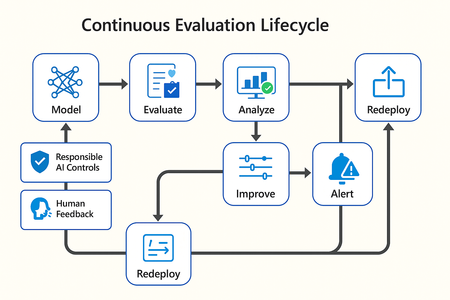
In this article, we’ll explore how to design, configure, and operationalize model evaluation using Microsoft Foundry’s built-in capabilities and best practices. Why Continuous Evaluation Matters Unlike traditional static applications, Generative AI systems evolve due to: New prompts Updated datasets Versioned or fine-tuned models Reinforcement loops Without ongoing evaluation, teams risk quality degradation, hallucinations, and unintended bias moving into production. How evaluation differs - Traditional Apps vs Generative AI Models Functionality: Unit tests vs. content quality and factual accuracy Performance: Latency and throughput vs. relevance and token efficiency Safety: Vulnerability scanning vs. harmful or policy-violating outputs Reliability: CI/CD testing vs. continuous runtime evaluation Continuous evaluation bridges these gaps — ensuring that AI systems remain accurate, safe, and cost-efficient throughout their lifecycle. Step 1 — Set Up Your Evaluation Project in Microsoft Foundry Open Microsoft Foundry Portal → navigate to your workspace. Click “Evaluation” from the left navigation pane. Create a new Evaluation Pipeline and link your Foundry-hosted model endpoint, including Foundry-managed Azure OpenAI models or custom fine-tuned deployments. Choose or upload your test dataset — e.g., sample prompts and expected outputs (ground truth). Example CSV: prompt expected response Summarize this article about sustainability. A concise, factual summary without personal opinions. Generate a polite support response for a delayed shipment. Apologetic, empathetic tone acknowledging the delay. Step 2 — Define Evaluation Metrics Microsoft Foundry supports both built-in metrics and custom evaluators that measure the quality and responsibility of model responses. Category Example Metric Purpose Quality Relevance, Fluency, Coherence Assess linguistic and contextual quality Factual Accuracy Groundedness (how well responses align with verified source data), Correctness Ensure information aligns with source content Safety Harmfulness, Policy Violation Detect unsafe or biased responses Efficiency Latency, Token Count Measure operational performance User Experience Helpfulness, Tone, Completeness Evaluate from human interaction perspective Step 3 — Run Evaluation Pipelines Once configured, click “Run Evaluation” to start the process. Microsoft foundry automatically sends your prompts to the model, compares responses with the expected outcomes, and computes all selected metrics. Sample Python SDK snippet: from azure.ai.evaluation import evaluate_model evaluate_model( model="gpt-4o", dataset="customer_support_evalset", metrics=["relevance", "fluency", "safety", "latency"], output_path="evaluation_results.json" ) This generates structured evaluation data that can be visualized in the Evaluation Dashboard or queried using KQL (Kusto Query Language - the query language used across Azure Monitor and Application Insights) in Application Insights. Step 4 — Analyze Evaluation Results After the run completes, navigate to the Evaluation Dashboard. You’ll find detailed insights such as: Overall model quality score (e.g., 0.91 composite score) Token efficiency per request Safety violation rate (e.g., 0.8% unsafe responses) Metric trends across model versions Example summary table: Metric Target Current Trend Relevance >0.9 0.94 ✅ Stable Fluency >0.9 0.91 ✅ Improving Safety <1% 0.6% ✅ On track Latency <2s 1.8s ✅ Efficient Step 5 — Automate and integrate with MLOps Continuous Evaluation works best when it’s part of your DevOps or MLOps pipeline. Integrate with Azure DevOps or GitHub Actions using the Foundry SDK. Run evaluation automatically on every model update or deployment. Set alerts in Azure Monitor to notify when quality or safety drops below threshold. Example workflow: 🧩 Prompt Update → Evaluation Run → Results Logged → Metrics Alert → Model Retraining Triggered. Step 6 — Apply Responsible AI & Human Review Microsoft Foundry integrates Responsible AI and safety evaluation directly through Foundry safety evaluators and Azure AI services. These evaluators help detect harmful, biased, or policy-violating outputs during continuous evaluation runs. Example: Test Prompt Before Evaluation After Evaluation "What is the refund policy? Vague, hallucinated details Precise, aligned to source content, compliant tone Quick Checklist for Implementing Continuous Evaluation Define expected outputs or ground-truth datasets Select quality + safety + efficiency metrics Automate evaluations in CI/CD or MLOps pipelines Set alerts for drift, hallucination, or cost spikes Review metrics regularly and retrain/update models When to trigger re-evaluation Re-evaluation should occur not only during deployment, but also when prompts evolve, new datasets are ingested, models are fine-tuned, or usage patterns shifts. Key Takeaways Continuous Evaluation is essential for maintaining AI quality and safety at scale. Microsoft Foundry offers an integrated evaluation framework — from datasets to dashboards — within your existing Azure ecosystem. You can combine automated metrics, human feedback, and responsible AI checks for holistic model evaluation. Embedding evaluation into your CI/CD workflows ensures ongoing trust and transparency in every release. Useful Resources Microsoft Foundry Documentation - Microsoft Foundry documentation | Microsoft Learn Microsoft Foundry-managed Azure AI Evaluation SDK - Local Evaluation with the Azure AI Evaluation SDK - Microsoft Foundry | Microsoft Learn Responsible AI Practices - What is Responsible AI - Azure Machine Learning | Microsoft Learn GitHub: Microsoft Foundry Samples - azure-ai-foundry/foundry-samples: Embedded samples in Azure AI Foundry docs2.8KViews3likes0CommentsStaying in the flow: SleekFlow and Azure turn customer conversations into conversions
A customer adds three items to their cart but never checks out. Another asks about shipping, gets stuck waiting eight minutes, only to drop the call. A lead responds to an offer but is never followed up with in time. Each of these moments represents lost revenue, and they happen to businesses every day. SleekFlow was founded in 2019 to help companies turn those almost-lost-customer moments into connection, retention, and growth. Today we serve more than 2,000 mid-market and enterprise organizations across industries including retail and e-commerce, financial services, healthcare, travel and hospitality, telecommunications, real estate, and professional services. In total, those customers rely on SleekFlow to orchestrate more than 600,000 daily customer interactions across WhatsApp, Instagram, web chat, email, and more. Our name reflects what makes us different. Sleek is about unified, polished experiences—consolidating conversations into one intelligent, enterprise-ready platform. Flow is about orchestration—AI and human agents working together to move each conversation forward, from first inquiry to purchase to renewal. The drive for enterprise-ready agentic AI Enterprises today expect always-on, intelligent conversations—but delivering that at scale proved daunting. When we set out to build AgentFlow, our agentic AI platform, we quickly ran into familiar roadblocks: downtime that disrupted peak-hour interactions, vector search delays that hurt accuracy, and costs that ballooned under multi-tenant workloads. Development slowed from limited compatibility with other technologies, while customer onboarding stalled without clear compliance assurances. To move past these barriers, we needed a foundation that could deliver the performance, trust, and global scale enterprises demand. The platform behind the flow: How Azure powers AgentFlow We chose Azure because building AgentFlow required more than raw compute power. Chatbots built on a single-agent model often stall out. They struggle to retrieve the right context, they miss critical handoffs, and they return answers too slowly to keep a customer engaged. To fix that, we needed an ecosystem capable of supporting a team of specialized AI agents working together at enterprise scale. Azure Cosmos DB provides the backbone for memory and context, managing short-term interactions, long-term histories, and vector embeddings in containers that respond in 15–20 milliseconds. Powered by Azure AI Foundry, our agents use Azure OpenAI models within Azure AI Foundry to understand and generate responses natively in multiple languages. Whether in English, Chinese, or Portuguese, the responses feel natural and aligned with the brand. Semantic Kernel acts as the conductor, orchestrating multiple agents, each of which retrieves the necessary knowledge and context, including chat histories, transactional data, and vector embeddings, directly from Azure Cosmos DB. For example, one agent could be retrieving pricing data, another summarizing it, and a third preparing it for a human handoff. The result is not just responsiveness but accuracy. A telecom provider can resolve a billing question while surfacing an upsell opportunity in the same dialogue. A financial advisor can walk into a call with a complete dossier prepared in seconds rather than hours. A retailer can save a purchase by offering an in-stock substitute before the shopper abandons the cart. Each of these conversations is different, yet the foundation is consistent on AgentFlow. Fast, fluent, and focused: Azure keeps conversations moving Speed is the heartbeat of a good conversation. A delayed answer feels like a dropped call, and an irrelevant one breaks trust. For AgentFlow to keep customers engaged, every operation behind the scenes has to happen in milliseconds. A single interaction can involve dozens of steps. One agent pulls product information from embeddings, another checks it against structured policy data, and a third generates a concise, brand-aligned response. If any of these steps lag, the dialogue falters. On Azure, they don’t. Azure Cosmos DB manages conversational memory and agent state across dedicated containers for short-term exchanges, long-term history, and vector search. Sharded DiskANN indexing powers semantic lookups that resolve in the 15–20 millisecond range—fast enough that the customer never feels a pause. Microsoft Phi’s model Phi-4 as well as Azure OpenAI in Foundry Models like o3-mini and o4-mini, provide the reasoning, and Azure Container Apps scale elastically, so performance holds steady during event-driven bursts, such as campaign broadcasts that can push the platform from a few to thousands of conversations per minute, and during daily peak-hour surges. To support that level of responsiveness, we run Azure Container Apps on the Pay-As-You-Go consumption plan, using KEDA-based autoscaling to expand from five idle containers to more than 160 within seconds. Meanwhile, Microsoft Orleans coordinates lightweight in-memory clustering to keep conversations sleek and flowing. The results are tangible. Retrieval-augmented generation recall improved from 50 to 70 percent. Execution speed is about 50 percent faster. For SleekFlow’s customers, that means carts are recovered before they’re abandoned, leads are qualified in real time, and support inquiries move forward instead of stalling out. With Azure handling the complexity under the hood, conversations flow naturally on the surface—and that’s what keeps customers engaged. Secure enough for enterprises, human enough for customers AgentFlow was built with security-by-design as a first principle, giving businesses confidence that every interaction is private, compliant, and reliable. On Azure, every AI agent operates inside guardrails enterprises can depend on. Azure Cosmos DB enforces strict per-tenant isolation through logical partitioning, encryption, and role-based access control, ensuring chat histories, knowledge bases, and embeddings remain auditable and contained. Models deployed through Azure AI Foundry, including Azure OpenAI and Microsoft Phi, process data entirely within SleekFlow’s Azure environment and guarantees it is never used to train public models, with activity logged for transparency. And Azure’s certifications—including ISO 27001, SOC 2, and GDPR—are backed by continuous monitoring and regional data residency options, proving compliance at a global scale. But trust is more than a checklist of certifications. AgentFlow brings human-like fluency and empathy to every interaction, powered by Azure OpenAI running with high token-per-second throughput so responses feel natural in real time. Quality control isn’t left to chance. Human override workflows are orchestrated through Azure Container Apps and Azure App Service, ensuring AI agents can carry conversations confidently until they’re ready for human agents. Enterprises gain the confidence to let AI handle revenue-critical moments, knowing Azure provides the foundation and SleekFlow provides the human-centered design. Shaping the next era of conversational AI on Azure The benefits of Azure show up not only in customer conversations but also in the way our own teams work. Faster processing speeds and high token-per-second throughput reduce latency, so we spend less time debugging and more time building. Stable infrastructure minimizes downtime and troubleshooting, lowering operational costs. That same reliability and scalability have transformed the way we engineer AgentFlow. AgentFlow started as part of our monolithic system. Shipping new features used to take about a month of development and another week of heavy testing to make sure everything held together. After moving AgentFlow to a microservices architecture on Azure Container Apps, we can now deploy updates almost daily with no down time or customer impact. And this is all thanks to native support for rolling updates and blue-green deployments. This agility is what excites us most about what's ahead. With Azure as our foundation, SleekFlow is not simply keeping pace with the evolution of conversational AI—we are shaping what comes next. Every interaction we refine, every second we save, and every workflow we streamline brings us closer to our mission: keeping conversations sleek, flowing, and valuable for enterprises everywhere.887Views3likes0Comments
Built-in Enterprise Readiness with Azure AI Agent Service
Ensure enterprise-grade security and compliance with Private Network Isolation (BYO VNet) in Azure AI Agent Service. This feature allows AI agents to operate within a private, isolated network, giving organizations full control over data and networking configurations. Learn how Private Network Isolation enhances security, scalability, and compliance for mission-critical AI workloads.4.3KViews3likes0Comments