azure container instances
23 Topics
Migrating to the next generation of Virtual Nodes on Azure Container Instances (ACI)
What is ACI/Virtual Nodes? Azure Container Instances (ACI) is a fully-managed serverless container platform which gives you the ability to run containers on-demand without provisioning infrastructure. Virtual Nodes on ACI allows you to run Kubernetes pods managed by an AKS cluster in a serverless way on ACI instead of traditional VM‑backed node pools. From a developer’s perspective, Virtual Nodes look just like regular Kubernetes nodes, but under the hood the pods are executed on ACI’s serverless infrastructure, enabling fast scale‑out without waiting for new VMs to be provisioned. This makes Virtual Nodes ideal for bursty, unpredictable, or short‑lived workloads where speed and cost efficiency matter more than long‑running capacity planning. Introducing the next generation of Virtual Nodes on ACI The newer Virtual Nodes v2 implementation modernises this capability by removing many of the limitations of the original AKS managed add‑on and delivering a more Kubernetes‑native, flexible, and scalable experience when bursting workloads from AKS to ACI. In this article I will demonstrate how you can migrate an existing AKS cluster using the Virtual Nodes managed add-on (legacy), to the new generation of Virtual Nodes on ACI, which is deployed and managed via Helm. More information about Virtual Nodes on Azure Container Instances can be found here, and the GitHub repo is available here. Advanced documentation for Virtual Nodes on ACI is also available here, and includes topics such as node customisation, release notes and a troubleshooting guide. Please note that all code samples within this guide are examples only, and are provided without warranty/support. Background Virtual Nodes on ACI is rebuilt from the ground-up, and includes several fixes and enhancements, for instance: Added support/features VNet peering, outbound traffic to the internet with network security groups Init containers Host aliases Arguments for exec in ACI Persistent Volumes and Persistent Volume Claims Container hooks Confidential containers (see supported regions list here) ACI standby pools Support for image pulling via Private Link and Managed Identity (MSI) Planned future enhancements Kubernetes network policies Support for IPv6 Windows containers Port Forwarding Note: The new generation of the add-on is managed via Helm rather than as an AKS managed add-on. Requirements & limitations Each Virtual Nodes on ACI deployment requires 3 vCPUs and 12 GiB memory on one of the AKS cluster’s VMs Each Virtual Nodes node supports up to 200 pods DaemonSets are not supported Virtual Nodes on ACI requires AKS clusters with Azure CNI networking (Kubenet is not supported, nor is overlay networking) Migrating to the next generation of Virtual Nodes on Azure Container Instances via Helm chart For this walkthrough, I'm using Bash via Windows Subsystem for Linux (WSL), along with the Azure CLI. Direct migration is not supported, and therefore the steps below show an example of removing Virtual Nodes managed add-on and its resources and then installing the Virtual Nodes on ACI Helm chart. In this walkthrough I will explain how to delete and re-create the Virtual Nodes subnet, however if you need to preserve the VNet and/or use a custom subnet name, refer to the Helm customisation steps here. Be sure to use a new subnet CIDR within the VNet address space, which doesn't overlap with other subnets nor the AKS CIDRS for nodes/pods and ClusterIP services. To minimise disruption, we'll first install the Virtual Nodes on ACI Helm chart, before then removing the legacy managed add-on and its resources. Prerequisites A recent version of the Azure CLI An Azure subscription with sufficient ACI quota for your selected region Helm Deployment steps Initialise environment variables location=northeurope rg=rg-virtualnode-demo vnetName=vnet-virtualnode-demo clusterName=aks-virtualnode-demo aksSubnetName=subnet-aks vnSubnetName=subnet-vn Create the new Virtual Nodes on ACI subnet with the specific name value of cg (a custom subnet can be used by following the steps here): vnSubnetId=$(az network vnet subnet create \ --resource-group $rg \ --vnet-name $vnetName \ --name cg \ --address-prefixes <your subnet CIDR> \ --delegations Microsoft.ContainerInstance/containerGroups --query id -o tsv) Assign the cluster's -kubelet identity Contributor access to the infrastructure resource group, and Network Contributor access to the ACI subnet: nodeRg=$(az aks show --resource-group $rg --name $clusterName --query nodeResourceGroup -o tsv) nodeRgId=$(az group show -n $nodeRg --query id -o tsv) agentPoolIdentityId=$(az aks show --resource-group $rg --name $clusterName --query "identityProfile.kubeletidentity.resourceId" -o tsv) agentPoolIdentityObjectId=$(az identity show --ids $agentPoolIdentityId --query principalId -o tsv) az role assignment create \ --assignee-object-id "$agentPoolIdentityObjectId" \ --assignee-principal-type ServicePrincipal \ --role "Contributor" \ --scope "$nodeRgId" az role assignment create \ --assignee-object-id "$agentPoolIdentityObjectId" \ --assignee-principal-type ServicePrincipal \ --role "Network Contributor" \ --scope "$vnSubnetId" Download the cluster's kubeconfig file: az aks get-credentials -n $clusterName -g $rg Clone the virtualnodesOnAzureContainerInstances GitHub repo: git clone https://github.com/microsoft/virtualnodesOnAzureContainerInstances.git Install the Virtual Nodes on ACI Helm chart: helm install <yourReleaseName> <GitRepoRoot>/Helm/virtualnode Confirm the Virtual Nodes node shows within the cluster and is in a Ready state (virtualnode-n): $ kubectl get node NAME STATUS ROLES AGE VERSION aks-nodepool1-35702456-vmss000000 Ready <none> 4h13m v1.33.6 aks-nodepool1-35702456-vmss000001 Ready <none> 4h13m v1.33.6 virtualnode-0 Ready <none> 162m v1.33.7 Scale-down any running Virtual Nodes workloads (example below): kubectl scale deploy <deploymentName> -n <namespace> --replicas=0 Drain and cordon the legacy Virtual Nodes node: kubectl drain virtual-node-aci-linux Disable the Virtual Nodes managed add-on (legacy): az aks disable-addons --resource-group $rg --name $clusterName --addons virtual-node Export a backup of the original subnet configuration: az network vnet subnet show --resource-group $rg --vnet-name $vnetName --name $vnSubnetName > subnetConfigOriginal.json Delete the original subnet (subnets cannot be renamed and therefore must be re-created): az network vnet subnet delete -g $rg -n $vnSubnetName --vnet-name $vnetName Delete the previous (legacy) Virtual Nodes node from the cluster: kubectl delete node virtual-node-aci-linux Test and confirm pod scheduling on Virtual Node: apiVersion: v1 kind: Pod metadata: annotations: name: demo-pod spec: containers: - command: - /bin/bash - -c - 'counter=1; while true; do echo "Hello, World! Counter: $counter"; counter=$((counter+1)); sleep 1; done' image: mcr.microsoft.com/azure-cli name: hello-world-counter resources: limits: cpu: 2250m memory: 2256Mi requests: cpu: 100m memory: 128Mi nodeSelector: virtualization: virtualnode2 tolerations: - effect: NoSchedule key: virtual-kubelet.io/provider operator: Exists If the pod successfully starts on the Virtual Node, you should see similar to the below: $ kubectl get pod -o wide demo-pod NAME READY STATUS RESTARTS AGE IP NODE NOMINATED NODE READINESS GATES demo-pod 1/1 Running 0 95s 10.241.0.4 vnode2-virtualnode-0 <none> <none> Modify the nodeSelector and tolerations properties of your Virtual Nodes workloads to match the requirements of Virtual Nodes on ACI (see details below) Modify your deployments to run on Virtual Nodes on ACI For Virtual Nodes managed add-on (legacy), the following nodeSelector and tolerations are used to run pods on Virtual Nodes: nodeSelector: kubernetes.io/role: agent kubernetes.io/os: linux type: virtual-kubelet tolerations: - key: virtual-kubelet.io/provider operator: Exists - key: azure.com/aci effect: NoSchedule For Virtual Nodes on ACI, the nodeSelector/tolerations are slightly different: nodeSelector: virtualization: virtualnode2 tolerations: - effect: NoSchedule key: virtual-kubelet.io/provider operator: Exists Troubleshooting Check the virtual-node-admission-controller and virtualnode-n pods are running within the vn2 namespace: $ kubectl get pod -n vn2 NAME READY STATUS RESTARTS AGE virtual-node-admission-controller-54cb7568f5-b7hnr 1/1 Running 1 (5h21m ago) 5h21m virtualnode-0 6/6 Running 6 (4h48m ago) 4h51m If these pods are in a Pending state, your node pool(s) may not have enough resources available to schedule them (use kubectl describe pod to validate). If the virtualnode-n pod is crashing, check the logs of the proxycri container to see whether there are any Managed Identity permissions issues (the cluster's -agentpool MSI needs to have Contributor access on the infrastructure resource group): kubectl logs -n vn2 virtualnode-0 -c proxycri Further troubleshooting guidance is available within the official documentation. Support If you have issues deploying or using Virtual Nodes on ACI, add a GitHub issue here777Views3likes0CommentsVulnerability Assessment on Azure Container Registry with Microsoft Defender and Docker Hub
Azure Container Registry: Microsoft Defender for Containers and Docker Scout. Rather than comparing these tools, I want to highlight how they complement each other to enhance container security on ACR. Containers revolutionize the way applications are deployed, providing a consistent and efficient way to package code and dependencies. However, with this convenience comes the critical need for robust security measures. In this post, we'll explore why container security is essential, focusing on preventing malicious code, avoiding vulnerabilities, and managing configuration and deployment risks.4.2KViews3likes2CommentsAnnouncing public preview of confidential containers on Azure Container Instances
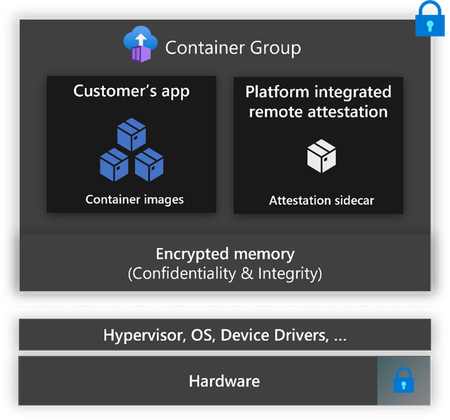
We are announcing the public preview of confidential containers on ACI makes it easier to adopt confidential computing with the simplicity and benefits of a fully managed serverless container platform.14KViews3likes0Comments
Detecting ACI IP Drift and Auto-Updating Private DNS (A + PTR) with Event Grid + Azure Functions
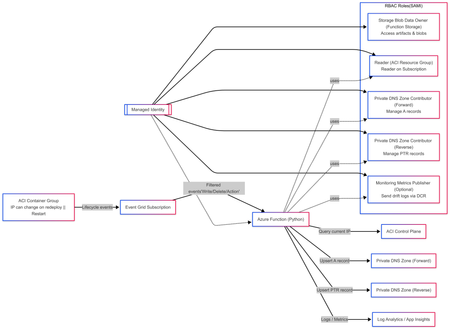
Solution Author Aditya_AzureNinja , Chiragsharma30 Solution Version v1.0 TL;DR Azure Container Instances (ACI) container groups can be recreated/updated over time and may receive new private IPs, which can cause DNS mismatches if forward and reverse records aren’t updated. This post shares an event-driven pattern that detects ACI IP drift and automatically reconciles Private DNS A (forward) and PTR (reverse) records using Event Grid + Azure Functions. Key requirement: Event delivery is at-least-once, so the solution must be idempotent. Problem statement In hub-and-spoke environments using per-spoke Private DNS zones for isolation, ACI workloads created/updated/deleted over time can receive new private IPs. We need to ensure: Forward lookup: aci-name.<spoke-zone> (A record) → current ACI private IP Reverse lookup: IP → aci-name.<spoke-zone> (PTR record) Two constraints drive this design: Azure Private DNS auto-registration is VM-only and does not create PTR records, so ACI needs explicit A/PTR record management. Reverse DNS is scoped to the VNet (reverse zone must be linked to the querying VNet, otherwise reverse lookup returns NXDOMAIN). Design principle: This solution was designed with the following non‑negotiable engineering goals: Event‑driven DNS updates must be triggered directly from resource lifecycle events, not polling or scheduled jobs. Container creation, restart, and deletion are the only reliable sources of truth for IP changes in ACI. Idempotent Azure Event Grid delivers events with at‑least‑once semantics. The system must safely process duplicate events without creating conflicting DNS records or failing on retries. Stateless The automation must not rely on in‑memory or persisted state to determine correctness. DNS itself is treated as the baseline state, allowing functions to scale, restart, and replay events without drift or dependency on prior executions. Clear failure modes DNS reconciliation failures must be explicit and observable. If DNS updates fail, the function invocation must fail loudly so the issue is visible, alertable, and actionable—never silently ignored. Components Event Grid subscriptions (filtered to ACI container group lifecycle events) Azure Function App (Python) with System Assigned Managed Identity Private DNS forward zone (A records) Private DNS reverse zone (PTR records) Supporting infra (typical): Storage account (function artifacts / operational needs) Application Insights + Log Analytics (observability) Event-driven flow ACI container group is created/updated/deleted. Event Grid emits a lifecycle event (delivery can be repeated). Function is triggered and reads the current ACI private IP. Function reconciles DNS: Upsert A record to current IP Upsert PTR record to FQDN Remove stale PTR(s) for hostname/IP as needed Function logs reconciliation outcome (updated vs no-op). Architecture overview (INFRA) This follows the“Event-driven registration” approach: Event Grid → Azure Function that reconciles DNS on ACI lifecycle events. RBAC at a glance (Managed Identity) Role Scope Purpose Storage Blob Data Owner Function App deployment storage account Access function artifacts and operational blobs (required because shared key access is disabled). Reader Each ACI workload resource group Read container group state and determine the current private IP. Private DNS Zone Contributor Private DNS forward zone(s) Create, update, and delete A records for ACI hostnames. Private DNS Zone Contributor Private DNS reverse zone(s) Create, update, and clean up PTR records for ACI IPs. Monitoring Metrics Publisher (optional) Data Collection Rule (DCR) Upload structured IP‑drift events to Log Analytics via the ingestion API. --- --- Architecture overview (APP) Event‑Driven DNS Reconciliation for Azure Container Instances 1. Event contract: what the function receives Azure Event Grid delivers events using a consistent envelope (Event Grid schema). Each event includes, at a minimum: topic subject id eventType eventTime data dataVersion metadataVersion In Azure Functions, the Event Grid trigger binding is the recommended way to receive these events directly. Why the subject field matters The subject field typically contains the ARM resource ID path of the affected resource. This solution relies on subject to: verify that the event is for an ACI container group (Microsoft.ContainerInstance/containerGroups) extract: subscription ID resource group name container group name Using subject avoids dependence on publisher‑specific payload fields and keeps parsing fast, deterministic, and resilient. 2. Subscription design: filter hard, process little The solution follows a strict runbook pattern: subscribe only to ARM lifecycle events filter aggressively so only ACI container groups are included trigger reconciliation only on meaningful state transitions Recommended Event Grid event types Microsoft.Resources.ResourceWriteSuccess (create / update / stop state changes) Microsoft.Resources.ResourceDeleteSuccess (container group deletion) Microsoft.Resources.ResourceActionSuccess (optional) (restart / start / stop actions, environment‑dependent) This keeps the Function App simple, predictable, and low‑noise. 3. Application design: two functions, one contract The application is intentionally split into authoritative mutation and read‑only validation. Component A — DNS Reconciler (authoritative writer) A thin Python v2 model wrapper: receives the Event Grid event validates this is an ACI container group event parses identifiers from the ARM subject resolves DNS configuration from a JSON mapping (environment variable) delegates DNS mutation to a deterministic worker script DNS changes are not implemented inline in Python. Instead, the function: constructs a controlled set of environment variables invokes a worker script (/bin/bash) via subprocess streams stdout/stderr into function logs treats non‑zero exit codes as hard failures This thin wrapper + deterministic worker pattern isolates DNS correctness logic while keeping the event handler stable and testable. Component B — IP Drift Tracker (stateless observer) The drift tracker is a read‑only, stateless validator designed for correctness monitoring. It: parses identifiers from the event subject exits early on delete events (nothing to validate) reads the live ACI private IP using the Azure SDK reads the current DNS A record baseline compares live vs DNS state and emits drift telemetry Core comparison logic No DNS record exists → emit first_seen DNS record matches live IP → emit no_change DNS record differs from live IP → emit drift_detected (old/new IP) Optionally, drift events can be shipped to Log Analytics using DCR‑based ingestion. 4. DNS Reconciler: execution flow Step 1 — Early filtering Reject any event whose subject does not contain: Microsoft.ContainerInstance/containerGroups. This avoids unnecessary processing and ensures strict contract enforcement. Step 2 — ARM subject parsing The function splits the subject path and extracts: resource group container group name This approach is fast, robust, and avoids publisher‑specific schema dependencies. Step 3 — Zone configuration resolution DNS configuration is resolved from a JSON map stored in an environment variable. If no matching configuration exists for the resource group: the function logs the condition exits without error Why this matters This keeps the solution multi‑environment without duplicating deployments. Only configuration changes — not code — are required. Step 4 — Delegation to worker logic The function constructs a deterministic runtime context and invokes the worker: forward zone name reverse zone name(s) container group name current private IP TTL and execution flags The worker performs reconciliation and exits with explicit success or failure. 5. What “reconciliation” actually means Reconciliation follows clear, idempotent semantics. Create / Update events Upsert A record if record exists and matches current IP → no‑op else → create or overwrite with new IP Upsert PTR record compute PTR name using IP octets and reverse zone alignment create or overwrite PTR to hostname.<forward-zone> Delete events delete the A record for the hostname scan PTR record sets: remove targets matching the hostname delete record set if empty All operations are safe to repeat. 6. Why IP drift tracking is separate DNS reconciliation enforces correctness at event time, but drift can still occur due to: manual DNS edits partial failures delete / recreate race conditions unexpected redeployments or restarts The drift tracker exists as a continuous correctness validator, not as a repair mechanism. This separation keeps responsibilities clear: Reconciler → fixes state Drift tracker → observes and reports state 7. Observability: correctness vs runtime health There is an important distinction: Runtime health container crashes image pull failures restarts platform events (visible in standard ACI / Container logs) DNS correctness A record != live IP missing PTR records stale reverse mappings The IP Drift Tracker provides this correctness layer, which complements — not replaces — runtime monitoring. 8. Engineering constraints that shape the design At‑least‑once delivery → idempotency Event Grid delivery must be treated as at‑least‑once. Every reconciliation action is safe to execute multiple times. Explicit failure behavior If the worker script returns a non‑zero exit code: the function invocation fails the failure is visible and alertable incorrect DNS does not silently persist352Views2likes0CommentsRethinking Ingress on Azure: Application Gateway for Containers Explained
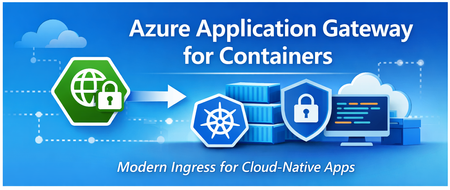
Introduction Azure Application Gateway for Containers is a managed Azure service designed to handle incoming traffic for container-based applications. It brings Layer-7 load balancing, routing, TLS termination, and web application protection outside of the Kubernetes cluster and into an Azure-managed data plane. By separating traffic management from the cluster itself, the service reduces operational complexity while providing a more consistent, secure, and scalable way to expose container workloads on Azure. Service Overview What Application Gateway for Containers does Azure Application Gateway for Containers is a managed Layer-7 load balancing and ingress service built specifically for containerized workloads. Its main job is to receive incoming application traffic (HTTP/HTTPS), apply routing and security rules, and forward that traffic to the right backend containers running in your Kubernetes cluster. Instead of deploying and operating an ingress controller inside the cluster, Application Gateway for Containers runs outside the cluster, as an Azure-managed data plane. It integrates natively with Kubernetes through the Gateway API (and Ingress API), translating Kubernetes configuration into fully managed Azure networking behavior. In practical terms, it handles: HTTP/HTTPS routing based on hostnames, paths, headers, and methods TLS termination and certificate management Web Application Firewall (WAF) protection Scaling and high availability of the ingress layer All of this is provided as a managed Azure service, without running ingress pods in your cluster. What problems it solves Application Gateway for Containers addresses several common challenges teams face with traditional Kubernetes ingress setups: Operational overhead Running ingress controllers inside the cluster means managing upgrades, scaling, certificates, and availability yourself. Moving ingress to a managed Azure service significantly reduces this burden. Security boundaries By keeping traffic management and WAF outside the cluster, you reduce the attack surface of the Kubernetes environment and keep security controls aligned with Azure-native services. Consistency across environments Platform teams can offer a standard, Azure-managed ingress layer that behaves the same way across clusters and environments, instead of relying on different in-cluster ingress configurations. Separation of responsibilities Infrastructure teams manage the gateway and security policies, while application teams focus on Kubernetes resources like routes and services. How it differs from classic Application Gateway While both services share the “Application Gateway” name, they target different use cases and operating models. In the traditional model of using Azure Application Gateway is a general-purpose Layer-7 load balancer primarily designed for VM-based or service-based backends. It relies on centralized configuration through Azure resources and is not Kubernetes-native by design. Application Gateway for Containers, on the other hand: Is designed specifically for container platforms Uses Kubernetes APIs (Gateway API / Ingress) instead of manual listener and rule configuration Separates control plane and data plane more cleanly Enables faster, near real-time updates driven by Kubernetes changes Avoids running ingress components inside the cluster In short, classic Application Gateway is infrastructure-first, while Application Gateway for Containers is platform- and Kubernetes-first. Architecture at a Glance At a high level, Azure Application Gateway for Containers is built around a clear separation between control plane and data plane. This separation is one of the key architectural ideas behind the service and explains many of its benefits. Control plane and data plane The control plane is responsible for configuration and orchestration. It listens to Kubernetes resources—such as Gateway API or Ingress objects—and translates them into a running gateway configuration. When you create or update routing rules, TLS settings, or security policies in Kubernetes, the control plane picks up those changes and applies them automatically. The data plane is where traffic actually flows. It handles incoming HTTP and HTTPS requests, applies routing rules, performs TLS termination, and forwards traffic to the correct backend services inside your cluster. This data plane is fully managed by Azure and runs outside of the Kubernetes cluster, providing isolation and high availability by design. Because the data plane is not deployed as pods inside the cluster, it does not consume cluster resources and does not need to be scaled or upgraded by the customer. Managed components vs customer responsibilities One of the goals of Application Gateway for Containers is to reduce what customers need to operate, while still giving them control where it matters. Managed by Azure Application Gateway for Containers data plane Scaling, availability, and patching of the gateway Integration with Azure networking Web Application Firewall engine and updates Translation of Kubernetes configuration into gateway rules Customer-managed Kubernetes resources (Gateway API or Ingress) Backend services and workloads TLS certificates and references Routing and security intent (hosts, paths, policies) Network design and connectivity to the cluster This split allows platform teams to keep ownership of the underlying Azure infrastructure, while application teams interact with the gateway using familiar Kubernetes APIs. The result is a cleaner operating model with fewer moving parts inside the cluster. In short, Application Gateway for Containers acts as an Azure-managed ingress layer, driven by Kubernetes configuration but operated outside the cluster. This architecture keeps traffic management simple, scalable, and aligned with Azure-native networking and security services. Traffic Handling and Routing This section explains what happens to a request from the moment it reaches Azure until it is forwarded to a container running in your cluster. Traffic Flow: From Internet to Pod Azure Application Gateway for Containers (AGC) acts as the specialized "front door" for your Kubernetes workloads. By sitting outside the cluster, it manages high-volume traffic ingestion so your environment remains focused on application logic rather than networking overhead. The Request Journey Once a request is initiated by a client—such as a browser or an API—it follows a streamlined path to your container: 1. Entry via Public Frontend: The request reaches AGC’s public frontend endpoint. Note: While private frontends are currently the most requested feature and are under high-priority development, the service currently supports public-facing endpoints. 2. Rule Evaluation: AGC evaluates the incoming request against the routing rules you’ve defined using standard Kubernetes resources (Gateway API or Ingress). 3. Direct Pod Proxying: Once a rule is matched, AGC forwards the traffic directly to the backend pods within your cluster. 4. Azure Native Delivery: Because AGC operates as a managed data plane outside the cluster, traffic reaches your workloads via Azure networking. This removes the need for managing scaling or resource contention for in-cluster ingress pods. Flexibility in Security and Routing The architecture is designed to be as "hands-off" or as "hands-on" as your security policy requires: Optional TLS Offloading: You have full control over the encryption lifecycle. Depending on your specific use case, you can choose to perform TLS termination at the gateway to offload the compute-intensive decryption, or maintain encryption all the way to the container for end-to-end security. Simplified Infrastructure: By using AGC, you eliminate the "hop" typically required by in-cluster controllers, allowing the gateway to communicate with pods with minimal latency and high predictability. Kubernetes Integration Application Gateway for Containers is designed to integrate natively with Kubernetes, allowing teams to manage ingress behavior using familiar Kubernetes resources instead of Azure-specific configuration. This makes the service feel like a natural extension of the Kubernetes platform rather than an external load balancer. Gateway API as the primary integration model The Gateway API is the preferred and recommended way to integrate Application Gateway for Containers with Kubernetes. With the Gateway API: Platform teams define the Gateway and control how traffic enters the cluster. Application teams define routes (such as HTTPRoute) to expose their services. Responsibilities are clearly separated, supporting multi-team and multi-namespace environments. Application Gateway for Containers supports core Gateway API resources such as: GatewayClass Gateway HTTPRoute When these resources are created or updated, Application Gateway for Containers automatically translates them into gateway configuration and applies the changes in near real time. Ingress API support For teams that already use the traditional Kubernetes Ingress API, Application Gateway for Containers also provides Ingress support. This allows: Reuse of existing Ingress manifests A smoother migration path from older ingress controllers Gradual adoption of Gateway API over time Ingress resources are associated with Application Gateway for Containers using a specific ingress class. While fully functional, the Ingress API offers fewer capabilities and less flexibility compared to the Gateway API. How teams interact with the service A key benefit of this integration model is the clean separation of responsibilities: Platform teams Provision and manage Application Gateway for Containers Define gateways, listeners, and security boundaries Own network and security policies Application teams Define routes using Kubernetes APIs Control how their applications are exposed Do not need direct access to Azure networking resources This approach enables self-service for application teams while keeping governance and security centralized. Why this matters By integrating deeply with Kubernetes APIs, Application Gateway for Containers avoids custom controllers, sidecars, or ingress pods inside the cluster. Configuration stays declarative, changes are automated, and the operational model stays consistent with Kubernetes best practices. Security Capabilities Security is a core part of Azure Application Gateway for Containers and one of the main reasons teams choose it over in-cluster ingress controllers. The service brings Azure-native security controls directly in front of your container workloads, without adding complexity inside the cluster. Web Application Firewall (WAF) Application Gateway for Containers integrates with Azure Web Application Firewall (WAF) to protect applications against common web attacks such as SQL injection, cross-site scripting, and other OWASP Top 10 threats. A key differentiator of this service is that it leverages Microsoft's global threat intelligence. This provides an enterprise-grade layer of security that constantly evolves to block emerging threats, a significant advantage over many open-source or standard competitor WAF solutions. Because the WAF operates within the managed data plane, it offers several operational benefits: Zero Cluster Footprint: No WAF-specific pods or components are required to run inside your Kubernetes cluster, saving resources for your actual applications. Edge Protection: Security rules and policies are applied at the Azure network edge, ensuring malicious traffic is blocked before it ever reaches your workloads. Automated Maintenance: All rule updates, patching, and engine maintenance are handled entirely by Azure. Centralized Governance: WAF policies can be managed centrally, ensuring consistent security enforcement across multiple teams and namespaces—a critical requirement for regulated environments. TLS and certificate handling TLS termination happens directly at the gateway. HTTPS traffic is decrypted at the edge, inspected, and then forwarded to backend services. Key points: Certificates are referenced from Kubernetes configuration TLS policies are enforced by the Azure-managed gateway Applications receive plain HTTP traffic, keeping workloads simpler This approach allows teams to standardize TLS behavior across clusters and environments, while avoiding certificate logic inside application pods. Network isolation and exposure control Because Application Gateway for Containers runs outside the cluster, it provides a clear security boundary between external traffic and Kubernetes workloads. Common patterns include: Internet-facing gateways with WAF protection Private gateways for internal or zero-trust access Controlled exposure of only selected services By keeping traffic management and security at the gateway layer, clusters remain more isolated and easier to protect. Security by design Overall, the security model follows a simple principle: inspect, protect, and control traffic before it enters the cluster. This reduces the attack surface of Kubernetes, centralizes security controls, and aligns container ingress with Azure’s broader security ecosystem. Scale, Performance, and Limits Azure Application Gateway for Containers is built to handle production-scale traffic without requiring customers to manage capacity, scaling rules, or availability of the ingress layer. Scalability and performance are handled as part of the managed service. Interoperability: The Best of Both Worlds A common hesitation when adopting cloud-native networking is the fear of vendor lock-in. Many organizations worry that using a provider-specific ingress service will tie their application logic too closely to a single cloud’s proprietary configuration. Azure Application Gateway for Containers (AGC) addresses this directly by utilizing the Kubernetes Gateway API as its primary integration model. This creates a powerful decoupling between how you define your traffic and how that traffic is actually delivered. Standardized API, Managed Execution By adopting this model, you gain two critical advantages simultaneously: Zero Vendor Lock-In (Standardized API): Your routing logic is defined using the open-source Kubernetes Gateway API standard. Because HTTPRoute and Gateway resources are community-driven standards, your configuration remains portable and familiar to any Kubernetes professional, regardless of the underlying infrastructure. Zero Operational Overhead (Managed Implementation): While the interface is a standard Kubernetes API, the implementation is a high-performance Azure-managed service. You gain the benefits of an enterprise-grade load balancer—automatic scaling, high availability, and integrated security—without the burden of managing, patching, or troubleshooting proxy pods inside your cluster. The "Pragmatic" Advantage As highlighted in recent architectural discussions, moving from traditional Ingress to the Gateway API is about more than just new features; it’s about interoperability. It allows platform teams to offer a consistent, self-service experience to developers while retaining the ability to leverage the best-in-class performance and security that only a native cloud provider can offer. The result is a future-proof architecture: your teams use the industry-standard language of Kubernetes to describe what they need, and Azure provides the managed muscle to make it happen. Scaling model Application Gateway for Containers uses an automatic scaling model. The gateway data plane scales up or down based on incoming traffic patterns, without manual intervention. From an operator’s perspective: There are no ingress pods to scale No node capacity planning for ingress No separate autoscaler to configure Scaling is handled entirely by Azure, allowing teams to focus on application behavior rather than ingress infrastructure. Performance characteristics Because the data plane runs outside the Kubernetes cluster, ingress traffic does not compete with application workloads for CPU or memory. This often results in: More predictable latency Better isolation between traffic management and application execution Consistent performance under load The service supports common production requirements such as: High concurrent connections Low-latency HTTP and HTTPS traffic Near real-time configuration updates driven by Kubernetes changes Service limits and considerations Like any managed service, Application Gateway for Containers has defined limits that architects should be aware of when designing solutions. These include limits around: Number of listeners and routes Backend service associations Certificates and TLS configurations Throughput and connection scaling thresholds These limits are documented and enforced by the platform to ensure stability and predictable behavior. For most application platforms, these limits are well above typical usage. However, they should be reviewed early when designing large multi-tenant or high-traffic environments. Designing with scale in mind The key takeaway is that Application Gateway for Containers removes ingress scaling from the cluster and turns it into an Azure-managed concern. This simplifies operations and provides a stable, high-performance entry point for container workloads. When to Use (and When Not to Use) Scenario Use it? Why Kubernetes workloads on Azure ✅ Yes The service is designed specifically for container platforms and integrates natively with Kubernetes APIs. Need for managed Layer-7 ingress ✅ Yes Routing, TLS, and scaling are handled by Azure without in-cluster components. Enterprise security requirements (WAF, TLS policies) ✅ Yes Built-in Azure WAF and centralized TLS enforcement simplify security. Platform team managing ingress for multiple apps ✅ Yes Clear separation between platform and application responsibilities. Multi-tenant Kubernetes clusters ✅ Yes Gateway API model supports clean ownership boundaries and isolation. Desire to avoid running ingress controllers in the cluster ✅ Yes No ingress pods, no cluster resource consumption. VM-based or non-container backends ❌ No Classic Application Gateway is a better fit for non-container workloads. Simple, low-traffic test or dev environments ❌ Maybe not A lightweight in-cluster ingress may be simpler and more cost-effective. Need for custom or unsupported L7 features ❌ Maybe not Some advanced or niche ingress features may not yet be available. Non-Kubernetes platforms ❌ No The service is tightly integrated with Kubernetes APIs. When to Choose a Different Path: Azure Container Apps While Application Gateway for Containers provides the ultimate control for Kubernetes environments, not every project requires that level of infrastructure management. For teams that don't need the full flexibility of Kubernetes and are looking for the fastest path to running containers on Azure without managing clusters or ingress infrastructure at all, Azure Container Apps offers a specialized alternative. It provides a fully managed, serverless container platform that handles scaling, ingress, and networking automatically "out of the box". Key Differences at a Glance Feature AGC + Kubernetes Azure Container Apps Control Granular control over cluster and ingress. Fully managed, serverless experience. Management You manage the cluster; Azure manages the gateway. Azure manages both the platform and ingress. Best For Complex, multi-team, or highly regulated environments. Rapid development and simplified operations. Appendix - Routing configuration examples The following examples show how Application Gateway for Containers can be configured using both Gateway API and Ingress API for common routing and TLS scenarios. More examples can be found here, in the detailed documentation. HTTP listener apiVersion: gateway.networking.k8s.io/v1 kind: HTTPRoute metadata: name: app-route spec: parentRefs: - name: agc-gateway rules: - backendRefs: - name: app-service port: 80 Path routing logic apiVersion: gateway.networking.k8s.io/v1 kind: HTTPRoute metadata: name: path-routing spec: parentRefs: - name: agc-gateway rules: - matches: - path: type: PathPrefix value: /api backendRefs: - name: api-service port: 80 - backendRefs: - name: web-service port: 80 Weighted canary / rollout apiVersion: gateway.networking.k8s.io/v1 kind: HTTPRoute metadata: name: canary-route spec: parentRefs: - name: agc-gateway rules: - backendRefs: - name: app-v1 port: 80 weight: 80 - name: app-v2 port: 80 weight: 20 TLS Termination apiVersion: networking.k8s.io/v1 kind: Ingress metadata: name: app-ingress spec: ingressClassName: azure-alb-external tls: - hosts: - app.contoso.com secretName: tls-cert rules: - host: app.contoso.com http: paths: - path: / pathType: Prefix backend: service: name: app-service port: number: 801.5KViews2likes0CommentsReimagining App Modernization for the Era of AI
This blog highlights the key announcements and innovations from Microsoft Build 2025. It focuses on how AI is transforming the software development lifecycle, particularly in app modernization. Key topics include the use of GitHub Copilot for accelerating development and modernization, the introduction of Azure SRE agent for managing production systems, and the launch of the App Modernization Guidance to help organizations modernize their applications with AI-first design. The blog emphasizes the strategic approach to modernization, aiming to reduce complexity, improve agility, and deliver measurable business outcomes5.1KViews2likes0CommentsBuilding the Agentic Future
As a business built by developers, for developers, Microsoft has spent decades making it faster, easier and more exciting to create great software. And developers everywhere have turned everything from BASIC and the .NET Framework, to Azure, VS Code, GitHub and more into the digital world we all live in today. But nothing compares to what’s on the horizon as agentic AI redefines both how we build and the apps we’re building. In fact, the promise of agentic AI is so strong that market forecasts predict we’re on track to reach 1.3 billion AI Agents by 2028. Our own data, from 1,500 organizations around the world, shows agent capabilities have jumped as a driver for AI applications from near last to a top three priority when comparing deployments earlier this year to applications being defined today. Of those organizations building AI agents, 41% chose Microsoft to build and run their solutions, significantly more than any other vendor. But within software development the opportunity is even greater, with approximately 50% of businesses intending to incorporate agentic AI into software engineering this year alone. Developers face a fascinating yet challenging world of complex agent workflows, a constant pipeline of new models, new security and governance requirements, and the continued pressure to deliver value from AI, fast, all while contending with decades of legacy applications and technical debt. This week at Microsoft Build, you can see how we’re making this future a reality with new AI-native developer practices and experiences, by extending the value of AI across the entire software lifecycle, and by bringing critical AI, data, and toolchain services directly to the hands of developers, in the most popular developer tools in the world. Agentic DevOps AI has already transformed the way we code, with 15 million developers using GitHub Copilot today to build faster. But coding is only a fraction of the developer’s time. Extending agents across the entire software lifecycle, means developers can move faster from idea to production, boost code quality, and strengthen security, while removing the burden of low value, routine, time consuming tasks. We can even address decades of technical debt and keep apps running smoothly in production. This is the foundation of agentic DevOps—the next evolution of DevOps, reimagined for a world where intelligent agents collaborate with developer teams and with each other. Agents introduced today across GitHub Copilot and Azure operate like a member of your development team, automating and optimizing every stage of the software lifecycle, from performing code reviews, and writing tests to fixing defects and building entire specs. Copilot can even collaborate with other agents to complete complex tasks like resolving production issues. Developers stay at the center of innovation, orchestrating agents for the mundane while focusing their energy on the work that matters most. Customers like EY are already seeing the impact: “The coding agent in GitHub Copilot is opening up doors for each developer to have their own team, all working in parallel to amplify their work. Now we're able to assign tasks that would typically detract from deeper, more complex work, freeing up several hours for focus time." - James Zabinski, DevEx Lead at EY You can learn more about agentic DevOps and the new capabilities announced today from Amanda Silver, Corporate Vice President of Product, Microsoft Developer Division, and Mario Rodriguez, Chief Product Office at GitHub. And be sure to read more from GitHub CEO Thomas Dohmke about the latest with GitHub Copilot. At Microsoft Build, see agentic DevOps in action in the following sessions, available both in-person May 19 - 22 in Seattle and on-demand: BRK100: Reimagining Software Development and DevOps with Agentic AI BRK 113: The Agent Awakens: Collaborative Development with GitHub Copilot BRK118: Accelerate Azure Development with GitHub Copilot, VS Code & AI BRK131: Java App Modernization Simplified with AI BRK102: Agent Mode in Action: AI Coding with Vibe and Spec-Driven Flows BRK101: The Future of .NET App Modernization Streamlined with AI New AI Toolchain Integrations Beyond these new agentic capabilities, we’re also releasing new integrations that bring key services directly to the tools developers are already using. From the 150 million GitHub users to the 50 million monthly users of the VS Code family, we’re making it easier for developers everywhere to build AI apps. If GitHub Copilot changed how we write code, Azure AI Foundry is changing what we can build. And the combination of the two is incredibly powerful. Now we’re bringing leading models from Azure AI Foundry directly into your GitHub experience and workflow, with a new native integration. GitHub models lets you experiment with leading models from OpenAI, Meta, Cohere, Microsoft, Mistral and more. Test and compare performance while building models directly into your codebase all within in GitHub. You can easily select the best model performance and price side by side and swap models with a simple, unified API. And keeping with our enterprise commitment, teams can set guardrails so model selection is secure, responsible, and in line with your team’s policies. Meanwhile, new Azure Native Integrations gives developers seamless access to a curated set of 20 software services from DataDog, New Relic, Pinecone, Pure Storage Cloud and more, directly through Azure portal, SDK, and CLI. With Azure Native Integrations, developers get the flexibility to work with their preferred vendors across the AI toolchain with simplified single sign-on and management, while staying in Azure. Today, we are pleased to announce the addition of even more developer services: Arize AI: Arize’s platform provides essential tooling for AI and agent evaluation, experimentation, and observability at scale. With Arize, developers can easily optimize AI applications through tools for tracing, prompt engineering, dataset curation, and automated evaluations. Learn more. LambdaTest HyperExecute: LambdaTest HyperExecute is an AI-native test execution platform designed to accelerate software testing. It enables developers and testers to run tests up to 70% faster than traditional cloud grids by optimizing test orchestration, observability and streamlining TestOps to expedite release cycles. Learn more. Mistral: Mistral and Microsoft announced a partnership today, which includes integrating Mistral La Plateforme as part of Azure Native Integrations. Mistral La Plateforme provides pay-as-you-go API access to Mistral AI's latest large language models for text generation, embeddings, and function calling. Developers can use this AI platform to build AI-powered applications with retrieval-augmented generation (RAG), fine-tune models for domain-specific tasks, and integrate AI agents into enterprise workflows. MongoDB (Public Preview): MongoDB Atlas is a fully managed cloud database that provides scalability, security, and multi-cloud support for modern applications. Developers can use it to store and search vector embeddings, implement retrieval-augmented generation (RAG), and build AI-powered search and recommendation systems. Learn more. Neon: Neon Serverless Postgres is a fully managed, autoscaling PostgreSQL database designed for instant provisioning, cost efficiency, and AI-native workloads. Developers can use it to rapidly spin up databases for AI agents, store vector embeddings with pgvector, and scale AI applications seamlessly. Learn more. Java and .Net App Modernization Shipping to production isn’t the finish line—and maintaining legacy code shouldn’t slow you down. Today we’re announcing comprehensive resources to help you successfully plan and execute app modernization initiatives, along with new agents in GitHub Copilot to help you modernize at scale, in a fraction of the time. In fact, customers like Ford China are seeing breakthrough results, reducing up to 70% of their Java migration efforts by using GitHub Copilot to automate middleware code migration tasks. Microsoft’s App Modernization Guidance applies decades of enterprise apps experience to help you analyze production apps and prioritize modernization efforts, while applying best practices and technical patterns to ensure success. And now GitHub Copilot transforms the modernization process, handling code assessments, dependency updates, and remediation across your production Java and .NET apps (support for mainframe environments is coming soon!). It generates and executes update plans automatically, while giving you full visibility, control, and a clear summary of changes. You can even raise modernization tasks in GitHub Issues from our proven service Azure Migrate to assign to developer teams. Your apps are more secure, maintainable, and cost-efficient, faster than ever. Learn how we’re reimagining app modernization for the era of AI with the new App Modernization Guidance and the modernization agent in GitHub Copilot to help you modernize your complete app estate. Scaling AI Apps and Agents Sophisticated apps and agents need an equally powerful runtime. And today we’re advancing our complete portfolio, from serverless with Azure Functions and Azure Container Apps, to the control and scale of Azure Kubernetes Service. At Build we’re simplifying how you deploy, test, and operate open-source and custom models on Kubernetes through Kubernetes AI Toolchain Operator (KAITO), making it easy to inference AI models with the flexibility, auto-scaling, pay-per-second pricing, and governance of Azure Container Apps serverless GPU, helping you create real-time, event-driven workflows for AI agents by integrating Azure Functions with Azure AI Foundry Agent Service, and much, much more. The platform you choose to scale your apps has never been more important. With new integrations with Azure AI Foundry, advanced automation that reduces developer overhead, and simplified operations, security and governance, Azure’s app platform can help you deliver the sophisticated, secure AI apps your business demands. To see the full slate of innovations across the app platform, check out: Powering the Next Generation of AI Apps and Agents on the Azure Application Platform Tools that keep pace with how you need to build This week we’re also introducing new enhancements to our tooling to help you build as fast as possible and explore what’s next with AI, all directly from your editor. GitHub Copilot for Azure brings Azure-specific tools into agent mode in VS Code, keeping you in the flow as you create, manage, and troubleshoot cloud apps. Meanwhile the Azure Tools for VS Code extension pack brings everything you need to build apps on Azure using GitHub Copilot to VS Code, making it easy to discover and interact with cloud services that power your applications. Microsoft’s gallery of AI App Templates continues to expand, helping you rapidly move from concept to production app, deployed on Azure. Each template includes fully working applications, complete with app code, AI features, infrastructure as code (IaC), configurable CI/CD pipelines with GitHub Actions, along with an application architecture, ready to deploy to Azure. These templates reflect the most common patterns and use cases we see across our AI customers, from getting started with AI agents to building GenAI chat experiences with your enterprise data and helping you learn how to use best practices such as keyless authentication. Learn more by reading the latest on Build Apps and Agents with Visual Studio Code and Azure Building the agentic future The emergence of agentic DevOps, the new wave of development powered by GitHub Copilot and new services launching across Microsoft Build will be transformative. But just as we’ve seen over the first 50 years of Microsoft’s history, the real impact will come from the global community of developers. You all have the power to turn these tools and platforms into advanced AI apps and agents that make every business move faster, operate more intelligently and innovate in ways that were previously impossible. Learn more and get started with GitHub Copilot3.1KViews2likes0CommentsAnnouncing Public Preview of Larger Container Sizes on Azure Container Instances
ACI provides a fast and simple way to run containers in the cloud. As a serverless solution, ACI eliminates the need to manage underlying infrastructure, automatically scaling to meet application demands. Customers benefit from using ACI because it offers flexible resource allocation, pay-per-use pricing, and rapid deployment, making it easier to focus on development and innovation without worrying about infrastructure management. Today, we are excited to announce the public preview of larger container sizes on Azure Container Instances (ACI). Customers can now deploy workloads with higher vCPU and memory for standard containers, confidential containers, containers with virtual networks, and containers utilizing virtual nodes to connect to Azure Kubernetes Service (AKS). ACI now supports vCPU counts greater than 4 and memory capacities of 16 GB, with a maximum of 32 vCPU and 256 GB for standard containers and a maximum of 32 vCPU and 192 GB for confidential containers. Benefits of Larger Container Sizes on ACI Enhanced Performance More vCPUs mean more processing power, allowing for more efficient handling of complex tasks and applications. The enhanced performance from more vCPUs and larger GB capacity offers faster processing times and reduced latency, which can translate to cost savings in terms of time and productivity. Larger container groups with more GB can handle bigger datasets and more extensive workloads, making them ideal for data-intensive applications. Simplified Scalability Larger container groups provide the flexibility to scale up resources even higher as needed, accommodating growing business demands without compromising performance. Larger container SKUs can simplify the scaling process. Instead of managing many smaller containers, you can scale your applications with fewer, larger ones, potentially reducing the need for frequent scaling adjustments. Scenarios for Larger Container Sizes Data Inferencing Larger container SKUs are ideal for data inferencing tasks that require robust computational power. Examples include real-time fraud detection in financial transactions, predictive maintenance in manufacturing, and personalized recommendation engines in e-commerce. These containers ensure efficient and secure processing of large datasets for accurate predictions and insights. Collaborative Analytics When multiple parties need to share and analyze data, larger container SKUs provide a secure and efficient solution. For instance, companies in healthcare can collaborate on patient data analytics while maintaining confidentiality. Similarly, research institutions can share large datasets for scientific studies without compromising data privacy. Big Data Processing Organizations dealing with large-scale data processing can benefit from the enhanced capacity of larger container SKUs. Examples include processing customer data for targeted marketing campaigns, analyzing social media trends for sentiment analysis, and conducting large-scale financial modeling for risk assessment. These containers ensure efficient handling of extensive workloads. High-Performance Computing High-performance computing applications, such as climate modeling, genomic research, and computational fluid dynamics, demand substantial computational power. Larger container SKUs provide the necessary resources to support these intensive tasks, enabling precise simulations and faster results. How to start using Larger Container Sizes To begin using Larger Container Sizes, follow these steps. If you plan to run containers larger than 4 vCPU and 16 GB, you must request quota. Once your quota has been allocated, you can deploy your container groups through Azure portal, Azure CLI, PowerShell, ARM template, or any other method that allows you to connect to your container groups in Azure. Here are some tutorials for how to deploy containers using different methods. Quickstart - Deploy Docker container to container instance - Azure CLI - Azure Container Instances | Microsoft Learn Quickstart - Deploy Docker container to container instance - Portal - Azure Container Instances | Microsoft Learn Quickstart - Deploy Docker container to container instance - PowerShell - Azure Container Instances | Microsoft Learn Quickstart - create a container instance - Bicep - Azure Container Instances | Microsoft Learn Quickstart - Create a container instance - Azure Resource Manager template - Azure Container Instances | Microsoft Learn To learn more about Azure Container Instances, see Serverless containers in Azure - Azure Container Instances | Microsoft Learn.1.4KViews2likes0CommentsAzure Cloud Lab Environment
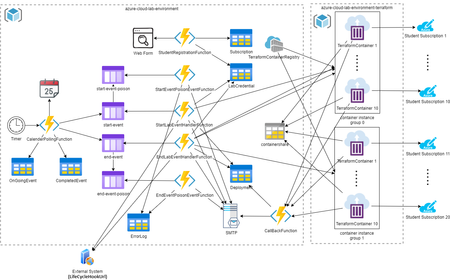
Azure Cloud Lab Environment is aims to facilitate educators using Azure in their teaching. Using Azure, educators can create the tailor-made lab environment for every student, and it is very important during the pandemic as students cannot back to school and they do not have a good PC at home. On the other hand, students need to work on some complicate deployment projects to learn Azure across the semester. Two main problems – the First is the project cost to continue running the project for a few months, and the second there is no check point for students. In case, a student done something wrong in middle of semester, then he must redo everything or just give up the project. As a result, it limits the scale of student lab project exercise.7.2KViews2likes0Comments