azure container apps
253 Topics
How Microsoft Intune team upgraded a .NET service with GitHub Copilot modernization
Microsoft's Customer Zero blog series gives an insider view of how Microsoft builds and operates Microsoft using our trusted, enterprise-grade platform. Learn best practices from our engineering teams through real-world lessons, architectural patterns, and operational strategies for building, operating, and scaling AI-powered systems across the organization. A hosting platform transition gave our team an opportunity to modernize a Microsoft Intune enrollment service to .NET 8. I used GitHub Copilot modernization to assist with that work while retaining responsibility for design decisions and validation. Using GitHub Copilot modernization, I saved more than four weeks on the first library alone. The more durable outcome was the working method built around the agent: three working files that I kept alongside the code and owned myself, rather than leaving that state to the model, that let a months-long migration be paused, corrected and resumed without re-deriving the analysis every time. What follows is how that worked in practice, including where the agent stopped helping. The Challenge: retiring a hosting platform without carrying the framework forward My team owns a Platform as-a Service (PaaS) service that supports devices enrolling into Intune at the start of their enrollment journey. Microsoft Intune is a cloud-based endpoint management service that secures and manages an organization's devices and apps. It lets a company’s IT team manage and secure employees’ laptops, phones, tablets, apps, and company data from one central service. It supports Android, iOS/iPadOS, Linux, macOS, tvOS, visionOS, and Windows devices. This Service was running on .NET Framework 4.7.2, hosted on a non-AKS hosting platform. I moved it to Azure Kubernetes Service (AKS) hosting environment which is what started the work. The modernization combined two related but distinct changes: moving the workload to AKS and modernizing the application code to .NET. 8. The heaviest part was dependency mapping. A key part of the migration was mapping dependencies across shared libraries, namespaces, and APIs, including Intune owned and even team-owned libraries, some of which also needed modern .NET-compatible packages. The service had a substantial codebase with dependencies across multiple libraries, namespaces, and APIs. Some APIs were unchanged, some were renamed, and some had no direct replacement and required a design decision. These APIs were most often from internal Intune libraries. Without reusable mappings, those questions recur across projects and files. To maintain continuity across the migration as this was a long-term project, I kept an explicit record of decisions, completed work, and the next steps. The service spans several libraries and multiple endpoints that support about 20 plus different enrollment flows across Windows, Linux, Android, iOS, and macOS platforms. A single pull request covering the full migration was not possible, so I divided the work into increments small enough to review, test, and merge, or to isolate by enrollment flow, with a way to stop one day and pick up the next without paying the analysis cost twice. The Solution: a modernization agent with engineer-owned working content I started the side-by-side .NET framework service to .NET 8 service migration by hand, then brought in GitHub Copilot. In my early tests, I needed .NET migration-specific domain context beyond what I had established in my copilot session. The limitation was missing domain context, not an inability to generate code, and that is the gap a purpose-built tool closes. GitHub Copilot modernization is an agent built on GitHub Copilot, with Microsoft's language teams supplying domain knowledge. For .NET, its recommendations draw on current assembly and NuGet package analysis rather than relying only on patterns learned during model training. GitHub Copilot modernization is now available in Visual Studio, Visual Studio Code, GitHub Copilot CLI, GitHub Copilot app, and GitHub.com. When I did this migration, it was available only in Visual Studio and Visual Studio Code. For this migration, I chose GitHub Copilot modernization in Visual Studio through GitHub Copilot Chat in agent mode. I tested the modernization agent against work it could already check, running it over the same project and classes that I had migrated by hand and comparing the two. They were very close. That comparison, rather than anything in the tool's description, is what established enough confidence to point it at code nobody had migrated or analyzed manually yet. Once I started using the modernization agent, I realized that it was able to map .NET specific and global libraries as well as the API calls efficiently. The agent analyzed well but did not reliably retain migration state across sessions. Returning to the work could trigger a new assessment that overwrote prior artifacts. To avoid this, the more transferable part of my approach was the working context I built around the agent: a migration plan (migrationplan.md), a progress record (progress.md), and context notes. The agent generated a migrationPlan.md and progress.md at my request; I added the context from my notes from my previous sessions and manual migration and kept all three current in my local repository. The context preserved mappings I had already established by hand, so the agent could reuse settled decisions instead of researching them again. I kept them in my local repository rather than checking them in. The migrationplan.md broke the work into phases and day-sized tasks, and the progress.md file was updated after each increment. The next session could resume the recorded task instead of reassessing the codebase. When a migration increment surfaced a build issue, fixing it meant a side conversation, and the thread of the main work got lost in it. To avoid this, I started recording each failure under that day's task: what failed, what was tried, and what was ruled out. That gave the investigation somewhere to live without overwriting the main work. The current agents experience records task failures in progress-details.md. The Migrationplan.md is an editable markdown file, not opaque internal state, and I edited it when needed. Where a generated step was wrong for the service, or I wanted smaller increments of work per pull request, or to migrate a scenario before another, or to focus on one API path per pull request, or even to change the ordering, I updated the file with the correct information and the agent picked up the revision and carried on rather than reverting to its own plan. That made the editable plan especially useful when the migration approach changed. Plan granularity is also how I controlled pull request size. I used the plan to constrain each increment: for example, three model files and a view file, or one small end-to-end enrollment flow at a time, or one controller at a time, or sometimes not even a whole controller, just one API path, I made this judgement depending on the complexity of the scenario I wanted to migrate. Small increments stayed reviewable, and a broken build left a smaller surface to investigate. Supplying the build error and asking the agent to re-examine that increment produced a focused follow-up change. I began using the .NET modernize agent with an internal library, that supports Windows client calls made over Simple Object Access Protocol (SOAP). Before discovering the tool, I had already side-by-side migrated the .NET framework version of that library into another .NET8 successor library and had updated portions of the service’s windows enrollment flow. I used the mapping I had made between framework and .NET 8 libraries and APIs during this migration as a context for the tool, allowing each migration pass to reuse and add to the mappings established in previous one. The tool’s recommendations closely aligned with my manual migration approach on redo of the first library, which built my confidence in its output. I then used it for my next two internal library migrations, and the remaining Apple and Android enrollment flows in the service. The Impact: what the approach saved, and what it did not The internal library that handles Windows enrollment calls was estimated and took roughly six weeks of work but the tool completed it in one and a half weeks, a 75% schedule reduction, and on the second internal library dependency, also estimated at six weeks, I saved time again. I was able to reapply those savings to the remaining enrollment flows as I continued the service migration. The saving came from work that did not have to happen twice. Mappings settled in one phase were reused in the next rather than rediscovered. Project file conversion and NuGet package resolution, which is mechanical but voluminous, moved to the agent. What stayed with me was review, integration, the decisions, and the containerization and move to AKS itself. Without the agent, I would have needed to prioritize the migration more exclusively, which would have cut into the other project work I was delivering at the same time. Where the agent stopped helping In my experience, public libraries and Microsoft-wide libraries mapped well. Intune-internal libraries did not. In a subsequent internal prototype, I tested the agent on another service with different migration dependencies. For Intune-internal libraries, it could not identify which modern NuGet package or API replaced each dependency because those mappings were not available in its context. It still removed some of the mechanical work, but the mappings themselves stayed manual. During the prototype, I also built skills that work as a wrapper for the modernization agent that provides this internal migration context. I checked those skills into our internal repository so other Microsoft Intune engineering teams can use them internally through a plugin. What another team should take from this Validate it against work already done by hand to gain confidence. Running the agent over classes you have already migrated manually and comparing the output is cheap, and it gives you evidence for deciding whether to use the agent on code it has not yet migrated. Own the plan, not just the prompt. The agent writes its own plan and progress files to the repository. Read them and correct them, and it will follow your edits. For what it can't know, such as internal library mappings or your team's coding conventions, add a custom skill to the repository, and the agent will follow that too. Control pull request size through the plan rather than after the fact. Break pull requests into small increments. Scoping an increment to one controller, one API path, or a small end-to-end scenario keeps the change reviewable and testable, with a clear boundary for investigating migration issues. Reuse dependency mapping instead of rediscovering them. A large part of time savings come from carrying mappings established in previous phases into subsequent ones, even across libraries and services. Mechanical work like project conversion and NuGet package resolution can be handed off to the agent while you retained responsibility for integration, review and design decisions. Looking ahead The application-layer modernization is finished, while parity validation and the AKS traffic rollout continues. The reusable skills are checked into an internal repository and available to Intune engineering teams through an internal plugin, so another library or service can reuse established dependency-mapping work as well as Intune internal guidelines. I also shared the method and its measured time savings through Intune learning sessions, show and tell, Teams posts, and a newsletter. Learn more about GitHub Copilot modernization for .NET at https://dotnet.microsoft.com/platform/modernize and about Microsoft Intune at What is Microsoft Intune? - Microsoft Intune | Microsoft Learn.474Views0likes0Comments
Enterprise Adoption Guide for Azure SRE Agent, Part 1: Deploying Your First Azure SRE Agent
We have learned a lot from talking with teams that are bringing Azure SRE Agent into their day-to-day operations. Across those conversations, we have seen a common set of questions emerge as teams move from exploring an initial use case to adopting SRE Agent more broadly. Some teams are starting with a simple question: “Where should we begin?” Others have already seen value in reducing operational toil and improving incident response and are asking what comes next. How do we expand from one successful use case to more workflows? Can multiple teams share the same agent safely? When should we use one SRE Agent versus multiple agents? How should agents collaborate? And how do we deploy and govern them consistently across the enterprise? This two-part guide shares the patterns we have seen and our recommendations for navigating that journey, from the first use case to broader enterprise adoption. Our recommendation is to start with one operational problem your team understands, learn what the agent needs to solve it effectively, and expand from there. The goal is not to design your enterprise topology on day one. It is to make each next decision with better evidence. Part 1: Deploying Your First Azure SRE Agent Which operational problem should we start with? How do I run the first use case? Should I use SRE Agent’s built-in capabilities or customize it? How do we turn a successful first use case into more automated operational workflows? Part 2: From One Team to Enterprise-Wide Adoption How do we share an SRE Agent with more users? How do we expand from one team to multiple teams, and do we need one SRE Agent or multiple? How do we codify, deploy, and govern SRE Agents at enterprise scale? Part 1 focuses on proving and expanding the operational value. Part 2 addresses the questions that appear when more users, teams, and agents become involved. 1. Which operational problem should we start with? A strong first use case is a recurring, bounded problem that the team feels today and understands well enough to judge. Focus on work that affects reliability, consumes engineering time, slows incident response, or creates avoidable cost. Start with the operational pain your team feels most. Choose one well-bounded problem that matters to the team and is familiar enough to judge. If you are unsure where to begin, start by asking SRE Agent to investigate an issue or incident your team is already looking at. Give it the observed symptom or question, let it bring together telemetry, dependencies, source code, and recent changes, and see whether it can identify where the problem is likely occurring. That investigation can include root-cause analysis, deployment correlation, Azure resource health, and dependency analysis. The examples below are some of the use cases we have seen customers implement. Alert investigation: correlate alerts with telemetry, dependencies, source code, and recent changes to explain what happened and identify the next step. Incident auto-triage: collect the initial evidence, identify likely ownership and severity, remove known false positives, and prepare the incident for the responding team. Proactive availability: perform proactive health checks, reliability risks, degraded signals, or unhealthy dependencies before they become customer-facing incidents. Deployment correlation: correlate a failure or degradation with recent deployments, configuration changes, feature releases, and infrastructure updates. Production deployment validation: evaluate post-deployment telemetry, logs, dependencies, and service-health criteria to confirm that a production release is healthy. FinOps proactive cost optimization: identify unexpected cost changes, underused resources, and rightsizing opportunities before spend becomes a larger problem. Certificate expiry monitoring: identify certificates approaching expiration, determine the affected services and owners, and initiate the appropriate follow-up. 2. How do I run the first use case? Should I use SRE Agent’s built-in capabilities or customize it? Once the team has selected the operational pain it wants to address, the next step is to prove that SRE Agent can improve the outcome. Two questions matter at this stage: how should we set up SRE Agent to execute the first use case, and do we need to customize beyond its built-in capabilities? Keep the first use case deliberately small. Connect only the context required to solve the selected problem. For deployment validation, that may be the relevant telemetry source, code repository, deployment history, and runbook, not every repository, monitoring system, or resource the team may eventually use. For more guidance on setting up the first SRE Agent, see Getting the best out of Azure SRE Agent. Begin with diagnostic or read-only access. Use the agent’s managed identity and Azure RBAC as the starting point for Azure resource access. Grant only the resource scopes and permissions required for the use case. As the workflow demonstrates a need to perform write actions, add the narrowest permission at the narrowest practical scope rather than granting broad access up front. Test the agent against a few recent historical incidents the team understands. Use these cases to confirm that the agent can reach the right telemetry, code, deployment history, and operational knowledge, and to expose missing context before a live incident. Then use SRE Agent alongside the team’s normal response process when a real issue occurs. This is where teams begin to build trust: the agent surfaces the relevant evidence, identifies where the problem is likely occurring, connects it to a dependency or recent change, explains its reasoning, and helps responders reach the diagnosis faster. Define the outcomes you want to accomplish. Measure the outcome in the system that already records it, for example, mean time to resolution in the incident platform, alert volume or false-positive rate in monitoring, deployment failure or rollback rate in CI/CD. Choose the measure that matches the pain that justified the use case. Establish a baseline, then use an SRE Agent live report or an existing dashboard to track the result. 2.1 When do I customize SRE Agent, and do I need a skill, custom subagent, or tool? Always start small with SRE Agent’s built-in capabilities. Then add only what the workflow needs. Start with the expert skills and tools that come with SRE Agent. Out of the box, SRE Agent combines Azure-specific product knowledge and built-in operational capabilities for diagnosing issues and finding probable root causes across Azure. This expertise spans all of Azure, including compute, storage, networking, data, monitoring, and management services. Its native integrations connect Azure Monitor, Application Insights, and Log Analytics, GitHub, and Azure DevOps so the agent can correlate infrastructure state, telemetry, deployments, work items, and source code. General-purpose tools, including Azure CLI, Kusto queries, and code analysis, let it gather deeper evidence within its assigned permissions. For example, it can trace network connectivity, troubleshoot gateway and load-balancing paths, query application telemetry and logs, and correlate a degradation with a recent code or deployment change. Add a custom skill when SRE Agent needs to understand how your environment or organization works. Before writing a new skill, browse the plugin marketplace and the public Azure SRE Agent Plugins repository to see whether an existing plugin covers the scenario. A skill can teach the agent how to use and interpret a third-party telemetry source such as Dynatrace, which dashboards or signals matter, how your runbooks and escalation processes work, or how your organization performs a workflow such as pull-request validation, release-risk analysis, or compliance review. Even with a native integration, adding your operating instructions as a skill can help the agent find the right evidence faster. Add a custom tool when part of the workflow must run consistently. Use deterministic code when the agent must perform the same calculation, execute a predefined query, call an external API, or generate a report in an exact format every time. A skill explains when and how your organization performs the task; a tool performs the required action consistently. Prefer an existing built-in or connector tool before adding a custom Python tool, HTTP or Kusto tool, or MCP connector. Use a skill and tool together when the workflow needs both organizational guidance and deterministic execution. For example, a skill can describe how your organization evaluates deployment risk, while a tool calculates the risk score or generates the required report. For most workflows, built-in capabilities plus a custom skill are sufficient. Add a custom tool only when the workflow requires repeatable execution, external-system access, or an exact output. 2.2 When do I need a custom subagent? A custom subagent is a specialist within SRE Agent designed for a focused operational workflow. For most use cases, start with a skill. A skill is enough when the main SRE Agent needs to understand and apply your team’s instructions as part of a broader conversation or investigation. Create a custom subagent when you want to control the scope of that workflow, package a focused set of instructions, skills, and tools, test or invoke it independently, or connect it to a trigger. The use case itself does not determine the choice. The same deployment-validation guidance can remain a skill when an engineer asks the main agent to apply it during an investigation. Package that skill in a deployment-validation agent when the workflow should stay within a defined scope, use selected tools, and run after a deployment through an incident, schedule, HTTP trigger, or another workflow. Start with a skill. Use a custom subagent when the workflow needs tighter scope, focused instructions and tools, independent invocation, or trigger-based automation. 3. How do we turn a successful first use case into more automated operational workflows? Once the first use case proves the value, look at what the team still does manually around it. Where are engineers repeatedly gathering the same evidence, running the same diagnostics, monitoring the same risks, preparing the same updates, or handing off the same follow-up work? Use live reports to bring together incident, service-health, reliability, and cost signals so recurring patterns and remaining operational toil are easier to see. When the team understands the work and the result is repeatable, it is ready to become an automated workflow. Begin with the context already connected to the agent. Reuse the same telemetry, repositories, runbooks, resource access, and team knowledge where they apply. Add another source only when the workflow needs evidence the agent cannot currently reach. There are different ways to start that automation. Use a: Response plan when an incident or alert should start the investigation Scheduled task for recurring health, capacity, compliance, or reporting work HTTP trigger when a pipeline, external monitoring system, or another workflow should invoke the agent Start these workflows in Review mode, where a person can evaluate the agent’s reasoning and proposed actions. Autonomous mode is a good fit for actions the team has already approved its operators to perform without case-by-case review. Start with a human in the loop, build confidence in the workflow, and move approved actions to Autonomous mode when the team is comfortable allowing the agent to perform them on its own. Start automating the work the team now understands. Use the right trigger for each workflow, and use live reports to make the next source of operational toil visible. Continue to Part 2: From One Team to Enterprise-Wide Adoption Every team has operational work it wishes were faster, more consistent, or less manual. What is the recurring operational problem your team would most like to solve with SRE Agent? And what could we build or improve to make it easier to turn that problem into a trusted workflow? In part 1, we explored how your organization can go from zero to one with adoption of Azure SRE Agent to address this operational toil in your organization. We'd love for you to share your experience and ideas in the comments below. Your feedback will help us understand where teams need more guidance, better starting points, or new product capabilities. To continue on to scaling Azure SRE Agent across your enterprise, go on to: Part 2: From One Team to Enterprise-Wide Adoption. Next steps Continue to Part 2: From One Team to Enterprise-Wide Adoption. Open Azure SRE Agent and start your first use case. Create and set up an Azure SRE Agent. Explore the public SRE Agent templates for infrastructure as code, export, verification, and CI/CD examples.1.4KViews0likes0CommentsBring Azure SRE Agent into your developer workflow with the new canvas
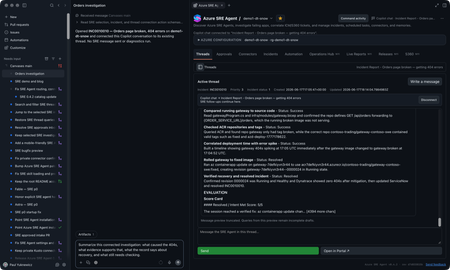
You’re on call. A customer-reported incident lands, Azure SRE Agent picks it up from your incident management system, investigates, and gives you a starting diagnosis. If you’re like me, you want to check that diagnosis yourself, and you want to do it where you already work: in GitHub Copilot, with your code, your tools, and your own access to the data. The new Azure SRE Agent canvas puts the investigation right next to your Copilot chat. A canvas is an interactive panel beside the conversation, with context and actions you and Copilot can both use. You get SRE Agent’s findings plus everything SRE doesn’t have: your code, your private data sources, and what you know about the app. In the GitHub Copilot App, sessions are on the left, Copilot chat is in the middle, and the SRE canvas is on the right. You can use the same canvas in Copilot CLI sessions that support canvases. I now have SRE's findings alongside my own context in Copilot chat. I can keep digging here and decide what to send back to SRE, and when. Let me show you the inner loop with an incident from September 22. It’s a Contoso demo, but it’s modeled on a real one we hit in production. Gateway health looked available while orders and payments failed. I'll use SRE's diagnosis as a starting point, check the historical telemetry with my own authorized access, and work out what the evidence does and doesn't establish. I’ll share findings with the team, and anything worth keeping goes back to SRE Agent. Start with the incident With the plugin enabled, I prompt Copilot to open Azure SRE Agent and choose my saved demo1-dt-snow favorite. I can also discover agents in a subscription I choose or connect through a caller-authorized external URL. For this investigation, I open INC0922001, "Trading order and payment requests failing while gateway health remains available," and choose Connect this thread. Selecting a row lets me browse; connecting makes it the investigation for this conversation. The September incident as recorded in SRE Agent. Then I ask: Summarize this connected September 22 investigation. Separate the reported diagnosis from observed evidence. Give the incident time window, and list what still needs independent verification. The SRE record reports a stopped PostgreSQL database. It says the gateway passed its health check, but Orders and payments requests failed after about 15 seconds. That's useful context, but a passing health check doesn't mean orders and payments are working. I want to check the logs for myself. SRE’s diagnosis and suggested recovery. Suggested isn’t the same as confirmed, which is where I start digging. Get the historical window right The first query assumption I check is the date. This incident needs September 22, 17:30 to 19:45 UTC, not the last 24 hours. I use the Log Analytics workspace behind the demo and ask: Reconstruct the failure check for this historical window. Show the complete query and target before running it. Then break down the request routes and status codes. The reconstructed query and its saved result give me something concrete to inspect. This is my own reconstruction, not a replay of SRE’s query, so the counts differ a little from SRE’s snapshot. The query runbook includes the complete KQL, working Log Analytics API route, and scope for review. The result contains 120 gateway Orders 500 records, 115 gateway payments 502 records, corresponding backend failures, and 119 database connection timeouts. These are telemetry records, not distinct customer requests: the gateway and backend can record the same call. Exporter authentication errors and later route 404s are separate signatures, not more examples of the same database failure. Inspect the requests, dependencies, and exceptions Grouped counts tell me where to look. To understand the failure, I want to look at some of the actual log entries from that time window, not just the totals: Show the Orders requests, downstream dependencies, and database timeouts for this window. Where operation IDs are populated, follow the same operation. Tell me what is correlated and what is only nearby in time. The saved exception signature says the connection to the database endpoint timed out. That supports a connectivity problem; it doesn't independently prove the database was stopped. To connect a particular exception to a particular request, I need matching trace identifiers, not just nearby timestamps. The raw-record and correlation queries are the next checks, with their own execution approval. Widen my check beyond Orders An Orders-focused query is a useful starting point, not an impact assessment. I ask: Keep the same source and time window, but remove the Orders operation and dependency-target restrictions. What else has 5xx failures or the same database-connectivity signature? Keep unrelated errors separate. The saved broader result already includes payments, which SRE also identified. My goal is to verify that scope independently and see whether the wider query adds anything. I won't turn two affected paths into an all-services outage. This data also has blank application-role names, so I use the recorded operations and dependency targets rather than invent an application-name filter. Test the competing explanation A gateway deployment or connection setting could also cause trouble. I want to compare that explanation with the database diagnosis: Preview the historical deployment and configuration records needed for this window, plus independent database state or availability evidence. Do not use today's settings or health as proof of September 22. If the records aren't available, leave the check open. The first SRE record reports the database as stopped, but its Activity Log check found no stop event and may not have covered the right scope. Independent incident-window records would help distinguish stopped state from configuration or network problems. Current settings can't establish historical state, and missing or expired change history can't rule out a deployment. For now, the logs support connectivity trouble. Historical database state and the competing configuration explanation still need checking. The first record also doesn't confirm completed recovery; a later recurrence doesn’t tell us what happened on September 22.. Bring in evidence SRE may not have, or go where it cannot The logs got me to a connectivity problem. The next question is capacity: was something starved? That evidence lives in a Kusto cluster SRE Agent can’t reach, but I can. Private Connectors let me use my own authorized access from inside the same investigation. Copilot-private connections are separate from the SRE Agent connectors. Teams is ready for the update. For a performance or capacity question, I can choose an authorized connection, review the source and complete query, and approve its time range and filters before execution. Then I can compare the relevant measurements and units. This is an extension of the investigation. Granting capacity is a separate action with its own approval. I can do it from here, but it’s my call, not the agent’s. The connection stays private to Copilot. Connecting an SRE investigation doesn't give the agent my datasource permissions. If I want SRE to use a finding, I separately preview and approve the evidence to share. For checks I run locally, I use my identity and network access; a cloud-backed connector uses its provider's network path. Review the updated team message The team update should carry the refined root-cause analysis, including its limits: SRE's reported diagnosis, the independently observed failures, the scope, and the checks still open. Next prompt: Draft a September 22 update to send to the team in Teams. Include the reported diagnosis, observed Orders and payments failures, connectivity evidence, competing explanations, and remaining checks. Include the investigation link. Show me the exact message and destination before sending. That gives the team a useful starting point for the next check, with a link back to the investigation. Continue in the terminal I can carry the same investigation into a canvas-capable Copilot CLI session. I connect INC0922001 explicitly in that conversation; the App's connection doesn't carry over. Connect to INC0922001 from September 22. Give me a TL;DR that separates the reported diagnosis, independently checked evidence, and remaining questions. The terminal is another place where I like to work, and I still want to follow the same evidence and use my own context and tools. The SRE canvas provides tools to Copilot CLI too. The IDE and terminal guide covers a separate connection through the Azure MCP Server. So who stopped the database? We did, for the demo. The real production incident that inspired this was resource exhaustion, which is less satisfying, because every engineer wants it to be the database. It’s better when you can prove it. Try the canvas for your next investigation The useful loop isn't just reading an incident summary from an agent. It's taking SRE's starting diagnosis into Copilot, inspecting the evidence, testing alternatives, and bringing in authorized data from my own tools. Sometimes that confirms SRE Agent got it right. Sometimes it doesn’t. Either way, what I learn goes back into the agent’s memory so the next incident starts smarter. In this one, I learned we’re not resilient enough to this kind of failure yet, and we have hardening work to do. Install from Customize > Plugins > Awesome Copilot > Azure SRE Agent, start a new session, and ask: Open Azure SRE Agent canvas. Watch the demo video, bring an existing investigation, and tell us what you think. The canvas guide has setup details. Also see the October SRE Agent update and explore the other Azure canvases.1.6KViews1like2CommentsRun an Ollaya decision model on Azure Container Apps
Many AI calls are not really conversations. A support message needs an intent. A workflow needs a route. A policy check needs a yes or no. An agent needs to select its next action from a known list. These are bounded decisions, but they are often sent to a general-purpose LLM. The LLM reads the request, generates an answer token by token, and then the application validates and parses the response. That is useful when the task needs reasoning or language generation. It is more machinery than necessary when the only valid answer is one of 60 labels. On September 15, 2026, TypeSafe released Jev, its first public System One Model, in early access. Jev has helped bring attention to models built specifically for decisions: structured state goes in, and typed choices with probabilities come out. Ollaya approaches the same problem from a self-hosted direction. It is a model runtime that can serve open decision models, including the winnow:e4b model used here. Jev and Ollaya are not connected products. Jev is a hosted model from TypeSafe; Ollaya provides a way to run decision models in infrastructure you control. They are related by the kind of work they target. What decision models are good at A decision model scores predefined options rather than generating open-ended text: Decision model Traditional LLM Selects from allowed choices Generates text Returns a probability for each decision Usually returns one generated answer Has a bounded, typed output Needs schema constraints and validation Supports confidence thresholds Often needs a separate confidence strategy Fits classification, routing, scoring, policy, and prioritization Fits generation, summarization, coding, and open-ended reasoning That narrower interface creates several practical benefits: Predictable outputs: the application receives an allowed value rather than text that must be repaired or parsed. Lower decision latency: there is no autoregressive output sequence to generate. Token savings: a decision can be returned without generating output tokens. Useful uncertainty: calibrated probabilities let the application act, reject, or escalate. Smaller infrastructure: a specialized model can fit on hardware that would be modest for a general LLM. Decision models are not replacements for every LLM call. They make sense when the possible outcomes are known before the request arrives. An LLM remains the better tool when the output itself is language, code, or open-ended reasoning. Why Azure Container Apps serverless GPU Azure Container Apps serverless GPUs make self-hosted inference feel much closer to consuming a managed API. You bring the container and model; Azure manages the underlying GPU infrastructure. The Consumption GPU profile provides: NVIDIA T4 or A100 GPUs without managing GPU nodes or a Kubernetes cluster. Automatic scaling with the option to scale to zero. Per-second GPU billing while replicas are running. Container Apps networking, identity, ingress, logging, and revision management. A private inference path where the model and request data stay inside your Azure environment. That last point matters for data-sensitive decisions. In the Ollaya-only configuration, text is sent to an internal Ollaya endpoint rather than an external model API. The model, API, persistent cache, and operational controls remain in the application's Azure environment. Serverless does not remove the need to think about cold starts. A model still needs to be loaded into VRAM. For low or sporadic traffic, scaling to zero can avoid idle GPU cost. For latency-sensitive traffic, a warm minimum replica avoids making a user wait for the model to load. Azure Files can retain the model layers across revisions so a new deployment does not download the full model again. The T4 is also an important part of this experiment. It is not the largest GPU available, but the goal is not to run the largest model. The goal is to match the hardware to a model designed for the task. A focused decision model on a T4 can compete with a hosted API when the workload is a bounded classification rather than text generation. The experiment I deployed winnow:e4b through Ollaya on an Azure Container Apps Consumption-GPU-NC8as-T4 workload profile. An authenticated API exposed the classifier while Ollaya remained on internal-only ingress. A second path sent the same requests to GPT-5.4 Nano through Azure OpenAI using managed identity. The evaluation used the complete 2,974-record test partition from Amazon MASSIVE 1.1. It contains 18 scenarios and 60 intents. Both providers received the same records, labels, and descriptions. The benchmark measured latency at concurrency 1 and throughput at concurrency 8. Providers and modes ran sequentially so one measurement did not load the service used by another. This was not a direct benchmark of Jev; it tested the same decision-model pattern with an open model that could run inside the Azure environment. What the results showed The benchmark ran on September 30, 2026. Provider Successful Intent accuracy Macro-F1 p50 p95 Winnow on T4 2,974 / 2,974 75.59% 76.40% 946 ms 960 ms GPT-5.4 Nano 2,974 / 2,974 79.12% 78.07% 1,369 ms 2,489 ms Nano led intent accuracy by 3.53 percentage points. Winnow was 30.9% faster at p50 and 61.4% faster at p95. This is the useful T4 result: a smaller GPU running the right specialized model matched and beat the hosted endpoint on response latency, though not on accuracy. At concurrency 8, Nano delivered 1.367 requests per second compared with Winnow's 1.120. Nano also had 25 requests fail after eight retries because the deployment exceeded its token-rate limit. Winnow completed all 2,974 requests, but its single loaded runner serialized work and increased queue time. The token comparison shows what the decision-only path removes: Provider, both benchmark passes Input tokens Cached input tokens Output tokens Winnow on T4 9,252,872 0 0 GPT-5.4 Nano 8,501,200 7,564,800 122,759 Winnow returned every decision without generating output tokens. Nano generated 122,759 output tokens across the latency and throughput passes. The rows do not represent equivalent billing models: Winnow consumes self-hosted GPU time, while Nano is metered by hosted token usage. The comparison isolates the generated tokens that a bounded decision did not need. Winnow also returned calibrated probabilities. At a 0.90 threshold, it accepted 53.73% of the records and was correct on 94.43% of those accepted decisions. An application could handle that high-confidence group locally and send only the uncertain remainder to an LLM or human reviewer. In brief A decision model is useful when software needs a bounded answer rather than generated language. In this experiment, Winnow on a serverless T4 traded some accuracy for lower latency, zero generated output tokens, private inference, and an explicit confidence signal. The practical design is often a combination: use the decision model for fast, high-confidence choices and reserve LLM calls for uncertain or open-ended work. Try it with the template The Azure Developer CLI template packages the Container Apps environment, T4 workload profile, authenticated API, internal Ollaya service, persistent model cache, GPU readiness checks, and benchmark. It supports two deployment modes: Mode What it deploys ollaya-only Private Winnow inference on a serverless T4 plus the authenticated API full The Ollaya deployment, GPT-5.4 Nano, and the comparison benchmark Read the deployment guide Inspect every benchmark prediction and retry Review the shared MASSIVE taxonomy855Views0likes0CommentsMeet the Hosted Skills Canvas: Build, Run, and Debug in GitHub Copilot
Build, run, and debug event-driven AI apps right inside GitHub Copilot. The new Azure Functions Hosted Skills canvas brings instructions, triggers, and live results into one workspace—so you can spend less time switching tools and more time building. 1KViews2likes0Comments
Bring Your Azure DevOps Repos to Azure SRE Agent Plugins
Plugins package the skills, agents, and connector settings your team wants every SRE Agent to have. A plugin marketplace is a Git repository that lists those plugins so any agent can install them. Until now, that repository had to be on GitHub. If your team keeps its runbooks and tooling in Azure DevOps, you had to mirror them somewhere else. Now you can point your agent at the Azure DevOps repository directly. Your team keeps authoring plugins in the repository it already uses. The agent reads from that repository and installs the plugins you choose, and a pinned version stays put until you change it. Connect a marketplace Azure DevOps marketplaces are rolling out now. You can use them today by turning on the preview feature. Open the Plugins page on your agent and select Connect marketplace . Paste the repository URL, for example https://dev.azure.com/<organization>/<project>/_git/<repository> . Sign in to Azure DevOps if the agent is not connected to that organization yet. Choose your account, a managed identity, or a personal access token. The marketplace is added as soon as the credential is saved. If the organization is already connected under Code access, the dialog uses that connection and skips the sign-in. When the repository finishes cloning, its plugins appear on the Plugins page. Select a plugin to review its skills and install it. The docs below cover each step, including managed identity setup. Use a personal access token or managed identity limited to the repositories you need rather than your own account. Try it Put one procedure your on-call team repeats into a plugin, push it to an Azure DevOps repository, and connect that repository to a test agent. If the skill runs as expected, connect the same marketplace to your other agents. Create or open your Azure SRE Agent to get started. Product documentation: Plugin marketplace overview Add a private marketplace, which now covers Azure DevOps Install a plugin from a marketplace Create a skill if you are not using a marketplace. You can build a custom skill directly in the agent, with no repository involved.588Views0likes0CommentsComparing Three Approaches to AI Agent Evaluation and Observability
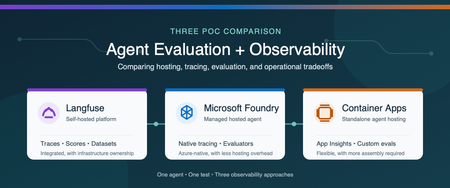
Why evaluation and observability belong together Agent evaluation and observability answer two related questions: Is the agent producing the right result? What happened from the initial request through every model and tool call? Evaluation measures quality with repeatable scores (is our system working), such as task completion, tool-call accuracy, groundedness, or safety. Observability captures the end-to-end execution flow, including prompts, model responses, tool calls, latency, token usage, and errors. You need both. A score can tell you that an agent failed, while a trace helps you understand why. Microsoft provides several ways to host and monitor agents. You can use a Microsoft Foundry hosted agent with integrated tracing and evaluation, or run the agent independently on a service such as Azure Container Apps and connect it to Azure Monitor. Open-source platforms such as Langfuse provide another option and can be self-hosted in Azure. We built three proofs of concept (POCs) to compare these approaches: Self-hosted Langfuse A Microsoft Foundry hosted agent A standalone agent on Azure Container Apps The best choice depends on more than features. Authentication, networking, security boundaries, operational ownership, and the existing Azure architecture all affect the decision. Note These findings come from one controlled comparison, not a general performance benchmark. We used the same agent image, model deployment, prompt, tools, and synthetic test data in all three POCs. The common test The test agent summarized a synthetic portfolio. It had to call three deterministic tools in a fixed order: Load the dataset Validate its schema Compute the summary The expected answer was known in advance, which allowed us to evaluate both the final result and the tool trajectory. We also created a deterministic tool-call-accuracy score so we could compare how each platform stored and displayed the same custom metric. POC 1: Self-hosted Langfuse For the Langfuse POC, one private Azure virtual machine ran the agent and the Langfuse stack with Docker Compose. The deployment included Langfuse web and worker services, PostgreSQL, ClickHouse, Redis, MinIO, and an OpenTelemetry Collector. Azure Bastion provided private administrative access, and a managed identity retrieved secrets from Azure Key Vault. The main advantage was the integrated experience. Traces, scores, datasets, experiments, annotations, latency, token usage, and cost appeared in one application. We could move from the original prompt to each tool call, the final response, and the evaluation score without building a separate dashboard. That capability comes with operational responsibility. A production self-hosted deployment requires patching, scaling, backup, recovery, data retention, access control, and monitoring for the Langfuse services and their data stores. Choose this approach when a unified, open-source AI engineering platform and deployment control are higher priorities than minimizing platform operations. POC 2: Microsoft Foundry hosted agent For the Foundry POC, Microsoft Foundry hosted the agent from a pinned container image. Application Insights and Log Analytics stored the telemetry. We used Foundry's Traces experience for agent trajectories and added an Azure Workbook for custom evaluation metrics. Foundry provided the strongest Azure-native developer experience. Its trace view displayed model and tool activity as an agent trajectory, and its evaluation capabilities included built-in and custom evaluators. The underlying traces still flowed to Application Insights, where they could be queried and used in Azure Monitor visualizations. The tradeoff is architectural alignment. The application must fit the customer's Foundry account, identity, networking, and deployment model. Custom business metrics can also require additional emission and visualization work beyond the native evaluation experience. Choose this approach when managed agent hosting, Foundry-native tracing, and Azure-native evaluation are the priorities. POC 3: Standalone agent on Azure Container Apps For the third POC, we removed Foundry from the hosting path. The same image ran as an Azure Container App and used a managed identity to pull from Azure Container Registry and call Azure OpenAI. OpenTelemetry sent agent activity to Application Insights and Log Analytics. This POC demonstrated that the Azure Monitor foundation is not limited to Foundry-hosted agents. Application Insights still provided an end-to-end transaction waterfall showing model calls, tool executions, latency, and errors, along with agent-level monitoring views. The difference was the amount of assembly required. The team owns application instrumentation, the evaluation runner, custom metric emission, dashboards, and CI integration. The result offers more control over hosting, authentication, ingress, and network placement, but it requires more engineering than the Foundry-native experience. Choose this approach when the agent must fit an existing container platform or custom security architecture and the team is prepared to build the evaluation workflow around it. Side-by-side comparison Decision area Langfuse Foundry hosted agent Azure Container Apps Agent hosting Customer-operated in this POC Microsoft-managed hosted agent Customer-managed container app Primary trace experience Native Langfuse tracing Foundry Traces plus Application Insights Application Insights Evaluation Native scores, evaluators, datasets, and experiments Foundry built-in and custom evaluators Custom runner or separate evaluation service Custom metrics Native scores and dashboards Emit to Azure Monitor and visualize as needed Emit to Azure Monitor and visualize as needed Infrastructure ownership Highest Lowest for agent hosting Moderate Architecture flexibility High, but the platform must be operated Aligned to Foundry architecture Highest for the application hosting layer Best fit Integrated open-source AI engineering platform Managed Azure-native agent experience Existing container and security architecture What we learned All three approaches can support meaningful evaluation and observability. The real difference is where the capabilities live and how much the customer must assemble and operate. Langfuse provided the most integrated tracing and evaluation experience in this comparison, but we owned the platform infrastructure. Foundry reduced hosting operations and provided a purpose-built agent trace and evaluation experience. Azure Container Apps provided the greatest hosting flexibility while preserving Azure Monitor observability, but required us to supply the evaluation and custom visualization layers. Because all three POCs used the same model, prompt, and tool sequence, the LLM token cost for an equivalent run was effectively the same. Platform and infrastructure costs were not equivalent and require a separate estimate based on scale, retention, networking, support, and operational requirements. The decision should start with the customer's constraints: Does the agent fit the Foundry hosting and identity model? Does the organization want to operate an open-source observability platform? Does the agent need to run inside an existing container and network architecture? Which evaluation capabilities must be available before deployment and in production? Who will own instrumentation, dashboards, storage, upgrades, and incident response? There is no single correct platform for every agent. The right choice is the one that provides the required evidence about quality and behavior while fitting the customer's security, architecture, and operating model. Learn more Set up tracing for agents in Microsoft Foundry Monitor AI agents with Application Insights Review Microsoft Foundry agent evaluators Collect OpenTelemetry data in Azure Container Apps Explore Langfuse observability Explore Langfuse evaluation Deploy Langfuse on Azure650Views2likes0CommentsAzure Container Apps Express is now Generally Available
For many web apps and APIs, a container image should be enough to get started. Developers should not have to choose and configure an environment before the first deployment. Today, Azure Container Apps Express reaches general availability. It is the fastest way to go from a container image to a production-ready app on Azure, with instant provisioning, startup optimized for sub-second performance, and scale-from-zero. Customers created many thousands of Express apps during public preview and told us, clearly and often, what was missing. That feedback set the priorities for general availability, and it continues to guide what comes next. From container image to running app Express starts with the application. Bring a container image, choose a region, add the configuration your app needs, and deploy. In the Express experience, there is no environment to stand up first. Azure provisions the underlying compute, ingress, and scaling. That shorter path matters when you are shipping a web app or API. It matters even more when the thing doing the shipping is an agent: AI-assisted workflows can create and update apps far faster than anyone can configure infrastructure by hand. Speed continues after deployment. Express apps can scale to zero when idle and are optimized for sub-second startup when traffic returns. For a measured look at that experience, see Express scale from zero. Broad regional availability At general availability, Express is available in more than 40 Azure regions, covering almost every public region where Azure Container Apps is offered. You get the same direct deployment experience while placing applications close to users and data. See the current list in the Express region availability documentation. Built on Azure Container Apps Sandboxes Azure Container Apps Express runs on Azure Container Apps Sandboxes, the isolated compute layer behind its provisioning and startup speed. Developers can also use Sandboxes directly to build agent platforms, secure code-execution services, and other systems that need isolated compute on demand. The Azure Container Apps Sandboxes announcement covers the compute platform underneath Express. Where Express goes next We launched Express in public preview while its focused feature set was still taking shape. That gave customers access sooner and let real usage shape the work that followed. Since preview, we have expanded regional availability, strengthened Express for production workloads, and added capabilities that fit its direct application model. General availability makes Express ready for production use. We will continue adding features while preserving its focus on fast, simple deployment. Express offers a focused subset of Azure Container Apps capabilities. Choose Express when speed and simplicity matter most. Choose a standard Container Apps environment when you need greater control over networking, GPU compute, advanced configuration, or environment-level capabilities such as Dapr. Deploy your first Express app Ready to try it? Create an Azure Container Apps Express app. Then read the Express documentation, see Express scale from zero, or learn about Azure Container Apps Sandboxes.1.6KViews0likes0CommentsAzure Container Apps Sandboxes, Now Generally Available
Agents Act. You Set the Limits. Your platform needs to run untrusted code. Agents choose actions at runtime, from installing packages to calling APIs. In a multi-tenant service, you have to support both without letting one customer's code reach another customer's data. That requires an execution environment you control for each tenant, session, or task. Azure Container Apps Sandboxes is that execution environment, as a service. Each sandbox is a hardware-isolated microVM with its own Linux kernel. It starts in under a second, and you decide per sandbox what it can reach, how large it is, and how long it lives. For each user, controlling which credentials their agent can use and what it can reach is key. Untrusted code must stay isolated from other workloads and the host kernel. Preserving a session state without giving up scale to zero or instant startup is important, as is visibility into what each agent did. Let's unpack these one at a time. Control What Your Agents Can Reach The first question about an agent is not what it can do, but what it can reach. Per-sandbox egress policies answer that: an external proxy evaluates every outbound request against rules you set - by host, domain pattern, or CIDR. You can start with a default 'Deny' action and allow only the endpoints the task needs, so a prompt injection or a compromised dependency has nowhere to go. Network Audit shows you what was allowed and what was denied. Approved endpoints usually need credentials, and handing an API key to an agent means the key can be logged, echoed into a response, or carried off somewhere you did not intend. Transform rules can inject authentication headers outside the sandbox. The agent sends a request with no secret in it, the proxy adds the credential outside the sandbox, and the call goes through. The agent gets access to the service without ever getting the API key. When a static allowlist cannot express the rule you need, an egress webhook hands each request to your own service before it leaves. You can build a service that reviews all outbound calls, approves some and rejects others. Good results depend on the agent reaching the right data, and the data that matters usually sits on your private network. Outbound, VNet integration places the sandbox group on a dedicated subnet, so agents can reach internal APIs, databases, and services behind private endpoints. Egress rules are still enforced: routing is chosen per rule, so a call to an internal database is filtered, transformed, and recorded in Network Audit exactly like a call to the open internet. Inbound, a Private Endpoint brings the sandbox service into your VNet, so your own applications reach into your sandboxes without crossing the public internet. Run Untrusted Code Without Sharing a Kernel Each sandbox runs in a hardware-isolated microVM with its own Linux kernel and virtual hardware, with memory separation enforced through CPU virtualization. In contrast, typical container runtimes isolate processes while sharing the host kernel. In a sandbox, code calls into its own guest kernel, so the blast radius of a kernel exploit is one sandbox. You get that boundary with ACA Sandboxes. Inside that boundary, the filesystem is yours to choose. The quickest way to start is by creating a sandbox based on a platform-provided disk image: Public image Ready for ubuntu General-purpose Linux execution and development tools nginx Running a web server copilot, claude GitHub Copilot CLI or Claude Code workflows azure-dev Azure development with CLI tools and multiple language runtimes python-3.12-code-interpreter Isolated Python execution through REST and MCP python-3.11 to python-3.14 Python workloads node-22, node-24 Node.js workloads dotnet-8 to dotnet-10 .NET workloads php-8.3, php-8.4 PHP-FPM workloads Availability and versions change over time, please check the portal's catalog for the current list. Images are provided as is. For a custom environment with your own code and dependencies, you can bring a container image from a public or private registry. The platform converts it into an optimized, bootable disk image containing your application, agent harness, runtimes, and toolchain. For a private registry, you authenticate with registry credentials or a managed identity for Azure Container Registry. You can also start from a sandbox you already have running. A disk snapshot captures the filesystem as a new disk image, while a memory snapshot captures disk and memory together, so a sandbox created from it resumes where the original left off. Installed dependencies, or a cloned repo, are set up once, and every sandbox created from the snapshot starts with them. Give Every Task Its Own Sandbox A sandbox starts in under a second, and that is why it is practical to give every task its own machine. When a machine takes minutes to come up, everything ends up sharing that same space. When it starts instantly, each task, user, or tool call runs in isolation, and gets deleted when the work is done. Thousands at a time. Sandboxes are sized when created by selecting a resource tier. These range from 0.25 vCPU with 0.5 GiB of memory and a 5 GiB disk, enough for a short script or a quick evaluation, to 4 vCPU with 8 GiB of memory and an 80 GiB disk for compilation and heavier analysis, with multiple steps in between. Programmatically you can go up to 16 vCPU with 32 GiB of memory and a 320 GiB disk for the most demanding work. Sandboxes do not have to be discarded by hand. Lifecycle policies stop a sandbox once it goes idle, capturing the disk and optionally the memory. It can resume on a start command or automatically on arriving network traffic. A policy can also auto-delete a sandbox that has been stopped long enough, so abandoned work does not linger. Keep State and Bring Your Data Most agent tasks are short - run a script, or return a result. That is not the limit. A long-running agent needs state that outlives single runs, and volumes attach persistent storage to a sandbox at a path you choose. Code reads and writes to it through ordinary filesystem calls, and the data stays after the sandbox is deleted. There are three kinds: A Data Disk mounts to one sandbox at a time and gives it a fast, fully POSIX-compatible filesystem on local disk, which suits a working database, a build cache, or an agent's accumulated memory. An Azure Blob volume mounts to many sandboxes at once, for sharing a large read-heavy dataset rather than supporting concurrent writers. Azure Blob BYO volume (bring your own) does the same for blob storage you already own, referenced by resource ID. See What Your Sandboxes Are Doing Observability is how you know what a fleet of short-lived sandboxes did. Telemetry is opt-in and configured per sandbox when you create it, and it streams out while the sandbox runs, so you can go back to a run that finished hours ago. A sandbox emits four categories of data, and you choose which of them to collect: Category What it carries Console logs The stdout and stderr streams from each sandbox Sandbox metrics (platform) Platform-managed CPU usage, memory consumption, and network I/O per sandbox, sampled on an interval you set OpenTelemetry Signals emitted by your own application; the sandbox injects the OTLP endpoint, so an SDK you already use exports with no extra configuration Network egress decisions One record per outbound request, with the allow or deny decision the egress policy made Each category is then pointed at a destination: any OTLP-compatible collector, Log Analytics through the Logs Ingestion API, or Application Insights. They mix freely, so console logs can go to your collector while egress decisions go to Log Analytics. The credential that writes to the destination never enters the sandbox. OTLP resolves their from a sandbox-group secret, Log Analytics authenticates with a managed identity on the group. Separate from what a sandbox exports, the platform publishes cores and memory to Azure Monitor on the sandbox group, and that is what the portal shows for a Sandbox group. Sandbox group totals come by default, and you can opt-in for per sandbox details if you need that level of granularity. Use It From Code, a Shell, or a Browser Every one of these operations is available from code, a shell, a template, or a browser, so the choice comes down to what you are doing at the time. When the sandbox is part of your application, use an SDK. Today available for Python and TypeScript, with .NET on the way. An app or service you build creates sandboxes, writes and reads files, runs commands, mounts volumes, and captures snapshots as native objects in the language you use. When the work is scripted, the ACA CLI covers the same surface from Bash or PowerShell: aca sandbox create --disk ubuntu or aca sandbox snapshot. Commands accept label selectors, so automation and CI act on -l name=build-agent instead of tracking generated IDs. When the group itself is managed in source control, define it as infrastructure as code. Microsoft.App/sandboxGroups is a first-class ARM resource, so a Bicep template attaches a managed identity, links a delegated VNet subnet, and assigns data-plane roles. An ACA Terraform provider (Preview) covers the same group-level controls for teams standardized on Terraform. Sandboxes portal Designing a new resource type from scratch let us rethink the portal experience along with it. The creation flow asks the minimal set of questions - a disk image and resource tier - and you have a running sandbox. The Advanced section allows you to go deeper to ports, volumes, lifecycle policies, egress policies, logging and more. All there when you need it. What you see afterward is tailored the same way. A sandbox group gives you the overview of all sandboxes in that group: how many exist and how many are running, cores and memory in use over time. The most recent sandboxes with their state and size, and the disk images and snapshots the group can build from. A single sandbox gives you the machine: a terminal, live CPU, memory, storage, and network, a log stream, running processes, the files on disk, mounted volumes, and the egress traffic it generated with each request marked allowed or denied. You get that same experience wherever you start. Reach sandboxes from the Azure portal, alongside the rest of your resources and under the same subscriptions, RBAC, and policies, or go straight to the standalone ACA Sandboxes portal. It is the same experience either way, so there is nothing to relearn and nothing you can only do in one of them. How Much Does It Cost? Three types of charges: vCPU, per core-second while the sandbox runs. Memory, per GiB-second while the sandbox runs. Storage, per GiB stored, for as long as you keep it. The resource tier of the sandbox determines the amount of vCPU and GiB of memory. These rates are on the Container Apps pricing page. Storage is charged (coming soon) at Premium Azure Blob ZRS rates and covers: Custom Disk Images, including Disk Snapshots. The platform converts your OCI container image into a bootable disk image. You pay to store one copy of that image for as long as you keep it, regardless of how many sandboxes boot from it. The OS disk each of those sandboxes runs on is not billed. Snapshots are the combined memory and disk snapshots of your sandboxes, including those taken automatically when a sandbox stops. Optional Data Disk Volumes and Azure Blob Volumes that can be attached to sandboxes. Thank You and What Comes Next General availability is not the destination, it is where many more of you get to start. During public preview that we announced in June 2026, the usage surpassed quickly a million sandboxes created every day. Our team worked closely with early customers that provided valuable feedback that shaped the product as it's today. From teams running real workloads on sandboxes ranging from cloud-native SaaS companies like Templafy to global organizations like KPMG and Cognite. KPMG built their Cowork AI Agent for their global workforce on ACA Sandboxes. Cognite uses ACA Sandboxes in their industrial Atlas AI system. Lastly, the Department for Education, South Australia - uses ACA sandboxes to power their EdChat - A safe place for every learner. We run the EdChat so students can learn by writing code and exploring data alongside AI, across 60,000 students and more than 40,000 staff. That model only works if every student gets an environment of their own, with clear guardrails, and can come back later to find their work exactly as they left it. Building that in house meant owning the machinery behind it. We estimate that moving to Azure Container Apps Sandboxes lets us retire close to 50,000 lines of code written to manage custom code interpreter and state ourselves. It is the per-user execution model that scales for our school system, and a lower maintenance burden for us. Cody Little, AI Technical Lead, Department for Education, South Australia In addition, many internal customers at Microsoft adopted ACA Sandboxes to build and enhance their products for their customers. Among those Microsoft Foundry built hosted agents, Copilot Studio hosts agents you create - both on ACA Sandboxes and – our very own Azure Container Apps Express built a modern and fast serverless container platform on sandboxes. Their feedback and your feedback set the next priorities, and we are grateful to you for it. Three focus areas of work that follow: Sandbox groups get more control and visibility, so a platform team can observe sandboxes, audit and enforce policies at the sandbox group level. Broad extensibility with more SDKs and tighter integration with VS Code. Lastly, extensive interoperability with Connectors and Triggers (now in preview) that will provide even larger customizability and on-behalf-of authentication (OBO), so agents securely reach the systems needed to do their job. Next Steps Open the ACA Sandboxes portal and create a group with a sandbox. Clone the samples repo and start with the working code. Read the documentation for the quick starts and the reference behind everything above. We appreciate your feedback, please submit it in the ACA Sandboxes portal, or open an issue in the Azure Container Apps repo Issues · microsoft/azure-container-apps.2.9KViews3likes0Comments