azure cache for redis
22 TopicsIf You're Building AI on Azure, ECS 2026 is Where You Need to Be
Let me be direct: there's a lot of noise in the conference calendar. Generic cloud events. Vendor showcases dressed up as technical content. Sessions that look great on paper but leave you with nothing you can actually ship on Monday. ECS 2026 isn't that. As someone who will be on stage at Cologne this May, I can tell you the European Collaboration Summit combined with the European AI & Cloud Summit and European Biz Apps Summit is one of the few events I've seen where engineers leave with real, production-applicable knowledge. Three days. Three summits. 3,000+ attendees. One of the largest Microsoft-focused events in Europe, and it keeps getting better. If you're building AI systems on Azure, designing cloud-native architectures, or trying to figure out how to take your AI experiments to production — this is where the conversation is happening. What ECS 2026 Actually Is ECS 2026 runs May 5–7 at Confex in Cologne, Germany. It brings together three co-located summits under one roof: European Collaboration Summit — Microsoft 365, Teams, Copilot, and governance European AI & Cloud Summit — Azure architecture, AI agents, cloud security, responsible AI European BizApps Summit — Power Platform, Microsoft Fabric, Dynamics For Azure engineers and AI developers, the European AI & Cloud Summit is your primary destination. But don't ignore the overlap, some of the most interesting AI conversations happen at the intersection of collaboration tooling and cloud infrastructure. The scale matters here: 3,000+ attendees, 100+ sessions, multiple deep-dive tracks, and a speaker lineup that includes Microsoft executives, Regional Directors, and MVPs who have built, broken, and rebuilt production systems. The Azure + AI Track - What's Actually On the Agenda The AI & Cloud Summit agenda is built around real technical depth. Not "intro to AI" content, actual architecture decisions, patterns that work, and lessons from things that didn't. Here's what you can expect: AI Agents and Agentic Systems This is where the energy is right now, and ECS is leaning in. Expect sessions covering how to design agent workflows, chain reasoning steps, handle memory and state, and integrate with Azure AI services. Marco Casalaina, VP of Products for Azure AI at Microsoft, is speaking if you want to understand the direction of the Azure AI platform from the people building it, this is a direct line. Azure Architecture at Scale Cloud-native patterns, microservices, containers, and the architectural decisions that determine whether your system holds up under real load. These sessions go beyond theory you'll hear from engineers who've shipped these designs at enterprise scale. Observability, DevOps, and Production AI Getting AI to production is harder than the demos suggest. Sessions here cover monitoring AI systems, integrating LLMs into CI/CD pipelines, and building the operational practices that keep AI in production reliable and governable. Cloud Security and Compliance Security isn't optional when you're putting AI in front of users or connecting it to enterprise data. Tracks cover identity, access patterns, responsible AI governance, and how to design systems that satisfy compliance requirements without becoming unmaintainable. Pre-Conference Deep Dives One underrated part of ECS: the pre-conference workshops. These are extended, hands-on sessions typically 3–6 hours that let you go deep on a single topic with an expert. Think of them as intensive short courses where you can actually work through the material, not just watch slides. If you're newer to a particular area of Azure AI, or you want to build fluency in a specific pattern before the main conference sessions, these are worth the early travel. The Speaker Quality Is Different Here The ECS speaker roster includes Microsoft executives, Microsoft MVPs, and Regional Directors, people who have real accountability for the products and patterns they're presenting. You'll hear from over 20 Microsoft speakers: Marco Casalaina — VP of Products, Azure AI at Microsoft Adam Harmetz — VP of Product at Microsoft, Enterprise Agent And dozens of MVPs and Regional Directors who are in the field every day, solving the same problems you are. These aren't keynote-only speakers — they're in the session rooms, at the hallway track, available for real conversations. The Hallway Track Is Not a Cliché I know "networking" sounds like a corporate afterthought. At ECS it genuinely isn't. When you put 3,000 practitioners, engineers, architects, DevOps leads, security specialists in one venue for three days, the conversations between sessions are often more valuable than the sessions themselves. You get candid answers to "how are you actually handling X in production?" that you won't find in documentation. The European Microsoft community is tight-knit and collaborative. ECS is where that community concentrates. Why This Matters Right Now We're in a period where AI development is moving fast but the engineering discipline around it is still maturing. Most teams are figuring out: How to move from AI prototype to production system How to instrument and observe AI behaviour reliably How to design agent systems that don't become unmaintainable How to satisfy security and compliance requirements in AI-integrated architectures ECS 2026 is one of the few places where you can get direct answers to these questions from people who've solved them — not theoretically, but in production, on Azure, in the last 12 months. If you go, you'll come back with practical patterns you can apply immediately. That's the bar I hold events to. ECS consistently clears it. Register and Explore the Agenda Register for ECS 2026: ecs.events Explore the AI & Cloud Summit agenda: cloudsummit.eu/en/agenda Dates: May 5–7, 2026 | Location: Confex, Cologne, Germany Early registration is worth it the pre-conference workshops fill up. And if you're coming, find me, I'll be the one talking too much about AI agents and Azure deployments. See you in Cologne.Cut Costs and Speed Up AI API Responses with Semantic Caching in Azure API Management
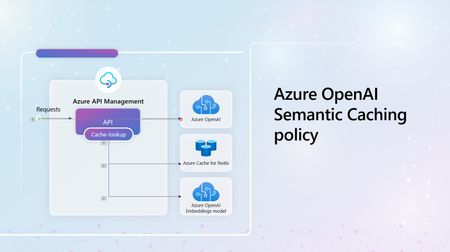
This article is part of a series of articles on API Management and Generative AI. We believe that adding Azure API Management to your AI projects can help you scale your AI models, make them more secure and easier to manage. We previously covered the hidden risks of AI APIs in today's AI-driven technological landscape. In this article, we dive deeper into one of the supported Gen AI policies in API Management, which allows you to minimize Azure OpenAI costs and make your applications more performant by reducing the number of calls sent to your LLM service. How does it currently work without the semantic caching policy? For simplicity, let's look at a scenario where we only have a single client app, a single user, and a single model deployment. This of course does not represent most real-world use-cases, as you often have multiple users talking to different services. Take the following cases into consideration: - A user lands on your application and sends in a query (query 1), They then send the exact same query again, with similar verbiage, in the same session (query 2), The user changes the wording of the query, but it is still relevant and related to the original query (query 3) The last query, (query 4), is completely different and unrelated to the previous queries. In a normal implementation, all these queries will cost you tokens (TPM), resulting in higher cuts in your billing. Your users are also likely to experience some latency as they wait for the LLM to build a response with each call. As the user base grows, you anticipate that the expenses will grow exponentially, making it more expensive to run your system eventually. How does Semantic caching in Azure API Management fix this? Let's look at the same scenario as described above (at a high level first), with a flow diagram representing how you can cut costs and boost your app's performance with the semantic cache policy. When the user sends in the first query, the LLM will be used to generate a response, which will then be stored in the cache. Queries 2 and 3 are somewhat related to query 1, which could be a semantic similarity, or exact match, or could contain a specified keyword, i.e.. price. In all these cases, a lookup will be performed, and the appropriate response will be retrieved from the cache, without waiting on the LLM to regenerate a response. Query 4, which is different from the previous prompts, will require the call to be passed through to the LLM, then grabs the generated response and stores it in the cache for future searches. Okay. Tell me more - How does this work and how do I set it up? Think about this - What would be the likelihood of your users asking related questions or exactly comparable questions in your app? I'd argue that the odds are quite high. Semantic caching for Azure OpenAI API requests To start, you will need to add Azure OpenAI Service APIs to your Azure API Management instance with semantic caching enabled. Luckily, this step has been reduced to just a one-click step. I'll link a tutorial on this in the 'Resources' section. Before you get to configure the policies, you first need to set up a backend for the embeddings API. Oh yes, as part of your deployments, you will need an embedding model to convert your input to the corresponding vector representation, allowing Azure Redis cache to perform the vector similarity search. This step also allows you to set a score_threshold, a parameter used to determine how similar user queries need to be to retrieve responses from the cache. Next, is to add the two policies that you need: azure-openai-semantic-cache-store/ llm-semantic-cache-store and azure-openai-semantic-cache-lookup/ llm-semantic-cache-lookup The azure-openai-semantic-cache-store policy will cache the completions and requests to the configured cache service. You can use the internal Azure Redis enterprise or any another external cache as long as it's a Redis-compatible cache in Azure API Management. The second policy, azure-openai-semantic-cache-lookup, based on the proximity result of the similarity search and the score_threshold, will perform a cache lookup through the compilation of cached requests and completions. In addition to the score_threshold attribute, you will also specify the id of the embeddings backend created in an earlier step and can choose to omit the system messages from the prompt at this step. These two policies enhance your system's efficiency and performance by reusing completions, increasing response speed, and making your API calls much cheaper. Alright, so what should be my next steps? This article just introduced you to one of the many Generative AI supported capabilities in Azure API Management. We have more policies that you can use to better manage your AI APIs, covered in other articles in this series. Do check them out. Do you have any resources I can look at in the meantime to learn more? Absolutely! Check out: - Using external Redis-compatible cache in Azure API Management documentation Use Azure Cache for Redis as a semantic cache tutorial Enable semantic caching for Azure OpenAI APIs in Azure API Management article Improve the performance of an API by adding a caching policy in Azure API Management Learn moduleTake full control of your AI APIs with Azure API Management Gateway
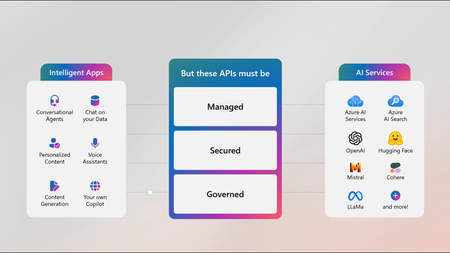
This article is part of a series of articles on API Management and Generative AI. We believe that adding Azure API Management to your AI projects can help you scale your AI models, make them more secure and easier to manage. In this article, we will shed some light on capabilities in API Management, which are designed to help you govern and manage Generative AI APIs, ensuring that you are building resilient and secure intelligent applications. But why exactly do I need API Management for my AI APIs? Common challenges when implementing Gen AI-Powered solutions include: - Quota, (calculated in tokens-per-minute (TPM)), allocation across multiple client apps, How to control and track token consumption for all users, Mechanisms to attribute costs to specific client apps, activities, or users, Your systems resiliency to backend failures when hitting one or more limits And the list goes on with more challenges and questions. Well, let’s find some answers, shall we? Quota allocation Take a scenario where you have more than one client application, and they are talking to one or more models from Azure OpenAI Service or Azure AI Foundry. With this complexity, you want to have control over the quota distribution for each of the applications. Tracking Token usage & Security I bet you agree with me that it would be unfortunate if one of your applications (most likely that which gets the highest traffic), hogs up all the TPM quota leaving zero tokens remaining for your other applications, right? If this occurs though, there is a high chance that it might be a DDOS Attack, with bad actors trying to bombard your system with purposeless traffic causing service downtime. Yet another reason why you will need more control and tracking mechanisms to ensure this doesn’t happen. Token Metrics As a data-driven company, having additional insights with flexibility to dissect and examine usage data down to dimensions like subscription ID or API ID level is extremely valuable. These metrics go a long way in informing capacity and budget planning decisions. Automatic failovers This is a common one. You want to ensure that your users experience zero service downtime, so if one of your backends is down, does your system architecture allow automatic rerouting and forwarding to healthy services? So, how will API Management help address these challenges? API Management has a set of policies and metrics called Generative AI (Gen AI) gateway capabilities, which empower you to manage and have full control of all these moving pieces and components of your intelligent systems. Minimize cost with Token-based limits and semantic caching How can you minimize operational costs for AI applications as much as possible? By leveraging the `llm-token limit` policy in Azure API Management, you can enforce token-based limits per user on identifiers such as subscription keys and requesting IP addresses. When a caller surpasses their allocated tokens-per-minute quota, they receive a HTTP "Too Many Requests" error along with ‘retry-after’ instructions. This mechanism ensures fair usage and prevents any single user from monopolizing resources. To optimize cost consumption for Large Language Models (LLMs), it is crucial to minimize the number of API calls made to the model. Implementing the `llm-semantic-cache-store` policy and `llm-semantic-cache-lookup` policies allow you to store and retrieve similar completions. This method involves performing a cache lookup for reused completions, thereby reducing the number of calls sent to the LLM backend. Consequently, this strategy helps in significantly lowering operational costs. Ensure reliability with load balancing and circuit breakers Azure API Management allows you to leverage load balancers to distribute the workload across various prioritized LLM backends effectively. Additionally, you can set up circuit breaker rules that redirect requests to a responsive backend if the prioritized one fails, thereby minimizing recovery time and enhancing system reliability. Implementing the semantic-caching policy not only saves costs but also reduces system latency by minimizing the number of calls processed by the backend. Okay. What Next? This article mentions these capabilities at a high level, but in the coming weeks, we will publish articles that go deeper into each of these generative AI capabilities in API Management, with examples of how to set up each policy. Stay tuned! Do you have any resources I can look at in the meantime to learn more? Absolutely! Check out: - Manage your Azure OpenAI APIs with Azure API Management http://aka.ms/apimlove
Azure Managed Redis (Preview): The Next Generation of Redis on Azure at Microsoft Ignite 2024
Azure Managed Redis (Preview): The Next Generation of Redis on Azure, announced at Microsoft Ignite 2024 We were excited to announce the preview of Azure Managed Redis at Microsoft Ignite 2024, a first party, in-memory database solution designed for developers building the next generation of GenAI applications.Azure API Center: Centralizing API Management for Enhanced Discovery and Governance
Discover how Azure API Center can revolutionize your API management by centralizing control, improving discovery, and enhancing governance. Learn more about its key features, benefits, and access free training on Microsoft Learn today!Building Intelligent Apps with Azure Cache for Redis, EntraID, Azure Functions, E1 SKU, and more!
We're excited to announce the latest updates to Azure Cache for Redis that will improve your data management and application performance as we kickoff for Microsoft Build 2024. Coming soon, the Enterprise E1 SKU (Preview) will offer a lower entry price, Redis modules, and enterprise-grade features. The Azure Function Triggers and Bindings for Redis are now in general availability, simplifying your workflow with seamless integration. Microsoft EntraID in Azure Cache for Redis is now in GA, providing enhanced security management. And there's more – we are also sharing added resources for developing intelligent applications using Azure Cache for Redis Enterprise, enabling you to build smarter, more responsive apps. Read the blog below to find out more about these amazing updates and how they can enhance your Azure Cache for Redis experience. 2.4KViews2likes0Comments
Build your Web Apps faster with the Azure Cache for Redis: Quick Start Template
Are you a developer looking to quickly and securely spin up a Webapp with a database and cache? Look no further than the Azure Cache for Redis Quick Start Template, now available in the Azure Marketplace. This template allows developers to work across various databases and languages of their choice, making it easier than ever to get started.3.2KViews0likes0Comments⭐Azure Cache for Redis at Microsoft Ignite 2023: What's New for Developers⭐
Microsoft Ignite 2023 is here, and we're excited to share the latest updates on Azure Cache for Redis with our developer community. Our team has been working hard to bring you new features that enhance security, reduce costs, and improve performance. In this blog post, we'll take a closer look at what's new and how you can take advantage of these updates.2.2KViews0likes0Comments
Accelerate your AKS applications with Azure Cache for Redis
The landscape of cloud computing is evolving rapidly and more organizations are transitioning towards modern microservices architectures. Kubernetes has become the foundation to achieve scalability and blazing fast performance. Azure Kubernetes Service has emerged as a powerful solution, providing a robust and managed Kubernetes environment. As applications scale and demand for faster data access intensify, the need for efficient data caching mechanism becomes apparent. Azure Cache for Redis, a fully managed, open-source compatible, in-memory data store fits the bill! Since Redis is an open-source caching technology, application developers could choose to provision Redis to run on their AKS clusters. However, this option demands developer efforts for overall upkeep and maintenance. Choosing Azure Cache for Redis drastically reduces the operational overhead. Here are some more benefits of choosing managed Redis: 1. Seamless, in-place updates and scaling: Choosing Azure Cache for Redis drastically reduces operational overall and guarantees regular automated updates. You get the benefit of easy scaling your caches in-place to keep up with your growing workloads. 2. Sophisticated BCDR story: Advanced features like active geo-replication, zone redundancy, easy data persistence configuration guarantee extremely high availability of managed Redis instance. 3. Better security options: Various network isolation offerings like private link, firewall rules, along with password-less, AAD token-based authentication provide better security posture for your applications. 4. Seamless integration with Azure Functions: The ability to trigger Azure Functions from data events in Redis unlocks a variety of scenarios for synchronization of data between Azure Cache for Redis and the database you choose. 5. Out of the box, native Azure monitoring and alerting This blogpost is a collection of tutorials and code samples to help you get started with using Azure Cache for Redis with your AKS hosted applications. 1. Connect an AKS hosted application to Azure Cache for Redis instance In this tutorial, you will learn how to configure the popular AKS getting started sample to work with Azure Cache for Redis instead of hosting Redis in a container on your AKS cluster. 2. Leverage active data replication across regions offered by Azure Cache for Redis Enterprise In this tutorial, you will learn how to leverage the powerful active geo-replication offered by Azure Cache for Redis Enterprise instances. You will simulate a production scenario where you have two instances of your website hosted in on AKS clusters in two different regions. These websites in different regions synchronize inventory data by leveraging active data replication. 3. Manage your Azure Cache for Redis instances with Kubernetes tooling Azure Service Operator offers seamless automation to provision and manage your Azure Cache for Redis instance along with your Kubernetes application. This tutorial guides you through the modifications required to run the popular AKS getting started voting sample using Azure Service Operator. In the azure-vote-managed-redis.yaml file, you will notice specs to create Azure namespace and Azure Cache for Redis instance co-located with the deployment specs for your application. Applying this single file to your Kubernetes cluster will create an Azure Cache for Redis instance and inject the hostname and access keys for Redis into your application pod as secrets, thus eliminating various manual steps required for managing access to your Redis instance. 4. AKS Landing Zone Accelerator for Azure Cache for Redis Enterprise Azure Landing Zone Accelerators are architectural guidance, reference architecture, reference implementations and automation packaged to deploy workload platforms on Azure at Scale and aligned with industry proven practices. You can find Bicep templates to deploy Azure Cache for Redis Enterprise securely with your AKS cluster here. Stay tuned for more code samples of how to connect to Azure Cache for Redis from AKS applications using Microsoft Entra authentication!