azure cache for redis
59 Topics
Central pki
Has anyone implemented a centralised PKI where the Root CA is stored in Azure Key Vault and workloads can automatically obtain the Root CA when they are deployed, as well as receive updated versions when the Root CA needs to be rotated or renewed? I’m looking to implement a centralised PKI for an Azure hub-and-spoke architecture, where workloads across the spokes can automatically obtain and trust the Root CA. The workloads could include VMs, AKS, containers, App Services and Azure Functions. I’m aware that Azure Machine Configuration can be used to deploy certificates to VMs, but this is specific to VMs. What is the recommended approach for distributing the Root CA to the other Azure workload types using a consistent and automated mechanism? Ideally, I’d like the solution to be fully automated, so that new workloads receive the current Root CA during deployment and existing workloads automatically receive updated versions whenever the Root CA is rotated or renewed. I will be deploying the root ca in a key vault via terraform a project for the root ca only to update whenever is needed and then each resources to be able to get the latest root ca. Has anyone implemented something similar, or could you provide guidance on the recommended architecture and distribution mechanism?126Views0likes1Comment
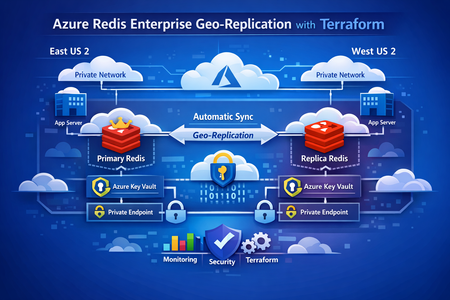
Deploying Azure Redis Enterprise with Geo-Replication Using Terraform
This post walks through a production‑proven pattern for running stateful services across Azure regions using Terraform. We’ll cover a primary–replica Redis architecture, regional isolation with Key Vault and networking, and a clean Terraform parameterization strategy that scales from development to production without duplication. Why Multi‑Region State Is Hard Running applications globally is easy when everything is stateless—if something fails, you redeploy. But stateful services tell a different story. Caches, message brokers, and data stores can’t be treated as disposable. They hold business‑critical data, and downtime or inconsistency quickly becomes customer‑visible. In real‑world systems, common requirements include: Low‑latency reads from multiple regions Automatic recovery when a region becomes unavailable Predictable data consistency Repeatable infrastructure from dev through production Manually configuring this per region doesn’t scale. Drift sets in. Failover is unclear. Backups get forgotten. That’s where Terraform + Azure Managed Redis geo‑replication shines. Github Link : https://github.com/vsakash5/Managed-redis.git High‑Level Architecture We use a primary–replica Redis Enterprise model: Primary Redis Single write endpoint Highly available inside its region Source of truth Replica Redis Read‑only Asynchronously synced from primary Can be promoted during disaster recovery Each region is fully isolated: Separate subnets Separate Key Vaults Private Endpoints only (no public exposure) This prevents shared failure domains and allows each region to operate independently if needed. The Terraform Design Principle Instead of maintaining separate Terraform stacks per region, the key idea is: One reusable module, one tfvars file per environment, multiple regions inside it. The module is written once. Regional differences are supplied via parameter suffixes like: _replica _secondary _tertiary This keeps logic centralized and environments consistent. Core Parameter Layers 1. Environment Identity (Shared) Terraform environment = "dev" # dev | staging | prod context_prefix = "app" Show more lines These values are reused everywhere—names, tags, and identifiers. 2. Primary Region Terraform location = "eastus2" resource_group_name = "rg-app-dev-primary" Show more lines 3. Replica Region Terraform location_replica = "uksouth" resource_group_name_replica = "rg-app-dev-replica" The symmetry is intentional. Terraform can now apply the same module twice without branching logic. Regional Isolation: Networking and Secrets Why isolation matters Geo‑replication copies data, not dependencies. If both Redis instances depend on: the same subnet the same Key Vault then a failure in one region can cascade into the other. Networking (One Subnet per Region) Benefits: Independent NSGs Independent routing Independent capacity planning Key Vault (One per Region) Why this matters: Redis credentials are not replicated Each region stores its own secrets A Key Vault outage doesn’t take both regions down Redis Configuration Primary Redis (Writes Enabled) The geo‑replication group name must match. That’s the logical binding Azure uses to link instances. Private Endpoint‑Only Access No Redis instance is exposed publicly. Each region uses: A private endpoint A workload subnet Internal DNS resolution This means: No public IPs No inbound attack surface Traffic stays on the Azure backbone Linking Primary and Replica Terraform explicitly defines the relationship: Terraform managed_redis_geo_replication_config = { primary_to_replica = { primary_redis_key = "primary" replica_keys = ["replica"] } } Terraform ensures: Primary is created first Replica is deployed second Geo‑replication is established last Environment Scaling: Dev → Staging → Prod The infrastructure pattern never changes. Only values do. Environment Group Name Dev dev-grp Staging stg-grp Prod prod-grp This is how you avoid “snowflake” environments. Disaster Recovery Strategy If the primary region fails: Applications fail over to the replica read endpoint Terraform configuration is updated to: Remove geo‑replication Promote replica config to primary Traffic is fully restored Once the original region recovers, roles can be re‑established cleanly. No click‑ops. No guesswork. Key Lessons Learned 1. Naming is Infrastructure Predictable names enable automation, discovery, and auditing. 2. Key Vault Isolation Beats Availability A shared Key Vault is a shared outage. 3. Parameterization Beats Copy‑Paste Fix once → benefit everywhere. 4. Geo‑Replication Is a Contract Matching replication group names is non‑negotiable. 5. The tfvars File Is the Source of Truth If it’s not in Terraform, it’s not real. Final Thoughts Running stateful services in multiple regions doesn’t require magic— it requires discipline: Isolate aggressively Parameterize consistently Automate everything Test failure often With this approach, adding a new region becomes configuration—not redesign. That’s how infrastructure scales.264Views1like0CommentsIf You're Building AI on Azure, ECS 2026 is Where You Need to Be
Let me be direct: there's a lot of noise in the conference calendar. Generic cloud events. Vendor showcases dressed up as technical content. Sessions that look great on paper but leave you with nothing you can actually ship on Monday. ECS 2026 isn't that. As someone who will be on stage at Cologne this May, I can tell you the European Collaboration Summit combined with the European AI & Cloud Summit and European Biz Apps Summit is one of the few events I've seen where engineers leave with real, production-applicable knowledge. Three days. Three summits. 3,000+ attendees. One of the largest Microsoft-focused events in Europe, and it keeps getting better. If you're building AI systems on Azure, designing cloud-native architectures, or trying to figure out how to take your AI experiments to production — this is where the conversation is happening. What ECS 2026 Actually Is ECS 2026 runs May 5–7 at Confex in Cologne, Germany. It brings together three co-located summits under one roof: European Collaboration Summit — Microsoft 365, Teams, Copilot, and governance European AI & Cloud Summit — Azure architecture, AI agents, cloud security, responsible AI European BizApps Summit — Power Platform, Microsoft Fabric, Dynamics For Azure engineers and AI developers, the European AI & Cloud Summit is your primary destination. But don't ignore the overlap, some of the most interesting AI conversations happen at the intersection of collaboration tooling and cloud infrastructure. The scale matters here: 3,000+ attendees, 100+ sessions, multiple deep-dive tracks, and a speaker lineup that includes Microsoft executives, Regional Directors, and MVPs who have built, broken, and rebuilt production systems. The Azure + AI Track - What's Actually On the Agenda The AI & Cloud Summit agenda is built around real technical depth. Not "intro to AI" content, actual architecture decisions, patterns that work, and lessons from things that didn't. Here's what you can expect: AI Agents and Agentic Systems This is where the energy is right now, and ECS is leaning in. Expect sessions covering how to design agent workflows, chain reasoning steps, handle memory and state, and integrate with Azure AI services. Marco Casalaina, VP of Products for Azure AI at Microsoft, is speaking if you want to understand the direction of the Azure AI platform from the people building it, this is a direct line. Azure Architecture at Scale Cloud-native patterns, microservices, containers, and the architectural decisions that determine whether your system holds up under real load. These sessions go beyond theory you'll hear from engineers who've shipped these designs at enterprise scale. Observability, DevOps, and Production AI Getting AI to production is harder than the demos suggest. Sessions here cover monitoring AI systems, integrating LLMs into CI/CD pipelines, and building the operational practices that keep AI in production reliable and governable. Cloud Security and Compliance Security isn't optional when you're putting AI in front of users or connecting it to enterprise data. Tracks cover identity, access patterns, responsible AI governance, and how to design systems that satisfy compliance requirements without becoming unmaintainable. Pre-Conference Deep Dives One underrated part of ECS: the pre-conference workshops. These are extended, hands-on sessions typically 3–6 hours that let you go deep on a single topic with an expert. Think of them as intensive short courses where you can actually work through the material, not just watch slides. If you're newer to a particular area of Azure AI, or you want to build fluency in a specific pattern before the main conference sessions, these are worth the early travel. The Speaker Quality Is Different Here The ECS speaker roster includes Microsoft executives, Microsoft MVPs, and Regional Directors, people who have real accountability for the products and patterns they're presenting. You'll hear from over 20 Microsoft speakers: Marco Casalaina — VP of Products, Azure AI at Microsoft Adam Harmetz — VP of Product at Microsoft, Enterprise Agent And dozens of MVPs and Regional Directors who are in the field every day, solving the same problems you are. These aren't keynote-only speakers — they're in the session rooms, at the hallway track, available for real conversations. The Hallway Track Is Not a Cliché I know "networking" sounds like a corporate afterthought. At ECS it genuinely isn't. When you put 3,000 practitioners, engineers, architects, DevOps leads, security specialists in one venue for three days, the conversations between sessions are often more valuable than the sessions themselves. You get candid answers to "how are you actually handling X in production?" that you won't find in documentation. The European Microsoft community is tight-knit and collaborative. ECS is where that community concentrates. Why This Matters Right Now We're in a period where AI development is moving fast but the engineering discipline around it is still maturing. Most teams are figuring out: How to move from AI prototype to production system How to instrument and observe AI behaviour reliably How to design agent systems that don't become unmaintainable How to satisfy security and compliance requirements in AI-integrated architectures ECS 2026 is one of the few places where you can get direct answers to these questions from people who've solved them — not theoretically, but in production, on Azure, in the last 12 months. If you go, you'll come back with practical patterns you can apply immediately. That's the bar I hold events to. ECS consistently clears it. Register and Explore the Agenda Register for ECS 2026: ecs.events Explore the AI & Cloud Summit agenda: cloudsummit.eu/en/agenda Dates: May 5–7, 2026 | Location: Confex, Cologne, Germany Early registration is worth it the pre-conference workshops fill up. And if you're coming, find me, I'll be the one talking too much about AI agents and Azure deployments. See you in Cologne.Redis Keys Statistics
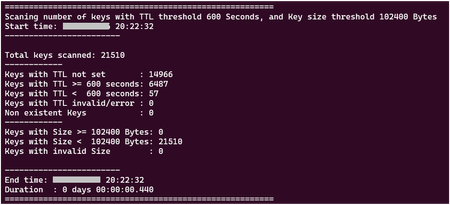
Redis Keys statistics including Key Time-to-Live (TTL) statistics and Key sizes are useful for troubleshooting cache usage and performance, from client side. This article have two sections: First one, using a script to get statistics from Keys on Redis ( 1 Bash script + 1 LUA script - getKeyStats.sh + getKeyStats.lua ) Second one, using a script to filter and list key names ( 1 Bash script that includes a LUA script - listKeys.sh ) Key Time-to-Live (TTL): TTL may have impact on memory usage and memory available on Redis services. Data Loss on Redis services may happened unexpectedly due to some issue on backend, but may also happen due to Memory eviction policy, or Time-to-Live (TTL) expired. Memory eviction policy may remove some keys from Redis service, but only when used capacity (the space used by Redis keys) reach 100% on memory available. Not having any unexpected issue on Redis backend side or not reaching the maximum memory available, the only reason for having some keys removed from cache is due to TTL value. TTL may not be defined at all, and in that case the key remains in the cache forever (persistent) TTL can be set while setting a new key TTL can be set / re-set later after key creation TTL is defined in seconds or milliseconds, or with a negative value: -1, the key exists but has no expiration (it’s persistent); this happens when the TTL was not defined or it was removed using PERSIST command -2, if the key does not exist. any other value Related commands: SET key1 value1 EX 60 - defines TTL as 60 seconds SET key1 value1 PX 60000 - defines TTL as 60000 milliseconds (60 seconds) EXPIRE key1 60 - Set a timeout of 60 seconds on key1 TTL key1 - returns the current TTL value, in seconds PTTL key1 - returns the current TTL value, in milliseconds PERSIST key1 removes TTL from that key and make the key persistent Notes: TTL counts down in real time, but Redis expiration is lazy + active, so exact timing isn’t guaranteed to the millisecond. A TTL of 0 is basically a race condition, that usually are not seen, it because the key expires immediately. EXPIRE key 0 deletes the key right away. There is no guarantee the deletion happens exactly at expiration time. Redis lazy + active expiration means the key is checked only when someone touches it (lazy), but to avoid memory filling up with expired junk, Redis also runs a background job to periodically scan a subset of keys and delete the expired ones (active). So, some expired keys may survive a bit longer, not accessible anymore but still im memory. Example Redis lazy: at 11:59:00 SET key1 value1 EX 60 - 60 seconds expiration time key1 expires at 12:00:00 no one accesses it until 12:00:05 - when someone try to access key1 at 12:00:05, Redis identify the key1 expired and delete it. Example Redis active: for the same key1, after 12:00:00. if during the periodically background job Redis scan the subset of keys containing key1, that key1 will be actively deleted. For that reason, we may see some higher memory usage than the real memory used by active keys in the cache. For more information about Redis commands, check Redis Inc - Commands Key Sizes: Large key value sizes in the cache, may have high impact on Redis performance. Redis service is designed to 1KB response size, and Microsoft recommends to use up to 100KB on Azure Redis services, to get a better performance. Redis response size may not be exactly the same as key size, as Response size is the sum of the response from each operation sent to Redis. While the response size can be the size of only one key requested (like GET), we can see very often response size being a sum of more than one key, as result of multikey operations (like MGET and others). The scope of this article is the focus on each key size; so, we will not discuss on this article the implications of multikey commands. By design Redis service is a single thread system per shard, and this is not a Microsoft/Azure limitation but a Redis design feature. To be very quick on processing requests, Redis is optimized to work and process small keys, and for that is more efficient using a single thread instead of the need of context switching. In a multi threaded system, context switching happens when the processor stops executing one thread and starts executing another. When that happens, the OS saves the current thread’s state (registers, program counter, stack pointer, etc.) and restores the state of the next thread. To save time on that process, Redis service is designed to run in a single thread system. Due to the single thread nature, all operations sent to Redis service, are waiting in a queue to be processed. To minimize latency, all keys must remain small so they can be processed efficiently and responses can be transmitted to the client quickly over the network. For that reason, it's important to understand the key sizes we have on our Redis service, and maintain all keys as small as possible. Scripts Provided To help on identifying some specific TTL values and Keys sizes in a Redis cache, two solutions are provided below: 1. Get Key statistics - that scans all cache and return the amount of Redis keys with: Number of keys with TTL no set Number of keys with TTL higher or equal to a user defined TTL threshold Number of keys with TTL lower than a user defined TTL threshold Number of keys with value size higher or equal than a user defined Size threshold Number of keys with value size lower than a user defined Size threshold Total number of keys in the cache. It also includes start and end time, and the total time spent on the keys scan. 2. List Key Names - this script returns a list of Redis Keys names, based on parameters provided: No TTL set, or TTL higher or equal to a user defined TTL threshold, or TTL lower than to a user defined TTL threshold Key value size higher or equal than a user defined Size threshold, or Key value size lower than a user defined Size threshold Total number of keys in the cache It also includes start and end time, and the total time spent on the keys scan. WARNING: Due to the need to read all keys in the cache, both solutions can cause high workload on Redis side, specially for high datasets on the cache, with high number of keys. Both solutions are using LUA script that runs on Redis side, and depending on the amount of keys in the cache, may block all other commands to be processed, while the script is running. The duration time on the output from each script run, may help to identify the impact of the scripts to run. Run it carefully and do some tests first on your developing environment, before using in a production. YOU CAN RUN THE BELOW SCRIPTS AT YOUR OWN RISK. WE DON'T ASSUME ANY RESPONSABILITY FOR UNEXPECTED RESULTS. 1- Get Key statistics To get Redis key statistics, we use Linux Bash shell and Redis-cli tool to run LUA script on Redis side, to get TTL values and sizes from each key. This solution is very fast, but needs to scan all keys in the cache during the LUA script run. Despite very quick, the time depends of the amount of keys to scan. This may block Redis to process other requests, due to the single-thread nature of Redis service. The below script scans all cache and return only the amount of Redis keys with: Number of keys with TTL no set Number of keys with TTL higher or equal to a user defined TTL threshold Number of keys with TTL lower than a user defined TTL threshold Number of keys with value size higher or equal than a user defined Size threshold Number of keys with value size lower than a user defined Size threshold Total number of keys in the cache. It also includes start and end time, and the total time spent on the keys scan. Calling getKeyStats.sh return statistics from the existing keys in the cache, based on the two threshold values (optional), that can be passed on script command line parameters. This script can clarify questions like: “Do I have any key in the cache without TTL set?”, or “Why my keys are not expiring?” (any threshold values used will clarify this) “Do I have large keys in my cache, larger than 1KB (any TTL threshold can be used, with key size threshold 1024) “How many keys I have that will expire on next 1 hour?” (threshold 3600, with any key size threshold) Output: How to run: create the below getKeyStats.sh and getKeyStats.lua files on same folder, on your Linux environment (Ubuntu 20.04.6 LTS used) give permissions to run Shell script, with command chmod 700 getKeyStats.sh Call the script using the syntax: ./getKeyStats.sh host password [port] [ttl_threshold] [size_threshold] Script parameters: host (mandatory) : the URI for the cache password (mandatory) : the Redis access key from the cache port (optional - default 10000) : TCP port used to access the cache ttl_threshold (optional - default 600 - 10 minutes) : Key TTL threshold (in seconds) to be used on the results (use -1 to 1 to get Keys with no TTL set) size_threshold (optional - default 102400 - 100KB) : Key Size threshold to be used on the results If not provided, the default values will be used: Redis Port: 10000, ttl_threshold: 600 Seconds, size_threshold: 102400 Bytes (100KB). Tested with: Ubuntu 20.04.6 LTS redis-cli -v redis-cli 7.4.2 Redis services: Azure Managed Redis Balanced B0 OSSMode Azure Cache for Redis Standard C1 getKeyStats.sh #!/usr/bin/env bash #============================== LUA script version ================= # Linux Bash Script to get statistics from Redis Keys TTL values and Key value sizes # It returns the Number of: # - keys with TTL no set # - keys with TTL higher or equal to TTL_treshold # - keys with TTL lower TTL_threshold # - keys with value size higher or equal than Size_threshold # - keys with value size lower than Size_threshold # - total number of keys in the cache. #------------------------------------------------------- # WARNING: # It uses LUA script to run on Redis server side. # Use it carefully, during low Redis workoads. # Do your tests first on a Dev environment, before use it on production. #------------------------------------------------------- # It requires : # redis-cli v7 or above #-------------------------------------------------------- # Usage: # getRedisTTL.sh <cacheuri> <cacheaccesskey> [<accessport>(10000)] [<ttl_treashold>(600)] [<size_threshold>(102400)] #======================================================== #------------------------------------------------------ # To use non-ssl port requites to remove --tls parameter from Redis-cli command below #------------------------------------------------------ # Parameters REDIS_HOST="${1:?Usage: $0 <host> <password> [port] [ttl_threshold] [Size_Threshold]}" REDISCLI_AUTH="${2:?Usage: $0 <host> <password> [port] [ttl_threshold] [Size_Threshold]}" REDIS_PORT="${3:-10000}" # 10000 / 6380 / 6379 REDIS_TTL_THRESHOLD="${4:-600}" # 10 minutes REDIS_SIZE_THRESHOLD="${5:-102400}" # 100KB # Port number must be numeric if ! [[ "$REDIS_PORT" =~ ^[0-9]+$ ]]; then echo "ERROR: Redis Port must be numeric" exit 1 fi # TTL threshold must be numeric if ! [[ "$REDIS_TTL_THRESHOLD" =~ ^[0-9]+$ ]]; then echo "ERROR: TTL threshold must be numeric" exit 1 fi # Size threshold must be numeric if ! [[ "$REDIS_SIZE_THRESHOLD" =~ ^[0-9]+$ ]]; then echo "ERROR: Size threshold must be numeric" exit 1 fi echo "" echo "========================================================" echo "Scaning number of keys with TTL threshold $REDIS_TTL_THRESHOLD Seconds, and Key size threshold $REDIS_SIZE_THRESHOLD Bytes" # Start time start_ts=$(date +%s.%3N) echo "Start time: $(date "+%d-%m-%Y %H:%M:%S")" echo "------------------------" echo "" # Procesing result=$(redis-cli \ -h "$REDIS_HOST" \ -a "$REDISCLI_AUTH" \ -p "$REDIS_PORT" \ --tls \ --no-auth-warning \ --raw \ --eval getKeyStats.lua , "$REDIS_TTL_THRESHOLD" "$REDIS_SIZE_THRESHOLD" \ | tr '\n' ' ') read no_ttl nonexist ttl_high ttl_low ttl_invalid size_high size_low size_nil total <<< "$result" if [[ $result == ERR* ]]; then echo "Redis Lua error:" echo "$result" else echo "Total keys scanned: $total" echo "------------" echo "Keys with TTL not set : $no_ttl" echo "Keys with TTL >= $REDIS_TTL_THRESHOLD seconds: $ttl_high" echo "Keys with TTL < $REDIS_TTL_THRESHOLD seconds: $ttl_low" echo "Keys with TTL invalid/error : $ttl_invalid" echo "Non existent Keys : $nonexist" echo "------------" echo "Keys with Size >= $REDIS_SIZE_THRESHOLD Bytes: $size_high" echo "Keys with Size < $REDIS_SIZE_THRESHOLD Bytes: $size_low" echo "Keys with invalid Size : $size_nil" fi echo "" echo "------------------------" end_ts=$(date +%s.%3N) echo "End time: $(date "+%d-%m-%Y %H:%M:%S")" # Duration - Extract days, hours, minutes, seconds, milliseconds duration=$(awk "BEGIN {print $end_ts - $start_ts}") days=$(awk "BEGIN {print int($duration/86400)}") hours=$(awk "BEGIN {print int(($duration%86400)/3600)}") minutes=$(awk "BEGIN {print int(($duration%3600)/60)}") seconds=$(awk "BEGIN {print int($duration%60)}") milliseconds=$(awk "BEGIN {printf \"%03d\", ($duration - int($duration))*1000}") echo "Duration : ${days} days $(printf "%02d" "$hours"):$(printf "%02d" "$minutes"):$(printf "%02d" "$seconds").$milliseconds" echo "========================================================" getKeyStats.lua local ttl_threshold = tonumber(ARGV[1]) local size_threshold = tonumber(ARGV[2]) local cursor = "0" -- Counters local no_ttl = 0 local nonexist = 0 local ttl_high = 0 local ttl_low = 0 local ttl_invalid = 0 local size_high = 0 local size_low = 0 local size_nil = 0 local total = 0 repeat local scan = redis.call("SCAN", cursor, "COUNT", 1000) cursor = scan[1] local keys = scan[2] for _, key in ipairs(keys) do local ttl = redis.call("TTL", key) local size = redis.call("MEMORY","USAGE", key) total = total + 1 if ttl == -1 then no_ttl = no_ttl + 1 elseif ttl == -2 then nonexist = nonexist + 1 elseif type(ttl) ~= "number" then ttl_invalid = ttl_invalid + 1 elseif ttl >= ttl_threshold then ttl_high = ttl_high + 1 else ttl_low = ttl_low + 1 end if size == nil then size_nil = size_nil + 1 elseif size >= size_threshold then size_high = size_high + 1 else size_low = size_low + 1 end end until cursor == "0" return { no_ttl, nonexist, ttl_high, ttl_low, ttl_invalid, size_high, size_low, size_nil, total } Performance: Redis service used: Azure Managed Redis - Balanced B0 - OSSMode Scanning number of keys with TTL threshold 600 Seconds, and Key size threshold 102400 Bytes Total keys scanned: 46161 TTL not set : 0 TTL >= 600 seconds: 46105 TTL < 600 seconds: 56 TTL invalid/error : 0 Non existent key : 0 Keys with Size >= 102400 Bytes: 0 Keys with Size < 102400 Bytes: 46161 Keys with invalid Size : 0 Duration : 0 days 00:00:00.602 # ------------------ Redis service used: Azure Cache for Redis - Standard - C1 Scanning number of keys with TTL threshold 100 Seconds, and Key size threshold 500 Bytes Total keys scanned: 1227 TTL not set : 2 TTL >= 100 seconds: 1225 TTL < 100 seconds: 0 TTL invalid/error : 0 Non existent key : 0 Keys with Size >= 500 Bytes: 1225 Keys with Size < 500 Bytes: 2 Keys with invalid Size : 0 Duration : 0 days 00:00:00.630 # ------------------ WARNING: The above scripts uses LUA script, that runs on Redis side, and may block you normal workload. Use it carefully when have a large number of keys in the cache, and during low workload times. 2 - List Key Names Once we identify some amount of keys in the cache with some specific threshold, we may want to list that key names. The below script can help on that, and returns a list of Redis Keys names with: No TTL set TTL higher or equal to a user defined TTL threshold TTL lower than to a user defined TTL threshold Key value size higher or equal than a user defined Size threshold Key value size lower than a user defined Size threshold Total number of keys in the cache It also includes start and end time, and the total time spent on the keys scan. Calling getKeyStats.sh return just key names and respective TTL values and key sizes. The result depends of the threshold values used, that can be passed on script command line parameters or using the default ones. On this script, we can use a sign on both threshold values: “-“, if we want to return keys lower than that threshold; “+” or no sign, if we want to return keys higher than that threshold. This script can clarify questions like: “What are the keys I have in the cache without TTL?” (Threshold values: -1 0) “What are the keys I have in the cache with TTL, and size higher than 1KB”? (Threshold values: 0 1024) “What are the keys I have in the cache with TTL, and size smaller than 1KB ?” (Threshold values: 0 -1024) “What are the keys I have in the cache with that will expire on next 1 hour?” (Threshold values: -3600 0) “What are the keys I have in the cache with that will expire after 1 hour?” (Threshold values: +3600 0) “What are the keys I have in the cache with No TTL set and size larger than 200K?” (Threshold values: -1 204800) Output: How to run: create the below listKeys.sh file under some folder, on your Linux environment (Ubuntu 20.04.6 LTS used) give permissions to run Shell script, with command chmod 700 listKeys.sh Call the script using the syntax: ./listKeys.sh host password [port] [+/-][ttl_threshold] [+/-][size_threshold] Script parameters: host (mandatory) : the URI for the cache password (mandatory) : the Redis access key from the cache port (optional - default 10000) : TCP port used to access the cache [+/-] (optional) before ttl_threshold: indicates if we want return keys with lower "-", or higher TTL "+" than ttl_threshold ttl_threshold (optional - default 600 - 10 minutes) : Key TTL threshold (in seconds) to be used on the results (use -1 to get Keys with no TTL set) [+/-] (optional) before size_threshold: indicates if we want return keys with small size "-", or large size "+" than size_threshold size_threshold (optional - default 102400 - 100KB) : Key Size threshold to be used on the results If not provided, the default values that will be used: No TTL set (-1), and Key size threshold 102400 Bytes (100KB). Tips: use ttl_threshold = -1 to return key names with no TTL (ex: /listKeys.sh [port] -1 [+/-][size_Threshold]) use ttl_threshold = -500 to return key names with TTL below 500 seconds (ex: /listKeys.sh [port] -500 [+/-][size_Threshold]) use ttl_threshold = 500 to return key names with TTL above or equal to 500 seconds (ex: /listKeys.sh [port] 500 [+/-][size_Threshold]) use size_threshold = 0 to return key names with any size in the cache (ex: /listKeys.sh [port] [+/-][ttl_threshold] 0) use size_threshold = -1000 to return key names with size below 1000 Bytes (ex: /listKeys.sh [port] [+/-][ttl_threshold] -1000) use size_threshold = 1000 to return key names with size above or equal to 1000 Bytes (ex: /listKeys.sh [port] [+/-][ttl_threshold] 1000) use ttl_threshold = 0 AND size_threshold = 0 to return all key names with any TTL and any size in the cache (ex: /listKeys.sh [port] 0 0) use ttl_threshold = -1 AND size_threshold = 0 to return all key names with no TTL and any size in the cache (ex: /listKeys.sh [port] -1 0) Tested with: Ubuntu 20.04.6 LTS redis-cli -v redis-cli 7.4.2 Redis services: Azure Managed Redis Balanced B0 OSSMode Azure Cache for Redis Standard C1 listKeys.sh #!/usr/bin/env bash set -euo pipefail #============================== LUA script version ================= # Linux Bash Script to list Redis Keys names # It returns key names with: # - No TTL set # - with TTL higher or equal to TTL_treshold # - with TTL lower TTL_threshold # - with value size higher or equal than Size_threshold # - with value size lower than Size_threshold # - total number of keys in the cache. #------------------------------------------------------- # WARNING: # It uses LUA script (included on Bash code) to run on Redis server side. # Use it carefully, during low Redis workoads. # Do your tests first on a Dev environment, before use it on production. #------------------------------------------------------- # It requires : # redis-cli v7 or above #-------------------------------------------------------- # Usage: # listKeys.sh <cacheuri> <cacheaccesskey> [<accessport>(10000)] [+/-][<ttl_treashold>(-1)] [+/-][<size_treashold>(102400)] #======================================================== #------------------------------------------------------ # Using non-ssl port requires to remove --tls parameter on Redis-cli command below #------------------------------------------------------ sintax="<redis_host> <password> [redis_port] [+/-][ttl_threshold] [+/-][size_threshold]" REDIS_HOST="${1:?Usage: $0 $sintax}" REDISCLI_AUTH="${2:?Usage: $0 $sintax}" REDIS_PORT="${3:-10000}" # Redis port (10000, 6380, 6379) KEYTTL_THRESHOLD=${4:-"-1"} # -1, +TTL_threshold, TTL_threashold, -TTL_threshold KEYSIZE_THRESHOLD="${5:-102400}" # +Size_threshold, Size_threashold, -Size_threshold # Port number must be numeric if ! [[ "$REDIS_PORT" =~ ^[0-9]+$ ]]; then echo "ERROR: Redis Port must be numeric" exit 1 fi # Check if KEYTTL_THRESHOLD is a valid integer if ! [[ "$KEYTTL_THRESHOLD" =~ ^[-+]?[0-9]+$ ]]; then echo "Error: ttl_threshold $KEYTTL_THRESHOLD is not an integer" exit 1 fi # Check if KEYSIZE_THRESHOLD is a valid integer if ! [[ "$KEYSIZE_THRESHOLD" =~ ^[-+]?[0-9]+$ ]]; then echo "Error: Size_threshold $KEYSIZE_THRESHOLD is not an integer" exit 1 fi # Check if TTL Threasold is positive (or zero), or negative if [ "$KEYTTL_THRESHOLD" -ge 0 ]; then TTLSIGN="+" else TTLSIGN="-" fi # Check if Size Threshold is positive (or zero), or negative if [ "$KEYSIZE_THRESHOLD" -ge 0 ]; then SIZESIGN="+" size_text="larger than" else SIZESIGN="-" size_text="smaler than" fi # specific with no TTL set if [ "$KEYTTL_THRESHOLD" -eq -1 ]; then ttl_text="No TTL set" fi if [ "$KEYTTL_THRESHOLD" -ge 0 ]; then ttl_text="TTL above $KEYTTL_THRESHOLD Seconds" fi if [ "$KEYTTL_THRESHOLD" -lt -1 ]; then ttl_text="TTL below ${KEYTTL_THRESHOLD#[-+]} Seconds" fi # remove any sign KEYTTL_THRESHOLD="${KEYTTL_THRESHOLD#[-+]}" KEYSIZE_THRESHOLD="${KEYSIZE_THRESHOLD#[-+]}" echo "========================================================" echo "List all key names with $ttl_text, and Key size $size_text $KEYSIZE_THRESHOLD Bytes" # Start time start_ts=$(date +%s.%3N) echo "Start time: $(date "+%d-%m-%Y %H:%M:%S")" echo "------------------------" echo "" # Procesing redis-cli -h "$REDIS_HOST" -p "$REDIS_PORT" -a "$REDISCLI_AUTH" --tls --no-auth-warning EVAL " local cursor = '0' local ttl_threshold = tonumber(ARGV[1]) -- KEYTTL_THRESHOLD local ttl_sign = ARGV[2] -- TTLSIGN local size_threshold = tonumber(ARGV[3]) -- KEYSIZE_THRESHOLD local size_sign = ARGV[4] -- SIZESIGN local output = {} local count = 0 local totalKeys = 0 local strKeyTTL = '' local strKeySize = '' -- Scanning keys in the cache table.insert(output, '--------------------------------------') repeat local res = redis.call('SCAN', cursor, 'COUNT', 100) cursor = res[1] for _, k in ipairs(res[2]) do local ttl = redis.call('TTL', k) local size = redis.call('MEMORY','USAGE', k) totalKeys = totalKeys + 1 if (size_sign == '+' and size >= size_threshold) or (size_sign == '-' and size < size_threshold) then -- TTL == -1 → no expiration if ttl_sign == '-' and ttl_threshold == 1 then if ttl == -1 then table.insert(output, k .. ': TTL: -1, Size: ' .. size .. ' Bytes') count = count + 1 end -- TTL comparisons (exclude -1 and -2) else if ttl >= 0 then if ttl_sign == '-' and ttl < ttl_threshold then table.insert(output, k .. ': TTL: ' .. ttl .. ' seconds, Size: ' .. size .. ' Bytes') count = count + 1 elseif ttl_sign == '+' and ttl >= ttl_threshold then table.insert(output, k .. ': TTL: ' .. ttl .. ' seconds, Size: ' .. size .. ' Bytes') count = count + 1 end end end end end until cursor == '0' -- Adding summary to output table.insert(output, '--------------------------------------') if (size_sign == '+') then strKeySize = 'larger' else strKeySize = 'smaler' end strKeySize = 'size ' .. strKeySize .. ' than ' .. size_threshold .. ' Bytes' if ttl_sign == '-' and ttl_threshold == 1 then strKeyTTL = 'No TTL' elseif ttl_sign == '-' then strKeyTTL = 'TTL < ' .. ttl_threshold .. ' seconds' elseif ttl_sign == '+' then strKeyTTL = 'TTL >= ' .. ttl_threshold .. ' seconds' end strKeyTTL = ' keys found with ' .. strKeyTTL table.insert(output, 'Scan completed.') table.insert(output, 'Total of ' .. totalKeys .. ' keys scanned.') table.insert(output, count .. strKeyTTL .. ', and ' .. strKeySize) table.insert(output, '--------------------------------------') return output " 0 "$KEYTTL_THRESHOLD" "$TTLSIGN" "$KEYSIZE_THRESHOLD" "$SIZESIGN" echo " " end_ts=$(date +%s.%3N) echo "End time: $(date "+%d-%m-%Y %H:%M:%S")" # Duration - Extract days, hours, minutes, seconds, milliseconds duration=$(awk "BEGIN {print $end_ts - $start_ts}") days=$(awk "BEGIN {print int($duration/86400)}") hours=$(awk "BEGIN {print int(($duration%86400)/3600)}") minutes=$(awk "BEGIN {print int(($duration%3600)/60)}") seconds=$(awk "BEGIN {print int($duration%60)}") milliseconds=$(awk "BEGIN {printf \"%03d\", ($duration - int($duration))*1000}") echo "Duration : ${days} days $(printf "%02d" "$hours"):$(printf "%02d" "$minutes"):$(printf "%02d" "$seconds").$milliseconds" echo "========================================================" Performance: Redis service used: Azure Managed Redis Balanced B0 OSSMode # ------------------ Scan completed. Total keys listed: 46005 Duration : 0 days 00:00:01.437 # ------------------ Redis service used: Azure Cache for Redis - Standard - C1 Scan completed. Total keys listed: 1225 Duration : 0 days 00:00:00.545 # ------------------ WARNING: The above script uses LUA script, that runs on Redis side, and may block you normal workload. Use it carefully when have a large number of keys in the cache, and during low workload times. YOU CAN RUN THE BELOW SCRIPTS AT YOUR OWN RISK. WE DON'T ASSUME ANY RESPONSABILITY FOR UNEXPECTED RESULTS. References Azure Managed Redis Azure Best Practice for Development Redis Inc - Commands Redis LUA - Lua API reference Redis Inc - How Redis expires keys Redis CLI Bash Script xargs man page awk man page I hope this can be useful !!!1.1KViews2likes2CommentsLeveraging Redis Insights for Azure Cache for Redis
The blog talks about how to leverage Redis Insights GUI tool while working with Azure Cache for Redis. We will look at some of the option what will help us with some high-level connectivity troubleshooting and insights to our data present inside the cache. To start with, we can leverage this for testing the connectivity to our Redis cache instance. After clicking on Add Redis Database button, we can fill in the other fields ahead: Host: Complete FQDN or the completed Redis cache Endpoint For Basic, Standard & Premium Tier - <Cachename>.redis.windows.net For Enterprise Tier - <Cachename>.<regionname>.redisenterprise.cache.azure.net Port: 6380 or 6379 (depending on whether we are testing for SSL or non-SSL port respectively) / 10000 for Enterprise Tier Database Alias: Cache name Password: Access Key for your cache Use TLS: Option to be checked for testing with 6380 port and also Enterprise Tier cache. Post that, we can click on Test Connection button which will help us doing a high-level check whether the cache endpoint is reachable or not. SSL Port: Non-SSL Port: Enterprise Cache: Once the test connection is successful, you can click on Add Redis Database to start exploring the insights of your cache instance. Note: All the above demo has been done without any kind of firewall, private endpoints or VNET restrictions. In case you are having VNET or private endpoints configured, then you have test it from a VM which is part of the VNET configured. On clicking My Redis Database option, it will list down all the databases you have connected too from the Redis Insights along with some high-level details such as modules if any for the enterprise tier or OSS Cluster as connection type if clustering policy selected was OSS. If Enterprise, it shows as Standalone only. For this Demo, we took an empty cache and the below snippet demonstrate on how your can-do simple Set operations or add a key to your cache instance. We can add a new key by providing the key type such as Set, String, List, Hast etc, Key name, TTL etc. We have added 3 keys initially and it will start reflecting in the left-hand window section as depicted below: Similarly, we added the keys further and all of them started listing. Selecting any of the keys shall provide insights to that particular key on the right sight window such as value, TTL , key size etc. You can also use this to do any kind of pattern match as well. E.g. In the below snippet, we tried listing all the keys that start key name as testkey. There is a Bulk Actions button available as well which has mainly 2 option available: Perform bulk deletion. Execute multiple set of Redis commands in a sequential format which can be uploaded as a plain text file. Moving ahead, there is an Analysis Tool option which can be leveraged to gain insight to the data summary residing in our cache. There is a New Report button which will generate a report providing various kind of insights on data residing in the cache. Below are some of the highlights: It provides a high-level summary key based on type. It gives you a view of how much data in under No Expiry (no TTL set) and is expected to get freed in expected time (based on TTL set). In the below example, it points around ~450 bytes of memory to get freed in less than an hour while there is approx. ~1200 bytes of data which don’t have any kind of TTL set and will not expire. It further provides high level details of top keys based on TTL or Key size which can be used to identify larger size keys. There is also a Workbench option that provides a command line option like Redis CLI, using which we can execute commands. In the below example, we have used it to do PING-PONG test, set up the keys and other operations too. Disclaimer: Please note that tool is supported by REDIS and not Azure cache for Redis so we don’t control the behavior or features for the tool. Hope that helps!11KViews1like2CommentsExciting Updates Coming to Conversational Diagnostics (Public Preview)
Last year, at Ignite 2023, we unveiled Conversational Diagnostics (Preview), a revolutionary tool integrated with AI-powered capabilities to enhance problem-solving for Windows Web Apps. This year, we're thrilled to share what’s new and forthcoming for Conversational Diagnostics (Preview). Get ready to experience a broader range of functionalities and expanded support across various Azure Products, making your troubleshooting journey even more seamless and intuitive.456Views0likes0CommentsFind the Alerts You Didn't Know You Were Missing with Azure SRE Agent
I had 6 alert rules. CPU. Memory. Pod restarts. Container errors. OOMKilled. Job failures. I thought I was covered. Then my app went down. I kept refreshing the Azure portal, waiting for an alert. Nothing. That's when it hit me: my alerts were working perfectly. They just weren't designed for this failure mode. Sound familiar? The Problem Every Developer Knows If you're a developer or DevOps engineer, you've been here: a customer reports an issue, you scramble to check your monitoring, and then you realize you don't have the right alerts set up. By the time you find out, it's already too late. You set up what seems like reasonable alerting and assume you're covered. But real-world failures are sneaky. They slip through the cracks of your carefully planned thresholds. My Setup: AKS with Redis I love to vibe code apps using GitHub Copilot Agent mode with Claude Opus 4.5. It's fast, it understands context, and it lets me focus on building rather than boilerplate. For this project, I built a simple journal entry app: AKS cluster hosting the web API Azure Cache for Redis storing journal data Azure Monitor alerts for CPU, memory, pod restarts, container errors, OOMKilled, and job failures Seemed solid. What could go wrong? The Scenario: Redis Password Rotation Here's something that happens constantly in enterprise environments: the security team rotates passwords. It's best practice. It's in the compliance checklist. And it breaks things when apps don't pick up the new credentials. I simulated exactly this. The pods came back up. But they couldn't connect to Redis (as expected). The readiness probes started failing. The LoadBalancer had no healthy backends. The endpoint timed out. And not a single alert fired. Using SRE Agent to Find the Alert Gaps Instead of manually auditing every alert rule and trying to figure out what I missed, I turned to Azure SRE Agent. I asked it a simple question: "My endpoint is timing out. What alerts do I have, and why didn't any of them fire?" Within minutes, it had diagnosed the problem. Here's what it found: My Existing Alerts Why They Didn't Fire High CPU/Memory No resource pressure,just auth failures Pod Restarts Pods weren't restarting, just unhealthy Container Errors App logs weren't being written OOMKilled No memory issues Job Failures No K8s jobs involved The gaps SRE Agent identified: ❌ No synthetic URL availability test ❌ No readiness/liveness probe failure alerts ❌ No "pods not ready" alerts scoped to my namespace ❌ No Redis connection error detection ❌ No ingress 5xx/timeout spike alerts ❌ No per-pod resource alerts (only node-level) SRE Agent didn't just tell me what was wrong, it created a GitHub issue with : KQL queries to detect each failure type Bicep code snippets for new alert rules Remediation suggestions for the app code Exact file paths in my repo to update Check it out: GitHub Issue How I Built It: Step by Step Let me walk you through exactly how I set this up inside SRE Agent. Step 1: Create an SRE Agent I created a new SRE Agent in the Azure portal. Since this workflow analyzes alerts across my subscription (not just one resource group), I didn't configure any specific resource groups. Instead, I gave the agent's managed identity Reader permissions on my entire subscription. This lets it discover resources, list alert rules, and query Log Analytics across all my resource groups. Step 2: Connect GitHub to SRE Agent via MCP I added a GitHub MCP server to give the agent access to my source code repository.MCP (Model Context Protocol) lets you bring any API into the agent. If your tool has an API, you can connect it. I use GitHub for both source code and tracking dev tickets, but you can connect to wherever your code lives (GitLab, Azure DevOps) or your ticketing system (Jira, ServiceNow, PagerDuty). Step 3: Create a Subagent inside SRE Agent for managing Azure Monitor Alerts I created a focused subagent with a specific job and only the tools it needs: Azure Monitor Alerts Expert Prompt: " You are expert in managing operations related to azure monitor alerts on azure resources including discovering alert rules configured on azure resources, creating new alert rules (with user approval and authorization only), processing the alerts fired on azure resources and identifying gaps in the alert rules. You can get the resource details from azure monitor alert if triggered via alert. If not, you need to ask user for the specific resource to perform analysis on. You can use az cli tool to diagnose logs, check the app health metrics. You must use the app code and infra code (bicep files) files you have access to in the github repo <insert your repo> to further understand the possible diagnoses and suggest remediations. Once analysis is done, you must create a github issue with details of analysis and suggested remediation to the source code files in the same repo." Tools enabled: az cli – List resources, alert rules, action groups Log Analytics workspace querying – Run KQL queries for diagnostics GitHub MCP – Search repositories, read file contents, create issues Step 4: Ask the Subagent About Alert Gaps I gave the agent context and asked a simple question: "@AzureAlertExpert: My API endpoint http://132.196.167.102/api/journals/john is timing out. What alerts do I have configured in rg-aks-journal, and why didn't any of them fire? The agent did the analysis autonomously and summarized findings with suggestions to add new alert rules in a GitHub issue. Here's the agentic workflow to perform azure monitor alert operations Why This Matters Faster response times. Issues get diagnosed in minutes, not hours of manual investigation. Consistent analysis. No more "I thought we had an alert for that" moments. The agent systematically checks what's covered and what's not. Proactive coverage. You don't have to wait for an incident to find gaps. Ask the agent to review your alerts before something breaks. The Bottom Line Your alerts have gaps. You just don't know it until something slips through. I had 6 alert rules and still missed a basic failure. My pods weren't restarting, they were just unhealthy. My CPU wasn't spiking, the app was just returning errors. None of my alerts were designed for this. You don't need to audit every alert rule manually. Give SRE Agent your environment, describe the failure, and let it tell you what's missing. Stop discovering alert gaps from customer complaints. Start finding them before they matter. A Few Tips Give the agent Reader access at subscription level so it can discover all resources Use a focused subagent prompt, don't try to do everything in one agent Test your MCP connections before running workflows What Alert Gaps Have Burned You? What's the alert you wish you had set up before an incident? Credential rotation? Certificate expiry? DNS failures? Let us know in the comments.664Views2likes0CommentsReimagining AI Ops with Azure SRE Agent: New Automation, Integration, and Extensibility features
Azure SRE Agent offers intelligent and context aware automation for IT operations. Enhanced by customer feedback from our preview, the SRE Agent has evolved into an extensible platform to automate and manage tasks across Azure and other environments. Built on an Agentic DevOps approach - drawing from proven practices in internal Azure operations - the Azure SRE Agent has already saved over 20,000 engineering hours across Microsoft product teams operations, delivering strong ROI for teams seeking sustainable AIOps. An Operations Agent that adapts to your playbooks Azure SRE Agent is an AI powered operations automation platform that empowers SREs, DevOps, IT operations, and support teams to automate tasks such as incident response, customer support, and developer operations from a single, extensible agent. Its value proposition and capabilities have evolved beyond diagnosis and mitigation of Azure issues, to automating operational workflows and seamless integration with the standards and processes used in your organization. SRE Agent is designed to automate operational work and reduce toil, enabling developers and operators to focus on high-value tasks. By streamlining repetitive and complex processes, SRE Agent accelerates innovation and improves reliability across cloud and hybrid environments. In this article, we will look at what’s new and what has changed since the last update. What’s New: Automation, Integration, and Extensibility Azure SRE Agent just got a major upgrade. From no-code automation to seamless integrations and expanded data connectivity, here’s what’s new in this release: No-code Sub-Agent Builder: Rapidly create custom automations without writing code. Flexible, event-driven triggers: Instantly respond to incidents and operational changes. Expanded data connectivity: Unify diagnostics and troubleshooting across more data sources. Custom actions: Integrate with your existing tools and orchestrate end-to-end workflows via MCP. Prebuilt operational scenarios: Accelerate deployment and improve reliability out of the box. Unlike generic agent platforms, Azure SRE Agent comes with deep integrations, prebuilt tools, and frameworks specifically for IT, DevOps, and SRE workflows. This means you can automate complex operational tasks faster and more reliably, tailored to your organization’s needs. Sub-Agent Builder: Custom Automation, No Code Required Empower teams to automate repetitive operational tasks without coding expertise, dramatically reducing manual workload and development cycles. This feature helps address the need for targeted automation, letting teams solve specific operational pain points without relying on one-size-fits-all solutions. Modular Sub-Agents: Easily create custom sub-agents tailored to your team’s needs. Each sub-agent can have its own instructions, triggers, and toolsets, letting you automate everything from outage response to customer email triage. Prebuilt System Tools: Eliminate the inefficiency of creating basic automation from scratch, and choose from a rich library of hundreds of built-in tools for Azure operations, code analysis, deployment management, diagnostics, and more. Custom Logic: Align automation to your unique business processes by defining your automation logic and prompts, teaching the agent to act exactly as your workflow requires. Flexible Triggers: Automate on Your Terms Invoke the agent to respond automatically to mission-critical events, not wait for manual commands. This feature helps speed up incident response and eliminate missed opportunities for efficiency. Multi-Source Triggers: Go beyond chat-based interactions, and trigger the agent to automatically respond to Incident Management and Ticketing systems like PagerDuty and ServiceNow, Observability Alerting systems like Azure Monitor Alerts, or even on a cron-based schedule for proactive monitoring and best-practices checks. Additional trigger sources such as GitHub issues, Azure DevOps pipelines, email, etc. will be added over time. This means automation can start exactly when and where you need it. Event-Driven Operations: Integrate with your CI/CD, monitoring, or support systems to launch automations in response to real-world events - like deployments, incidents, or customer requests. Vital for reducing downtime, it ensures that business-critical actions happen automatically and promptly. Expanded Data Connectivity: Unified Observability and Troubleshooting Integrate data, enabling comprehensive diagnostics and troubleshooting and faster, more informed decision-making by eliminating silos and speeding up issue resolution. Multiple Data Sources: The agent can now read data from Azure Monitor, Log Analytics, and Application Insights based on its Azure role-based access control (RBAC). Additional observability data sources such as Dynatrace, New Relic, Datadog, and more can be added via the Remote Model Context Protocol (MCP) servers for these tools. This gives you a unified view for diagnostics and automation. Knowledge Integration: Rather than manually detailing every instruction in your prompt, you can upload your Troubleshooting Guide (TSG) or Runbook directly, allowing the agent to automatically create an execution plan from the file. You may also connect the agent to resources like SharePoint, Jira, or documentation repositories through Remote MCP servers, enabling it to retrieve needed files on its own. This approach utilizes your organization’s existing knowledge base, streamlining onboarding and enhancing consistency in managing incidents. Azure SRE Agent is also building multi-agent collaboration by integrating with PagerDuty and Neubird, enabling advanced, cross-platform incident management and reliability across diverse environments. Custom Actions: Automate Anything, Anywhere Extend automation beyond Azure and integrate with any tool or workflow, solving the problem of limited automation scope and enabling end-to-end process orchestration. Out-of-the-Box Actions: Instantly automate common tasks like running azcli, kubectl, creating GitHub issues, or updating Azure resources, reducing setup time and operational overhead. Communication Notifications: The SRE Agent now features built-in connectors for Outlook, enabling automated email notifications, and for Microsoft Teams, allowing it to post messages directly to Teams channels for streamlined communication. Bring Your Own Actions: Drop in your own Remote MCP servers to extend the agent’s capabilities to any custom tool or workflow. Future-proof your agentic DevOps by automating proprietary or emerging processes with confidence. Prebuilt Operations Scenarios Address common operational challenges out of the box, saving teams time and effort while improving reliability and customer satisfaction. Incident Response: Minimize business impact and reduce operational risk by automating detection, diagnosis, and mitigation of your workload stack. The agent has built-in runbooks for common issues related to many Azure resource types including Azure Kubernetes Service (AKS), Azure Container Apps (ACA), Azure App Service, Azure Logic Apps, Azure Database for PostgreSQL, Azure CosmosDB, Azure VMs, etc. Support for additional resource types is being added continually, please see product documentation for the latest information. Root Cause Analysis & IaC Drift Detection: Instantly pinpoint incident causes with AI-driven root cause analysis including automated source code scanning via GitHub and Azure DevOps integration. Proactively detect and resolve infrastructure drift by comparing live cloud environments against source-controlled IaC, ensuring configuration consistency and compliance. Handle Complex Investigations: Enable the deep investigation mode that uses a hypothesis-driven method to analyze possible root causes. It collects logs and metrics, tests hypotheses with iterative checks, and documents findings. The process delivers a clear summary and actionable steps to help teams accurately resolve critical issues. Incident Analysis: The integrated dashboard offers a comprehensive overview of all incidents managed by the SRE Agent. It presents essential metrics, including the number of incidents reviewed, assisted, and mitigated by the agent, as well as those awaiting human intervention. Users can leverage aggregated visualizations and AI-generated root cause analyses to gain insights into incident processing, identify trends, enhance response strategies, and detect areas for improvement in incident management. Inbuilt Agent Memory: The new SRE Agent Memory System transforms incident response by institutionalizing the expertise of top SREs - capturing, indexing, and reusing critical knowledge from past incidents, investigations, and user guidance. Benefit from faster, more accurate troubleshooting, as the agent learns from both successes and mistakes, surfacing relevant insights, runbooks, and mitigation strategies exactly when needed. This system leverages advanced retrieval techniques and a domain-aware schema to ensure every on-call engagement is smarter than the last, reducing mean time to resolution (MTTR) and minimizing repeated toil. Automatically gain a continuously improving agent that remembers what works, avoids past pitfalls, and delivers actionable guidance tailored to the environment. GitHub Copilot and Azure DevOps Integration: Automatically triage, respond to, and resolve issues raised in GitHub or Azure DevOps. Integration with modern development platforms such as GitHub Copilot coding agent increases efficiency and ensures that issues are resolved faster, reducing bottlenecks in the development lifecycle. Ready to get started? Azure SRE Agent home page Product overview Pricing Page Pricing Calculator Pricing Blog Demo recordings Deployment samples What’s Next? Give us feedback: Your feedback is critical - You can Thumbs Up / Thumbs Down each interaction or thread, or go to the “Give Feedback” button in the agent to give us in-product feedback - or you can create issues or just share your thoughts in our GitHub repo at https://github.com/microsoft/sre-agent. We’re just getting started. In the coming months, expect even more prebuilt integrations, expanded data sources, and new automation scenarios. We anticipate continuous growth and improvement throughout our agentic AI platforms and services to effectively address customer needs and preferences. Let us know what Ops toil you want to automate next!5.2KViews1like0Comments- 17KViews3likes0Comments