azure app service
538 TopicsAuditing and Telemetry for the Agent Governance Toolkit - Getting Started with .NET Core
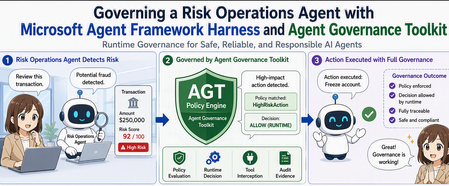
We've entered an era where AI agents autonomously invoke tools — reading and writing files, calling APIs, querying databases. Convenient as this is, without a mechanism to control who can call what, and under what conditions, you can't put it into production. The Agent Governance Toolkit (AGT), open-sourced by Microsoft, is exactly the toolkit for embedding that "gatekeeper" into AI agents. This article walks through getting started with AGT in .NET (C#), based on the following GitHub repository sample.38Views2likes0CommentsA Better Way to View Logs in Kudu for Azure App Service on Linux
Logs are often the fastest way to understand what is happening inside your application. Whether you are investigating startup behavior, runtime errors, failed requests, dependency issues, or unexpected application behavior, having the right log view can make troubleshooting much easier. To make this easier, we have added a new Log stream page in Kudu for Azure App Service on Linux, available under the Logs dropdown. This experience gives you a single place to stream, browse, search, and filter logs so you can understand what is happening in your app faster. Opening the Logs page You can open Kudu from the Azure portal: Go to your App Service. Select Advanced Tools. Click Go. You can also open Kudu directly by going to: https://<app-name>.scm.azurewebsites.net From there, open the Logs page. View live logs across your app and platform The Logs page lets you view logs as they are being written, with filters for timeframe, instance, container, log type, and level. This helps when you want to focus on a specific instance, look only at errors, or separate application logs from platform events. For example, you can use platform logs to understand container lifecycle events, restarts, startup behavior, warmup probe activity, and other platform-side events related to your app. Quickly find the log entries that matter You can use keyword search to narrow down the log stream or historical logs. This is useful when you are looking for a specific error message, request path, exception, dependency failure, timeout, or any application-specific keyword. Instead of scanning through hundreds of entries, you can search for the terms that are relevant to the issue you are investigating. Investigate issues within a specific timeframe The Log stream page also supports viewing logs for a selected time range. This is useful when you know when an issue occurred and want to inspect both application and platform activity around that time. For example, you can filter to a specific timeframe, switch to Application logs, and check what your app was doing when the issue happened. This can help you troubleshoot scenarios such as failed requests, application exceptions, slow startup, container restarts, dependency issues, or configuration problems. Summary The new Log stream page in Kudu makes it easier to work with logs for Azure App Service on Linux. With live streaming, keyword search, historical views, and filters for application and platform logs, you can quickly narrow down the information you need and troubleshoot issues more efficiently. We are continuing to improve the App Service Linux experience to make diagnostics simpler and more useful for day-to-day development and operations.179Views1like1CommentOnly 8.5% of MCP Servers Use OAuth — Here's How to Host One Securely on App Service
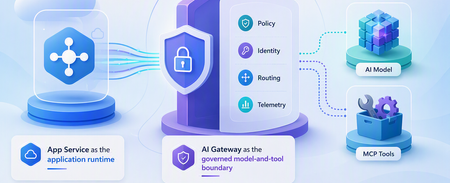
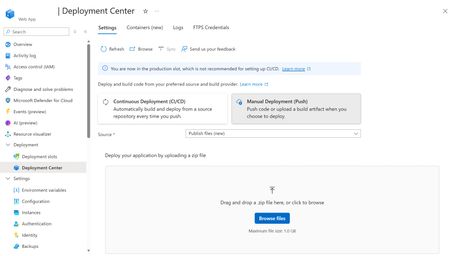
The Model Context Protocol exploded onto the scene because it's easy. Stand up a server, expose a few tools, point Claude or VS Code at it, and your agent can suddenly read files, hit APIs, and run code. That same ease is the problem: most MCP servers ship with no authentication at all, and they're getting pushed straight to the internet. The numbers are bleak-into-an-incident-report bad. Astrix Research's State of MCP Server Security 2025 found that only 8.5% of MCP servers use OAuth — the rest lean on static API keys or nothing. And the CVEs have already started: CVE-2025-6514 — a CVSS 9.6 OS command-injection flaw in mcp-remote . If a client connects to a malicious or hijacked MCP server, the server can inject shell commands through the OAuth authorization_endpoint during discovery and achieve remote code execution on the client. Roughly half a million downloads were exposed. CVE-2025-49596 — RCE in the MCP Inspector dev tool, which shipped with no authentication on its local web UI. A crafted request from a webpage you happened to visit could execute code on your machine. The throughline: MCP doesn't enforce security at the protocol level. The spec is explicit that authorization is optional and implementation-dependent. That's a reasonable design choice for a transport, but it means you own the perimeter. Skip it, and you've published an unauthenticated RPC endpoint that can read secrets and run tools. So let's not skip it. This post walks through a hardened MCP server on Azure App Service that closes every gap above — and most of it is platform configuration, not code you have to write and get right yourself. Sample: seligj95/app-service-secure-mcp. One azd up (plus an Entra app registration the hook creates for you) gives you an MCP server behind Easy Auth, talking to Key Vault over a managed identity, with no public network access, fronted by API Management, and an Application Insights alert watching for abuse. The threat model for a hosted MCP server Before the architecture, be honest about the attack surface. When an MCP server is internet-reachable, the bad days look like this: Unauthenticated tool invocation. Anyone who finds the endpoint calls your tools. If one of them reads a database or a secret, that's the whole game. Credential exfiltration. A tool that returns a secret value — even "helpfully," for debugging — hands credentials to whatever is driving the session. Prompt injection via tool responses. A compromised or malicious tool return can carry instructions that hijack the calling agent. Path traversal / injection. A tool that concatenates user input into a file path or shell command is the same class of bug we've fought for 25 years, now with an LLM cheerfully supplying the payload. Lateral movement. A server running with a broad identity or a network line of sight to everything becomes a pivot point. The architecture below maps a defense to each one. None of it is exotic — it's the App Service security stack, pointed at MCP. The architecture Five layers, each one a checkbox or a few lines of Bicep. Let's take them in order. 1. Easy Auth — spec-compliant OAuth you don't have to write The single most important fix is also the easiest: turn on App Service built-in authentication (Easy Auth) and point it at Entra ID. Now App Service validates the token and rejects unauthenticated requests at the platform, before a single line of your Python runs. App Service Authentication also has a built-in MCP server authorization mode (Preview) that makes your server comply with the MCP authorization spec: it serves Protected Resource Metadata (PRM) so a compliant MCP client can discover the authorization server and complete the OAuth handshake itself — instead of just getting a bare 401. In the sample that's an authsettingsV2 resource: resource authSettings 'Microsoft.Web/sites/config@2024-04-01' = { parent: web name: 'authsettingsV2' properties: { globalValidation: { requireAuthentication: true unauthenticatedClientAction: 'Return401' // reject, don't redirect } identityProviders: { azureActiveDirectory: { enabled: true registration: { clientId: authClientId openIdIssuer: '${environment().authentication.loginEndpoint}${authTenantId}/v2.0' } validation: { allowedAudiences: [ 'api://${authClientId}' ] } } } } } The piece that makes it MCP-compliant — not just "returns 401" — is enabling PRM. That's one app setting that publishes the metadata document MCP clients look for: { name: 'WEBSITE_AUTH_PRM_DEFAULT_WITH_SCOPES' value: 'api://${authClientId}/user_impersonation' } unauthenticatedClientAction: 'Return401' gives a clean 401 instead of a login redirect, and PRM turns that 401 into a discoverable OAuth challenge — the client follows the metadata, signs the user in, and retries with a valid token. Recall that 8.5% figure: this is the spec-compliant OAuth the other 91.5% are missing, and you got it from configuration, not code. One gotcha worth calling out: when App Service creates the Entra registration for you, the default policy only accepts tokens the app itself obtained. For a real MCP client to connect, add its client id to the allowed-applications policy and preauthorize it on the app registration. (Entra has no Dynamic Client Registration, so the client ships a known client id; for VS Code / GitHub Copilot, preauthorization avoids a consent prompt the client won't surface.) The bonus is that the validated identity is handed to your code. App Service injects the caller's claims into every forwarded request as the X-MS-CLIENT-PRINCIPAL headers — and crucially, it strips any client-supplied copy first, so they can't be forged. The whoami tool just reads them: def _client_principal(request: Request) -> Dict[str, Any]: raw = request.headers.get("x-ms-client-principal") # base64-encoded JSON of the caller's claims, injected by Easy Auth ... return {"authenticated": bool(raw), "name": name, ...} Your tools now know who's calling without you owning any of the token machinery. 2. Managed identity — stop storing the keys to the kingdom The static-API-key habit is how secrets leak. Replace it with a system-assigned managed identity: App Service gets an Entra identity that Azure manages, and your code authenticates to Key Vault, Storage, or Azure OpenAI with no stored credential. This matters for a subtle reason the MCP authorization guidance calls out explicitly: the token a client presents represents access to your server, not to Key Vault. Never forward it downstream — use the managed identity (or an on-behalf-of token) for that hop. Pass-through is a vulnerability; delegation is the fix, and the managed identity is how you delegate without holding a secret. resource web 'Microsoft.Web/sites@2024-04-01' = { identity: { type: 'SystemAssigned' } ... } In Python, DefaultAzureCredential resolves to that identity automatically — the same code runs locally against your az login and in Azure against the MI: from azure.identity import DefaultAzureCredential from azure.keyvault.secrets import SecretClient credential = DefaultAzureCredential() client = SecretClient(vault_url=KEY_VAULT_URI, credential=credential) And least privilege is one role assignment. The sample grants the identity exactly Key Vault Secrets User — read secret values, nothing else: var keyVaultSecretsUserRoleId = '4633458b-17de-408a-b874-0445c86b69e6' resource appSecretsUser 'Microsoft.Authorization/roleAssignments@2022-04-01' = { name: guid(keyVault.id, appPrincipalId, keyVaultSecretsUserRoleId) scope: keyVault properties: { roleDefinitionId: subscriptionResourceId('Microsoft.Authorization/roleDefinitions', keyVaultSecretsUserRoleId) principalId: appPrincipalId principalType: 'ServicePrincipal' } } There is now no secret used to read secrets. That's the chain of custody you want. 3. Key Vault references — and a tool that won't leak them Two pieces here. First, Key Vault references keep secrets out of your configuration. You point an app setting at a vault URI, and App Service resolves the value at runtime via the managed identity: { name: 'SECURE_CONFIG_VALUE' value: '@Microsoft.KeyVault(SecretUri=${secureConfigSecretUri})' } The plaintext never appears in your repo, your Bicep, or the portal's app settings blade — it shows up as a resolved reference. Second, and this is the part developers get wrong: a tool that reads a secret should never return the secret. The sample's read_secret_metadata proves the managed-identity path works end to end, then deliberately withholds the value: async def tool_read_secret_metadata(secret_name: str = "demo-secret"): secret = client.get_secret(secret_name) return { "available": True, "version": secret.properties.version, "value_length": len(secret.value), # length, never the value "note": "Value intentionally withheld — metadata only.", } If your MCP server has a get_secret tool that returns the secret, you've built a credential-exfiltration API with a friendly name. Return metadata; act on the value server-side. The same discipline applies to input. The safe_lookup tool matches against a fixed allow-list and refuses anything that smells like traversal or injection — it never touches a filesystem or a shell: suspicious = any(t in key for t in ("..", "/", "\\", ";", "|", "$(", "`")) if key in DOCS: return {"topic": key, "doc": DOCS[key], "found": True} return {"found": False, "rejected_as_suspicious": suspicious, ...} safe_lookup("../../etc/passwd") comes back rejected_as_suspicious: true . That is the entire fix for a whole class of CVEs. 4. Private endpoints + APIM — take the server off the internet Authentication is necessary but not sufficient. The strongest version of "don't expose your MCP server" is to not expose it — give the App Service and Key Vault private endpoints, disable public network access, and let API Management be the only public door. resource web 'Microsoft.Web/sites@2024-04-01' = { properties: { virtualNetworkSubnetId: appSubnetId // outbound: reach KV's private endpoint publicNetworkAccess: 'Disabled' // inbound: no public access at all ... } } Now the App Service hostname returns nothing from the internet. The only ingress is the APIM gateway, which runs the security policy before traffic ever reaches the VNet — validate the Entra JWT, rate-limit per caller, and (the documented extension point) run a content-safety check: <inbound> <base /> <validate-jwt header-name="Authorization" failed-validation-httpcode="401"> <openid-config url="https://login.microsoftonline.com/{tenant}/v2.0/.well-known/openid-configuration" /> <required-claims> <claim name="aud"><value>api://{clientId}</value></claim> </required-claims> </validate-jwt> <rate-limit-by-key calls="60" renewal-period="60" counter-key="@(context.Request.IpAddress)" /> <set-backend-service backend-id="mcp-backend" /> </inbound> This is defense in depth: APIM validates the token, and Easy Auth validates it again at the app. An attacker has to get past a public gateway with JWT enforcement and rate limiting just to reach a private endpoint that also demands a valid token. Compare that to the median MCP server, which is a raw port on the internet. The honest trade-off: this is a security reference architecture, not a 60-second demo. APIM takes ~30–45 minutes to provision, and because the app is private, you test through the gateway, not the App Service hostname. That friction is the point — it's the same friction an attacker hits. 5. Monitoring — see the abuse before it's an incident The last layer is visibility. The Azure Monitor OpenTelemetry distro auto-instruments FastAPI, and the audit_event tool emits a structured custom event per call. A scheduled-query alert watches the rate of those events and fires when tool invocations spike — the signature of an agent looping over a sensitive tool, or someone probing the surface: criteria: { allOf: [{ query: 'customEvents | where name == "mcp_tool_audit" | summarize calls = count() by bin(timestamp, 5m)' metricMeasureColumn: 'calls' operator: 'GreaterThan' threshold: 100 }] } Tune the threshold to your baseline. The point is that "is someone hammering my credential-reading tool?" becomes an alert, not a forensic exercise after the fact. Deploy it azd auth login azd up A preprovision hook creates the Entra ID app registration and stashes its client id in the azd environment, so Easy Auth and the APIM policy wire themselves up. Then Bicep provisions the VNet, private endpoints, Key Vault, App Service, APIM, and the monitoring stack. (Grab a coffee for the APIM step.) To verify, get a token and call through the gateway: TOKEN=$(az account get-access-token \ --resource "api://$(azd env get-value AZURE_AUTH_CLIENT_ID)" \ --query accessToken -o tsv) curl -s -X POST "$(azd env get-value APIM_MCP_URL)" \ -H "Authorization: Bearer $TOKEN" -H 'content-type: application/json' \ -d '{"jsonrpc":"2.0","id":1,"method":"tools/call","params":{"name":"whoami","arguments":{}}}' The response shows the authenticated principal. Drop the token and you get a 401 from APIM — exactly what you want an unauthenticated caller to see. To let a real MCP client (VS Code, Claude) sign users in itself rather than pasting a bearer token, point it at the same URL: PRM is already published, so the client discovers the auth server and runs the OAuth flow. Just make sure its app id is allowed — azd env set AZURE_MCP_CLIENT_APP_ID <client-id> before azd up adds it to the allowed-applications policy — and preauthorize it on the server's app registration so clients that don't surface a consent prompt can connect. Once it's deployed and you've verified it, take the App Service off the public internet with a one-line flip — azd env set LOCK_DOWN_WEB_APP true && azd provision . (The first deploy keeps public access on just long enough to push the code, because a fully-private app can only be deployed from inside its VNet. The sample's README walks through both phases.) Why this matters MCP is going to be the USB-C of agent tooling, and right now most of the connectors are unauthenticated and exposed. The CVEs aren't hypothetical — they have numbers and CVSS scores. But the fix isn't a research project. On App Service, the perimeter is mostly configuration: flip on Easy Auth, use a managed identity, reference Key Vault, go private, front it with APIM, and alert on the logs. That's the difference between "I shipped an MCP server" and "I shipped an MCP server I'd put in production." If you're hosting MCP — especially anywhere a compliance auditor will eventually look — start from the secure shape, not the demo shape. Try it Sample repo: github.com/seligj95/app-service-secure-mcp Astrix — State of MCP Server Security 2025: astrix.security MCP authorization spec: modelcontextprotocol.io App Service authentication: learn.microsoft.com472Views0likes0CommentsMCP Just Went Stateless — What the 2026 Spec Changes About Scaling on App Service
A couple of months ago I wrote about scaling MCP servers behind App Service's built-in load balancer. The trick back then was to lean on stateless HTTP transport so any instance could serve any request — and to make sure you turned off ARR affinity so the load balancer was actually free to spread traffic around. That post still works. But the MCP spec just caught up to it in a big way. The 2026-07-28 release candidate is the largest revision of the Model Context Protocol since it launched, and the headline change is exactly the thing we were working around: MCP is now stateless at the protocol layer. The handshake is gone, the session header is gone, and the sticky-routing-and-shared-session-store dance that horizontal deployments used to need is no longer part of the protocol at all. If you're hosting an MCP server on App Service, this is good news — and it means a few of the steps from my last post are now things the protocol does for you. Here's what changed, and what (if anything) you need to do about it. Here's the before and after, straight from the spec. In 2025-11-25 , the client POST s an initialize call to /mcp first and gets a session ID back: {"jsonrpc":"2.0","id":1,"method":"initialize", "params":{"protocolVersion":"2025-11-25","capabilities":{}, "clientInfo":{"name":"my-app","version":"1.0"}}} Heads up on timing: 2026-07-28 is a release candidate as I write this; the final spec ships July 28, 2026. It contains breaking changes, so treat this as "get ready" guidance rather than "rip everything out today." Quick recap: how we scaled MCP before In the original post, the recipe looked like this: Run the MCP server in stateless HTTP mode (the 2025-11-25 transport). Scale App Service out to N instances (the sample used three). Set clientAffinityEnabled: false so there's no ARR affinity cookie pinning a client to one instance. If you genuinely needed cross-request state, externalize it — typically into Azure Cache for Redis — so every instance saw the same data. Watch traffic spread across instances in Application Insights via cloud_RoleInstance . The catch: even in "stateless HTTP" mode, the 2025-11-25 protocol still started every connection with an initialize handshake and handed back an Mcp-Session-Id that the client had to send on every follow-up request. That session ID pinned a client to whichever instance issued it — so to scale cleanly you either kept affinity on (and gave up even load balancing) or did real work to share session state across instances. That's the part the 2026 spec deletes. What the 2026 spec actually changes The handshake and the session are gone Two proposals do the heavy lifting: SEP-2575 removes the initialize / initialized handshake. The protocol version, client info, and client capabilities that used to be exchanged once at connect time now ride along in _meta on every request. A new server/discover method lets a client ask for server capabilities when it actually wants them. SEP-2567 removes the Mcp-Session-Id header and the protocol-level session that came with it. With both gone, any MCP request can land on any instance. The sticky routing and shared session stores that horizontal deployments needed before just aren't required at the protocol layer anymore. Here's the before and after, straight from the spec. In 2025-11-25 , the client POST s an initialize call to /mcp first and gets a session ID back: {"jsonrpc":"2.0","id":1,"method":"initialize", "params":{"protocolVersion":"2025-11-25","capabilities":{}, "clientInfo":{"name":"my-app","version":"1.0"}}} …then every later call has to carry the Mcp-Session-Id header the server handed back, which pins it to that instance: {"jsonrpc":"2.0","id":2,"method":"tools/call", "params":{"name":"search","arguments":{"q":"otters"}}} In 2026-07-28 , the same tool call is one self-contained request that any instance can answer. The routing info rides in headers — MCP-Protocol-Version , Mcp-Method , and Mcp-Name — and the body carries everything else: {"jsonrpc":"2.0","id":1,"method":"tools/call", "params":{"name":"search","arguments":{"q":"otters"}, "_meta":{"io.modelcontextprotocol/clientInfo":{"name":"my-app","version":"1.0"}}}} No handshake, no session ID, nothing to pin. Traffic you can route and cache at the edge A few smaller changes make this traffic much friendlier to the infrastructure App Service already gives you: Routable headers (SEP-2243): Streamable HTTP now requires Mcp-Method and Mcp-Name headers, so load balancers, gateways, and rate-limiters can route or throttle on the operation without cracking open the request body. (Servers reject requests where the headers and body disagree.) Cacheable lists (SEP-2549): tools/list and resource-read results now carry ttlMs and cacheScope , modeled on HTTP Cache-Control . Clients know exactly how long a tool list is fresh and whether it's safe to share across users — no more holding an SSE stream open just to learn the list changed. Traceable calls (SEP-414): W3C Trace Context ( traceparent , tracestate , baggage ) propagation in _meta is now documented with fixed key names. A trace that starts in the host app can follow a tool call through the client SDK, your MCP server, and whatever it calls downstream — and show up as one span tree in any OpenTelemetry backend, including Application Insights. That last one pairs really nicely with the App Insights setup from the original sample, which already tags spans with cloud_RoleInstance . Why this is easier on App Service now App Service's built-in load balancer has always wanted to round-robin your requests. The thing stopping it from doing that cleanly with MCP was the protocol's own session affinity. Now that the protocol is stateless: No affinity tuning to reason about. You still want clientAffinityEnabled: false , but there's no longer a protocol session fighting it. Any instance serves any request, for real. Scale from 3 to 10 instances and the load balancer just spreads the work — no shared session store required for protocol state. Less Redis glue. In the old model, Redis was often there to share protocol session state. That reason is gone (see the next section for what Redis is still great for). "Stateless protocol" doesn't mean "stateless app" This is the part I want to be really clear about, because it's easy to over-read the headline. Removing the protocol session does not mean your application can't have state. It means the protocol stops carrying state for you. If your server needs to remember something across calls, you do what HTTP APIs have always done: mint an explicit handle and let the model pass it back as an argument. The spec calls this the explicit-handle pattern. A tool returns a basket_id (or browser_id , or whatever), and later calls include that ID as a normal parameter: // 1) create returns a handle {"name": "create_basket", "arguments": {}} // -> { "basket_id": "b_12345" } // 2) later calls pass it back as an ordinary argument {"name": "add_item", "arguments": {"basket_id": "b_12345", "sku": "ABC"}} The nice side effect: the model can see the handle, compose it across tools, and hand it off between steps — in ways that session state hidden in transport metadata never really allowed. So where does Redis fit now? Exactly where it always belonged — your application's data, not the protocol's plumbing: Backing store for those explicit handles (what's actually in basket b_12345 ). Caching expensive lookups or model responses across instances. App-level conversation memory or rate-limit counters. Stateless protocol, stateful application. You externalize state because your app needs it shared, not because the transport forces you to. Migrating an existing MCP server on App Service If you deployed the original sample (or something like it), here's the punch list to get to the 2026 model. The good news: the App Service / infra side barely changes — most of the work is in the protocol layer your SDK handles for you. App Service config — mostly already done: Keep clientAffinityEnabled: false . (Still the right call.) Keep scaling out to N instances. Nothing here changes. Keep Application Insights + OpenTelemetry — and lean into the new Trace Context key names for cleaner end-to-end traces. Protocol layer — the real work: Update to an SDK build that speaks 2026-07-28 . The handshake and session handling go away; your server reads protocol version and client info from _meta per request instead of from an initialize exchange. Emit ttlMs / cacheScope on tools/list and resource reads so clients (and your gateway) can cache them. Make sure your server honors / validates the Mcp-Method and Mcp-Name headers. If you were storing anything keyed off Mcp-Session-Id , move it to the explicit-handle pattern (handle in, handle out, state in Redis/Cosmos/etc.). Audit for the breaking bits: tasks/list is removed, Roots/Sampling/Logging are deprecated, and the "resource not found" error code moves from -32002 to the standard -32602 . I built a standalone companion sample for exactly this — the 2026-07-28 version of the original, with the handshake gone, everything read from _meta , server/discover implemented, and the explicit-handle pattern shown in a real tool. Link below. Try it yourself I built a companion sample for this post: a FastAPI MCP server that speaks 2026-07-28 natively — no handshake, no session — running on three App Service instances behind the built-in load balancer, with a staging slot, App Insights, a spec-compliant client, and a k6 load test: 👉 seligj95/app-service-mcp-stateless-scale-2026-python azd auth login azd up That provisions a Premium v3 plan with capacity: 3 , the web app with clientAffinityEnabled: false , a staging slot, and Log Analytics + Application Insights. No initialize , no Mcp-Session-Id anywhere — discovery is a single server/discover call, and every request carries its own protocol version and client info in _meta . The part I like best is the tally tool. It keeps a running total across calls using an explicit, signed handle instead of a session — so you can watch the total stay correct even as the load balancer routes each call to a different instance: +10 -> total=10 served_by=2103650c... +5 -> total=15 served_by=08fc7022... (different instance, total still right) +100 -> total=115 served_by=08fc7022... That's the stateless handle pattern from earlier, made concrete: state travels with the request, not the connection. Then watch the load spread in Application Insights: requests | where timestamp > ago(15m) | where name contains "/mcp" | summarize count() by cloud_RoleInstance Want the 2025-11-25 version for comparison? That's the original Part 1 sample: seligj95/app-service-mcp-stateless-scale-python. Diff the two main.py files and you can see the handshake and session handling simply disappear. The takeaway When I wrote the first post, "make MCP stateless so App Service can load-balance it" was a pattern you had to apply. With the 2026 spec, it's just how MCP works. The protocol deleted the exact friction we were routing around — which means hosting a horizontally scaled MCP server on App Service is now closer to "deploy a normal web app and scale it out" than ever. If you're already running MCP on App Service: you did the hard part early. The spec just made it official. Got an MCP server running on App Service? I'd love to hear how the migration goes — drop a comment.839Views0likes0CommentsHow Many Copies of Each Layer Does Your Container Registry Actually Need?
Authors: Payal Mahesh and Vicky Lin Azure Container Registry team: Jeanine Burke and Johnson Shi Introduction It's Monday morning. You spin up a fresh 1,000-node AKS cluster for a big training run or a fleet-wide rollout. Every node reaches for the same large container image at the same instant. What actually happens in the next ten minutes - and whether your pods reach Ready in 9 minutes or 14 - turns out to depend on a single number you've probably never thought about: how many copies of each image layer exist behind your registry. At the surface, you see a single capacity number for your registry size - but behind that abstraction, Azure Container Registry maintains copies of your layer data to optimize pull performance. That number of copies directly determines the read throughput available per layer. Each copy can serve requests independently, so distributing the layer across storage allows it to be read in parallel. More copies mean more independent readers - and higher aggregate throughput when thousands of nodes pull at once. The intuitive answer is that more is better: add copies, get faster pulls. When we actually tested it at 1,000-node scale, the truth turned out to be more interesting: A few extra copies helped a little. A moderate number helped a lot, and eliminated storage throttling entirely. A large number helped no more than the moderate one. A huge number actually made pulls slower again. Think of it like opening checkout lanes at a grocery store. Opening a few more lanes when the store is slammed cuts the line dramatically. Past a certain point, though, extra lanes barely help, because by then it's the customers, not the cashiers, who are the bottleneck. And open too many? Now the staff is spread thin and tripping over each other, and the line moves worse than it did at the sweet spot. This post walks through what we measured, why the curve bends where it does, and what we're building next so finding that sweet spot isn't something anyone has to do by hand. Key Takeaways There's a sweet spot, not a slope. Adding copies per layer cut pod-startup P99 by 27% and raised P50 per-node egress throughput by 244%, but only up to a point. Past that, the returns vanish, and far past it, latency actually regresses. Storage throttling is the real enemy. The win comes from spreading load across enough storage backends that no single backend gets pinned at its egress ceiling. Once throttling is gone, more copies stop helping. Storage scale alone has a ceiling. Even at the sweet spot, the per-backend egress limit caps total throughput. The next jump in performance has to come from somewhere else, which is exactly what we're building (see What's Next). This isn't something customers should need to manage. We're building a proactive, on-demand storage scaling capability that automatically grows the footprint before throttling happens and shrinks it back when the burst is over. A quick bit of background Within a region, the layer data behind your container images is backed by Azure storage. The number of copies ACR maintains per layer determines how many independent storage backends a concurrent-pull workload can spread its reads across. That's what matters, because each backend has a finite egress ceiling. Once concurrent reads against one backend get close to that ceiling, requests start getting throttled, and your pulls slow down in proportion. The principle is simple: more copies per layer means more backends serving the same data, which means more total egress headroom and fewer throttled requests. What we wanted data on was how many, and where it stops helping. How we tested We ran a controlled series of large-scale pull tests against ACR Premium on a roughly 1,000-node cluster, with every node pulling the same large image cold at the same time (no local cache on any node). The only thing we changed between runs was the number of per-layer copies behind a single registry endpoint. Everything else, including rate limits, the image, node count, and concurrency, stayed constant. For each run we measured pod-startup latency (P50/P90/P99), end-to-end storage read latency, egress throughput distributions (P50-P99.9), and storage throttling events. Pod-startup latency is our headline metric, because it's the one number that reflects the actual customer experience no matter where the bottleneck happens to be. Per-node egress throughput matters too, though. It tells you directly how much pull bandwidth ACR delivers to your fleet, and it's usually what customers have in mind when they ask how much faster extra copies will make their pulls. We report egress as a distribution rather than a single average, since per-request and per-time-window views can tell very different stories about the same set of pulls. These are observations from a single controlled environment, not a service guarantee. Absolute numbers will move with image size, node count, layer composition, network topology, and concurrency. What we found We tested five configurations, sweeping from a low baseline number of per-layer copies up to a very high one. We name them by relative copy count rather than exact instance counts: Baseline: the lowest level, our reference point. Low: a modest step up from Baseline. Mid: a meaningful step up from Low. Higher: a further step up from Mid. Very high: the largest configuration we tested, well above Higher. Here are the numbers. All percent changes are relative to Baseline. Configuration Pod startup P50 Pod startup P90 Pod startup P99 Storage throttling events Peak per-backend egress Baseline (fewest copies) 9m 36s 11m 0s 14m 16s Many; all top backends above the egress ceiling Highest Low 9m 27s (−2%) 10m 14s (−7%) 12m 59s (−9%) Some; one backend still above the ceiling High Mid 9m 25s (−2%) 9m 45s (−11%) 10m 22s (−27%) Zero Below the ceiling Higher 9m 20s (−3%) 9m 37s (−13%) 10m 22s (−27%) Zero Well below the ceiling Very high 9m 28s (−1%) 10m 31s (−4%) 13m 48s (−3%) Zero Lowest Look at the P99 pod-startup column from top to bottom: 14m 16s, 12m 59s, 10m 22s, 10m 22s, 13m 48s. It improves, flattens out, then climbs back up. Three things explain that shape: 1. The win: Throttling falls off a cliff at the Mid configuration As we added copies per layer, per-backend egress fell and storage-side throttling decreased. At the Mid configuration, throttling errors hit zero, and they stayed at zero for every configuration above it. The upside isn't just that the errors went away, though. It's raw pull bandwidth. At the Mid sweet spot, the typical node saw its P50 egress throughput jump 244% over Baseline. With load spread across enough copies, each node pulled its layers off storage much faster, not just without stalling. For a workload owner, that's the difference between watching pods come up in a steady stream and watching them stall for tens of seconds at a time while throttling clears. Same image, same node count, same registry, very different experience. To put it in concrete terms: if your team runs a daily AI training kickoff that needs all 1,000 nodes pulling before the job can start, this is the difference between starting on time and starting four minutes late every day. Over a quarter of training runs, that adds up. 2. The surprise: more copies made pulls slower This is the finding that genuinely surprised us. Going from Higher to Very high, the largest configuration we tested, cost us 3 minutes and 26 seconds at P99: 10m 22s climbing back up to 13m 48s. That gave back almost the entire benefit we'd built up over the previous four configurations. Tail storage-read latency at Very high actually came out worse than Baseline. The Very high run is where the wheels came off, and the reason is the trade-off underneath. Once storage throttling is gone, more copies stop buying you anything, and the cost of fanning reads across that many backends starts to take over. The throughput distribution shows it clearly. P50 and P75 throughput had been climbing steadily and getting smoother through Mid and Higher, then dropped sharply at Very high while the peak P99/P99.9 spikes came back. Spread the same load across too many backends and it fragments into smaller, less consistent bursts. The takeaway is that "more is better" stops being true past the sweet spot, and the failure mode is quiet. You won't see throttling errors. You'll just see your pulls get slower. 3. What we didn't expect: at few copies, the hottest backend is what hurts you At the lowest copy counts, pull traffic wasn't spread evenly across the underlying storage footprint. Some backends absorbed far more traffic than others. As we added copies, that distribution evened out and the hottest backends cooled down. The implication is sharp. You can saturate the busiest backend, and trigger throttling, even when the total headroom across all your backends is large in aggregate. What matters is the load on the hottest backend, not the average. That's exactly the failure mode that demand-driven, proactive scaling (described below) is meant to head off before it happens. So how should you think about this? You don't size copies yourself; ACR manages the storage footprint behind your registry. Still, it helps to understand what moves the sweet spot, because the shape of your own workload is what decides where it lands. The bigger your worst-case concurrent burst (more nodes, larger images, higher concurrency), the more copies per layer it takes to keep pulls off the throttling ceiling, and the further out the sweet spot sits. Smaller workloads may already be sitting on the flat part of the curve. One thing is worth saying plainly. The storage footprint underneath is managed by ACR and shared across many registries, so there's no fixed, private storage budget that maps one-to-one to your workload. The sweet spot isn't a number you compute and provision; it's a behavior the platform has to land on for you, which is exactly why we're moving toward demand-driven scaling that handles it automatically. That's what brings us to what we're building next. What's next: proactive, on-demand storage scaling and a caching layer The fixed-copy tests above answer the question "how many should the ACR system provision?" but they assume a single, static answer. Real workloads aren't static. A 1,000-node burst happens at deploy time, not at 3 a.m. on a Tuesday. And no matter how many copies are provisioned, the per-backend storage ceiling still bounds peak deliverable throughput. So we're investing along two complementary directions. 1. Proactive, demand-driven storage scaling We're building a capability that adjusts the number of per-layer copies automatically based on real-time pull demand: Proactive, not reactive. The system scales the storage footprint before concurrent pull pressure pushes any single backend near the throttling threshold, so throttling is prevented before it forms rather than cleaned up after the fact. On-demand scale-out. The footprint expands automatically as sustained pull demand grows. Scale-in when demand subsides. The footprint contracts so you're not paying for steady-state capacity you only needed during a burst. Tiering for cold content. Long-tail, rarely-pulled content can sit on colder storage, so the redundant footprint of frequently-pulled content doesn't pay full hot-storage cost everywhere. The benefit to customers is straightforward: smoother pulls under burst, higher delivered throughput on average, no permanent over-provisioning, and no manual re-tuning as workloads grow. 2. A caching layer to absorb burst beyond the storage ceiling Even a perfectly scaled storage footprint runs into the per-backend egress ceiling at extreme scale. To push past it, we're investing in a caching layer in the registry service that absorbs burst traffic before it ever reaches storage. A pull surge that hits the same set of layers, which is the common case for fleet-wide deployments, can be served largely from cache. That takes a lot of load off any single storage backend and complements the storage scaling above. We'll share results from this work in follow-up posts. If you have questions about scaling ACR for your workload, or about how we measure storage performance, reach out on the Azure Container Registry GitHub repository. Note: All results in this post are based on controlled internal testing configurations and are intended to illustrate general scaling behavior rather than prescribe exact configurations.181Views0likes0CommentsDebug App Startup Faster on Azure App Service for Linux with Startup Logs
When an app fails to start on Azure App Service for Linux, one of the first things you need is visibility into what happened during startup. This can include container initialization, runtime setup, startup command execution, application output, and warmup probe results. To make this easier, we have added new Azure CLI commands that let you list and view App Service startup logs directly from the command line. List available startup logs You can list startup logs for an app using: az webapp log startup list \ --name <app-name> \ --resource-group <resource-group> The output shows whether the startup attempt succeeded or failed, along with the instance name and log file size. This helps you quickly identify the right log file, especially when there are multiple startup attempts across different instances. Show startup log content To view the latest startup log, run: az webapp log startup show \ --name <app-name> \ --resource-group <resource-group> You can also view a specific log file by name: az webapp log startup show \ --name <app-name> \ --resource-group <resource-group> \ --log-file-name <log-file-name> The log content includes startup events from the platform and the application. For example, you can see the container image being pulled, the startup script being generated, the app command being run, and the warmup probe result. In a successful startup, the log shows that the site startup probe succeeded and the site started successfully. Failure logs are prioritized by default When you run az webapp log startup show without specifying a log file name, the command automatically prefers failure logs from the most recent date. This helps reduce the time spent looking for the right log when debugging startup failures. Instead of manually searching through multiple files, you can run one command and immediately see the most relevant failure details. For example, if the app fails because the worker process does not start within the allotted time, the log shows the timeout details and the platform actions taken during startup cancellation. Better hints for common startup failures The command also includes improved handling for common failure scenarios, including runtime startup failures and container startup timeouts. For example, if the app starts but does not respond on the expected port, the startup log may show application output such as: listening on 3000 (wrong port) while the platform is expecting the app to respond on a different port. This makes it much easier to understand why the warmup probe failed. Slot support The startup log commands also support deployment slots. To list startup logs for a slot: az webapp log startup list \ --name <app-name> \ --resource-group <resource-group> \ --slot <slot-name> To show startup logs for a slot: az webapp log startup show \ --name <app-name> \ --resource-group <resource-group> \ --slot <slot-name> This is useful when debugging slot-specific startup issues before swapping traffic to production. Summary The new az webapp log startup commands make it easier to inspect startup behavior for Azure App Service for Linux apps directly from Azure CLI. These commands are currently in preview. Try them out the next time you need to understand why your App Service Linux app did or did not start successfully.183Views0likes0CommentsWhat's new in Azure App Service at #MSBuild 2026
At Microsoft Build 2026, Azure App Service introduced a powerful set of updates designed to help organizations accelerate their journey into AI, without increasing complexity or cost. These innovations focus on one clear business outcome: enabling teams to build, deploy, and scale AI-powered applications and agents faster, more securely, and with greater operational efficiency. A key highlight is the new Easy AI experience, which allows existing web apps to become AI-ready with no rearchitecting required. With capabilities like built-in Model Context Protocol (MCP), developers can instantly expose app functionality as agent-ready endpoints, enabling AI agents to interact with business logic securely and seamlessly. This dramatically reduces development time, allowing teams to move from idea to intelligent application in a fraction of the usual effort. Security and compliance are also strengthened with the general availability of Isolated v4 for Azure App Service Environments, delivering improved performance for customers that need single-tenant isolation and strong data residency guarantees. For enterprises operating in regulated industries, this ensures AI applications meet strict governance requirements without sacrificing scalability or speed. For modernization scenarios, Managed Instance on Azure App Service simplifies the migration of legacy applications, including those with OS-level dependencies. Faster restarts, enhanced diagnostics, and AI-assisted migration workflows help organizations modernize existing systems cost-effectively—avoiding expensive rewrites while unlocking AI capabilities. Recent updates include an AI-assisted approach to migrating legacy IIS applications using a multi-agent workflow powered by MCP. Managed Instance is supported on both Premium v4 and Isolated v4, laying the foundation for a modern compute infrastructure across the board. Operational efficiency is further enhanced through platform and CLI improvements designed for the “agent era.” From structured deployment diagnostics to optimized Python pipelines delivering faster deployments, these updates reduce friction and infrastructure overhead, lowering total cost of ownership. Together, these innovations position Azure App Service as a future-ready platform where businesses can rapidly build intelligent, agent-driven applications securely, efficiently, and at scale. 👉 Learn more in the full announcement: Deep dive into Azure App Service Build 2026 updates1.4KViews0likes0CommentsDesigning for High Availability: The Operational Reference for Running a Geo-Replicated ACR
By Johnson Shi, Zoey (Zhuyu) Li, Huangli Wu Introduction Three of the most common questions we hear from enterprise teams running geo-replicated Azure Container Registries (ACR) are: "How do I control which region serves my traffic?" — When my AKS clusters are spread across regions, can I pin each one to its co-located replica, or am I stuck with however the global endpoint routes? "What happens during a regional incident — is failover automatic or do I have to act?" — If the registry in one region degrades, does the global endpoint reroute on its own, or do I need to manually disable the affected replica? "What happens after the region recovers — does traffic return on its own?" — Is there a cooldown, a quarantine, or any manual step before failback? We answer those head-on, then go deeper on the operational details that come up when you actually run a geo-replicated registry: authentication across endpoint switches, throttling under load concentration, eventual-consistency failure modes, home region outage scope, webhooks, and private endpoint interaction. We draw on the official geo-replication docs, the global endpoint health-aware failover blog, the regional endpoints engineering design implementation, the regional endpoints public preview and private preview announcements, and the ACR reference for various registry endpoints, . This post also draws notes from the ACR product team on roadmap items that aren't yet documented elsewhere. Key Takeaways Health-aware failover is automatic. When the registry in a region degrades, the global endpoint reroutes away from it on the order of minutes, evaluated per-registry. No customer action required. Failback is automatic too. Once health-aware failover marks a region healthy again, the global endpoint resumes routing to it. There is no cooldown period. Health-aware failover applies only to global endpoint operations. It does not apply to regional endpoints (you're talking to one replica, period) or to dedicated data endpoints (the redirect is per-region). Health-aware failover is not triggered by throttling. It responds to regional ACR service health and Azure infrastructure health, not HTTP 429 responses. Use regional endpoints to manage per-replica throttling. Regional endpoints (Step 2a) give you explicit per-region URLs for workloads that need affinity, capacity planning, push/pull consistency, troubleshooting, or client-side failover. Use myregistry.<region>.geo.azurecr.io . Regional endpoints are available on Premium SKU registries. For workloads that don't need pinning, do nothing (Step 2b). The global endpoint plus health-aware failover handles routing automatically. Re-authenticate when switching endpoints. Each global or regional endpoint is its own authenticated surface; re-auth via az acr login , SDK auth, or the Kubernetes ACR credential provider on endpoint change. Don't run a long-lived DNS cache for the global endpoint. ACR purges DNS server-side on disable and during failover; a long-lived client cache works against that. For production workloads, enable dedicated data endpoints for security and DNS predictability on layer downloads. ACR is working on bounded staleness consistency for cross-replica eventual-consistency failure modes; see the FAQ. Background What is ACR geo-replication? Geo-replication is a Premium SKU feature that turns a single ACR registry into a multi-region, multi-write service. Every geo-replica in every region is writable — you can push, pull, and delete from any of them — and content syncs asynchronously between replicas under an eventual consistency model. Per-push replication time scales with the size and number of images being pushed. Similarly, when creating a new geo-replica, the time to populate the new geo-replica scales with the total size of the registry. A geo-replicated registry exposes a global endpoint at myregistry.azurecr.io . Behind that endpoint, ACR uses an internal traffic manager to direct each request to the replica with the best network performance profile for the caller — usually the closest replica, but not always. When clients are equidistant from multiple replicas, or when the closest replica is experiencing Azure infrastructure degradation, requests may be routed elsewhere. A geo-replicated registry also exposes a regional endpoint at myregistry.<region>.geo.azurecr.io , which allows clients to pin API requests to a specific geo-replica in lieu of global endpoints, which has Azure-managed routing among geo-replicas. Zone redundancy is always enabled for geo-replicas in regions where Azure has multiple availability zones — in those regions, ACR automatically spreads replica data across multiple availability zones within each region to protect against zonal outages. Endpoints and data endpoints: what goes where A common point of confusion: when you push or pull, not every request goes to the same place. The registry endpoints (global endpoint and regional endpoints), as well as the data endpoint, do different jobs. Your choice of data endpoint configuration has real consequences for security and resilience. Two kinds of traffic flow during a typical pull: Registry API traffic — authentication, manifest reads/writes, tag resolution, referrers, repository operations, blob location lookups, listing, metadata. This is everything except the actual layer (blob) bytes. All these API requests go to the global endpoint ( myregistry.azurecr.io ) or, if you've pinned your clients to call these APIs to a specific geo-replica, a geo-replica's regional endpoint ( myregistry.<region>.geo.azurecr.io ). Behind the scenes, the global endpoint internally proxies these requests to a specific geo-replica. Layer (blob) downloads — when the client asks for a blob, the registry doesn't serve the bytes itself. It returns an HTTP 307 redirect to a regional data endpoint (separate endpoint from the global endpoint or regional endpoints), and the client follows the redirect to download the layer from that region. Where that 307 sends you depends on whether you've enabled the registry's dedicated data endpoints feature: Configuration Layer downloads redirect to Default (no dedicated data endpoints) *.blob.core.windows.net (the underlying Azure storage account) Dedicated data endpoints enabled myregistry.<region>.data.azurecr.io for the region you were routed to Private endpoints enabled myregistry.<region>.data.azurecr.io for the region you were routed to Regional by design. Dedicated data endpoints always land you on a specific geo-replica's data endpoint — there is no "global data endpoint." With the global endpoint as your registry endpoint, the 307 redirect picks the data endpoint for whichever region the global endpoint chose to serve you. With a regional endpoint pinned to a specific region, the 307 always redirects you to that same region's data endpoint — never cross-region. Why dedicated data endpoints matter. Dedicated data endpoints are a Premium SKU feature that exists primarily to address security and firewall scoping. By default, layer downloads redirect to *.blob.core.windows.net — a wildcard storage FQDN. Firewall rules to allow that wildcard either let all Azure storage accounts through or none of them, which raises data exfiltration concerns and isn't tightly scoped to your registry. Dedicated data endpoints replace the wildcard with a fully qualified domain in your registry's own domain — myregistry.<region>.data.azurecr.io — so firewall rules can be scoped tightly to your specific registry, in your specific regions. That same design choice can also make layer downloads more predictable during routing changes. With dedicated data endpoints, the data endpoint FQDN is known ahead of time and lives in the registry's domain — one predictable hostname per region, configured once. Without them, the layer download has to resolve a wildcard storage FQDN that points to whichever storage account the registry happens to have provisioned, which is a separate DNS resolution path with its own routing behavior and its own caching profile. Dedicated data endpoints simplify the DNS picture by aligning the data path with the registry path and keeping the entire pull experience inside one set of predictable, scoped FQDNs. For any geo-replicated registry where security and high availability matter, enable dedicated data endpoints. Note: Health-aware failover applies only to operations against the global endpoint, not to regional endpoints or dedicated data endpoints. Take note that health-aware failover only kicks in and directs traffic away from a geo-replica when an Azure region is experiencing significant infrastructure degradation. At this stage, it does not kick in to redirect traffic to another geo-replica if a client's data plane API requests are throttled. See the relevant section below for the full scope when health-aware auto failover kicks in or not. The three traffic control tools ACR geo-replication gives you three complementary tools for controlling where traffic lands. Each one solves a different class of problem, and customers most often run into trouble when they reach for the wrong one. We name them up front and use these names throughout the post: Tool Who controls it What it does Use cases Health-aware failover Platform (automatic) Reroutes the global endpoint away from a region whose registry can't reliably serve requests Regional incidents, automatic recovery Replica enable/disable for global routing Customer (manual) Excludes a specific replica from global endpoint routing without deleting it; data continues syncing DR rehearsals, planned maintenance, quarantining a replica without losing it Regional endpoints Customer (per request) Dedicated per-region URLs ( myregistry.<region>.geo.azurecr.io ) that bypass the internal traffic manager entirely Pinning AKS clusters to co-located replicas, push/pull consistency, capacity planning, troubleshooting, client-side failover Health-aware failover and replica enable/disable both act on the global endpoint. Regional endpoints are a separate URL surface that coexists with the global endpoint — enabling them does not disable the global endpoint myregistry.azurecr.io . You can use both simultaneously and choose per workload. The behavior in question When the registry in one region experiences a real degradation, there are three possible answers to "what happens?": (A) Nothing automatic. The customer must manually disable the affected region's endpoint to stop traffic from being routed there. (B) The system detects the regional front-door failure and reroutes within seconds. (C) A per-registry health evaluation detects the degradation and reroutes the global endpoint within minutes, with no customer action. After the region recovers, routing resumes automatically. The answer today is (C). Before health-aware failover, customers were stuck closer to (A) — the system could see whether the regional reverse proxy responded, but not whether the registry could actually serve real pull and push traffic end to end. Health-aware failover closes that gap. We walk through all three tools in the next section, in order: setting up geo-replication, using regional endpoints to pin specific workloads, keeping the global endpoint for everything else, the manual replica disable mechanism, re-enabling participation in global routing, and what to expect when health-aware failover triggers. Walkthrough The following steps assume an existing Premium SKU registry and the Azure CLI logged in. We use myregistry as the registry name, myrg as the resource group, and eastus as the home region. Substitute <your-registry> , <your-rg> , and <your-region> for your environment. Prerequisites A Premium SKU ACR registry (geo-replication requires Premium) Azure CLI ( az ) installed and logged in For regional endpoints (Step 2a): Azure CLI 2.86.0 or later. All regional endpoints commands ( --regional-endpoints , az acr show-endpoints , az acr login --endpoint ) are available natively in Azure CLI 2.86.0+. If you previously installed the acrregionalendpoint private preview CLI extension, uninstall it with az extension remove --name acrregionalendpoint to prevent conflicts with the built-in CLI commands. Step 1: Add a West US replica to a registry that lives in East US Geo-replication requires the Premium SKU. The create call below fails on Basic or Standard. # Confirm the registry is Premium az acr show --name myregistry --resource-group myrg \ --query sku.name --output tsv # Premium # Create a West US geo-replica az acr replication create --registry myregistry --location westus # Confirm both replicas are present az acr replication list --registry myregistry --output table NAME LOCATION PROVISIONING STATE STATUS REGION ENDPOINT ENABLED ------ ---------- -------------------- -------- ----------------------- eastus eastus Succeeded online True westus westus Succeeded online True Pushes and pulls continue working through the existing replica throughout initial sync. Because the registry is multi-region, multi-write, the existing replica keeps serving traffic while the new replica catches up in the background. Initial replica seeding time is a function of registry size — the total number and cumulative size of images already in the registry that need to be replicated to the new replica — not the size of any single image. Step 2a: Pin workloads to specific regions using regional endpoints Use regional endpoints when a workload needs explicit per-region control. The five common cases: Regional affinity — an AKS cluster in East US should pull from the East US replica, every time, without ever hopping to a more distant replica because of a network performance fluctuation. Predictable routing — workloads that need to know exactly which replica will serve them, for benchmarking, capacity planning, or in-region traffic SLAs. Push/pull consistency — pinning both ends of a publish-then-deploy flow to the same replica eliminates eventual-consistency races. Troubleshooting — reproducing an issue on a specific replica requires sending traffic to that specific replica. Client-side failover — customers with their own health checks and business rules want to implement failover on their own terms, on signals only they can see. Enable regional endpoints on the registry: az acr update -n myregistry -g myrg --regional-endpoints enabled When enabled, ACR automatically creates per-region login server URLs for every existing geo-replica. No per-region configuration is needed. Note: Regional endpoints can be enabled on any Premium SKU registry, even without geo-replication. A registry without geo-replication has a single geo-replica in the home region, which gets one regional endpoint URL. However, the feature is most useful when your registry has at least two geo-replicas, where you can pin different workloads to different replicas for routing control and capacity distribution. Push to a specific region using its regional endpoint: # Log in to the West US regional endpoint az acr login --name myregistry --endpoint westus # Tag and push using the regional endpoint URL docker tag myapp:v1 myregistry.westus.geo.azurecr.io/myapp:v1 docker push myregistry.westus.geo.azurecr.io/myapp:v1 Pin AKS deployments to their co-located replica by using regional endpoint URLs in the deployment manifest. The example below shows two clusters in different regions; each cluster references the regional endpoint for its own region's replica (assuming replicas exist in both eastus and westeurope ): # East US-based AKS cluster pulls from the East US replica apiVersion: apps/v1 kind: Deployment metadata: name: myapp-eastus spec: template: spec: containers: - name: myapp image: myregistry.eastus.geo.azurecr.io/myapp:v1 --- # West Europe-based AKS cluster pulls from the West Europe replica apiVersion: apps/v1 kind: Deployment metadata: name: myapp-westeurope spec: template: spec: containers: - name: myapp image: myregistry.westeurope.geo.azurecr.io/myapp:v1 This eliminates cross-region pulls when global routing would otherwise prefer a different replica for a given client, and it gives you a per-region traffic profile you can plan capacity against. Regional endpoint operational tips View all endpoints. Use az acr show-endpoints to see all endpoint URLs for your registry — global, regional (if enabled), and dedicated data endpoints (if enabled): az acr show-endpoints --name myregistry --resource-group myrg Import from a specific geo-replica. When importing images between registries, you can use a regional endpoint to import from a specific geo-replica of the source registry. This is useful when you want predictable network paths or need to import from a replica in a specific region: az acr import \ --name mydownstreamregistry \ --source myupstreamregistry.westeurope.geo.azurecr.io/myapp:v1 \ --image myapp:v1 Firewall rules for regional endpoints. If you use firewall rules, allow access to the following endpoints for each geo-replica that clients connect to: Endpoint Purpose myregistry.<region>.geo.azurecr.io Regional endpoint for registry operations myregistry.azurecr.io Global endpoint (if also used) myregistry.<region>.data.azurecr.io Layer downloads (if using private endpoints or dedicated data endpoints) *.blob.core.windows.net Layer downloads (if not using private endpoints or dedicated data endpoints) For the full list of endpoint types and FQDN patterns, see the ACR reference for various registry endpoints. DNS-based routing without changing manifests. If you don't want to maintain different deployment manifests per region, you can keep all manifests pointing to the global endpoint ( myregistry.azurecr.io ) and use software-defined networking or a regional traffic manager to resolve the global endpoint to the appropriate regional endpoint based on the originating region's traffic. This achieves the same co-location goals as regional endpoints — predictable routing and reduced latency — without embedding region-specific URLs in your deployment manifests. Step 2b: Keep using the global endpoint for everything else For workloads that don't need explicit pinning, do nothing. The global endpoint at myregistry.azurecr.io continues to work exactly as before, and the global endpoint plus health-aware failover gives you intelligent routing across replicas without configuration. ACR picks the best replica for each client based on network performance and reroutes during regional incidents. Regional endpoints coexist with the global endpoint — enabling them does not disable myregistry.azurecr.io . You can use both simultaneously and choose per workload, mixing pinned workloads (Step 2a) with workloads that ride the global endpoint (Step 2b) in the same registry. Step 3: Take a replica out of global endpoint routing Use this when you need to keep a replica alive but stop it from serving global-endpoint traffic — for DR rehearsals, planned maintenance, or troubleshooting an isolated replica. # Exclude the West US replica from global endpoint routing az acr replication update --registry myregistry --name westus \ --global-endpoint-routing false Confirm the change: az acr replication list --registry myregistry --output table NAME LOCATION PROVISIONING STATE STATUS REGION ENDPOINT ENABLED ------ ---------- -------------------- -------- ----------------------- eastus eastus Succeeded online True westus westus Succeeded online False Requests to myregistry.azurecr.io no longer route to West US. The replica still receives replicated content — and continues to replicate its own content out to other replicas — and storage quota and per-replica costs continue to accrue. If regional endpoints are enabled, the West US regional endpoint URL also continues to work; --global-endpoint-routing controls only the replica's participation in global endpoint routing. A note on naming. The CLI flag --global-endpoint-routing (on az acr replication update ) and the regional endpoints feature (enabled via az acr update --regional-endpoints enabled ) are two different things despite the similar names. --global-endpoint-routing controls whether a replica participates in global endpoint routing. The regional endpoints feature creates per-region URLs ( myregistry.<region>.geo.azurecr.io ) that bypass the global endpoint entirely. They are independent controls. In Azure CLI 2.86.0 and later, the old --region-endpoint-enabled flag has been renamed to --global-endpoint-routing . The old flag name is deprecated and will be removed in Azure CLI 2.87.0 (June 2026). If you have existing scripts or automation that use --region-endpoint-enabled , update them to use --global-endpoint-routing . CLI flags quick reference: Flag Scope Purpose --regional-endpoints Registry-level ( az acr create or az acr update ) Enables dedicated regional endpoint URLs ( myregistry.<region>.geo.azurecr.io ) for all geo-replicas. --global-endpoint-routing Per-geo-replica ( az acr replication create or az acr replication update ) Controls whether the global endpoint routes traffic to a specific geo-replica. Set to false to temporarily exclude a geo-replica from global routing. --data-endpoint-enabled Registry-level ( az acr create or az acr update ) Enables dedicated data endpoints ( myregistry.<region>.data.azurecr.io ) for layer blob downloads. Auto-enabled when at least one private endpoint is configured. This bidirectional sync during disable is intentional. When you re-enable the replica, every image pushed to the registry while the replica was disabled — from any region — is already present, so the replica can serve traffic immediately with no catch-up window. If we stopped syncing on disable, re-enabling would leave the replica with stale data and force a long catch-up before it could safely serve pulls. Step 4: Re-enable the replica to participate in global endpoint routing Re-enable the replica: az acr replication update --registry myregistry --name westus \ --global-endpoint-routing true NAME LOCATION PROVISIONING STATE STATUS REGION ENDPOINT ENABLED ------ ---------- -------------------- -------- ----------------------- eastus eastus Succeeded online True westus westus Succeeded online True There is no cooldown. The global endpoint resumes routing requests to the West US replica as soon as the change takes effect on ACR's side. Because data continued syncing while the replica was disabled (Step 3), the replica is immediately ready to serve pulls — no catch-up window. Note on DNS during disable/enable. When you take a replica out of global routing, ACR purges its own DNS records for that replica from the global endpoint on a fast path — there is no waiting on a published TTL on ACR's side. If clients run their own DNS cache for the global endpoint, however, those clients will keep resolving to the disabled replica until the client cache expires. We can't control client-side caches. The recommendation: do not run a long-lived DNS cache for the global endpoint. A short-lived DNS pin for the duration of a single push (covered in the DNS and Client-Side Considerations section) is fine and even helpful — but a long-lived DNS cache will make --global-endpoint-routing false look broken from the client's perspective. Step 5: What to expect when health-aware failover triggers Health-aware failover is automatic. ACR evaluates registry health on a per-registry basis, and when a registry in a region can't reliably serve requests, the global endpoint reroutes that registry's traffic to a healthy replica. There is no customer-invocable trigger — that's the point. End-to-end timing is on the order of minutes — fast enough to catch real regional degradation, slow enough to ride out transient errors that resolve on their own. DNS TTL may add additional propagation delay before all clients switch to the new region. Scope of health-aware failover. Health-aware failover applies only to operations against the global endpoint — the registry API calls (auth, get manifest, get tag, get referrers, get blob location). It evaluates health when those API calls come in; it does not trigger mid-operation. Two important consequences: Regional endpoints are not in scope. When you talk to a regional endpoint like myregistry.westus.geo.azurecr.io , you're talking to that one replica. There is no automatic reroute. If you've pinned a workload to a regional endpoint and that region degrades, you implement client-side failover by switching the workload to a different regional endpoint. Dedicated data endpoints are not in scope. Once a registry endpoint has redirected you to a dedicated data endpoint, you stay on that region's data endpoint for the duration of the layer download. There is no automatic reroute of an in-flight blob download. The region targeted by the redirect is decided up front by whichever registry endpoint served the blob-location call: the global endpoint chooses based on its per-registry health evaluation, and a regional endpoint always targets its own region. The signals you can use to confirm a failover is in progress: # Check replication status az acr replication list --registry myregistry --output table You can also check Resource Health for the registry in the Azure portal — navigate to your registry and select Resource health under the Help section to see platform-side degradation signals. You'll typically see: Increased pull latency as traffic shifts to a more distant replica Resource Health flagging known issues in the affected region Replication status indicating which replicas are online After the region recovers, the per-registry health evaluation marks it healthy again and the global endpoint resumes routing — automatic, no cooldown, no customer action. Note that health is evaluated per registry, not per region: if a degradation affects only a subset of registries in a region, only those registries are rerouted, and other registries in the same region continue to be served locally with no unnecessary latency penalty. Not triggered by throttling. Health-aware failover is DNS-based and responds to regional ACR service health and Azure infrastructure health. It does not reroute traffic based on HTTP 429 (throttling) responses. If a geo-replica is throttling your requests but the region's infrastructure is healthy, the global endpoint continues routing you to that geo-replica. To manage throttling, use regional endpoints to spread workloads across multiple geo-replicas for better capacity distribution. Note on long-running pushes during a failover. A multi-layer push that spans a failover boundary can land layers and the manifest on different replicas — exactly the failure mode that DNS bouncing produces during a single push. ACR is actively tightening health-aware failover behavior to minimize cross-replica scatter during these scenarios, and the recommendation today remains: pin pushes to a single replica via a regional endpoint when push/pull consistency matters. Common Questions Q1. Performance impact during initial replica creation on a live registry Because ACR is multi-region, multi-write, the existing replica continues serving pull and push traffic throughout the period when a new replica is being seeded. Replication is asynchronous and content propagates in the background; the time to populate a new geo-replica scales with the size of the registry — the cumulative number and total size of images already in the registry — not with any single image. The docs do not publish a quantified degradation percentage or a throttling window for this period, and they do not promise zero performance impact — the safe operating assumption for a live production registry is that existing replicas continue serving traffic normally, with the new replica catching up in the background. Q2. Restricted/updating state during initial sync There is no "restricted" state for the registry during normal replica creation. Writes, control-plane operations, and pushes/pulls against existing replicas continue normally. The only time configuration changes are unavailable is during a home region outage — see the relevant FAQ item later on for the full data-plane-versus-control-plane breakdown. Q3. Cooldown periods and non-straightforward failback scenarios There is no cooldown before failback, manual or automatic. Re-enabling a replica's participation in global endpoint routing takes effect immediately on ACR's side. Health-aware failover returns traffic to a region as soon as its per-registry health evaluation passes again. The failback case that is not seamless: if a recently pushed image has not yet replicated to the failover region, a pull from that region may not find the image until replication catches up. This is a function of eventual consistency, not failback timing — and it's part of a broader class of issues we cover in Q4. Q4. Common pull and push failure modes during the eventual-consistency window DNS bouncing during a single push is one well-known problem, but it isn't the only one. The eventual-consistency window between geo-replicas surfaces in several recurring failure modes worth knowing about: Push-then-immediate-pull-cross-region. Pushing myapp:v1 to one region and immediately pulling it from a different region can fail with manifest unknown until replication catches up. This shows up most painfully in CI/CD pipelines where one CI runner pushes an image and thousands of pods across other regions all try to pull from their local geo-replicas at the same time. Today, customers work around this with indeterminate sleeps before scheduling expensive compute, or with retry logic, or by waiting on a replication-complete signal — none of which is a clean planning story. Tag overwrite races. Pushing myapp:v1 , then re-pushing myapp:v1 shortly after with a fix (same tag, different digest), can leave different replicas resolving the same tag to different digests during the eventual-consistency window. Delete propagation. Deleting a tag or repository in one region takes some time to propagate to other replicas. Pulls from regions where the delete hasn't yet propagated can return the supposedly-deleted content. Mid-push failover scatter. A multi-layer push that spans a health-aware failover boundary or a DNS bouncing event can land layers on one replica and the manifest on another, surfacing as manifest validation errors or blob unknown on subsequent pulls. What ACR is doing about this. We're working on bounded staleness consistency for pushed images across all geo-replicas worldwide, which addresses these four failure modes directly. This will be covered in an upcoming blog post. If you're hitting eventual-consistency brittleness today and want to talk through your scenario, reach out to us on the Azure Container Registry GitHub repository — we want the customer signal to land in the design. Mitigations available today: Pin pushes to a single replica via a regional endpoint. Every sub-request in the push — login, blob uploads, manifest upload — goes to the same replica, eliminating the DNS bouncing and mid-push scatter classes entirely. Use a short-lived client-side DNS cache like dnsmasq scoped to the duration of a single push, only when you're not using regional endpoints. Do not run a long-lived DNS cache for the global endpoint — it interferes with --global-endpoint-routing false and with health-aware failover routing. Build retry logic into pulls that immediately follow a cross-region push. Either retry with backoff or check replication status with ACR webhooks before pulling. ACR can detect and notify you when an image or tag is available for pull in a geo-replica (say geo-replica B), after it has been pushed to another geo-replica (geo-replica A) and background replication has succeeded to geo-replica B. Design publish steps to be idempotent so retries triggered by mid-push failover are safe. Q5. Auth behavior across endpoint switches For safety, treat each global endpoint and each regional endpoint as its own authenticated surface. All registry APIs except the actual blob downloads (auth, manifests, tag resolution, referrers) flow through whichever endpoint you've chosen. If you switch from the global endpoint to a regional endpoint, or from one regional endpoint to another, re-authenticate. That means az acr login , fresh SDK auth, or — for AKS — letting the Kubernetes ACR credential provider handle re-auth, which it does automatically when the endpoint changes. Q6. Throttling under failover and pinning Throttling limits on registry API operations are per-replica, not per-registry. This has two operational implications: During health-aware failover, traffic that was spread across replicas can shift heavily onto whichever replicas remain in the global endpoint's routing pool. Capacity plan to spread traffic across two or three healthy replicas during a failover scenario rather than concentrating onto one — the global endpoint's routing already does this for you when multiple healthy replicas exist, but registries with only two regions configured can hit per-replica limits more easily during a failover. To mitigate, use regional endpoints to spread workloads across multiple geo-replicas and plan per-replica capacity. When pinning via regional endpoints (Step 2a), you concentrate traffic on whichever replica you've pinned to. If you've pinned all your AKS clusters to a single regional endpoint, you may hit that replica's per-region throttling limits at peak. Mitigations: pin different workloads to different regional endpoints across multiple regions for better topology mapping and capacity distribution, or use the global endpoint (Step 2b) for workloads where you don't need explicit pinning so ACR's routing can spread load. We're also working on improving the throttling metrics surfaced during health-aware failover events. Note: Health-aware failover does not reroute traffic based on HTTP 429 (throttling). If you're experiencing throttling but the region's infrastructure is healthy, the global endpoint continues routing you there. Use regional endpoints to explicitly spread load across replicas for capacity planning. Q7. Home region outage scope Geo-replication provides high availability for the data plane. During a home region outage, the control plane is unavailable, which means you can't create or delete replicas, modify network rules, or change replication settings until the home region recovers. ACR Tasks are also bound to the home region and don't run while it's unavailable. The data plane keeps working: Global endpoint continues routing pulls and pushes to healthy replicas. Regional endpoints continue working — you talk directly to specific replicas, and your client-side logic decides which region to use. Authentication, manifests, blob downloads, webhooks continue functioning through any healthy replica. The home region of a registry is fixed at creation and cannot be changed afterward. Microsoft's registry relocation guidance describes a redeployment procedure — creating a new registry in a different region — not an in-place change to an existing registry's home region. Note: If your registry uses a customer-managed key, review the key vault failover and redundancy guidance for maximum resilience. Key vault availability directly affects the registry's ability to encrypt and decrypt data. Q8. Webhooks during failover Webhooks fire from the replica that received the push. Because ACR also replicates content to other geo-replicas, webhooks fire from each geo-replica as the image syncs to it — so a single push results in webhook events from the receiving replica plus an event from each replica as replication completes. During a failover where pushes are routed to a different region, webhooks from those pushes fire from the new region; once the original region recovers and replication catches up, webhook events fire from there too. Webhook consumers should be designed to handle multiple events per pushed image and deduplicate as needed. Q9. Private endpoints with regional endpoints and dedicated data endpoints When a private endpoint is created against a registry, the private endpoint covers all of the registry's endpoint surfaces — the global endpoint, every regional endpoint (if regional endpoints are enabled), and every regional dedicated data endpoint. A single private endpoint in one VNet can reach the global endpoint (which routes you to a suitable replica), any regional endpoint in the same or a different region, and any region's dedicated data endpoint for blob downloads. The trade-off is private IP allocation: each endpoint surface consumes IPs in the VNet. With many replicas plus regional endpoints plus dedicated data endpoints all enabled, private endpoint creation can fail if the VNet runs out of available private IPs. IP address consumption per feature: Configuration IPs consumed per VNet Initial private endpoint (global endpoint + home region dedicated data endpoint) 2 Each geo-replication region added +1 (regional dedicated data endpoint) Regional endpoints enabled +1 per geo-replica Example: A registry with 3 geo-replicas and regional endpoints enabled consumes 7 private IPs per VNet: 1 (global) + 3 (data) + 3 (regional). Without regional endpoints, the same registry requires 4 private IPs: 1 (global) + 3 (data). Subnet sizing: Use at minimum a /27 (32 addresses) subnet for PE subnets on geo-replicated registries, and /24 where possible. To check how many private IPs are already consumed on a subnet: az network vnet subnet show \ --name <subnet-name> \ --vnet-name <vnet-name> \ --resource-group <resource-group> \ --query "{addressPrefix:addressPrefix, usedIPs:length(ipConfigurations || \`[]\`)}" \ --output table See the ACR private endpoints documentation for the full IP-allocation math and sizing guidance. Q10. Geo-replica creation stuck for private endpoint-enabled registries When creating a geo-replica for a registry that has private endpoints configured, the replica provisioning can get stuck in a Creating state if the identity performing the operation doesn't have sufficient permissions to create private endpoint networking resources. Solution: Manually delete the geo-replica that got stuck in the provisioning state. Ensure the identity has the permission Microsoft.Network/privateEndpoints/privateLinkServiceProxies/write before creating the geo-replica again. Also verify that every PE subnet connected to the registry has free IP capacity — if any PE subnet across any connected VNet does not have enough free IPs, the replication provisioning fails and rolls back. The replica appears briefly in a Creating state and then is removed. The resulting error does not identify which subnet or VNet is exhausted. Q11. Metrics, logs, and alerts for the three phases We map each phase to the signals available in the Monitoring Guidance section below. The headline: Resource Health (in the Azure portal) and az acr replication list give you the platform-side signals; Azure Monitor platform metrics are collected automatically, and resource logs require Diagnostic Settings to be enabled on the customer side. Behavior summary Scenario Automatic? Customer Action Required Notes Registry in a region degrades Yes None Health-aware failover; per-registry; minutes-scale; global endpoint operations only Region recovers after a degradation event Yes None No cooldown Pin AKS clusters to co-located replicas No Use regional endpoint URLs in deployment manifests (Step 2a) Coexists with global endpoint No pinning needed for most workloads Yes None — keep using myregistry.azurecr.io (Step 2b) Global endpoint plus health-aware failover Push/pull from the same replica (consistency) No Use a regional endpoint for both push and pull Eliminates DNS bouncing and mid-push scatter Capacity planning per region No Spread workloads across multiple regional endpoints Per-replica throttling; avoid concentrating on one replica DR rehearsal: take a replica out of global routing No az acr replication update --global-endpoint-routing false Data continues syncing both directions; costs continue accruing Re-enable replica participation in global routing No az acr replication update --global-endpoint-routing true No cooldown; replica is immediately ready Switch a workload between endpoints No Re-auth ( az acr login , SDK auth, or Kubernetes ACR credential provider) Each endpoint is its own authenticated surface Initial replica seeding on a live registry N/A None Existing replica continues serving traffic; seeding time scales with registry size Long-running push during a failover No Retry; design publishes to be idempotent Pin via regional endpoint to avoid mid-push scatter; ACR is tightening this behavior Pull of a recently pushed image from a different region No Wait for replication, retry with backoff, or check replication status Eventual consistency; bounded staleness consistency in development Home region outage Data plane: yes; control plane: no Use global or regional endpoints for data plane operations Control plane (replica config, network rules) requires home region DNS and Client-Side Considerations DNS bouncing during a single push is the most common geo-replication push problem in customer threads, and it warrants a section of its own. The failure mode. A docker push is a sequence of HTTP requests: blob uploads for each layer, then a manifest upload that references those layers by digest. If the Linux DNS resolver on the client doesn't cache myregistry.azurecr.io consistently for the duration of the push, individual sub-requests can resolve to different replicas. Because replication is eventually consistent, the manifest can land on a replica that doesn't yet have the layers it references, and the manifest validation fails. The two mitigations: Regional endpoints pin the push to a single replica end-to-end. Every sub-request — login, blob uploads, manifest upload — goes to the same replica. This is the cleanest fix and the one we recommend for any pipeline where push/pull consistency matters. A short-lived client-side DNS cache like dnsmasq scoped to the duration of a single push. For Linux VMs in Azure, follow the DNS name resolution options guidance. The pin should last the push and no longer. For other clients performing pushes, you can customize your stack's DNS resolver to have a similar short-lived DNS cache to pin the global endpoint's resolved DNS for only the duration of an image push operation. A note on long-lived DNS caching for the global endpoint. Don't run a long-lived DNS cache for myregistry.azurecr.io . ACR purges its own DNS records on the server side when a replica is taken out of global routing (Step 3) and during health-aware failover; a long-lived client-side cache will keep clients pointed at the old region after our purge, which makes both the manual disable mechanism and health-aware failover look broken from the client's perspective. Retry behavior: In-flight pushes during a failover may fail. Design publish steps to be idempotent so retries are safe. Pipelines that push in one region and immediately pull from a different region should retry with backoff or check replication status — eventual consistency means the pull may race ahead of replication. ACR is working on bounded staleness consistency that addresses this directly by enabling proxying (on ACR infrastructure) an image pull request from one geo-replica (if it does not have the image) to another geo-replica that has the image; see the relevant FAQ item. Note: Specific retry counts, back-off intervals, and push timeout values are application-layer decisions. The platform behavior is documented; the retry policy belongs to your client. Monitoring Guidance We map the three phases to the signals available from each source. Where a signal requires customer-side configuration, we flag it. Phase A: Initial replication (after creating a new replica) az acr replication list and az acr replication show — confirm the new replica reaches provisioningState: Succeeded and status: online , and view per-replica status. Azure Monitor platform metrics — push count, pull count, and other registry metrics are collected automatically and visible in the Azure portal under Metrics. No customer configuration is needed to view platform metrics. To export metrics or enable resource logs (detailed operation logs), configure Diagnostic Settings on the registry. Phase B: Failover (planned via replica disable, or automatic via health-aware failover) Per-replica regionEndpointEnabled state via az acr replication list — confirms whether a manual disable took effect, i.e. which replicas are currently eligible for global endpoint routing. Note: this flag reflects the manual configuration for configuring a geo-replica's global endpoint routing eligibility; it does not indicate whether health-aware failover has actively rerouted traffic away from a replica. Resource Health for the registry (in the Azure portal under Help > Resource health) — surfaces platform-side degradation signals during incidents. ACR does not yet expose a definitive "this region is currently serving your traffic" signal; Resource Health and client-side latency changes are the best available indicators. Pull latency from clients — increased latency from a more distant replica is the client-observable signal that traffic has rerouted. Azure Monitor platform metrics — visible per-region in the Azure portal Metrics blade. To export metrics or query them programmatically, enable Diagnostic Settings. Phase C: Failback (replica returns to global routing) az acr replication list — confirms regionEndpointEnabled: True (manual) or online status across all replicas (automatic). Pull latency normalizing as clients reach the recovered replica again. Resource Health clearing for the registry (visible in the Azure portal). Note: The health-aware failover blog calls out ongoing work to surface richer signals — including notifications for when routing changes and which region is currently serving your traffic. The signals listed above are what's available today. Pricing Considerations Storage billing vs. storage quota: Storage is billed per geo-replica — a 1 GiB image replicated to 5 geo-replicas is charged as 5 GiB of storage (1 GiB × 5 geo-replicas). However, storage quota (the tier's maximum storage limit) counts the image only once — the same 1 GiB image counts as 1 GiB toward your tier's maximum, not 5 GiB. Data transfer: Geo-replication can reduce costs by enabling in-region image pushes and pulls, which avoids cross-region data transfer charges during these push or pull operations. However, cross-region data transfer charges still apply when ACR replicates pushed content to other geo-replicas as part of eventual consistency. Disabled replicas still cost: When you take a replica out of global routing with --global-endpoint-routing false , storage and per-replica costs continue accruing because data continues syncing bidirectionally. For more information, see ACR pricing. Cleanup Run these commands to undo the walkthrough setup. Order matters: disable regional endpoints before deleting replicas, since regional endpoint URLs depend on which replicas exist. # Disable regional endpoints if you enabled them in Step 2a az acr update -n myregistry -g myrg --regional-endpoints disabled # Re-enable any replicas you disabled in Step 3 (no-op if already enabled) az acr replication update --registry myregistry --name westus \ --global-endpoint-routing true # Delete the West US replica created in Step 1 az acr replication delete --registry myregistry --name westus # Confirm only the home region replica remains az acr replication list --registry myregistry --output table Note: Replica deletion is a control-plane operation that requires the home region to be available. During a home region outage, replica configuration cannot be modified. Summary Table Question Answer When should I use regional endpoints vs the global endpoint? Use regional endpoints (Step 2a) for workloads that need affinity, predictable routing, push/pull consistency, troubleshooting, or client-side failover. Use the global endpoint (Step 2b) for everything else and let health-aware failover handle routing. What should I enable for secure, resilient layer downloads? Enable dedicated data endpoints. They scope firewall rules tightly to your registry and replace wildcard storage DNS with predictable per-region FQDNs. How do I avoid DNS-bouncing manifest validation failures on push? Pin pushes to a single replica via a regional endpoint. A short-lived client-side dnsmasq for the push duration is also fine if you're not using regional endpoints. Should I run a long-lived DNS cache for the global endpoint? No. ACR purges DNS server-side on disable and during failover; client-side caching works against that. Do I need to re-auth when switching endpoints? Yes. Each global or regional endpoint is its own authenticated surface. az acr login , SDK auth, or the Kubernetes ACR credential provider handles the re-auth. What happens during a home region outage? Data plane keeps working through any replica via the global endpoint or regional endpoints. Control plane operations (replica configuration, network rules) are unavailable until the home region recovers. The home region is fixed at registry creation. What's ACR doing about eventual-consistency pain? Bounded staleness consistency for cross-replica pushed images is in development and will be covered in an upcoming blog post. Reach out via GitHub if you want to share your scenario. For the full automation matrix — what's automatic, what requires customer action, and what to expect for each scenario — see the behavior summary above. If you have further questions about ACR geo-replication routing, pinning, capacity planning, eventual consistency, or failover behavior, reach out to us on the Azure Container Registry GitHub repository or file feedback through the Azure portal.234Views0likes0CommentsNow in preview: built-in MCP for Azure App Service
At Build 2026 last week, we announced the public preview of built-in MCP for Azure App Service. It does one thing, and it does it with almost no effort on your part: it turns a REST API you already host on App Service into a Model Context Protocol (MCP) server, so AI agents and assistants can call your API as a set of tools. No MCP code to write. No second service to deploy. What it does You give App Service an OpenAPI 3.x specification (JSON or YAML) describing the operations you want to expose. The platform reads that spec and generates one MCP tool per operation, then serves the MCP endpoint over streamable HTTP at a path you choose (the default is /mcp). From there, App Service handles the parts that are tedious to build yourself: MCP protocol negotiation Tool discovery, so clients can list the operations your spec exposes Hot reload of the spec when it changes Client cancellation Any MCP-compatible client can connect, including GitHub Copilot Chat, Cursor, Windsurf, and Claude Desktop. Why it matters Most teams already have the API the agent ecosystem wants to call. What they don't have is the time to wrap it in a bespoke MCP server, keep that server in sync with the API, and operate it. Built-in MCP removes that work entirely. If your REST API runs on App Service and you can produce an OpenAPI spec for it — and most web frameworks generate one for you — you're a configuration change away from an agent-ready endpoint. Built-in or custom? Built-in MCP is the fastest path when your tools map cleanly to REST operations. If you need behavior that doesn't — multi-step workflows, in-memory aggregation, MCP resources or prompts, or more than one MCP server on a single app — a custom MCP server built with an MCP SDK and deployed as your application code is still the right choice. The two approaches complement each other, and you can read more about choosing between them in the docs. Security Built-in MCP works with App Service Authentication, so MCP requests go through the same identity checks as every other route on your app, using Microsoft Entra or any OpenID Connect provider you've configured. When App Service Authentication is enabled, the platform also publishes OAuth protected-resource metadata so MCP clients can complete the OAuth flow automatically. As always, your application code is responsible for validating the bearer token on each request — and you should avoid exposing an MCP server publicly without authentication, since every published tool becomes callable once a client connects. Getting started Built-in MCP is configured through the aiIntegration property on your App Service app, and the preview supports three configuration paths: the Azure portal, the Azure CLI (az rest), and Bicep. It runs on dedicated pricing tiers, Basic or higher — it isn't supported on Free, Shared, Consumption, or Flex Consumption plans. This is a preview, and we'd love your feedback as you try it. To enable built-in MCP on your own app and connect an MCP client, head to the docs: Configure App Service built-in MCP (preview) Use App Service as a Model Context Protocol (MCP) server377Views0likes0CommentsRegional Endpoints for Azure Container Registry Geo-Replication — Now in Public Preview
By Johnson Shi, Zoey (Zhuyu) Li, Huangli Wu What's new Regional endpoints for geo-replicated Azure Container Registries are now in public preview. See the feature's official MS Learn documentation. If you've been following since the private preview announcement, here's what changed: No feature flag registration. No subscription enrollment so all Azure subscriptions and customers can now use this feature. No CLI extension. Regional endpoints commands are built into Azure CLI 2.86.0+ natively. If you installed the private preview acrregionalendpoint extension, uninstall it to avoid conflicts. Native CLI and portal support. With Azure CLI 2.86.0+, enable regional endpoints for all geo-replicas of a registry with az acr create --regional-endpoints enabled or az acr update --regional-endpoints enabled . The Azure portal also supports configuring regional endpoints natively. CLI flag rename for configuring a geo-replica's global endpoint routing (an existing separate feature). The existing flag --region-endpoint-enabled (on az acr replication create/update ) has been renamed to --global-endpoint-routing . Key clarifications: "--global-endpoint-routing" (formerly "--region-endpoint-enabled" on "az acr replication create / az acr replication update") — controls whether a specific geo-replica participates in global endpoint routing. This is an existing feature that is different from the new registry-level "--regional-endpoints" feature being discussed in this post. "--regional-endpoints" (on az "acr create / az acr update") — enables or disables the regional endpoints feature at the registry level for all geo-replicas. This is the feature discussed in this post. See the endpoint reference for the full breakdown of the various registry endpoints (global endpoints, regional endpoints, and data endpoints). Regional endpoints are available on Premium SKU registries in all Azure public cloud regions. What are regional endpoints? Regional endpoints give you dedicated, per-region login server URLs for each geo-replica with the following URL pattern: myregistry.eastus.geo.azurecr.io myregistry.westeurope.geo.azurecr.io Regional endpoints coexist with the registry's global endpoint ( myregistry.azurecr.io ) — enabling regional endpoints doesn't disable a registry's global endpoint that is backed by Azure-managed routing. You can choose per workload: You can use the global endpoint with automatic Azure-managed routing with health-aware failover, where Azure will route your requests to the geo-replica with the best network performance profile to the client. You can use a regional endpoint when you need explicit control or routing to a specific geo-replica. Other resources: For the full background on why regional endpoints exist and the problems they solve, see the private preview blog post. For the complete operational deep dive — health-aware failover, throttling considerations, storage quota and pricing, eventual consistency, home region outage behavior, DNS propagation, private endpoint interaction, capacity planning, and monitoring guidance — see How ACR geo-replication handles failover, failback, and traffic redirection. For the behind-the-scenes engineering implementation — architectural overview and the engineering system design of the feature — see Determinism over magic: the engineering design behind Azure Container Registry Regional Endpoints. Getting started Enable regional endpoints on an existing registry: az acr update -n myregistry -g myrg --regional-endpoints enabled View all registry endpoint URLs, including the registry global endpoint, geo-replica regional endpoints, and data endpoints: az acr show-endpoints --name myregistry --resource-group myrg Using regional endpoints Authenticate to a specific regional endpoint: az acr login --name myregistry --endpoint eastus Push to a specific geo-replica. Images and tags pushed to a geo-replica via regional endpoints still propagate to all other geo-replicas under eventual consistency. docker tag myapp:v1 myregistry.eastus.geo.azurecr.io/myapp:v1 docker push myregistry.eastus.geo.azurecr.io/myapp:v1 Pull an image: docker pull myregistry.eastus.geo.azurecr.io/myapp:v1 You can specify regional endpoints directly in Kubernetes deployment manifests if you need to pin workloads to specific regions. This ensures clusters in specific regions always pull from their colocated replica, providing predictable routing and reduced latency. By using different regional endpoints in each cluster's manifests, you can choose to guarantee that each cluster pulls from its local replica instead of relying on Azure-managed routing. East US cluster deployment: apiVersion: apps/v1 kind: Deployment metadata: name: myapp-eastus spec: template: spec: containers: - name: myapp image: myregistry.eastus.geo.azurecr.io/myapp:v1 West Europe cluster deployment: apiVersion: apps/v1 kind: Deployment metadata: name: myapp-westeurope spec: template: spec: containers: - name: myapp image: myregistry.westeurope.geo.azurecr.io/myapp:v1 When to use regional endpoints Scenario What to do Most workloads Keep using the global endpoint ( myregistry.azurecr.io ). Health-aware failover handles routing automatically. Pin AKS clusters to co-located replicas Use regional endpoint URLs in deployment manifests. CI/CD push-then-pull consistency Pin pushes to a regional endpoint to avoid eventual-consistency races. Client-side failover Switch between regional endpoints based on your own health checks. Capacity planning Spread workloads across multiple regional endpoints to avoid per-replica throttling. Troubleshooting Target a specific geo-replica to reproduce or isolate an issue. What changed from private preview Private preview Public preview Feature flag registration required ( az feature register ) No registration needed Subscription private preview enrollment and propagation wait Immediately available to all Azure subscriptions for all Premium SKU registries in all Azure public cloud regions. Separate CLI extension ( acrregionalendpoint ) Built into Azure CLI 2.86.0+ natively No registry-level CLI flag az acr update --regional-endpoints enabled enables regional endpoints for all geo-replicas --region-endpoint-enabled flag for controlling a geo-replica's global endpoint routing via az acr replication update Flag for controlling a geo-replica's global endpoint routing renamed to --global-endpoint-routing No portal support Native Azure portal support for enabling regional endpoints for new registries (during creation) and for existing registries Private preview docs in Azure/acr Full documentation on MS Learn Enabling regional endpoints in the Azure portal You can enable regional endpoints directly from the Azure portal for both new registries (during creation), as well as existing registries: If you were in the private preview 1. Uninstall the CLI extension. The private preview CLI extension conflicts with the built-in commands in Azure CLI 2.86.0+. Remove it: az extension remove --name acrregionalendpoint Verify it's gone: az extension list --query "[?name=='acrregionalendpoint']" -o table 2. Ensure you're running Azure CLI 2.86.0 or later. Regional endpoints commands are available natively starting in Azure CLI 2.86.0. Check your version: az version 3. Update scripts that use --region-endpoint-enabled for controlling global endpoint routing for a geo-replica. The old flag name for controlling a geo-replica's global endpoint routing configuration is deprecated and will be removed in Azure CLI 2.87.0 (June 2026). Update to --global-endpoint-routing : # Old (deprecated) az acr replication update --registry myregistry --name westus \ --region-endpoint-enabled false # New az acr replication update --registry myregistry --name westus \ --global-endpoint-routing false Why the rename? The old flag name --region-endpoint-enabled was confusing — it sounded like it controlled the regional endpoints feature, but it actually controlled whether a geo-replica participates in global endpoint routing. The new name --global-endpoint-routing says exactly what it does. For a full breakdown of all three CLI flags and how they relate, see the endpoint reference. Learn more Full documentation: Geo-replication in Azure Container Registry — Regional endpoints — prerequisites, CLI commands, network considerations, private endpoint integration, and troubleshooting. Operational deep dive: How ACR geo-replication handles failover, failback, and traffic redirection — health-aware failover, throttling, eventual consistency, DNS considerations, monitoring, pricing, and a full walkthrough. Behind-the-scenes engineering implementation: Determinism over magic: the engineering design behind Azure Container Registry Regional Endpoints — architectural details and the engineering system design behind the feature. Endpoint reference: Azure Container Registry endpoint reference — all endpoint types, URL formats, and CLI flags in one place. Private endpoints: Connect privately to a registry using private endpoints — IP allocation math, subnet sizing, and NIC queries for registries with regional endpoints. Firewall rules: Configure firewall access rules — which FQDNs to allow for regional endpoints. Feedback We'd love to hear how you're using regional endpoints and what we can improve. Reach out via: Azure Container Registry GitHub repository — issues, feature requests, and discussion Azure portal feedback — use the feedback button in the Azure portal on your registry's page Regional endpoints are on the path to GA. Your feedback directly shapes the feature's direction.256Views1like1Comment